Resilio
Dub spring reverb firmware for Versio.
forNoise Engineering Versio·by@jeffebauer
Unclaimed. Is this yours? Sign in with GitHub as @jeffebauer to claim it.
resilio-versio-firmware.bin· 125 KB· +4 files
MIT· jeffebauer/resilio-versio·resilio-versio.vercel.app·downloads come from the creator’s GitHub releases
v2026.10.07-0671d22Resilio Versio v2026.10.07-0671d22Latest5 files
RESILIO VERSIO v2026.10.07-0671d22 — a dub spring reverb By Jesse Bauer — https://jessebauer.xyz
Resilio Versio is firmware for the Noise Engineering Versio. Not affiliated with or endorsed by Noise Engineering.
Resilio is a spring reverb that runs as firmware on the Versio Eurorack module. The plugin is its desktop twin: the exact same sound engine as the module, laid out like its panel. It's a work in progress, so honest ears are very welcome.
Think King Tubby / Lee Perry: a send effect you throw snares and skanks into, feed from a tape echo, and push into feedback.
Resilio Versio: a dub spring reverb for the Noise Engineering Versio
By Jesse Bauer. Website: resilio-versio.vercel.app.
Resilio turns the Versio into a spring tank you play like a dub engineer: throw single snares into it, splash it, drive it, cut its lows like King Tubby's "Big Knob", hold its tail as a bed under the groove, push it into a howl, or feed it from a worn tape echo. The same sound runs as an AU/VST3 plugin, so you can try it in a DAW before flashing the module.
New since the last pre-public build (v2026.10.06-a6c70a4)
- The first chord after a run of drums no longer comes in up to 3 dB louder than the chords after it: a new sound is read on its own.
What's in the download
resilio-versio-firmware.bin: the firmware for the Versio. Install it with Noise Engineering's Firmware Swap web app in Chrome (Select Custom File, Connect, Change Firmware). Use USB power only: never connect USB and Eurorack power at the same time. To go back, pick any Noise Engineering firmware in the same app. Step by step: the player's guide.resilio-versio-plugin-macos.zip: the plugin for macOS 12 or newer, Apple Silicon or Intel, as VST3 and Audio Unit, with a read-me (install steps), the licence files and a copy of the firmware. It isn't signed by Apple yet, so the read-me shows the one Terminal line that lets macOS open it.SHA256SUMS.txt: checksums, if you want to check a download.
The same files are also attached under their dated names.
On the panel
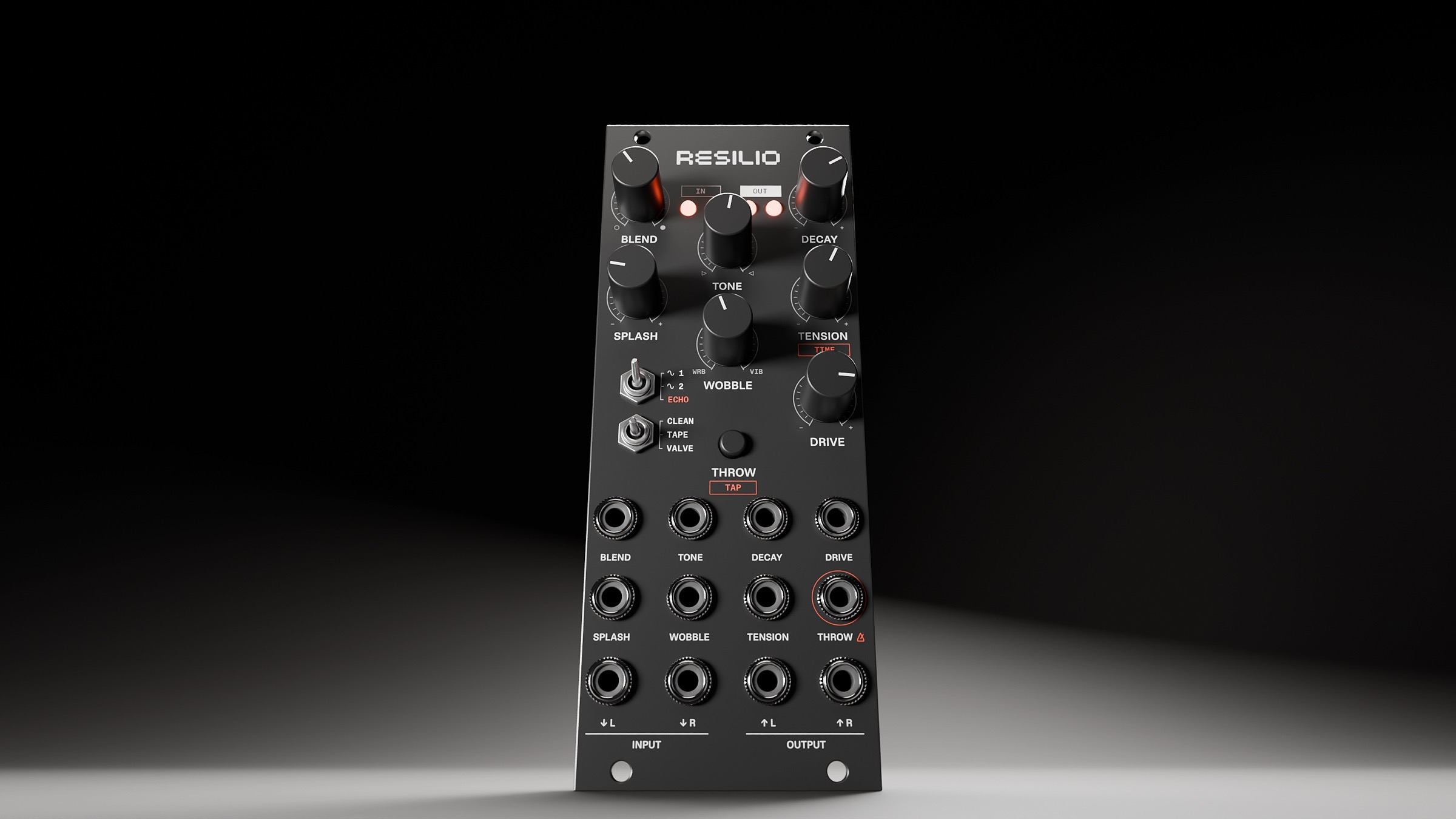
BLEND, DECAY, TONE, SPLASH, TENSION, WOBBLE and DRIVE on the knobs; TANK (1, 2 or ECHO, a tape echo into two springs) and ATTITUDE (CLEAN, TAPE or VALVE) on the switches; THROW / TAP on the button. The Versio's printed labels don't match yet: the README has the map, and the player's guide explains every control.
Feedback
Bugs and sound ideas go on GitHub Issues. Settings in panel names and a short recording help most.
Licence
The code is MIT. The plugin is built with JUCE, used under the GNU AGPLv3, so the plugin binaries are AGPLv3; their source is this repository at this release's tag. The firmware uses libDaisy (MIT), the STM32 HAL (BSD-3-Clause) and CMSIS (Apache-2.0). Details:
NOTICE.Resilio Versio is firmware for the Noise Engineering Versio. Not affiliated with or endorsed by Noise Engineering. Versio is a trademark of Noise Engineering. VST is a registered trademark of Steinberg Media Technologies GmbH. Audio Units is a trademark of Apple Inc.
INSTALL (Mac, macOS 12 or newer, Apple Silicon or Intel)
- Unzip. The plugin is two files: "Resilio Versio.vst3" (VST3) and "Resilio Versio.component" (Audio Unit, for Logic or Ableton). Install whichever your DAW uses, or both. (LICENSE, NOTICE and the LICENSES folder are the licence texts; see LICENCE below.)
- In Finder, Go > Go to Folder... and paste: ~/Library/Audio/Plug-Ins/ Drag "Resilio Versio.vst3" into the VST3 folder and "Resilio Versio.component" into the Components folder (create the folder if it's missing).
- It isn't signed by Apple, so macOS will block it at first. Open Terminal and paste these two lines (each one is a single line): xattr -dr com.apple.quarantine ~/Library/Audio/Plug-Ins/VST3/"Resilio Versio.vst3" xattr -dr com.apple.quarantine ~/Library/Audio/Plug-Ins/Components/"Resilio Versio.component"
- Restart your DAW and rescan plug-ins. In Ableton: Settings > Plug-Ins, turn on the VST3 / Audio Units system folders, then hold Option and click Rescan. It shows up as "Resilio Versio".
FIRMWARE FOR THE VERSIO (only if you have a Noise Engineering Versio)
The same sound runs on the module. File: resilio_versio_firmware_0671d22.bin
- Unplug the module's Eurorack power cable. Never have USB and rack power connected at the same time.
- Connect the Versio to your computer with USB.
- In Chrome, open Noise Engineering's Firmware Swap app, choose your Versio, then "Select Custom File" and pick resilio_versio_firmware_0671d22.bin. Wait for it to finish.
- Unplug USB, reconnect rack power. To go back, use the same app to install any stock Noise Engineering firmware. On the module: P1 BLEND, P2 DECAY, P3 TONE, P4 SPLASH, P5 TENSION, P6 WOBBLE, P7 DRIVE; the top toggle is TANK, the bottom ATTITUDE; the button is THROW / TAP and the gate input throws (or clocks the echo in TANK ECHO); the four LEDs are the meters described below.
Use the plugin on a return track (BLEND fully up) or as an insert (BLEND to taste).
THE CONTROLS (same places as on the module)
BLEND — dry / wet. Fully up = reverb only (best on a send). DECAY — how long the tail rings. At the very top, in CLEAN and TAPE the tail holds as a bed that ducks under kick and bass; in VALVE it feeds back into a howl. TONE — left is dark and warm; right is King Tubby's "Big Knob": a steep low cut on the reverb's return that thins the tail as you turn it, more telephone-like the further you go, with a nasal ring on snares and rimshots. SPLASH — how hard each hit clangs the springs. Up = a brighter clang on snares and rimshots; the last quarter is much bigger. It works the same at any DRIVE, so it splashes on quiet sends too. TENSION — how tight the springs are. Down = loose and drippy; up = tight, with a higher-pitched ring. WOBBLE — noon is still. Left = tape wow and flutter that never repeats. Right = vibrato, getting faster and deeper. DRIVE — the input level, like the gain on an old tank's driver: from clean to gritty, and the tail gets a few dB louder as you push it.
TANK (1 / 2 / ECHO) — one spring (sparse, splashy), two (the classic tank), or ECHO: a tape echo feeding the two springs. In ECHO, DECAY is the echo's feedback and TENSION the echo time (following the DAW's tempo in the plugin). ATTITUDE (CLEAN / TAPE / VALVE) — the saturation: clean and polite; tape saturation, the dub colour with a fine grain; or a cranked valve stage inside the tank, with rattle, coarse grit and a howl at the top of DECAY. THROW / TAP — in TANK 1–2, hold it and the springs hear the input only while it's held, and the tail rings on (double-tap and hold 2 s to go back to always-on). In ECHO it taps the tempo (in a DAW its tempo wins). Held MIDI notes into the plugin act like the gate: a clip can sequence throws to the sample. The GATE switch next to it is the gate jack.
The four lights at the top are level meters, like on the module: input left / right, output left / right. Green to amber as it gets hot; red means the input is close to clipping, or the output is being limited. White once when throw mode goes off; purple on tap tempo.
THINGS TO TRY
- A snare or rimshot on a send, BLEND up, SPLASH and DECAY around 2 o'clock. Hold THROW on the hits you want drenched.
- A skank (offbeat chords) at DECAY noon, TENSION low, a touch of WOBBLE to the left. Then TANK to ECHO, TENSION on a dotted 1/8.
- VALVE, DECAY near max, feed it a few hits. Sweep TONE and TENSION while it howls.
KNOWN ISSUES (already being fixed)
- Held sounds (low pads, drones) are gently turned down going into the springs so they stay clean; with DRIVE well up on hot material the output limiter can still catch them (the output light goes red).
- Still in development: the sound may keep changing between versions.
FEEDBACK
Bugs and sound ideas are welcome on GitHub Issues: https://github.com/jeffebauer/resilio-versio/issues
- How it sounds next to spring reverbs you know (real tanks or plugins).
- Any knob that feels dead, too touchy, or doesn't do what its name suggests.
- Anything that clicks, glitches, or sounds broken, with the settings if you can.
LICENCE
Source: https://github.com/jeffebauer/resilio-versio/tree/v2026.10.07-0671d22 Resilio's own code is MIT (LICENSE). The plugin is built with JUCE, used under the GNU AGPLv3, so the plugin binaries in this download are distributed under AGPLv3 (LICENSES/AGPL-3.0.txt); the link above is their source. The firmware uses libDaisy (MIT), the STM32 HAL (BSD-3-Clause) and CMSIS (Apache-2.0). Notices: NOTICE.
Versio is a trademark of Noise Engineering. VST is a registered trademark of Steinberg Media Technologies GmbH. Audio Units is a trademark of Apple Inc.
Thanks!
v2026.10.06-a6c70a4Resilio Versio v2026.10.06-a6c70a42 files
Pre-public build. This release was shared privately with friends before Resilio Versio went public, so its notes are written to them, and its download has no licence files. The current release, with install steps and licence notices, is at Releases → Latest. The plugin in this download is built with JUCE under the GNU AGPLv3; its source is this repository at this release's tag. Resilio Versio is not affiliated with or endorsed by Noise Engineering.
RESILIO VERSIO v2026.10.06-a6c70a4 — a dub spring reverb (test build)
Hi! This is a spring reverb I'm building as firmware for the Noise Engineering Versio Eurorack module. The plugin is my desktop test bench: it runs the exact same sound engine as the module, laid out like its panel. It's a work in progress, so I'd love your honest ears on it.
Think King Tubby / Lee Perry: a send effect you throw snares and skanks into, feed from a tape echo, and push into feedback.
What's new since the 1 Oct build
The springs got a big rework, and there's a whole new mode on the third switch position. Roughly in order of how much you'll notice:
New names (same sound, same positions; saved Ableton sets keep their settings)
- BLEND (was MIX), as on Noise Engineering's own Versio modules.
- TANK 1 · 2 · ECHO (was SPRINGS 1 · 2 · 3): the third position is the echo, and echo isn't a spring.
- ATTITUDE CLEAN · TAPE · VALVE (was CLEAN · DRIVEN · KICKED), named for the saturation: TAPE is tape saturation, the dub colour; VALVE is a cranked valve stage inside the tank, with rattle, coarse grit and the Howl.
- THROW / TAP: the button throws in TANK 1–2 and taps the echo's tempo in ECHO.
- Ableton may show the old names on a device you already have until it rescans the plugin or you load a fresh one.
A new spring sound
- The tank is rebuilt against recordings of my Teaching Machines Wellspring (a desktop BBD delay + stereo spring reverb): gentler highs from the first moment, and repeats that darken and blur into a wash instead of ticking like a delay.
- Then a final fit from a second recording session: a softer hit up front, the main ring sitting lower and warmer, and Wellspring-like stereo (lows centred, the width growing as the tail goes on). The springs' level also sits more evenly across TONE and DRIVE.
TANK ECHO: a tape echo feeding the springs (the third switch position)
- Every dub rig paired a spring with tape echo (King Tubby's homemade delay, Lee Perry's Space Echo, Adrian Sherwood, Pole). A quarter of each repeat goes through the springs and the rest comes straight off the tape, wide like two playback heads, so every repeat stays a distinct hit with a spring halo. The repeats wear like old tape: loud, bright ones come back thicker and duller, each pass a little darker and rounder, with no digital fizz.
- DECAY sets the echo's feedback. At the very top it holds a steady, saturated loop instead of running away.
- TENSION sets the echo time; moving it bends the repeats' pitch like a Space Echo's rate knob.
- Patch a clock into the gate, or tap the button (see below), and TENSION steps through 1/2 down to 1/16, dotted values included. The tempo holds when the clock stops, so stopping and starting your sequencer doesn't bend the echo; one lone pulse sends it back to free time. The plugin follows the DAW's tempo, and its TENSION readout shows the note value.
TONE: King Tubby's "Big Knob"
- The right half of TONE is modelled on the stepped high-pass on Tubby's MCI desk (an Altec 9069B): a steep 18 dB/oct low cut up to 800 Hz, with the filter's nasal bump on sharp hits. Unlike the Altec's fixed steps it sweeps smoothly, so you can ride it by hand or modulate it with CV.
- It now sits after the springs, the way Black Ark's low cut sat on the spring return: sweep it and the tail you're hearing goes thin and telephone-like straight away.
THROW / TAP: the button and the gate (dub's classic send move)
- Heads-up: the Kick is gone. The button is now THROW / TAP.
- In TANK 1–2, hold the button (or send a gate) and the springs' send opens only while it's held: drench one snare, leave the next dry, and the tail always rings on. It's the mixer move from Tubby, Dennis Bovell and Sherwood.
- Throw mode switches on at the first press or gate, so the button works with nothing patched. To leave it: double-tap, then hold the button for 2 s (the four LEDs blink white). Single taps and holds of any length always throw.
- In TANK ECHO the button taps the tempo instead, and the gate is the echo's clock. A tapped tempo holds after you stop; one lone tap goes back to TENSION's free time. The LEDs flash purple on each tap, then pulse purple on your beat for 4 s to confirm it.
- In the plugin: the KICK button is now THROW (it reads TAP in TANK ECHO), and held MIDI notes act as the gate (a clip can sequence throws to the sample).
HOLD at the top of DECAY (CLEAN and TAPE)
- Turn DECAY all the way up and the tail holds: a near-infinite bed for dub techno breakdowns that new sounds layer into.
- The bed ducks under kick and bass only, like sidechaining a reverb to the kick in Basic Channel-style dub techno. Hats and snares leave it alone.
- VALVE keeps its Howl, the rideable spring feedback.
Lo-fi grit on TAPE and VALVE
- In TAPE and VALVE the springs now go through a 24 kHz µ-law converter: the companded grit of early digital delays and samplers, and of Mutable Instruments Beads' "Sunny Tape" and "Scorched Cassette" modes.
- TAPE is 12-bit (a subtle grain), VALVE 10-bit (clearly gritty). CLEAN stays clean.
- Only the wet gets it, before TONE: the dry stays clean in every ATTITUDE, and turning TONE left files down the grit's aliasing.
SPLASH is stronger
- The top quarter of the knob is much bigger, and SPLASH now works fully with DRIVE down, so a quiet mixer send still splashes. In VALVE it never weakens as DRIVE goes up.
Smaller fixes
- BLEND fully right is now 100 % wet on the module (the pots stopped just short before).
- All of this fits the Versio: the firmware stays under 80 % of the chip at its busiest moment and inside its 128 KB of flash, checked on the module with no clicks or dropouts.
INSTALL (Mac, macOS 12 or newer, Apple Silicon or Intel)
- Unzip. You get two files: "Resilio Versio.vst3" (VST3) and "Resilio Versio.component" (Audio Unit, for Logic or Ableton). Install whichever your DAW uses, or both.
- In Finder, Go > Go to Folder... and paste: ~/Library/Audio/Plug-Ins/ Drag "Resilio Versio.vst3" into the VST3 folder and "Resilio Versio.component" into the Components folder (create the folder if it's missing).
- It isn't signed by Apple (it's a test build), so macOS will block it at first. Open Terminal and paste these two lines (each one is a single line): xattr -dr com.apple.quarantine ~/Library/Audio/Plug-Ins/VST3/"Resilio Versio.vst3" xattr -dr com.apple.quarantine ~/Library/Audio/Plug-Ins/Components/"Resilio Versio.component"
- Restart your DAW and rescan plug-ins. In Ableton: Settings > Plug-Ins, turn on the VST3 / Audio Units system folders, then hold Option and click Rescan. It shows up as "Resilio Versio".
FIRMWARE FOR THE VERSIO (only if you have a Noise Engineering Versio)
The same sound runs on the module. File: resilio_versio_firmware_a6c70a4.bin
- Unplug the module's Eurorack power cable. Never have USB and rack power connected at the same time.
- Connect the Versio to your computer with USB.
- In Chrome, open Noise Engineering's Firmware Swap app, choose your Versio, then "Select Custom File" and pick resilio_versio_firmware_a6c70a4.bin. Wait for it to finish.
- Unplug USB, reconnect rack power. To go back, use the same app to install any stock Noise Engineering firmware. On the module: P1 BLEND, P2 DECAY, P3 TONE, P4 SPLASH, P5 TENSION, P6 WOBBLE, P7 DRIVE; the top toggle is TANK, the bottom ATTITUDE; the button is THROW / TAP and the gate input throws (or clocks the echo in TANK ECHO); the four LEDs are the meters described below.
Use the plugin on a return track (BLEND fully up) or as an insert (BLEND to taste).
THE CONTROLS (same places as on the module)
BLEND — dry / wet. Fully up = reverb only (best on a send). DECAY — how long the tail rings. At the very top, in CLEAN and TAPE the tail holds as a bed that ducks under kick and bass; in VALVE it feeds back into a howl. TONE — left is dark and warm; right is King Tubby's "Big Knob": a steep low cut on the reverb's return that thins the tail as you turn it, more telephone-like the further you go, with a nasal ring on snares and rimshots. SPLASH — how hard each hit clangs the springs. Up = a brighter clang on snares and rimshots; the last quarter is much bigger. It works the same at any DRIVE, so it splashes on quiet sends too. TENSION — how tight the springs are. Down = loose and drippy; up = tight, with a higher-pitched ring. WOBBLE — noon is still. Left = tape wow and flutter that never repeats. Right = vibrato, getting faster and deeper. DRIVE — the input level, like the gain on an old tank's driver: from clean to gritty, and the tail gets a few dB louder as you push it.
TANK (1 / 2 / ECHO) — one spring (sparse, splashy), two (the classic tank), or ECHO: a tape echo feeding the two springs. In ECHO, DECAY is the echo's feedback and TENSION the echo time (following the DAW's tempo in the plugin). ATTITUDE (CLEAN / TAPE / VALVE) — the saturation: clean and polite; tape saturation, the dub colour with a fine grain; or a cranked valve stage inside the tank, with rattle, coarse grit and a howl at the top of DECAY. THROW / TAP — in TANK 1–2, hold it and the springs hear the input only while it's held, and the tail rings on (double-tap and hold 2 s to go back to always-on). In ECHO it taps the tempo (in a DAW its tempo wins). Held MIDI notes into the plugin act like the gate: a clip can sequence throws to the sample. The GATE switch next to it is the gate jack.
The four lights at the top are level meters, like on the module: input left / right, output left / right. Green to amber as it gets hot; red means the input is close to clipping, or the output is being limited. White once when throw mode goes off; purple on tap tempo.
THINGS TO TRY
- A snare or rimshot on a send, BLEND up, SPLASH and DECAY around 2 o'clock. Hold THROW on the hits you want drenched.
- A skank (offbeat chords) at DECAY noon, TENSION low, a touch of WOBBLE to the left. Then TANK to ECHO, TENSION on a dotted 1/8.
- VALVE, DECAY near max, feed it a few hits. Sweep TONE and TENSION while it howls.
KNOWN ISSUES (already being fixed)
- Held sounds (low pads, drones) are gently turned down going into the springs so they stay clean; with DRIVE well up on hot material the output limiter can still catch them (the output light goes red).
- It's a test build: expect the sound to keep changing between versions.
WHAT I'D LOVE TO HEAR FROM YOU
- How it sounds next to spring reverbs you know (real tanks or plugins).
- Any knob that feels dead, too touchy, or doesn't do what its name suggests.
- Anything that clicks, glitches, or sounds broken, with the settings if you can.
Thanks!
v2026.10.02-cef6a77-candidate-FResilio Versio v2026.10.02-cef6a77-candidate-FBeta1 file
Pre-public build. This release was shared privately with friends before Resilio Versio went public, so its notes are written to them, and its download has no licence files. The current release, with install steps and licence notices, is at Releases → Latest. The plugin in this download is built with JUCE under the GNU AGPLv3; its source is this repository at this release's tag. Resilio Versio is not affiliated with or endorsed by Noise Engineering.
RESILIO VERSIO v2026.10.02-cef6a77-candidate-F — a dub spring reverb (test build)
Hi! This is a spring reverb I'm building as firmware for the Noise Engineering Versio Eurorack module. The plugin is my desktop test bench: it runs the exact same sound engine as the module, laid out like its panel. It's a work in progress, so I'd love your honest ears on it.
Think King Tubby / Lee Perry: a send effect you throw snares and skanks into, kick for crashes, and push into feedback.
THIS IS A CANDIDATE: "Resilio Versio F"
This build is called "Resilio Versio F" so it installs NEXT TO the version you already have ("Resilio Versio", from 1 Oct). I'd love you to compare the two: put each on its own return track, send the same snare or skank to both, and switch between them.
What changed since the 1 Oct build:
- The tank is modelled on my Teaching Machines Wellspring: gentler highs from the very first moment (like a real tank's coil and magnet), repeats that darken instead of staying bright and metallic, less boom in the low end, and a wider, blurrier stereo tail with no left-right flicker.
- TONE: right of noon is now King Tubby's "Big Knob", a steep low cut that thins the sound before it hits the springs, with a nasal ring on snares and rimshots. Fully left is still warm and dark.
- SPLASH: much bigger in its last quarter, and it works the same with DRIVE all the way down.
- SPRINGS 3 (right): the three springs now share energy, so hits bloom into a wash instead of dripping.
What I'm most curious about:
- Which one sounds more like a real spring tank to you, and which would you rather use?
- Does F sound too dull or too distant anywhere?
- Sweep TONE on a snare: does the level jump anywhere?
No Versio firmware with this one: it hasn't been tested on the module yet.
INSTALL (Mac, macOS 12 or newer, Apple Silicon or Intel)
- Unzip. You get two files: "Resilio Versio F.vst3" (VST3) and "Resilio Versio F.component" (Audio Unit, for Logic or Ableton). Install whichever your DAW uses, or both.
- In Finder, Go > Go to Folder... and paste: ~/Library/Audio/Plug-Ins/ Drag "Resilio Versio F.vst3" into the VST3 folder and "Resilio Versio F.component" into the Components folder (create the folder if it's missing).
- It isn't signed by Apple (it's a test build), so macOS will block it at first. Open Terminal and paste these two lines (each one is a single line): xattr -dr com.apple.quarantine ~/Library/Audio/Plug-Ins/VST3/"Resilio Versio F.vst3" xattr -dr com.apple.quarantine ~/Library/Audio/Plug-Ins/Components/"Resilio Versio F.component"
- Restart your DAW and rescan plug-ins. In Ableton: Settings > Plug-Ins, turn on the VST3 / Audio Units system folders, then hold Option and click Rescan. It shows up as "Resilio Versio F".
Use the plugin on a return track (MIX fully up) or as an insert (MIX to taste).
THE CONTROLS (same places as on the module)
MIX — dry / wet. Fully up = reverb only (best on a send). DECAY — how long the tail rings. Near the top it rings for ages; in KICKED it can feed back into a howl. TONE — left is dark and warm; right is King Tubby's "Big Knob": a steep low cut that thins the sound before it hits the springs, more telephone-like the further you go, with a nasal ring on snares and rimshots. SPLASH — how hard each hit clangs the springs. Up = a brighter clang on snares and rimshots; the last quarter is much bigger. It works the same at any DRIVE, so it splashes on quiet sends too. TENSION — how tight the springs are. Down = loose and drippy; up = tight, with a higher-pitched ring. WOBBLE — noon is still. Left = tape wow and flutter that never repeats. Right = vibrato, getting faster and deeper. DRIVE — the input level, like the gain on an old tank's driver: from clean to gritty, and the tail gets a few dB louder as you push it.
SPRINGS (1 / 2 / 3) — how many springs are in the tank. More springs = a denser, smoother tail. ATTITUDE (CLEAN / DRIVEN / KICKED) — how roughly the tank is treated: clean and polite, warmer and saturated, or cranked with a bigger crash and feedback. KICK — kicks the tank for that classic crash. Any MIDI note into the plugin does the same, at the exact time of the note, so you can sequence kicks.
The four lights at the top are level meters, like on the module: input left / right, output left / right. Green to amber as it gets hot; red means the input is close to clipping, or the output is being limited.
THINGS TO TRY
- A snare or rimshot on a send, MIX up, SPLASH and DECAY around 2 o'clock. Ride the send level.
- A skank (offbeat chords) at DECAY noon, TENSION low, a touch of WOBBLE to the left.
- KICKED, DECAY near max, then hit KICK a few times. Sweep TONE and TENSION while it howls.
KNOWN ISSUES (already being fixed)
- Held sounds (low pads, drones) are gently turned down going into the springs so they stay clean; with DRIVE well up on hot material the output limiter can still catch them (the output light goes red).
- It's a test build: expect the sound to keep changing between versions.
WHAT I'D LOVE TO HEAR FROM YOU
- How it sounds next to spring reverbs you know (real tanks or plugins).
- Any knob that feels dead, too touchy, or doesn't do what its name suggests.
- Anything that clicks, glitches, or sounds broken, with the settings if you can.
Thanks!
v2026.10.01-1d18fceResilio Versio v2026.10.01-1d18fce2 files
Pre-public build. This release was shared privately with friends before Resilio Versio went public, so its notes are written to them, and its download has no licence files. The current release, with install steps and licence notices, is at Releases → Latest. The plugin in this download is built with JUCE under the GNU AGPLv3; its source is this repository at this release's tag. Resilio Versio is not affiliated with or endorsed by Noise Engineering.
RESILIO VERSIO v2026.10.01-1d18fce — a dub spring reverb (test build)
Hi! This is a spring reverb I'm building as firmware for the Noise Engineering Versio Eurorack module. The plugin is my desktop test bench: it runs the exact same sound engine as the module, laid out like its panel. It's a work in progress, so I'd love your honest ears on it.
Think King Tubby / Lee Perry: a send effect you throw snares and skanks into, kick for crashes, and push into feedback.
INSTALL (Mac, macOS 12 or newer, Apple Silicon or Intel)
- Unzip. You get two files: "Resilio Versio.vst3" (VST3) and "Resilio Versio.component" (Audio Unit, for Logic or Ableton). Install whichever your DAW uses, or both.
- In Finder, Go > Go to Folder... and paste: ~/Library/Audio/Plug-Ins/ Drag "Resilio Versio.vst3" into the VST3 folder and "Resilio Versio.component" into the Components folder (create the folder if it's missing).
- It isn't signed by Apple (it's a test build), so macOS will block it at first. Open Terminal and paste these two lines (each one is a single line): xattr -dr com.apple.quarantine ~/Library/Audio/Plug-Ins/VST3/"Resilio Versio.vst3" xattr -dr com.apple.quarantine ~/Library/Audio/Plug-Ins/Components/"Resilio Versio.component"
- Restart your DAW and rescan plug-ins. In Ableton: Settings > Plug-Ins, turn on the VST3 / Audio Units system folders, then hold Option and click Rescan. It shows up as "Resilio Versio".
FIRMWARE FOR THE VERSIO (only if you have a Noise Engineering Versio)
The same sound runs on the module. File: resilio_versio_firmware_1d18fce.bin
- Unplug the module's Eurorack power cable. Never have USB and rack power connected at the same time.
- Connect the Versio to your computer with USB.
- In Chrome, open Noise Engineering's Firmware Swap app, choose your Versio, then "Select Custom File" and pick resilio_versio_firmware_1d18fce.bin. Wait for it to finish.
- Unplug USB, reconnect rack power. To go back, use the same app to install any stock Noise Engineering firmware. On the module: P1 MIX, P2 DECAY, P3 TONE, P4 SPLASH, P5 TENSION, P6 WOBBLE, P7 DRIVE; the top toggle is SPRINGS, the bottom ATTITUDE; the button and the gate input KICK the tank; the four LEDs are the meters described below.
Use the plugin on a return track (MIX fully up) or as an insert (MIX to taste).
THE CONTROLS (same places as on the module)
MIX — dry / wet. Fully up = reverb only (best on a send). DECAY — how long the tail rings. Near the top it rings for ages; in KICKED it can feed back into a howl. TONE — left is dark and warm; right thins the lows out for a splashier, brighter tank. SPLASH — how hard each hit clangs the springs. Up = more "boing" on snares and rimshots. TENSION — how tight the springs are. Down = loose and drippy; up = tight, with a higher-pitched ring. WOBBLE — noon is still. Left = tape wow and flutter that never repeats. Right = vibrato, getting faster and deeper. DRIVE — the input level, like the gain on an old tank's driver: from clean to gritty, and the tail gets a few dB louder as you push it.
SPRINGS (1 / 2 / 3) — how many springs are in the tank. More springs = a denser, smoother tail. ATTITUDE (CLEAN / DRIVEN / KICKED) — how roughly the tank is treated: clean and polite, warmer and saturated, or cranked with a bigger crash and feedback. KICK — kicks the tank for that classic crash. Any MIDI note into the plugin does the same, at the exact time of the note, so you can sequence kicks.
The four lights at the top are level meters, like on the module: input left / right, output left / right. Green to amber as it gets hot; red means the input is close to clipping, or the output is being limited.
THINGS TO TRY
- A snare or rimshot on a send, MIX up, SPLASH and DECAY around 2 o'clock. Ride the send level.
- A skank (offbeat chords) at DECAY noon, TENSION low, a touch of WOBBLE to the left.
- KICKED, DECAY near max, then hit KICK a few times. Sweep TONE and TENSION while it howls.
KNOWN ISSUES (already being fixed)
- Very big held sounds (low pads, drones) at high TENSION can still briefly light the output red: the reverb gently holds them back, and the brief limiting that remains is kept clean.
- It's a test build: expect the sound to keep changing between versions.
WHAT I'D LOVE TO HEAR FROM YOU
- How it sounds next to spring reverbs you know (real tanks or plugins).
- Any knob that feels dead, too touchy, or doesn't do what its name suggests.
- Anything that clicks, glitches, or sounds broken, with the settings if you can.
Thanks!