Prysm
A 4-voice wavetable FM synthesizer firmware for the M-VAVE FM-1.
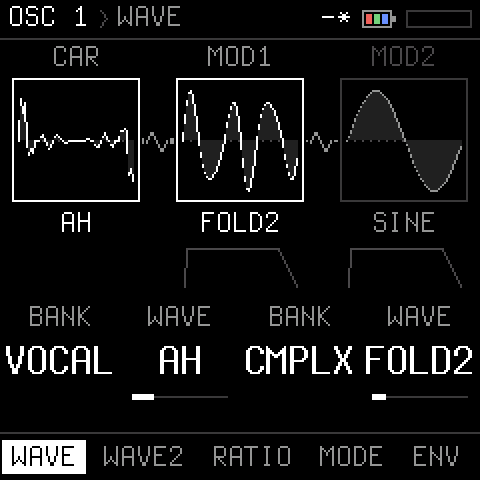
Two oscillators per voice, each a chain of three wavetable operators (mod 2 -> mod 1 -> carrier) that modulate each other by FM, ring or mix, and a noise source (white, pink, brown, digital, S&H, crackle), each through the filter or past it; a drum machine (kick, snare, hat, clap in three kits, a lane in every pattern); a resonant, self-oscillating filter (12 / 24 dB low-pass or a comb) with drive and a high-pass; an LFO with six shapes and two destinations; a second, tempo-syncable LFO with many more; two mod envelopes that can loop and modulate the LFO's rate; a mod matrix; a bit-crusher, a phaser / flanger, stereo chorus, delay (with wow and pitch-shifting repeats) and a plate reverb (with modulation and shimmer); sequencer steps that lock knobs; a MIDI looper; 8 patch slots with UNDO; graphical pages; USB audio and MIDI.
- See it: the demo video (2½ minutes: the screen and the sound)
- Install it: the web installer (Chrome or Edge), or
tools/fm1_install.py(below) - Try it in a browser: the editor: Prysm itself, running in the page, with every parameter on screen; connected to an FM-1 (1.0 or later) the two stay in step
- In your DAW: the CLAP plugin (macOS, Windows, Linux): Prysm's engine as an instrument, every parameter automatable, the editor as its window, a connected FM-1 kept in step
- Use it: the manual (as a page)
- Build it: SETUP-MACOS.md, and below
Prysm is a community firmware, not made or supported by M-VAVE. Installing firmware is at your own risk. If an FM-1 does not start after an update, hold OCT- while switching it on: the rescue updater.
The sound
| Voices | 4, polyphonic |
| Oscillators | 2 per voice; each a carrier modulated by mod 1, modulated by mod 2. Each operator: 6 banks x 8 morphing waves (BASIC, HARM, PULSE, VOCAL, DIGI, CMPLX), a ratio to the note (0.5 .. 16); each modulator: FM / RING / MIX (in MIX / RING a pitch, -24 .. +24 semitones, instead of the ratio), fine tune, an amount, its own AR envelope |
| Noise | in every voice: WHITE, PINK, BROWN (a tone each), DIGI (a short-loop shift register, pitched to the key), S&H (random steps at 16 x the note), CRACKLE (density); its level, its route |
| Routing | osc 1, osc 2 and the noise each through the filter or DIRECT (past it, to the amp) |
| Filter | state-variable low-pass, 12 or 24 dB/oct (zero-delay feedback), or a Blofeld-style comb (COMB+ / COMB-: the cutoff its frequency, resonance its feedback, plus damping and spread); self-oscillation at the top of RES (a steady, keytracked sine at any cutoff); drive, keytrack, its own ADSR; a 12 dB/oct high-pass (no resonance) |
| Amp | ADSR; VCA OPEN (a bias: an instant drone, each voice on its last note) |
| LFO | sine, triangle, saw up / down, square, S&H; 0.05 .. 40 Hz; delay; retrig or free-running; two destinations (pitch, wave positions, mod amounts, the modulators' pitch (together or mod 1 / mod 2 alone), cutoff, amp, mix) |
| LFO 2 | one for all the voices; the same shapes; free (0.05 .. 40 Hz) or in time (4/1 .. 1/32, triplets); any LFO destination, or resonance, drive, high-pass, comb damping, filter envelope amount, levels, osc 2 detune, the mod envelope's amount, the LFO's shape (morphed), the effects' mixes, delay time and feedback, reverb size |
| Mod envelopes | two, each an ADSR with LOOP (attack-decay until release) and its own destination and amount; into the LFO's rate, depth or shape (a morph through its waves), or any LFO destination |
| Mod matrix | four more routes: LFO, LFO 2, the mod envelopes, velocity, key, the mod wheel or a random value per note onto any LFO destination, an amount either way |
| Effects | bit-crusher (bits and rate); phaser or flanger (manual, feedback either way); stereo chorus; delay up to 735 ms with ping-pong, tone, wow and per-repeat pitch shift; Dattorro plate reverb with pre-delay, damping, modulation and shimmer |
| Velocity | from MIDI, to level, cutoff and modulation (the FM-1's keys play at full velocity) |
| Glide | portamento, always or legato |
| Arpeggiator | UP, DOWN, UPDN, RAND, ORDER; 1/4 .. 1/32 with triplets; 1 .. 4 octaves; gate (to tied), swing, latch; 40 .. 240 BPM or the MIDI clock (START / STOP / CONTINUE); sample-accurate |
| Sequencer | polyphonic: chords of up to 4 notes a step; 4 patterns of up to 64 steps, 303-style: notes, rests, accents, slides (legato glide), ties; a song of up to 16 entries, each a pattern played 1 .. 16 times; row copy / paste; step entry from the keys (chords: keys held together) or real-time recording (quantized to the step, velocity, held notes tied, overdub); step locks (two lanes a pattern, any knob, a value per step); a metronome (always, or only while recording) and a bar's count-in; its own or the MIDI clock; each patch slot has its own (patterns, song, kit); with the split on, two parts (one each side, by pitch) to mute or clear apart |
| Drums | kick, snare, hat (an accent opens it), clap, made from scratch in three kits: LO-FI (8-bit samples at 11 .. 22 kHz, played back unsmoothed), TR (clean, bright), BOOM (deep); a lane in each of the 4 patterns, entered on the keys as on a TR (white keys the steps, their LEDs the lane), accents, a snare flam, hat rolls (2 .. 8 hits a step, fading or swelling); level, tune (+-24 st), decay and a send through the sound's filter each; the bus: drive, crush (bits and rate), sends into the delay and the reverb; MIDI channel 10 (General MIDI notes) |
| Split | per patch: OSC 1 below a key, OSC 2 from it, an octave each side (a bass under a lead), the 4 voices shared; the key set with a knob or LEARN |
| LIVE | HOME twice: patterns (the black keys) and patches (the white keys) change on the next bar line; mutes (the top white keys) for the kick, snare, hats, clap, each oscillator and the noise, and one to unmute all; four knobs, each any parameter you choose |
| Looper | records the notes you play (not the audio) over 1, 2, 4 or 8 bars, in time with the sequencer; overdub, quantize to 1/16 or 1/8; up to 512 notes |
| Oscilloscope | on HOME: locked to the newest note, auto-zoom; three styles: PRISM (the wave split into a spectrum, fading trails), ORBIT (the wave against itself a quarter cycle later: a sine a circle, FM a knot), MONO (left and right) |
| Patches | 8 slots, saved in flash (power-cut safe), the last one back at power-on; UNDO (and redo) of the last change |
| Editor | in the browser: the firmware itself running in the page (screen, knobs, keys, sound), every parameter, patch files; in sync with a connected FM-1 both ways |
| USB | class-compliant stereo audio input ("Prysm FM-1", 44.1 / 48 kHz, works on macOS 14) and MIDI in / out, with channel select and clock; MIDI in and clock on the TRS jack too |
Everything runs in fixed point on the FM-1's JieLi AC791N (no FPU); the header shows how much of the audio budget the sound takes.
The pages
ALGORITHM steps through the pages (or a button jumps to one), SELECT picks a row, KNOB1..4 edit its four values; PRESETS is the filter's cutoff on every page. Every page draws what it does: the oscillator chain with its live waves, the filter's response curve, the envelopes, the LFO, the effects chain.
| Page | Button | Rows |
|---|---|---|
| OSC 1, OSC 2 | EDIT | WAVE, WAVE2, RATIO, MODE, ENV, MIX |
| NOISE | EDIT (3 times) | NOISE (TYPE, COLOUR, LEVEL, ROUTE) |
| FILTER | SELECT (the button) | FILTER, TYPE, COMB |
| AMP | ENV | ENV, VEL, VCA |
| F.ENV, M.ENV 1, M.ENV 2 | ENV (2, 3, 4 times) | ENV; the mod envelopes: ENV, DEST |
| LFO | LFO (twice: LFO 2; three times: MATRIX) | LFO, DEST; LFO 2: LFO, DEST; MATRIX: MOD 1 .. MOD 4 |
| MIX | GLO | OSC, ROUTE, GLIDE, SPLIT |
| SETUP | GLO (twice) | MIDI: IN / OUT channels, CLOCK, pitch BEND range |
| ARP | ARP (again: on / off) | ARP, TIME |
| SEQ | SEQ (PLAY: run; REC: step entry, or recording while it plays) | STEP, CHORD, LOCK, PATTERN, EDIT, PARTS, CLICK, SONG, ENTRY |
| DRUM | SEQ (twice; the keys: the steps) | STEP, ROLL, KICK, SNARE, HAT, CLAP, BUS, KIT, EDIT |
| LOOP | SEQ (three times; REC: record, overdub) | LOOP (BARS, QUANT, PLAY, CLEAR) |
| CHORUS / DELAY / REVERB / MOD FX / CRUSH | FX (1 .. 5 times) | CHORUS; DELAY, D.MOD; REVERB, R.MOD; MOD FX, TONE; CRUSH |
| PATCH | SAVE | SAVE, LOAD, SOUND, INIT, UNDO over 8 slots |
| SCOPE | HOME | the output, live (KNOB1: cycles, KNOB2: PRISM / ORBIT / MONO) |
| LIVE | HOME (twice; the keys: patterns, patches, mutes) | PLAY, K1 .. K4 (the knobs' parameters) |
Installing from the command line
pip3 install mido python-rtmidi
python3 tools/fm1_install.py prysm-1.4.fwsc       # asks before it writes; restarts into Prysm
python3 tools/fm1_install.py --info               # what the connected FM-1 runs
From ETCH: restore the official firmware first (ETCH only accepts its own updates). Back to the official firmware or another one: the FM-1 Firmware Hub.
Installing the CLAP plugin
Prysm in your DAW, as an instrument (what it does). It needs a DAW that loads CLAP plugins (Reaper and Bitwig Studio among them). To keep an FM-1 in step with it, the FM-1 needs Prysm 1.0 or later.
- Download the zip for your system from the latest release:
Prysm-clap-macos.zip,Prysm-clap-windows.ziporPrysm-clap-linux.zip. - Unzip it: you get
Prysm.clap. - Put
Prysm.clapin your CLAP folder, as below for your system. - In your DAW, rescan the plugins (Reaper: Options, Preferences, Plug-ins, CLAP, Re-scan), then add Prysm to a track as an instrument.
macOS (10.15 or later, Intel or Apple Silicon)
-
In Finder, Go, Go to Folder..., type
~/Library/Audio/Plug-Ins/CLAP(if there is noCLAPfolder, make one inPlug-Ins) and movePrysm.clapinto it. -
The plugin is not notarized by Apple, so macOS blocks it until you clear the download mark. In Terminal:
xattr -dr com.apple.quarantine ~/Library/Audio/Plug-Ins/CLAP/Prysm.clap
Windows (10 or 11, 64-bit)
- Move
Prysm.clapintoC:\Program Files\Common Files\CLAP(make theCLAPfolder if there is none; Windows asks for permission). - Its window uses Microsoft's Edge WebView2, which Windows 11 has, as does Windows 10 with its updates. If the window stays empty, install the WebView2 Runtime.
- With an FM-1: Windows lets only one program at a time use a MIDI port. In the DAW's MIDI settings, switch the FM-1's input and output off, so that Prysm can reach it (Reaper: Preferences, MIDI Devices, the FM-1, Disabled).
Linux (x86-64)
-
Install GTK 3 and WebKitGTK 4.1, on Debian or Ubuntu:
sudo apt install libgtk-3-0 libwebkit2gtk-4.1-0 -
Then put the plugin in your CLAP folder:
mkdir -p ~/.clap && cp Prysm.clap ~/.clap/
With an FM-1: connect it by USB before you open the project, or any time after. The plugin finds it by itself, and its window's status line says when it is connected. The project's sound then goes to the FM-1, and what you turn on the FM-1 comes back as the plugin's parameters.
One Prysm per process: a second Prysm in the same project stays silent, and its window says so. To use more than one, run each in a process of its own (Reaper: the FX window's menu, Run as, Separate process).
Building
The toolchain is JieLi's (Linux; on a Mac it runs in Docker). SETUP-MACOS.md has the details;
tools/setup_macos.sh sets it all up.
tools/setup_macos.sh                 # once: colima + docker, the JieLi toolchain, the AC79 SDK, a Python venv
export PATH="$PWD/.venv/bin:$PATH"
./build.sh                           # build/prysm.fwsc (identity FM-1_980)
./build.sh --release 1.4             # build/prysm-1.4.fwsc (identity FM-1_989, as every release from 0.9 on; "1.4" on the splash)
tools/make_site.py build/prysm-1.4.fwsc 1.4   # site/: the web installer and the manual (GitHub Pages)
APP_VER=1.4 emu/build.sh             # site/editor/: Prysm in a browser, and the editor (needs emscripten: emsdk)
Tests (on the computer, no FM-1 needed)
tests/run_engine.sh     # renders test sounds and checks them by spectrum: oscillators, filter, LFO, mod envelope,
                        # effects; and the patch bank's format conversions
tests/run_ui.sh         # screenshots of every page and of a save / load session: build/ui/*.png
tests/run_host.sh       # the whole app on the computer: build/host/prysm.wav and screens
Where things are
firmware/src/engine.c | the voices: oscillators, modulators, filter, envelopes, LFO, mod envelope |
firmware/src/fx.c | chorus, delay, reverb |
firmware/src/ui.c | the pages and the PATCH screen |
firmware/src/patches.c | the 8 slots and their format conversions |
firmware/src/prysm.c | the app: notes, the splash animation, the main loop |
firmware/src/platform.c, usb.c, hal/, loader/ | the platform (Dinghy / Felucca / SLOOP), with Prysm's USB audio layout and store |
tools/gen_prysm_tables.py, tools/gen_prysm_font.py | the wavetables and lookup tables; the UI's Terminus fonts (FONT_M, FONT_P) |
tools/gen_drums.py | the drum machine's sounds, made from scratch, stored 8-bit (firmware/gen/prysm_drums.h; --wav DIR to listen) |
tools/gen_splash.py | the old splash picture (assets/splash.jpg; no longer shown) |
web/, tools/make_site.py | the web installer |
firmware/src/capture.c, tools/capture.py | performance capture: record a take on the FM-1, film it on the computer (MP4) |
firmware/src/editor.c, emu/, web/editor/ | the editor: parameters over USB-MIDI (SysEx); the firmware compiled for a browser; the page |
plugin/ | the CLAP plugin: the firmware as a library, the editor as its window, the FM-1 over USB-MIDI |
tools/demo.py | the demo video: its patches (sent to an FM-1), its scenes scripted and filmed |
docs/ | the manual, the design, the platform's API and rules |
Credits and licence
Prysm by Nicholas Pratt. It is built on Dinghy (zvenson), which carries the
platform of Felucca by Leo Kuroshita (Hügelton Instruments), as
SLOOP (isod89) carries it: the boot, the updater, the USB stack, the
screen and the flash driver are theirs. The reverb is Jon Dattorro's plate ("Effect Design, Part 1", JAES 1997). The
web installer's update protocol is Felucca's web/fm1ota.js and web/fm1pkg.js.
GPL-3.0 only: see LICENSE and LICENSING.md. If you give someone a firmware built from
it, give them its source too. The package holds three JieLi AC79 SDK files (Apache-2.0, LICENSES/).
M-VAVE and FM-1 are trademarks of their respective owners.