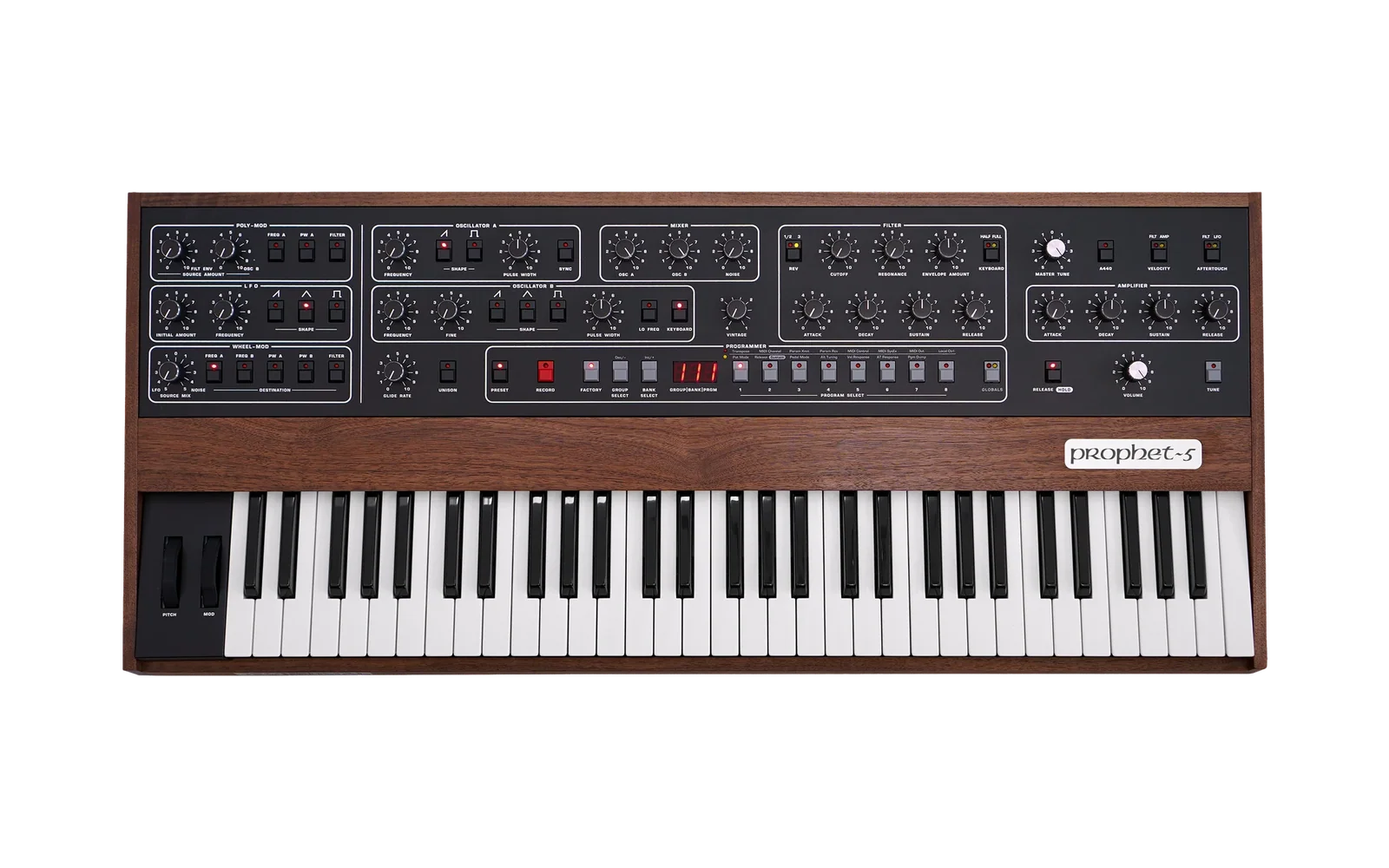
prophet-rev4-mods

An arpeggiator and a polyphonic step sequencer for the Sequential Prophet‑5 / Prophet‑10 Rev4, added to Sequential's own Main OS 2.1.0 as a firmware patch. You apply the patch to your copy of the official OS in your browser and install the result over USB like any OS update. Everything is controlled from the front panel.
Built on someone else's idea. The notion of patching the Rev4's firmware, and the proof that it works, belong to another person: an arpeggiator mod that circulated privately showed the way and set the control conventions this project keeps (A440 as the arp button, Bank/Group for modes, Glide Rate for tempo). This project began as additions chained in front of that mod and makes several additions — the polyphonic sequencer with rests and ties, the keyboard octave shift, tap tempo, patch memory, tempo divisions, and more.
New here? The walkthrough takes you through every feature at the instrument, step by step; the manual below is the reference.
Not affiliated with Sequential. This is a hobby project that modifies the instrument's firmware. Installing a modified OS is at your own risk and may void your warranty. Only the project's own code, tooling and notes are published here; Sequential's OS files are not redistributed, which is why you supply your own copy.
What it adds
- Arpeggiator — Up, Down, Up/Down, Random and Assign (the notes in the order you played them), 1–4 octaves, HOLD latch with re‑latch, tempo 40–300 BPM by knob or tap, MIDI clock sync, thirteen note values from four bars to 32nds including triplets and Prophet‑6‑style swing.
- Polyphonic step sequencer — a second generator beside the arp: up to 512 steps of chords (up to 10 notes each, each note with the velocity you played it at), rests and ties, recorded from the keyboard or MIDI with undo. Start it and play over it; transpose it from a key; run it forward, backward or pendulum — or arpeggiated: the sequence becomes a chord progression the arpeggiator plays through, a quarter note to four bars per chord.
- Keyboard octave shift — ±2 octaves from the panel, applied to the keys, the arp and MIDI Out.
- Patch memory — the arp's on/off, mode, octaves, note value and gate are saved with each program, and so is the sequence: a Record on a user program stores the recording with its style, order, note value, gate, chord length, transposition and generator selection in a block of the synth's own flash, and loading the program brings it all back — on the instrument, no computer involved. Changing programs never stops a running sequence; a program with a saved sequence takes over at the next step.
- Nothing else changes: with the arp off the synth is stock, and the whole patch can be bypassed at power‑on.
Verified on a Prophet‑10 Rev4 (October 2026), including the 2.0 sequencer from the panel; the spec marks the few paths not yet tried on hardware (the sequencer under MIDI clock, recording from MIDI‑in, the pedal as rest/tie). Sequential's A440 tuning‑reference tone is still there — on A440 + HOLD, since A440 itself is now the arp button.
Installing
You need Sequential's Main OS 2.1.0 file, a USB connection, and a program that sends SysEx files (SysEx Librarian on macOS, MIDI‑OX on Windows, SendMIDI on anything).
- Download Main OS 2.1.0 from
Sequential's download page
and unzip it. The Main OS file is named
prophet5_main_2.1.0.syx— that is the one the patcher takes (not the Panel OS). - Open the patcher: https://dangerous.github.io/prophet-rev4-mods/. Drop the file on
the page. It checks that the file is exactly the stock 2.1.0 OS, applies the patch in
your browser (nothing is uploaded), checks that the result is exactly the released image,
and offers the patched OS for download —
prophet5_main_2.1.0_patched_<version>.syx. - On the synth: Globals → MIDI SysEx = USB. Send the downloaded file with your SysEx program, exactly as you would an official update. The display counts to 100 while the OS is written and the synth restarts.
- Tap A440: its LED lights and the arpeggiator is on. You're done.
To go back to stock, send Sequential's original 2.1.0 file the same way.
About the risk. The transfer is the standard OS‑update mechanism — the same loader, the same checks, a complete OS image — so Sequential's own advice for OS updates applies: if an update ever fails to boot, recovery is through the bootloader described in their troubleshooting guide, and that needs a 5‑pin DIN MIDI connection, so have one available before you start. What is different from an official update is the testing: this image has been verified on one Prophet‑10 Rev4. The Prophet‑5 Rev4 runs the same Main OS file, and the patch uses only on‑chip memory the stock OS already sets up, so it is expected to behave identically — but it has not been tried on one. If the arpeggiator misbehaves, hold A440 while powering on to bypass the patch for that session, and re‑send the stock file to remove it.
The same patch can be applied from a terminal with Python 3.9+ and nothing else installed:
python3 -m tools apply site/manifest.js prophet5_main_2.1.0.syx prophet5_main_2.1.0_patched.syx
Both routes refuse a wrong input file and refuse to hand over a result whose hash does not
match the release (dist/SHA256SUMS).
Manual
The patch lives on the A440 button. There are two generators, the arpeggiator
(ArP) and the sequencer (SEq): A440 + Keyboard (the filter's Keyboard Amount
button) selects one, a tap of A440 starts or stops the selected one (LED lit while it
runs), and holding A440 turns the buttons around it into controls — most act on the
selected generator. Every message the patch puts on the display goes away after 1.5 s and
the program number comes back.
Arpeggiator
| Control | Action | Display |
|---|---|---|
| A440 + Keyboard | Select the arp / the sequencer | ArP / SEq |
Tap A440 (ArP selected) | Arp on / off (LED) | BPM / OFF |
| A440 + Bank / Group | Next / previous mode | UP dn Ud rnd ASS |
| A440 + Program 1–4 | 1–4 octaves | o 1 … o 4 |
| A440 + Program 5 | Clock: internal / MIDI sync | int / Syn |
| A440 + Program 7 / 8 | The arp's note value longer (−) / shorter (+) | 4b 2b 1 2 4 8d 8 8S 8t 16 16S 16t 32 |
| A440 + Glide Rate knob | Tempo 40–300 BPM (picks up the current tempo first, no jump) | the BPM |
| A440 + Amp Decay knob | Gate: how long each note sounds, 5–100 % of the step (jumps to the knob) | 5 … 100 |
| A440 + Velocity (tap repeatedly) | Tap tempo | tAP, then the BPM |
| A440 + HOLD (generator stopped) | Sequential's A440 tuning tone on / off | A440 LED, as stock |
HOLD (or pedal in HLd mode) | Latch | — |
"HOLD" is the button labelled RELEASE / HOLD, with the Release/Hold global set to hold.
- Modes. Up and Down by pitch; Up/Down bounces without repeating the top and bottom notes; Random picks a note from the held set at every step; Assign plays the notes in the order you pressed them (press a note again to repeat it in the pattern).
- Octaves play the whole pattern, then the pattern an octave up, and so on — not one big sorted set.
- Note values: 4 bars, 2 bars and a whole note (
4b,2b,1— for pad sequences: 64 steps of 4 bars is 256 bars), then the Prophet‑6's ten in its order: half, quarter, dotted 8th, 8th, 8th swing, 8th triplet, 16th, 16th swing, 16th triplet, 32nd. The swing values play pairs of steps long–short (2 : 1). - Tempo. The knob and the taps set the internal clock. The knob picks up rather than
jumps: each time you hold A440 it does nothing until you turn it past the tempo you're
at (the display shows that tempo meanwhile), then it follows your hand. Under MIDI sync the arp follows
the incoming clock and transport (Start/Stop/Continue, 24 ppqn, always on the DAW's grid);
the tempo it measures from the clock is what the internal clock resumes at when you switch
back to
int, and the two tempo gestures just showSyn. - HOLD latches whatever you hold. With HOLD on, the first key you press after releasing all keys starts a fresh chord instead of adding to the old one (re‑latch). One note sounds per step, HOLD or not — the synth's own sustain is suspended while the arp is on. The arp has its own HOLD latch, separate from the synth's: switching the arp off puts the synth's hold back as you left it, switching it on brings the arp's latch back, and the HOLD LED always shows the one in use. The sustain pedal is momentary and belongs to whichever is active.
- Gate sets how long each step's note sounds: 5–100 % of the step in 5 % steps, 50 % by default (the fixed gate of earlier builds). At 100 % a note lasts until the next one starts. The arp and the sequencer each have their own; the knob sets the selected one's, and the arp's is saved with the program. Under MIDI sync it is timed from the tempo the arp measures, so short gates stay short on long clock steps.
- Glide Rate and Amp Decay on their own are always the normal glide and amp decay, even with the arp running. Keys played via MIDI In arpeggiate like local keys; MIDI Out carries the keys you play, not the arp.
- Tuning tone. With the selected generator stopped, hold A440 and press HOLD: the stock A440 reference tone toggles, lighting the A440 LED as it does in stock. Starting a generator silences it, so from then on a lit LED means the generator.
Step sequencer
The sequencer is the second generator: it plays a recording on its own while the keyboard stays yours. Recording happens in record mode:
| Control | Action | Display |
|---|---|---|
| A440 + Tune | Enter record mode (selects the sequencer, stops what was playing) | r 0, A440 LED blinks |
| Play a note or a chord | Record a step (notes held together = one chord; velocities kept) | r 1, r 2 … |
| HOLD with no key down | Insert a rest | rSt, then the count |
| HOLD while holding the step's keys | Tie: the step lasts one more step (repeatable) | tiE, then the count |
| Group (A440 not held) | Back: undo the last tie, else the last chord or rest | the count |
| A440 + Program 6 | Start over (stays in record mode) | r 0 |
| Tap A440 (or A440 + Tune) | Finish — the sequencer is selected and stopped | program number |
The count is the length recorded so far in timing steps — every chord, rest and tie adds
one; there is room for 512. The sustain pedal (in HLd mode) does the same as the HOLD
button here; the HOLD latch itself is not changed. What you play sounds as you play it, and
until your first entry the previous sequence is still there, so finishing with nothing
recorded keeps it.
Playing it, with the sequencer selected (A440 + Keyboard shows SEq):
| Control | Action | Display |
|---|---|---|
| Tap A440 | Start from the first step / stop (LED) | BPM / OFF |
| A440 + a key | Transpose: middle C = as recorded, any other key = that many semitones | the offset |
| A440 + Bank / Group | Order (chords style): forward / backward / pendulum | For bAC Pnd |
| A440 + Program 7 / 8 | The sequencer's note value longer (−) / shorter (+) | as the arp's |
| A440 + Amp Decay knob | The sequencer's gate (both styles) | 5 … 100 |
| A440 + Unison | Style: chords / arpeggiated | CHd / ArP |
| A440 + Aftertouch | Chord length for ArP (quarter → half → whole → 2 bars → 4 bars) | 4 2 1 2b 4b |
| A440 + Program 6 | Clear the sequence (the arp is selected again) | --- |
- Chords (
CHd): one step per sequencer step at the sequencer's note value — a chord sounds as recorded and is released at the sequencer's gate of its last step (half‑way by default), ties hold it for their length, rests are silence. The arp's direction and octaves don't apply here. - Arpeggiated (
ArP): the sequence becomes a chord progression. Each step is held for the chord length while the arpeggiator plays its notes at the sequencer's note value, in the arp's direction mode and octaves (A440 + Bank / Group and Program 1–4 while in this style) — record four pads as four steps, set a whole note per chord and 16ths, and you have a bar of arpeggio per chord. Chords always come in order; a tied step is held for more chord lengths, a rest is silence. A note value that doesn't divide the chord length (a dotted 8th into a bar) is cut at the chord change; triplets fit. - Transposition takes effect from the next step or chord and stays until you record again or clear; the command key itself doesn't sound. It needs Local Control on.
- Playing over it: keys and MIDI‑in notes sound as normal and never affect playback. HOLD and the pedal sustain what you play — while the sequence runs the patch does the sustaining itself, so the sequence's own notes keep their gates (notes released under HOLD sound until HOLD goes off or you press them again). Starting or stopping the sequencer doesn't cut your notes. Voices are shared with the sequence (a chord step takes up to ten).
- MIDI sync (
Syn): a tap arms the sequencer and it starts on the next step of the DAW's grid; the DAW's Stop pauses it where it is and Continue resumes; Start takes it back to the first step; a tap of A440 stops it for good. CC 123–127 (all notes off) stop it too. - Switching generators (A440 + Keyboard) stops the one that was playing and leaves the new one stopped; what you were holding on the keyboard keeps sounding. The HOLD button's latch is handed over as described under HOLD above.
- Limits: 512 timing steps, 10 notes per chord. The sequence and its settings (style, order, note value, gate, chord length, transposition) are saved with user programs — see Patch memory.
Keyboard octave shift
| Control | Action | Display |
|---|---|---|
| Lo Freq (Osc B) + Bank / Group | Keyboard up / down an octave (±2) | 001, -01 … |
| Lo Freq + Bank and Group together | Back to 0 | 000 |
| Hold Lo Freq on its own | Show the current shift | the shift |
| Tap Lo Freq | Osc B low‑frequency mode, as stock (on release) | — |
The shift applies to the keys you play, to what the arp and sequencer see, and to the notes sent to MIDI Out; notes arriving from MIDI In are not shifted. A key always releases at the pitch it was pressed at, so changing the shift mid‑chord never sticks a note. Not saved with programs.
Patch memory
Arp on/off, mode, octaves and the arp's note value are stored with the program when you save it (they travel in SysEx program dumps too) and come back when the program is loaded; a program saved without arp data loads with the arp off. A saved "arp on" starts the arp only if it is the selected generator.
The sequence is saved too. When you Record a user program, the patch also writes the recording and its settings — style, order, note value, chord length, transposition and which generator is selected — into a 16 KB block of its own in the synth's flash (the upper half of the chip, which the stock OS never uses; one block per user program). Loading the program brings everything back; power‑off loses nothing that was Recorded. What to expect:
- Loading a program never stops the sequencer. If the program has a saved sequence, the running one switches to it at the next step, in time; its settings come with it, the generator selection only when the sequencer is stopped.
- A program without a saved sequence leaves the current sequence and settings alone, so you can browse sounds under a running sequence.
- Recording a program with nothing recorded saves "no sequence" explicitly — an earlier sequence cannot come back by surprise. Clearing (A440 + Program 6) only clears the live sequence; the saved one changes at the next Record.
- A block only counts for the program it was saved with: it remembers the slot and a checksum of the program's parameters, so a program overwritten by a SysEx dump or a bank copy brings no foreign sequence. Factory programs have no blocks; with PRESET off nothing loads (the program's stored parameters are not what sounds then either).
- Sequences are not part of SysEx program dumps; the flash is their home. Going back to the stock OS leaves them where they are, and reinstalling the patch finds them again as long as the programs have not changed. Saving over a program is the only thing that rewrites a block.
Tempo, clock source and keyboard shift remain global and are not saved.
Safety net
- Kill switch. Hold A440 while powering on and the patch stays completely inactive for that session — every hook passes straight through to the stock OS.
- While the Globals menu is open every button is passed to the stock OS untouched. (Stock ignores A440 while its menu is open, which is why the tone has its own combo.)
- Button and knob id readout. Hold A440 and press a button the patch doesn't use: its
panel id is shown. Turn any knob other than Glide Rate and Amp Decay:
Pand the knob's id (P 9,P16…), and the knob's own parameter doesn't move while A440 is held. Handy if you want to add controls of your own. - Flash diagnostic (read‑only). Hold A440 and press Sync (Osc A): the patch reads
the serial flash — a climbing number while it runs, then three readings of 1.5 s:
F16/F 8/F -(chip size),1 E/1 Uand2 E/2 U(whether the two areas the stock OS never touches are empty or used — area 2 is where the sequence blocks live, so it reads2 Uonce you have saved one). After a run, A440 + Sync recalls the readings one by one; a new run needs a power cycle. It never writes. - The patch writes flash in exactly one situation — the sequence block of a user program you Record — through the stock OS's own verified writer, into a region nothing else uses. Your programs, globals and tuning data are written by the stock OS exactly as before.
For developers
How it is built, tested and laid out: docs/DEVELOPING.md. The
behavioural spec is docs/SPEC.md; what changed in each version,
CHANGELOG.md; a hands-on tour, docs/WALKTHROUGH.md.