OpenTracker (syamajala fork)
OpenTracker is an open-source, clean-room firmware for the original Polyend Tracker, written from behavioural specifications. It contains no Polyend code, fonts, icons or graphics, and is not affiliated with or endorsed by Polyend.
This is a fork of sandlbn/polyend-tracker-re.
It follows upstream's 2.x line (currently 2.2.1) and adds the features below. Projects stay
compatible: everything the fork adds is stored in extra files next to project.mt, so stock
firmware, upstream OpenTracker and the Tracker Mini still open them (see each feature for
details).
Documentation: syamajala.github.io/polyend-tracker-re (user guide for each feature, install and troubleshooting, and a developer section).
Screenshots are from the desktop simulator, which runs the same code as the firmware.
What this fork adds
| Live resampling | Performance scenes and master FX |
|---|---|
 |  |
| DX7 synth: Load Patch with .syx banks | DX7 synth: a bank's voices |
 |  |
| MIDI instrument LFO | Pattern |
 |  |
DX7 FM synth
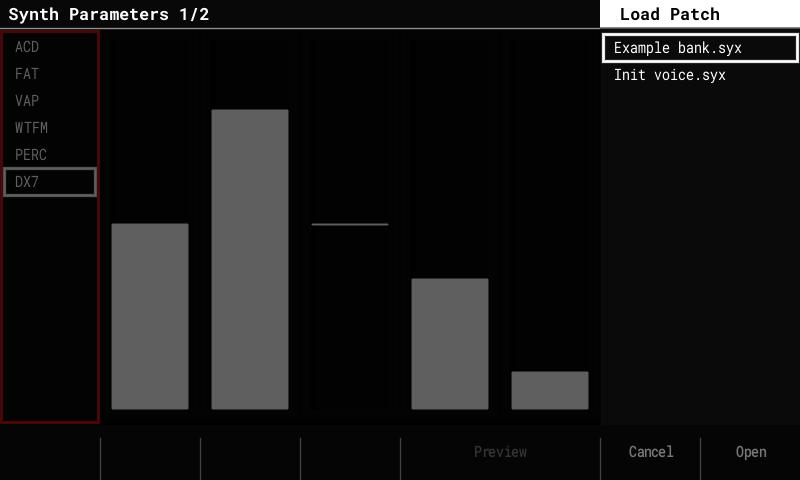
- A 6-operator FM engine that plays Yamaha DX7 voices, as a sixth synth model next to ACD, FAT, VAP, WTFM and PERC. Pick DX7 in a synth slot's Model list.
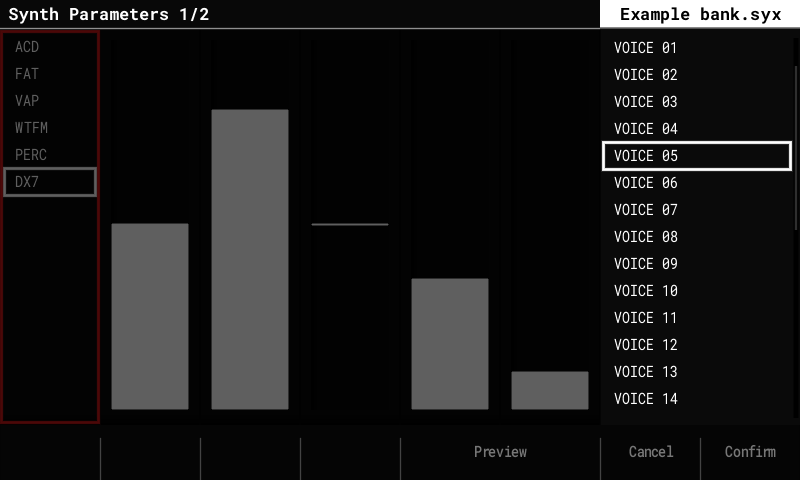
- Load Patch lists the
.syxfiles inPatches/DX7/:- 32-voice banks come first and open like folders. Pick a voice, Preview it, Confirm; Left goes back to the folder.
- Single-voice
.syxfiles sit with the patches and preview and load directly. - A loaded voice is named after the voice. Save writes it as a normal
.patchfile (the voice is stored inside it).
- The sound core is a port of Google's Music Synthesizer for Android (msfa, Apache 2.0), checked against Dexed. Our additions: amplitude modulation, the feedback loops of algorithms 4 and 6, key sync.
- Edit Patch has controls that work on top of any loaded voice, without an operator
editor:
- Voice: Volume, and Mono for polyphony 1 slots: Retrigger (default; every note restarts like a new voice) or Legato (a note that overlaps the held one only moves the pitch).
- Tone: Brightness (modulator levels, ±12 dB), Feedback (±7 on the voice's own), Attack and Release (envelope rates, + = slower / longer), LFO Depth (0–200 % of the voice's vibrato and tremolo, up to the DX7's maximum) and Detune (spreads the operators up to ±7 cents).
- A DX7 patch's macros M1–M6 come aimed at the six Tone controls, named after them, so a voice can be shaped from the Synth Macros page or with step FX.
- Velocity (the Volume step FX) works as on a DX7: through each operator's velocity sensitivity in the voice, so it can change the tone as well as the level. Voices with sensitivity 0 ignore it; aim M7 (Velocity) at Volume on those if you want it.
- About 6 % CPU per voice (estimated).
- A Tracker Mini has no DX7 model: it resets a DX7 slot to its default.
Live resampling
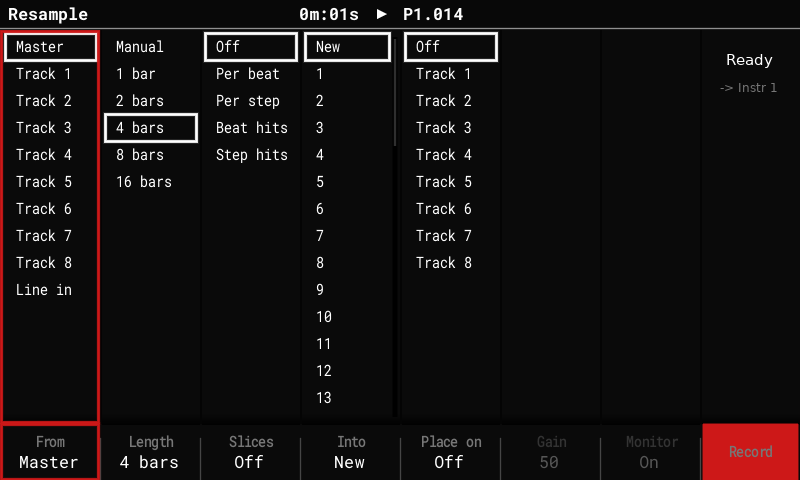
- Record the master mix, one track (including the synth it plays) or Line in while the sequencer keeps playing, Octatrack-style. The take starts on the next bar and lasts 1, 2, 4, 8 or 16 bars, or until you stop it.
- Shift + Sample Recorder arms, stops or cancels a take from any screen. The Resample screen opens from the Sample Recorder's "This will stop the pattern" prompt (button Resample); the pattern keeps playing. Line in has a level meter, Gain and Monitor.
- Into: New puts the take into the next free instrument (above every loaded one), in stereo, saved with the project. Instrument N re-records into N: a take of the same length overwrites it in place, without a gap, and keeps N's settings, so a loop can be re-sampled take after take. A take of another length is not lost: it goes to a new instrument instead. Arming into a slot that holds a sample asks once.
- Slices: Off, Per beat, Per step, or Beat hits / Step hits (a slice starts only where a new hit begins, so empty steps stay empty). Sliced takes play in Beat Slice mode.
- Place on track N: the take, or each slice on its own step, is written into a track so it plays back in time (undoable).
Performance mode
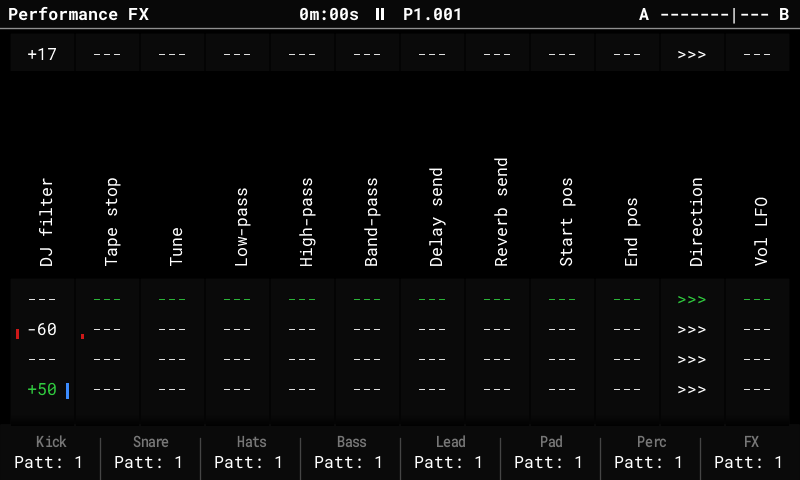
- A bank of 16 scenes with a crossfader (Octatrack-style). The fader's ends A and
B each play a scene from the bank; the encoder or MIDI CC 63 fades between them.
Filters cross over at the middle, stepped FX switch there.
- Performance (on the Performance screen) opens the scene bank page: pick a scene with the arrows, encoder or pads, F1 / F2 put it on A / B, F3 Edit opens it on the Performance screen, where the pads set its rows (you hear it as you go) and going back saves it. F4 clears a scene, F8 or Performance returns.
- Shortcuts while playing: Shift + Left / Right store the pad rows into the scene on A / B, Delete + Left / Right clear it; hold pads to store or clear only those columns.
- Rows of the scene on A are marked red, on B blue, and the pad LEDs follow the fader.
- A whole-scene store also keeps which tracks have their FX on (the F keys); loading the scene, or the fader crossing to it, switches them, so arrangements can move tracks in and out of the FX.
- Left / Right (outside edit mode) switch the F keys between tracks 1–8 and 9–16 (stock 2.x used the Performance key).
- Fader ranges: each column can move over part of the fader instead of all of it, so one A→B fade stages its changes (the filter opens first, the delay comes in last). On the bank page, F7 Ranges: the encoder plays the fader, F1 / F2 toggle editing a column's start / end; saved with the project and in scene bank files (#12).
- The per-track FX toggles (F keys) are remembered across visits and saved with the project (stock turns every track on again each time).
- Master insert FX, played like any other Performance column:
- DJ filter: one filter on the whole mix; below 0 a low-pass sweeping down, above 0 a high-pass sweeping up.
- Tape stop: hold its pad and the whole mix slows to a stop over 1 or 2 steps, beats or bars; release and it spins back up.
- In edit mode, a tapped row's value can be changed with the encoder without holding the pad.
- Scene bank files: on the bank page, F5 Export saves the columns and the 16 scenes
to
Performance/Scenes/<name>.txt(a text file), and F6 Import loads one into another project (#70). - The scene bank, the FX toggles and the master FX types are stored in
perf_scenes.binnext toproject.mt; stock firmware sees those slots as empty.
Song mode
- Repeat counts: a Count column next to the Song list's patterns plays a slot's
pattern 1 to 16 times before the song moves on, so a section no longer needs duplicate
slots. Set it in edit mode (Right from the list, then the encoder; Delete resets it to 1).
While playing, the playing slot shows its pass, for example
2/4. - Add Slot copies the count; Loop Pattern / Continue Song work as before (Continue leaves the slot at the end of the current pass).
- Song + Right jumps from the track grid straight to the Pattern list; Song + Left goes back into the grid (edit mode). Shift + Left / Right still sizes the grid selection.
- Scenes per slot: a Scene column after Count puts a Performance scene from the
bank on the crossfader's A end as the slot starts, with the fader at A. Edit mode, Right
to the column: the encoder picks the scene (
-keeps what plays), Shift + encoder a second scene for B (3>5). Delete resets it to-. - Ramps: a slot with a scene on B sweeps the fader from A to B. The Ramp column sets
when:
Slot(across every pass),Each(across each pass, back to A as the next starts),First(the first pass, then B),Last/L2...L15(the last N passes; the choices follow the slot's Count) or the slot's last 1-128 steps (Shift + encoder moves 16). Moving the fader yourself takes over until the next slot. With four columns the Song list no longer shows pattern names. - A slot's scene plays on any screen, not only on the Performance screen. It stops at Stop,
or when the song reaches a
-slot; on the Performance screen a-slot keeps what plays. - Song exports render the slots' scenes and ramps like playback (File > Export, F7 Perf FX On / Off; Off is the stock dry export). Stems get each track's FX; the master FX go on the full mix only.
- Counts, scenes and ramps are stored in
song.binnext toproject.mt; stock firmware plays every slot once, without scenes.
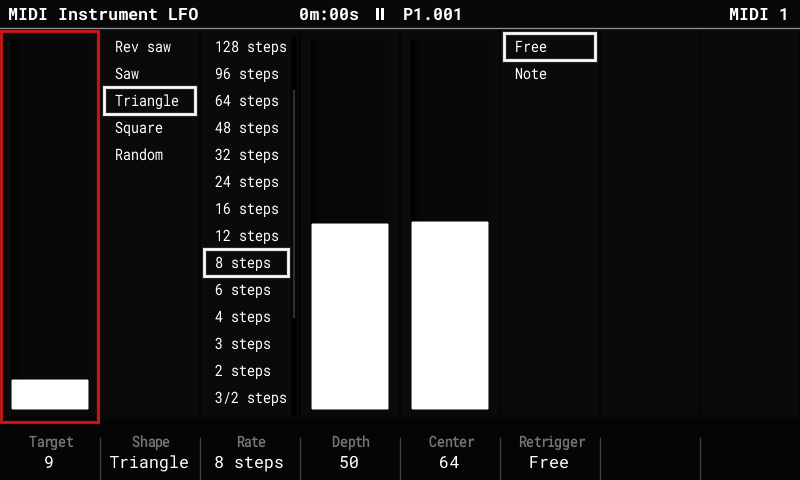
MIDI instrument LFO
- One tempo-locked LFO per MIDI instrument, on a new MIDI Instrument LFO page (the Instr Params key toggles it with the MIDI parameters page).
- Target: a CC (0-127), pitch bend or channel pressure. Shape, Rate (128 steps down to 1/8 step), Depth, Center, and Retrigger (Free, or restart on each Note).
- LFO messages use at most half of a DIN MIDI port's bandwidth, so notes are never delayed.
- Stored in
midi_lfo.binnext toproject.mt.
Note names
- Config > General > Note names: Sharps / Flats / Auto. Auto spells the project's scale correctly, modes included (C Mixolydian shows Bb, not A#). Display only.
Piano pads
- Config > General > Pad layout: Stock / Piano. Piano makes the pads two keyboards an octave apart, as on grid controllers: the white keys along a row, the black keys in the row above. The pad lights draw the keys (root brightest, black keys dimmer, notes outside the scale barely lit); the gaps play nothing.
Chord entry
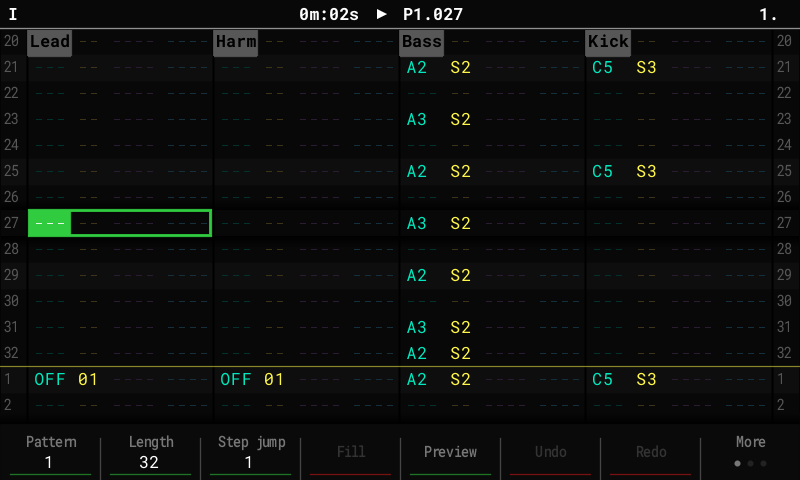
- In the pattern editor's edit mode, pads held together enter a chord: one note per track on the same step, from the cursor track rightwards. One Undo removes it.
Slices to pattern
- Sample Playback, slice More page: To Pattern (F5) writes the sliced sample on the pattern's current track, one trig per slice where it starts, so a chopped break plays back at once and you flip it from there. Steps (F4) is the sample's length in steps, guessed from the song tempo.
Multisample instruments
- Add on an
.sfzin the Sample Loader opens a panel: pick the note range, the spacing (every note ... every 12th) and a Max length, with the size against free memory, then Load puts up to 48 notes into one instrument. Its new Multi play mode plays the nearest note repitched, so a sampled synth or piano sounds right across the keys. Stock and the Mini play it as a Slice instrument.tools/make_sfz.pywrites the SFZ for a folder of note samples (#3).
USB audio
- The Tracker is a USB sound card (Linux, Windows): pick OpenTracker as the computer's output and its audio plays through the Tracker, with a USB column in the Global Mixer (muted in a new project, like Line in), a USB source in the Sample Recorder and From: USB in Resample. Sample a browser, a DAW or a software synth straight in.
- Record the Tracker on the computer: its OpenTracker input carries the master bus (after the limiter, before master volume, with Line in when unmuted; never the computer's own audio back) (#97).
MIDI presets
- Instrument Params on a MIDI instrument now steps through Parameters, LFO and a new
Preset page: name the synth's CCs ("74 Cutoff"), and the names show for CC A–F
("Cutoff" instead of "CC A"), in the CC lists and as the LFO target. Save the setup
(velocity, offset, CC A–F, the CC names, LFO) to
MidiPresets/<name>.txtand Load it into any MIDI instrument. Presets hold no channel and no program change. Releases includeMidiPresets.zipwith presets for the Model:Cycles, Syntakt, volca fm2, SP-404MKII and S-1.
Remote control and on-device testing
- Config > USB > Remote control (Off after every power-on):
- Panel mode: a Tracker connected over USB becomes the simulator's front panel.
- Drive mode:
tools/tracker_remote.pyruns scripts on the Tracker: button presses, status and CPU checks, screenshots and the text on screen. The simulator can mirror the Tracker's screen live (--mirror).
- Telemetry on the USB serial log: CPU per block, the stack high-water mark, I2S input health, and per-take resample diagnostics.
Build and memory
- Games are off by default in this fork's builds (
make OT_GAMES=1builds them); this frees 5.8 KB of SRAM and ~49 KB of flash for the features above. - The UI screens live in SDRAM instead of the SRAM heap, and the stack reserve is 75 KiB (measured peak use: 18 KB).
- CI builds and tests every push and pull request; tagged versions are released automatically (see Install).
Upstream 2.x features
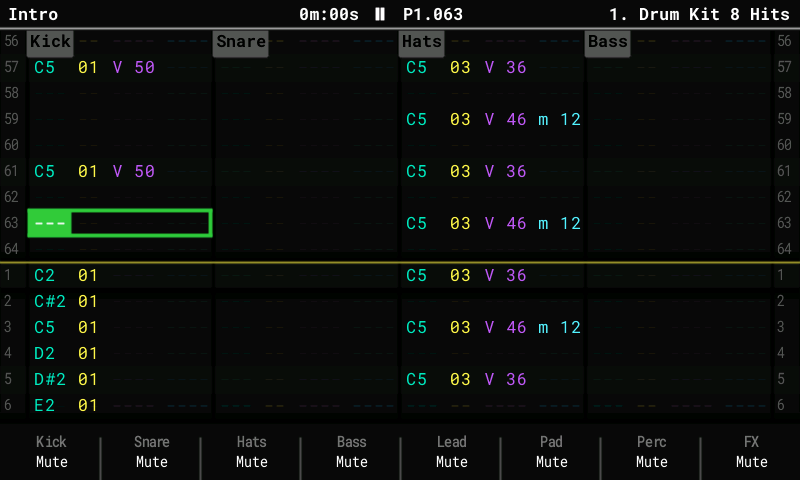
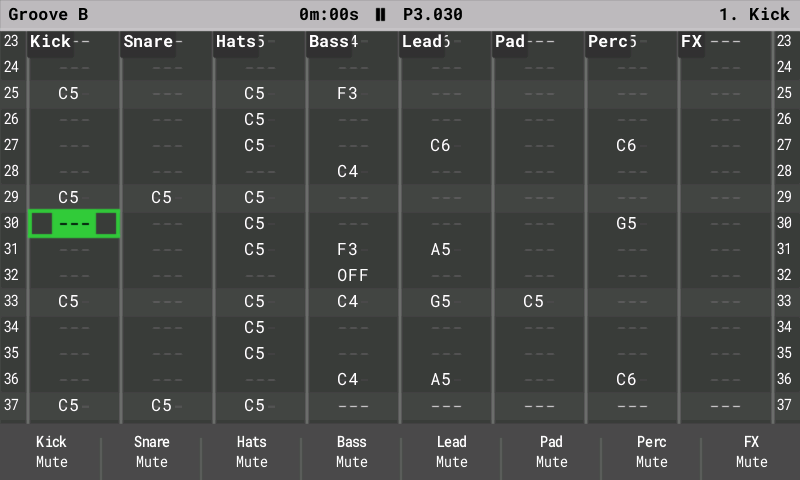
Upstream's photos (2.2.1, on an original Tracker):
| Pattern (synth drums, FX) | 8-track view (Pattern + Note) |
|---|---|
 |  |
| Synth Parameters (ACD) | Edit Patch (PERC kit) |
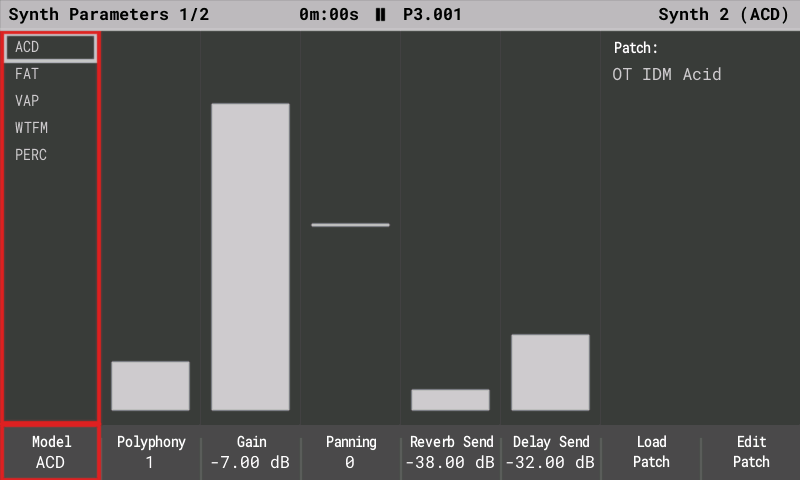 | 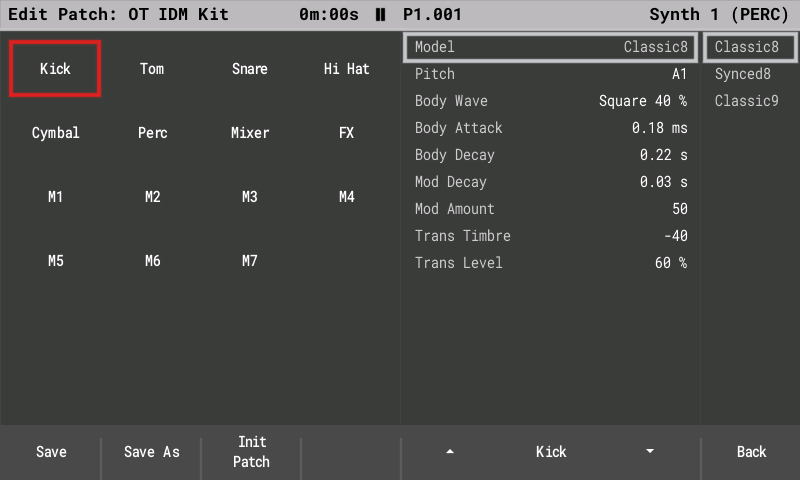 |
| Sample Editor, stereo sample | Live resampling |
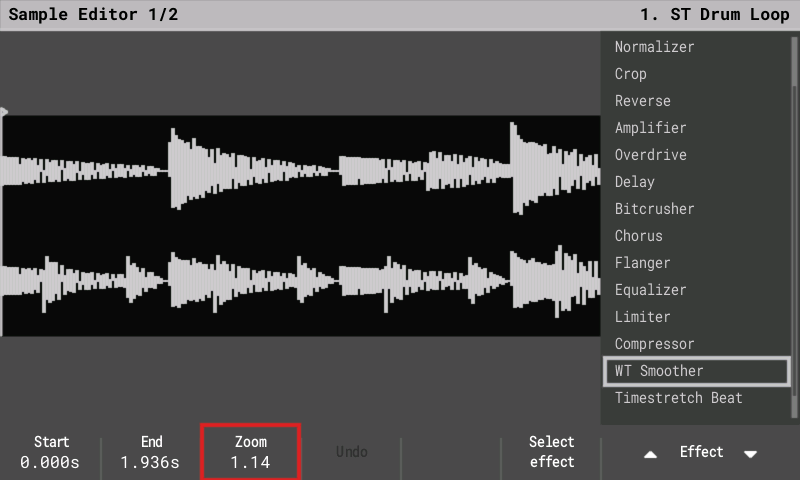 | 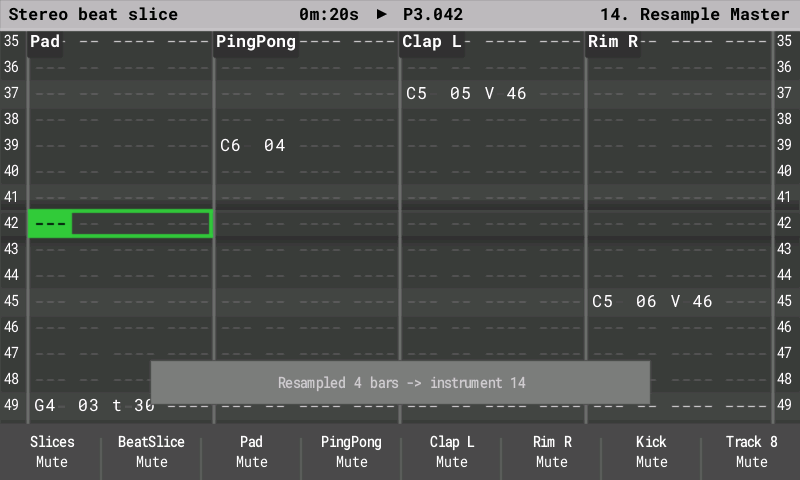 |
| Performance FX | Config: USB Storage |
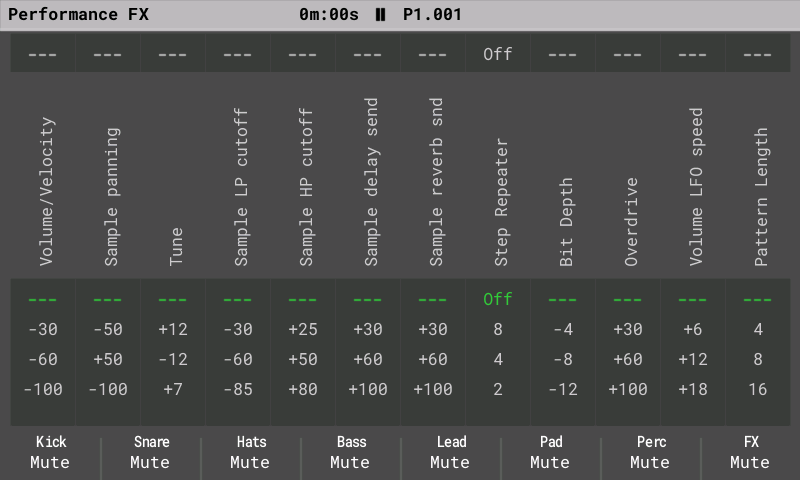 | 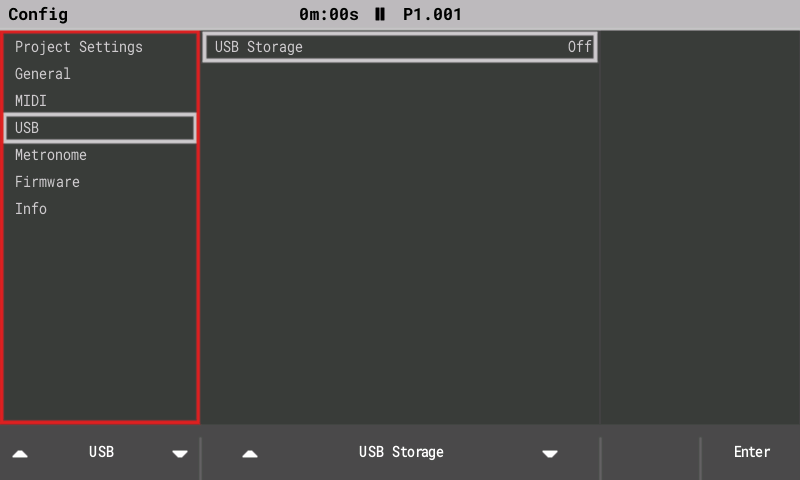 |
2.x brings the newer Tracker Mini features to the original hardware: 16 tracks, synth engines, stereo samples, Mini-compatible project files and USB Storage mode. These notes cover the whole 2.x line (2.0 to 2.2.4); the full list is in the release notes of the 2.2.4 download.
New in 2.2.4
- Piano pad layout (contributed by syamajala): Config > General > Pad layout > Piano turns the pads into two keyboards an octave apart, white keys in a row and black keys above, with the pad lights drawing the keyboard and the scale. Stock stays the default.
- Chords in step entry (contributed by syamajala): select two or more tracks and press pads together; the notes fill the selected tracks on one step. One Undo removes the chord.
- Synth pads play chords up to the slot's Polyphony; before, each new pad released the last one (reported by idagani).
- Cleaner 44.1 kHz export (contributed by bungoleena): a 32-tap sinc conversion, clean up to 18 kHz. Export Song takes about 28 % longer; stems barely change.
- Sample Loader: previews of 24-bit and float stereo files no longer drop out, and names with accents show as plain letters instead of stray symbols (issue #128).
- Busy screens no longer fault (contributed by syamajala): screens with many gradients or lots of text, such as the MIDI instrument CC page, draw in full detail again.
New in 2.2.2 to 2.2.3
- Stream long samples from the card (optional, Off by default): Config > General >
Stream from card. Long samples load only their start into memory and play the rest from
the SD card, so projects with long stems fit. The Sample Loader marks files that will
stream with
~. - Your own colour themes: theme files in
/Themeson the card, plus Export theme. Twelve example themes come as a separate download, among them Halloween (contributed by AnthonyBerg1983). - Steady MIDI clock on the DIN jack while you change screens, and pitch bend from a MIDI keyboard on live notes.
- Synth stereo Width, and a hand-turned Synth Macro now takes over from a pattern FX CC.
- Stack overflow protection (contributed by syamajala) and many fixes from user and beta reports, among them the Sample Editor, synth notes in the pattern editor and starting without an SD card.
New in 2.1 to 2.2.1
- All five Mini synth models play: FAT (2.1) and WTFM (2.2) joined ACD, VAP and PERC, with
74 presets of our own in the preset pack (
OpenTracker-Presets-1.2). - Live resampling (2.1.2, contributed by syamajala): record the mix, one track or Line In into a new instrument while the pattern keeps playing.
- Waveforms like the Tracker+ / Mini: sample envelopes, stereo samples as two lanes, and a preview playhead on the Sample Recorder and Sample Editor.
- Closer to the stock manual: about 30 details fixed after a check against the stock 1.9.2 manual (live-record velocity, Slice-mode pads, Performance labels, MIDI CC lists and more).
- User-report fixes: live recording (first note with Pre-roll, OFF steps, red cursor), MIDI channels on the pads, a crack in the headphones at power-on, headphone level +1 dB.
- More free memory: Games is no longer built into the image (
make OT_GAMES=1brings it back), and the file browsers share one buffer (PR #28, syamajala).
New in 2.0
Tracker Mini project compatibility
- Projects are saved in the Tracker Mini 2.2.1 format: 16-track patterns, the three synth slots, track names and mutes for tracks 13–16.
- Synth patches use the Mini's
.patchfiles. They are stored with the project and in a library atPatches/<ENGINE>/. All 299 Mini factory patches load and save back unchanged. - Older original-Tracker projects open as they are, with tracks 13–16 empty.
16 tracks
- Tracks 13–16 work like MIDI tracks 9–12: notes, MIDI channels, CC A–F, pitch bend, velocity, mute and solo. Performance Play mode, Pattern length and Step repeater act on them too (no voice FX, levels or per-track patterns, as on the Mini).
- Pattern pages through all 16 tracks. Song shows a scrolling 12-track window.
- Fill, copy and paste work across all 16 tracks.
Synth engines (instruments S1–S3)
- Three synth slots, played from any track as instruments S1–S3.
- Five engines, our own sound design following the Mini's parameter sets:
- ACD: acid bass and lead, with a 24 dB and a ladder-style filter, and glide;
- VAP: virtual-analog poly, with morphing oscillators, hard sync, 15 filter types and a 6-slot modulation matrix;
- PERC: drum kit with kick, snare, hats, cymbal, perc and tom;
- FAT (2.1): a stack of detuned saws for supersaw pads, leads and basses;
- WTFM (2.2): two-operator wavetable FM, from electric pianos to bells.
- Macros: FX columns A–F drive macros 1–6, and Volume drives macro 7.
- Voices: a shared pool of 4 voices by default, adjustable in Config > General > Synth voices (1–8).
- Screens, after the Mini's layout:
- Synth Parameters: model, polyphony, gain, pan, sends.
- Synth Macros.
- Edit Patch: sections on the pads; Save, Save As, Init.
- Load Patch popup with Preview.
- Synth 1–3 level columns with meters on Global Mixer page 3.
- Exports include separate stems
synth_1..3.wav.
Stereo samples
- Stereo WAVs keep both channels on import.
- They play in stereo in one-shot, loop, slice and beat-slice modes. Pan works as balance.
Performance and monitoring
- CPU meter in the title bar (Config > General > CPU meter: Auto, Always or Off).
- Voice limiter: if the audio gets close to its limit, only synth voices are cut; sample tracks never are.
- Faster loading: project loading does about half the work in our host model (not yet timed on the device).
- Smoother display: frames go to the screen over DMA without waiting.
- More code in fast internal RAM: the hottest audio and synth code runs from it.
- USB serial diagnostics: CPU, peak breakdown, display, SD and radio/recorder lines.
USB Storage mode (2.0.1)
- Config > USB > USB Storage: On shows the SD card on a connected computer as a USB drive, as on the Tracker Mini. Copy projects, samples and patches without taking the card out.
- Playback stops and the project is saved first. Keep the power and the USB cable connected while files are transferred.
- To finish: eject the drive on the computer, then press Exit (or set the row back to Off). The project reloads from the card. If the computer still uses the drive, Exit first reminds you to eject it.
- The setting is always Off after power-on.
- About 1 MB/s (full-speed USB; measured 1,033 KB/s on a real Tracker). Tested with Linux and macOS; Linux can take a few seconds longer to notice the drive. USB MIDI and the serial log keep working.
- If the cable is pulled during a transfer, the Tracker recovers within half a second.
- The drive has a stable serial number, so a computer keeps recognising the same Tracker. On Windows, the Tracker may appear once as a new device (new COM/MIDI port).
Install
- Download the latest image from this fork's
Releases and copy
PolyendTrackerOTv224.ptfto/Firmwareon the SD card. Keep the name; the bootloader only accepts 24-character names. - Go to Config > Firmware update, select it and confirm. If the screen stays dark after the update, press the power button once.
Going back: keep the stock PolyendTracker_1.9.2.ptf in /Firmware. Install it the
same way, or put its file name into /Firmware/ot_restore.txt and power-cycle. Keep only the
image you want, plus stock, in /Firmware: the rear reset button installs a random .ptf
from that folder.
Stack guard: 2.x stops a stack overflow with a reset and says "Restarted after a crash
(stack overflow)" on the next boot. To run without the guard, put an empty
/Firmware/ot_noguard.txt on the card.
Note: projects saved by 2.x use the Mini's 16-track patterns. Stock firmware for the original Tracker reads only tracks 1–8 of those patterns (expected from the stock loader's rules; not yet confirmed on a stock unit).
Building
- Firmware:
make(Arm GNU toolchain) writesbuild/PolyendTrackerOTv224.ptf. - Host tests:
make host-test. Performance and memory gate:make perf-gate. - Simulator:
make sim, thenbuild/sim/opentracker-sim(seesim/README.md).
Known limitations
- The synth sound is own design: settings match the Mini, the sound is close but not identical.
- Synth notes take the Performance filters, panning and sends; bit depth, overdrive, the LFOs, start / end and direction act on samples only (#30). The master insert FX include synth notes.
- The synth voice pool defaults to 4 because of the processor's speed.
- USB Storage mode: back up the card before first use; Linux systems without a desktop may need
partprobeor a re-plug to see the card. - The USB ID is the pid.codes test ID 1209:0001.
- USB audio: not supported on macOS (it can't follow the Tracker's 44,117 Hz clock and clicks now and then).
- Live resampling from Line In starts 10–14 ms late (the round trip through external gear); compensation is planned.
- Games (the game-music player) is not in the release image since 2.2.1.
- Stream from card is new and Off by default; please report anything odd when you turn it on.
- A couple of Performance screen issues are still open (among them the global Pattern length in Song mode); fixes are planned.
Test songs
make testsongs builds eleven OT Test songs (among them one per synth engine and an IDM
track using three engines at once) and seven BLAST GRID synth remixes (Title, World 1,
World 4, Battle, Battle FM, Boss, Final Boss) into build/testsongs/. Copy its Projects/
and Samples/ folders to the card.