PocketCake
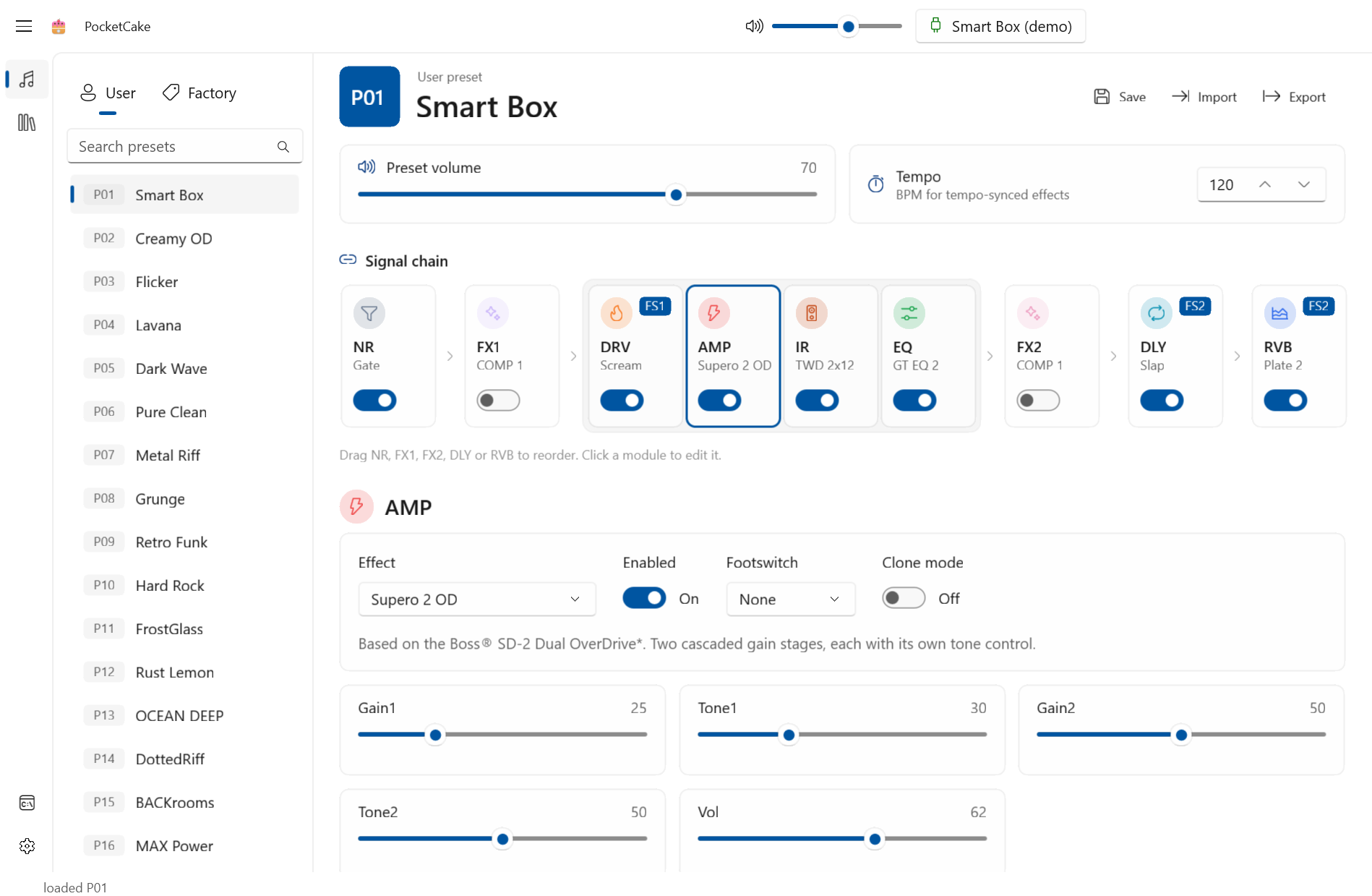
A native Windows editor for the Sonicake Pocket Master and Sonicake Smart Box multi-effects pedals, built with WinUI 3 and a Fluent (Mica) interface.
Features
- Real-time, two-way editing over USB-MIDI or Bluetooth LE MIDI (with auto-reconnect)
- Browse, search and load the Factory and User presets; save to any User slot
- Signal chain view with drag-to-reorder and per-module on/off
- Every effect parameter, effect type picker, FS1/FS2 footswitch assignment, DLY tap tempo
- Preset volume, per-preset BPM and master volume
- Global settings: levels, USB audio mode, re-amp, EXP/FS jack, backlight, ECO, power, factory reset
- User IR upload / rename / clear from
.wav - NAM → .clo clone-profile conversion and upload
- Preset JSON import / export
AI agents (MCP)
Turn on Settings → Agent control (MCP) and PocketCake serves an MCP
endpoint on http://127.0.0.1:47821/mcp (loopback only; the port can be changed with AgentPort in
settings.json). Agents like Claude can then browse presets, build tones and change settings in the running
editor, and you watch the edits happen live. Saving a preset and writing User IR / clone slots still pop a
confirmation in the app; factory reset is never exposed.
Every request must carry a bearer token. To register PocketCake with Claude Code, copy the setup command from Settings → Agent control (Copy setup command) and run it; Reset token issues a new token, after which agents must be set up again with the new command.
The server sends skills/pocketcake/SKILL.md to the agent as its instructions
and offers it as the pocketcake_guide prompt. For Claude Code you can also install it as a skill by copying
that folder into ~/.claude/skills/. Clients that only speak stdio can bridge with npx mcp-remote <url>
(it must also pass the token header).
Acknowledgements
The device protocol, data tables and NAM conversion are based on SonicMaster, whose author reverse-engineered the pedal's USB-MIDI and BLE protocol. PocketCake ports that work to C# with its own WinUI 3 interface.
Build & run
Requires the .NET 10 SDK on Windows 10 1904x or later. The app is unpackaged and self-contained on the Windows App SDK.
dotnet test tests/PocketCake.Core.Tests
dotnet run --project src/PocketCake -p:Platform=x64
| Path | |
|---|---|
src/PocketCake.Core | Platform-free protocol, data tables, decoders, frame builders and the NAM → .clo DSP. |
src/PocketCake | The WinUI 3 app: MIDI / BLE transports, app state, view models and views. |
tests/PocketCake.Core.Tests | xUnit tests, including DSP parity tests against SonicMaster goldens. |
tools/make-icon.py | Draws the app icon (python tools/make-icon.py <prefix>, needs Pillow). |
Try demo (shown while no pedal is connected) replays real device captures as a virtual Smart Box, so
the editor can be explored without hardware; POCKETCAKE_DEMO=1 starts in demo mode. Debug builds also
include a developer console for raw MIDI traffic.
Settings are stored in %LOCALAPPDATA%\PocketCake\settings.json; unhandled exceptions are logged to
crash.log in the same folder.
License
MIT. Copyright (c) 2026 An Long; portions ported from SonicMaster, copyright (c) 2026 Andrii Klaptsov.
Not affiliated with, or endorsed by, Sonicake.