


pipedal
Hype22/100Guitar Effect Pedal for Raspberry Pi, with a web interface designed specifically for phones.
pipedal is custom firmware for the Raspberry Pi 4, by @rerdavies. Latest release v2.0.110 (July 2026), 410 stars on GitHub.
forRaspberry Pi Raspberry Pi 4·by@rerdavies
Unclaimed. Is this yours? Sign in with GitHub as @rerdavies to claim it.
pipedal_2.0.110_arm64.deb· 31 MB· +3 files
Custom license· rerdavies/pipedal·rerdavies.github.io/pipedal/·downloads come from the creator’s GitHub releases
v2.0.110PiPedal 2.0.110 ReleaseLatest4 files
7 new factory presets. If upgrading, you will find them added to the Factory Presets bank.
Major Features:
- This release includes 7 new factory presets, created and contributed by Andrew Curtis.
Minor Features:
- The MIDI Devices settings dialog now allows MIDI channel selection (OMNI, or accept messages on only a specific channel).
- Renamed TooB NAM "Slim" control to "Quality", to better reflect its purpose. The Quality control now shows where the quality breakpoints are.
- Prevent underruns cueing or looping compressed audio files. (TooB File Player, TooB Loopers).
- Serve react .js files using gzip compression, to reduce bandwidth server bandwidth.
Bug Fixes:
- Allow cross-subnet connections.
- Allow NeuralRack.lv2 to load in PiPedal.
- Give correct error message when config.json request fails.
- Remove conflict with
sqlite3.devpackage (leaked installation of /usr/include/sqlite3.h). - Fix missing x86/non-avx binaries missing in retracted v2.0.109 release.
- Improve TooB NAM x86 AVX runtime detection.
For a complete list of recent changes, see the full PiPedal Release Notes.
For complete installation instructions, see here.
.asc files are gpg digital signatures for the corresponding .deb files.
Files are signed with the following key:
PiPedal Project <rerdavies@gmail.com> - 2D1F 39DB B1F8 1941 2B67 8F88 E9D7 081E 08E3 D85C
Show all 4 filesHide 2 files
v2.0.108PiPedal 2.0.108 Release4 files
Emergency fix for breaking change in Tone3000 Web API.
Features in this release:
- An emergency fix for a breaking change in Tone3000 Web APIs. Fixes failure to launch Tone3000 browser dialog.
- NEW TooB Warmer plugin. A gentle slow-breakup overdrive pedal that is particularly useful for warming up clean and acoustic guitar tones. See the plugin Info dialog for guidance on how to use this plugin.
- Improvements to TooB Spectrum Analyzer: new Range control for the spectrum display; better DFT windowing to reduce spectral leakage; improved rendering of FFT peaks in PiPedal.
Known issues:
- Ongoing reports of compatibility problems MacOS Safari. (IOS Safari is apparently fine). If you are experiencing problems with loading of the PiPedal UI in Safari, please see this page for a potential workaround.
For a complete list of recent changes please see the full PiPedal Release Notes.
.asc files are gpg digital signatures for the corresponding .deb files.
Files are signed with the following key:
PiPedal Project <rerdavies@gmail.com> - 2D1F 39DB B1F8 1941 2B67 8F88 E9D7 081E 08E3 D85C
Show all 4 filesHide 2 files
v2.0.107PiPedal 2.0.107 Release4 files
New Features
- New TooB Multi-Tap Delay plugin.
- Drag and copy/paste Split nodes (and all their children) to new locations in the pedalboard. This allows you to easily rearrange the structure of your pedalboard.
- Range mapping controls in MIDI bindings now use the units of the target control, instead of 0..1 ranges. Provided by Fulgenzio Ruiz Rubio.
- New system MIDI bindings for Next/Previous Snapshot. Provided by Fulgenzio Ruiz Rubio.
Minor Features:
- Alpha release of PiPedal build procedure for ARCH Linux. Provided by Fulgenzio Ruiz Rubio.
- Fix compilation warnings/errors when compiling with GCC 16. Provided by Fulgenzio Ruiz Rubio.
- Better display names for ALSA USB audio devices in the UI.
Bug fixes:
- Incorrect rendering when dragging plugins.
- MIDI hangups when using MIDI footpedals (or other high-rate CC messages). Provided by onirob.
- TooB Multi-Tap Delay: fix crash with mono plugin; add handling for previously non-functional Bypass.
.asc files are gpg digital signatures for the corresponding .deb files.
Files are signed with the following key:
PiPedal Project <rerdavies@gmail.com> - 2D1F 39DB B1F8 1941 2B67 8F88 E9D7 081E 08E3 D85C
Show all 4 filesHide 2 files
v2.0.105PiPedal 2.0.105 Release4 files
Bug fix:
- TooB Cab IR plays IR files with incorrect output levels when playing presets saved with a previous version. (Reverts behaviour introduced in v2.0.103)
PiPedal 2.0 is a big release, with exciting new features, improvements, and bug fixes.
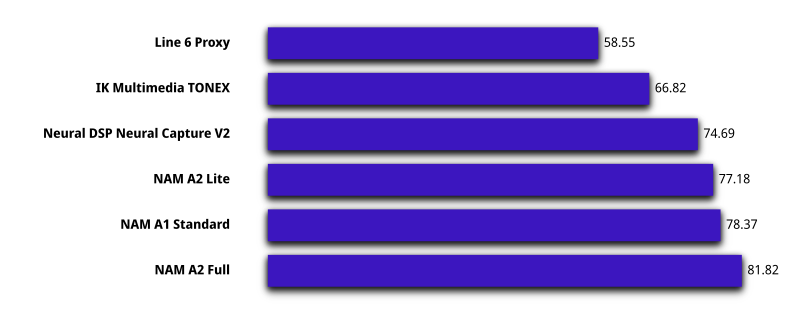
The headline feature of PiPedal 2.0 is support for TooB Neural Amp Modeler A2 models. TooB Neural Amp Modeler A2 models provide significant improvements in sound quality and performance compared to NAM A1 models, while consuming significantly less CPU resources. This is particularly important for users of Raspberry Pi 4, since it allows Pi 4 users to use an additional NAM instance in a preset.
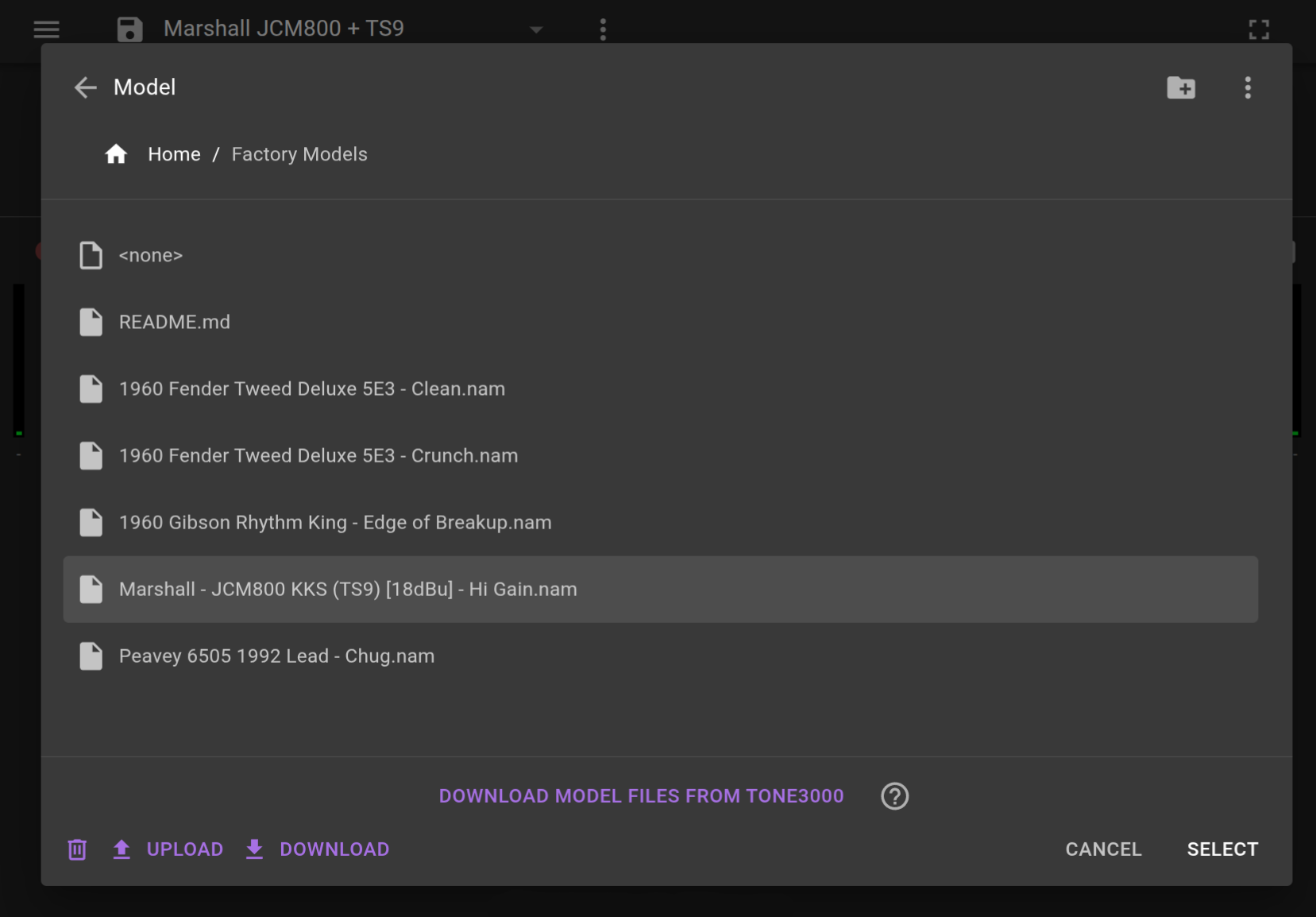
PiPedal 2.0 connects to Tone3000.com web services, so that you can download Tone3000 NAM models and IRs directly to the PiPedal server, without ever having to leave the PiPedal web application interface. All existing NAM A1 models on Tone3000 have been retrained for NAM A2. When you download from Tone3000 using the integrated downloader, you will get NAM A2 models. Just click on the DOWNLOAD MODELS FROM TONE3000 button in the File Selection dialog for Toob Neural Amp Modeler, in order to download NAM A2 models directly to the PiPedal server.
Currently, the best way to get access to NAM A2 models is via the integrated Tone3000 model downloader. Models downloaded externally from the Tone3000 website will still be NAM A1 models; however this should change soon with a forthcoming announcement from Tone3000.
PiPedal 2.0 has a (long overdue) new Factory Presets bank. These are also the set of presets that are included in the Default Bank when performing a clean install of PiPedal 2.0. The new Factory Presets are built around a small selection of NAM A2 models that show off the improved sound quality and performance of NAM A2. And a small selection of NAM A2 models are also bundled with PiPedal.
PiPedal 2.0 can now be installed as a Progressive Web Application (PWA). This allows you to launch Pipedal from your desktop as a native desktop application, without extra browser address bars and window decorations. This provides a much nicer experience when using PiPedal from a Windows or Apple device.
Features
-
Support for Neural Amp Modeler A2 models. The latest version of the TooB Neural Amp Modeler plugin now supports NAM A2 models, which provide improved performance and sound quality compared to older NAM A1 models.
-
Download Tone3000 NAM models and IIR files directly to the PiPedal server. Click on the DOWNLOAD MODELS FROM TONE3000 button in the TooB Neural Amp Modeler plugin's file selection dialog to download the latest NAM A2 models.
-
New Channel Routing Dialog. Configure Auxiliary pass-through channels, or use un otherwise unused channel to pass through unprocessed guitar input for later re-amping in a DAW.
-
Install PiPedal as a Progressive Web Application (PWA), which allows you to launch PiPedal from your desktop as a native desktop application. (A nice feature if you are accessing Pipedal from a Windows or Apple device).
-
New Factory Presets bank, with presets that show off the improved sound quality and performance of NAM A2 models.
-
New TooB Tone plugin: a simple one-knob tone control. The new TooB Tone plugin provides a simple one-knob tone control that can be used to adjust the overall tone of your guitar signal. It is a great tool for quickly shaping your tone without having to use a more complex EQ plugin.
-
Copy and Paste plugins (and their settings) between pedalboards. Accessible via the "Copy Plugin" and "Paste Plugin" menu items in the former Plugin Preset selector menu.
Miscellaneous features and bug fixes
-
Runtime detection and use of AVX extensions for TooB plugins. Reduces CPU use of TooB NAM by 50% on most x86_64/amd64 computers.
-
Better handling of step sizes in numeric edit controls.
-
Split controls now support double-tap to reset to a default value. (Other controls already support this feature).
-
Many small tweaks and improvements to the Pipedal user interface.
-
Fixes problems with Tone3000 direct downloading when using a .local address to connect to the PiPedal server.
.asc files are gpg digital signatures for the corresponding .deb files.
Files are signed with the following key:
PiPedal Project <rerdavies@gmail.com> - 2D1F 39DB B1F8 1941 2B67 8F88 E9D7 081E 08E3 D85C
Show all 4 filesHide 2 files
v2.0.103PiPedal 2.0.103 Release4 files
PiPedal 2.0 is a big release, with exciting new features, improvements, and bug fixes.
The headline feature of PiPedal 2.0 is support for TooB Neural Amp Modeler A2 models. TooB Neural Amp Modeler A2 models provide significant improvements in sound quality and performance compared to NAM A1 models, while consuming significantly less CPU resources. This is particularly important for users of Raspberry Pi 4, since it allows Pi 4 users to use an additional NAM instance in a preset.
PiPedal 2.0 connects to Tone3000.com web services, so that you can download Tone3000 NAM models and IRs directly to the PiPedal server, without ever having to leave the PiPedal web application interface. All existing NAM A1 models on Tone3000 have been retrained for NAM A2. When you download from Tone3000 using the integrated downloader, you will get NAM A2 models. Just click on the DOWNLOAD MODELS FROM TONE3000 button in the File Selection dialog for Toob Neural Amp Modeler, in order to download NAM A2 models directly to the PiPedal server.
Currently, the best way to get access to NAM A2 models is via the integrated Tone3000 model downloader. Models downloaded externally from the Tone3000 website will still be NAM A1 models; however this should change soon with a forthcoming announcement from Tone3000.
PiPedal 2.0 has a (long overdue) new Factory Presets bank. These are also the set of presets that are included in the Default Bank when performing a clean install of PiPedal 2.0. The new Factory Presets are built around a small selection of NAM A2 models that show off the improved sound quality and performance of NAM A2. And a small selection of NAM A2 models are also bundled with PiPedal.
PiPedal 2.0 can now be installed as a Progressive Web Application (PWA). This allows you to launch Pipedal from your desktop as a native desktop application, without extra browser address bars and window decorations. This provides a much nicer experience when using PiPedal from a Windows or Apple device.
Features
-
Support for Neural Amp Modeler A2 models. The latest version of the TooB Neural Amp Modeler plugin now supports NAM A2 models, which provide improved performance and sound quality compared to older NAM A1 models.
-
Download Tone3000 NAM models and IIR files directly to the PiPedal server. Click on the DOWNLOAD MODELS FROM TONE3000 button in the TooB Neural Amp Modeler plugin's file selection dialog to download the latest NAM A2 models.
-
New Channel Routing Dialog. Configure Auxiliary pass-through channels, or use un otherwise unused channel to pass through unprocessed guitar input for later re-amping in a DAW.
-
Install PiPedal as a Progressive Web Application (PWA), which allows you to launch PiPedal from your desktop as a native desktop application. (A nice feature if you are accessing Pipedal from a Windows or Apple device).
-
New Factory Presets bank, with presets that show off the improved sound quality and performance of NAM A2 models.
-
New TooB Tone plugin: a simple one-knob tone control. The new TooB Tone plugin provides a simple one-knob tone control that can be used to adjust the overall tone of your guitar signal. It is a great tool for quickly shaping your tone without having to use a more complex EQ plugin.
-
Copy and Paste plugins (and their settings) between pedalboards. Accessible via the "Copy Plugin" and "Paste Plugin" menu items in the former Plugin Preset selector menu.
Miscellaneous features and bug fixes
-
Runtime detection and use of AVX extensions for TooB plugins. Reduces CPU use of TooB NAM by 50% on most x86_64/amd64 computers.
-
Better handling of step sizes in numeric edit controls.
-
Split controls now support double-tap to reset to a default value. (Other controls already support this feature).
-
Many small tweaks and improvements to the Pipedal user interface.
-
Fixes problems with Tone3000 direct downloading when using a .local address to connect to the PiPedal server.
.asc files are gpg digital signatures for the corresponding .deb files.
Files are signed with the following key:
PiPedal Project <rerdavies@gmail.com> - 2D1F 39DB B1F8 1941 2B67 8F88 E9D7 081E 08E3 D85C
Show all 4 filesHide 2 files
-
v2.0.102PiPedal 2.0.102 Alpha2 files
PiPedal 2.0 provides support for Neural Amp Modeler A2 models.
NAM A2 provides significant improvements in sound quality and performance compared to NAM A1. NAM A2 also provides "Slimable" models. Slimmable models provide multiple levels of performance and sound quality in a single model file, allowing you to choose the level of performance and sound quality that best suits your needs. This is particularly useful for users of Raspberry Pi 4, since NAM A2 models can provide better sound quality than NAM A1 models, while consuming significantly less CPU resources.
A new integrated Tone3000 model downloader provides a convenient way to download the latest NAM A2 models and IIR files from Tone3000 directly to the PiPedal server. All existing NAM A1 models on Tone3000 have been retrained for NAM A2. When you download from Tone3000 using the integrated downloader, you will get NAM A2 models. Just click on the DOWNLOAD MODELS FROM TONE3000 button.
Currently, the best way to get access to NAM A2 models is via the integrated Tone3000 model downloader. Models downloaded externally from the Tone3000 website will still be NAM A1 models; however this should change soon with a forthcoming announcement from Tone3000.
A new channel routing dialog replaces the channel configurationg dialog. The Channel Routing dialog allows global (i.e. not per-preset) configuration of audio channels. You can now configure audio channels as Aux channels (e.g. using the non-guitar channel on your audio interface as an input for backing tracks), or sending unprocessed guitar input signal to an unused output channel for re-amping in a DAW or external hardware. Refer to the (?) help dialog in the Channel Routing Dialog for more information on how to use this feature.
PiPedal 2.0 can now be installed as a Progressive Web Application (PWA). This allows you to launch Pipedal from your desktop as a native desktop application, without extra browser address bars and window decorations.
Features
-
Support for Neural Amp Modeler A2 models. The latest version of the TooB Neural Amp Modeler plugin now supports NAM A2 models, which provide improved performance and sound quality compared to older NAM A1 models.
-
Download Tone3000 NAM models and IIR files directly to the PiPedal server. Click on the DOWNLOAD MODELS FROM TONE3000 button in the NAM file selection dialog to download the latest NAM A2 models.
-
Download IIR files directly into TooB Cab IR from Tone3000.
-
New Channel Routing Dialog.
-
Install PiPedal as a Progressive Web Application (PWA), which allows you to launch PiPedal from your desktop as a native desktop application. (A nice feature if you are accessing Pipedal from an Apple device).
-
New TooB Tone plugin: a simple one-knob tone control. The new TooB Tone plugin provides a simple one-knob tone control that can be used to adjust the overall tone of your guitar signal. It is a great tool for quickly shaping your tone without having to use a more complex EQ plugin.
-
Copy and Paste plugins (and their settings) between pedalboards. Accessible via the "Copy Plugin" and "Paste Plugin" menu items in the former Plugin Preset selector menu.
Minor features and bug fixes
-
Better handling of step sizes in numeric edit controls.
-
Short names of TooB CE-2 Chorus and TooB BF-2 Flanger changed to "TooB Chorus" and "TooB Flanger", repsectively.
-
Split controls now support double-tap to reset to a default value. (Other controls already support this feature).
-
Runtime detection and use of AVX extensions for TooB plugins. Reduces CPU use of TooB NAM by 50% on most x86_64/amd64 computers..
-
v1.5.100PiPedal 1.5.100 ExperimentalBeta2 files
Provisional fix for TooB Cab IR and TooB Convoution reverb ALSA lockups. Currently x86-64 only.
Bug Fixes:
- Toob Cab IR and TooB Convolution Reverb ALA lockups when using buffers smaller than 64 samples.
Show all 2 filesHide 1 files
Other filesv2.0.101PiPedal v2.0.101 ExperimentalBeta2 files
Not for general release. Please do not use this build.
Show all 2 filesHide 1 files
Other filesv2.0.100PiPedal v2.0.100 Experimental1 file
Do not use! For private testing only.
v1.5.99PiPedal v1.5.99 Beta4 files
See this page for instructions on how to install packages once you have downloaded them. See the Assets section, below, for downloadable Debian packages.
Bug Fixes
- Midi Bindings dialog shows blank screen for pedalboards with splits.
- pipedal_1.5.99_arm64.deb21 MB685↓
- pipedal_1.5.99_amd64.deb19 MB228↓
- pipedal_1.5.99_arm64.deb.asc659 B82↓
Show all 4 filesHide 1 files
Other filesv1.5.98PiPedal 1.5.98 Beta4 files
Features
- Stereo versions of TooB 3 Band EQ and TooB Parameteric EQ
- Added a Start Offset control to the TooB Convolution Reverbs.
Bug Fixes
- TooB 3 Band Eq has no effect.
- TooB Convolution Reveb Bypass not saved in Snapshots.
- Split controls do not reset to default when double-tapped/-clicked.
- Convolution Reverb: Default values changed. Direct control defaults to 0dB, Reverb control defaults to -12dB
- L/R Split volume controls should default to 0Db instead of -3dB.
- Split controls behave unpredictably if the type of a Split is changed by a snapshot change.
- Split controls behave unpredictably if the type of a Split is changed when switching between presets that have otherwise identical structure.
- File selections are lost when switching between presets that have identical structure.
- Snapshot plugin states are not trimmed when a plugin is removed.
- Allow license.txt/.md and readme.txt/.md files to be uploaded via .zip files.
Re-issue of v1.5.97, including missing updates to ToobAmp/amd64.
- pipedal_1.5.98_arm64.deb21 MB57↓
- pipedal_1.5.98_amd64.deb19 MB22↓
- pipedal_1.5.98_arm64.deb.asc659 B21↓
Show all 4 filesHide 1 files
Other filesv1.5.97PiPedal 1.5.97 Beta4 files
Features
- Stereo versions of TooB 3 Band EQ and TooB Parameteric EQ
- Added a Start Offset control to the TooB Convolution Reverbs.
Bug Fixes
- TooB 3 Band Eq has no effect.
- TooB Convolution Reveb Bypass not saved in Snapshots.
- Split controls do not reset to default when double-tapped/-clicked.
- Convolution Reverb: Default values changed. Direct control defaults to 0dB, Reverb control defaults to -12dB
- L/R Split volume controls should default to 0Db instead of -3dB.
- Split controls behave unpredictably if the type of a Split is changed by a snapshot change.
- Split controls behave unpredictably if the type of a Split is changed when switching between presets that have otherwise identical structure.
- File selections are lost when switching between presets that have identical structure.
- Snapshot plugin states are not trimmed when a plugin is removed.
- Allow license.txt/.md and readme.txt/.md files to be uploaded via .zip files.
Show all 4 filesHide 1 files
Other filesv1.5.96PiPedal 1.5.96 ExperimentalBeta2 files
A very minor feature, and a series of small but important bug fixes.
Minor Features
- Added a Start Offset control to the TooB Convolution Reverbs.
Bug Fixes
- TooB 3 Band Eq has no effect.
- Split controls do not reset to default when double-tapped/-clicked.
- L/R Split volume controls should default to 0Db instead of -3dB.
- Split controls behave unpredictably if the type of a Split is changed by a snapshot change.
- Split controls behave unpredictably if the type of a Split is changed when switching between presets that have otherwise identical structure.
- File selections are lost when switching between presets that have identical structure.
- Snapshot plugin states are not trimmed when a plugin is removed.
v1.5.95Pipedal v1.5.95 Beta4 files
See this page for instructions on how to install packages once you have downloaded them. Se the Assets section, below, for downloadable Debian packages.
A couple of features that have been blocked by a pending major feature that's taking longer than expected.
Major features
- Tap Tempo MIDI Bindings. Use MIDI events to set time-based controls for any plugin using tap tempo. The Tap Tempo MIDI binding is only visible for controls that have been declared as having units of seconds, milliseconds, Hz, or BPM by their owning plugin, and also have value ranges that are suitable for tap tempo controls.
To use Tap Tempo, open the Midi Bindings dialog, and scroll to find a suitable control. If the control supports Tap Tempo, you will find a Tap Tempo entry in the dropdown that controls the event type.
Consecutive MIDI Note ON events are measured, and the target control will be set to match the measured time between events, as long as the time fits within valid value ranges for the control (again, as declared by the owning plugin).
Tap Tempo is only implemented for MIDI bindings, because the HTML event system used in the PiPedal UI is not responsive enough to implement usable tap-tempo control in the UI. - Mix Plugin Phase Controls. The TooB Mix plugin has new controls that allow independent phase inversion of left and right input channels.
Major features
- The maximum delay for the TooB Delay plugin has been increased from 1.2 seconds to 3 seconds, in order to make it suitable for use with the new Tap Tempo feature.
- The CPU temperature is no longer displayed on systems where PiPedal can't find temperature sensors.
.asc files are gpg digital signatures for the corresponding .deb files.
Files are signed with the following key:
PiPedal Project <rerdavies@gmail.com> - 2D1F 39DB B1F8 1941 2B67 8F88 E9D7 081E 08E3 D85C
- pipedal_1.5.95_arm64.deb21 MB97↓
- pipedal_1.5.95_arm64.deb.asc659 B30↓
- pipedal_1.5.95_amd64.deb19 MB24↓
Show all 4 filesHide 1 files
Other files- Tap Tempo MIDI Bindings. Use MIDI events to set time-based controls for any plugin using tap tempo. The Tap Tempo MIDI binding is only visible for controls that have been declared as having units of seconds, milliseconds, Hz, or BPM by their owning plugin, and also have value ranges that are suitable for tap tempo controls.
v1.5.94Pipedal v1.5.94 Beta4 files
See this page for instructions on how to install packages once you have downloaded them.
A minor release that allows use of plugins with audio sidechains.
Features in this release
-
Sidechains. You can now load plugins that have sidechain inputs. This allows you to use compressor and gate plugins, particularly, that often have sidechains, but also enables a broad class of dynamics processing plugins that would not be loadable in previous versions of PiPedal. Plugins that have sidechain inputs will show a dropdown control in their control view which allows you to select the source of the sidechain input. The source plugin for the sidechain must appear earlier in the signal chain.
Although sidechain processing is occasionally useful in guitar effect pedalboards, the more important part of this feature is that it allows you to load plugins that were rejected by previous versions of PiPedal because they had optional sidechain inputs.
.asc files are gpg digital signature for the corresponding .deb files.
Files are signed with the following key:
PiPedal Project <rerdavies@gmail.com> - 2D1F 39DB B1F8 1941 2B67 8F88 E9D7 081E 08E3 D85C
Show all 4 filesHide 2 files
-
v1.5.93PiPedal v1.5.93 Release4 files
See this page for instructions on how to install packages once you have downloaded them.
Major Features in This Build
-
New TooB Tremolo plugin. Normal and harmonic tremolo in mono and stereo versions. Harmonic tremolo is a tremolo variant that modulates the amplitude of high-frequency and low-frequency content in opposite phase. It follows the lead of many classic and modern Fender amps, which also provide harmonic tremolo. Stereo harmonic tremolo is particularly smooth and pleasant.
-
Colored plugin icons. Tap on the title of the plugin in the middle toolbar to edit the display name of the plugin and choose a color for the icon.
-
Tools for copying presets between banks. You can now import presets from another bank using the Presets menu found at the top of the main screen, or you can import presets from another bank, or export presets from the current bank to another bank, using menu commands found in the "Manage Presets" dialog.
-
Multi-select in the Manage Presets dialog makes it easier to perform bulk exports to another bank or delete multiple presets. To select multiple presets when using a mouse, press the Ctrl key and click on presets to toggle selection, or press the Shift key and click on a preset to select all presets from the last selected to the newly selected preset. On touch devices, long-press on a preset (without dragging) to start multi-select action mode (an Android touch-UI convention), then tap on individual presets to toggle selection.
Bug fixes
-
several bugs relating to the new Factory Presets bank: preset amp model files were not getting properly installed; one preset used an amp model that is not included in factory installed presets. And a new preset showing off the new TooB Tremolo plugin has been added.
-
pipedal_config will no longer accept the --port option without also specifying the --install option. (It used to silently fail).
-
pipedal_latency_test now provides instructions on how to enable missing real-time scheduling permissions for non-root users.
.asc files are gpg digital signature for the corresponding .deb files.
Files are signed with the following key:
PiPedal Project <rerdavies@gmail.com> - 2D1F 39DB B1F8 1941 2B67 8F88 E9D7 081E 08E3 D85C
Show all 4 filesHide 2 files
-
v1.5.92PiPedal v1.5.92 Release4 files
See this page for instructions on how to install packages once you have downloaded.
Major Features in This Build
-
New default presets that make better use of plugins that have been added since the original set of default presets were created. A modest change; expect a more thorough revamp of default presets soon.
-
The installer creates a new "Factory Presets" bank. If you are upgrading, you can access the new presets in the Factory Presets bank. New factory presets added in future PiPedal updates may add or modify presets in the Factory Presets bank. If you want to use or modify the new Factory Presets, you should copy them to a new bank, or copy individual presets to a bank you currently use for your own presets.
-
Stream between audio adapters. You can now select different audio adapters for input and output. (Thanks to Gabriel Hernandez)
Major Features (Since PiPedal 1.4.76 Release)
-
Support for Ubuntu 25.04. Compatibility fixes for Ubuntu 25.04 may also make it easier to build PiPedal on other Debian-based Linux distros.
-
Code optimizations for Raspberry Pi 5 (Cortex-A76), providing substantial performance improvements for TooB Neural Amp Modeler. ToobAmp automatically loads A72- or A76-optimized code depending on which processor you are using.
-
New "Threaded" button optionally executes TooB NAM computation on a separate thread. Allows up to 5 NAM instances on Pi 4, and practically unlimited NAM instances on Pi 5.
-
TooB Neural Amp Modeler: Input and output calibration. See Using TooB Neural Amp Modeler for guidance on how to use this feature.
-
TooB Convolution Reverb: Predelay, Stretch and Decay controls allow adjustments of impulse response characteristics.
-
TooB Convolution Reverb, Freeverb: New "Tails" control, which allows reverb tails to continue after bypassing the effect.
-
TooB Parametric EQ: New plugin providing a 4-band parametric EQ. A musically useful Parametric EQ that's suitable both for shaping guitar tone before amp models, or for shaping overall sound at the end of plugin chains. This should become your go-to EQ plugin when using PiPedal.
-
New TooB Player plugin that allows you to play (and loop) audio files (even large ones).
-
TooB 3 Band EQ: New plugin providing a simple 3-band EQ. (Replicates the EQ stage on Steve Atkinson's Windows and Mac-based Neural Amp Modeler plugin).
-
TooB CE-2 Chorus, TooB BF-2 Flanger, TooB Phaser: New "Wet/Dry" controls.
-
Noise Gates threshold ranges have been increased in TooB NAM, TooB Input and TooB Noise Gate plugins.
-
MIDI bindings allow users to specify minimum and maximum control values, in order to better support expression pedals.
-
Editable plugin labels. You can now edit the labels of plugins in the PiPedal UI. Tap the plugin label to override the default label with a custom label. Useful when you have multiple instances of the same plugin in a preset.
-
Multi-select support in file browser dialogs. Allows you to easily delete, copy or move multiple files at once.
-
Long-press/hover tooltips are now displayed for all controls in the PiPedal UI.
-
TooB Neural Amp Modeler: Switch to the NeuralAudio NAM Backend (Thanks to Mike Oliphant for providing MIT-licensed sources that provide significant performance improvements).
-
Support for custom MOD User Interfaces for plugins that provide a MOD UI.
-
Switch from ALSA rawmidi devices to ALSA sequencer devices for MIDI input. This provides a number of useful improvements. PiPedal now supports Bluetooth MIDI controllers. PiPedal provides better support for subdevices (multiple MIDI connections on the same device). Connections to the PiPedal MIDI input port can now be made at runtime by other applications, or by using
aconnect. Changing MIDI devices does not require a restart of the audio stream. Disconnected MIDI devices that have been selected will now be automatically reconnected when they are plugged in again. -
Dial control values are displayed in a fly-out when editing, which makes it easier to determine the current value of a control when using touch user interfaces.
-
Direct link to TONE3000 website from the TooB Neural Amp Modeler file browser.
-
Double-tap gestures now supported in touch user interfaces. Double-tap a dial to reset it to its default value. Double-tap a file in the File Browser to select it. Double-tap a plugin label to edit it.
-
Improvements to long-press handling in touch and mouse user interfaces. Long-press a control to display a tooltip for the control, and triggers multi-select in the file browser dialog.
-
Audio files in the Tracks directory (only) are displayed using audio-file metadata and artwork if available.
Minor features in This Build
-
Improved enumeration of available audio devices. ALSA devices that are currently in use by other applications are now shown in the list of available audio devices, but are disabled.
-
Select README.md or LICENSE.md files in File Selection dialogs to view their contents inside the PiPedal UI.
-
PiPedal respects LV2 plugins' minimum-buffer-size requirements. If PiPedal is using a buffer size smaller than the plugin's minimum size, PiPedal will assemble buffers of the currect size before passing them to the plugin. This allows use of plugins written in Faust, including a number of useful plugins from Guitarix/Lv2 and Gx/Lv2 projects.
Please refer the full set of Release Notes for a complete list of features and bug fixes since the last full release of PiPedal.
.asc files are gpg digital signature for the corresponding .deb files.
Files are signed with the following key:
PiPedal Project <rerdavies@gmail.com> - 2D1F 39DB B1F8 1941 2B67 8F88 E9D7 081E 08E3 D85C
Show all 4 filesHide 2 files
-
v1.5.91Pipedal v1.5.91 Beta4 files
Themes for this release
-
Major improvements to TooB plugins; new plugins, new features.
-
Support for Ubuntu 25.04 (am64 and aarch64).
Major Features
-
TooB Neural Amp Modeler: Input and output calibration.
-
TooB Convolution Reverb: Predelay, Stretch and Decay controls allow adjustments of impulse response characteristics.
-
TooB Parametric EQ: New plugin providing a 4-band parametric EQ. A musically useful Parametric EQ that's suitable both for shaping guitar tone before amp models, or for shaping overall sound at the end of plugin chains. This should become your go-to EQ plugin when using PiPedal.
-
TooB 3 Band EQ: New plugin providing a simple 3-band EQ. (Replicates the EQ stage on Steve Atkinson's Windows and Mac-based Neural Amp Modeler plugin).
-
TooB CE-2 Chorus, TooB BF-2 Flanger, TooB Phaser: New "Wet/Dry" controls.
-
Noise Gates threshold ranges have been increased in TooB NAM, TooB Input and TooB Noise Gate plugins.
-
Improvements to the default presets. Default presets have been completely redesigned to make use of plugins that have been added since the initial release of PiPedal, and to provide really great presets out of the box.
-
Support for Ubuntu 25.04. Compatibility fixes for Ubuntu 25.04 may also make it easier to build PiPedal on other Debian-based Linux distros.
Minor Features/Bug Fixes
- Correct missing '-' key on Samsung keyboards when editing control values.
- Default to dark theme on first use.
- dB values are now displayed on plugin VU output controls.
- Correctly display name of plugin in MIDI bindings dialog. (Thanks to Jiri Popek).
- Auto-focus input control on Rename dialogs. (Thanks to Jiri Popek).
- Display LICENSE files found in upload directories.
Notes
A number of plugins have been modified to provide better functionality going forward. Every effort has been made to prevent breaking changes in existing plugins. If you encounter a breaking change in an existing preset, please report it as a bug. If you are using presets in live performance, it might be a good idea to check them before you next use them in live performance, in order to verify that they have not been inadvertently broken by the upgrade. In particular, CPU use for presets that are using TooB Convolution Reverb may go up slightly; so if you are using presets that run at or close to maximum CPU use, you should check that they still work after the upgrade.
The EQ section in TooB NAM has been removed. It has become apparent that the existing EQ controls were not entirely fit for purpose. To prevent breaking changes, EQ controls will still show up if you load an instance of TooB NAM that was saved with a previous version of PiPedal; but when you load new instances, the EQ section will not be present. Instead, please consider adding one of the rich set of old or new TooB EQ plugins before or after TooB NAM instead:
- TooB Parametric EQ (recommended).
- TooB GE-7 Graphic EQ.
- TooB 3 Band EQ (equivalent to Steve Atkinson's NAM EQ section).
- TooB Tone Stack (replicates the old TooB NAM EQ functionality).
Normalization of reverb IRs has been significantly improved in order to ensure that newly loaded IR files sound reasonable when loaded using default TooB Convolution Reverb control settings. It should now take significantly less effort to adjust levels on Convolution Reverb IR files. In order to prevent breaking changes, instances of TooB Convolution Reverb that were saved in previous versions of PiPedal will use the old normalization procedure; newly loaded instances of TooB Convolution Reverb will use the new normalization.
In addition, the MaxT control has been removed. IR files will now play to their full length without feeding back. This change may cause overruns on existing presets if you are using unusually long Reverb IR files. TooB Convolution Reverb can comfortably support reverb IRs well in excess of ten seconds long, even on a Pi 4. For reference, typical IR files are about 1 to 3 seconds long; and extremely reverberant IRs may sometimes stretch out to five or six seconds long. In practice, the increase in CPU use is relatively modest; but you may want to double-check that presets using extremely reverberant IRs run without problems before using them in live performance.
See this page for instructions on how to install the file once you have downloaded it, and how to complete the installation after you have installed the package.
The .asc files are gpg digital signature for the .deb files. You can verify the signature using the following command:
gpg --verify pipedal_1.5.91_arm64.deb.asc pipedal_pipedal_1.5.91_arm64.deb

gpg --verify pipedal_1.5.91_amd64.deb.asc pipedal_pipedal_1.5.91_amd64.deb
Files are signed with the following key:
PiPedal Project <rerdavies@gmail.com> - 2D1F 39DB B1F8 1941 2B67 8F88 E9D7 081E 08E3 D85C
Show all 4 filesHide 2 files
-
v1.5.90PiPedal 1.5.90 Retracted4 files
Retracted due to serious bug. Fix forthcoming.
Themes for this release
-
Major improvements to TooB plugins; new plugins, new features.
-
Default presets have been redesigned to make use of new and improved plugins. If upgrading, you will see the new presets in a new "Factory Presets" bank.
-
Support for Ubuntu 25.04 (am64 and aarch64).
Major Features
-
TooB Neural Amp Modeler: Input and output calibration.
-
TooB Convolution Reverb: Predelay, Stretch and Decay controls allow adjustments of impulse response characteristics.
-
TooB Convolution Reverb, Freeverb: New "Tails" control, which allows reverb tails to continue after bypassing the effect.
-
TooB Parametric EQ: New plugin providing a 4-band parametric EQ. A musically useful Parametric EQ that's suitable both for shaping guitar tone before amp models, or for shaping overall sound at the end of plugin chains. This should become your go-to EQ plugin when using PiPedal.
-
TooB 3 Band EQ: New plugin providing a simple 3-band EQ. (Replicates the EQ stage on Steve Atkinson's Windows and Mac-based Neural Amp Modeler plugin).
-
TooB CE-2 Chorus, TooB BF-2 Flanger, TooB Phaser: New "Wet/Dry" controls.
-
Noise Gates threshold ranges have been increased in TooB NAM, TooB Input and TooB Noise Gate plugins.
-
Improvements to the default presets. Default presets have been completely redesigned to make use of plugins that have been added since the initial release of PiPedal, and to provide really great presets out of the box.
-
A new Factory Presets bank has been added. The Factory Presets bank contains the initial set of presets that you would find in the "Default Bank" after a fresh install. If you are upgrading, the "Default Bank" presets will not be modified; but you will find a new bank named "Factory Presets", which contains the current set of default presets. You should not modify these presets, as they may be overwritten or added to by future upgrades. Instead, copy presets from the Factory Presets bank into your "Default Bank", or whichever bank you are currently using for personal use.
-
Support for Ubuntu 25.04. Compatibility fixes for Ubuntu 25.04 may also make it easier to build PiPedal on other Debian-based Linux distros.
Minor Features/Bug Fixes
- Correct missing '-' key on Samsung keyboards when editing control values.
- Default to dark theme on first use.
- dB values are now displayed on plugin VU output controls.
- Correctly display name of plugin in MIDI bindings dialog. (Thanks to Jiri Popek).
- Auto-focus input control on Rename dialogs. (Thanks to Jiri Popek).
- Display LICENSE files found in upload directories.
Notes
A number of plugins have been modified to provide better functionality going forward. Every effort has been made to prevent breaking changes in existing plugins. If you encounter a breaking change in an existing preset, please report it as a bug. If you are using presets in live performance, it might be a good idea to check them before you next use them in live performance, in order to verify that they have not been inadvertently broken by the upgrade. In particular, CPU use for presets that are using TooB Convolution Reverb may go up slightly; so if you are using presets that run at or close to maximum CPU use, you should check that they still work after the upgrade.
The EQ section in TooB NAM has been removed. It has become apparent that the existing EQ controls were not entirely fit for purpose. To prevent breaking changes, EQ controls will still show up if you load an instance of TooB NAM that was saved with a previous version of PiPedal; but when you load new instances, the EQ section will not be present. Instead, please consider adding one of the rich set of old or new TooB EQ plugins before or after TooB NAM instead:
- TooB Parametric EQ (recommended).
- TooB GE-7 Graphic EQ.
- TooB 3 Band EQ (equivalent to Steve Atkinson's NAM EQ section).
- TooB Tone Stack (replicates the old TooB NAM EQ functionality).
Normalization of reverb IRs has been significantly improved in order to ensure that newly loaded IR files sound reasonable when loaded using default TooB Convolution Reverb control settings. It should now take significantly less effort to adjust levels on Convolution Reverb IR files. In order to prevent breaking changes, instances of TooB Convolution Reverb that were saved in previous versions of PiPedal will use the old normalization procedure; newly loaded instances of TooB Convolution Reverb will use the new normalization.
In addition, the MaxT control has been removed. IR files will now play to their full length without feeding back. This change may cause overruns on existing presets if you are using unusually long Reverb IR files. TooB Convolution Reverb can comfortably support reverb IRs well in excess of ten seconds long, even on a Pi 4. For reference, typical IR files are about 1 to 3 seconds long; and extremely reverberant IRs may sometimes stretch out to five or six seconds long. In practice, the increase in CPU use is relatively modest; but you may want to double-check that presets using extremely reverberant IRs run without problems before using them in live performance.
Show all 4 filesHide 2 files
-
v1.4.89PiPedal v1.4.89 Testing2 files
Internal test build. Please use v1.4.87 Beta instead.
Show all 2 filesHide 1 files
Other files