Overtone
Overtone is custom firmware for the Elektron Digitone II, built on OS 1.12. It adds:
- four new machines: SOPHIE, MACHINEDRUM, LOOP and THRU;
- per-track insert effects;
- envelope followers, a second arpeggiator that works as a step modulator, and an arpeggiator locked to the scale;
- parameter slides and knobs that show what is playing;
- GROOVE, a step-by-step timing editor that replaces swing, with presets, random grooves and a modulatable drift;
- instant pattern switching that keeps the place in the bar.
You make the build yourself: the patcher here turns Elektron's own OS 1.12 file into Overtone on your computer, and you send the result to the Digitone with Elektron Transfer. No Elektron firmware file is shared here.
Not made or supported by Elektron.
- What's in it
- Install
- Going back, and recovery
- Compatibility
- Known limitations
- How it's made and tested
- Credits and licence
The screens below are taken from Overtone running in an emulator.
What's in it
Pick the new machines like any other: [FUNC] + [SYN] on a track.
SOPHIE
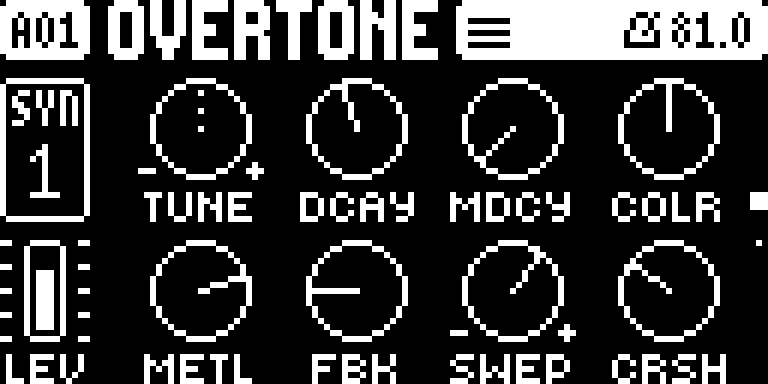
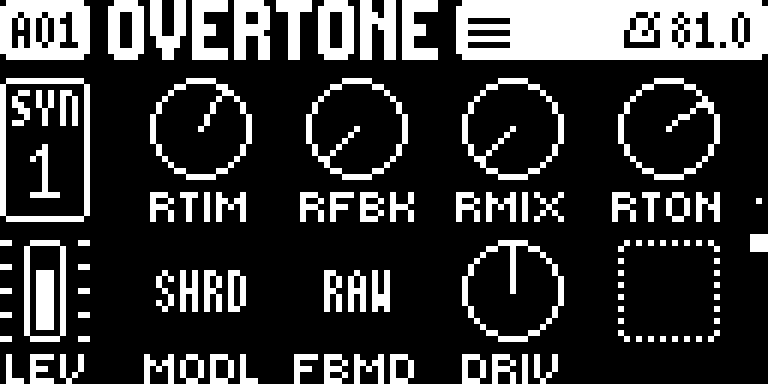
Percussive metal, pipes and kicks: a port of Matt Estela's Schwung Sophie synth.
- Page 1: TUNE DCAY MDCY COLR / METL FBK SWEP CRSH.
- Page 2: RTIM RFBK RMIX RTON / MODL (FUSE, STAK, SPLT, SHRD, PIPE, BOOM, KICK), FBMD (RAW / SMTH), DRIV.
- It has no filter of its own: use the track's filter.
MACHINEDRUM
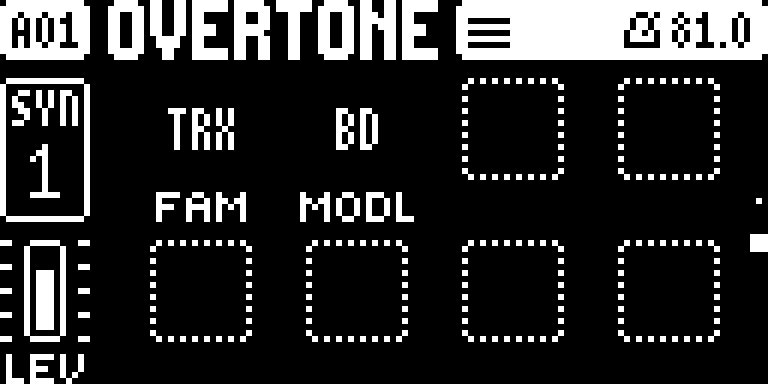
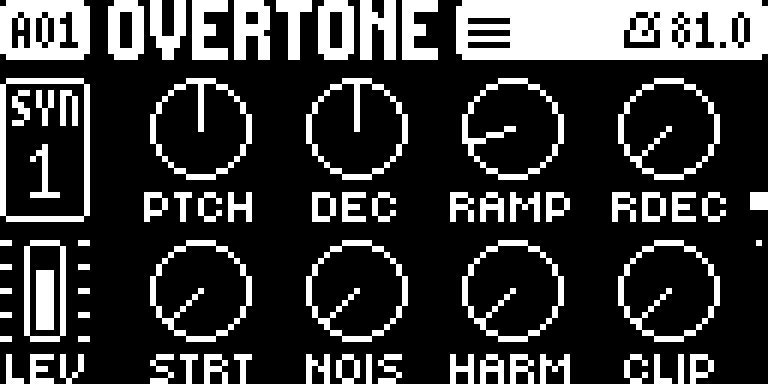
Three of the Machinedrum's synthesis families in one machine, ported from its own sound engines.
- Page 2: FAM picks the family, MODL the model.
- TRX: BD B2 SD RS XT XC CP MA CB CL CH OH CY.
- EFM: BD SD XT CP RS CB HH CY.
- P-I (physical models): BD SD MT ML MA RS RC CC HH.
- Page 1: the model's 8 knobs, labelled as on the Machinedrum.
- Notes above or below C4 transpose it.
LOOP
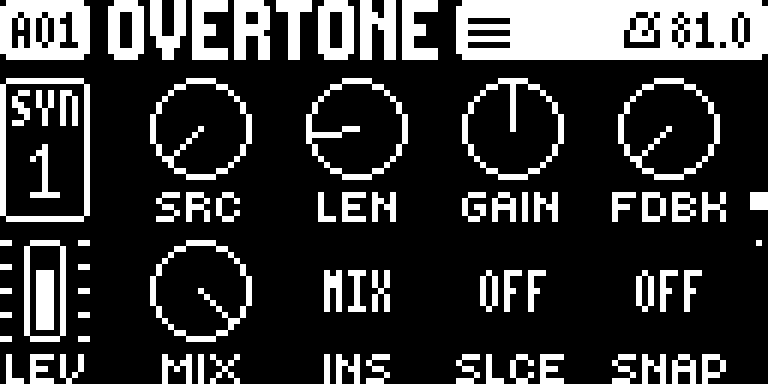
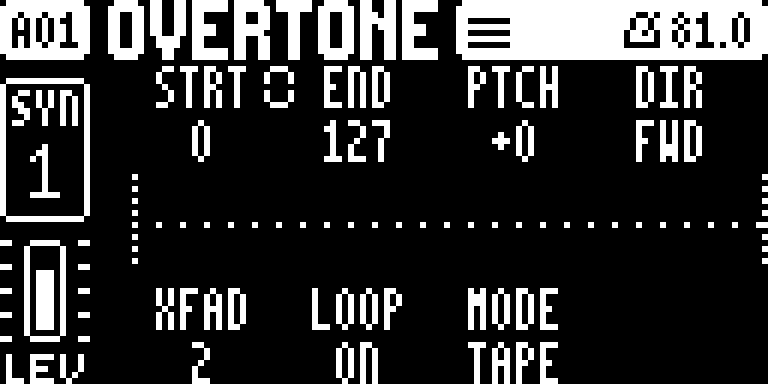
A looper on a synth track, after the Machinedrum's RAM machines. It records all the time (8 seconds per track, stereo). A trig plays what it has, at the trig's pitch. Selecting LOOP on an empty track puts a 16-step trig on step 1.
- Page 1:
- SRC: what it records: a track (T1–T16), MAIN (the mix) or IN (the audio inputs, after the external mixer), or OFF (freezes the buffer).
- LEN: the take's length. GAIN, and FDBK (overdub).
- MIX: crossfades the source into the loop. INS: MIX replaces the source, LAYR plays the loop on top of it.
- SLCE: cuts the take into slices, played by note (C4 = the first slice). SNAP: start and end move in steps.
- Page 2 ([SYN] again): the buffer. The waveform, where it records and where it plays. STRT END PTCH DIR /
XFAD LOOP MODE SPED.
- MODE TAPE: speed follows pitch. STRC: time-stretch, so pitch (PTCH, ±36 semitones) and speed (SPED) are separate.
- Push A or B to link start and end: the chain icon joins and END becomes the window size.
- Hold [FUNC] while turning SPED to step through ratios (×1, ×1.5, ×2 …), or PTCH to step through fifths and octaves.
THRU
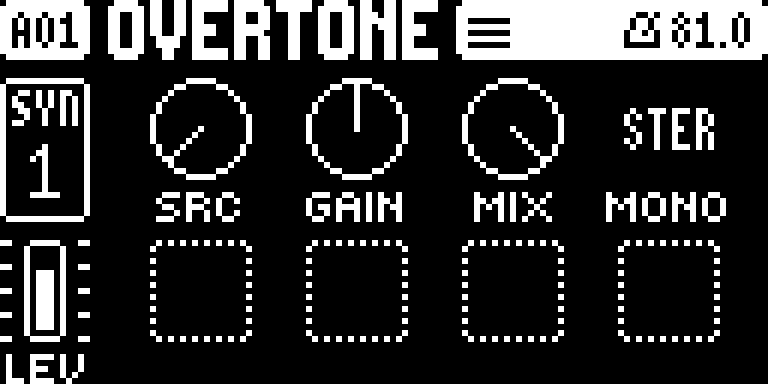
A machine whose sound is another track's output, sent through this track's own overdrive, filter, amp, pan and insert.
- SRC: the source track (by default the one on the left).
- GAIN: the level (64 = unchanged).
- MIX: crossfades from the source to THRU. At 127 only THRU is heard, including the source's delay and reverb sends.
- MONO: STER (stereo) or MONO.
Insert effects on every track
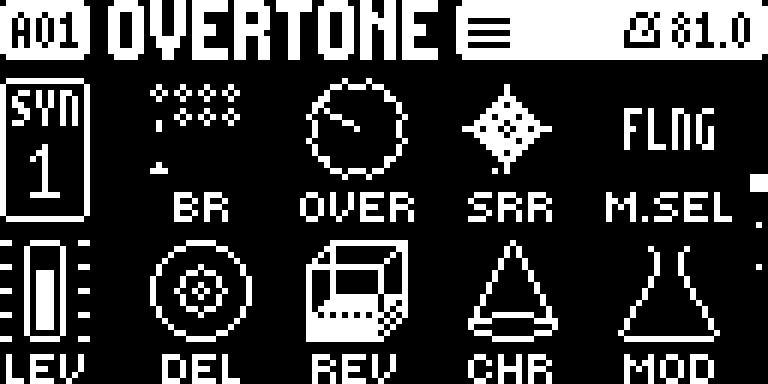
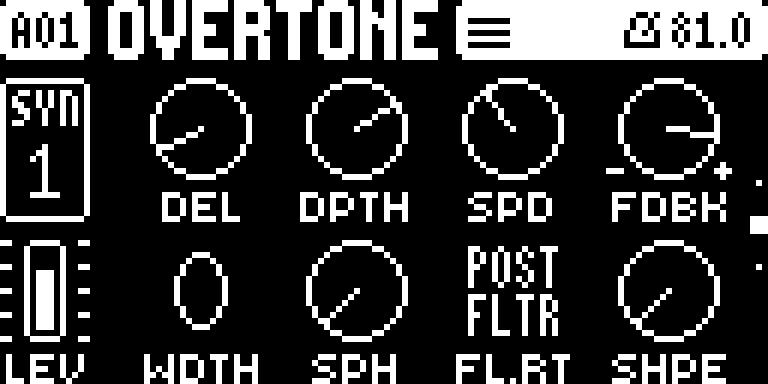
Every track gets its own insert effect, on top of the shared delay, reverb and chorus. Each insert has its own settings and p-locks, and LFOs and envelope followers can modulate it.
- [FX], first page:
- D M.SEL picks the insert: FLNG (flanger), PHSR (phaser), CHOR (chorus) or REVB (reverb).
- H MOD is the insert's dry/wet.
- Both can be p-locked, so one trig can switch to another effect.
- [FX], second page: the insert's knobs.
- FLNG, PHSR and CHOR: DEL (or CNTR), DPTH, SPD, FDBK / WDTH (stereo width), SPH (or LP), FL.RT, SHPE.
- REVB: DEC DAMP GATE PDLY / LP HP MODD WDTH.
- FL.RT routes the insert PRE FLTR (before the filter, in stereo: the track takes two voices per note) or POST FLTR (after the pan).
- [FX], third page: SR.RT and OD.RT put the stock bit reduction and overdrive before or after the filter.
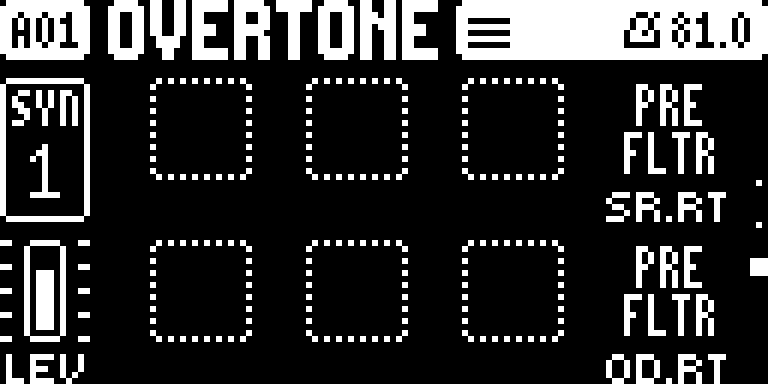
FLNG is an original design. PHSR, CHOR and REVB are ports of the Monomachine's effects.
Envelope followers
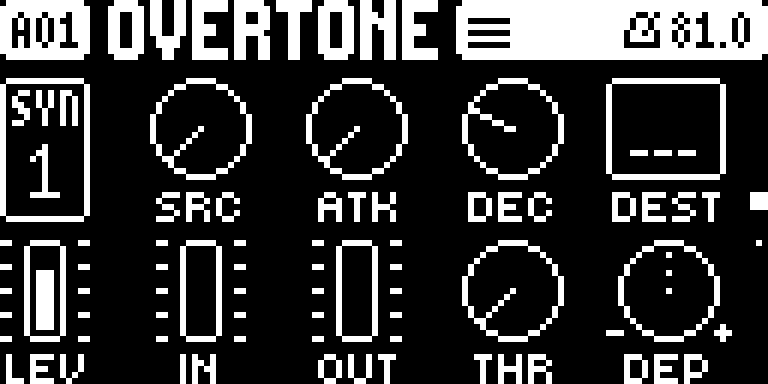
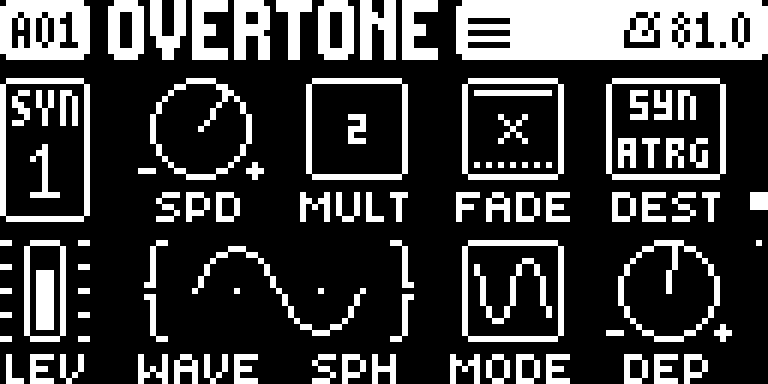
Two followers per sound. On a [MOD] page press RIGHT for ENV1 (UP / DOWN for ENV2), and LEFT to go back to the LFOs.
- SRC: the track it listens to (by default its own).
- ATK and DEC: how fast it follows.
- DEST: what it moves (any parameter, as with LFO DEST).
- IN and OUT: meters of the input and output levels; turning them sets the gain.
- THR: the threshold below which it does nothing.
- DEP: the depth, positive or negative.
- Every knob can be p-locked.
Two arpeggiators
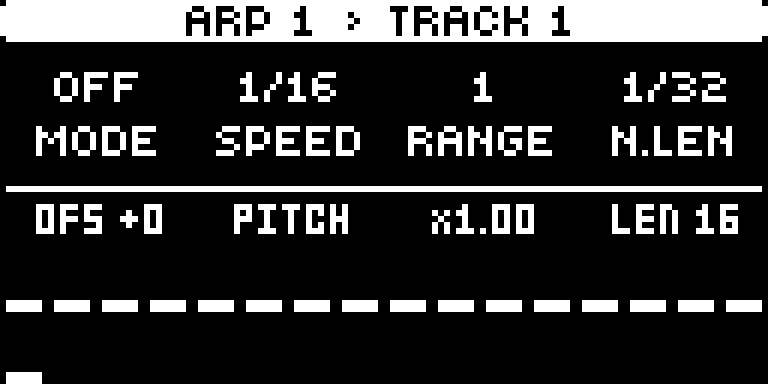
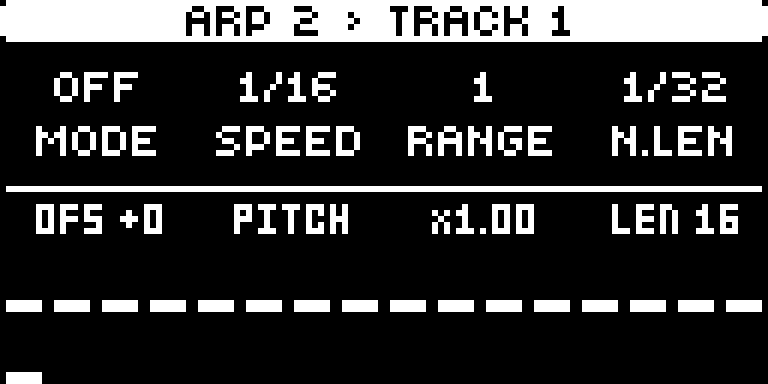
- ARP 1 is the stock arpeggiator with more controls. The second row:
- E OFS: the selected step's offset (LEFT / RIGHT picks the step).
- F DEST: on PITCH the arp plays in the keyboard scale (KEYBOARD SETUP: ROOT and SCALE). Anywhere else, each step moves that parameter by its offset while the note stays.
- G DEP: on PITCH it stretches or flips the pattern (×−4 to ×4); elsewhere it is the depth.
- H LEN.
- UP / DOWN mutes or unmutes the selected step.
- ARP 2 is a step modulator: it plays no notes. It restarts at every trig and moves its DEST by each step's offset × DEP. On PITCH it adds scale degrees to ARP 1's notes.
- Keys in the ARP menu: tap [ARP] to switch between ARP 1 and ARP 2. Hold [ARP] and press [YES] to randomize the shown arp. [FUNC] + [ARP] or a page key closes the menu.
- Per trig: in GRID RECORDING, hold a trig and turn the ARP knobs. That trig's arp uses the locked values, so, for example, one trig can arpeggiate while the rest don't. Mutes set on a held trig apply to that trig only.
- Live recording records ARP knob moves as locks.
Cross-modulation
Each sound has its LFOs ([MOD], UP / DOWN), two envelope followers and two arps. Every continuous knob of each of them is a destination for the others: for example, LFO1 can wobble ARP 1's speed, ARP 2 can step ENV1's depth, and LFO1 can modulate LFO2's knobs. No modulator targets itself. In the DEST lists, each LFO, follower and arp has its own group after SYN and FX.
GROOVE
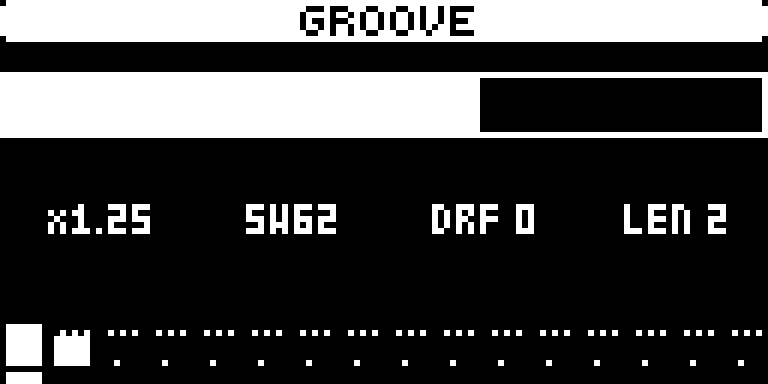
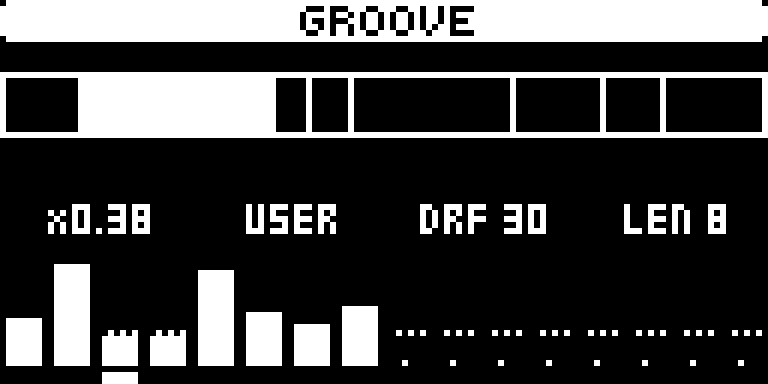
[TEMPO] opens the tempo screen; [TEMPO] again switches to GROOVE, and once more back to the tempo screen. GROOVE replaces swing: each step of a cycle gets a weight, and the cycle keeps its length, so the bar stays in time.
- LEVEL or LEFT / RIGHT move the pointer one step. E sets that step's weight (1–99, 24 = straight); its label shows how long the step lasts compared with straight (×1.50). UP / DOWN change the weight by one; held, they repeat.
- F picks a preset: STRT, SW54 / SW58 / SW62 / SW66 / SW71 (16th swing), 8S58 / 8S66 (8th swing), PUSH (off-beats early), SHFL, LAZY and QUIN. Editing a weight or the length shows USER.
- G sets DRIFT (0–99): every cycle each weight moves by a new random amount, while the cycle's start stays in time. DRIFT is also a modulation destination ("Groove Drift", at the end of the DEST lists) for the LFOs, envelope followers and arps.
- H sets the cycle's length (1–16 steps).
- Hold [TEMPO] and press [YES] for random weights (the length stays). Release [TEMPO] and hold it again for another.
- The top row shows the cycle as it plays, each step a box as wide as its time; the playing step's box is filled.
- A cycle starts again at the pattern's start. GROOVE times every track and the arpeggiators, and it is saved with the pattern.
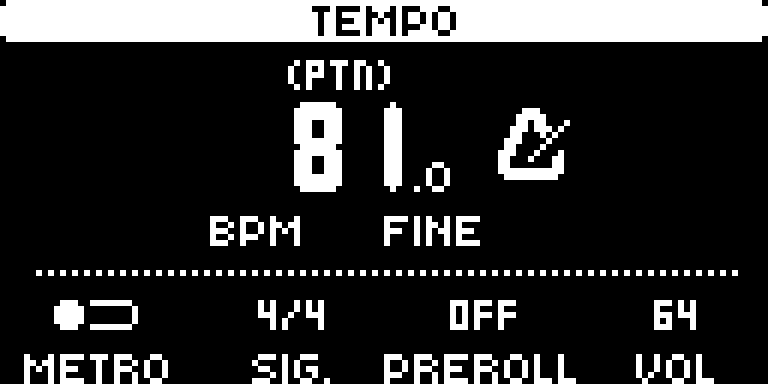
The tempo screen has no SWING. [FUNC] + [TEMPO] is tap tempo, as on Elektron's OS.
Instant pattern switch
Hold [PTN] and press [YES] to turn it on, [NO] to turn it off; a message shows which for about a second, and you can press them again while [PTN] is still held. While it is on, a pattern picked with [PTN] + [TRIG] takes over at the next step instead of at the end of the playing pattern, at the place it would have reached had it played since PLAY: a 16-step pattern picked on step 21 starts at its step 6, so the bar stays in place. Chains, songs and program changes still change at the pattern's end. The setting is saved with the project.
Parameter slides
On TRIG page 2, SLD turns on a slide for the trig and SLEN sets its length, in steps. Every parameter the trig changes (its p-locks, or the sound's values) glides from where the track was to the new value, insert effects included. Turning a knob by hand acts at once.
Knobs that show what is playing
While the sequencer runs, the knobs on the sound pages show the value that is actually playing: p-locks, slides and LFO / follower / arp movement, not only the value you set. The filter's FREQ follows the filter envelope too. Holding a page key shows the set values as numbers. Holding a trig shows that trig's locks so you can edit them.
DSP load
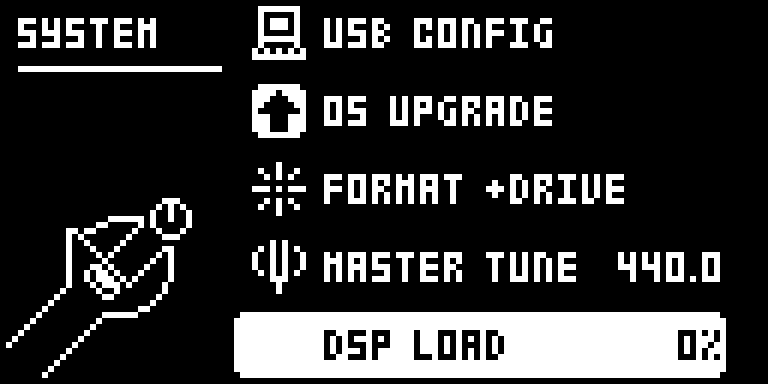
[SETTINGS] > SYSTEM > DSP LOAD shows how busy the sound engine is. LOOP, SOPHIE and MACHINEDRUM voices cost more than the stock machines. When it reaches 100 % the audio crackles: use fewer voices.
Install
You need a Digitone II, a computer, a USB cable and Elektron Transfer.
- Get Elektron's OS 1.12. On Elektron's download page,
download Digitone II OS 1.12 (
Digitone_II_OS1.12_dist.zip). Keep this file: Elektron's page lists only the current OS, and you need it to go back or to make another build. - Make the build in the Overtone builder: drop the .zip on the
page and press Make. It runs in the browser, with nothing to install and nothing uploaded. It checks that the
file is Elektron's original OS 1.12, and lets you save the Overtone
.syxonly if it is byte for byte the tested build. - Send it to the Digitone. Connect it over USB, open Transfer, drag the Overtone
.syxonto it, answer YES on the Digitone and wait for it to restart.
Without the browser: the patcher in Python
With Python 3.11 or later (python.org/downloads), download Overtone from Releases, unzip it, and in a terminal in the unzipped folder run:
python3 patcher/patch.py ~/Downloads/Digitone_II_OS1.12_dist.zip
It makes the same file in 1 to 3 minutes and saves it next to the .zip. The .zip, its unzipped folder and the .syx all work as input.
Going back, and recovery
-
Back to Elektron's OS: send Elektron's
Digitone_II_OS1.12.syx(inside the .zip) with Transfer, the same way. Overtone installs it by itself, without asking for YES. -
Updating Overtone: send the new build with Transfer the same way.
-
On Overtone 1.0: an OS sent with Transfer stops on Receiving or PREPARING... and nothing is written: switch the Digitone off and on. To update from 1.0, go back to Elektron's OS with the STARTUP menu below, then send the new build with Transfer.
-
If the Digitone doesn't start:
- Hold [FUNC] while you switch it on. The STARTUP menu appears.
- Press [TRIG 4] (OS UPGRADE).
- In Transfer, use LEGACY OS UPGRADE mode and send Elektron's
Digitone_II_OS1.12.syxover a DIN MIDI cable. USB doesn't work in the STARTUP menu. It takes about 15 minutes.
Overtone never changes the bootstrap that holds this menu.
Compatibility
- Digitone II, OS 1.12 only. The patcher refuses any other file.
- Projects stay in Elektron's format. Overtone's settings live in spare space in the sound, the pattern's lock table and values the stock OS doesn't use.
- Swing is gone. A project's saved swing is ignored, and GROOVE takes its place.
- Opening Overtone projects on Elektron's OS is not tested. Keep a copy.
- An OS sent over USB installs without a confirmation on the unit (Transfer included).
Known limitations
- The Overbridge plugin knows only Elektron's names and ranges.
- GROOVE is global for now (per track is planned). Tempo-synced LFOs and delays follow the BPM, not the groove, and an external MIDI clock is not warped by it.
- PRE FLTR inserts use two voices per note on that track.
- Heavy machines (LOOP in STRC mode, P-I, many SOPHIE voices) can push the DSP over 100 %. Watch DSP LOAD.
How it's made and tested
Overtone was developed with Claude Code and the digitone-2-modding-skill. Every build runs a suite of about 160 checks in two emulators before it reaches a unit:
- the Digitone's real main OS in digikit;
- the DSP program in a SHARC emulator.
Overtone 1.3 is played on a Digitone II and passed every check. Installing with Transfer, from Elektron's OS and from Overtone, was checked on the unit.
The patcher (patcher/patch.py) needs only Python. It holds Overtone's changes as copy instructions over your own file,
plus Overtone's own bytes. Every 16-byte run inside those bytes is checked against Elektron's OS 1.12 file, and none of them is in
it. It seals the build with the key it derives from your file, as the Digitone expects.
Credits
- dnfw (angellinares): the firmware container, the code
loader and the C build path.
patcher/_dnfwis its code, unchanged. - elektron-firmware-tool (Marcel Bierling): the container format that dnfw follows.
- digikit (Em D): the ColdFire emulator every build is tested in.
- Schwung Sophie (Matt Estela, digisophie contributors; MIT): the SOPHIE machine.
- gearmulator: its DSP56300 emulator ran the Machinedrum and Monomachine references the ports were compared against.
- Elektron's Machinedrum and Monomachine: the MACHINEDRUM machine and the PHSR, CHOR and REVB inserts are ports of their sound engines.
- naturarum/dn2-cfw (Digiwerk) showed how to ship Digitone II firmware as a patcher.
Made by complex-ping with Claude, Anthropic's AI model, in Claude Code.
Licence
AGPL-3.0-or-later (the patcher includes dnfw, which is AGPL). See LICENSE.
Elektron, Digitone, Machinedrum, Monomachine and Overbridge are trademarks of Elektron Music Machines. Overtone is not made or supported by Elektron, and not affiliated with or endorsed by it.