ORBIT
Make a beat, shape three synths, then rearrange their events on Tape.
ORBIT is a four-track groovebox firmware for the M-VAVE FM-1: three synth parts and a drum machine, played through a color-coded Synth / Drum / Event Tape / Mixer workflow. Record a loop, turn it into a song, and keep your favorite sound controls together with user macros. Based on SLOOP/Felucca, with original ORBIT engines and graphics inspired by the original OP-1's four encoder roles.
Play in your browser · Install · Get started · User guide · MIDI controllers · 0.9.0 release notes · 0.9.B release notes
0.9.0 / 0.9.B: a MIDI controller mode that turns the panel into a USB MIDI keyboard and four-knob controller, selected SLOOP 2.8.4 bug fixes, and a separate Bluetooth MIDI build, 0.9.B (orbit-ble.fwsc). Both packages were installed and their versions read back. The device owner confirmed BLE pairing and synchronization; worst-case radio/audio timing remains unmeasured. Compare both sound builds in the web emulator.
0.8.2: a stereo delay TYPE (MONO / WIDE / PING), and about 19 KB of static RAM back from SLOOP 2.7 memory ports and the removed visualizer. The FM-1 release keeps ORP8/OPB3 storage; the device owner confirmed normal operation and the delay types after installation.
0.8.1: selected SLOOP 2.8 / 2.8.3 behavior fixes for SAMPLE retriggers, drum voices, live-held POLY notes, MIDI, layer pages and USB rescue, with credit to the SLOOP authors. The FM-1 release retains ORP8/OPB3 storage. The device owner confirmed normal screen and basic playing operation after installation.
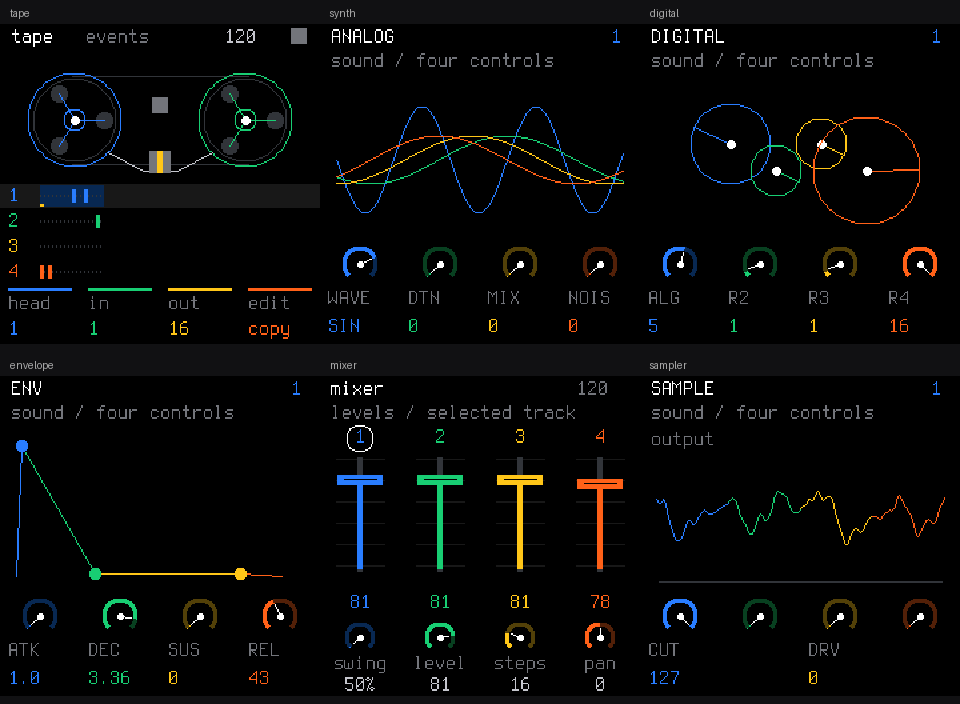
Actual firmware UI rendered by the native host harness. These are earlier ORBIT screens, not hardware photographs or captures of 0.8.0.
Make a loop, then move its events
- Select track 4 with ALGORITHM and choose a drum kit with PRESETS. Press REC and play; on an empty project in free mode, press REC on the next downbeat to close the loop.
- Select track 1, choose a sound, and record a bass line. Add chords or a melody on tracks 2 and 3.
- Press HOME for Event Tape. Set the region with KNOB 2/3, choose COPY or LIFT with KNOB 4, and hold SEL while pressing OCT- to capture it. Set the destination with KNOB 1 and use SEL + OCT+ to drop it.
- Press GLO for Mixer to balance the four tracks. Save variations into sections A-D and play or chain them with the SAVE layer.
Tape edits sequencer events, including notes, drum hits, timing, fills and parameter locks. It is not audio recording, PCM overdubbing or tape-speed playback. Drop overwrites destination events, so save a section before experimenting. See the Tape controls.
What makes ORBIT its own instrument
- Event Tape: a four-track event timeline with reels, an inclusive selection and COPY / LIFT / DROP, alongside the step sequencer.
- Original sounds: SWARM's six detuned harmonic oscillators, PULSE's dual pulse/PWM synthesis, FM4's four sine operators, and CLOUD, an oscillator-source granular engine. CLOUD makes grains from oscillators; GRAIN makes grains from samples.
- Controls that follow the sound: four blue / green / white / orange encoders, one-index slow detents and accelerated fast turns through wide numeric ENV/LFO ranges, and an instant preset list that auditions each selection on Tape or Mixer.
- User macros: assign four destinations on MACROS, edit their values on PERFORM through EDIT/SELECT, and save the map with a USER sound or project. HOME remains Tape.
- A real-firmware preview: the native preview runs ORBIT's C sound engine, sequencer and display rather than a separate browser synth.
Sounds and performance
| Area | What you can play and edit |
|---|---|
| Instruments | 17 engines, 189 factory sounds in the default build: analog, FM, phase distortion, chip, sampler, formant, three-oscillator, organ, sample granular, SWARM, PULSE, FM4, FM6, PHYS, NOISE, CLUSTER and CLOUD |
| Tracks | 3 synth + 1 drum multitimbrality; synth parts share 8 voices globally, not eight each. Engine limits and CPU load also apply: CLUSTER at most 4 per part, CLOUD at most 3 |
| Sound design | ADSR and envelope destinations, tempo-synced envelopes and LFO, retrigger/free-running and bipolar/unipolar LFO, glide, voice modes and ANALOG LP/BP/HP filter |
| Sequencing | Up to 64 steps per track, four-note chords, ties, ratchets, swing, note length, step velocity, 24 parameter locks per track, microtiming and fill conditions |
| Live playing | Free or tempo recording, overdub, note repeat, one-key chords, mute/solo/fill, section chains, MIDI keyboard step entry and live drum mutes |
| Effects | Per-track INSERT with eight effect types and dry/wet; resonant LP/HP or BP track filter, slicer and sends; 27 punch-in effects, REV/ECHO THROW and dotted delay; master DUST/DUCK/filter and a look-ahead limiter |
| Texture | A separate background bed: vinyl, tape, rain, wind, radio, room tone or USR sample, with tone, tempo movement and optional ducking |
| Your material | Four user sample slots, sample CHOP and drum-kit editing, SYN1-SYN4 drum synthesis, 32 USER sounds, four project/section slots and a 27-patch FM6 bank |
| Connections | USB MIDI, TRS MIDI IN, MIDI clock, sustain, pitch bend, Program Change and 16 persistent MIDI-learn slots; a MIDI controller mode that sends notes and CCs from the panel; stereo USB audio at 44.1 or 48 kHz |
| Editor | Sound and macro editing, piano roll, MIDI files, song arrangement, DX7 SysEx, samples, libraries and full backup/restore over Web MIDI |
CLUSTER uses a translated original OP-1 #246 oscillator core with 16 raw presets; pitch, envelope, velocity and effects are ORBIT's. Its four-voice cap is conditional on the shared budget and available CPU time, not a hardware polyphony guarantee. Read CLUSTER's scope and limits.
On FX > FILTER, each synth track and the drum track have FILT, RES and TYPE. FILT keeps its -64..63 range and zero bypass. TYPE selects the original LP/HP behavior or BP, which sweeps the band's centre from low to high across the range. RES defaults to 40 out of 127, shown as about 31%, matching the previous fixed resonance. This is separate from ANALOG's own filter and the master filter. See track-filter controls.
Bluetooth MIDI build
Bluetooth MIDI exists only in the separate 0.9.B build, orbit-ble.fwsc. The default orbit.fwsc never turns the radio on. In 0.9.B you start Bluetooth by hand from MENU > SYSTEM > BLUETOOTH, and the FM-1 shows up as a Bluetooth MIDI device named ORBIT FM-1. It mirrors ORBIT's USB MIDI output and treats incoming Bluetooth MIDI like USB MIDI. Pairing, latency and audio under radio load are untested on hardware. The build also trades some features for room: the melodic samples below, a shorter delay line and refused writes over the radio calibration. Read the Bluetooth MIDI build section of the guide before installing it.
Sounds replaced in the Bluetooth build
The separate Bluetooth MIDI build (orbit-ble.fwsc) needs flash for the Bluetooth stack, so it leaves out the melodic built-in samples (171,870 bytes). Each removed sample set keeps its name and is played by a light FM voice instead; existing presets and projects that use these sets load and play the replacement. The drum samples (PERC: GM KIT and the sampled drum kits) and your own USR1-USR4 samples are kept unchanged. The default build orbit.fwsc keeps every sample.
| Set | Replacement in the Bluetooth build | Factory sounds that use it |
|---|---|---|
| PIANO | 3-operator FM electric piano with a tine partial (ratio 14) | SAMPLE: GRAND PNO, DUSTY PNO, LOFI KEYS; GRAIN: LOFI CLOUD, SHIMMER, PNO FREEZE |
| BASS | 2-operator FM plucked bass | SAMPLE: UP BASS, DEEP BASS |
| VIBES | 2-operator FM bell, ratio 1:4 | SAMPLE: VIBES; GRAIN: VIBE HAZE |
| HORNS | 2-operator FM brass with an index swell | SAMPLE: HORN STAB; GRAIN: DRONE, HORN CLOUD |
| STRGS | 2-operator FM, slightly detuned, slow attack | SAMPLE: STRING STB; GRAIN: STR CLOUD |
| FLUTE | 2-operator FM with breath noise | SAMPLE: LOFI FLUTE; GRAIN: FLUTE DUST |
| SCRCH | Noise and triangle pitch sweep | SAMPLE: SCRATCH |
These replacements are approximations, not the recorded instruments.
Listen and explore
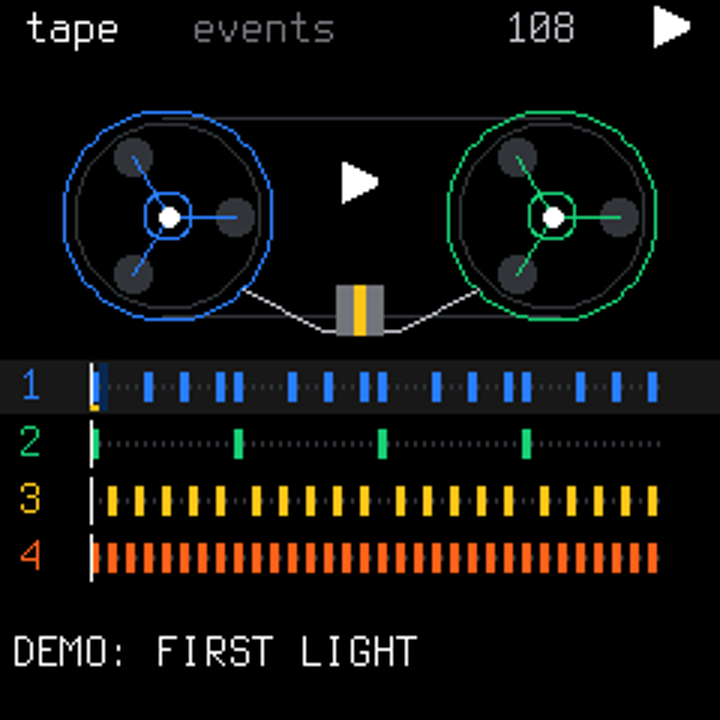
Listen to FIRST LIGHT: an original four-bar, 108 BPM loop of FM4 bass, SWARM chords, PULSE melody and 808 drums, rendered by the C sequencer/DSP. Hear the original engine examples. These are host renders, not FM-1 recordings.
FIRST LIGHT is a historical host-rendered example. ORBIT 0.8.0 removes the built-in demo-song loader and DEMO SONG menu. Updating doesn't erase an earlier working autosave; use NEW PROJECT to clear it after saving any work you want to keep. See projects and autosave.
Install
The browser installation address is dspaudio.github.io/orbit. Check the version shown by the installer before writing.
The site downloads the latest stable release automatically and validates its package before enabling Connect. Use Chrome or Edge, a USB data cable and a direct connection. Connect grants Web MIDI SysEx access; Install is a separate action after device preflight. Keep power and USB connected during the write. If the download fails, retry it; the page does not accept a local package picker.
BACKUP before every update. Stop playback and use the editor's Projects / Backup export. ORBIT 0.8.0 writes ORP8 projects, still 3840 bytes, and OPB3 preset banks. It imports ORP7 projects and OPB2/UPB1 banks with parameter-ID migration; legacy ORBIT projects remain readable, but raw SLOOP 2.6 FUN6 is rejected. Older firmware, including 0.7.0 and 0.7.1, cannot read the new formats, and its autosave may overwrite them. Keep a pre-update backup for a downgrade. See storage and recovery.
Local fallback for a verified package:
python3 -m pip install mido python-rtmidi
python3 tools/fm1_install.py --info
python3 tools/fm1_install.py build/orbit.fwsc
The source version is ORBIT 0.8.2, and the default FM-1 install identity remains FM-1_900. Use the default build command, not --release, whose upstream version scheme changes the identity and appends BETA. See BUILDING.md for the toolchain, local site generation and CLI instructions. The official v0.8.2 firmware assets are orbit.fwsc and SHA256SUMS for FM-1. Generated firmware packages are not committed to this tree.
0.8.2 validation: the full host suite (with the new delay tests), native preview, target build/budgets and web tests passed; all 218 renders match the goldens unchanged. Static RAM headroom grows from 760 B to 19,720 B. The separate orbit_check.py run returned 35 PASS / 1 FAIL (the known macOS IRQ compile limitation). Installation on 2026-10-29 reached 100%, restarted and returned FM-1_900; the device owner confirmed normal operation and the MONO / WIDE / PING delay types by ear and approved release. Measured audio/timing, a firmware-version query and physical OCT- rescue remain unverified. See the validation record.
Historical 0.8.1 validation: the full host suite, native preview, target build/budgets and web tests passed; all 218 renders match the reviewed goldens after six attributed changes. The separate orbit_check.py run returned 34 PASS / 1 FAIL (the known macOS IRQ compile limitation). Installation on 2026-10-28 reached 100%, restarted and returned FM-1_900. The device owner confirmed normal screen and basic playing operation and approved release; measured audio/timing, firmware-version query and physical OCT- rescue checks remain unverified. See the validation record.
Historical 0.8.0 validation: the final no-demo firmware passed the full host, native-preview and target checks, with 218 audio goldens unchanged. On 2026-10-27, the no-demo 0.8 hardware candidate completed the FM-1 write, reboot and identity check. The device owner confirmed a normal screen, cleared the earlier autosave with NEW PROJECT and accepted the hardware for release. INFO/PING timed out, so no successful firmware-version query is claimed. The version-only 0.8.0 rebuild has not been separately hardware-tested. Earlier 0.7.1 software checks, 0.7.0 installation/version/PING checks and the 0.6.0 USB recording remain historical. Final hashes, resource measurements and detailed evidence belong in the validation record.
M-Vave SMK-37: board support is merged, with model-specific source builds for SMK-37 Pro, SMK-37 Elite and MKE-P37. The port adds velocity keys/pads, fader banks, wheels and a pad sound picker. The feature list above describes the default FM-1 build: SMK-37 has only USR1/USR2 sample storage and no TRS MIDI IN. Use a package for the matching model and read the SMK-37 controls and safety instructions. The v0.8.2 release does not include SMK-37 binaries.
Play in your browser
Open the ORBIT web emulator and press POWER ON. No FM-1 or local installation is required: the real firmware sound engine and display run as WebAssembly in your browser. Select 0.9.0 for original melodic samples or 0.9.B for FM replacements. Use the on-screen keys and knobs or your computer keyboard to play. Check the version shown on the page; browser audio does not establish FM-1 hardware performance or Bluetooth connectivity.
Try the native preview
Python 3, a C compiler and Pillow are required:
python -m pip install -r requirements.txt
python tools/orbit_preview.py --port 8080
Open http://127.0.0.1:8080 and press Start audio. The preview includes its own demo pattern; firmware boot does not load that preview pattern. Audio is buffered approximately 250-550 ms, project saves are nonpersistent host doubles, and sample upload is unsupported. Button taps work; held-button menus and layer combinations require the hardware. For the hosted browser version, use the WebAssembly emulator.
Documentation
- GUIDE.md: panel workflow, recording, Event Tape, sound design, macros and saving.
- MIDI control: channels, CC learn, MiniLab routing and controller limits.
- BUILDING.md: build, local installer site and checks.
- 0.9.0 candidate notes, 0.8.2 release notes, 0.8.1 release notes, 0.8.0 release notes and validation record.
- Earlier releases: 0.7.1, 0.7.0, 0.6.0, 0.5.0, 0.4.1; SLOOP 2.5 integration.
- Original ORBIT engines, CLUSTER, design, editor protocol and Dots.
Origin, credits and licensing
ORBIT began from the isod89/sloop-fm1 v2.3 snapshot d691ba7b2d922f1a1f41a3622cffe29ce41c5506, not a fork retaining upstream history. SLOOP v2.4.1 and v2.5 changes were subsequently integrated; 0.7.0 brings the functional v2.6 changes from immutable commit d30d6553353373cf5506b9ed285fc4a2aa0c30ef while retaining ORBIT's registry, graphics and storage contract. The original README remains available.
Thanks to SLOOP's authors and community, and Felucca by Leo Kuroshita (@kurogedelic) / Hügelton Instruments for the synthesis, sequencing, editor and update foundations. Copyright (C) 2026 Leo Kuroshita (@kurogedelic), Hügelton Instruments; original notices are retained. Other credits include ChanceTheMaker and keremimo (MIDI input/clock), @renebohne (note lights/Program Change), Versilian Studios and Sonic Pi (CC0 samples), Terminus (SIL OFL), Fukiai (MIT), msfa/Dexed (FM6, Apache-2.0), DaisySP/Rings (PHYS) and the credited PHASE/VOICE references.
Code is GPL-3.0-only, with the existing msfa exception and asset notices: LICENSE, LICENSING.md. Distribute corresponding source with firmware. Extracted OP-1 tables and factory data retain Teenage Engineering's original rights; they are not CC0 or newly GPL-licensed assets, and extraction alone does not establish distribution permission. See asset provenance and rights. ORBIT's graphics are original; no OP-1 logo or artwork is included. ORBIT is not affiliated with M-VAVE or teenage engineering. No warranty.