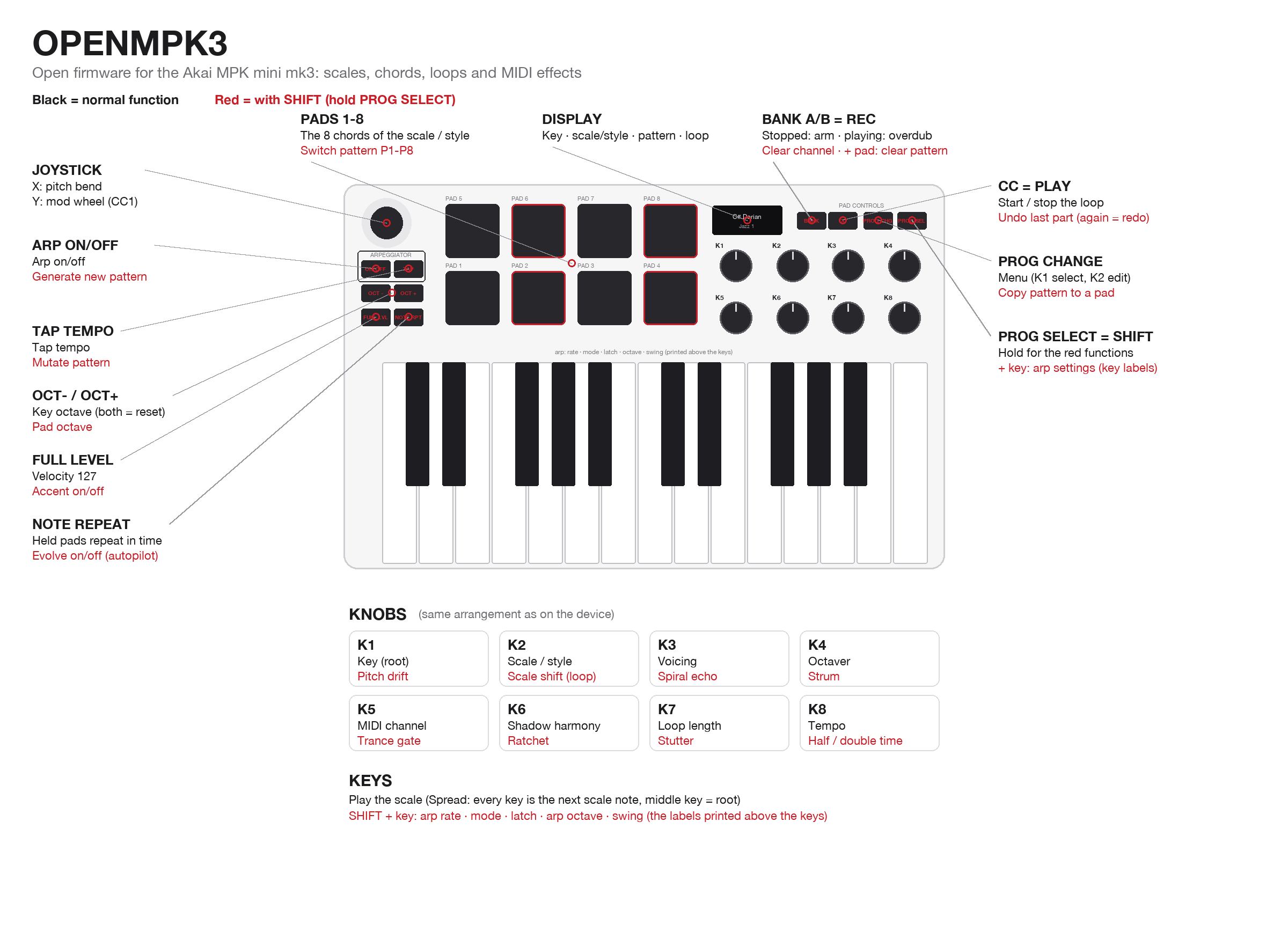
OPENMPK3
Open firmware for the Akai MPK mini mk3: scale-locked keys, chord pads in 103 styles, live looper, MIDI effects, generative tools
forAkai Professional MPK mini MK3·by@Gianducaconte
openmpk3-v0.8.bin.sha256· 84 B· +1 file
Custom license· Gianducaconte/OPENMPK3·downloads come from the creator’s GitHub releases
v0.8OPENMPK3 v0.8Latest2 files
First public release of OPENMPK3, open firmware that turns the Akai MPK mini mk3 into an instrument you can't play wrong.
What you get
- Keys locked to a scale. Pick from 35 scales and every key sounds right.
- Chord pads in 103 styles. Pop, Lo-Fi, Jazz, Synthwave, Cinematic, Flamenco and more, each with its own voicing.
- A live looper. Arm and play, overdub, undo, 8 auto-saved patterns, several MIDI channels in one loop.
- Arpeggiator with 13 modes, set with the labels printed above the keys.
- MIDI effects: spiral echo, strum, shadow harmony, octaver, ratchet, trance gate, stutter, half/double time.
- Generative tools: generate, mutate, accent, evolve.
- Sync: USB MIDI clock locked to Ableton's bars, plus optional analog clock in/out with a small mod.
Install (no compiler needed)
- Download this repository, then run
pip3 install mido python-rtmidi hidapi. - Run
python3 tools/get_stock_firmware.py. This downloads Akai's official firmware from Akai's server, once. - Download
openmpk3-v0.8.binbelow and put it in the repository folder. - Unplug the keyboard, hold BANK A/B + PROG SELECT, and plug it back in. The screen shows Upgrade.
- Run
python3 tools/mpk_flash.py flash openmpk3-v0.8.bin --write.
To go back to the original firmware at any time, flash
stock/MPKmini3_v1.26_STM32F070_pid0049.binthe same way. Akai's bootloader is never modified, so update mode always stays reachable.About the release file: it contains only OPENMPK3's own code. The flasher adds Akai's bootloader from the file you downloaded in step 2, so no Akai firmware is distributed here.
Supported: units with USB product ID 0x0049 (most units). Flashing erases settings and patterns.