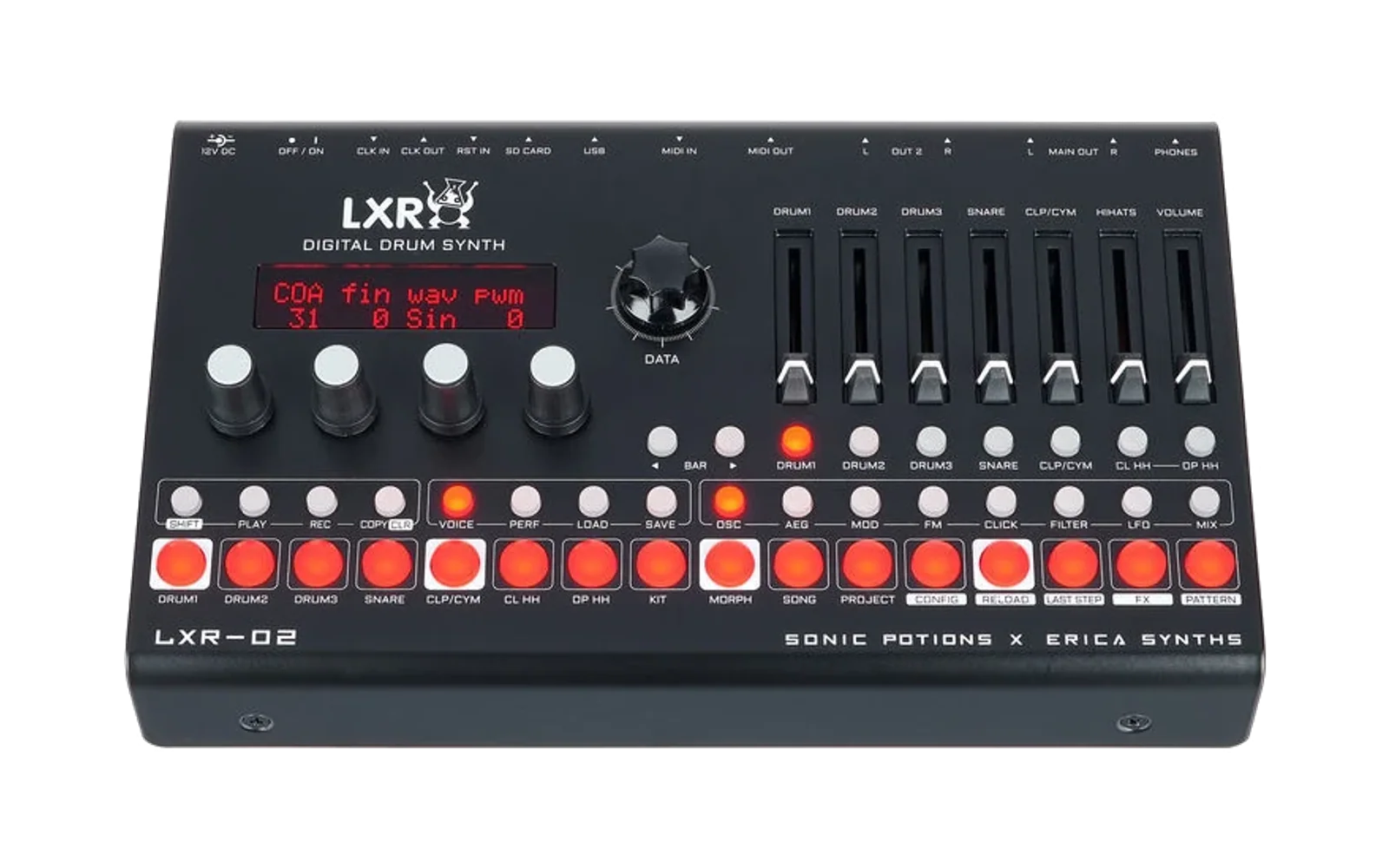
openelixir-02
Loud91/100Firmware for LXR desktop drum synthesizer
openelixir-02 is custom firmware for the Erica Synths LXR-02, by @tunefish777. Open source under GPL-3.0, latest release v1.2 (October 2026), 8 stars on GitHub.
forErica Synths LXR-02·by@tunefish777
Unclaimed. Is this yours? Sign in with GitHub as @tunefish777 to claim it.
LXR_OpenElixir-02_V1.2.img· 290 KB· +2 files
GPL-3.0· tunefish777/openelixir-02·downloads come from the creator’s GitHub releases
v1.2OpenElixir-02 v1.2Latest3 files
OpenElixir-02 1.2, custom firmware for the Erica Synths LXR-02 drum machine: a DJ filter on the performance page, on top of the uninterrupted playback from 1.1.
Tested on hardware by the author. OpenElixir-02 is not official Erica Synths firmware and is not affiliated with or approved by Erica Synths. Install it at your own risk.
New in 1.2: DJ filter
A filter on the final mix of all outputs, right on the performance page next to shuffle:
dj: turn it left of the center for a low-pass that closes down to 40 Hz, right of the center for a high-pass that opens up to 8 kHz. Around the center it is off. The display shows "DJ Filt. Cutoff" with "Off", "LP -xx" or "HP xx".res: resonance, from a flat filter up to a strong peak.- Smooth sweeps without zipper noise, and no clicks when it switches on or off or changes from low-pass to high-pass.
- It filters after the effects and before the limiter, so even a strong resonance peak doesn't clip (with the limiter switched off, it clips like the stock mix).
- It isn't saved and starts off after every boot. While it is off, the sound is exactly as before.
New in 1.1: uninterrupted playback
From 1.1 on, one rule applies to everything in OpenElixir-02: nothing has a higher priority than the sound and the sequencer. Menus, the display, the SD card and MIDI all wait for them, never the other way round.
While the sequencer runs, these no longer interrupt the audio:
- Turning knobs and the encoder, and working in the config menu.
- Loading kits, also single voices and kits from other projects on the SD card.
- Saving kits, patterns and projects to the SD card.
- Inserting the SD card and saving or loading the settings.
What changed:
- The DACs can't run dry any more. The audio is sent to the DACs continuously by the hardware instead of being restarted in software after every block. The worst delay in that path dropped from up to 103 µs to 17 µs, and no longer matters.
- No more pauses during SD card access. Saving a kit used to stop the audio and the sequencer for up to 28 ms, loading a kit from another project for about 6 ms. Now the audio keeps being rendered while the card is read or written.
- The display stays out of the way. Page changes and full screen repaints no longer run in the highest-priority interrupt.
For developers
- CPU meter build (
-DLXR_CPU_METER=ON): two new pages, timing (DMA callback delay, render wait, ADC interrupt load, sequencer tick delay) and stalls (longest pause in rendering and the code address it happened at). Switching pages keeps the measurements; SHIFT + MORPH on these pages resets them.
Also included
Everything from 1.0: freely assignable voice engines (SHIFT + KIT), loading single voices and kits from any project, the limiter (switchable in the config menu), the safe project save and the stock firmware fixes. Details: README.
Installing
- Download
LXR_OpenElixir-02_V1.2.imgbelow. - Copy it to the top folder of the SD card and delete any other
LXR*.imgfiles there. - Switch the LXR-02 off, insert the card, hold the encoder button and switch it on. Keep holding until "LXR Updater" appears.
- Wait for "Update OK!". The device restarts with the new firmware.
To go back, install the official firmware update from Erica Synths the same way. Kits saved with OpenElixir-02 keep working there; slots with a different engine play with their stock engine.
The
.hexand.elffiles are for programming and debugging with an ST-Link; you don't need them for a normal update.v1.1OpenElixir-02 v1.13 files
OpenElixir-02 1.1, custom firmware for the Erica Synths LXR-02 drum machine: uninterrupted playback.
Tested on hardware by the author. OpenElixir-02 is not official Erica Synths firmware and is not affiliated with or approved by Erica Synths. Install it at your own risk.
Sound and timing come first
From this release on, one rule applies to everything in OpenElixir-02: nothing has a higher priority than the sound and the sequencer. Menus, the display, the SD card and MIDI all wait for them, never the other way round. A drum machine is played live; a dropout or a stumble in front of an audience is not acceptable, however busy the unit is.
This release is the first big step: it removes the interruptions we measured on the device with the CPU meter development build. More work on the sequencer timing will follow.
Keep playing, whatever you do
While the sequencer runs, these no longer interrupt the audio:
- Turning knobs and the encoder, and working in the config menu.
- Loading kits, also single voices and kits from other projects on the SD card.
- Saving kits, patterns and projects to the SD card.
- Inserting the SD card and saving or loading the settings.
What changed:
- The DACs can't run dry any more. The audio is sent to the DACs continuously by the hardware. It used to be restarted in software after every block (64 samples), from the lowest-priority interrupt, so any busy moment could leave a gap. The worst delay in that path dropped from up to 103 µs to 17 µs, and no longer matters.
- No more pauses during SD card access. Saving a kit used to stop the audio and the sequencer for up to 28 ms, loading a kit from another project for about 6 ms. Now the audio keeps being rendered while the card is read or written.
- The display stays out of the way. Page changes and full screen repaints no longer run in the highest-priority interrupt, where they held up the audio.
No dropouts were counted in any of the tested situations. The sound itself is unchanged.
Also included
Everything from 1.0: freely assignable voice engines (SHIFT + KIT), loading single voices and kits from any project, the limiter (switchable in the config menu), the safe project save and the stock firmware fixes. Details: README.
For developers: the CPU meter build (
-DLXR_CPU_METER=ON) has two new pages, timing and stalls.Installing
- Download
LXR_OpenElixir-02_V1.1.imgbelow. - Copy it to the top folder of the SD card and delete any other
LXR*.imgfiles there. - Switch the LXR-02 off, insert the card, hold the encoder button and switch it on. Keep holding until "LXR Updater" appears.
- Wait for "Update OK!". The device restarts with the new firmware.
To go back, install the official firmware update from Erica Synths the same way. Kits saved with OpenElixir-02 keep working there; slots with a different engine play with their stock engine.
The
.hexand.elffiles are for programming and debugging with an ST-Link; you don't need them for a normal update.v1.0OpenElixir-02 v1.03 files
First stable release of OpenElixir-02, custom firmware for the Erica Synths LXR-02 drum machine.
OpenElixir-02 extends what the LXR-02 already does while staying fully backwards compatible: kits, patterns and projects from the stock firmware load and play as before, the MIDI implementation is unchanged, and the update works with the stock bootloader. Every change to the core sound comes with a switch in the config menu, so the stock sound is always one setting away.
Tested on hardware by the author. OpenElixir-02 is not official Erica Synths firmware and is not affiliated with or approved by Erica Synths. Install it at your own risk.
Kit management
Load full kits and single voices from any project:
- Single voices: hold LOAD and press step button 1-7 (Drum 1 ... OP HH). Choose the kit with the encoder, also from other projects, and press the encoder button to load just that voice into the current kit. The menu stays open, so you can try several kits.
- Full kits: "Change Project" below kit 0 in the load and save kit menus loads kits from other projects and saves kits into them.
Freely assignable voice engines
Each of the 6 voice slots can run any engine: drum, snare, cymbal or hi-hat. Select a voice and press SHIFT + KIT (or send NRPN 98). The engines are saved in the kit; kits from the stock firmware load with the stock engines.
Details for kit management and engines: docs/ENGINES.md.
Limiter
Voices and FX are summed in 32 bit, followed by a limiter on each output, so loud kits no longer hard-clip. Levels that didn't clip before are unchanged. Config menu "lim" (2nd page) switches it off for exactly the stock mix.
Under the hood
- About 10 % less CPU load.
- Many stock firmware bugs fixed (MIDI, sequencer, SD card, memory corruption), most of them found in the firmware review by jhw in erica-synths/lxr-desktop-app#3.
- A project save that can't lose the saved project: it is written into a new folder and replaces the old one only when everything was written. The card needs free space for a second copy of the project (a few hundred KB).
Stock issues that are kept on purpose: docs/KNOWN_ISSUES.md.
Installing
- Download
LXR_OpenElixir-02_V1.0.imgbelow. - Copy it to the top folder of the SD card and delete any other
LXR*.imgfiles there. - Switch the LXR-02 off, insert the card, hold the encoder button and switch it on. Keep holding until "LXR Updater" appears.
- Wait for "Update OK!". The device restarts with the new firmware.
To go back, install the official firmware update from Erica Synths the same way. Kits saved with OpenElixir-02 keep working there; slots with a different engine play with their stock engine.
The
.hexand.elffiles are for programming and debugging with an ST-Link; you don't need them for a normal update.v0.2OpenElixir-02 v0.2Beta3 files
Second release of OpenElixir-02, custom firmware for the Erica Synths LXR-02 drum machine.
Pre-release. Tested on hardware by the author. OpenElixir-02 is not official Erica Synths firmware and is not affiliated with or approved by Erica Synths. Install it at your own risk.
New: assignable voice engines
Each of the 6 voice slots can now run any of the 4 engines: drum, snare, cymbal or hi-hat. Want three snares, or a second kick instead of the cymbal? Select the voice and press SHIFT + KIT: turn the encoder to choose the engine and press the encoder button to apply it. Via MIDI, NRPN 98 does the same.
- Track 7 is always the second trigger of slot 6, for any engine: track 6 plays with decay A (d1), track 7 with decay B (d2), and they cut each other off like closed and open hi-hat.
- A switched slot starts from the new engine's default sound. Its menu pages, value ranges and modulation target names follow the engine.
- The engines are saved in kits, projects and the autosave.
- Fully compatible: kits from the stock firmware, older versions or anyone else load with the stock engines and sound exactly as before. The stock firmware still loads OpenElixir-02 kits (switched slots then play with their stock engine). All MIDI CC and NRPN numbers are unchanged.
Details, including the MIDI table: docs/ENGINES.md.
Other changes since 0.1
- About 10 % less CPU load in the worst case (all voices busy, heavy FX), with identical sound.
- Fix: switching the FX delay to ping-pong could overwrite up to 32 KB of other sound data. (Also in the stock firmware.)
- Fix: saving a project into an existing project slot renamed kit 1 to ".SNG". (Also in the stock firmware.) If one of your kits got that name, rename it once.
Everything from 0.1 is included: no more hard clipping in the mix (32-bit mix bus with a limiter on each output).
Installing
- Download
LXR_OpenElixir-02_V0.2.imgbelow. - Copy it to the top folder of the SD card and delete any other
LXR*.imgfiles there. - Switch the LXR-02 off, insert the card, hold the encoder button and switch it on. Keep holding until "LXR Updater" appears.
- Wait for "Update OK!". The device restarts with the new firmware.
To go back, install the official firmware update from Erica Synths the same way. Kits saved with OpenElixir-02 keep working there; slots with a different engine play with their stock engine.
The
.hexand.elffiles are for programming and debugging with an ST-Link; you don't need them for a normal update.v0.1OpenElixir-02 v0.1Beta3 files
First release of OpenElixir-02, custom firmware for the Erica Synths LXR-02 drum machine.
Changes from the stock firmware (1.7)
- No more hard clipping in the mix. Voices and FX are summed in 32 bit, followed by a limiter on each output. Kits that didn't clip before sound exactly the same; louder ones are limited instead of clipped. Voice drive/distortion and the FX are unchanged.
- Renamed to OpenElixir-02. The start-up screen shows "OpenElixir-02 / Version 0.1" and the device appears as "OpenElixir-02" (manufacturer "tunefish.at") on USB. MIDI mappings in your DAW that use the old "Sonic Potions USB MIDI" port name need to be set up again.
- Memory usage report in every build (developer change, no effect on the device).
Kits, patterns, projects and the MIDI implementation are unchanged.
Installing
- Download
LXR_OpenElixir-02_V0.1.imgbelow. - Copy it to the top folder of the SD card and delete any other
LXR*.imgfiles there. - Switch the LXR-02 off, insert the card, hold the encoder button and switch it on. Keep holding until "LXR Updater" appears.
- Wait for "Update OK!". The device restarts with the new firmware.
To go back, install the official firmware update from Erica Synths the same way.
The
.hexand.elffiles are for programming and debugging with an ST-Link; you don't need them for a normal update.