OP-XY MNMD
The Elektron Machinedrum and Monomachine, written from scratch as engines for the Teenage Engineering OP-XY, on the Open-XY SDK.
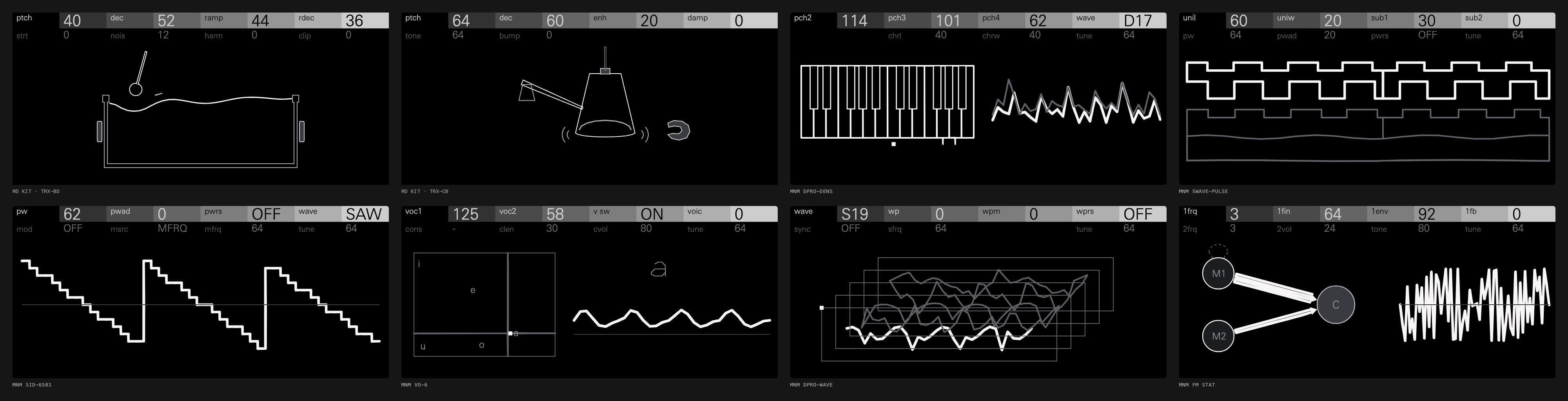
- The Machinedrum is MD KIT, a drum kit of its synthesised families, TRX, EFM, P-I and GND. It plays like the OP-XY's Drumline: each of the 24 keys holds its own machine (kick, snare, toms, clap, rim, cowbell, hats, cymbals and more). Shift and the first encoder choose a key's machine, the encoders hold that machine's eight controls, and the project saves them.
- MD E12, the sampled family, is build-it-yourself. Its sounds are the Machinedrum ROM's own samples, which can't be shared, so it isn't in the open-xy.com builder or any release. Capture them from your own ROM and build it (E12 and DPRO samples).
- Each Monomachine machine is its own engine, played chromatically, with its SYN page's two rows as two pages of four encoders. A press of any encoder switches between them, as on the SDK's Macro Osc.
| Engine | ID | Machines |
|---|---|---|
| MD KIT | mdkit | Four families, 33 machines: TRX BD, SD, XT, CP, RS, CB, CH, OH, CY, MA, CL, XC, B2; EFM BD, SD, XT, CP, RS, CB, HH, CY; P-I BD, SD, MT, ML, MA, RS, RC, CC, HH; GND SN, NS, IM |
| MD E12 (build it yourself) | mde12 | E12's 16 machines, on samples you capture from your own ROM |
| MNM SWAVE-SAW | mmsaw | A stack of detuned saws with sub-octaves |
| MNM SWAVE-PULSE | mmpulse | Detuned pulses with a sweeping width and sub-octaves |
| MNM SWAVE-ENS | mmens | A four-voice chord of saws or pulses, with chorus |
| MNM SID-6581 | mmsid | Triangle, saw, pulse, mixed and noise, with a pulse-width sweep, ring and sync |
| MNM FM STAT | mmstat | Two modulators into one carrier, M1 with its decay and feedback |
| MNM FM PAR | mmpar | Three modulators into one carrier, each with its own depth or decay |
| MNM FM DYN | mmdyn | M1 with pitch and depth envelopes, M2 with its decay and feedback |
| MNM VO-6 | mmvo6 | Vowels from two formants, with twenty consonants before them |
| MNM GND-SIN | mmsin | A pure sine at the played key |
| MNM GND-NOIS | mmnois | White noise turning red |
| MNM DPRO-WAVE | mmwave | Its own S-sets, captured from your ROM, moved along WP |
| MNM DPRO-DDRW | mmddrw | Two D-waves, crossfaded, spread and bit-reduced |
| MNM DPRO-DENS | mmdens | A chord of up to four D-waves, each with a chorus |
| MNM DPRO-BBOX | mmbbox | Its 24 drum samples on 24 keys, from your own ROM |
All the DSP is fixed point, because the OP-XY's Blackfin has no floating point. This repository holds no Elektron code, firmware, ROM data or samples. The sounds were fitted by ear and by measurement against the original ROMs running in an emulator. E12 and the DigiPRO machines need samples and waves from the ROM. You capture those from your own ROM into a folder outside the checkout, and without them those engines build silent.
Status: experimental. Every engine passes its tests, and MD KIT and the published
synths have been played on an OP-XY on OS 1.2.1. MD KIT's heaviest single voice measures 3.085% of the stock
block budget on the device (opxy-drum-callback-v1, one capture), under the SDK's
recommended 3.5%, its own keys at its full 16 voices, saved as a project's are, 24.662%, and that heaviest voice on all 16 48.991%. Those figures time
its voices through the SDK's drum adapter, not stock's drum renderer, envelope or
mixing. TRX-SD's PTCH goes further than the original's, which barely moves: five semitones
either way, finely around its default, so a project that saved it away from the default 48 plays at
its new pitch: a saved 90 was 10 cents up and is now about 2.5 semitones up. The track menu's scramble doesn't change a kit yet
(open-xy#324).
What you need
- macOS (the tools are written for it, though most of them run elsewhere).
- Python 3.12, Node 22, Homebrew's
llvmandlld. - The Open-XY SDK with drum-kit support. Upstream
staginghas it since pull requests #121 and #143 merged, with the two-page synth controls (#125 and its follow-ups). These tools build for OS 1.2.0 on the fork's branch below. - To put the engines on a device: an OP-XY on OS 1.2.0 exactly, a USB cable, and the Open-XY Blackfin toolchain.
- Only for E12 and DPRO's sounds, or for comparing against the originals: your own Machinedrum and Monomachine OS ROMs and the gearmulator-md-mm emulator.
Setup
Clone this repository and the SDK side by side:
git clone https://github.com/mmockett/OP-XY-MNMD
git clone -b two-page-synths https://github.com/mmockett/open-xy
cd OP-XY-MNMD
The SDK must sit at ../open-xy. Then install the compiler and give the SDK
a Python environment:
brew install llvm lld node
python3.12 -m venv ../open-xy/.venv
../open-xy/.venv/bin/pip install numpy==2.3.5
../open-xy/.venv/bin/python ../open-xy/sdk.py doctor --preview --cxx "$(brew --prefix llvm)/bin/clang++"
Play it on the Mac
Everything up to flashing runs on the Mac, from the same C++ that goes on the device:
python3 tools/make_engine.py
python3 tools/test_voices.py
../open-xy/.venv/bin/python ../open-xy/sdk.py test --machine machines/mdkit --cxx "$(brew --prefix llvm)/bin/clang++"
python3 tools/serve_bench.py
In order, these commands generate every engine in machines/ from voices/
and tools/catalog.py, check each voice's fitted measures, run the SDK's
checks on an engine, and serve the bench.
The bench, at http://127.0.0.1:8930/, has every engine as a track, with a step grid, a keyboard, the OP-XY screen and knobs. Space plays, 1 to 9 pick a track, the keys A W S E D … play from C3, and you drag a knob to turn it. The bench plays a kit as its first key's machine.
E12 and DPRO samples (optional)
Build the emulator beside this folder (../gearmulator-md-mm, see
reference/README.md), then run:
MD_ROM=/path/to/machinedrum-os.bin ../open-xy/.venv/bin/python tools/capture_e12.py
MM_ROM=/path/to/monomachine-os.bin ../open-xy/.venv/bin/python tools/capture_dpro.py
python3 tools/make_engine.py
The captures go to ~/Library/Application Support/OPXY-MD/private/, and
make_engine.py copies the generated headers into the engines, where git
ignores them. Never commit them.
Put it on the OP-XY
MD KIT and ten of the Monomachine engines are live in the open-xy.com builder, which builds them into a copy of your own OS 1.2.1 with none of the tools here: MD KIT, SWAVE-SAW, SWAVE-PULSE, SWAVE-ENS, SID-6581, FM STAT, FM PAR, FM DYN, VO-6, GND-SIN and GND-NOIS. docs/CATALOG.md lists the version it installs for each. MD E12 and the DPRO engines need your own ROM's captures, so they aren't there; build them as below.
Open-XY links these engines into a copy of your own OP-XY's OS, and you install the result from the device's boot menu. It is unofficial and experimental, and the SDK's checks cannot guarantee that a device can be recovered. docs/DEVICE.md has every step. In short:
- Fetch the Blackfin toolchain:
../open-xy/.venv/bin/python ../open-xy/sdk.py toolchain fetch. - Copy
os.ldroff your OP-XY once, over the boot menu's MTP mode, to~/Library/Application Support/OPXY-SDK/private/stock-1.2.0/os.ldr. - Build:
python3 tools/build_firmware.py. The build goes to~/Library/Application Support/OPXY-MD/builds/NNN/. Engines keep their numbers from build to build, so saved projects keep their machines. - Install:
python3 tools/install_firmware.py --copycopies the build over MTP and keeps the files it replaces. Then press track 2 (exit) and track 5 (write OS). - Pick a drum track and choose MD KIT (or MD E12, if you built it from your own ROM), or a synth track for a Monomachine engine.
To go back to stock, reinstall the official OS 1.2.0 update.
How to play
The drum kits
Load MD KIT on a drum track (or MD E12, if you built it from your own ROM).
The 24 keys start as the Machinedrum's default kit: BD, SD, three toms, CP,
RS, CB, CH, OH, RC, CC and four more machines (M1 to M4), then eight
variations, such as a second kick, snare or cowbell. MD KIT starts on the TRX kit, and its presets trx, efm
and pi load the TRX, EFM and P-I kits. Each kit's keys are listed in tools/catalog.py.
- Choose a key's machine: select the key and hold Shift. On MD KIT, encoder 1 chooses the family (KIT: TRX, EFM, P-I or GND) and keeps the machine's place in it, so BD stays BD, and encoder 2 the machine (MACHINE). On a self-built MD E12, encoder 1 chooses the machine. Any key can hold any of the engine's machines.
- Choke groups: hold Shift and turn the next encoder (encoder 3 on MD KIT, encoder 2 on a self-built MD E12) to put the key in choke group 1, 2 or 3, or none. Keys in the same group cut each other off. A kit starts with CH, OH and RC in group 1 and the other keys in none.
- Eight controls a key: the four encoders hold the machine's first four controls. Press an encoder to switch it to its alternate (controls 5 to 8), and press it again to switch back. The labels and values follow the selected key's machine. A machine with fewer than eight controls leaves the rest blank, and a blank slot does nothing.
- Tuning: a key's pitch is its PTCH control, as on the Machinedrum. The note you play doesn't change it.
- Parameter locks: hold a step and turn an encoder to lock that control on the step. While you hold the step, the screen shows the values it plays.
- Saving: each key's machine and controls are saved with the project, and in presets.
The Monomachine engines
Load one on a synth track and play it chromatically.
- Controls: two pages of four. Page 1 is the top row of the machine's SYN page, page 2 the bottom row. Press any encoder to switch all four. The header shows both pages in place: the page you're editing at full size on the stepped bar, the other small and grey under or over it. Where the bottom row has no control, page 2 repeats the one above it.
- Fine steps: hold Shift while turning for a tenth of the rate. Choice controls, such as WAVE or MOD, move one choice a detent.
- Presets: each engine comes with a few presets of its own, in the preset browser: SID-6581 has saw, square, ring, sync and more.
The screen
The screen draws the selected key's machine, or the Monomachine engine's, from its controls. Each note you play strikes it: the drawing moves rather than being replaced.
Layout
| Path | What |
|---|---|
voices/ | The sound: one module per machine, with its view and its fitted tests (docs/VOICES.md) |
machines/<id>/ | One OP-XY engine, generated by tools/make_engine.py: don't edit it |
lib/ | Shared fixed-point DSP, tables and the screen library |
tools/ | The catalog, generators, bench server, captures and firmware build |
tools/art/ | The screen pipeline (docs/SCREEN.md) |
bench/ | The bench page and its AudioWorklet |
reference/ | Measuring and fitting against the emulator (reference/README.md) |
docs/ | The plan, the voice and screen guides, and the design handoff |
Links
- Open-XY SDK, whose drum kits arrived in #121
- open-xy-mdkit, a 24-key drum kit of MDKit's TRX, EFM and PI models for Open-XY
- xy-format, the OP-XY project format
- gearmulator-md-mm, the Machinedrum and Monomachine emulator used as the reference
- Elektron's Machinedrum and Monomachine manuals
- The OP-1 design kit, whose principles the screens follow
Licence
MIT, as the Open-XY SDK is. See LICENSE. Machinedrum and Monomachine are trademarks of Elektron. This project is not affiliated with Elektron or Teenage Engineering.