Plugin Manager for MPC / Force
A VST2 "instrument" for the MPC OS plugin host that is really an app: it lists the mpc-vst-plugins catalog on the MPC screen and installs, updates and removes plugins, with one MPC restart per batch. Working on an MPC One and an MPC Key 37 (Gen1, MPC OS 3.9.1).
| Search | Details |
|---|---|
 |  |
Using it
- Add Plugin Manager to a plugin track. It loads the catalog and reads what is installed.
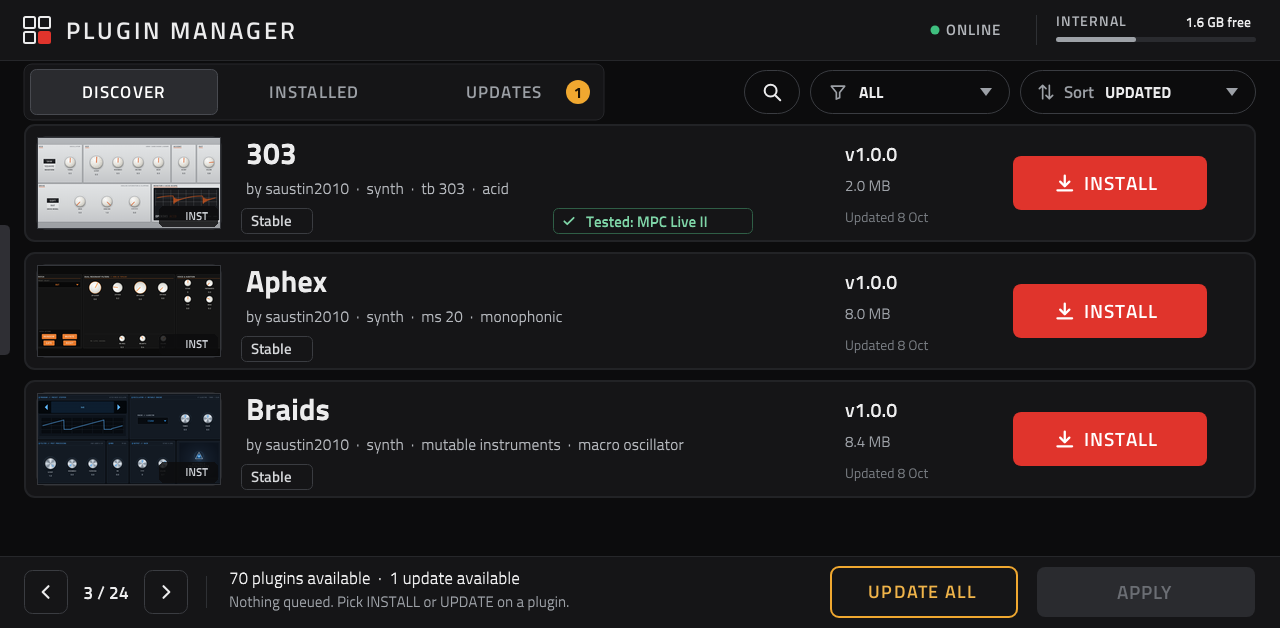
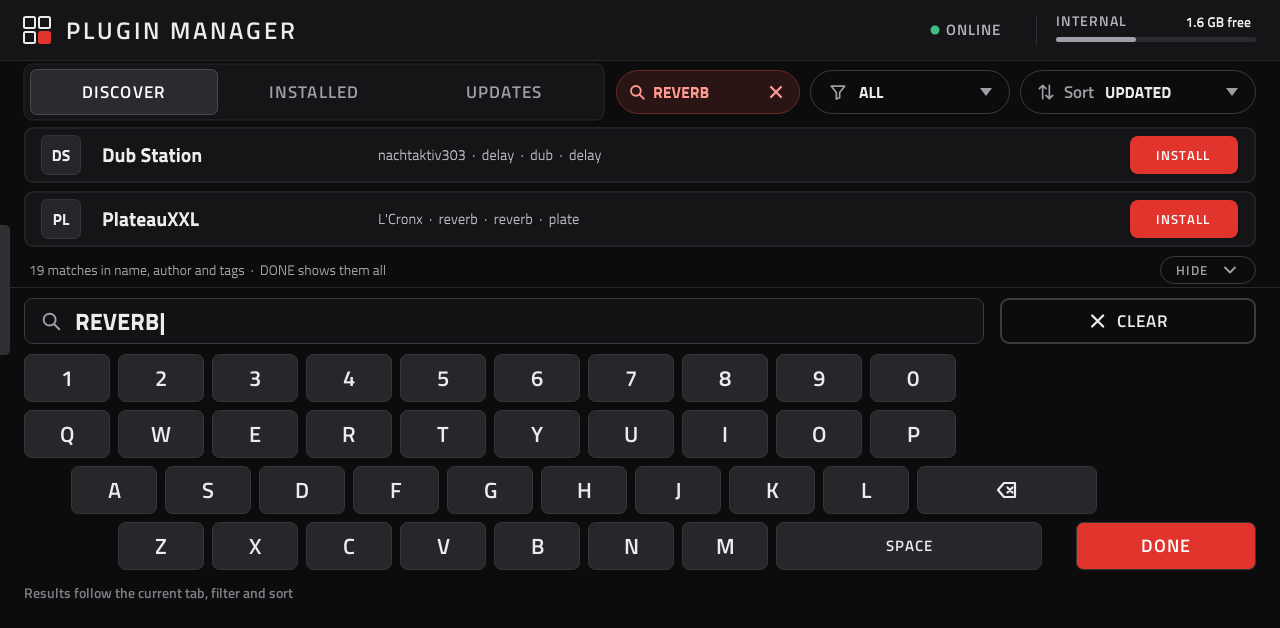
- DISCOVER lists the catalog plugins not on this MPC yet that you can install as a download (build-it-yourself ports are left out: they aren't plug and play), INSTALLED what is on this MPC, UPDATES what has a newer version (the amber count). The filter menu (All / Instruments / Effects / Addins) and the Sort menu (Last updated, Newest, Most downloaded, Name) at the top apply to every tab; each card's last line shows what it is sorted by. The arrows page through the list, three plugins at a time. 🔍 opens a keyboard on the screen: what you type matches plugin names, authors and tags, the first two matches show above the keys (tap one for its details, or its button to queue it), and DONE shows them all as cards with the search at the top (tap it to edit, × to clear).
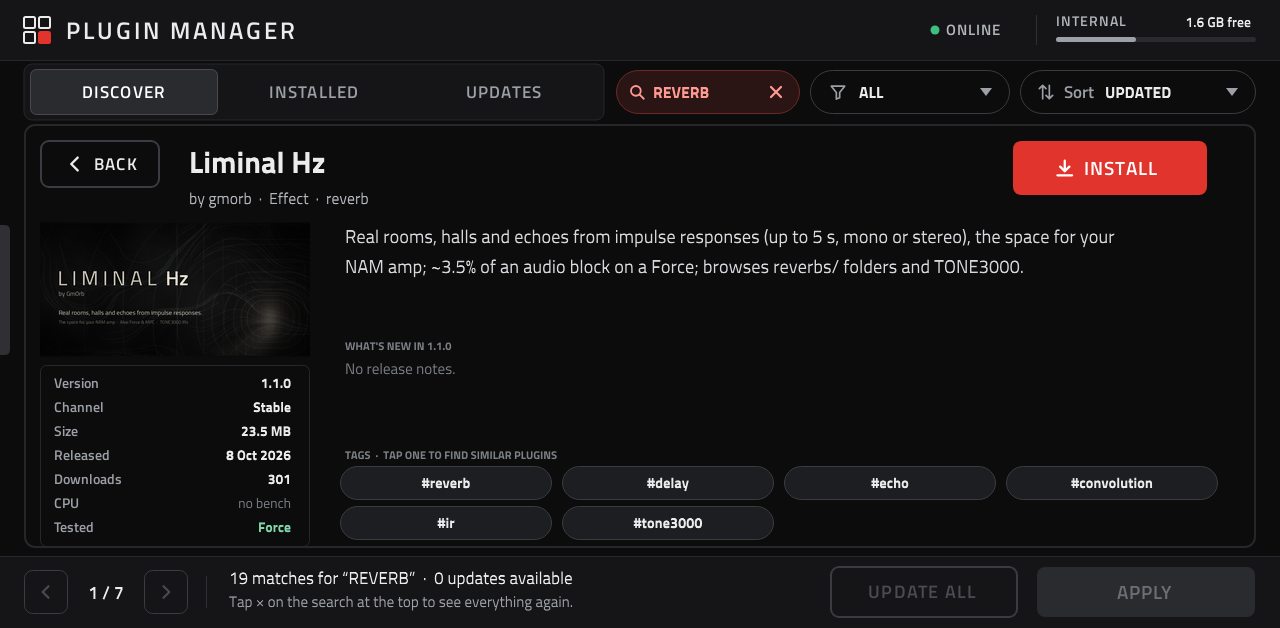
- Each card shows the plugin's screenshot (or its initials), author, style and tags, its version, download size and checksum, and badges: Stable/Beta, Tested: , High CPU (the catalog's CPU bench said WARN or FAIL) and Old install (installed the old way, outside a plugin folder). Tap the card or its screenshot for the details: the screenshot, version, channel, size, release date, downloads, CPU and tested devices, the catalog's description, What's new (the release notes' "What's new" section; else "First release." / "No release notes."), and the same INSTALL / UPDATE / ⋮ buttons. Tap a tag there to list the plugins with that tag (the header then shows it; tap it to clear the search). BACK returns to the list.
- The card's button queues a change: INSTALL, UPDATE, or (tap again) undo it. ⋮ on an installed plugin offers REINSTALL and REMOVE. UPDATE ALL queues every update.
- APPLY downloads, checks the sha256 and unpacks every queued package, with a progress bar. Nothing changes yet.
When the status says Ready, save your project and press APPLY (now RESTART & APPLY) again: a prompt lists
the changes and warns that anything not saved is lost. CANCEL keeps them ready for later; RESTART & APPLY
stops MPC, runs each package's own
install.sh/uninstall.sh, and starts MPC again. A failed download changes nothing and offers RETRY.
Addins (catalog kind addin: libraries MPC loads at start, such as a remote screen or USB audio; see
mpc-vst-plugins' docs/ADDINS.md) are installed and removed the same way. Each lives in its own folder under
/data/mpc-addins/<id>, is removed with the uninstall.sh kept there, and never touches MPC.settings. An addin
folder without uninstall.sh was made by hand: it shows Old install and can be updated, not removed.
Logs: /tmp/pluginmgr/manager.log, /tmp/pluginmgr/apply.log. Device report: /tmp/pluginmgr/device.txt.
How it works
- Catalog and zips over HTTPS with the system
libcurl.so.4(loaded at run time, nothing bundled). sha256sumandunziprun as child processes with a clean environment (MPC'sLD_PRELOAD, e.g. MockbaMod's, dropped).- Nothing about the model is hard-coded: install locations come from
SynthContentLocationsinMPC.settings(internal, writable, exec-allowed storage first; never/usr, exFAT/noexec cards or a nearly full disk), and what is installed comes from thepluginList-armentries (uid,file=) plus thempc-plugin.jsonin each plugin folder. Installed addins come from theaddin.manifestin each folder under/data/mpc-addins. - The screen is a normal MPC plugin skin (
vst/layout.conf, artwork drawn byvst/make_images.py). Every value it shows or switches on (button states, badges, banners, the progress bar) is a parameter the engine computes; the wrapper'sHAS_DISPLAY_REVtells MPC when they change. - APPLY writes
/tmp/pluginmgr/apply.shand starts it withsystemd-run, so it runs outside MPC's service and survives MPC being stopped. Withoutsystemd-runit falls back to leaving MPC's cgroup by hand (untested).
Building
Needs Docker and an mpc-vst-plugins checkout next to this folder
(or MPC_VST=<path>), and Pillow for the card thumbnails.
python3 vst/make_images.py   # only after changing the artwork
python3 vst/shots.py         # before a release: card thumbnails from the catalog's screenshots (params.json, layout.conf, src/shots.h)
vst/build.sh      # vst/build/plugin_manager.so, the skin, the plugin-list entry
tests/run.sh      # offline: wrapper host test + fake devices (tests/devices/*.sh) + addins (tests/fixture.py)
python3 ../mpc-vst-plugins/tools/release.py --so vst/build/plugin_manager.so \
  --skin "vst/build/skin/poloq - VST - Plugin Manager" --entry vst/build/pluginlist-entry.xml --version 1.2.0 \
  --repo poloq-instruments/mpc-vst-manager --license MIT \
  --about "Install, update and remove catalog plugins from the MPC screen" -o dist
Install the zip like any catalog plugin (sh install.sh, see its INSTALL.md).
The Instruments-browser tile is vst/art/tile.svg, drawn by vst/art/gen_tile.py in the skin's palette with the
wordmark in Titillium Web (SIL OFL) converted to outlines, and rendered to vst/art/tile.png (270×110) with
rsvg-convert -w 270 -h 110 vst/art/tile.svg -o vst/art/tile.png. vst.json's "tile" makes gen_vst.py ship it in the
skin folder with a Default preset, so tapping the tile opens the manager (MPC indexes presets at start, so the tile
works from the restart that installs it).
Compatibility
| Device | Status |
|---|---|
| MPC One (Gen1, MPC OS 3.9.1) | works: install, update, remove, progress, restart; 1.2.0 screens (details, search, filter/sort, restart prompt) |
| MPC Key 37 (Gen1, MPC OS 3.9.1) | works: install, remove, progress, restart, addins, browser tile (report) |
| Force (Gen1) | expected to work (same userland; /sdcard/Synths layout covered by an offline test); needs a device test |
| MPC Live / Live II / X / Key 61 (Gen1) | expected to work; needs a device test |
| Gen2 (64-bit, e.g. Live III) | not yet: needs an aarch64 build of this plugin and of the catalog plugins |
Tested another model? See TESTING.md and open a PR with the results.
Licence
MIT, see LICENSE. The built plugin includes the mpc-vst-plugins VST2 wrapper (MIT).