Tributary
A small Overwitch rework for MPC standalone. It plays Elektron Overbridge audio, over USB, on the MPC track the plugin sits on. One copy can sum several outputs. The Digitone II is the machine this has been heard on.
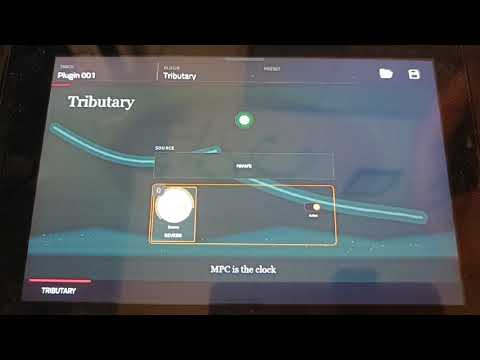
Several copies can sit on several tracks. They share one USB read. Each copy sums the outputs whose switches are on. A mono output is sent to both sides. Levels stay on the Elektron machine.
Caveats
- There is a small amount of latency. On a Digitone II the plugin holds about 4 milliseconds of audio behind the newest USB sample, so a late packet does not become a gap. That can leave the audio a little late against the MPC grid. The plugin cannot shift the other tracks to match. USB or DIN, and which machine is the clock, do not remove that wait. The spare is
HEAR_LAGinsrc/probe.c. The two clocks drift, so if the spare grows it is walked back without a skip. - Eight copies is the maximum in one project unless Hakai is installed. That is the MPC's own plugin limit.
- Other Overbridge machines are listed and untested. Only the Digitone II has been heard. Testers are welcome. Analog Rytm MKI, Analog Four MKI and Analog Keys are unsupported, same as Overwitch. They use the older Overbridge 1 link, and Tributary only speaks the interrupt one.
- You can only listen on the plugin track. The sound comes out of the track Tributary sits on. It is not a separate USB audio device. One copy sums the switches that are on.
- Recording needs a resample. The sound is live USB audio, so a bounce does not capture it. Resample the track, or a submix, with the MPC sampler while it plays.
- Use the MPC as the clock. Set the Digitone to follow MIDI clock and press play on the MPC. The Digitone can be the clock instead. Play and tempo do reach the MPC, and they wobble, because the clock shares the USB cable with the audio. The screen says MPC is the clock along the bottom for this reason.
What you need
- A Digitone II on OS 1.10A or newer, set to Overbridge, plugged into the MPC's USB host port.
- The MPC as the clock.
On the screen
The light is the session:
- Red means no Digitone, or the stream is off.
- Amber means it is connecting.
- Green means audio is coming in.
The switches are the outputs of the connected machine. On a Digitone II that grid is MAIN, ACTIVE, tracks 1 to 16, DLY, REV, CHO, and IN. A Digitakt, Syntakt, or the other listed machines show their own output names on those switches. Switches the connected machine does not have stay blank.
Turn a switch on to add that output to this track. Turn it off to take it out. The line above the switches names what is on. A fresh copy starts with MAIN on. Main already contains the tracks, so leave MAIN off when this copy should be one track on its own, or when several copies are splitting the machine across MPC tracks.
An older project that saved a single source opens with only that output on.
The rendered screen is screenshots/tributary.png. The artwork and the lamp frames live in vst/art/. The skin layout is vst/layout.conf.
ACTIVE turns this copy on or off. The first copy to turn on opens the USB stream. Another copy just joins that stream. Turning ACTIVE off on the copy that opened it lets the Digitone go. Turning it off on another copy mutes that copy only.
Take the plugin off the track when you are finished. The last copy releases the audio interfaces. The Digitone's MIDI interface is left on its driver the whole time, and loading Tributary wires the sequencer link between the Digitone and the MPC.
The switch names follow the connected device. Maps for Digitakt, Digitakt II, Digitone, Digitone Keys, Syntakt, Analog Rytm MKII, Analog Four MKII, and Analog Heat (including MKII and +FX) come from Overwitch's device list. They are untested. Digitakt II uses the same outputs as Digitone II.
Install
These steps assume the same layout as Stream: plugin files in the Synths folder on /media/EOS_DIGITAL, reached over SSH as root.
-
Copy the plugin into its own folder. Use a temporary name, then rename the file. Do not delete the folder.
ssh root@<MPC> "mkdir -p '/media/EOS_DIGITAL/Synths/johnny - VST - Tributary'" scp -O vst/build/tributary.so "root@<MPC>:/media/EOS_DIGITAL/Synths/johnny - VST - Tributary/tributary.so.new" ssh root@<MPC> "cd '/media/EOS_DIGITAL/Synths/johnny - VST - Tributary' && mv tributary.so.new tributary.so && md5sum tributary.so" tar -C vst/build/skin -cf - "johnny - VST - Tributary" | ssh root@<MPC> "tar -C /media/EOS_DIGITAL/Synths -xf -" -
Register it once, if the MPC does not already list it. On a 32-bit MPC the list is
pluginList-arm. On a Gen2 / AArch64 MPC it ispluginList-arm-64bit. The release installer picks the one that matches the package. Back upMPC.settingsfirst. The line looks like this, with the path on your drive:<PLUGIN name="Tributary" descriptiveName="Tributary" format="VST" category="Synth" manufacturer="johnny" version="1.0" file="/media/EOS_DIGITAL/Synths/johnny - VST - Tributary/tributary.so" uid="54726962" isInstrument="1" fileTime="0" infoUpdateTime="0" numInputs="0" numOutputs="2" isShell="0"/>A new line needs one MPC restart. Take any older Overprobe off the track, then insert Tributary.
-
Plug the Digitone in before you start. Insert Tributary on a track and turn ACTIVE on. Main is already on. Use the MPC as the clock.
If a session cannot open, a log is written to /media/EOS_DIGITAL/tributary.log (or /sdcard/tributary.log if that drive is missing). The one-second check writes there too. A stream that is already hearing does not keep logging.
Build
The VST2 wrapper and entrypoint are not in this repo. They come from sd88me/mpc-vst-plugins (tools/build_port.sh), so clone that alongside to build.
The plugin description is vst/vst.json. The engine is src/probe.c and src/devices.h. The VST2 wrapper (vst2_wrap.c) stays in sd88me/mpc-vst-plugins and is not copied into this repo. vst.json tells that toolchain the flags:
- compile:
-pthread - link:
-pthread -lm
-lm is required because the wrapper uses libm. USB transfer structs come from <linux/usbdevice_fs.h>. Nothing in this repo writes out a 32-bit usbdevfs size or pointer.
You need Docker. Set MPC_VST to a checkout of mpc-vst-plugins. Both commands below use the same flags. The architecture is the compiler image.
32-bit ARM, for pluginList-arm (the v1.1.0 zip). build_port.sh runs this, and also draws the skin:
"$MPC_VST/tools/build_port.sh" "$PWD/vst/vst.json"
The compile itself matches build_port.sh: arm32v7/gcc:11-bullseye (--platform linux/arm/v7):
docker run --rm --platform linux/arm/v7 -v "$PWD":/src -v "$MPC_VST":/mv:ro -w /src arm32v7/gcc:11-bullseye \
  gcc -O2 -Wall -Wextra -Wno-unused-parameter -fPIC -shared -fvisibility=hidden -std=gnu11 \
      -pthread -Ivst/build \
      src/probe.c /mv/wrapper/vst2_wrap.c \
      -pthread -lm -Wl,--no-undefined \
      -o vst/build/tributary.so
AArch64, for pluginList-arm-64bit on a Gen2 MPC. Same flags, arm64v8/gcc:12-bookworm (--platform linux/arm64):
docker run --rm --platform linux/arm64 -v "$PWD":/src -v "$MPC_VST":/mv:ro -w /src arm64v8/gcc:12-bookworm \
  gcc -O2 -Wall -Wextra -Wno-unused-parameter -fPIC -shared -fvisibility=hidden -std=gnu11 \
      -pthread -Ivst/build \
      src/probe.c /mv/wrapper/vst2_wrap.c \
      -pthread -lm -Wl,--no-undefined \
      -o vst/build/tributary-aarch64.so
vst/build/params.h has to exist before that gcc line (the wrapper includes it). build_port.sh writes it. Output under vst/build/ is not part of the git tree.
Pack a zip (the .so stays out of git; it only goes in the zip):
python3 tools/pack_release.py --so vst/build/tributary.so \
  --skin "vst/build/skin/johnny - VST - Tributary" --arch armv7 --version 1.1.0
--arch aarch64 writes pluginList-arm-64bit instead of pluginList-arm.
The host test checks the USB decisions and the device table on a fake bus. It needs Linux headers, so it runs in a container:
sh test/run.sh
Further development
This has been heard on one Digitone II. It would be good to see other people take it further: a shorter wait, and the other Overbridge machines, which are listed and untested.
Licence
This program is free software under the GNU General Public License, version 3. See LICENSE.
Device ids and the channel maps are facts from Overwitch by David García Goñi (dagargo), also GPL-3. No Overwitch source is copied into this tree.