mpc-sample-kit
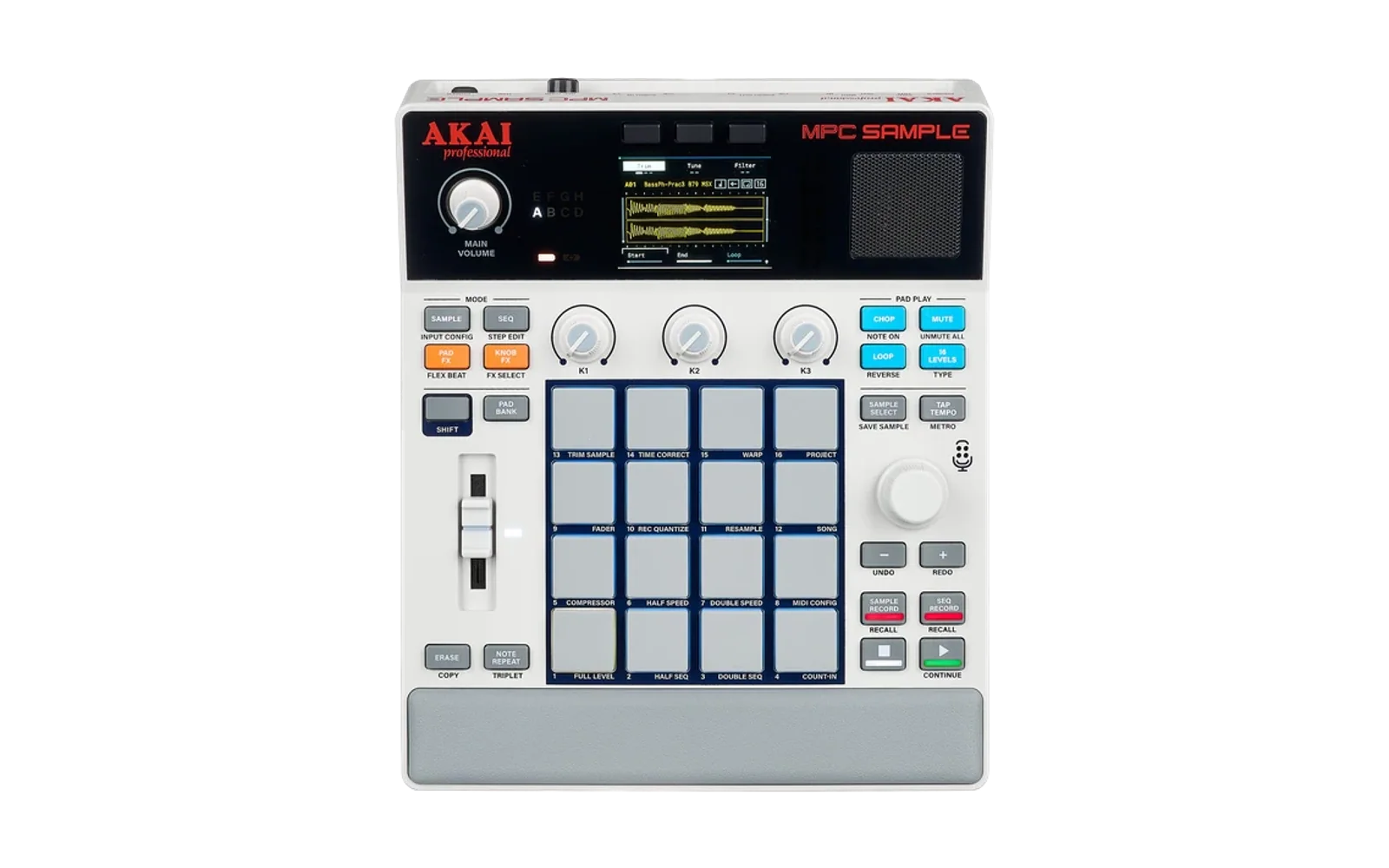
A framework for controlling and automating the Akai MPC Sample — the battery-powered standalone sampler Akai released in March 2026 — with the long-term goal of driving it from natural language.
Status: early, but playing. Patterns generated on the laptop drive the unit over USB-MIDI with musical timing.
Quick start
cd tools/midi && make && cd -
node bin/mpc-seq.mjs patterns/boom-bap.json
On the device, SHIFT + pad 8 (MIDI CONFIG) → MIDI Port → USB first, or
nothing will sound.
Goals
- Author drum sequences programmatically and schedule them onto the unit.
- Generate drumkits (
.xpmprograms plus samples) from a description. - Drive the sequencer live from a laptop over USB-MIDI.
- Do as much as possible from a static, client-side HTML app on GitHub Pages, with no backend — Web MIDI for control, the File System Access API for writing projects to the mounted device.
- Let Claude Code act as the natural-language driver via the same core library.
Layout
src/             pattern, dynamics, generation, transforms, arrangement, clock
src/gm.mjs       General MIDI note map, for when the MPC is not the target
src/synth.mjs    the same kit synthesised in the browser, for no hardware at all
src/soundfont.mjs  a sampled GM kit, played from a SoundFont bank
web/vendor/      checked-in SoundFont player (see its README)
web/soundfonts/  the GM sound bank itself
bin/mpc-seq.mjs  render a pattern or phrase and play it
bin/mpc-live.mjs continuous generation, steerable while running
bin/mpc-kit.mjs  audition pads and save a kit map
web/             Web MIDI browser app (Chromium)
patterns/        example patterns
kits/            saved role->pad maps
tools/midi/      mpcmidi — zero-dependency CoreMIDI CLI
docs/            hardware findings, verified vs assumed
test/            node --test suite
The core in src/ has no Node or browser dependencies, so the same rhythm code
will drive both this CLI and the planned Web MIDI page. Delivery backends stay
dumb: they receive { ms, bytes } and have no opinion about timing.
Patterns
Step strings, one per track. Written to be easy to read, edit and generate:
| Char | Meaning |
|---|---|
. | rest |
x | accent (velocity 110) |
o | normal hit (90) |
s | ghost note (45) |
1–9 | explicit level |
| | ignored, for spacing bars out |
{
  "bpm": 88,
  "swing": 0.18,
  "humanizeMs": 6,
  "humanizeVel": 12,
  "repeats": 4,
  "tracks": {
    "kick":  "x..o | .... | ..x. | o...",
    "snare": ".... | x..s | .... | x.s.",
    "hat":   "o.oo | o.o. | o.oo | o.o."
  }
}
Swing and feel
Swing is a time warp within each pair of swing units, not a delay bolted onto
alternate steps: the first half of the pair is stretched and the second half
compressed by the same proportion. Delaying without compensating shoves swung
notes towards the following step — at swing 0.5 on a 16th grid the gap closes
far enough that neighbouring tracks flam. Warping keeps the remaining gap at
1 - swing of a step however hard it is pushed.
swingUnit decides what swings, and it matters more than the amount:
| Unit | Swings | Styles |
|---|---|---|
| 1 | 16ths | hip-hop, boom bap, garage |
| 2 | 8ths | jazz — and what "swing" usually means |
At unit 2, swing 1/3 places the second eighth exactly two thirds through the
beat: true triplet swing. Getting this wrong is audible rather than subtle — the
jazz ride sits entirely on even steps, so 16th swing left it completely
unswung while displacing the odd-step snare, producing lurch instead of swing.
Humanisation splits in two. Most of humanizeMs is a per-step offset shared
by every voice on that step — where the player put the beat — and only
limbSpread (default 0.25) varies per voice. Applying the whole amount per
event let hits meant to land together drift apart by twice humanizeMs, which
the ear hears as a flam rather than as feel. Humanisation is seeded, so a given
--seed always renders identically.
node bin/mpc-seq.mjs patterns/boom-bap.json --bpm 96 --repeats 8
node bin/mpc-seq.mjs patterns/boom-bap.json --dry-run   # inspect events
Generating patterns
Styles are starting points chosen to respond well to the transforms below:
node bin/mpc-seq.mjs --list-styles
node bin/mpc-seq.mjs --style garage --bars 8
jazz is a swung ride with the classic skip note, hi-hat closing on 2 and 4,
kick feathered underneath rather than driving, and a snare that comps against
the ride instead of marking the backbeat. free-jazz goes further out: the
pulse is unanchored and conformity is low enough that accents land almost
anywhere. Push --drift up and it stops resembling a bar at all.
node bin/mpc-seq.mjs --style free-jazz --bars 16 --drift 0.85 --conformity 0.3
Euclidean rhythms distribute pulses as evenly as possible across a bar, which
is where a lot of the interesting material comes from. name=pulses/steps,
optionally @rotation:
node bin/mpc-seq.mjs --euclid "kick=4/16,snare=2/16@4,hat=7/16" --bpm 128 --bars 8
This is Bjorklund's algorithm proper, so the named rhythms come out canonical —
E(3,8) is the tresillo x..x..x., E(5,8) the cinquillo x.xx.xx..
Algorithmic control
--bars N grows a one-bar idea into a phrase that develops instead of looping.
Each bar varies the original rather than the previous bar, so the groove
drifts without wandering off; bar 1 always plays as written so the listener
hears the idea plainly first.
node bin/mpc-seq.mjs --style techno --bars 16 --drift 0.4 --fill-every 4 --lock kick
Nothing is locked by default. Locking the kick keeps a groove anchored at high drift, but it also stops the kick developing at all — which reads as the pattern ignoring the controls rather than as a deliberate choice.
| Flag | Effect |
|---|---|
--drift | 0–1, how far variations stray |
--fill-every N | fill on every Nth bar, 0 to disable |
--lock a,b | tracks held steady while others vary (default none) |
--ratchet P | probability of a hit becoming a roll |
--seed N | seed for all randomness |
Everything stochastic is seeded, so a phrase you like is reproducible: note the seed and it renders identically every time.
The building blocks are composable directly from src/ if
the CLI flags are too blunt — rotate, thin, densify, mutate, shade,
accentEvery, upsample, vary, fill, plus arrange, evolve and chain
for song form.
Dynamics
Flat velocity is the clearest sign a beat was generated rather than played. Velocities are shaped by metric position: the more times a step index divides by two, the stronger the position, which falls straight out of the binary structure of the bar and generalises to any grid.
For a 16-step bar the hierarchy is beat 1 (1.00) > beat 3 (0.76) > beats 2 and 4 (0.63) > eighths (0.49) > sixteenths (0.35).
| Flag | Effect |
|---|---|
--dynamics D | how much metric position shapes volume (default 0.45) |
--conformity C | proportion of hits following the metre (default 0.8) |
--no-anchor | let beat 1 be de-accented too, dissolving the pulse |
Conformity is what stops this becoming mechanical: at 0.8, one hit in five is
displaced onto a weak step instead, which is what syncopation is. By default
beat 1 is exempt so the pulse stays anchored; --no-anchor removes that
exemption when losing the downbeat is the point.
node bin/mpc-seq.mjs --style boom-bap --bars 8 --dynamics 0.6 --conformity 0.75
Voicing
Two things that make programmed drums sound programmed, both handled here.
Snare substitution. A drummer never hits the same spot on the same drum
twice. --voice-spread substitutes a rim, clap or open hat for the primary
voice, biased towards quieter hits — ghost notes are where a player reaches
for the rim, while accents land on the drum itself. Making it velocity-dependent
rather than uniform is most of what stops it sounding like a random sample
swapper.
Un-stacking kick and snare. Kick and snare landing on the same downbeat is
the most tiring thing a programmed pattern does: the transients fuse into one
thud and the groove loses its conversation. --decollide nudges the snare a
sixteenth late instead — late reads as laid-back, early reads as a mistake.
Only on-beat collisions are treated; off-beat coincidences are usually
deliberate, and four-on-the-floor styles depend on kick and clap landing
together, so clap is deliberately not in the default pairing.
| Flag | Effect |
|---|---|
--voice-spread S | how often an alternate voice is used (default 0.35) |
--decollide S | how often on-beat kick/snare collisions are broken up (default 0.6) |
Both are applied per bar, since variation and fills can create fresh collisions that were not in the original.
Alternates live in DEFAULT_VOICES in src/pads.mjs, and a kit
entry may be an array ("snare": [2, 9, 10]) to set them explicitly. Roles
whose alternates are missing from the kit fall back to the primary, so a custom
kit never breaks playback.
Fills
Fills are built across the kit rather than derived from the pattern's tracks. That distinction is the whole point: a groove usually has only kick, snare and hat, so anything that merely transforms those tracks can never reach a tom — which is why fills built that way always come out as snare busywork. Tom and crash voices are pulled from the kit and added as new tracks.
| Shape | Character |
|---|---|
descend | falls down the kit, snare into successively lower toms |
linear | one voice at a time, kick threaded through the toms |
triplet | three-step groupings, cutting against a 16th grid |
herta | four-note kick/snare/snare/tom cell, repeated |
sparse | a handful of loud, well-placed hits rather than a roll |
roll | dense crescendo on the snare, kick still marking the beats |
node bin/mpc-seq.mjs --style boom-bap --bars 16 --fill-shape descend
node bin/mpc-seq.mjs --style boom-bap --bars 16          # auto varies the vocabulary
Three rules keep them from sounding mechanical:
Never more than three strikes on one drum. Past that a fill stops being a fill and becomes a buzz. Overflow strikes are handed to whichever voice has been quiet longest, which both satisfies the limit and pushes the fill around the kit. The count carries over from the groove, since a run that starts before the fill is still a run to the listener.
Direction and span vary per fill. Running up the kit into the snare feels like a question, running down feels like an answer; the entry point moves by up to half a beat. Without this, six shapes still shared a family resemblance because every fill occupied the same span and rose the same way.
Fills land somewhere. A crash closes roughly half of them; otherwise the
landing falls on the downbeat of the next bar. Never on a linear fill, where
sounding two voices at once is exactly what the shape exists to avoid.
Kits
The role→pad map in src/pads.mjs is a convention, not
something read off the hardware. Audition the pads and save what you hear:
node bin/mpc-kit.mjs audition              # plays pads 1-16, announcing each
node bin/mpc-kit.mjs pad 7                 # one pad
node bin/mpc-kit.mjs save kick=1,snare=4,hat=9 --out kits/mine.json
node bin/mpc-seq.mjs --style boom-bap --kit kits/mine.json
Kit specs merge over the defaults, so naming two pads does not orphan the rest.
When there is no MPC
Pads 1-16 are MIDI notes 36-51 on this unit. Sent to anything else, that map
plays whatever happens to live at those notes — usually toms and cymbals where
the kick and snare should be. So a kit entry can name a raw note instead of a
pad, via midiNote():
import { midiNote } from './src/pads.mjs';
const kit = { kick: midiNote(36), tamb: midiNote(54) };   // 54 is past bank A
src/gm.mjs is that map filled in: GM_KIT covers every role the
pad kit does, using the General MIDI percussion notes, plus a few alternates
(pedal hat, ride bell, second crash) that sixteen pads cannot hold.
General MIDI percussion is channel 10. The same notes on channel 1 play a
piano, which is the usual explanation for a GM device that appears to be
ignoring us — hence GM_CHANNEL, and the channel field in the browser app.
Built-in synth
src/synth.mjs synthesises the GM kit in the browser, so the
page makes a sound with no hardware attached at all. It looks like a Web MIDI
output — send(bytes, at), clear(), id, name — so the transport,
scheduler and grid cannot tell it from a port.
All 47 GM percussion notes have a voice, synthesised rather than sampled: no assets, no network, and the page stays static. Note-offs are ignored, as the MPC's one-shot pads ignore them.
It is also among the most punctual outputs here. Voices are scheduled directly
on the audio clock, which is sample-accurate — no port, no bridge, no timer
between the schedule and the sound. contextTimeFor() in
src/audioclock.mjs lines the audio clock up against
performance.now() using getOutputTimestamp(), so a note is audible when
it was asked for rather than merely queued then.
SoundFont
The synthesised kit sounds like a drum machine, because that is what it is. For
recorded drums there is a third output, playing
GeneralUser GS through
SpessaSynth — both vendored, see
web/vendor/README.md for versions and licences.
It is a 32MB download, so it loads when selected rather than at page load; the built-in synth is what keeps the page instant. The browser caches it after the first time. Progress is reported on the status line.
It brings the GM drum kits with it. GeneralUser GS carries thirteen — Standard 1-3, Room, Power, Electronic, 808/909, Dance, Jazz, Brush, Orchestral, SFX, CM-64/32L — and the selector is populated by reading the bank's own presets, so a different bank dropped in later describes itself with no code change.
Selecting a kit is an ordinary program change on the percussion channel, which means the same selector drives an external GM sound module. It stays disabled for a pad map, where a program change would tell an MPC to switch program — not what someone choosing a General MIDI kit is asking for.
src/soundfont.mjs is only the MIDI-to-engine adapter; the
engine is injected, so the core keeps its no-dependencies property and the
player could be swapped without touching it. Scheduling is sample-accurate here
too: the engine takes an AudioContext time per event, so the transport's
look-ahead timestamps are honoured exactly rather than drained by a timer.
Clock and transport
--sync sends MIDI clock at 24 PPQN wrapped in transport start/stop. Because
the notes and the clock come from the same timestamped event list, they cannot
drift apart.
node bin/mpc-seq.mjs --style techno --bars 8 --sync
Live performance
mpc-live generates bars continuously and streams them ahead of the play
cursor, so the groove can be steered while it runs:
node bin/mpc-live.mjs --style boom-bap
Then type drift 0.6, bpm 128, dyn 0.7, conf 0.6, lock kick,hat,
fill, seed 42, ? or quit.
The look-ahead window (default 2s) is what buys the slack: CoreMIDI owns delivery timing, so this process only has to stay ahead, not be punctual.
Browser app
web/index.html is the same core driven by Web MIDI, ready
for GitHub Pages. Serve the repo root — it imports ../src/ directly, and ES
modules will not load over file://:
python3 -m http.server 8765
then open http://localhost:8765/web/. Chromium for MIDI; Safari and Firefox do
not implement Web MIDI, but the built-in synth still plays there.
It degrades to something audible rather than to nothing. Three cases, and the page picks between them without being asked:
| What is attached | Output | Kit | Channel |
|---|---|---|---|
| An MPC | the MPC | pads 1-16 | 1 |
| Some other MIDI device | that device | General MIDI | 10 |
| Nothing, or no Web MIDI | built-in synth | General MIDI | 10 |
The output selector always also offers the built-in synth and the SoundFont, so either can be chosen over an attached device — which is the point when comparing a pattern against the MPC's own kit.
The Kit selector overrides the guess, and stops following the output once
touched — re-plugging a cable should not overrule a choice already made. Custom
maps take kick=1 for a pad and kick=#36 for a raw note. The built-in synth
appears in the output list at all times, so it can be chosen over a device that
is attached.
Record to MPC is disabled on the built-in synth, there being nothing to record into, and Measure timing declines to run: the synth is the audio clock, so the answer would be zero by construction rather than by measurement.
Play runs until you press Stop. Playback is a rolling look-ahead
(src/transport.mjs) that queues a few hundred
milliseconds at a time rather than the whole phrase up front. Web MIDI cannot
un-send a timestamped message, so queueing everything made Stop impossible —
the notes had already gone. Queueing incrementally means Stop is immediate,
playback can run indefinitely, Play cannot stack a second stream on top, and
moving a control takes effect on the next bar instead of the next press of Play.
The step grid shows the velocities that will actually sound, including substituted voices — not the pattern as written.
Recording into the MPC
There is no way to drop a pattern straight into the unit's memory: projects live on the ext4 partition macOS cannot write. What is possible is arming the MPC's own sequencer over MMC and playing the phrase through in real time.
Record to MPC in the browser app does that — it arms, plays the phrase once with clock, then punches out. It takes as long as the phrase does, and the MPC records what it hears, so humanised timing is captured unless the MPC is quantising on input.
Two prerequisites on the device: Receive MMC enabled under MIDI/Sync, and the track you want to capture selected. Without SysEx permission in the browser the arming step is skipped and only transport start is sent, so arm the MPC by hand.
Running from an iPhone
The page works on an iPhone, but not in Safari — WebKit has never shipped Web MIDI, citing fingerprinting, and every iOS browser is forced onto WebKit, so Chrome and Edge on iOS inherit the gap.
The route that does work is a third-party browser that bundles its own MIDI plumbing. Open the GitHub Pages URL in one of those and it drives the MPC over USB-C or Bluetooth MIDI like any other class-compliant device. An iPhone 15 or later can host USB MIDI directly, and the MPC runs on its own battery so it does not need bus power.
Use MIDIWeb Browser. The choice of app turns out to matter far more than anything in this code:
| Browser | Timing jitter |
|---|---|
| MIDIWeb Browser | under 5ms |
| Web MIDI Browser | 11ms mean, 30ms worst |
| (laptop via CoreMIDI, for reference) | 0.6ms sd |
Same page, same phone, same MPC — only the app changed. The difference is in each app's JavaScript-to-native bridge, which no amount of scheduling work on this side can influence. Measure it yourself with the Measure timing button rather than trusting either number.
Those browsers implement an older draft of the API, so
src/webmidi.mjs normalises the differences:
-
Port collections. The spec settled on Maplike
access.outputs; older implementations use arrays or plain objects. Spreadingoutputs.values()throws there, and the failure surfaces as "MIDI access denied" — which points at permissions rather than at the real cause. -
Scheduled send. Compliant implementations queue a message for a future timestamp. Where that is not supported, delivery falls back to a single short-interval poll draining a sorted queue — not a timer per message, which puts dozens of independently jittering timers in charge of the groove and is audibly loose on a phone.
clear()drops the queue, keeping Stop working.Dispatch is driven by the audio render thread, not by a timer. Measured on an iPhone,
setIntervaldispatch jittered by up to 30ms, against 0.6ms standard deviation for the same burst sent through CoreMIDI on a laptop — so the echo path is clean and the fault was ours. Neither a larger look-ahead nor cached bar generation moved it, because the problem is when the wake-up happens, not how far ahead the work was queued: mobile browsers throttle and coalesce timers.The audio render thread runs at real-time priority and calls its processor once per 128-frame quantum — about 2.7ms — whatever the main thread is doing. It cannot send MIDI itself, but it can wake the main thread punctually, which is the part that was failing. Three tiers, best first: AudioWorklet (~2.7ms), ScriptProcessor (~5.8ms, deprecated but present in WebKit), then timers. The status line names which one is in use.
The Timing selector overrides the guess.
autouses timers only where the implementation looks archaic, but that inference is unreliable: how a browser exposes its port list says nothing about whether it honours timestamps, and a timer can never beat a real MIDI scheduler. If timing sounds loose, try MIDI timestamps — if the notes then arrive all at once, that implementation genuinely ignores them and software timer is the ceiling. -
SysEx. Only needed for MMC record-arming. Some implementations reject the option outright rather than denying permission, so a refusal must not take note output down with it.
Detection is by feature, and a compliant browser takes exactly the path it did before — Chrome behaviour is unchanged. If ports still cannot be found, the status line reports the shape of the collection it was given, which is the useful thing to send back.
Tests
node --test "test/*.test.mjs"
tools/midi/mpcmidi
A ~140-line C utility so Claude Code can talk MIDI without native npm builds.
cd tools/midi && make
./mpcmidi list                              # enumerate ports
./mpcmidi send "MPC Sample" 90 24 7F        # note-on, pad 1
./mpcmidi monitor "MPC Sample" 10           # capture for 10s
./mpcmidi testsrc 5                         # virtual source, for self-testing
Port names match on a case-insensitive substring, so mpc finds MPC Sample.
testsrc exists to prove the send and receive paths work independently of any
attached hardware — worth running before concluding the device is at fault.
Platform notes
The browser half is Chromium-only by necessity: Web MIDI and the File System
Access API are both unavailable in Safari and Firefox, and every iOS browser is
forced onto WebKit. See docs/hardware-notes.md.
Licence
MIT.