Mini-Tone


Mini-Tone 1.0.5
What changed since 1.0.4:
- The ELEK reverb no longer leaves a noise floor. After a note's reverb had died away, ELEK kept a faint steady noise that HALL, ROOM and
SPRING do not have. The cause was rounding in the reverb's feedback loops: a few LSB circulated for ever (a limit cycle, about -84 dB).
Below a tiny amplitude (4 LSB, about -96 dB) the loops now round toward zero, so the tail ends in true silence; above it nothing changes and
the reverb time stays as set. DEC INF still never decays on its own.
tests/elek_rev_test.cchecks that the last second after a noise burst is exactly zero
Mini-Tone 1.0.4
What changed since 1.0.3:
- EUCLID 2, a second page for the EUCLID mode (after the Digitone 2's): a second rhythm B with its own LEN, PULSES and ROT, combined with A step by step by a boolean operator. OP (KNOB 1) is OFF, AND (both hit), OR (either), XOR (one of them) or SUB (A without B). B loops on its own length against A's, so the pair repeats after lcm(LEN A, LEN B) steps. The page draws A, B and the result, the step playing outlined (OFF keeps B's numbers). It shows with EUCLID on, after the EUCLID page. B is saved with the project in bytes of the stochastic settings that were unused, so the project format and its size do not change and projects saved before load with B off
- DUALVCO's CNFG explained on screen: the MIX page keeps the scope, shorter, and under it says what the picked configuration is, for
example
*S+Treads "SINE + TRIANGLE / OSC 1 AND OSC 2 MIXED / PHASES RESTART AT EACH NOTE" andZFMZ"SINE/SAW FM SINE/SAW / FM: OSC 2 MODULATES OSC 1 / PHASES RUN ON". The letters are the waves (S sine, K bent sine, T triangle, Z sine/saw, A saw), then the mode (+mix,Rring,FM,F+RFM then ring modulated by oscillator 2), and a*first means the phases restart at each note. The text is built from the CNFG number, so it costs next to no flash
Mini-Tone 1.0.3
What changed since 1.0.2:
- A new TR808 engine: a TR-808 of 16 voices (bass drum, snare, three toms and three congas, rim shot, claves, maracas, clap, cowbell, closed and open hats, cymbal), the circuit models of the 8W8 module for Ableton Move (GPL-3.0) rewritten in fixed point and checked against its own renders (Engines, below). General MIDI notes strike the voices, a hit on a ringing drum adds to it, and a closed hat cuts the open one
- EUCLID mode (after the Digitone 2's): a track plays an Euclidean rhythm E(PULSES, LEN) turned by ROT, in a loop of its own (a polymeter against the pattern's LEN), instead of its pattern (SEQ > EUCLID, one layer; exclusive with STOCHASTIC)
- SEQ shows the pages of the track's generator mode only: OFF the STOCH page (its MODE), STOCHASTIC its four, EUCLID STOCH and EUCLID
- The web editor follows the firmware again: six tracks, the 25 engine numbers, the 111-parameter layout (LFO 2, the INSERT, SPREAD,
QUANTIZE, ENV SYNC), each engine's own EDIT pages, the delay TIME as the device shows it;
web/sync_mock.mjsregenerates its tables from the firmware (tests/descdump.c) so they cannot drift. The editor protocol names enums up to 32 values (24 before, the engine list has 25) - Fixes: the engine list (MENU / the editor) had no name for SLICE's number, so every engine after it was shifted by one name and TB303 could not be picked from it; the host tests for the old four-track formats, the removed engines and STOCHASTIC mode run again (the suite fails only on one BRAIDS hash that depends on the host's libm)
Mini-Tone 1.0.2
What changed since 1.0.1:
- Sloop 2.8's sequencer features, ported onto Mini-Tone's own steps (credits at the end):
- a sheet on SEQ > STEP and on the drum grid: hold OCT+ for NOTE, PITCH, LEN, FORCE, RATCH, SLIDE, NUDGE, FILL, MOVE, COPY and DELETE (the drum grid's: ACC, RATCH, NUDGE, FILL, MOVE, COPY, DELETE); PRESETS zooms the roll to 8, 16, 32 or 64 steps
- per-note force (GHOST, SOFT, NORM, HARD, ACC) and per-note ratchet (each note of a chord x2..x4 on its own)
- FILL conditions: a step plays only during a fill, or only outside one; hold GLO + E4 for a fill, GLO + D#4 for the next bar
- nudge in 64ths of a step (it was sixteenths); live recording keeps your timing at that resolution; on SEQ > STEP KNOB 1 is the note's START, a 64th a detent, on into the next step and so on (PRESETS now moves the cursor)
- the playing section's letter (A..D) on each row of HOME > TRACKS while a song plays
- the extra step data is saved with the project (in its extension; projects of 1.0.0 load as they were), not with user presets or in the web editor
- STOCHASTIC mode (after the OXI ONE's): a track generates its steps as they come, from odds you set, instead of playing its pattern (SEQ > STOCH, NOTES, SHAPE, STACK; see Controls). The pattern rests untouched, and LOCK writes what it draws into the pattern
- KNOB 1 on SEQ > STEP is the note's START, a 64th of a step a detent and on into the next step (see Controls)
Mini-Tone 1.0.1
What changed since 1.0.0:
- A new SID engine: a port of reSID 0.16 (bit-exact waveform generator, the 6581 / 8580 filters, the combined waveforms of the real chips), with a MODEL switch and 26 presets that show what it can do (Engines, below)
- A shared resonant filter in the Elektron engines (SWARM, FMTONE, WAVETONE, CHIP, DUALVCO, ANALOG4): CUT, RES and KEY, TYPE LP / BP / HP, up to self-oscillation that follows the keys, on a FILTER page of its own (SWARM, FMTONE, WAVETONE, CHIP, DUALVCO) or in ANALOG4's two filters; 10 new presets. A fix with it: an engine that fades out on a switch now keeps its own operator values, so the switch no longer clicks
- Delay TIME in dotted notes and milliseconds, and LEN any length from 1 to 64 (7 against 16 is a polyrhythm)
- FMTONE's algorithm diagram on its EDIT pages, as FM6 has
Mini-Tone 1.0.0
Mini-Tone is Stephane Schmitz's firmware, based on Felucca 1.5 by Leo Kuroshita (Hügelton Instruments), GPL-3.0-only. What it changes:
- Six tracks instead of four (the voice budget stays 8, shared). The panel shows four at a time: the MIXER, HOME TRACKS and LEVELS, the GLO layer's levels, solos and mutes and the FX layer's mutes follow a window of four tracks, tracks 1..4, or 3..6 when track 5 or 6 is selected. Tracks 5 and 6 are saved with each project slot in an extension (flash 0xA0000..0xA9FFF); a project saved by Felucca loads with them at their power-on sound
- New engines: SID (MOS 6581 / 8580, after reSID), CHIP (Elektron's SY CHIP), DUALVCO (Elektron's SY DUAL VCO), ANALOG4 (Elektron's Analog Four), BRAIDS (Mutable Instruments' Braids: its 48 models), SWARMER (Digitone 2), FMTONE (Digitone 2), WAVETONE (Digitone 2), FMDRUM (Digitone 2) and TB303 (Roland's TB-303); the engines ANALOG, PHASE, LOFI, SAMPLE, VOICE, TRIO, WHEEL, GRAIN, PHYS, NOISE and SLICE (and the user sample slots) are removed
- A ping-pong stereo delay (MENU > AUDIO > PING PONG, DLY HALF: the line at half the sample rate for twice the time) with a TIME of 16 note values (4BAR to 1/32, triplets, and the dotted 1/1D 1/2D 1/4D 1/8D 1/16D 1/32D) and then 1 to 1486 ms off the grid (the tempo does not move them); the time glides to a new TIME (8 samples a block, a tape's glide) instead of clicking
- The ELEK reverb (FX > REVERB TYPE ELEK, pages ELEK REV and ELEK REV 2: PRE DEC FRQ GAIN HPF LPF VOL)
- LEN any length, 1 to 64, a step a detent (the knob went in blocks of 16): 7 against 16, 15 against 4 are polyrhythms, each track cycling on its own (tests/poly_test.c); themes by MENU > DISPLAY > COLOR
- MIDI IN: CH1-6, SEL, CH5-10, CH9-14, CH13-16 (the block of channels the six tracks follow)
Features
- Nine engines (below), each with its own factory presets; every factory sound has a category (BASS, LEAD, PAD, PLUCK, KEYS, DRUM, FX, OTHER) to browse by
- Six tracks, one synth part each with its own engine and sound (drums are the DRUM engine); 8 voices shared between them (tracks 5 and 6 are saved in a flash extension of each project slot). ALGORITHM selects the track on every page
- Sequencer: 64 steps per track with chords, ties, accent, slide, per-step chance, velocity, a force for each note (ghost, soft, normal, hard), fill conditions and ratchets (a step, or each note of it, played 2, 3 or 4 times in its length); a piano roll of the steps, where KNOB 3 sets a note's length; a drum grid (white keys = steps, black keys = lanes); automation: recording of knob moves per step (an automation icon marks the cards it drives); live loop recording with overdub; step recording at the cursor (REC on SEQ > STEP while stopped), one chord at a time or note by note (MENU > CHORD ENTRY ADD); divisions listed by length, 4 bars to 1/32; loading a sound never touches your patterns
- Timing: live recording keeps when you played each note, as a per-step NUDGE (1/64 of a step, half a step early to 31/64 late; the AUTOMATION list and the web editor set it in sixteenths); the track's QUANTIZE decides what plays: ON (the default) every step on the grid, as always, OFF your own timing. Nudges can also be set by hand
- Parameter locks and the AUTOMATION list: hold a step on SEQ > STEP (or the drum grid) and turn a knob to set that parameter for that step only; EDIT with the step held clears its locks. SEQ > AUTOMATION is one list of everything that happens on the track's steps: PLAY / CLEAR, QUANTIZE, each step's CHANCE, RATCH, NUDGE and VEL, its locks and automation events; change their step, parameter or value, turn a lock into automation or back, add or delete one. 128 records shared by the four tracks. SAVE held undoes every edit
- SEQ TOOLS: hold SEQ on any page for tools on the keys: CLEAR, REVERSE, SHIFT < / >, RANDOM (a new beat, or new notes in the scale on the same rhythm) and COOK (changes the pattern a little each press); on a DRUM track also BEAT and each lane's CLEAR, REVERSE, FILL and RANDOM; KNOB 1–4 are LEN, DIV, SWING and GATE. Each tool is one undo (SAVE held); OCT− puts the track back as the layer found it
- Metronome and count-in: CLICK (OFF, while recording, or always) with three levels, and a count-in of 1 or 2 bars before recording from stop; the click goes to the headphones and speaker only, never to USB audio or into a pattern
- Songs (GLO > SONG): up to 16 sections, each naming the project slot (A–D) every track plays, or "-" for a track that rests there, with its repeats; drawn as a timeline with a lane per track
- Chord keys: one finger plays an in-key chord (triads or sevenths of the scale, or fixed chord shapes), with voicings; on the keys, MIDI in, recording and the arpeggiator
- Arpeggiator with UP, DN, UPDN, RND, ORD (the notes in the order you pressed them), REPEAT and, for chords, DNUP, UP+8, CONV, DIVG, PINKY, THUMB, WALK and CHORD; a beat LED; 16 scales with a white-key mode, glide, MONO / LEGATO / UNISON
- LFO: RATE or SYNC to a note value (4 bars to 1/32, following the tempo or an external clock), TRIG NOTE or FREE, POL bipolar or unipolar (LFO > LFO 2)
- Modulation matrix: 4 slots per track, MIDI controllers as sources, S&H and SLEW (a random value per LFO cycle, held or gliding), and DEPTH as a destination, so the matrix can modulate the LFO itself
- SPREAD (EDIT > VOICE 3): the voices of a POLY or UNISON track alternate left and right of its PAN
- ENV SYNC (ENV > ENV DEST): the envelope's attack, decay and release as note values of the tempo
- Effects: distortion, an INSERT (drives, CRUSH, phaser, flanger, chorus, with a dry / wet MIX) and the SLICER per track; chorus, delay and reverb sends (the reverb as HALL, ROOM or SPRING; HALL is a smooth stereo reverb, the default on a fresh start); master limiter
- FX layer: hold FX for repeat, reverse, filter sweeps, tape stop, freeze, a harmonizer (OCT UP / OCT DN with shimmer), FLANGER and PHASER (in time with the tempo), and mutes on the black keys; any white key can hold any effect (hold the key in the layer and turn PRESETS); MENU > FX LATCH makes them toggle, so nothing has to stay held
- MOMENTARY: hold LFO and turn a knob on HOME or a sound / FX page; let go of LFO and the value jumps back (OCT+ while holding keeps it)
- Quick layers: hold FX, GLO, SCL, EDIT, REC or SEQ for shortcuts on the keys and knobs, or double-tap it to keep the layer open; one-step undo (SAVE held); REC on every page; OCT+ confirms, OCT- goes back; what can be pressed breathes softly instead of blinking
- Presets: factory presets, 32 user preset slots and 4 projects, named on the device (an FM6 sound keeps its own patch in both); user presets get a category, and a project can get a random name; projects from every earlier version load. The PRESETS knob changes the sound from every page that is not a list. Turn the FM-1 off and on and the music is as you left it (MENU > RESTORE LAST, an autosave of its own, written only when stopped and idle)
- Screen: flat UI with Inter Tight and Fukiai icons, FLAT or LINE style, 10 palettes including grayscale, black and white, high contrast and NIGHT; type in sizes by role (what you read in the larger size, labels and hints in the smaller); MENU > LARGE for tall knob cards with larger labels and values; the menu in five tabs. The header shows the track and the project slot of its pattern ("1 A", "1 A*" once edited), the play state and the tempo. HOME shows the oscilloscope or, with MENU > HOME TRACKS, the four tracks with their steps playing (LEVELS: with the four tracks' levels on the knobs); the screen can go dark when the panel is left alone (MENU > SCREEN OFF); MENU > HELP shows a short hint when a page or a layer opens
- LEDs: idle buttons and keys glow dim so the panel can be found in the dark (MENU > LEDS: OFF, DIM LO, DIM HI or INV, the official firmware's look); PLAY turns green while playing; the keys show the notes the sequencer and MIDI IN play, and on SEQ > STEP (stopped) the notes of the step under the cursor; the drum grid marks the beats (steps 1, 5, 9, 13); MENU > SCALE LEDS shows the track's scale on the keys; a soft light sweeps over the keys at power-on, and with MENU > ANIM IDLE drifts over them while the FM-1 waits
- USB: class-compliant MIDI in and out, and a stereo audio input ("Felucca") at 44.1 or 48 kHz (the computer picks) that records the master output on the computer, no driver needed (at a fixed level with MENU > USB LEVEL FIXED; on macOS 13–15, set MENU > USB SERIAL to OFF so the audio input appears)
- MIDI: USB and TRS MIDI in; MENU > MIDI > MIDI IN: CH1-4 (channels 1–4 play tracks 1–4), CH5-8, CH9-12 or CH13-16 (another block of four, e.g. for two FM-1s on one cable), or SEL (every channel plays the selected track); the keys send on the track's channel; pitch bend, sustain, panic; clock from internal, USB or TRS. MIDI CCs set track parameters: 5 GLIDE, 7 LEVEL, 10 PAN, 71 resonance, 72 / 73 / 75 release / attack / decay, 74 brightness, 91 / 93 / 94 the reverb, chorus and delay sends. MIDI LEARN (GLO + D4) sets up to 16 more CCs of your controller to any knob's parameter of any track, on the device
- Web: editor for every parameter (with a 6-operator FM patch editor that also sends a whole 32-voice bank), step grid, mixer, preset library, sample upload and recording with trim, the MENU settings; full backup and restore (everything but the FM6 voice bank: keep its .syx file); return to the official firmware; Felucca itself running in the browser
Controls
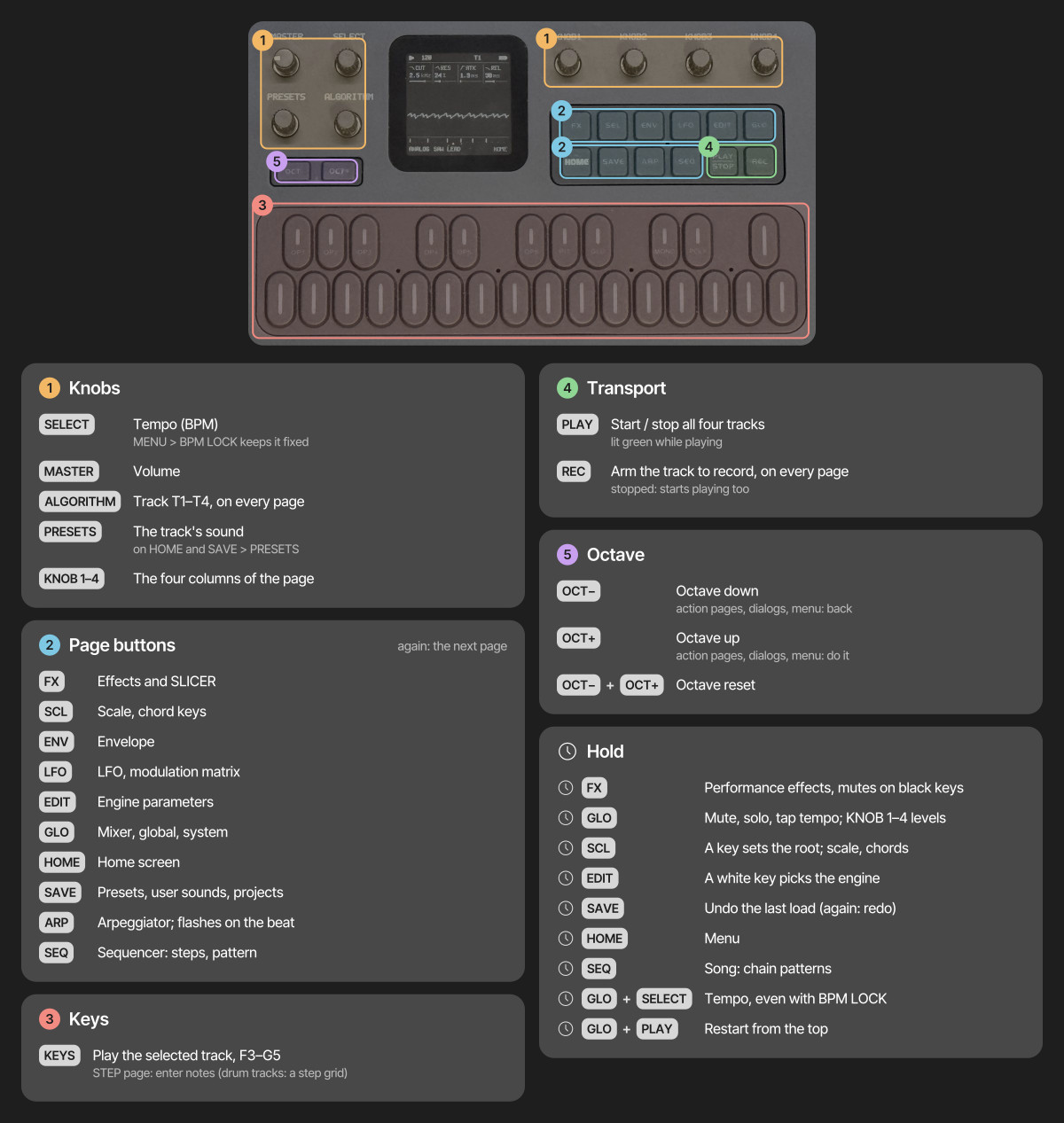
- Tap a page button for its page, again for the next; HOME returns home. Page buttons act when let go
- Hold FX, GLO, SCL, EDIT, REC or SEQ for its quick layer; hold SAVE to undo, HOME for the menu; hold LFO and turn a knob for a MOMENTARY change
- Double-tap a layer's button to keep its layer open without holding; tap it again to close
- On SEQ > STEP (a melodic track) KNOB 1 is the note's START: a detent moves the note under the cursor by 1/64 of a step (its NUDGE, which plays with the track's QUANTIZE off) and, past the end of its step, on into the next one (its TIEs, chance, force, condition and locks with it) and so on, 64 detents a step, onto free steps only. The cursor moves with the PRESETS knob (and the grid's keys); on a step with no note KNOB 1 does nothing. KNOB 2 NOTE, KNOB 3 LEN, KNOB 4 FLAG as before. The drum grid keeps KNOB 1 as its cursor
- STOCHASTIC mode: tap SEQ to go on from AUTOMATION to the STOCH page and, with MODE on STOCH, its three others (NOTES, SHAPE, STACK), for the selected track.
With MODE ON the track draws each step as it plays, from these settings; its pattern is not played and not changed. MODE OFF plays the pattern as before.
- STOCH: MODE (KNOB 1, OFF / ON), DENS (the chance a step plays, 0..100 %), GROOVE (how much likelier the downbeats are than the offbeats), LOOP (FREE: a new draw every pass; 1..64: the same loop of that many steps every pass, for the same SEED)
- NOTES: KNOB 1 picks a pitch class C..B (a DRUM track: a lane), KNOB 2 its WEIGHT 0..15 (0 never plays; a note outside the track's scale is marked OUT and is not heard), OCT (the lowest octave) and RANGE (1..4 octaves). The bars show the weights and a dot marks the notes of the step playing
- SHAPE: VEL MIN and VEL MAX (each velocity is drawn between them), RAT (the chance of a ratchet x2..x4), SLIDE (the chance a note slides into the next)
- STACK: the chance of each extra note of a chord (up to two more), and the SEED of the loop
- EUCLID mode: the EUCLID page follows the STOCH page when MODE is EUCLID (NOTES, SHAPE and STACK are then hidden, as EUCLID is with the other modes). MODE on the STOCH page (KNOB 1) steps OFF / STOCH / EUCLID: one
at a time, the track's pattern rests untouched in both. With EUCLID the track plays the pattern's first note step (its notes,
velocity, accent, slide and ratchet; C4, or lane 1 on a DRUM track, if the pattern holds none) on each hit of the rhythm.
- EUCLID: LEN (KNOB 1, 1..64 steps: the rhythm's own loop, restarted when the song starts), PULSES (KNOB 2, 0..LEN: the hits, spread as evenly as they can be), ROT (KNOB 3, 0..LEN-1: the rhythm turned that many steps later). The row of steps shows the hits and the step playing
- EUCLID 2: a second rhythm B with its own LEN, PULSES and ROT, combined with A step by step: OP (KNOB 1) is OFF, AND (both hit), OR (either), XOR (one of them) or SUB (A without B). B loops on its own length against A's, so the pair repeats after lcm(LEN A, LEN B) steps. The page shows A, B and the result (OFF keeps B's numbers; projects saved before load with B off)
- On a STOCH page OCT+ tapped is REROLL (another SEED; with LOOP FREE every pass is new anyway) and OCT+ held (0.4 s) is LOCK: the LEN steps it would draw are written into the pattern, MODE goes OFF, and you edit them as any pattern (one undo, SAVE held)
- Settings are saved with the project (in its extension; projects saved before load with the mode OFF), not in user presets
- MENU > CONTROL > SELECT: what the SELECT knob does. TEMPO (the default): the tempo, as before. PAGES: a detent steps to the next or previous page of the family shown (a wrap; from HOME, the EDIT pages), and the tempo is set with GLO held + SELECT, GLO's F4 TAP or HOME > CLOCK
- On SEQ > STEP, hold a step and turn KNOB 1–4 to lock those parameters on that step (PRESETS: its NUDGE)
- On SEQ > STEP, hold OCT+ for 0.4 s for the sheet, after SLOOP 2.8's NOTES page and its sheet. KNOB 1 picks a row (six show, they scroll), KNOB 2 sets it, PRESETS zooms the roll (8, 16, 32 or 64 steps), OCT+ tapped does SLIDE / COPY / DELETE, OCT− closes it; OCT+ tapped without it is the octave as before (on release). One undo per turn (SAVE held). On a melodic track the rows are NOTE (which note of the step's chord the next rows edit), PITCH (that note alone; on an empty step it writes your last note), LEN (the note and its TIEs), FORCE (that note's GHOST / SOFT / NORM / HARD, velocity 42 / 72 / step's / 127; ACC is the step's accent), RATCH (that note's own x2..x4, the others on the step's), SLIDE, NUDGE (a 64th of the step a detent, −32..+31; it plays with the track's QUANTIZE off, and live recording keeps the timing at the same resolution), FILL (NORMAL, FILL: the step plays only during a fill, NO FILL: only outside one), MOVE (the note a step on or back with its TIEs, chance, nudge, force, condition and parameter locks, onto free steps only), COPY (just after it, then MOVE moves the copy) and DELETE (the picked note; the last one takes the TIEs and locks too). On the DRUM grid the sheet works on the hit of the lane at the cursor: ACC, RATCH, NUDGE and FILL (the last three are the step's), MOVE, COPY, DELETE; the white keys play while it is open
- Fills: hold GLO and E4 for a fill while it is held, or tap D#4 to make the next bar a fill (again: cancelled). Steps set to FILL play only then, steps set to NO FILL only outside it; STOP ends it
- While a song plays, each row of HOME > TRACKS shows the letter (A..D) of the slot its section plays that track from
- The extra per-step data (force, ratchet per note, condition, finer nudge) is saved with the project (in its extension, older projects load as they were); a user preset's pattern and the web editor's steps keep none of it
- On action pages and in dialogs, OCT+ does it and OCT− goes back; in the menu, OCT+ / OCT− change the value and HOME closes it
- Save a sound: stop, tap SAVE, pick a slot with KNOB 1, then OCT+ and OCT+ again (name it with the keys)
The pages by button:
| Button | Taps go round | Held |
|---|---|---|
| HOME | HOME, MIXER, CLOCK (BPM, swing, clock source) | the menu |
| SEQ | STEP (the piano roll, or the drum grid), AUTOMATION | SEQ TOOLS, on every page |
| GLO | SONG | the GLO layer (mutes, solos, levels, TAP tempo, D4: MIDI LEARN) |
| SAVE | USER, PRESETS, PHRASES (the pattern loader), PROJECT, TOOLS | UNDO |
| LFO | LFO, LFO 2, LFO DEST, MOD | MOMENTARY (with a knob) |
| EDIT | EDIT 1, EDIT 2, VOICE, VOICE 2, VOICE 3 (FM6 adds OPERATOR, OP ENV, OPERATOR 2; DRUM LANES; SLICE SLICES; ANALOG FILTER) | the EDIT layer (the engines; on DRUM the black keys mute lanes) |
| FX, SCL, ENV, ARP | their pages (FX: INSERT and INSERT 2 after the SLICER) | FX and SCL: their layers |
| REC | arms the track | the REC layer (CLEAR, CLICK, COUNT-IN, CLICK LEVEL) |
Menu
Hold HOME for the menu, in five tabs: DISPLAY (COLOR, STYLE, LARGE, ANIM, LEDS, SCREEN OFF, SCOPE, HOME), CONTROL (HOLD, KNOB ACCEL, FX LATCH, BPM LOCK, SCALE LEDS, STEP PREVIEW, CHORD ENTRY), AUDIO (SPEAKER EQ, USB LEVEL, CLICK, CLICK LEVEL, COUNT-IN, TUNE), MIDI (MIDI IN, LEARN CLEAR) and SYSTEM (USB SERIAL, RESTORE LAST, HELP, HARDWARE CALIBRATION, INFO, ABOUT). ALGORITHM moves between the tabs and PRESETS through the rows of one; any of KNOB 1–4, or OCT+ / OCT−, changes the value (OCT+ opens HARDWARE CALIBRATION, INFO and ABOUT); press HOME to close the menu. Every new setting defaults to the earlier behaviour. The web editor's Settings tab reads and changes them too, saved the same way as from the menu, in the same tabs.
- COLOR: the palette. GREY (grayscale, called MONO up to 1.0.1), GREEN, AMBER, ICE, VIOLET, ROSE, PAPER (light), HI-CON (high contrast), NIGHT (the 0.9 look: true black, green-tinted text) and MONO (black and white)
- STYLE: FLAT (filled cards) or LINE (areas divided by thin lines)
- LARGE: OFF or ON: on HOME and the value pages the four knob cards grow tall, marked K1–K4, with larger labels and values about twice the size; the graph below becomes a strip. Lists, the piano roll, the drum grid and the quick layers keep their layout with larger labels
- ANIM: ON, OFF or IDLE. OFF shows every change at once, without rolling digits, a gliding piano roll or the LED sweep at power-on. IDLE is ON plus a gentle LED animation after a minute without input: a soft light drifts over the keys and the buttons breathe; any key, button or knob ends it and does what it always does. It never runs while playing, with a track armed, in a layer, the menu or a dialog
- LEDS: OFF (no glow), DIM LO, DIM HI (default) or INV (the idle LEDs lit, the active ones dark). What can be pressed breathes up to about 60 % of a lit LED, about 30 % with DIM LO
- SCREEN OFF: NEVER (default), 5 MIN, 15 MIN, 30 MIN or 60 MIN: after that long with no button, key or knob touched, the screen goes dark; the sound, the sequencer, MIDI and USB go on. The backlight stays on (on the FM-1 its line also enables the buttons and keys). The next button, key or knob only turns the screen back on
- SCOPE: OUT (default) or MIX: what HOME's oscilloscope shows. OUT the sound after MASTER (the picture shrinks with the volume), MIX the mix before MASTER, the same size at any volume
- HOME: SCOPE (default), TRACKS or LEVELS: under HOME's four cards, the oscilloscope or the four tracks, a row each with its sound, its steps playing, MUTE and a meter. With TRACKS only the look changes; with LEVELS KNOB 1–4 set the LEVEL of T1–T4 (the engine's main parameters are on EDIT)
- HOLD: how long a layer's button is held before its map shows
- KNOB ACCEL: OFF (one step per click) or ON: a fast, steady turn of a wide value moves 2 to 4 steps per click, up to 8 on values of more than 64 steps, the FX and GLO layers' knobs included; lists never jump. ON or OFF, every click of a fast turn counts
- FX LATCH: ON, FX + an effect key turns the effect on until pressed again, the knob macros stay where you leave them, and FX + OCT− turns everything off
- BPM LOCK: ON, SELECT no longer changes the tempo; hold GLO and turn SELECT, tap F4 in the GLO layer or use HOME > CLOCK instead
- SCALE LEDS: OFF or ON: the keys show the selected track's scale all the time (the root a little brighter); not on DRUM or SLICE tracks
- STEP PREVIEW: OFF (default) or ON: on SEQ > STEP with the transport stopped, moving the cursor plays the step it lands on once (its notes or hits, through the track's sound)
- CHORD ENTRY: HOLD (default) or ADD: how step recording writes. HOLD: the keys held together become the step, letting go moves on. ADD: each key adds its note to the step, up to 4 (a key whose note is there takes it out), and KNOB 1 moves on, so a chord goes in one finger at a time
- SPEAKER EQ: FLAT, LOWCUT or BASS+, a tone setting for the built-in speaker (not a switch). It also shapes the headphone out and USB audio, so keep it on FLAT when recording. The firmware cannot turn the speaker off, but headphones in the jack do
- USB LEVEL: MASTER (the MASTER knob sets the USB audio level too) or FIXED (USB always at full level, MASTER sets only the speaker and headphones)
- CLICK: OFF (default), REC (while a track is armed) or ON: a click on every beat while playing, the bar's first beat higher. CLICK LEVEL: LOW, MID (default) or HIGH; MASTER sets it too
- COUNT-IN: OFF (default), 1 BAR or 2 BARS: with a track armed, PLAY counts in first (clicking even with CLICK OFF), and a note played in the last half beat lands on step 1. Not with an external clock
- TUNE: the global tuning, −50 to +50 cents. It is the project's, saved and loaded with it
- MIDI IN: CH1-4 (default), SEL, CH5-8, CH9-12 or CH13-16 (see MIDI above). The project's too
- LEARN CLEAR: how many CCs MIDI LEARN has set (NONE, 1 CC … 16 CC); OCT+ clears them all
- USB SERIAL: ON or OFF, applied when the menu closes (the FM-1 reconnects). OFF leaves out the serial console, a developer tool, so the FM-1 is a plain audio + MIDI device; this lets macOS 13–15 see its USB audio input. MIDI, the editor and the installer work either way
- RESTORE LAST: ON (default) or OFF. ON, the FM-1 starts with the music you left (the header says RESTORED), kept in an autosave apart from the four projects; it is written when the music changed, the transport is stopped and nothing has been touched for 10 s, at most once a minute. OFF starts with the power-on sounds
- HELP: OFF (default) or ON: a short hint in the footer for about 2 s when a page opens, and under a quick layer's map while it shows
- HARDWARE CALIBRATION, INFO (the version, the USB link and the CPU load) and ABOUT
Engines
In the order the device lists them (the engines of Felucca 1.5 that are not listed here, ANALOG, PHASE, LOFI, SAMPLE, VOICE, TRIO, WHEEL, GRAIN, PHYS, NOISE and SLICE, are gone in this firmware: their numbers are kept, a sound that names one loads with its values and plays silence):
- FM6: classic 6-operator FM (Dexed-based): 32 algorithms, a full patch per track, edited in the web editor (which imports .syx files) or on the device: EDIT > OPERATOR (ratio or fixed frequency, fine, level), OP ENV (each stage's rate and level, drawn as the envelope) and OPERATOR 2 (mode, detune, velocity), one operator at a time on the algorithm chart; macros on top; SLOT picks a factory patch (F1–F8), the track's own (OWN) or a voice of the bank the web editor sent (B1–B32)
- The resonant filter (SWARM, FMTONE, WAVETONE, CHIP, DUALVCO, and ANALOG4's two): a multimode filter (TYPE LP / BP / HP, a
12 dB state-variable) with CUT, RES and KEY (key tracking) on each engine's own FILTER page. RES runs on from a Q of 0.5 through 32
into self-oscillation (from about 118): the filter rings by itself as a near-sine at the cutoff, with a level that holds at every
pitch, even from a silent voice; with KEY 127 the cutoff follows the note one to one, so CUT 44 puts the ring on C4 (262 Hz) and CUT
52 a fifth above the note. The resonance is fat, not thin: the filter's state saturates softly, so a high Q rounds and thickens
instead of squealing, and the closer RES gets to the ring the more the filter is the source of the sound. CUT 127 with RES 0 and
TYPE LP leaves FMTONE, WAVETONE, CHIP and DUALVCO exactly as they were; SWARM's filter was always on, and now has RES, KEY and TYPE
(RES 0 and KEY 0 are close to its old fixed filter). ENV / LFO -> FLT move CUT. The engines' filters are in
dsp.c(rsvf), tested intests/rsvf_test.c - SWARM: a super-saw cluster in the manner of Elektron's Swarmer machine: one main oscillator and six detuned swarm oscillators, each of the two groups with its own waveform (SAW SQR TRI SIN), the main able to sit one or two octaves down (OCT), DTN the swarm's detune, MIX the swarm against the main, ANIM a slow drift of each swarm oscillator's detune, NOIS a random pitch wander, CUT a low-pass; at most 4 voices a track. Its presets cannot be starred (no favourites row is free for engines 14 .. 17); a project or a user preset using SWARM does not load on firmware without it
- FMTONE: four-operator FM after the structure of Elektron's FM TONE machine: operators C (the carrier), A, and B1 / B2 (B2 an octave above B1). EDIT 1 / 2: ALGO (eight algorithms, Felucca's own), RAT C / A / B (ratios 0.25 .. 16), HARM (+ brightens the waves of A and B1, - the wave of C), DTN (A up, B2 down), FB (B2's feedback), MIX (the level of the other carriers in algorithms 5..8). Further pages: A ENV and B ENV (ATK DEC END LEV), DEL TRK (the envelopes' delays, the key tracking of the modulation, 127 = none left at C8) and FINE (FTO A, B1, B2: -64..63 cents). At most 6 voices a track. Its presets cannot be starred, and a project or a user preset using it does not load on firmware without it. Not Elektron's: the algorithms, the HARM morph (a self-modulation, not additive), the trigged-only envelopes EDIT 1 and EDIT 2 draw the algorithm as a chart (as FM6's): C A B1 B2 in boxes, the modulators above what they modulate, the carriers over the output bus, B2's feedback loop; a group at LEV 0 goes dim, and the operators the knob you just turned affects light up
- WAVETONE: two wavetable oscillators after the structure of Elektron's WAVETONE machine. EDIT 1 / 2 (OSC 1, OSC 2): WAV
(a position morphing through eight frames), PD (phase distortion, the Casio CZ's warp), LEV and TUN (-24..24 semitones) of
each. INTERACT: INTR (OFF, SYNC, RING, FM: osc 1 into osc 2's phase), TABL (PRIM: sine, triangle, square, saw, pulses; HARM:
eight harmonic mixes), OFS1 / OFS2 (-64..63 cents). UTIL: DRFT (a slow random wander of each pitch, up to about 16 cents)
and PHAS (RST: every note starts at phase 0; FREE: at another phase each note). NOISE: NTYP (WHT, PNK, RED, DIGI), NLEV, NCUT
(a low-pass) and NDEC (how long the noise lasts after a note on). At most 4 voices a track. Felucca's own implementation,
not Elektron's: the tables, the morph and the PD curve are this engine's, and "Offset" among the interactions of the
original is replaced by FM. It has no key in the EDIT layer (its 15 engine keys are taken): pick it with KNOB 1 ENG, the PRESETS
ENG knob or the editor. Its tables take 16.6 kB of flash;
FELUCCA_WAVETONE=0builds without it. Its presets cannot be starred either - FMDRUM: a three-operator FM drum after the structure of Elektron's FM DRUM machine, with 62 built-in PCM
transients. EDIT 1 / 2 (PITCH, TONE): TUNE, SWTM and SWDP (a pitch sweep down onto the key: its time and depth), ALGO
(STCK, PARA, SPLT, FULL: Felucca's own routings of A, B and C), WVC (the wave of C) and WVAB (the wave of A and B: SIN, TRI,
SAW, SQR, HALF, SIN2), FB (B's feedback) and FOLD (a wavefolder on the FM body only). RATIOS: RTA, RTB, RTC (0.25 .. 9, a
ratio below 1 for the negative values); FM MOD: MAC, MBA, MBC (the modulation depths: each algorithm uses two or three of
them); BODY: HOLD, DECY (the body's hold and decay), ENVR (how far the decay pulls the FM depths down) and PHSC (C's
starting phase); TRANS: TRLV (0 = no transient), TRSL (the 62 samples across 0..127), TRLP (a low-pass on the transient
alone); NOISE: NLEV, NDCY (its own decay, independent of the body), NCOL (red, white, lo-fi). At most 4 voices a track; a hit
ends on its own, a note-off does not cut it. The 62 transients are original synthesis (tools/gen_transients.py: clicks,
noise ticks, rims, woods, metals, thumps, snare cracks, claps, digital bits, zaps; WAVs in
assets/transients/NN_NAME.wavreplace a slot), stored as 8-bit mu-law at 44.1 kHz (40.6 kB of flash;FELUCCA_FMDRUM=0builds without it). Not Elektron's: the algorithms, the waves, the fold, the ratio scale and the samples. It has no key in the EDIT layer: pick it with KNOB 1 ENG, the PRESETS ENG knob or the editor. Its presets cannot be starred, and a project or a user preset using it does not load on firmware without it - SID: reSID's MOS 6581 / 8580 voice (Dag Lem's reSID 0.16, ported to integer C): TRI SAW PULSE NOISE and their combinations (TRI+SAW, TRI+PUL, SAW+PUL, T+S+P are the combined waveforms measured from real chips, not an AND), PULSE width, SYNC and RING MOD with a modulator RATIO, the chip's multimode filter (LP BP HP and the sums, 4-bit resonance, its FC curve across CUT) and MODEL 6581 or 8580 (waveform tables, filter curve, character). The noise is the chip's 23-bit shift register. The amplitude is the track's ADSR (no chip envelope). Three voices a track; 26 presets, among them the same patch on both chips
- CHIP: after Elektron's SY CHIP machine: a WAVE axis of 120 waves (static, animated, tables, pulse 1..99 %), an arpeggiator of up to four notes (OF2 OF3 OF4, SPD in note divisions, Hz or single-shot) that makes chords and drums the way the 80s home computers did, DEC and OVER. Four voices a track
- DUALVCO: after Elektron's SY DUAL VCO machine: two oscillators with their own decays, CNFG (80 waveform / mix / RING / FM / FM+RING configurations, a * restarts the phases), BEND (a fixed-time pitch envelope), BAL and OVER. Four voices a track
- BRAIDS: Mutable Instruments' Braids macro oscillator, ported from the module's source (MIT;
firmware/src/braids_osc.c): its 48 models, SHAP: CSAW MORPH SAWSQ SINTRI BUZZ SQSUB SAWSUB SQSYNC SAWSYN 3SAW 3SQR 3TRI 3SIN 3RING SWARM COMB TOY FILTLP FILTPK FILTBP FILTHP VOSIM VOWEL VOWFOF HARM FM FBFM CHAOS PLUCK BOWED BLOWN FLUTE BELL DRUM KICK CYMBAL SNARE WAVES WMAP WLINE WPARA FLTNZ TWINPK CLKNZ CLOUD PARTCL DIGMOD and the MORSE code easter egg. TIMB and COLR are the module's TIMBRE and COLOR (the track's ENV / LFO -> SHP moves TIMB, -> FLT moves COLR, and the matrix's SHP and CUT), SWP lets the amplitude envelope sweep up the list of models (the module's meta modulation), BITS (2 .. 16) and RATE (4 .. 44 kHz) are its reduction, DRFT its VCO drift. Pitch tables are moved to run the models at 44.1 kHz instead of 96 kHz; their time constants (strikes, consonants, drums) come out about twice as slow. One voice a track; the five models with delay lines (COMB PLUCK BOWED BLOWN FLUTE) share two sets of them, so a third track playing one of them is silent until a set is free. At 96 kHz the port renders what the original renders, sample for sample (tests/braids_osc_test.c) - TB303: after Roland's TB-303 Bass Line: SAW or SQR, a four-pole resonant ladder filter (the output between its third and fourth pole, a little under 24 dB an octave) with CUT, RES and ENVM (the envelope's depth, up to 4 octaves), DEC (the filter envelope), ACNT (the accent: louder, a deeper envelope, and the accent sweep that builds over accented notes), DRV and the square's width PW. The sequencer's SLIDE and ACCENT do the rest: a slide glides without a new envelope (MONO, as the presets are), an accented step is played at velocity 127. One voice a track
- TR808: a TR-808 of 16 voices after the circuit models of the 8W8 module for Ableton Move (https://github.com/athousanddetails/schwung-8W8,
GPL-3.0), rewritten in fixed point: the bass drum (a bridged-T resonator in an op-amp loop: DECY is its loop gain, with the pitch sigh and the
attack-time jump), the snare (two shells at 173 and 336 Hz and a noise path through a swing-type VCA), the three toms and three congas
(the same resonator, struck two ways), the rim shot and the claves, the maracas, the hand clap (three bursts and a tail), the cowbell, the
closed and the open hat and the cymbal (one bank of six Schmitt oscillators, shared, through each voice's own filters and gate). General MIDI
notes (35..81) strike the voices; a hit on a drum still ringing adds to it, as on the machine.
tests/tr808_test.crenders every voice and compares it with the 8W8's own render of it (peak, level, pitch). Not in it: 8W8's reverb, delay, compressor and per-voice distortions (the track's sends, DIST and INSERT do those). EDIT 1 TUNE (all voices, +-2 semitones for the toms and congas, +-12 for the others; 64 is the machine's), DECY (each voice's own decay pot moved together), BTON and BATK (the kick's tone and attack), EDIT 2 SNAP (the snare's snappy), DRV (a soft clip), VEL (how far velocity moves the level), CHOK (OFF, CH>OH, BOTH: the hats are one hat), LEVELS 1..4 the 16 levels (BD SD LT MT, HT LC MC HC, RS CL MA CP, CB CH OH CY). Five kits: 808 KIT, BOOM KIT, TIGHT KIT, DIRTY KIT, METAL KIT - DRUM: an 8-lane kit of Felucca's own drum voices on the General MIDI key map. KIT picks the standard kit or one of five virtual-analog (VA) kits in the manner of classic analog drum machines (the numbers are a hint), every lane its own voice: 80 (deep sine kick with a long decay, noisy snare, six-square hats), 10 (swept kick, white-noise snare, long-tailed claps, a cymbal), 66 (soft round kick, bright snare, noise hats, a conga), 55 (dropping kick, high metal hats, a metal bell) and 77 (swelling kick, multi-burst claps, claves, a cymbal). All of them are synthesized by Felucca, no samples. EDIT > LANES and LANES 2 set each lane's level
Scale keyboard
On the SCL page, set QNT to WHITE to play the selected scale using only the white keys (SNAP keeps every key and rounds it down to the scale). C4 plays ROOT; consecutive white keys play consecutive scale notes above and below it. Black keys are silent, including during live recording and step entry. TRN transposes the resulting notes; the octave buttons shift them by full octaves. Set QNT to OFF for the normal chromatic keyboard. QNT SEQ snaps the keys like SNAP and also maps the sequenced notes onto the current ROOT / SCALE as they play (the steps are not changed; drum kits are never quantized).
Available scales: chromatic (CHR), major (MAJ), natural minor (MIN), Dorian (DOR), Mixolydian (MIX), major pentatonic (PEN), minor pentatonic (MPEN), harmonic minor (HARM), Phrygian (PHRY), Lydian (LYD), Locrian (LOC), ascending melodic minor (MEL), minor blues (BLUES), whole tone (WHOLE), half-whole diminished (DIMHW), and whole-half diminished (DIMWH). Scales with other than seven notes continue across the white keys without repeating notes; their roots need not fall on every C key. Drum kits and incoming MIDI keep their own note mapping.
Press SCL again for the CHORD page: CHRD picks the chord keys (OFF, the scale's triads or sevenths, or a fixed shape) and VOIC the voicing.
Layout
| Path | What |
|---|---|
firmware/ | firmware sources: src/ app, hal/ hardware layer, loader/ update loader |
tools/ | build script, generators, package maker, installer and sample uploader |
assets/ | UI font, icon names, CC0 instrument samples |
web/ | the web installer, the earlier editor and the browser emulator (web/emu/); the new editor: Felucca-WebApp |
tests/ | tests that run on the build machine |
LICENSES/ | licence texts of the bundled fonts, icons, ported DSP and SDK files |
If the FM-1 does not start
If an update is interrupted and the FM-1 stays black, check whether a computer sees it as a USB device named WL80UBOOT (or a USB mass-storage device with ID 4C4A:8057). That is the chip's built-in boot mode, and the FM-1 can be brought back:
- First try another USB data cable, and close every other app that uses MIDI, then run the web installer again.
- If it stays in boot mode, FM-1 Transporter reads and writes the FM-1's flash from a Mac through a Seeed XIAO RP2040 (three wires to the FM-1's USB lines). Back up the flash first, then write the official firmware (M-VAVE's FM-1.fwsc).
- Questions: Issues.
Support
If Felucca is useful to you, sponsoring on GitHub or a donation on itch.io helps keep its development going.
Issues are for reproducible bugs (one per issue). Ideas and requests go to Discussions, and feature requests posted as issues will be moved there. Pull requests are welcome: see CONTRIBUTING.md.
AI disclaimer
Felucca is developed with the assistance of AI coding agents. These tools are used for coding, testing, documentation, translation, and maintenance. The instrument's design, features, sound design, and overall direction are determined by the maintainer or community. No generative AI is used to create music, icons, or visual artwork for this project. For more details, see On AI-Assisted Development and Responsibility.
Credits
- Hügelton Instruments (Leo Kuroshita, @kurogedelic): Felucca itself; the PHASE engine's waveforms (a C port of the oscillator of CrispyZebra, GPL-3.0); the DRUM voices and kits; the Hügelton Sample Pack (the drum samples, GPL-3.0-only, not CC0); the Fukiai icon font (MIT)
- Fonts: Inter Tight by The Inter Project Authors, SIL OFL 1.1; the browser emulator's labels: DotGothic16 by The DotGothic16 Project Authors, SIL OFL 1.1
- Samples: Versilian Studios VSCO-2 Community Edition and VCSL, CC0 1.0: the SAMPLE sets, also SLICE's PIANO and PIANO HD (attribution)
- VOICE engine: after klattsch by Tony Gies (MIT); formant data from Klatt (1980) and Hillenbrand et al. (1995)
- PHYS engine: models ported from DaisySP by Electrosmith and Emilie Gillet (MIT) and from Emilie Gillet's eurorack code (MIT)
- FM6 engine: msfa from Dexed by Google Inc. and Pascal Gauthier (Apache-2.0)
- Browser emulator: after X0X by charlesvestal (GPL-3.0), a Felucca fork whose browser build showed the way
- SID engine: reSID 0.16 by Dag Lem (Simon Owen's fork), GPL-2.0-or-later, ported to integer C (
firmware/src/eng_sid.c) - Sequencer sheet, fills and per-note editing: after SLOOP 2.8 by isod89 (GPL-3.0), itself a Felucca fork (its NOTES page after Melodee by keremimo)
- Package format and boot files: JieLi AC79 SDK (Apache-2.0; three of its files are in every package, none in this tree)
- Contributions: keremimo (white-key scales, #2), ChanceTheMaker (TRS MIDI, bend, sustain and clock, palettes, favourites, editor display settings: #8, #10, #11, #12), andreahaku (sample recording and trim, #29; SLICE manual slices and tests, #27, #22), spinkham (the boot fix for 0.9 projects, #111), zednaked (ratchets, #100), jasonpersinger (the ROOM reverb click fix, #121)
Licence
Free software: GPL-3.0-only, the Hügelton Sample Pack included. The bundled fonts and the ported DSP keep their own licences (LICENSES/); details in LICENSING.md.
M-VAVE and FM-1 are trademarks of their respective owners. Felucca is not affiliated with or endorsed by them.
Copyright (C) 2026 Leo Kuroshita (@kurogedelic), Hügelton Instruments