
MIDIMON for the M-VAVE FM-1
A MIDI monitor firmware for the M-VAVE FM-1, in a green phosphor terminal's look.
- It watches notes, CCs, clock and other messages, with filtering, from TRS, USB, USB host, BLE peripheral and BLE central. USB and USB host are mutually exclusive, and in USB host mode the FM-1 can't power the connected MIDI device: it needs its own power (another FM-1, for example). BLE peripheral and BLE central work in parallel, so the FM-1 can sit in the middle between a BLE MIDI controller and a synth, for example.
- It routes MIDI messages between all these ports (except TRS, which is input only) as a matrix, with many-to-many routing and filtering by message type and channel.
I already use it to debug my other FM-1 and a bunch of BLE MIDI controllers, and it also works as an improvised BLE MIDI dongle.
Before you install: this is a custom firmware, and it might brick your FM-1 if there's a hidden bug somewhere, which is always possible given the multiple layers of AI-written code involved. If you don't have an RP2040 dongle or another way to recover from a hard brick, install the custom bootloader with m-flasher first, so you can unbrick the FM-1 if something goes wrong. So far it hasn't bricked either of my two FM-1s.
Status: early (0.4). It runs on the FM-1. Expect changes.
A Bluetooth MIDI dongle you already have
With THRU on, the FM-1 is an improvised wireless MIDI interface, in the way of a WIDI or a CME dongle, that also
shows you what passes through it. It plays both Bluetooth roles at once: BLE-Periphery (a computer or an iPad finds
it as FM1_MONITOR and connects to it: BLE-P) and BLE-Central (it connects to a Bluetooth controller or synth
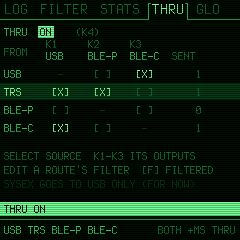
itself: BLE-C). The THRU screenshot above is one such setup:
TRS → USB, BLE-P: a hardware synth's MIDI OUT on the jack reaches the computer over the cable and an iPad over Bluetooth.BLE-C → USB: a Bluetooth MIDI controller shows up on the computer as a USB MIDI device, with no Bluetooth on the computer at all.USB → BLE-C: the DAW plays a Bluetooth synth.
With the USB port in host mode there is no computer at all: BLE-C → USB lets a Bluetooth controller play a USB
synth (or a USB controller, USB → BLE-C, a Bluetooth synth), the FM-1 in between showing what passes.
Any source can go to any number of outputs (never back to itself), and each route has its own filter: only channel 1 notes from the Bluetooth controller, no clock to the iPad, and so on. The FM-1 has no MIDI OUT jack, so the outputs are USB, BLE-P and BLE-C.
What it does
- Four sources, each its own:
USB,TRS(the MIDI IN jack),BLE-P(BLE-Periphery: a computer or tablet connected to the FM-1 over Bluetooth) andBLE-C(BLE-Central: a Bluetooth MIDI device the FM-1 connected to). Both Bluetooth roles at once. The FM-1 isFM1_MONITORon Bluetooth andMIDIMON FM-1on USB (with "FM-1" in it, which the firmware installers look for). - USB port: DEVICE MODE or HOST MODE: in device mode the FM-1 is a computer's MIDI device, as usual; in host
mode it is the host of a class-compliant USB-MIDI controller or synth (GLO 1/3, K2; asks first, never kept: every
power-on is device mode again, so updates always work). In host mode what that controller or synth sends comes in
as
USB(the footer saysHOST), and USB out, THRU's too, goes to it: a Bluetooth controller (BLE-C) can play a USB synth. Full-speed devices, alone or behind one hub; the FM-1 gives no power on the port, so use a powered hub or an OTG adapter that powers the device. The driver is Adrien Tibi's and Kerem Kilic's, from Melodee, ported to felucca-bsp in its pull request #7. - Bluetooth (GLO 2/3): BLE-Periphery on or off; BLE-Central OFF, FIRST (the first MIDI device it sees, and again when that one goes) or CHOOSE (the one chosen from a list that shows the last four digits of each device's address, so two of one name can be told apart); RECONNECT to the chosen one at power-on and when it goes. The radio is off only when both roles are. The page shows both links' state.
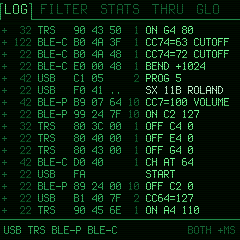
- Everything as it came: SysEx (assembled, the maker named, its length), system common, clock and transport, active sensing, reset, running status (marked), and the faults: a stray byte, a message cut short, a SysEx without its end, messages lost to a full buffer.
- LOG: the last 4096 messages, HEX, HUMAN or BOTH, the time between lines or since power-on; pause, scroll back.
ALGO turns what the LOG tab shows:
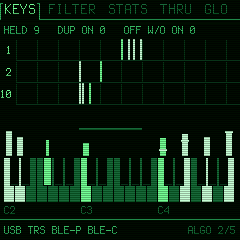
- KEYS: the notes held on each channel across all 128 notes, and a keyboard zoomed to where they are, with each note's velocity and its poly pressure. Counts note-ons for notes already held and note-offs for notes not held: where stuck notes come from.
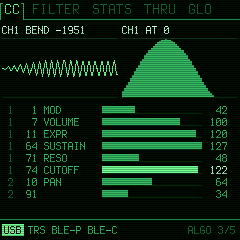
- CC: pitch bend and channel pressure as graphs over the last seconds, the controllers last moved as bars, by channel and number: a row stays where it is while its knob turns (the one just moved glows).
- CHANS: each channel's activity per source, and its last message.
- CLOCK: the tempo coming in, running or stopped, the beat, the position (bar.beat.16th, song position pointer), the clocks' spacing (min, average, max), MIDI timecode put together from its quarter frames.
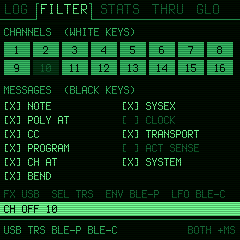
- FILTER: per source, per channel (white keys), per message type (black keys). Clock and active sensing hidden by default, as in MIDI-OX.
- STATS: messages and bytes per source, messages a second, what was lost and sent, Bluetooth's state, the tempo of a clock coming in.
- THRU: routes from each source to any of USB, BLE-P and BLE-C, each route with its own filter (channels and message types). The FM-1 as a Bluetooth MIDI bridge: a Bluetooth device to the computer over USB, a keyboard on the jack to an iPad, and so on. (SysEx goes to USB only, for now.)
- GLO, three pages (GLO turns them): 1/3 C3 or C4 for note 60, the USB port (device mode / host mode) and the battery; 2/3 Bluetooth; 3/3 the skin (green, amber, cyan, white, red), the scanlines and whether the FM-1's own SysEx over USB (screen reader, updates) is logged.
- Battery (GLO 1/3): a percentage, a bar and the volts. An estimate: the FM-1's battery divider and converter reference are not documented, so the reading is taken as against the 3.2 V I/O supply through 1:2 (which puts the stock firmware's bar thresholds at 3.32, 3.51 and 3.70 V) and turned into a percentage on a lithium cell's discharge curve. The raw reading is shown too. On USB power it shows what the charging cell reads.
- Lights: the source buttons flash as messages come in, the keys light with the notes held, PLAY blinks green on the beat of a clock coming in and turns red while paused or on an error.
The panel
| Control | Does |
|---|---|
| PRESETS | the page: LOG, FILTER, STATS, THRU, GLO |
| GLO | the settings: 1/3, 2/3 (Bluetooth), 3/3, then back |
| ALGO | what the LOG tab shows: LOG, KEYS, CC, CHANS, CLOCK (from any page) |
| SELECT | LOG (the log itself): scroll back (the view stops; back at the end it is live again). THRU: the source. The device list: move |
| PLAY | pause / go on (what comes meanwhile is still logged). The device list: look again |
| FX, SEL, ENV, LFO | show / hide USB, TRS, BLE-P, BLE-C |
| K1 | LOG: HEX / HUMAN / BOTH. THRU: the source's route to USB. GLO 1/3: note 60. 2/3: BLE-Periphery on / off. 3/3: the skin |
| K2 | LOG: the time. THRU: route to BLE-P. GLO 1/3: the USB port, DEVICE MODE / HOST MODE (asks). 2/3: BLE-Central OFF / FIRST / CHOOSE. 3/3: the platform's SysEx |
| K3 | THRU: route to BLE-C. GLO 2/3: the device list (BLE-Central CHOOSE), and move in it. 3/3: the scanlines |
| K4 | THRU: thru on / off. GLO 2/3: RECONNECT to the chosen device on / off |
| EDIT | THRU: a route's filter, and back. FILTER: the default filter |
| HOME | home: the LOG tab from any page, then the log itself from KEYS, CC, CHANS or CLOCK; on the log, clear it (asks) |
| SAVE | keep the settings (lit when something changed; the chosen Bluetooth device is kept at once) |
| OCT- / OCT+ | a question's NO / YES. The device list: back / connect. FILTER and a route's filter: nothing / everything |
Installing
Install MIDIMON with the web installer or python3 fm1-base/tools/fm1_install.py midimon-X.Y.fwsc, over the stock
firmware, another custom firmware (tested over Felucca) or an earlier MIDIMON. Its settings live in the flash's data
area; another firmware's settings at 0xFC000 are left alone.
Releases are built on GitHub by The Firmware Hub's shared workflow (zvenson/fm1-build) and carry a build attestation. To check a file:
gh attestation verify midimon-X.Y.fwsc --repo ignis32/midimonitor_fm1 \
    --signer-workflow zvenson/fm1-build/.github/workflows/build.yml
Building
sh build.sh               # app/build/midimon.fwsc (development, identity FM-1_8800)
sh build.sh test          # the host simulator and the scripted tests (app/tests), screens in app/build/host
sh build.sh release       # app/build/midimon-VERSION.fwsc (identity FM-1_88XXYYZZ)
sh build.sh screens       # the screenshots above, from docs/screens.txt in the host simulator
Clone with git clone --recursive (or build.sh fetches the submodules itself). It needs JieLi's Linux toolchain
and the AC79 SDK (AC79NN_SDK_V1.2.1, commit d179b44): JIELI_TOOLCHAIN and AC79_SDK, or a local.env beside
build.sh that sets them. A release is a tag vX.Y matching VERSION; the
workflow (.github/workflows/release.yml) builds, tests, attests and publishes it.
Based on fm1-base
MIDIMON is an app (app/) on fm1-base by Charles Vestal, a git
submodule in fm1-base/ pinned to an upstream commit, with felucca-bsp by
Leo Kuroshita inside it (fm1-base/bsp/). Both are used as upstream has them: the few changes MIDIMON needs in
them are patches in patches/, each with what it does and why, applied before every build.
Today they are: the MIDI tap (every byte from every source, stamped: what a monitor needs and an instrument doesn't),
the USB MIDI host (felucca-bsp's own pull request #7, carried until it is merged) and its API for apps, and Bluetooth
(BLE-Periphery on and off, the name FM1_MONITOR, the found devices' addresses).
Following an fm1-base update is: revert the patches, bump the submodule, apply them again. See
LICENSING.md and CREDITS.md.
Licence
MPL-2.0, as fm1-base (LICENSE). A build with Bluetooth links JieLi's binary Bluetooth libraries from the AC79 SDK
(Apache-2.0), taken from the SDK at build time and never kept in this repository, so no GPL code may be in it. The
USB MIDI host, by Adrien Tibi and Kerem Kilic, is MPL-2.0 by its authors' explicit permission: Adrien's
comment on Melodee #75 and Kerem's
felucca-bsp #7, both quoted in LICENSING.md.