
MAKU
Rising66/100Groovebox firmware forked from Felucca.
forM-VAVE FM-1·by@okumurari2
Unclaimed. Is this yours? Sign in with GitHub as @okumurari2 to claim it.
maku-1.0.fwsc· 596 KB· +5 files
GPL-3.0· okumurari2/maku·okumurari2.github.io/maku/·downloads come from the creator’s GitHub releases
maku-v1.0MAKU 1.0Latest6 files
幕間機。M-VAVE FM-1 のためのファームウェア。 / An interlude machine: firmware for the M-VAVE FM-1.
日本語
毎回ちがう世界が鳴り、好きを押すと、次の世界があなたに寄っていく。 MAKU は、電源を入れた瞬間から鳴っているアンビエンスの機械です。
MAKU のここが違う
FM-1 にはアンビエント系のファームがほかにもあります(たとえば AMB-1:曲を選び、手入れして育てる)。MAKU は設計の軸が違います。
- 起動のたびに新しい世界。 曲を選ぶのではなく、音色・根音・スケール・テンポ・つまみの初期値がその場でランダムに決まります。音はつねにスケールの中。保存される状態はありません。
- 好みで育つ。 REC で気に入った世界を「いいね」に記録(最大16件)。増えるほど、新しい世界は、いいねから(少し変えて)選ばれやすくなります(最大90%)。保存されるのはいいねだけ。
- ボタンは動詞。 潜る・降り注ぐ・膨らむ・揺れる・持ち上げる・崩す。押している間だけ効き、離すとゆっくり戻ります。音を「設定する」のではなく、場に「手を入れる」。
- 幕間のための道具。 DJ イベントの転換でつないで、すぐ鳴らす。電池駆動と小さなスピーカーを前提に、起動は無音からふくらむ・高域のピークを抑える・REC で音を止めない・電池表示は必要なときだけ、LED は電池なら暗め、という作法(
docs/UI_RULES.md10 章)で作っています。MIDI クロックに追従します。
v1.0 の変更点
v0.1 以降の変更をまとめて 1.0 とします。
- テンポを落とすと、音が息をする:70 BPM より遅くすると、1 小節がひと呼吸になっていきます(いちばん遅いと約18秒)。キックはぽつんとやわらかい合図になり、止まりそうで止まらない、ゆったりした波になります。外部クロックに合わせているときは働きません。
- 放っておくと、音色まで変わっていく:DRIFT をオンにしておくと、値が漂うだけでなく、40〜60秒ごとに床・霞・アルペジオのどれかが、休符のところでこっそり別の音色に入れ替わります。気づいたら違う景色にいます。
- 背景に空気が敷かれる:世界ごとに、潮騒・雨・風・たきび・レコードのノイズ・人のざわめきのどれか(または、なし)がうっすら流れます。録音ではなく計算で作った音です。SWELL を押すと近づいてきて(潮騒なら大波)、SINK を押すと遠くに沈みます。新しい世界のはじめに、音色名のあとに「~ SURF」のように名前が出ます。
- 新しい世界は、ふんわり明けてくる:新しい世界・いいね・音色替えのあと、新しい音はこもった状態から数秒かけて自然に明るくなっていきます。いきなり耳に飛び込みません。
- 小さなスピーカーでも耳にやさしく、広く:明るい音のきつさを抑え、ROOM の残響は広いホールのようにゆったり響きます。キックも少し控えめな音量から始まります。
- 出会える音が増えた:床・霞・声あわせて20種の新しい音色。既存のいいねはそのまま使えます。
- いま鳴っている音の名前がわかる:フォーカスした役の音色名が PRESETS の下に出て、新しい世界では3つの音色名が順に画面の左上に出ます。
- バグ修正をしました。
インストール
ファームウェアの書き換えは自己責任です。戻し方を先に確認してください。
- 下の
maku-1.0.fwscをダウンロードします。 - FM-1 を USB でつなぎ、コンピューターから書き込みます:
python3 tools/fm1_install.py maku-1.0.fwsc(pip3 install mido python-rtmidiが必要。詳しくは BUILDING.md)。 FM-1 Firmware Hub などのブラウザ版インストーラーからも書き込めます(Chrome / Edge)。 - 戻すには:インストーラーの「Return to official V15」、または M-VAVE 公式のアップデーター。どちらもいいねは消えます。
途中で止まって画面が真っ黒のままのときは、README の "If the FM-1 does not start" を見てください。
ブラウザで試せます
MAKU emulator(実機と同じコードを WebAssembly で動かしています)。
既知の制限・実機で未確認のこと
実機での動作は作者が確認済みですが、次はコードやホストでの測定から読んだ値で、実機では確かめていません。
- REC の書き込み:フラッシュ書き込みで音が約 40 ms 途切れます。
- いいねの保存:MAKU / Felucca 間の更新では残るはずですが(コードからの判断)、実機では未検証です。
- 処理負荷:v0.1 での見積もりは最悪の世界で約 51%(ホスト測定からの換算)。v1.0 の追加分(高域コンプ・ホールリバーブ・背景層など)は実機で測っていません(背景層は、ホストの見積もりで最悪の世界に +4〜7 ポイント、合計約 58%)。
- v0.1 以降に加えた音色・リバーブ・呼吸・背景層は(背景層は各種類の大きさと音質が、小さなスピーカーでどう聞こえるか未確認)、、ホストでの試聴・測定が中心です。気になる音があれば Issues へ。
ライセンス
GPL-3.0-only。Felucca(Leo Kuroshita / Hügelton Instruments)から、シーケンサー編集・プリセットと保存・音作りページ・Web エディタを捨てて作った派生版です。パッケージには JieLi AC79 SDK(Apache-2.0)のファイルが3つ入っているため、ライセンス文は
LICENSES/にあります(パッケージの添付物にもLICENSEとLICENSING.mdを付けています)。ロゴは AI 生成です。M-VAVE・FM-1 は各権利者の商標で、MAKU は関係も承認もありません。English
A different world every time, and the more you like, the more the next ones come from your taste. MAKU is an ambience machine that is already playing when you switch it on.
What sets MAKU apart
There are other ambient firmwares for the FM-1 (for example AMB-1: you pick a piece and tend it). MAKU is built on a different axis.
- A new world on every boot. You do not choose a piece: the sounds, root, scale, tempo and every macro are drawn at random, on the spot. Notes always stay in the scale. No state is saved.
- It grows to your taste. REC keeps the world playing as a like (up to 16). The more likes there are, the more often a new world comes from them, a little changed (up to 90 %). The likes are all it stores.
- Buttons are verbs. Sink, cascade, swell, wobble, lift, scramble. Each works while held and fades back slowly: you lay a hand on the room rather than set a sound.
- Made for the gaps between DJ sets. Plug it in and get sound, fast. Built for a small speaker and a battery (
docs/UI_RULES.md, section 10): power-on swells up from silence, high-band peaks are tamed, REC does not stop the sound, the battery shows only when it matters, LEDs are dim on battery. It follows MIDI clock.
What changed in v1.0
Everything since v0.1 is collected into 1.0.
- Slow it down and the music breathes: below 70 BPM a bar becomes one breath (up to about 18 s at the slowest). The kick turns into a soft cue and the music rolls like a slow tide. Not under external clock.
- Leave it alone and the sounds change too: with DRIFT on, not only do the values wander: every 40-60 s one of the floor, haze or arp quietly swaps to another sound, at a rest. You look up and the scene is different.
- Air under the music: each world lays surf, shower, breeze, campfire, vinyl crackle or a murmuring crowd faintly underneath (or nothing). All of it is computed, not recorded. SWELL brings it close (a surf sends a big wave), SINK sinks it far away. A new world names it after the sounds, as "~ SURF".
- A new world dawns softly: after a new world, a like or a change of voice, the new sound starts muffled and opens by itself over a few seconds. Nothing jumps at your ears.
- Gentler and wider on a small speaker: bright sounds no longer shout, ROOM rings like a wide hall, and the kick starts a little quieter.
- More sounds to meet: 20 new sounds across the floor, haze and voice. Existing likes keep working.
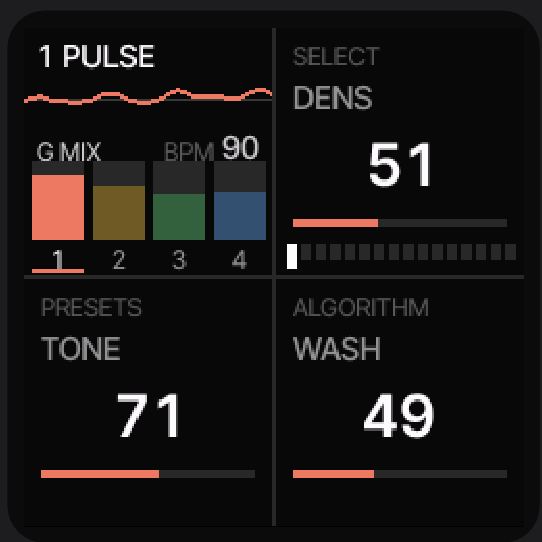
- You can see what is playing: the focused part's sound name appears under PRESETS, and a new world names its three sounds in the top left.
- Bug fixes.
Install
Installing replaces the FM-1's firmware: at your own risk. Check the way back first.
- Download
maku-1.0.fwscbelow. - Connect the FM-1 over USB and write the package from a computer:
python3 tools/fm1_install.py maku-1.0.fwsc(needspip3 install mido python-rtmidi; see BUILDING.md). A browser installer such as the FM-1 Firmware Hub (Chrome / Edge) can write it too. - To go back: the installer's "Return to official V15", or M-VAVE's own updater. Both erase your likes.
If an update is interrupted and the screen stays black, see "If the FM-1 does not start" in the README.
Try it in the browser
The MAKU emulator runs the same code as the instrument, compiled to WebAssembly.
Known limits / not yet verified on hardware
Verified on hardware by the author, except for the following, which are read from the code or measured on the host:
- REC write: the flash write leaves a gap of about 40 ms in the sound.
- Likes surviving an update: they should survive MAKU / Felucca updates (read from the code), not yet tested on hardware.
- CPU load: about 51 % of the device in the worst world in v0.1 (converted from host measurements). What v1.0 adds (the high-band compressor, the hall reverb, the background bed and so on) is not measured on the device (the bed adds 4-7 points in the worst world by a host estimate, about 58 % in all).
- The sounds, reverb, breath and background bed (its levels and tone on a small speaker above all) added since v0.1 were mostly judged on the host. If a sound bothers you, please open an Issue.
Licence
GPL-3.0-only. A derivative of Felucca (Leo Kuroshita / Hügelton Instruments) with the sequencer editing, presets and saving, sound-design pages and web editor removed. Every package contains three Apache-2.0 files of the JieLi AC79 SDK, so the licence texts are kept in the repository (
LICENSES/). The logo is AI-generated. M-VAVE and FM-1 are trademarks of their respective owners; MAKU is not affiliated with or endorsed by them.Files
File What maku-1.0.fwscthe installable package (identity FM-1_910)maku-1.0-app.binthe app alone SHA256SUMSchecksums ATTRIBUTION.txt,LICENSE,LICENSING.mdsample attribution and licence texts (the other licence texts: LICENSES/in the repository)Show all 6 filesHide 2 files
Other filesv0.1MAKU v0.1 (first release)6 files
幕間機。M-VAVE FM-1 のためのファームウェア。 / An interlude machine: firmware for the M-VAVE FM-1.
日本語
電源を入れた瞬間から、その場限りのアンビエンスが鳴っています。設定してから鳴らすのではなく、起動したらもう鳴っている。 DJ イベントの転換や幕間に、ささっとつないで音を出すための機械です。
できること
- 4つの役:脈(キック)・床(ドローン)・霞(シマー)・声(アルペジオのフレーズ)。起動のたびに、音色・根音・スケール・テンポ(約70〜90 BPM)・つまみの初期値がランダムに決まります。音はつねにスケールの中にあります。
- つまみ:KNOB 1〜4 が各役の音量(回した役にフォーカスが移る)。SELECT / PRESETS / ALGORITHM がその役の3つのマクロで、右へ回すほど賑やかになります。
- 変化の動詞(上段、押している間だけ効く):FX 潜る / SCL 降り注ぐ / ENV 膨らむ / LFO 揺れる / EDIT 持ち上げる / GLO 崩す。
- 残る操作(下段):ARP(根音・スケール・音域)、SEQ(テンポ・スウィング・ダック)、PLAY(DRIFT:値が勝手に漂う)、OCT-/OCT+(五度圏で転調)。
- HOME 長押しで新しい世界。REC で今の世界を「いいね」に記録(最大16件)。いいねが増えるほど、新しい世界はいいねから(少し変えて)選ばれやすくなり(最大90%)、使う人の好みに育ちます。保存されるのはこのいいねだけです。
- キーはフォーカスした役の音を鳴らします(弾いた音は声のフレーズにも溶けます)。脈にフォーカスすると16ステップのキックシーケンサーになります。
- MIDI:USB と TRS の入力、クロックに追従、CC20 がキックの密度。USB はステレオのオーディオ入力も運びます。
- ブラウザで試せます:MAKU emulator(実機と同じコードを WebAssembly で動かしています)。
インストール
ファームウェアの書き換えは自己責任です。戻し方を先に確認してください。
- 下の
maku-0.1.fwscをダウンロードします。 - FM-1 を USB でつなぎ、コンピューターから書き込みます:
python3 tools/fm1_install.py maku-0.1.fwsc(pip3 install mido python-rtmidiが必要。詳しくは BUILDING.md)。 FM-1 Firmware Hub などのブラウザ版インストーラーからも書き込めます(Chrome / Edge)。 - 戻すには:インストーラーの「Return to official V15」、または M-VAVE 公式のアップデーター。どちらもいいねは消えます。
途中で止まって画面が真っ黒のままのときは、README の "If the FM-1 does not start" を見てください。
既知の制限・実機で未確認のこと
実機での動作は作者が確認済みですが、次はコードやホストでの測定から読んだ値で、実機では確かめていません。
- 処理負荷:最悪の世界で実機の約51%という見積もり(ホストでの測定からの換算)。オーバーロード時は、ボイスを1つずつ減らす保護が働きます。
- REC の書き込み:フラッシュ書き込みで音が約40 ms 途切れます。許容できるかは実機で聴いて決める予定です。
- いいねの保存:MAKU / Felucca 間の更新では残るはずですが(コードからの判断)、実機では未検証です。
- SINK の時間:潜るのは約0.5秒、戻りは約3秒(コードからの値)。
- 起動時ランダムの範囲、いいねの定数(16件・増え方・変異率)は、使いながら耳で詰めていきます。
ライセンス
GPL-3.0-only。Felucca(Leo Kuroshita / Hügelton Instruments)から、シーケンサー編集・プリセットと保存・音作りページ・Web エディタを捨てて作った派生版です。パッケージには JieLi AC79 SDK(Apache-2.0)のファイルが3つ入っているため、ライセンス文は
LICENSES/にあります(パッケージの添付物にもLICENSEとLICENSING.mdを付けています)。ロゴは AI 生成です。M-VAVE・FM-1 は各権利者の商標で、MAKU は関係も承認もありません。English
The moment it is powered on, a one-off ambience is already playing. There is no setup step. It is made for the interludes of DJ events: plug it in and get some sound, fast.
What it does
- Four parts: pulse (kick), floor (drone), haze (shimmer), voice (arpeggiated phrase). Every boot picks the sounds, root, scale, tempo (about 70-90 BPM) and every macro at random; notes always stay in the scale.
- Knobs: KNOB 1-4 are the volumes of the four parts (and move the focus). SELECT / PRESETS / ALGORITHM are the focused part's three macros; turning right always makes it livelier.
- Six verbs of change (upper row, work while held): FX sink, SCL cascade, ENV swell, LFO wobble, EDIT lift, GLO scramble.
- Operations that keep (lower row): ARP (root / scale / register), SEQ (tempo / swing / duck), PLAY (DRIFT: the values wander on their own), OCT-/OCT+ (modulate around the circle of fifths).
- HOME held makes a new world. REC keeps the world playing as a like (up to 16). The more likes there are, the more often a new world comes from them, a little changed (up to 90 %), so MAKU grows to your taste. The likes are all it stores.
- Keys play the focused part's sound (and melt into the voice's phrase); with the pulse focused they are a 16-step kick sequencer.
- MIDI: USB and TRS in, clock follow, CC20 = kick density. USB also carries the stereo audio input.
- Try it in the browser: the MAKU emulator runs the same code as the instrument, compiled to WebAssembly.
Install
Installing replaces the FM-1's firmware: at your own risk. Check the way back first.
- Download
maku-0.1.fwscbelow. - Connect the FM-1 over USB and write the package from a computer:
python3 tools/fm1_install.py maku-0.1.fwsc(needspip3 install mido python-rtmidi; see BUILDING.md). A browser installer such as the FM-1 Firmware Hub (Chrome / Edge) can write it too. - To go back: the installer's "Return to official V15", or M-VAVE's own updater. Both erase your likes.
If an update is interrupted and the screen stays black, see "If the FM-1 does not start" in the README.
Known limits / not yet verified on hardware
Verified on hardware by the author, except for the following, which are read from the code or measured on the host:
- CPU load: about 51 % of the device in the worst world (converted from host measurements). Overload protection drops voices one by one.
- REC write: the flash write leaves a gap of about 40 ms in the sound; whether that is acceptable is to be decided by ear on the device.
- Likes surviving an update: they should survive MAKU / Felucca updates (read from the code), not yet tested on hardware.
- SINK timing: about 0.5 s down, about 3 s back (from the code).
- The boot-randomness ranges and the likes' constants (16, growth rate, mutation rate) will be tuned by ear with use.
Licence
GPL-3.0-only. A derivative of Felucca (Leo Kuroshita / Hügelton Instruments) with the sequencer editing, presets and saving, sound-design pages and web editor removed. Every package contains three Apache-2.0 files of the JieLi AC79 SDK, so the licence texts are kept in the repository (
LICENSES/). The logo is AI-generated. M-VAVE and FM-1 are trademarks of their respective owners; MAKU is not affiliated with or endorsed by them.Files
File What maku-0.1.fwscthe installable package (identity FM-1_901)maku-0.1-app.binthe app alone SHA256SUMSchecksums ATTRIBUTION.txt,LICENSE,LICENSING.mdsample attribution and licence texts (the other licence texts: LICENSES/in the repository)Show all 6 filesHide 4 files