MAKU37: MAKU for the M-Vave SMK-37
Unofficial SMK-37 build of MAKU by okumurari2. Offered upstream as okumurari2/maku#4; once merged, use the original project and this repo will be archived. All credit to okumurari2.
Install: in Chrome or Edge at https://genkigenki.github.io/smk37/ (picks the build for your model). Packages: Releases.
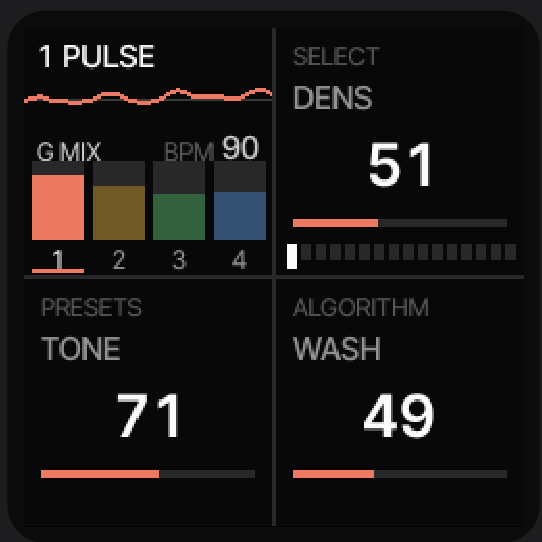
This is MAKU by okumurari2 built for the M-Vave SMK-37 keyboard (SMK-37 Pro, Elite or MKE-P37; same JieLi AC791N chip as the FM-1, a different panel). MAKU is an always-on ambience machine: power it on and a new, random, in-key world is already playing. Four parts (a pulse, a floor, a haze, a voice), buttons that are verbs (sink, cascade, swell, wobble, lift, scramble, drift), and your likes, from which the new worlds grow.
All of that is okumurari2's work. This port only maps MAKU onto the SMK's controls; it is also offered upstream as okumurari2/maku#4.
Unofficial: not affiliated with or endorsed by M-Vave, okumurari2 or Hügelton Instruments.
Status: experimental. Install it only if you can recover the keyboard (see Safety), at your own risk.
Everything about MAKU itself (the parts, the verbs, the likes, the spec) is MAKU's: read the upstream README-UPSTREAM.md and docs/SPEC.md. This page covers what is different on the SMK-37.
Credits
- MAKU by okumurari2: https://github.com/okumurari2/maku (browser emulator at https://okumurari2.github.io/maku/). Its own credits (engines, samples, fonts, contributors) are in README-UPSTREAM.md.
- Felucca by Leo Kuroshita (Hügelton Instruments): https://github.com/hugelton/Felucca, the FM-1 platform MAKU is built on, including its SMK-37 board layer.
- SMK-37 mapping: made with the fm1-to-smk37 kit (hardware facts, flash map, update path, backup and recovery).
What the SMK-37 adds
Everything sits behind one build switch, BOARD_SMK37 (BOARD=smk37); the FM-1 build of this tree is
byte for byte MAKU's. The SMK gives MAKU more hands: the verbs get a button row and two wheels, the 16 pads
hold your likes, and the faders hold verb amounts where you leave them. Details:
docs/SMK37.md, the decisions: docs/smk37-port.yaml.
| SMK-37 | MAKU37 |
|---|---|
| K1 | MASTER (output volume) |
| K2 / K3 / K4 | the focused part's three macros (SELECT, PRESETS = TONE, ALGORITHM); a verb held: RISE / HOLD / FADE |
| K5..K8 | volume of parts 1..4 (pulse, floor, haze, voice); the turned part gets the focus |
| top row: ARP, NOTE REPEAT, SCALE, CHORD, GLOBE, BT | the verbs SINK, CASCADE, SWELL, WOBBLE, LIFT, SCRAMBLE |
| PATCH | HOME: held, a new world; with OCTAVE-, the settings menu |
| PARA | the key (MAKU's ARP: tap steps the scale; held, a key sets the root) |
| SEQ | held: BPM, SWING, DUCK |
| SEQ PLAY | DRIFT on / off (lit while on); held: RATE, RANGE, REACH |
| SEQ REC | tap: like; held 2 s: every like forgotten |
| OCTAVE- / OCTAVE+ | a fifth down / up |
| KNOB BANK | the settings menu (again: closes it) |
| < / > | the world before (up to 8 back) / a new world |
| 16 pads | the 16 likes: tap a lit one, its world as it was liked; the pulse focused: its 16 steps |
| faders 1..4 | CASCADE, SWELL, SCRAMBLE as standing amounts (a button press goes on top), SPACE (the space DRIFT adds) |
| pitch wheel | down: SINK, up: LIFT, back at rest when let go |
| mod wheel | WOBBLE, as far as it is up |
| 27 middle keys | as on the FM-1, with velocity |
| 10 outer keys | more notes for the focused part |
| FX, FADER BANK | nothing |
The SMK's TRS jack is an output, so MIDI clock follows over USB only.
Install
Easiest: the web installer at genkigenki.github.io/smk37. Open it in Chrome or Edge, connect the keyboard by USB, press Connect, then Install on MAKU37.
From a release or a build (Python 3 with mido and python-rtmidi; close other programs that use the
keyboard's MIDI port):
python3 tools/fm1_install.py --info               # the connected keyboard's identity, e.g. SMK-37 Pro_016
python3 tools/fm1_install.py maku37.fwsc          # install; the keyboard restarts into MAKU37
Packages: maku37.fwsc for the SMK-37 Pro, maku37-elite.fwsc for the SMK-37 Elite, maku37-mke.fwsc for
the MKE-P37 (the same keyboard under other names; each package keeps that model's name, so M-Vave's updater
still takes the factory firmware back). The installer only sends an SMK package to an SMK keyboard, never to
an FM-1.
Back to stock: install M-Vave's official firmware with M-Vave's updater (on an SMK-37 Pro also
python3 tools/fm1_install.py SMK-37_Pro_016.fwsc, the unmodified official file). Calibration and Bluetooth
pairing are untouched; MAKU37's likes stay in the stock firmware's data area, so for a clean state write that
area back from your backup (the kit's recovery chapter).
Safety
Read the kit's update and recovery chapter before you install anything.
- Make a full flash backup first (the chapter, section 3): parts of the flash are unique to your unit and cannot be downloaded anywhere.
- MAKU37 writes only its settings and likes (
0xA9000-0xAEFFF), the store owner tag (0xAF000) and the update staging (0xBB000-0xBFFFF), plus the app through the update loader. It never writes the boot head, Bluetooth pairing, the factory calibration, the stock resources or key_mac: an allow-list with compile-time checks and a second guard. - Store owner. Other FM-1 ports on the SMK use the same store area. At power-on MAKU37 clears a store written by another firmware before it reads anything: save what you want to keep first.
- Do not unplug the keyboard while an update runs.
Build
Toolchain and SDK as for MAKU: see BUILDING.md. Linux x86-64 (or WSL2) builds natively; macOS uses Docker.
tools/get_toolchain.sh                    # the JieLi toolchain, once
./build.sh                                # FM-1: build/felucca.fwsc (identity FM-1_900), unchanged
BOARD=smk37 ./build.sh                    # SMK-37 Pro: build/maku37.fwsc (identity SMK-37 Pro_900)
BOARD=smk37 MODEL=elite ./build.sh        # SMK-37 Elite: build/maku37-elite.fwsc (SMK-37 Elite_900)
BOARD=smk37 MODEL=mke ./build.sh          # MKE-P37: build/maku37-mke.fwsc (MKE-P37_900)
tests/run_tests.sh                        # MAKU's tests plus the SMK board tests
License
GPL-3.0-only, as MAKU and Felucca: see LICENSE and LICENSING.md. The SMK-37 changes are under the same license. This repository contains no stock firmware, no flash dumps and no vendor code.
M-Vave, FM-1, SMK-37 Pro, SMK-37 Elite and MKE-P37 are trademarks of their respective owners.