
Makohai
A generative groovebox for the M-VAVE FM-1, in the style of early-90s PC tracker music.
Makohai is Finnish for the longfin mako shark. It was called Espada before 1.0.
Six lanes (lead, arp, pad, bass, drums and sfx) play parts that are composed live in one of eighteen styles: chords, bass lines, melodies, drum patterns and noise in the manner of the S3M scene, played as a tracker musician plays them, with glides, swells and an echo channel. You do not program steps; you mix styles. Queue the next style, blend it in lane by lane from the bottom up, or launch it at once with its own tempo. Shape each lane with a filter, a tempo-synced wobble, FM brightness and drive, or with tracker effects: slide, porta, vibrato, tremolo, tremor, gate, swing, retrigger, a bit crusher, echo, and an equal-power pan per lane with an autopan that sends each note to the other side or sweeps the lane in time. An arc builds the piece up from the drums to a drop, and DROP lets you call the break yourself. SETUP's free knobs show pictures: a scope, level meters, a goniometer, a spectrum landscape, and demo-style pictures (a turning crystal, a tunnel, dots, plasma, fire and more). SEL + HOME shows them full screen, cut on the beat; SETUP's BACK puts one behind the whole screen, cycling every few bars if you like.
Status: 1.3. It runs on the FM-1. A voice budget keeps the sound in time however much plays (SETUP, VOICES); if the sound ever turns to crackles, SETUP's AUDIO and VOICES rows show what the FM-1 was doing. Install it over the official firmware and keep the USB rescue in mind (below).
The screens
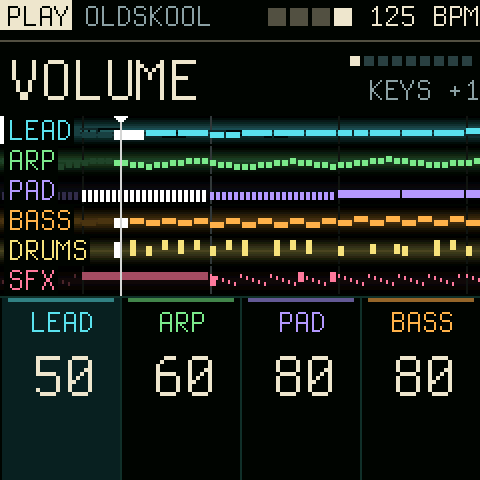
One screen, laid out as a mixing desk: the setting in large letters on top, all six lanes in the middle, and at the bottom the four knobs in a row, four lanes side by side, each with its value for that setting; ALGORITHM slides the window over the six lanes. A group button picks the kind of setting, PRESETS steps through them.
PLAY (HOME): volume, style, sound, melody, rhythm, pitch, density, octave, change. |
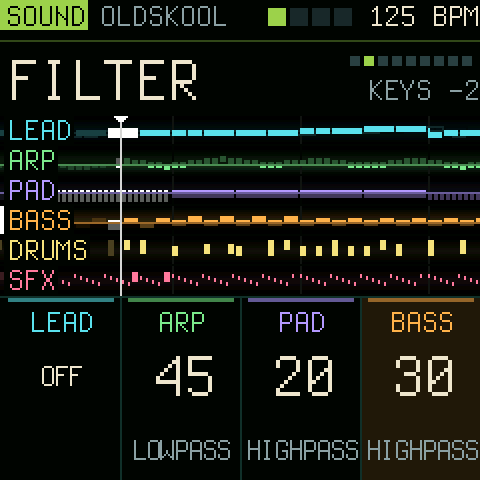 SOUND (FX): reverb, filter, resonance, wobble, brightness, drive, crush, vary. The lanes darken what the filter cuts. |
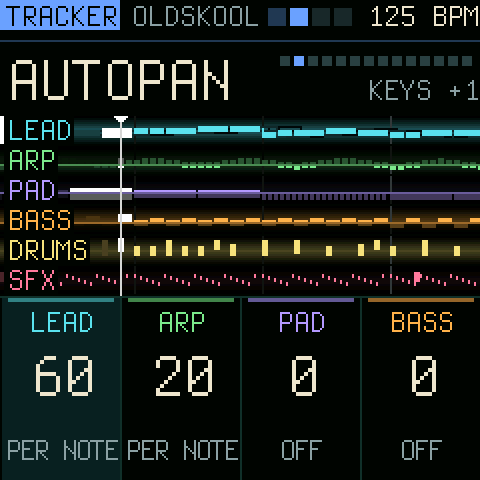 TRACKER (ARP): pan, autopan, pan rate, swing, echo, slide, glides, porta, vibrato, tremolo, tremor, gate, retrigger, rate. |
||||||||||||||||||||
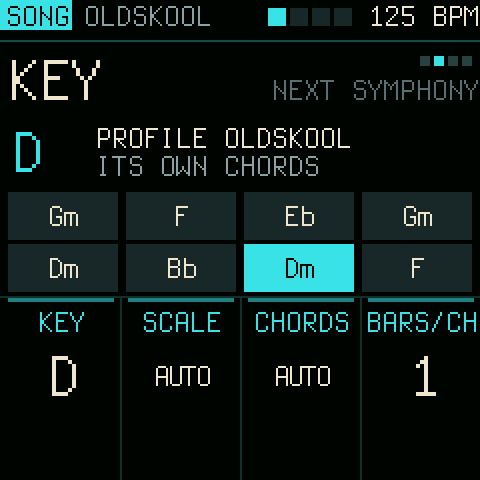 SONG (GLO): the knobs are four settings of their own. KEY: key, scale, chords, bars per chord, the chord playing lit. |
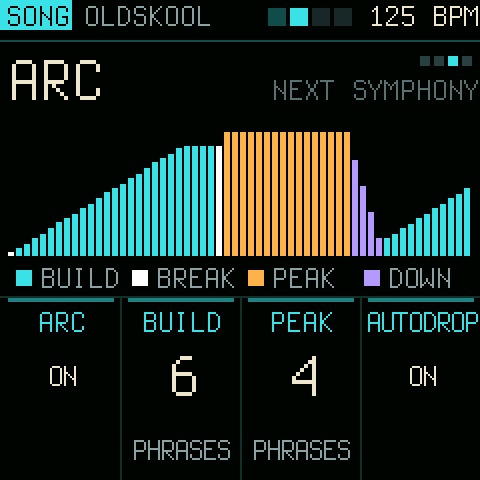 ARC (off until you turn it on): the energy over the coming bars, build, break, peak and down. |
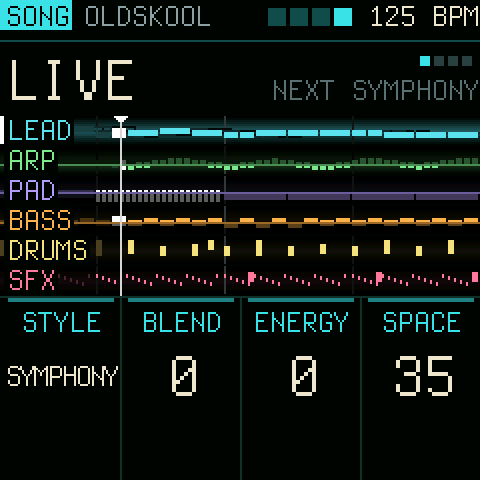 LIVE: the next of eighteen styles, blend, energy and space; SEQ launches it at once, with its tempo. |
||||||||||||||||||||
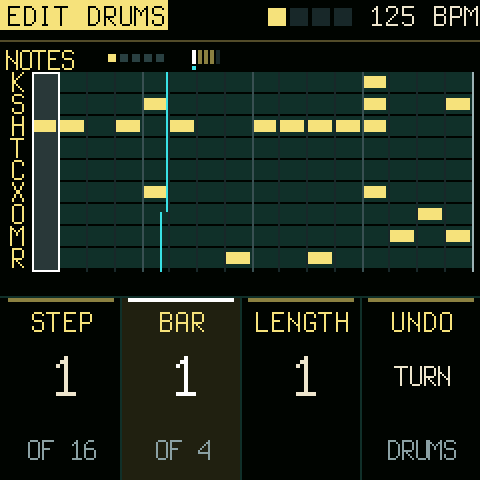 EDIT: the lane's own part, bar by bar, up to 512 bars, in scale steps from the chord root; the drums' nine hits by row. RECORD live, an effect column per step, undo, bar and range tools, FILL a bar from any style, COPY another lane's part; after your last bar: LOOP, PROFILE or MY STYLE (new bars in your manner). |
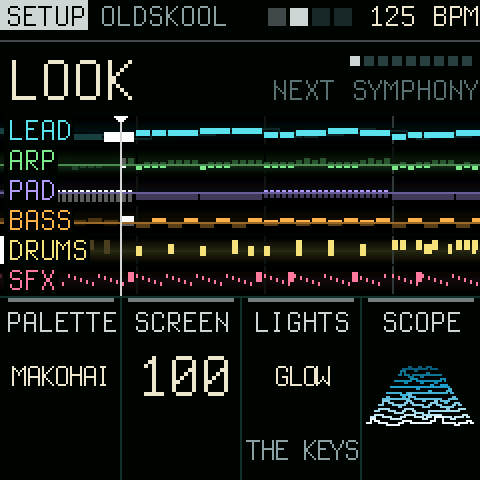 SETUP (hold HOME): the palette, the screen's level and the lights; the lanes' MIDI channels; back to defaults. |
|||||||||||||||||||||
|
||||||||||||||||||||||
How it plays
- Lanes. Notes scroll from right to left past a fixed "now" line. Solid blocks are what a lane plays; outlined blocks are a preview of the queued style. Stopped, the lanes show the INTRO that PLAY will start. All six are always on screen; the white mark is the lane the buttons and keys act on. Every setting is on a knob, the keys only play.
- ARP. Arpeggios through the chord that plays, in each style its own (up, down, up-down, Alberti, broken, random; 16ths to quarters, 1 to 3 octaves), set on the knobs as every lane.
- SFX. The sixth lane: a gale of noise into every drop, the impact on it, washes, surf, laser zaps, crackle and 8-bit noise, following the arc and the style.
- Ten styles, to change the mood in one move: EPIC (orchestral minor), HYPERSPACE (techno minor with power chords), FUSION (melodic major with a chromatic turn), OLDSKOOL (the 4-channel sound with arpeggio chords), SYMPHONY (the orchestra), TROPIC (off-beat chords, congas, a flute), STEEL (power chords, a galloping bass, double kick), DRIFT (sus chords, swells, no snare), FUNK (slap bass, clav, ghost notes) and RAVE (four on the floor, an acid bass). Each brings its chords, parts, instruments, tempo and way of playing.
- Drums. Kick, snare, hats open and closed, clap, toms that step down in a fill, rim shot, kettle drum and crash, in five kits (DEEP: a very low, long kick; PUNCH: the sharp one); each style has its own grooves and fills. SUPERSAW, seven detuned saws, for big chords and leads; AH VOX, a choir's aah for the pad; ORCH HIT, the orchestra hit on one key, on every drop.
- Sets. Eight sets of everything but your parts (styles, knobs, mutes, key, tempo, effects), to load at once while playing (SONG, SETS).
- Played by hand. Lead notes glide in from the last one, long chords swell in or fade out, the lead has an echo channel, as in the trackers; strings carry bow noise and the drums ring as recorded ones. Each style also plays the tracker's effects its own way: vibrato, slides, dives, cut-off stabs, volume slides, swing, trance gates, wide stereo and orchestra hits.
- The music of a lane. MELODY (which idea), RHYTHM, PITCH and CHANGE (how soon new material comes, from frozen to every 16 bars), side by side for all four lanes. LFO: a new idea now. ENV fades a lane out and in.
- Long arcs. The lead plays 16-bar sections of two 8-bar periods: a motif stated, answered, sequenced, closed open, then driven to its high point and closed on the root.
- Mixing. BLEND moves lanes to the queued style one at a time: drums, then bass, pad, lead. LAUNCH moves every unlocked lane at the next 4-bar phrase. LOCK keeps a lane where it is. The bass lane's style sets the chords for everyone, so a half-blended mix stays in key.
- The lead stays on the harmony: chord tones on every beat, scale runs into them, a motif per phrase that is answered and closed. VARY gives each phrase a different character (echo, slide, bite, filter, stutter).
- Density. 50 % is the part as the style writes it. Lower thins it out; higher adds notes inside the chord and its scale, 16th hats, ghost snares and fills.
- Song form. PLAY starts with an INTRO: pad, drums or bass alone, the other lanes in one by one. A tap on REC is an INTER: one lane alone for two bars, the others back one by one. Holding REC is a DROP: one lane alone while you hold, everything back with a crash the moment you let go. PLAY again is the END: the lanes fade out one by one, bass or drums last, and Makohai stops. ENERGY (SONG) turns every lane's density up or down at once.
- Stereo and a room. The voices spread left and right as a tracker's channels do, strings and brass play as sections, and a stereo reverb (SPACE) puts it all in a hall.
- The arc (off until you turn it on): starts with a few drum hits and builds bass, pad and lead in as the energy rises, breaks, drops and builds again.
- Your own parts. On the EDIT page you enter notes step by step, tracker style: white keys are scale steps counted from the chord root, so a melody follows the chords and stays in key. A part is as long as you write it, up to 512 bars a lane. FILL writes a bar in any of the eighteen styles, or a variation of yours, never the same one twice; REPEAT copies the bar before; COPY takes another lane's part (a lead line becomes a bass line in the same chords). RECORD what you play, live, into the part; a tracker's effect column per step (volume, slide, porta up and down, vibrato, retrigger, cut, delay); undo, transpose, shift, bars in and out, copy and paste a range of bars. On PAD a key plays a chord in key. After your last bar the part loops, gives way to the generated one, or goes on in your style: MY STYLE learns the rhythms and jumps of your bars and writes new ones like them.
- Song. Key, scale (major, minor, the church modes, harmonic and melodic minor, pentatonics, blues), a list of suggested progressions, bars per chord, and the arc's lengths.
The full guide to the panel is in docs/MANUAL.md. Where Makohai is going, how it is built and why: docs/DEVELOPMENT.md.
Try it in the browser
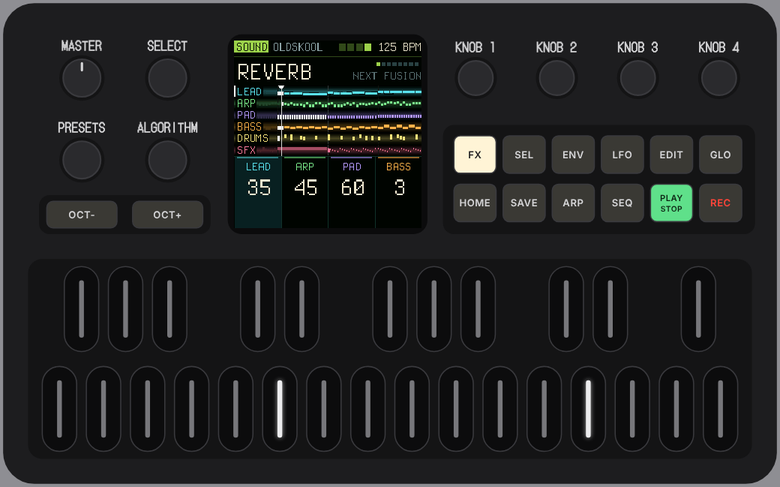
Makohai in the browser: the same code the FM-1 runs, compiled to WebAssembly, on Felucca's browser FM-1 (knobs, buttons, keys; your computer's keyboard plays it too, a MIDI controller turns the knobs). Chrome, Edge, Firefox or Safari.
Install
Makohai's web installer in Chrome or Edge on a computer (it also takes a test
build, and brings back the official V15), the FM-1 Firmware Hub, or from the command
line (once: pip3 install mido python-rtmidi):
python3 tools/fm1_install.py makohai-1.3.fwsc
Install over M-VAVE's official firmware. If anything goes wrong: hold OCT- while switching on for the USB rescue, where the installers still reach the FM-1. Installing firmware is at your own risk.
Build
You need Linux on x86-64 (or macOS / Windows with Docker or WSL), Python 3 with Pillow, JieLi's toolchain and three files of the JieLi AC79 SDK:
pip3 install Pillow
tools/get_toolchain.sh
git clone --depth 1 --branch AC79NN_SDK_V1.2.1_2023-12-13 \
    https://gitee.com/Jieli-Tech/fw-AC79_AIoT_SDK.git ~/fw-AC79_AIoT_SDK
./build.sh                         # -> build/makohai.fwsc
./build.sh --release 1.3           # -> build/makohai-1.3.fwsc, identity FM-1_47625642
GitHub Actions builds the package on every push (the run's artifact makohai-firmware).
In the browser: web/emu/makohai_build.sh (clang with wasm-ld, or Emscripten) writes build/makohai_emu/;
serve that folder and open it. node web/emu/makohai_emu_test.mjs build/makohai_emu/makohai.wasm checks it without
a browser.
Host mode runs the same code on a computer: tests/run_host.sh writes the screens as PNG and the sound as a WAV.
build/host/makohai OUT tests/demo.txt plays a scripted tour (buttons, encoders, keys over time). The screenshots
above come from host mode, pixel for pixel what the FM-1 draws, at twice the size.
firmware/src/makohai.c         the app: shared state, includes the parts below
firmware/src/makohai_synth.c   the audio interrupt: FM, drum and sfx voices, lane effects, the step clock
firmware/src/makohai_music.c   harmony, the eighteen styles, generators, density, the arc, your patterns, the bar cache
firmware/src/makohai_ui.c      the screen, the views and pages, the panel, saving
firmware/src/platform.c       Dinghy's wiring of the FM-1 platform (boot, USB, updates, panel, screen, settings)
The chip's rules (docs/RULES.md): integers only, no 64-bit division, the audio interrupt well under 5.8 ms. SEL + SAVE shows the interrupt's worst time in the header.
Licence and credits
GPL-3.0-only. Makohai is built on Dinghy (zvenson), which carries the platform of Felucca (Leo Kuroshita, Hügelton Instruments) as SLOOP (isod89) has it. Details in LICENSING.md.
"M-VAVE" and "FM-1" belong to their owners. Makohai is not made or endorsed by them.