Loom FM-1

5-Track Mixer (1–4 + D) | Sample Tape Scrub (SCRUB) | Granular Cloud (GRAIN) |
|---|---|---|
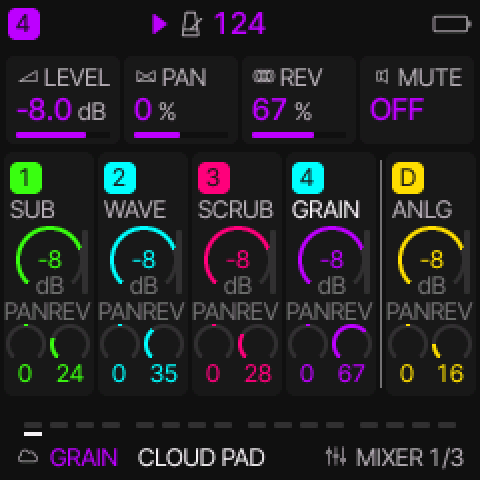 | 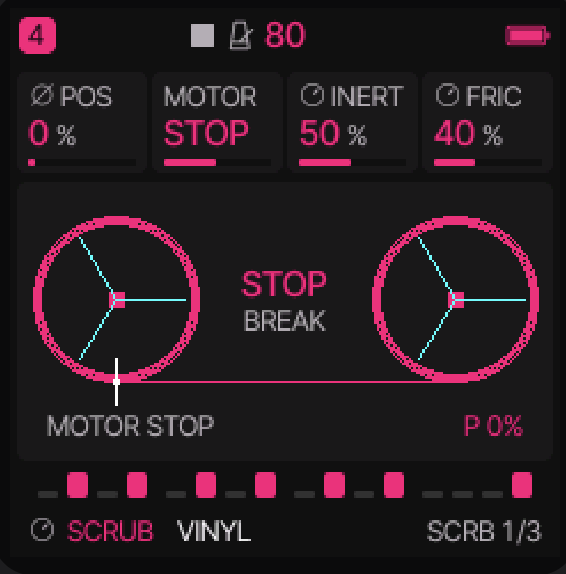 | 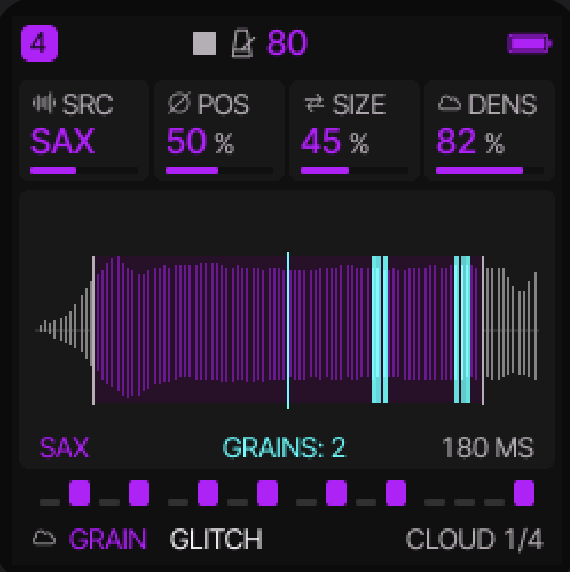 |
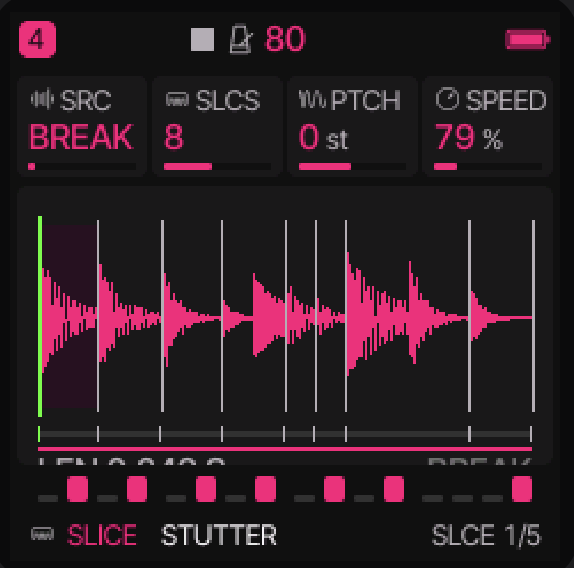
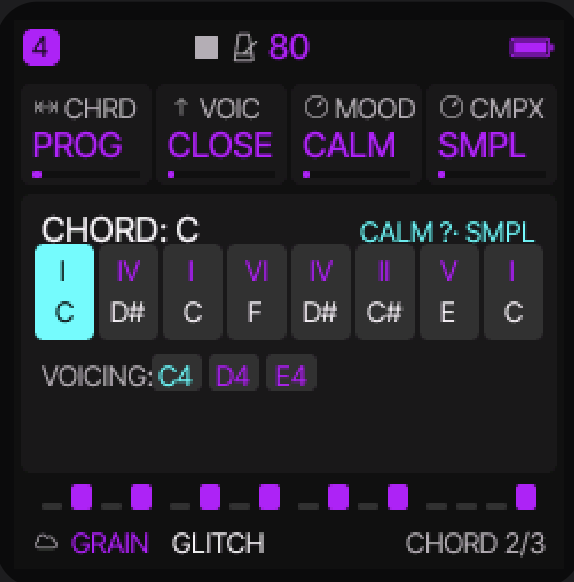
| 64-Step 8×8 Sequencer | Sample Slicer (SLICE) | Chord Progression Generator |
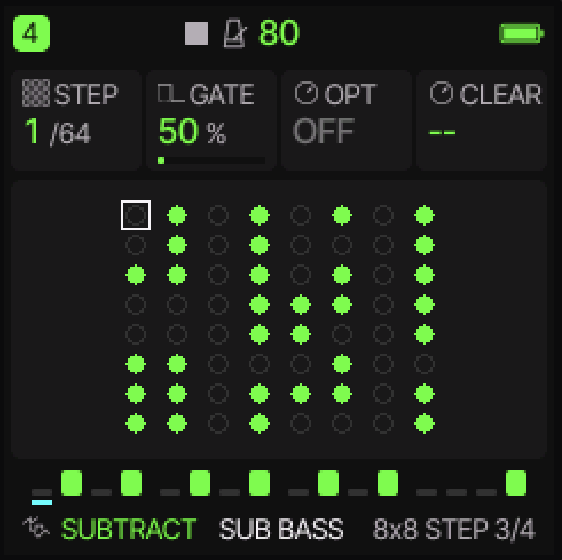 |  |  |
Loom FM-1 is a 5-track polyphonic synthesizer, sampler, and groovebox firmware for the M-VAVE FM-1, built on the open-source Felucca platform (GPL-3.0-only).
Loom FM-1 Highlights
- 5-Track Architecture (
1–4+D): 4 polyphonic synth/sampler tracks plus a dedicated 5th synthesized Drum track (DRUMwith Analog & FM kits, choke groups, and per-lane mixing), each with its own color-coded neon UI theme. - 14 Synthesis & Sampling Engines: Subtractive (
SUBTRACT), Wavetable (WAVETBLwith 3D terrain visualizer), 6-Op FM (FM6), Physical Tape-Platter Scrubbing (SCRUB), Granular (GRAIN), Sample Slicer (SLICE), Multisample (SAMPLE), Physical Modeling (PHYS), Phase Distortion (PHASE), Formant (VOICE), Organ (WHEEL), Chiptune (LOFI), Noise (NOISE), and Drum (DRUM). - 64-Step Dual-View Sequencer: Switch between
4x4 STEP/4x4 PAT4x4 sequencer grid and8x8 STEP/8x8 PAT64-step matrix views with humanize, swing, parameter locks, and instant pattern clear. - Chord Progression Generator & Bipolar Arpeggiator: Generative mood/complexity chord progression engine (
CHRD: PROG) with real-time voicing display, plus a 10-mode arpeggiator with bipolar-3to+3octave range and Euclidean gating. - Performance Macros & Sidechain Ducking: 4 assignable multi-destination performance macro knobs (
HOME > MACROS) and drum-triggered sidechain compression across synth tracks and master send FX. - Integrated Web Workbench & Live Browser Emulator: Full browser-based patch/sequence editor — the SEQUENCER tab has an interactive step grid (click or drag to paint steps, enter up to four notes per step on the keys, hit the eight DRUM lanes, and set time / accent / slide / velocity / chance / ratchet / nudge for each step) — and a real-time WebAssembly emulator with
.mid/.midimulti-track import,.mp3/.wav/.flacuser sample conversion (USR1–USR3), and Loom / Helm / Surge preset import into the librarian (seeweb/LOOM_IMPORT.md). - Firmware Package:
loom-groovebox.fwsc/loom-groovebox.fswc(Package Identity:FM-1_985, License:GPL-3.0-only, full details inLICENSING.md).
Current release, test and FUN11 planning: ROADMAP.md. Hardware validation for v1.8.4.3: docs/VALIDATION-1.8.4.3.md.
Upstream Felucca Documentation & Reference
Features
- Thirteen engines (below), each with its own factory presets; every factory sound has a category (BASS, LEAD, PAD, PLUCK, KEYS, DRUM, FX, OTHER) to browse by
- Four tracks, one synth part each with its own engine and sound (drums are the DRUM engine); 8 voices shared between them. ALGORITHM selects the track on every page
- Sequencer: 64 steps per track with chords, ties, accent, slide, per-step chance, velocity and ratchets (a step played 2, 3 or 4 times in its length); a 4x4 step grid and an 8x8 matrix, where KNOB 3 sets a note's length; a drum grid (white keys = steps, black keys = lanes); SEQ > DETAIL: the cursor step's chance, ratchet, nudge and velocity on the four knobs, drawn as lanes over the steps; automation: recording of knob moves per step (an automation icon marks the cards it drives); live loop recording with overdub; step recording at the cursor (REC on SEQ > STEP while stopped), one chord at a time or note by note (MENU > CHORD ENTRY ADD); divisions listed by length, 4 bars to 1/32; loading a sound never touches your patterns
- Timing: live recording keeps when you played each note, as a per-step NUDGE (1/16 of a step, half a step early to 7/16 late); the track's QUANTIZE decides what plays: ON (the default) every step on the grid, as always, OFF your own timing. Nudges can also be set by hand
- Parameter locks and the AUTOMATION list: hold a step on SEQ > STEP (or the drum grid) and turn a knob to set that parameter for that step only; EDIT with the step held clears its locks. SEQ > AUTOMATION is one list of everything that happens on the track's steps: PLAY / CLEAR, QUANTIZE, each step's CHANCE, RATCH, NUDGE and VEL, its locks and automation events; change their step, parameter or value, turn a lock into automation or back, add or delete one. 128 records shared by the four tracks. SAVE held undoes every edit
- SEQ TOOLS: hold SEQ on any page for tools on the keys: CLEAR, REVERSE, SHIFT < / >, RANDOM (a new beat, or new notes in the scale on the same rhythm) and COOK (changes the pattern a little each press); on a DRUM track also BEAT and each lane's CLEAR, REVERSE, FILL and RANDOM; KNOB 1–4 are LEN, DIV, SWING and GATE. Each tool is one undo (SAVE held); OCT− puts the track back as the layer found it
- Metronome and count-in: CLICK (OFF, while recording, or always) with three levels, and a count-in of 1 or 2 bars before recording from stop; the click goes to the headphones and speaker only, never to USB audio or into a pattern
- Songs (HOME > SONG): up to 16 sections, each naming the project slot (A–D) the four pattern tracks (T1–T4) play, or "-" for a track that rests there, with its repeats; drawn as a timeline with a lane per track. The DRUM track joins SONG with the next chain format. KNOB 1 picks the section, KNOB 2 the track, KNOB 3 its slot (A–D, "-") and KNOB 4 the repeats; on the + ADD cell a turn of KNOB 3 adds the next section (copying the one before it), and PLAY plays the chain. The white keys A3–D4 also set the slot.
- Chord keys: one finger plays an in-key chord (triads or sevenths of the scale, or fixed chord shapes), with voicings; on the keys, MIDI in, recording and the arpeggiator
- Arpeggiator with UP, DN, UPDN, RND, ORD (the notes in the order you pressed them), REPEAT and, for chords, DNUP, UP+8, CONV, DIVG, PINKY, THUMB, WALK and CHORD; a beat LED; 16 scales with a white-key mode, glide, MONO / LEGATO / UNISON
- LFO: RATE or SYNC to a note value (4 bars to 1/32, following the tempo or an external clock), TRIG NOTE or FREE, POL bipolar or unipolar (LFO > LFO 2)
- Modulation matrix: 4 slots per track, MIDI controllers as sources, S&H and SLEW (a random value per LFO cycle, held or gliding), and DEPTH as a destination, so the matrix can modulate the LFO itself
- SPREAD (EDIT > VOICE 3): the voices of a POLY or UNISON track alternate left and right of its PAN
- ENV SYNC (ENV > ENV DEST): the envelope's attack, decay and release as note values of the tempo
- Effects: distortion, an INSERT (drives, CRUSH, phaser, flanger, chorus, with a dry / wet MIX) and the SLICER per track; chorus, delay (in time with the tempo, dotted values included) and reverb sends (the reverb as HALL, ROOM or SPRING; HALL is a smooth stereo reverb, the default on a fresh start); master limiter
- FX layer: hold FX for repeat, reverse, filter sweeps, tape stop, freeze, a harmonizer (OCT UP / OCT DN with shimmer), FLANGER and PHASER (in time with the tempo), REV THROW and ECHO THROW (every track's reverb or delay send full while held), and mutes on the black keys; any white key can hold any effect (hold the key in the layer and turn PRESETS); MENU > FX LATCH makes them toggle, so nothing has to stay held
- MOMENTARY: hold LFO and turn a knob on HOME or a sound / FX page; let go of LFO and the value jumps back (OCT+ while holding keeps it)
- Quick layers: hold FX, GLO, SCL, EDIT, REC or SEQ for shortcuts on the keys and knobs, or double-tap it to keep the layer open; one-step undo (SAVE held); REC on every page; OCT+ confirms, OCT- goes back; what can be pressed breathes softly instead of blinking
- Presets: factory presets, 32 user preset slots and 4 projects, named on the device (an FM6 sound keeps its own patch in both); user presets get a category, and a project can get a random name; projects from every earlier version load. The PRESETS knob changes the sound from every page that is not a list. Turn the FM-1 off and on and the music is as you left it (MENU > RESTORE LAST, an autosave of its own, written only when stopped and idle)
- Screen: flat UI with Inter Tight and Fukiai icons, FLAT or LINE style, 10 palettes including grayscale, black and white, high contrast and NIGHT; type in sizes by role (what you read in the larger size, labels and hints in the smaller); MENU > LARGE for tall knob cards with larger labels and values; the menu in five tabs. The header shows the track and the project slot of its pattern ("1 A", "1 A*" once edited), the play state and the tempo. HOME shows the oscilloscope or, with MENU > HOME TRACKS, the four tracks with their steps playing (LEVELS: with the four tracks' levels on the knobs); the screen can go dark when the panel is left alone (MENU > SCREEN OFF); MENU > HELP shows a short hint when a page or a layer opens
- LEDs: idle buttons and keys glow dim so the panel can be found in the dark (MENU > LEDS: OFF, DIM LO, DIM HI or INV, the official firmware's look); PLAY turns green while playing; the keys show the notes the sequencer and MIDI IN play, and on SEQ > STEP (stopped) the notes of the step under the cursor; the drum grid marks the beats (steps 1, 5, 9, 13); MENU > SCALE LEDS shows the track's scale on the keys; a soft light sweeps over the keys at power-on, and with MENU > ANIM IDLE drifts over them while the FM-1 waits
- USB: class-compliant MIDI in and out, and a stereo audio input ("Felucca") at 44.1 or 48 kHz (the computer picks) that records the master output on the computer, no driver needed (at a fixed level with MENU > USB LEVEL FIXED; on macOS 13–15, set MENU > USB SERIAL to OFF so the audio input appears)
- MIDI: USB and TRS MIDI in; MENU > MIDI > MIDI IN: CH1-4 (channels 1–4 play tracks 1–4), CH5-8, CH9-12 or CH13-16 (another block of four, e.g. for two FM-1s on one cable), or SEL (every channel plays the selected track); the keys send on the track's channel; pitch bend, sustain, panic; clock from internal, USB or TRS. MIDI CCs set track parameters: 5 GLIDE, 7 LEVEL, 10 PAN, 71 resonance, 72 / 73 / 75 release / attack / decay, 74 brightness, 91 / 93 / 94 the reverb, chorus and delay sends. MIDI LEARN (GLO + D4) sets up to 16 more CCs of your controller to any knob's parameter of any track, on the device; Program Change loads a track's sound by its number in PRESETS
- Web: editor for every parameter (with a 6-operator FM patch editor that also sends a whole 32-voice bank), step grid, mixer, preset library, sample upload and recording with trim, the MENU settings; full backup and restore (everything but the FM6 voice bank: keep its .syx file); return to the official firmware; Felucca itself running in the browser
New in 1.8.4.3
- DRUM kits ANLG / FM render one lane per voice. The Loom drum voices used to render the whole kit once per sounding voice, so eight lanes played eight copies, the envelopes ran eight times too fast and a muted lane silenced the whole kit. Each voice now renders its own lane; the kit's level, decay and lane mutes are correct.
- The dedicated DRUM track refuses automation / parameter locks with
NO LOCKS ON DRUMuntil FUN11. The motion record's place byte holds two track bits (tracks 0..3); the old code silently aliased a track-5 lock onto track 1. - Project round trips are exact for the dedicated DRUM track. Capture stores the same compact 33-parameter drum block a load restores, old four-track stores load into the five-track project, and the project's
partsmarker is normalised after import. - The legacy host suites are green again:
fun10_test,motion_test,upreset_testanddrum_test(ARP modes, kits, 89/91/99/103/104-parameter migrations, FUN7/8/9 retained slots, DRUM voice budgets). The goldens were refreshed for the DRUM lane fix.
New in 1.8.4.2
- 4x4 STEP / 4x4 PAT are the 4x4 sequencer grid again (the intended Loom view): 16 large cells per bank, notes filled, rests ringed, ties carried, the cursor and the play head; the piano-roll experiment is reverted. 8x8 remains the 64-step matrix.
- Engine colours in GREY (v1.8.4.2 rebuild): the v1.8.4 package shipped the GREY palette monochrome; this rebuild restores the loaded engine's theme/accent. The theme is applied once, so rolling values and
MENU > ANIMstill work. MONO stays neutral. - No blank MIXER frame: PRESETS and ALGORITHM redraw the tracks over the old frame instead of clearing the panel first (#181).
- HELP: hints for MACROS and the ARP layer; the existing hints fit their row again.
- Legacy projects: old four-track projects with a GM drum part or SAMPLE PERC load onto the dedicated DRUM track, keeping their steps, level, reverb and automation.
- SAVE from HOME returns to USER; PRESETS on 8x8 STEP moves the step cursor; EDIT on AUTOMATION deletes/resets the selected row.
- DRUM lane mutes: the grid and the sound agree on the dedicated track, and a muted lane keeps ringing on unheard (channel mute).
- Filter envelope / project load: the OP1 level and F AMT no longer share one clamped value, so old and new projects load their sound unchanged.
New in 1.8.3
- HOME > CLOCK is gone: it repeated GLOBAL (BPM, SWING, CLOCK, TUNE); GLO has them. HOME now goes round HOME, MIXER, MACROS and SONG.
- AUTOMATION is navigable again: EDIT is the page button (it opens EDIT); OCT+ twice on a record deletes it. AUTOMATION is the list of parameter locks and automation events, not the notes: the notes are on STEP and DETAIL.
- Help hints follow the Loom page names (AMP ENV / FILT ENV / ENV SYNC, MACRO 1–4, SCALE, 4x4 and 8x8 STEP/PAT, DETAIL, AUTOMATION, SONG, GLOBAL), so MENU > HELP explains the restored screens.
New in 1.8.2
- Update without a replug: the update path now holds the USB disconnect long enough for the host to see it, so USB MIDI comes back on its own after a flash (it used to need a physical replug; this was also the web installer's false "device did not come back").
- SONG, DETAIL and AUTOMATION are reachable again. The Loom page rework had left them out of the page table: SONG is a HOME view (HOME taps: MIXER, CLOCK, MACROS, SONG; GLOBAL stays GLO's one page), and SEQ keeps its 4x4 / 8x8 STEP and PAT pages followed by DETAIL and AUTOMATION.
- DRUM macros and kits: the Loom drum engine was reading the track parameter block from the wrong offset (P_LEVEL as KIT, P_ATK as TUNE, ...), so kits, TUNE / TONE / DECY / SNAP / ACC / PUNCH and the FM kit were wrong or silent. It now reads P_E0..P_E7, the analog and FM lane types are initialized, and a kit only keeps its own voices.
- SCRUB voices end: a released note is no longer held in sustain by the motor, and the auto-play voice releases when the scrub stops. The tape can keep moving silently; it no longer holds a voice open.
- WAVETABLE DC: a ~10 Hz blocker after the filter removes the offset left by bit reduction and drive (DIGI BITS and CYBERVOX were over the health limit).
- The sound categories now match the current engine order (SCRUB, WAVETABLE included), and the sound/CPU regression baselines are 1.8's.
New in 1.8.1
- PROG + VOIC fixes: turning VOIC while CHRD = PROG no longer resets the progression's playhead to step 1, and the ARP keeps walking after a voicing change. An inverted voicing (INV1 / INV2) keeps the chord's real root and name instead of being displayed as a different chord.
New in 1.8
- Held-ARP screen: holding ARP now shows its map (the mode in effect, spelled out, and the key hints). The panel used to be blank.
- VOIC with CHRD = PROG: the VOIC knob (SCL > CHORD) now voices the generated progression itself, so OPEN, INV1, INV2 and +OCT also change the keys, the CHORD page and the held ARP while PROG is selected. Before, it did nothing there.
- Factory presets are dry: every factory sound now sets its sends explicitly instead of falling back to the old wet defaults (chorus 24, delay 28, reverb 36). Basses, leads, plucks, keys, organs, drums, chip and tape sounds are fully dry. The effect-led sounds keep a light touch (about 8–12 % chorus and 12–20 % reverb): the pads, strings, choir, bells, wind/rain, grain clouds, shimmer, wavetable atmospheres, electric piano and the VINYL scrub; GLITCH, SHIMMER and NEON TAPE keep a delay of about 8 %. DIST is unchanged.
- SCRUB position knob: more torque (a first detent responds at once and a move lands several times faster), and the motor resumes as soon as the move is done instead of waiting out the old ~0.8 s hangover in silence.
New in 1.5.1
- SEQ > DETAIL (Discussion #199): SEQ now goes STEP, DETAIL, AUTOMATION. DETAIL is the STEP page (the same cursor, the same piano roll or drum grid) with KNOB 1–4 as the cursor step's CHANCE, RATCH, NUDGE and VEL; PRESETS walks the steps, and on a DRUM track a white key picks its step. The four are drawn as lanes over the steps; EDIT puts the step's four back. On STEP and the drum grid a step with a CHANCE, RATCH or NUDGE gets a small mark. These are the values AUTOMATION lists (EDIT there still deletes a row): nothing new is stored.
- MIDI Program Change (PR #179 by renebohne): a Program Change on a track's channel (routed as notes by MENU > MIDI > MIDI IN) loads that track's sound, numbered from 0 as PRESETS lists the engine's sounds. DRUM: its kits (0–5: STD, 80, 10, 66, 55, 77). FM6: 0–7 its presets (F1–F8), 8–39 the voice bank's B1–B32 that hold a voice. A number past the last is ignored; the engine never changes. SAVE held undoes it.
- Dotted delay times: the DLY page's TIME has 1/4D, 1/8D and 1/16D, and the knob steps them by length (… 1/2, 1/4D, 1/4, 1/8D, 1/8, 1/16D, 8T …). The delay holds 1.49 s, so 1/4D is held to that at 60 BPM and below.
- REV THROW and ECHO THROW in the FX layer, on D5 and E5 by default: while held, every track's reverb send (REV THROW) or delay send (ECHO THROW) is full, gliding in and out without a click; ECHO THROW also lifts the delay's FDBK to 70 % if it is lower. Let go and the tails ring out. Nothing is saved or recorded. If you had set D5 or E5 to NONE, they now hold the throws: set them to NONE again (hold the key in the FX layer, turn PRESETS).
- Fixed: turning KNOB 4 (LIST) or KNOB 3 (FAV) on PRESETS made all the LEDs flash; the change is now saved once you leave the page or after 10 s idle (#197). MOMENTARY (LFO held) now works on MIXER too: LEVEL, PAN, REV and MUTE go back when LFO is let go (#195).
- USB audio: the descriptors list the audio streaming interface before the MIDI one, for the USB audio driver of older macOS, where the audio input did not appear (#67; expected to fix macOS 15 and earlier, to be confirmed).
- 1.5.1 keeps 1.5's formats: projects, presets and settings move between 1.5 and 1.5.1 both ways (on 1.5 a dotted delay TIME plays as 4BAR).
New in 1.5
- An INSERT effect on every track, with a dry / wet MIX (Discussions #78, #177): FX → INSERT. KNOB 1 TYPE: SOFT, HARD, FOLD, FUZZ (drives: DRIVE, TONE, LEVEL), CRUSH (BITS, RATE, LPF), PHASR, FLANG, CHOR (RATE, DEPTH, FDBK); INSERT 2: MIX. It comes after DIST and before the SLICER, is part of the sound (user presets and projects keep it) and works with automation and locks. TYPE OFF, the default, plays exactly as before.
- MIDI LEARN (Discussion #170): on any page hold GLO and press D4 (MIDI LEARN ON), turn the FM-1 knob of a parameter, then move a knob or fader on your controller: that CC now sets the parameter (the header says e.g. "CC74 -> T1 CUT"). Turn the next knob and move the next control; OCT− clears the picked parameter's CC, OCT+ (or GLO + D4 again) ends it. Up to 16 CCs, kept with the settings; MENU > MIDI > LEARN CLEAR (OCT+) clears them all. Nothing changes for anyone who never learns.
- ANALOG's filter TYPE: LP, BP, HP (Discussion #104): EDIT → FILTER, a page an ANALOG track has after EDIT 2: KNOB 1 TYPE (LP the low-pass as before, BP band-pass, HP high-pass), KNOB 2–4 CUT, RES, KTR.
- ENV SYNC (Discussion #175): ENV DEST's KNOB 4 (ESYNC) makes ENV's ATK, DEC and REL note values of the tempo (1/64T to 4 bars, dotted and triplets) instead of milliseconds; they follow the tempo and an external clock.
- A note's length on the piano roll (Discussions #178, #173): on SEQ → STEP, KNOB 3 on a note step is its LEN: right ties the steps after it on, left takes them back. It stops before the next note ("NOTE AHEAD").
- Per-step velocity (Discussion #173): SEQ → AUTOMATION, + ADD VEL (OCT+: SHOW) lists every note step's velocity, KNOB 4 sets it (1–127). Steps entered by hand play 96, steps recorded live keep how hard you played.
- HELP (Discussion #156; MENU > SYSTEM > HELP, OFF by default): ON shows a short hint, key caps and a few words, in the footer for about 2 s when a page opens, and under a quick layer's map while it shows.
- SAVE reaches PRESETS on its second tap (#173): SAVE's pages go USER, PRESETS, PHRASES, PROJECT, TOOLS. The quick save (SAVE, OCT+, OCT+) is unchanged.
- The FX layer's map alternates light and dark columns (#173), so neighbouring effects are told apart at a glance.
- HOME LEVELS (#134): MENU > DISPLAY > HOME has a third value, LEVELS: HOME shows the four tracks' rows and KNOB 1–4 set the LEVEL of T1–T4.
- ⚠ SAMPLE's PIANO is the full piano again (five notes, as in 1.0 to 1.1.5): sounds and projects made on 1.4 or 1.4.1 that use PIANO play the full piano. PIANO HD in a user slot is no longer needed.
- Fixed: the arpeggiator follows TRN, ROOT, SCALE and QNT on held and latched notes (#191); MENU > DISPLAY > ANIM no longer changes HOME.
- ⚠ The INSERT, the filter TYPE and ENV SYNC are new sound parameters (OFF, LP, OFF by default): everything saved before plays as before. But a project saved by 1.5 does not open on 1.2 to 1.4.1: its slot shows EMPTY there (the data stays in flash until you save something into that slot there), and a backup that holds one is refused. User presets saved by 1.5 load there without the new values. The full backup still does not include the FM6 voice bank.
New in 1.4.1
- Engine quick actions on the EDIT layer's black keys. Hold EDIT: the black keys do what the selected track's engine offers, and the map shows it. On a DRUM track, black keys 1–8 (F#3 … A#4) mute its lanes KICK, SNARE, CLAP, HATCL, HATOP, TOM, RIM and BELL, one press to mute, the next to unmute. The LEDs show which lanes sound, the drum grid dims a muted lane. A muted lane keeps playing unheard, so unmuting brings it back in time. The mutes are for live play: never saved, not recorded, not undone; a sound or project load clears them, OCT− in the layer puts them back as they were when it opened. Other engines have no quick actions yet.
- FM6 voice bank (Discussion #168). The web editor's 6-OP FM tab sends a whole 32-voice SysEx bank (the standard 4096-byte file) to the FM-1 in one go, with its name. On an FM6 track SLOT (EDIT 2, KNOB 4) now goes F1–F8, OWN, then B1–B32, the bank's voices; the algorithm chart shows the voice's name. Picking a voice copies it into the track, as F1–F8 do, so a project or user preset saved with it keeps that sound after you send another bank (it loads with SLOT OWN). With no bank sent, SLOT stops at OWN as before. The bank has its own flash sector and is only replaced once a new one arrived whole; projects, presets, samples and settings are not touched. The full backup does not include the bank: keep the .syx file.
- 1.4.1 opens and saves everything 1.4 does, in the same formats.
⚠ Coming from 1.1.5
1.4 is the first release since 1.1.5.1 and holds a lot (all of this holds for 1.4.1 and 1.5 too). Everything you saved loads and sounds as before, except where marked here:
- Projects are saved in a new format (FUN10). 1.4 opens every older project, but 1.1.5.x and older cannot open a project saved by 1.4 or later: they show its slot as empty (the data stays in flash until you save something into that slot there), and refuse a backup that holds one. User presets saved by 1.4 load on 1.1.5.x without the five new values (LFO 2's SYNC, TRIG and POL, QUANTIZE, SPREAD).
- ARP ORD now plays the held notes in the order you pressed them (up to 1.1.5 it played them as UP): a sound or project using ORD sounds different when its notes were pressed in another order than low to high.
- SAMPLE's PIANO was a lighter lo-fi piano in 1.4 and 1.4.1; since 1.5 it is the full piano of 1.1.5 again.
- The pages moved (Discussion #153): see Controls below. In short: SEQ is STEP and AUTOMATION; SEQ held is SEQ TOOLS on every page (it no longer opens SONG); GLO opens GLOBAL; PHRASES is on SAVE; HOME goes round HOME, MIXER, MACROS and SONG; BPM, swing and clock source are on GLOBAL (GLO); TUNE is MENU > AUDIO, MIDI IN (ROUT) is MENU > MIDI, and the USB state and CPU load are MENU > SYSTEM > INFO. REC held is the REC layer as before.
- SONG has a lane per track: older songs load with all four tracks on each row's slot and play as before; its knobs are KNOB 1 SECTION, 2 TRACK, 3 PAT, 4 REPS, and on SONG the white keys A3 B3 C4 D4 set the slot.
- A fresh start uses the HALL reverb (up to 1.1.5: ROOM). Saved projects keep their reverb TYPE.
- BASS+ (MENU > SPEAKER EQ) is softer: its added harmonics are at half the level, so a full-scale kick no longer distorts (#180).
- The web editor needs its update for the new features; use the one on the site.
Controls
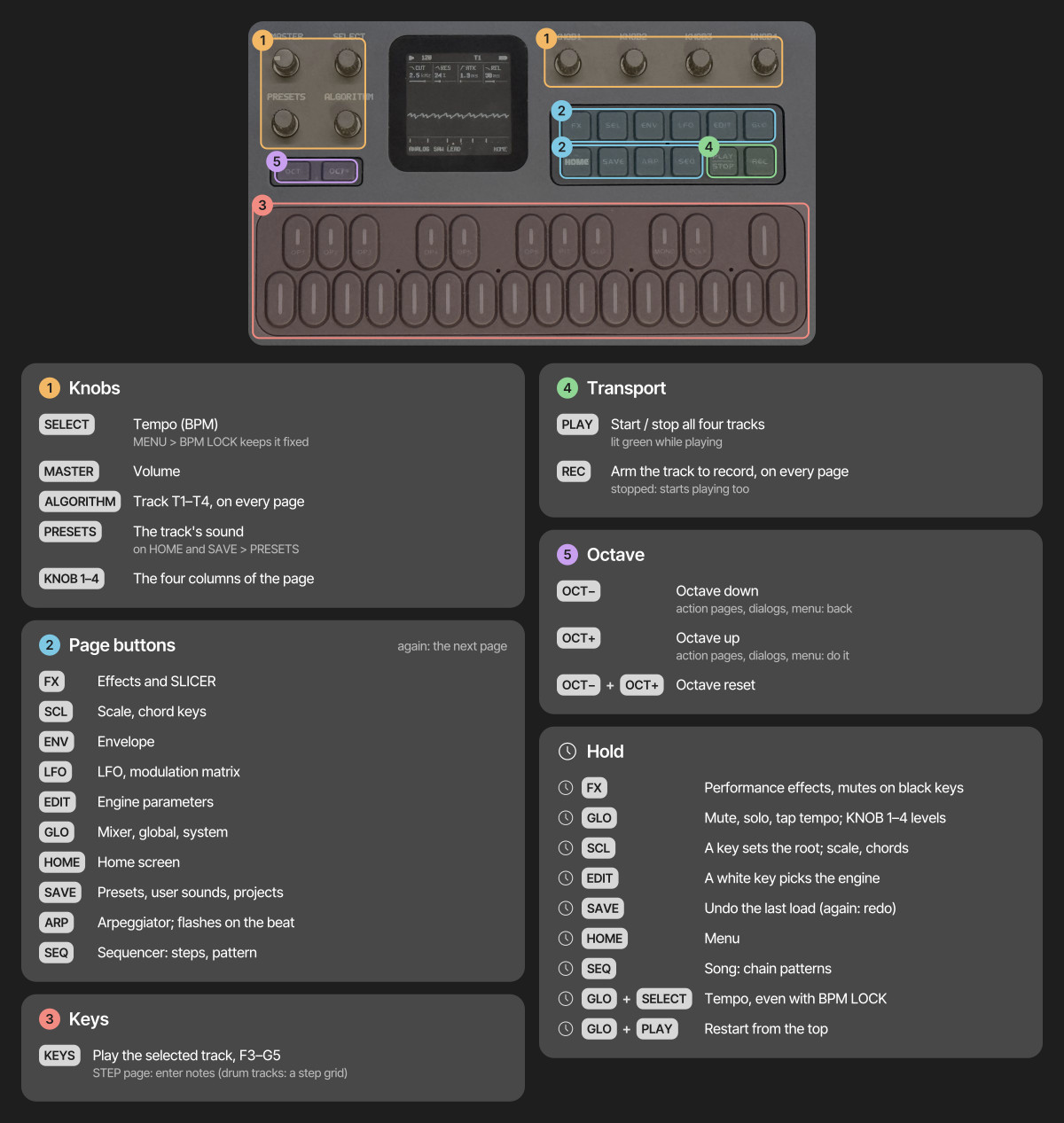
- Tap a page button for its page, again for the next; HOME returns home. Page buttons act when let go
- Hold FX, GLO, SCL, EDIT, REC or SEQ for its quick layer; hold SAVE to undo, HOME for the menu; hold LFO and turn a knob for a MOMENTARY change
- Double-tap a layer's button to keep its layer open without holding; tap it again to close
- On SEQ > STEP, hold a step and turn KNOB 1–4 to lock those parameters on that step (PRESETS: its NUDGE)
- On action pages and in dialogs, OCT+ does it and OCT− goes back; in the menu, OCT+ / OCT− change the value and HOME closes it
- Save a sound: stop, tap SAVE, pick a slot with KNOB 1, then OCT+ and OCT+ again (name it with the keys)
The pages by button:
| Button | Taps go round | Held |
|---|---|---|
| HOME | HOME, MIXER, MACROS, SONG | the menu |
| SEQ | 4x4 STEP, 4x4 PAT, 8x8 STEP, 8x8 PAT, DETAIL, AUTOMATION | SEQ TOOLS, on every page |
| GLO | GLOBAL | the GLO layer (mutes, solos, levels, TAP tempo, D4: MIDI LEARN) |
| SAVE | USER, PRESETS, PHRASES (the pattern loader), PROJECT, TOOLS | UNDO |
| LFO | LFO, LFO 2, LFO DEST, MOD | MOMENTARY (with a knob) |
| EDIT | EDIT 1, EDIT 2, VOICE, VOICE 2, VOICE 3 (FM6 adds OPERATOR, OP ENV, OPERATOR 2; DRUM LANES; SLICE SLICES; ANALOG FILTER) | the EDIT layer (the engines; on DRUM the black keys mute lanes) |
| FX, SCL, ENV, ARP | their pages (FX: INSERT and INSERT 2 after the SLICER) | FX and SCL: their layers |
| REC | arms the track | the REC layer (CLEAR, CLICK, COUNT-IN, CLICK LEVEL) |
Menu
Hold HOME for the menu, in five tabs: DISPLAY (COLOR, STYLE, LARGE, ANIM, LEDS, SCREEN OFF, SCOPE, HOME), CONTROL (HOLD, KNOB ACCEL, FX LATCH, BPM LOCK, SCALE LEDS, STEP PREVIEW, CHORD ENTRY), AUDIO (SPEAKER EQ, USB LEVEL, CLICK, CLICK LEVEL, COUNT-IN, TUNE), MIDI (MIDI IN, LEARN CLEAR) and SYSTEM (USB SERIAL, RESTORE LAST, HELP, HARDWARE CALIBRATION, INFO, ABOUT). ALGORITHM moves between the tabs and PRESETS through the rows of one; any of KNOB 1–4, or OCT+ / OCT−, changes the value (OCT+ opens HARDWARE CALIBRATION, INFO and ABOUT); press HOME to close the menu. Every new setting defaults to the earlier behaviour. The web editor's Settings tab reads and changes them too, saved the same way as from the menu, in the same tabs.
- COLOR: the palette. GREY (grayscale, called MONO up to 1.0.1), GREEN, AMBER, ICE, VIOLET, ROSE, PAPER (light), HI-CON (high contrast), NIGHT (the 0.9 look: true black, green-tinted text) and MONO (black and white)
- STYLE: FLAT (filled cards) or LINE (areas divided by thin lines)
- LARGE: OFF or ON: on HOME and the value pages the four knob cards grow tall, marked K1–K4, with larger labels and values about twice the size; the graph below becomes a strip. Lists, the step grid, the drum grid and the quick layers keep their layout with larger labels
- ANIM: ON, OFF or IDLE. OFF shows every change at once, without rolling digits, a gliding view or the LED sweep at power-on. IDLE is ON plus a gentle LED animation after a minute without input: a soft light drifts over the keys and the buttons breathe; any key, button or knob ends it and does what it always does. It never runs while playing, with a track armed, in a layer, the menu or a dialog
- LEDS: OFF (no glow), DIM LO, DIM HI (default) or INV (the idle LEDs lit, the active ones dark). What can be pressed breathes up to about 60 % of a lit LED, about 30 % with DIM LO
- SCREEN OFF: NEVER (default), 5 MIN, 15 MIN, 30 MIN or 60 MIN: after that long with no button, key or knob touched, the screen goes dark; the sound, the sequencer, MIDI and USB go on. The backlight stays on (on the FM-1 its line also enables the buttons and keys). The next button, key or knob only turns the screen back on
- SCOPE: OUT (default) or MIX: what HOME's oscilloscope shows. OUT the sound after MASTER (the picture shrinks with the volume), MIX the mix before MASTER, the same size at any volume
- HOME: SCOPE (default), TRACKS or LEVELS: under HOME's four cards, the oscilloscope or the four tracks, a row each with its sound, its steps playing, MUTE and a meter. With TRACKS only the look changes; with LEVELS KNOB 1–4 set the LEVEL of T1–T4 (the engine's main parameters are on EDIT)
- HOLD: how long a layer's button is held before its map shows
- KNOB ACCEL: OFF (one step per click) or ON: a fast, steady turn of a wide value moves 2 to 4 steps per click, up to 8 on values of more than 64 steps, the FX and GLO layers' knobs included; lists never jump. ON or OFF, every click of a fast turn counts
- FX LATCH: ON, FX + an effect key turns the effect on until pressed again, the knob macros stay where you leave them, and FX + OCT− turns everything off
- BPM LOCK: ON, SELECT no longer changes the tempo; hold GLO and turn SELECT, tap F4 in the GLO layer or use HOME > CLOCK instead
- SCALE LEDS: OFF or ON: the keys show the selected track's scale all the time (the root a little brighter); not on DRUM or SLICE tracks
- STEP PREVIEW: OFF (default) or ON: on SEQ > STEP with the transport stopped, moving the cursor plays the step it lands on once (its notes or hits, through the track's sound)
- CHORD ENTRY: HOLD (default) or ADD: how step recording writes. HOLD: the keys held together become the step, letting go moves on. ADD: each key adds its note to the step, up to 4 (a key whose note is there takes it out), and KNOB 1 moves on, so a chord goes in one finger at a time
- SPEAKER EQ: FLAT, LOWCUT or BASS+, a tone setting for the built-in speaker (not a switch). It also shapes the headphone out and USB audio, so keep it on FLAT when recording. The firmware cannot turn the speaker off, but headphones in the jack do
- USB LEVEL: MASTER (the MASTER knob sets the USB audio level too) or FIXED (USB always at full level, MASTER sets only the speaker and headphones)
- CLICK: OFF (default), REC (while a track is armed) or ON: a click on every beat while playing, the bar's first beat higher. CLICK LEVEL: LOW, MID (default) or HIGH; MASTER sets it too
- COUNT-IN: OFF (default), 1 BAR or 2 BARS: with a track armed, PLAY counts in first (clicking even with CLICK OFF), and a note played in the last half beat lands on step 1. Not with an external clock
- TUNE: the global tuning, −50 to +50 cents. It is the project's, saved and loaded with it
- MIDI IN: CH1-4 (default), SEL, CH5-8, CH9-12 or CH13-16 (see MIDI above). The project's too
- LEARN CLEAR: how many CCs MIDI LEARN has set (NONE, 1 CC … 16 CC); OCT+ clears them all
- USB SERIAL: ON or OFF, applied when the menu closes (the FM-1 reconnects). OFF leaves out the serial console, a developer tool, so the FM-1 is a plain audio + MIDI device; this lets macOS 13–15 see its USB audio input. MIDI, the editor and the installer work either way
- RESTORE LAST: ON (default) or OFF. ON, the FM-1 starts with the music you left (the header says RESTORED), kept in an autosave apart from the four projects; it is written when the music changed, the transport is stopped and nothing has been touched for 10 s, at most once a minute. OFF starts with the power-on sounds
- HELP: OFF (default) or ON: a short hint in the footer for about 2 s when a page opens, and under a quick layer's map while it shows
- HARDWARE CALIBRATION, INFO (the version, the USB link and the CPU load) and ABOUT
Engines
In the order the device lists them:
- ANALOG: virtual analog; two oscillators (WAVE SYNC: the second hard-synced to the first; SUB: a square an octave down), noise, drive, a resonant filter: low-pass, band-pass or high-pass (EDIT > FILTER)
- FM6: classic 6-operator FM (Dexed-based): 32 algorithms, a full patch per track, edited in the web editor (which imports .syx files) or on the device: EDIT > OPERATOR (ratio or fixed frequency, fine, level), OP ENV (each stage's rate and level, drawn as the envelope) and OPERATOR 2 (mode, detune, velocity), one operator at a time on the algorithm chart; macros on top; SLOT picks a factory patch (F1–F8), the track's own (OWN) or a voice of the bank the web editor sent (B1–B32)
- PHASE: phase distortion (ported from CrispyZebra)
- LOFI: chiptune; pulse, triangle, saw, noise and a 4-bit wave RAM, stepped envelope, sweep, arpeggio
- SAMPLE: multisampled instruments (PIANO, FLUTE, SAX) and 3 user sample slots
- VOICE: formant oscillator, sung vowels
- TRIO: 3 oscillators with ring modulation and sync, multimode filter
- WHEEL: tonewheel-style organ; drawbar registrations, percussion, key click, drive, rotary speaker
- GRAIN: granular textures from the built-in samples or a user slot
- PHYS: physical models: modal resonators, strings, struck membranes, sympathetic strings
- NOISE: noise from analog to digital: colours, crackle, shift-register and metallic tones
- SLICE: a drum break, a piano note (both built in) or your own sample cut into slices, one per key; set the slices by hand on the SLICES page
- DRUM: an 8-lane kit of Felucca's own drum voices on the General MIDI key map. KIT picks the standard kit or one of five virtual-analog (VA) kits in the manner of classic analog drum machines (the numbers are a hint), every lane its own voice: 80 (deep sine kick with a long decay, noisy snare, six-square hats), 10 (swept kick, white-noise snare, long-tailed claps, a cymbal), 66 (soft round kick, bright snare, noise hats, a conga), 55 (dropping kick, high metal hats, a metal bell) and 77 (swelling kick, multi-burst claps, claves, a cymbal). All of them are synthesized by Felucca, no samples. EDIT > LANES and LANES 2 set each lane's level
The DIGITAL engine of 0.9 has been replaced by FM6: projects and presets with DIGITAL sounds load as FM6 sounds converted from them. The SAMPLE engine's PERC kit was removed in 1.0.2: sounds and projects that used it load as the DRUM engine's kit, on the same key map. FM6's patch bank (the B slots) was removed in 1.0.3: user presets keep their own FM6 patch, and presets that used a B slot get that patch on the first start of 1.0.3. 1.4.1 brings B slots back as a voice bank sent from the web editor (B1–B32): a voice picked from it becomes the track's own patch, so nothing saved depends on the bank. SLICE gained a second built-in sound in 1.0.4, PIANO (the SAMPLE engine's middle C as it was then), next to BREAK. Since 1.0.4 a missing sample (an empty user slot, or a set missing from the build) plays a plain sine at the note's pitch on SAMPLE, GRAIN and SLICE, and the screen says NO SAMPLE once. DRUM's KIT variants HAND, CYM and H+CYM were retired in 1.0.5: sounds and projects that used them play the 66, 10 and 77 kits. SAMPLE's PIANO was a lo-fi piano in 1.4 and 1.4.1 (the full one installed into a user slot from the web editor as PIANO HD); 1.5 brings the full piano back.
SLICER (FX page, every track): a tempo-synced 16-step gate or stutter, with 16 patterns.
Reverb (FX > REVERB, TYPE): HALL (since 1.4, the default on a fresh start: eight delay lines feeding each other with slowly drifting taps, stereo, SIZE the decay up to about 4.5 s, DAMP how fast the highs die), ROOM (the default up to 1.1.5) and SPRING. A project plays the TYPE it was saved with.
Scale keyboard
On the SCL page, set QNT to WHITE to play the selected scale using only the white keys (SNAP keeps every key and rounds it down to the scale). C4 plays ROOT; consecutive white keys play consecutive scale notes above and below it. Black keys are silent, including during live recording and step entry. TRN transposes the resulting notes; the octave buttons shift them by full octaves. Set QNT to OFF for the normal chromatic keyboard. QNT SEQ snaps the keys like SNAP and also maps the sequenced notes onto the current ROOT / SCALE as they play (the steps are not changed; drum kits are never quantized).
Available scales: chromatic (CHR), major (MAJ), natural minor (MIN), Dorian (DOR), Mixolydian (MIX), major pentatonic (PEN), minor pentatonic (MPEN), harmonic minor (HARM), Phrygian (PHRY), Lydian (LYD), Locrian (LOC), ascending melodic minor (MEL), minor blues (BLUES), whole tone (WHOLE), half-whole diminished (DIMHW), and whole-half diminished (DIMWH). Scales with other than seven notes continue across the white keys without repeating notes; their roots need not fall on every C key. Drum kits and incoming MIDI keep their own note mapping.
Press SCL again for the CHORD page: CHRD picks the chord keys (OFF, the scale's triads or sevenths, or a fixed shape) and VOIC the voicing. With CHRD = PROG, VOIC voices the generated progression too (its keys, its chord page and the held ARP).
Layout
| Path | What |
|---|---|
firmware/ | firmware sources: src/ app, hal/ hardware layer, loader/ update loader |
tools/ | build script, generators, package maker, installer and sample uploader |
assets/ | UI font, icon names, CC0 instrument samples |
web/ | the web installer, the earlier editor and the browser emulator (web/emu/); the new editor: Felucca-WebApp |
tests/ | tests that run on the build machine |
LICENSES/ | licence texts of the bundled fonts, icons, ported DSP and SDK files |
If the FM-1 does not start
If an update is interrupted and the FM-1 stays black, check whether a computer sees it as a USB device named WL80UBOOT (or a USB mass-storage device with ID 4C4A:8057). That is the chip's built-in boot mode, and the FM-1 can be brought back:
- First try another USB data cable, and close every other app that uses MIDI, then run the web installer again.
- If it stays in boot mode, FM-1 Transporter reads and writes the FM-1's flash from a Mac through a Seeed XIAO RP2040 (three wires to the FM-1's USB lines). Back up the flash first, then write the official firmware (M-VAVE's FM-1.fwsc).
- Questions: Issues.
Support
If Felucca is useful to you, sponsoring on GitHub or a donation on itch.io helps keep its development going.
Issues are for reproducible bugs (one per issue). Ideas and requests go to Discussions, and feature requests posted as issues will be moved there. Pull requests are welcome: see CONTRIBUTING.md.
AI disclaimer
Felucca is developed with the assistance of AI coding agents. These tools are used for coding, testing, documentation, translation, and maintenance. The instrument's design, features, sound design, and overall direction are determined by the maintainer or community. No generative AI is used to create music, icons, or visual artwork for this project. For more details, see On AI-Assisted Development and Responsibility.
Credits
- Hügelton Instruments (Leo Kuroshita, @kurogedelic): Felucca itself; the PHASE engine's waveforms (a C port of the oscillator of CrispyZebra, GPL-3.0); the DRUM voices and kits; the Hügelton Sample Pack (the drum samples, GPL-3.0-only, not CC0); the Fukiai icon font (MIT)
- Fonts: Inter Tight by The Inter Project Authors, SIL OFL 1.1; the browser emulator's labels: DotGothic16 by The DotGothic16 Project Authors, SIL OFL 1.1
- Samples: Versilian Studios VSCO-2 Community Edition and VCSL, CC0 1.0: the SAMPLE sets, also SLICE's PIANO and PIANO HD (attribution)
- VOICE engine: after klattsch by Tony Gies (MIT); formant data from Klatt (1980) and Hillenbrand et al. (1995)
- PHYS engine: models ported from DaisySP by Electrosmith and Emilie Gillet (MIT) and from Emilie Gillet's eurorack code (MIT)
- FM6 engine: msfa from Dexed by Google Inc. and Pascal Gauthier (Apache-2.0)
- Browser emulator: after X0X by charlesvestal (GPL-3.0), a Felucca fork whose browser build showed the way
- Package format and boot files: JieLi AC79 SDK (Apache-2.0; three of its files are in every package, none in this tree)
- Contributions: keremimo (white-key scales, #2), ChanceTheMaker (TRS MIDI, bend, sustain and clock, palettes, favourites, editor display settings: #8, #10, #11, #12), andreahaku (sample recording and trim, #29; SLICE manual slices and tests, #27, #22), spinkham (the boot fix for 0.9 projects, #111), zednaked (ratchets, #100), jasonpersinger (the ROOM reverb click fix, #121), renebohne (MIDI Program Change, #179)
Licence
Free software: GPL-3.0-only, the Hügelton Sample Pack included. The bundled fonts and the ported DSP keep their own licences (LICENSES/); details in LICENSING.md.
M-VAVE and FM-1 are trademarks of their respective owners. Felucca is not affiliated with or endorsed by them.
Copyright (C) 2026 Leo Kuroshita (@kurogedelic), Hügelton Instruments