LCD-4
Rising74/100LCD-4 for M-Vave FM-1
LCD-4 is custom firmware for the M-VAVE FM-1, by @devrvega. Open source under GPL-3.0, latest release v0.1.2 (October 2026), 4 stars on GitHub.
forM-VAVE FM-1·by@devrvega
Unclaimed. Is this yours? Sign in with GitHub as @devrvega to claim it.
lcd4-0.1.2.fwsc· 595 KB
GPL-3.0· devrvega/LCD-4·downloads come from the creator’s GitHub releases
v0.1.2LCD-4 0.1.2Latest1 file
- Fixed: safe mode can be reached over USB again after a crash. If the FM-1 crashed while it was making sound, safe mode came up with USB off, so neither the web installer nor M-UPGRADE could find it until it was switched off and on. (The same fix as SEQ-4 0.1.0's; tried on an FM-1: two crashes on purpose, safe mode, then an install from it.) Nothing else changes.
Install
- From the browser (Chrome or Edge, the FM-1 on USB): the web installer. Or try it in the browser first.
- From the command line:
python3 tools/fm1_install.py lcd4-0.1.2.fwsc(Python 3 withpip3 install mido python-rtmidi). - Going back: the installer's "Back to the stock firmware", or M-VAVE's M-UPGRADE.
The firmware is
lcd4-0.1.2.fwscbelow; its source is this tag. Installing other firmware is at your own risk; see the manual's Troubleshooting.v0.1.1LCD-4 0.1.11 file
- Fixed: the panel under the screen redraws when a track is muted or unmuted, or another track or drum part is picked. After a change of page it could keep showing the old state until a knob was turned.
Install
- From the browser (Chrome or Edge, the FM-1 on USB): the web installer. Or try it in the browser first.
- From the command line:
python3 tools/fm1_install.py lcd4-0.1.1.fwsc(Python 3 withpip3 install mido python-rtmidi). - Going back: the installer's "Back to the stock firmware", or M-VAVE's M-UPGRADE.
The firmware is
lcd4-0.1.1.fwscbelow; its source is this tag. Installing other firmware is at your own risk; see the manual's Troubleshooting.v0.1.0LCD-4 0.1.01 file
The first release.
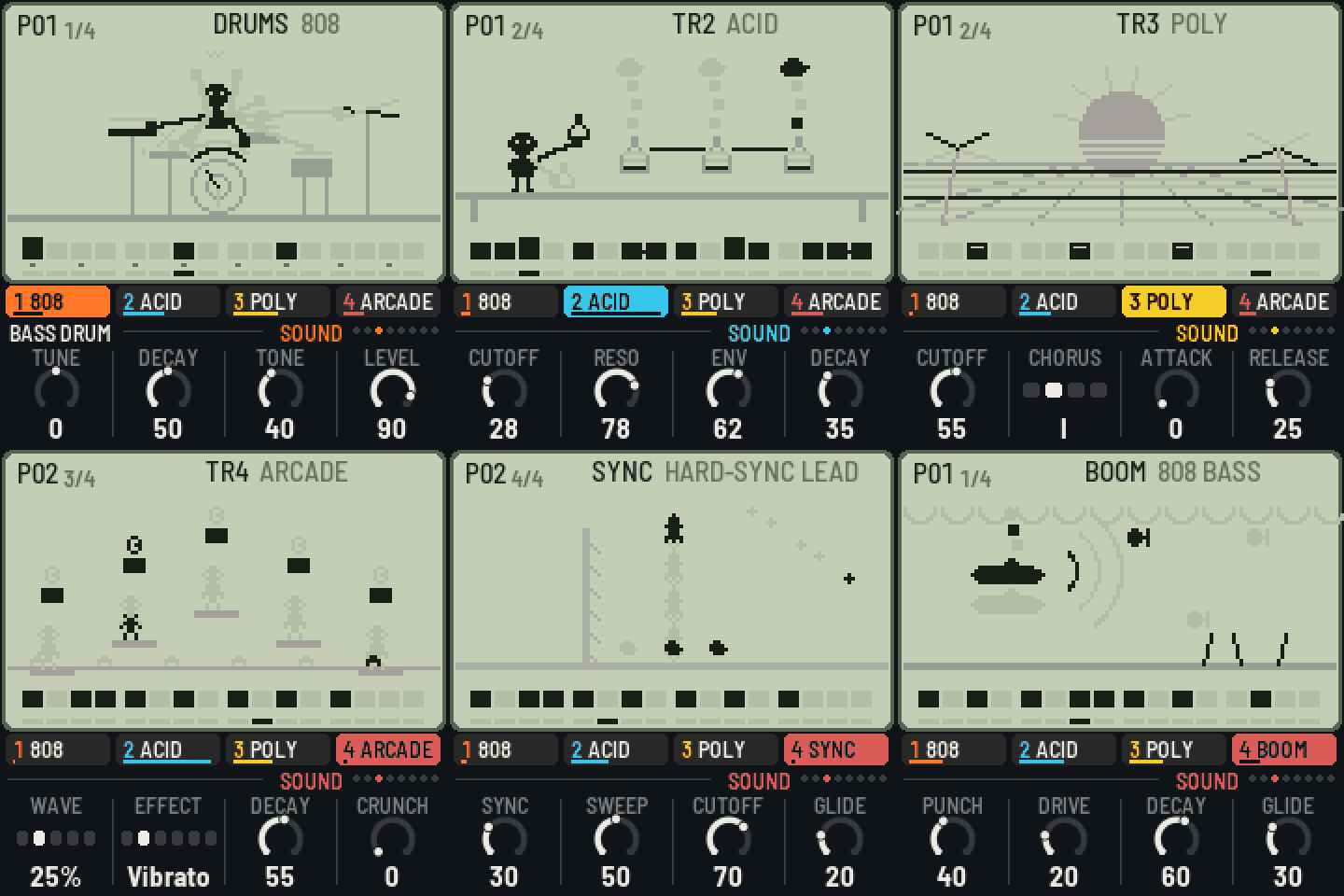
- Four tracks: a drum track and three synth tracks, each with its own sound, level, pan and sends.
- Drums: four kits of eleven parts (808, 909, Arcade, Box), the black keys picking the part and the white keys its steps, with tune, decay, tone and level for every part.
- Sixteen synth sounds modelled on their originals' circuits: Acid (TB-303), Mono (SH-101), Fat (Minimoog), Boom (808 bass), FM bass (DX7), Reese, Poly (Juno-60 and its chorus), Brass (Prophet-5 / OB-Xa), E.Piano (DX7), Organ (M1), Strings (Solina and its ensemble), Bells (DX / PPG), Sync, Scream (MS-20), Arcade (NES / Game Boy) and Arp (chip arpeggios).
- Patterns: sixteen 16-step patterns holding all four tracks, chains of up to 64, copy and clear, a length for each pattern, swing.
- Writing: live while playing (notes, chords, lengths, slides, accents, drum hits, knob moves, effects), step by step while stopped, and on the steps: a step held for its note, length and two locked knobs; slides, ratchets and accents.
- Chords: sixteen chords and chains of them, a chord a pattern; each synth track follows them or not.
- Sixteen punch-in effects, held or written onto the steps; a ping-pong delay, a plate reverb and a bus compressor.
- The screen: an LCD with a little game for every sound and kit, its segments lit by the music.
- Four demo songs (Pocket, Arcade, House, Lo-fi), the first one there on the first start.
- MIDI: notes in on channels 1–4 (the drums as General MIDI), clock in and out, notes out.
- Measured on the FM-1: the first demo takes about a quarter of its time; three tracks of four-note chords with every drum on every step stay under four fifths, and a governor thins the chords if it ever gets closer.
Install
- From the browser (Chrome or Edge, the FM-1 on USB): the web installer. Or try it in the browser first.
- From the command line:
python3 tools/fm1_install.py lcd4-0.1.0.fwsc(Python 3 withpip3 install mido python-rtmidi). - Going back: the installer's "Back to the stock firmware", or M-VAVE's M-UPGRADE.
The firmware is
lcd4-0.1.0.fwscbelow; its source is this tag. Installing other firmware is at your own risk; see the manual's Troubleshooting.