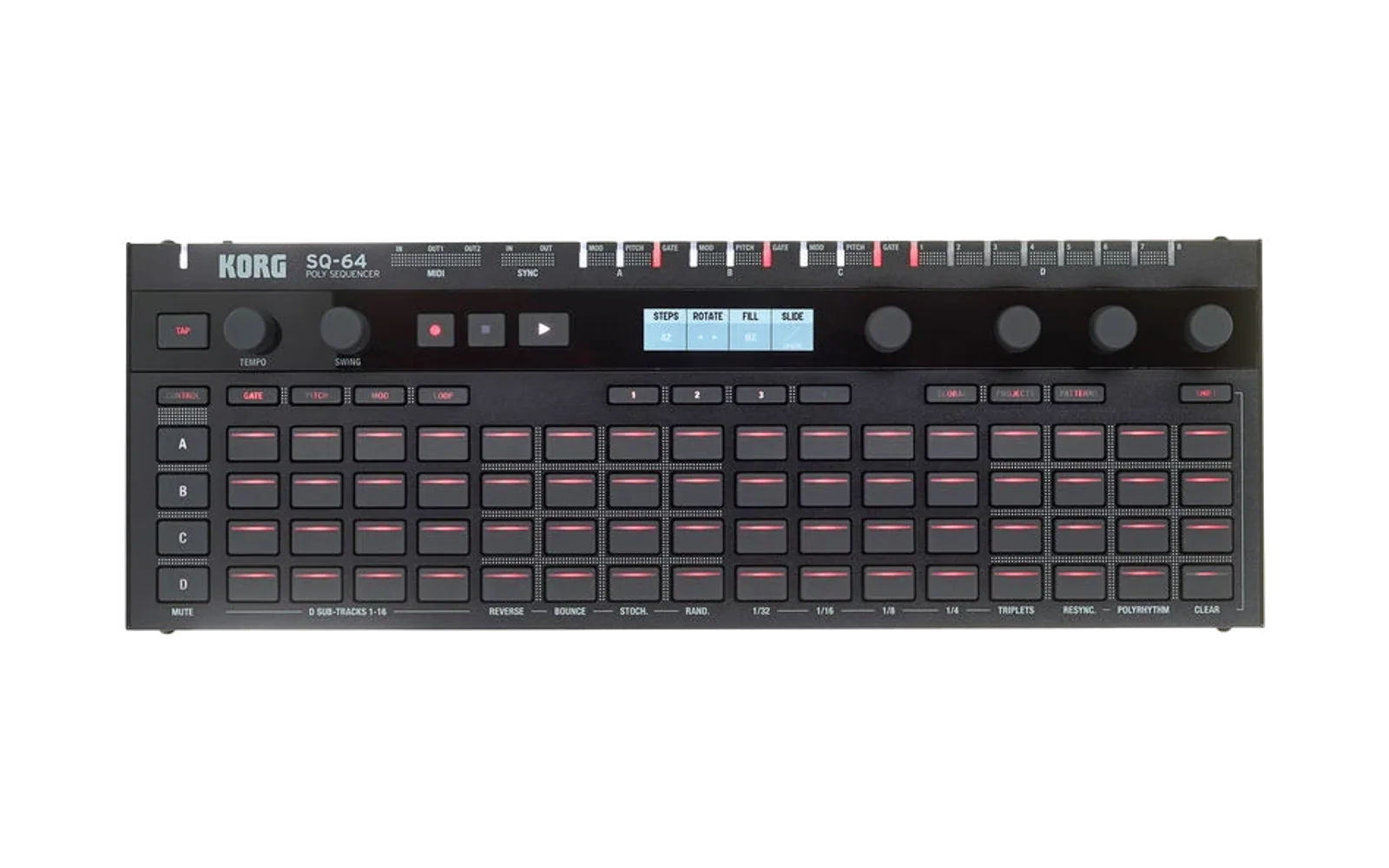
LFOs — original SQ-64 firmware

A from-scratch firmware for the Korg SQ-64 hardware sequencer that turns the box into a four-channel bank of tempo-synced LFOs. It is written entirely from the interface facts published by the independent SQ-64 firmware specification and exercised against the independent SQ-64 emulator. It contains no Korg source code, no decompiled vendor functions, no vendor assets and no bytes copied from stock firmware.
Hardware warning. The specification's board contract is explicitly incomplete: exact MCU part, wiring, electrical limits and protected-storage ownership remain unverified release blockers. This image passes the spec's
imageprofile and runs in the emulator; that is not a certification that it is safe on a physical SQ-64. Flashing real hardware is at your own risk, and power loss while internal flash is being programmed is not guaranteed to be recoverable (spec VUP-008). If you accept that, the sibling euclidean firmware's HARDWARE.md documents the identical install / operate / restore procedure (both images use the same container, updater and storage map).
What "synced" means here
All four LFOs derive their phase from one shared 24 PPQN transport position — they never free-drift against each other or against the beat. The position advances from the internal tempo clock (20–300 BPM, tap tempo, MIDI clock out while playing), and follows incoming MIDI clock automatically when one is present: the header flips from INT to EXT with the measured BPM, every LFO locks to the external ticks, and a second after the ticks stop it falls back to the internal clock. PLAY performs a hard resync (every phase restarts together) and MIDI start/stop in are honored.
Features
- Four LFOs (A–D) with six waveforms — sine, triangle, rise, fall, square, sample & hold — and sixteen synced rate divisions from 8 bars to 1/32, including dotted and triplet values. The A–D keys select the edited track (spec TRACK-001).
- Per-LFO depth (0–100 %), phase offset (sixteenths of a cycle) and MIDI CC number; each LFO streams its CC on its own MIDI channel (USB and DIN, rate-limited, sent only on change; channels 1–4 by default, movable in the global settings).
- Destinations per LFO: A/B/C drive their mod CV, pitch CV and gate jacks (gate = square-thresholded LFO); LFO D pulses trigger jack 1 once per cycle. Routing is edited inside the PITCH / GATE / MOD edit modes (spec MODE-001); the CONTROL mode edits the MIDI CC number.
- Every pattern carries a 64-step step sequence — four bars of sixteen sixteenth-note steps that gate the LFO — edited in the GATE mode with the bar keys 1–4 (spec BAR-001), loopable over the selected bar with the LOOP key (spec LOOP-001) and shuffled by the swing encoder (50–75 %, spec SWING-001) — see Steps, bars, loop and swing.
- Tap tempo and the tempo encoder set the internal clock across the declared 20–300 BPM range, one BPM per detent, clamped without wraparound (spec TAP-001 / TEMPO-001).
- Pad LEDs are live level meters — one animated bar per LFO; the display shows all four lanes plus the edited LFO's parameters and a waveform preview with a phase cursor. In the GATE mode the edited LFO's pad row becomes the selected bar's step editor.
- Full project lifecycle over the 64 documented saved-project slots: new, load, save and delete from the panel's PROJECT manager, with empty and invalid slots reported and the workspace left unchanged on rejection (spec PROJECT-001..004) — see Projects.
- 16 patterns per track: each LFO owns 16 stored configurations and plays its active one, selected from the PATTERN key (spec PATTERN-001..002) — see Patterns.
- A global settings mode on the GLOBAL key — MIDI clock out, the CC channel range, trigger pulse length and CC pacing — browsable without committing anything and committed on exit (spec GLOBAL-001..002) — see Global settings.
- SHIFT is a declared modifier only; every SHIFT function is listed in SHIFT functions and all other SHIFT combinations do nothing (spec SHIFT-001).
- Settings persist to SPI flash (SHIFT+GLOBAL commits; the power button saves and shuts down cleanly through the PB7 power hold).
- Boot chords per the spec: hold GLOBAL at power-on for version mode, GLOBAL+PATTERN for update mode. In version mode the PLAY indicator is lit, and pressing PLAY continues the normal boot sequence to the ready state (BOOT-004). Update mode carries the same complete VUP self-updater as the sibling euclidean firmware (protocol 1, 1024-byte packets, full validation before a RAM-resident installer programs anything).
Controls (normal mode)
| Control | Action |
|---|---|
| PLAY / STOP | Resync all LFO phases and start MIDI clock out / stop it (LFOs keep running) |
| TAP | Tap tempo (see Tap tempo and the tempo encoder) |
| A B C D | Select the edited LFO (TRACK-001); selection alone changes no data |
| Pad n (any bank) | Set that LFO's rate to division n (1=8 bars … 16=1/32); in an edit mode the pads edit that mode's parameter on the edited LFO instead |
| SHIFT + pad n | Set that LFO's waveform (1=sine 2=tri 3=rise 4=fall 5=square 6=S+H); only outside the edit modes |
| PITCH / GATE / MOD / CONTROL | Enter / leave that edit mode (MODE-001); entry and exit alone change no data |
| 1 2 3 4 | Select the edit bar of the step sequence (BAR-001) |
| LOOP | Loop step playback over the selected bar (LOOP-001) |
| Tempo encoder | BPM 20–300, one per detent, clamped (TEMPO-001) |
| Swing encoder | Swing 50–75 %, one per detent, clamped; 50 = unswung (SWING-001) |
| Param 1–4 encoders | Waveform, rate division, depth, phase offset — or the active edit mode's parameters |
| GLOBAL | Open / close the global settings mode |
| SHIFT + GLOBAL | Commit the workspace settings to SPI flash |
| PROJECT | Open / close the project manager (pads become the 64 slots) |
| SHIFT + PROJECT | New project: reset the workspace to the declared defaults |
| PATTERN | Open / close the pattern selector (pads become the pattern grid) |
| Power button | Save and shut down |
PLAY, STOP and TAP work in every mode; the LFOs never stop running. The transport, track, destination-mode, bar, loop and pad controls are inert inside the global settings mode, whose only exit is GLOBAL itself, and inside the project manager and pattern selector the pads belong to those modes.
Edit modes
The PITCH, GATE, MOD and CONTROL keys each toggle a documented edit mode over the normal surface (spec MODE-001). The active mode is reported on its key LED and named on the display; pressing the same key leaves, pressing a different mode key switches directly. Entering or leaving a mode changes no pattern, workspace or settings data, and all edits inside a mode go to that mode's documented parameters on the edited (active) track only — the A–D keys keep working inside every mode:
| Mode | Param 1 encoder | Param 2 encoder | Pads 1–16 (any bank) |
|---|---|---|---|
| PITCH | Pitch-CV routing on/off (right/left; A–C) | Phase offset | Set the phase offset (pad n = n−1 sixteenths) |
| GATE | Gate routing on/off (A–C; on D the cycle trigger) | — | Toggle step n of the selected bar (see below) |
| MOD | Mod-CV routing on/off (A–C) | Depth 0–100 % | — |
| CONTROL | MIDI CC number 0–127 | — | — |
LFO D has no pitch/mod jacks: the PITCH and MOD modes report NO JACK ON D
there and route nothing. Pads marked — are documented inert in that mode.
The waveform, rate, depth and phase encoder assignments and the pad rate
grid belong to the plain normal surface (no edit mode active).
Steps, bars, loop and swing
Every pattern carries a 64-step gate mask: four bars of sixteen sixteenth-note steps, all on by default (the classic continuous LFO). The step clock derives from the same shared transport position as the LFO phases; a cleared step mutes the LFO for that sixteenth (outputs, gate and the CC stream read zero), so a mask turns a drone LFO into a rhythm.
- Bar keys 1–4 select the edit bar (spec BAR-001). The selection is reported on the bar key LEDs and the display footer; selecting a bar alone changes no pattern data. In the GATE mode, pads toggle the selected bar's steps on the edited track only, and the edited track's pad row and the display show that bar's mask with the current step blinking.
- LOOP (spec LOOP-001) loops step playback over the selected bar: the documented operations are engaging the loop, retargeting it by selecting another bar while it runs, and clearing it with LOOP again. The loop region is always exactly one declared bar of the active pattern, and the position inside the looped bar still follows the transport, so clearing the loop resumes the declared normal four-bar playback immediately. Loop state is performance state: it is never persisted and touches no data.
- Swing (spec SWING-001) delays the documented steps — the second sixteenth of every pair — so that it starts at 50–75 % of the pair instead of halfway. The swing encoder moves one percent per detent, clamps at both declared limits, and 50 % is the unswung neutral setting; the value is shown in the display header. Swing offsets only the step boundaries (the documented steps); the first step of each pair and the LFO phases themselves stay on the grid. Swing is part of the workspace and saves with projects; adjusting it alone commits nothing.
Tap tempo and the tempo encoder
The declared internal tempo range is 20–300 BPM (spec TAP-001 /
TEMPO-001). The tempo encoder moves one BPM per detent and clamps at both
limits without wraparound; the current tempo is always shown in the display
header (with EXT and the measured BPM while an external clock leads). Tap
tempo uses two taps a quarter note apart: gaps of 200–3000 ms set
60000 / gap BPM, clamped to the declared range. A single tap only arms
the reference, and an out-of-range gap (faster than 300 BPM or slower than
20 BPM) re-arms it and leaves the tempo unchanged, so the tempo is never
undefined. Neither taps nor tempo or swing adjustments alone write anything
to flash. In the emulator the declared behavior is measured on the MIDI
clock output and the gate jack timing (tools/browser_controls_test.mjs);
quantitative claims on physical hardware remain unmeasured.
Projects
A project is the workspace's musical content: every pattern of every track
(4 tracks × 16 patterns of waveform, rate division, depth, phase offset, CC
number, destinations and the 64-step gate mask), each track's active-pattern
selection, the pattern presence maps, the tempo and the swing. The
edited-LFO selection stays in the settings sector and the global settings
are outside projects entirely. The 64 saved-project slots follow the spec's
documented catalog at SPI 0xC0000 + n x 0x3D000; this firmware's record
occupies the first 4 KiB sector of its slot (magic LFP3, FNV-1a checked)
and the rest of the slot region is never written. Older records are
supported formats (spec STORE-006): v2 (LFP2, no step masks or swing)
loads with every step on and neutral swing, and version 1.0 records
(LFP1, one configuration per track) load with that configuration as
pattern 1 of each track. Saves always write the current format.
Press PROJECT to open the project manager. The 64 pads become the 64 slots (bank A pad 1 = slot A1 … bank D pad 16 = slot D16), lit when populated and blinking for the current slot; the display shows the catalog grid and a status line that reports every operation.
- Pad — load that slot into the workspace. An empty or invalid slot is
reported (
EMPTY/INVALID) and the workspace is not changed. - SHIFT + pad — the explicit save operation: write the workspace to that
slot. Only that slot is modified, and
SAVEDis reported only after the committed record reads back from flash. - RECORD + pad — the explicit delete operation: erase that slot's record sector, leaving it observably empty. Deleting an empty slot is accepted and performs no flash write. Every other slot, the workspace and the settings are untouched.
- SHIFT + PROJECT (in any mode) — new project: the workspace returns to the declared defaults (the same four-LFO setup a first boot shows). No saved slot is modified and nothing persists until an explicit save.
- PROJECT again leaves the manager; the LFOs keep running throughout.
Saved projects persist like settings: they survive power-button shutdown and
a cold restart. An interrupted save or delete leaves the previous record, the
complete new record, or an erased sector that is reported as empty/invalid on
load — never undefined data in the workspace. Re-saving identical content
performs no erase/program cycle (wear bounding, spec STORE-007). The firmware
sizes the catalog from the SPI flash's JEDEC density byte and only addresses
slots that physically fit: on the native emulator's 1 MiB model two slots are
available, on the 16 MiB browser model (and the presumed real part) all 64;
out-of-range slots report NO SLOT and are never addressed.
Patterns
Each track owns 16 patterns — complete LFO configurations — and always plays exactly one of them, its active pattern (spec PATTERN-001). All normal-mode editing (pads, encoders, destination toggles) edits the active pattern only; the other fifteen are preserved bit-for-bit across selections and edits (PATTERN-002).
Press PATTERN to open the pattern selector. The pads become the pattern
grid (bank A pad 1 = pattern A1 … bank D pad 16 = pattern D16): lit pads are
patterns holding user content, the blinking pad is the track's active
pattern, and the display mirrors the grid. Pressing a pad makes that pattern
the track's active pattern immediately — the lane, outputs and CC stream
follow at once — and reports it on the status line (PATTERN B3). Selecting
a never-used pattern activates it with the track's default configuration and
marks it present. PATTERN again returns to normal mode. In normal mode
the footer shows each track's active pattern number.
Each project record stores all 64 patterns together with a per-track presence bitmap; the active pattern is always marked present, and a record whose maps and contents disagree with the declared ranges is rejected as invalid on load. Patterns persist with the workspace (SHIFT+GLOBAL or the power button) and inside saved projects.
Global settings
Press GLOBAL to open the global settings mode (spec GLOBAL-001); the GLOBAL button LED lights while it is open. The four global settings are device-wide behavior, separate from the workspace and from every project:
| Field | Encoder | Range | Effect |
|---|---|---|---|
| CLOCK OUT | Param 1 | ON / OFF | Emit MIDI clock (F8) while playing |
| MIDI CH | Param 2 | 1–4 … 13–16 | The four channels the LFOs stream CCs on |
| TRIG MS | Param 3 | 5–100 ms | LFO D's trigger-pulse length |
| CC MS | Param 4 | 1–50 ms | Minimum spacing between CC sends per LFO |
Edits take effect immediately so they can be auditioned. GLOBAL is the
documented (and only) exit: it commits any edits to the global record and
reports GLB SAVED; leaving after merely browsing writes nothing, and
entering or leaving changes no workspace, saved-slot or settings data.
Sequencing continues throughout, and the mode can be entered while playing
(GLOBAL-002 behavior, persistence and non-global guards are exercised in the
tests). The committed record (magic LFG1, FNV-1a checked) survives normal
shutdown and cold restart; the power button also commits it.
SHIFT functions
SHIFT is a modifier only (spec SHIFT-001). Holding or tapping SHIFT by itself changes nothing. The complete set of SHIFT-modified functions is:
| Combination | Function |
|---|---|
| SHIFT + pad 1–6 (normal mode, no edit mode active) | Set the waveform of that pad's track |
| SHIFT + pad (project manager) | Save the workspace to that slot |
| SHIFT + PROJECT | New project (declared defaults in the workspace) |
| SHIFT + GLOBAL | Commit the workspace settings to SPI flash |
Every other control is inert while SHIFT is held — including the transport keys, the encoders, the edit-mode, bar and loop keys, pads 7–16 in normal mode, and any chord that also holds RECORD — and causes no state change.
Build
Requires the GNU Arm toolchain (arm-none-eabi-gcc) and Python 3.
make            # build/lfos.elf, .bin and .vsb
make check      # run the spec's seven image-profile checks on the VSB
make test       # headless + browser-engine behavioral tests (see below)
The code is compiled as the ARMv6-M subset so it runs on both emulator
engines (the native engine's stock Unicorn build cannot deliver interrupts
inside IT blocks); make ARCH=-mcpu=cortex-m7 builds Thumb-2 instead.
tools/make_vsb.py wraps the 64 KiB binary into a spec-conformant VSB,
filling unused payload with 0xFF and balancing the four region checksums.
Run it
Browser workbench (recommended): in ../../emulator/web, npm ci && npm run dev, open the printed URL, load build/lfos.vsb in Browser emulator,
and run. The LFOs animate from the moment the panel comes up. Importable
demo scripts for the workbench's UI scripts panel live in
scripts/; they walk through every major function
(synced free-running, transport resync, waveforms and rates, destination
routing in the edit modes, CC assignment, step editing with the bar loop
and swing, external MIDI clock sync, persistence, version mode and a full
self-update).
Native headless:
python -m pip install -e ../../emulator
make smoke      # 2M instructions, report in build/smoke.json
Tests
tools/headless_test.py(native engine): boot, tick interrupts, continuous CC streaming, MIDI start/stop/clock out, external-clock following without re-emission, version and update boot chords, VUP discovery / version / begin, ordered packets, and rejection of out-of-order packets, wrong blocks, and installs outside update mode — with zero flash writes.tools/browser_update_test.mjs(browser WASM engine): full end-to-end installation — update-mode boot via the panel chord, USB MIDI enumeration, all 224 packets through the firmware's own updater under the workbench's installation context, then byte-exact verification of internal flash and the three installed SPI regions, with no critical hazard tripped.tools/browser_panel_test.mjs(browser WASM engine): DMA panel scanning, LFO animation on the CV observers and LED bars, destination routing edits on the gate and trigger jacks, MIDI CC output and reassignment, transport, the full project lifecycle (save to first and last slots with untouched-slot and settings guards, new-project defaults without flash writes, exact load-back, empty/corrupt-slot rejection with the workspace unchanged, delete to an observably empty slot), pattern selection with edit isolation, SHIFT no-effect guards (SHIFT alone, SHIFT+PLAY, SHIFT+GATE, SHIFT+encoder), the global settings mode (browse-without-commit, a behavioral MIDI-channel edit committed on exit), the SHIFT+GLOBAL settings commit, power-button shutdown, and settings, globals, pattern and saved-project persistence across a cold restart.tools/browser_controls_test.mjs(browser WASM engine): the spec 0.6.0 panel requirements — track selection with edit-follow and selection-only-no-mutation guards (TRACK-001), edit-mode entry/exit, reporting and edit scoping (MODE-001), bar selection and step edits (BAR-001), the bar loop with boundary bars and clear-restores-normal (LOOP-001), and measured MIDI-clock and gate-jack intervals for tap tempo (TAP-001), the tempo encoder's per-detent step and clamps (TEMPO-001) and swing timing at the neutral and boundary values (SWING-001).
Storage map
| Region | Use |
|---|---|
| Internal flash 0x00200000 + 64 KiB | This firmware (VSB payload 0x00000) |
| SPI 0x00000–0x30000 | Installed-image regions; written only by the updater during a host-initiated installation |
| SPI 0x40000 (one 4 KiB sector) | Committed workspace settings (magic LFO3, FNV-1a checked; v2 LFO2 and v1 LFO1 records still load); rewritten only when contents change |
| SPI 0x41000 (one 4 KiB sector) | Committed global settings (magic LFG1, FNV-1a checked); rewritten only when contents change |
| SPI 0xC0000 + n × 0x3D000 (first 4 KiB sector of each of the 64 documented slots) | Saved projects (magic LFP3, FNV-1a checked; v2 LFP2 and v1 LFP1 records still load); written only by the explicit save and delete operations |
| Everything else | Never written |
Provenance
Original work. Interface facts (container format, update protocol, panel
wiring, peripheral behavior) come from the sibling spec's board.json,
contracts.md and the emulator's independently authored board model — see
src/board.h for the consolidated register map. The hardware-interface
modules are shared with the sibling euclidean firmware by
the same authors; the LFO engine, UI and tests are new. Licensed under the
MIT License (see LICENSE).
Known limits
- The stock backup/restore SysEx transport is not implemented; settings and the saved-project catalog are this firmware's only persistent data.
- The analog sync jack is not used; external sync means incoming MIDI clock.
- External clock below ~2.5 BPM-equivalent tick spacing (more than one second between ticks) is treated as absent.
- MIDI input notes are ignored; the LFO CC/CV outputs are the product.
- Quantitative timing behavior (tempo, tap and swing intervals) is measured
in the emulator's instruction-time clock by
tools/browser_controls_test.mjs; physical-hardware timing claims (jitter, latency, real clock accuracy) require hardware measurement and are not made.