HERA: a chord groovebox for the M-VAVE FM-1
The workflow of the Roland AIRA Compact J-6, rebuilt for the FM-1, with a real screen to show it.
An independent project. Not made, endorsed or supported by Roland.
Try it in your browser · Install on your FM-1 · Guide · Manual · Cheat sheet · Releases · Report a bug
HERA turns the FM-1 into a J-6-style chord machine:
- 100 chord sets, each mapping a chord to every key.
- 9 phrase styles × 12 variations: arpeggios, rhythms, and chord and strum phrases.
- A 64-pattern step sequencer with ties, per-step phrases, shuffle and real-time recording.
- A Juno-style 4-voice synth with delay and reverb.
Juno's Greek counterpart is Hera.
Version 1.1. Please tell us what you find.
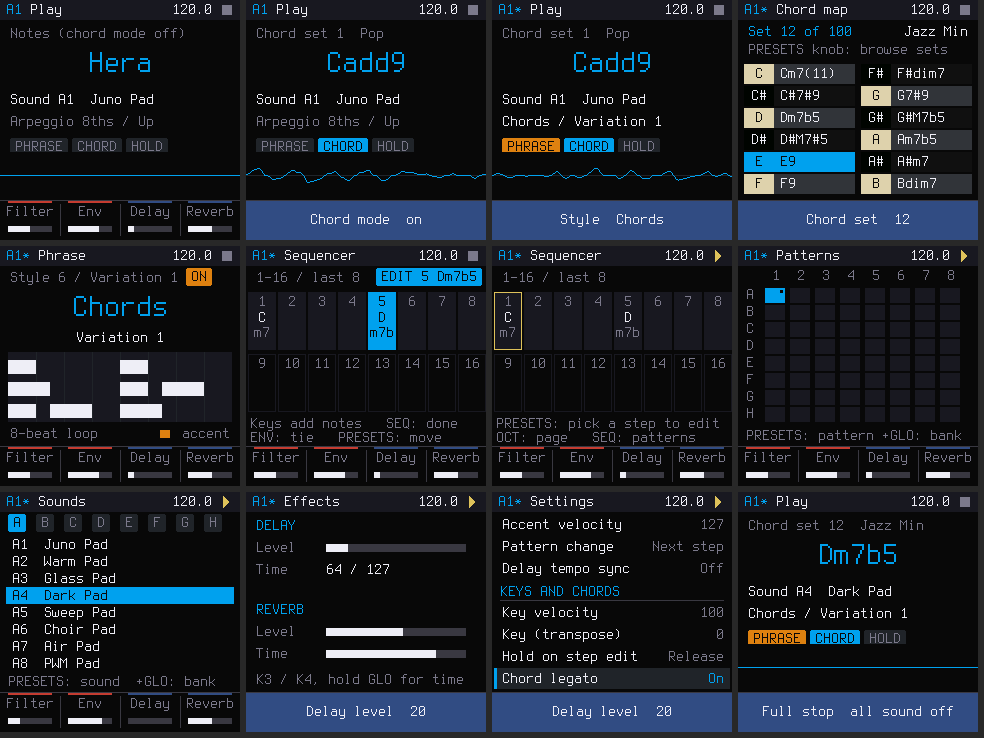
How it compares with the J-6
| Roland J-6 | HERA on the FM-1 | |
|---|---|---|
| Chord sets | 100 | The same 100 voicings |
| Phrase styles | 9 × 12 variations | The same 9 × 12, with a name for every style and variation |
| Sequencer | 64 patterns × 64 steps | The same: a 16-step page on screen, plus a Patterns page that shows all 64 patterns at once |
| Display | 4-character LED | 240 × 240 colour screen with plain-word menus |
| See which chord is on which key | No | Yes: the chord map page |
| Preview a phrase before playing it | No | Yes: a piano roll of the phrase |
| Extra settings | — | Hold on step edit, Chord legato |
| Sound | Roland's JUNO-60 model (ACB) | A 4-voice Juno-style synth: saw, pulse and sub oscillators, a 24 dB ladder filter, chorus, delay and reverb |
Features
The FM-1's colour screen shows everything in plain words.
- Top bar: pattern (with
*when unsaved), page name, tempo and transport. - Bottom bar: what the four knobs do, or a short pop-up after any change.
Play
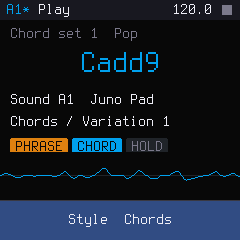
The home page.
- The chord (or note) you just played, in large text.
- The chord set and its genre.
- The sound.
- The phrase style and variation in words.
- Lights for PHRASE, CHORD and HOLD.
With a phrase running, a live oscilloscope shows the sound.
Chord map
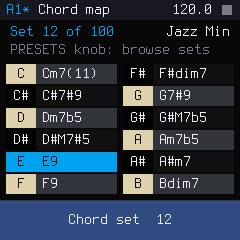
Which chord is on which key, something the J-6 can't show. Hold SEL to open it.
- Turn PRESETS to browse all 100 sets. The set number and genre sit at the top.
- Black keys are dark rows, white keys light rows, laid out like a keyboard.
- The key you play lights up, so you can audition every chord before choosing a set.
Phrase
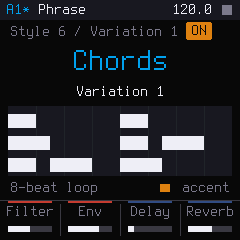
Turn SELECT for the style and ALGORITHM for the variation. Hold ARP to open the page.
For the chord and strum styles (6–9), a piano roll draws the actual phrase, with accents in orange. You can see a variation's rhythm before you hear it.
Sequencer
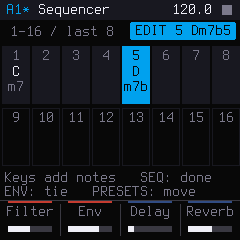
- Layout: 64 steps in 4 pages of 16, shown as a grid of chords and notes. Ties, per-step phrases (an orange mark) and the last step are all visible. OCT − / + turns pages.
- Entering steps: turn PRESETS to pick a step, play keys to enter notes or chords, and press SEQ when done. The lights under the white keys are the 16 steps of the page: lit = has notes, flashing = playing now, blinking = being edited.
- Recording: press REC, then PLAY, and play along. Your notes go into the step that is playing.
- Moving and editing: PRESETS moves to the next step. Holding GLO shows the step tools: copy, paste, insert, clear, double.
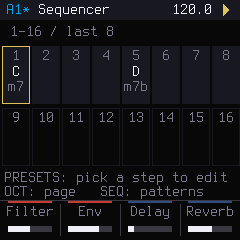
While it plays, a yellow frame follows the playhead. The key lights show which steps hold notes.
Patterns
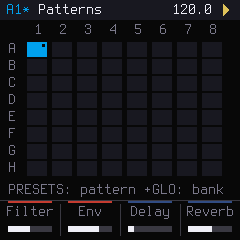
All 64 patterns, 8 banks × 8, on one grid (press SEQ twice).
- Shown: the current pattern, patterns with notes, unsaved ones (a dot), and a queued next one (a yellow frame).
- Choosing: turn PRESETS (GLO + PRESETS jumps a bank). The keys keep playing.
Sounds
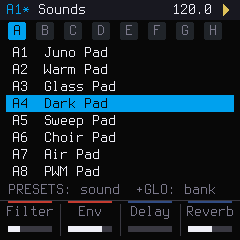
64 Juno-style sounds in 8 banks: pads, strings, brass, keys, bass, leads, plucks and effects (LFO). Browse them with PRESETS (GLO + PRESETS jumps a bank) while the keys keep playing, so you hear each one as you go.
The engine is a 4-voice Juno-style synth:
- saw, pulse and sub oscillators, plus noise;
- a 4-position high-pass;
- a 24 dB ladder filter;
- chorus I, II and I+II.
Effects
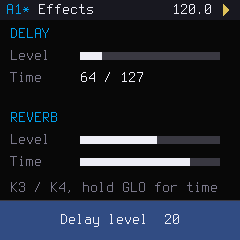
Delay and reverb, each with a level and a time (FX). With tempo sync on, the delay time reads as a note value.
Settings
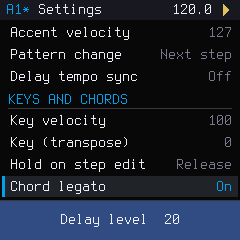
Every J-6 menu item in plain words, grouped as Pattern, Keys and chords, MIDI, Sync and System (EDIT). Two settings are new in HERA: Hold on step edit and Chord legato.
- PRESETS chooses an item, and K1 changes it.
- Leaving the page saves the settings.
The Workbench
Open the HERA Workbench: HERA running in your browser, modelled on M-VAVE's FM1 Open Workbench.
- The real firmware on a virtual FM-1 with the real panel layout. Play it with the mouse, touch, your computer keyboard or a MIDI keyboard, and hover any control to see what it does.
- A guided tour in the order of the J-6 manual. It highlights each control and moves on by itself when you've done the step.
- An editor for sounds, chord sets (with every chord's notes), phrases (with piano rolls), the 64-step grid, settings and projects (save in the browser, or export and import files).
- A manual with "to do this, press that" tables.
- An installer for HERA, and for putting the factory firmware back.
Using it
New here? Start with the guided tour in the Workbench (the Guided tour button), or read the Guide. Once you know your way around, this is the whole control list:
| FM-1 | HERA |
|---|---|
| PLAY | Tap: play / stop. Hold: full stop (all sound off). GLO + PLAY: play from the selected step |
| REC | Record (real time): REC, then PLAY, then play |
| SEL | Tap: chord mode on/off. Hold (or GLO + SEL): the chord map, i.e. which chord is on which key |
| ARP | Tap: phrase (STYLE) on/off. Hold: the phrase page |
| ENV | HOLD (in step edit: tie) |
| HOME / SEQ / LFO / FX / EDIT | Pages: play, sequencer (SEQ again: patterns), sounds, effects, settings |
| SAVE | Save the pattern (GLO + SAVE: all patterns) |
| OCT − / + | Octave (GLO: key transpose; on the sequencer page: steps page) |
| K1–K4 | Filter, envelope (release), delay level, reverb level. GLO: resonance, attack, delay time, reverb time |
| SELECT / ALGORITHM | Phrase style / variation |
| PRESETS | Tempo, or whatever the page browses (chord sets, sounds, patterns, settings) |
| Keys | Notes, or chords in chord mode. On the sequencer page, PRESETS picks the step and the keys enter notes |
The settings page uses plain words: MIDI channel, clock source, hold on step edit, chord legato, count-in, tune and more. Leaving the page saves them.
Installing
- Connect the FM-1 with a USB data cable and open the installer in Chrome or Edge.
- Press install. The same page puts the factory firmware back, if you ever want it.
If something goes wrong, hold OCT − while switching on for the USB rescue. HERA carries the standard FM-1 update loader, so any other firmware (or the factory one) installs on top of it in the usual way.
What HERA keeps: its 64 patterns and its settings, in its own area of the FM-1's flash. It doesn't read the projects, presets or samples of the factory firmware or of other firmwares, and installing another firmware can overwrite HERA's patterns. There's no way yet to copy patterns off the FM-1, so treat them as temporary for now.
Documentation
- GUIDE.md: a written guide, from your first chord to a finished pattern
- The cheat sheet: every control on one printable page
- HERA.md: the manual: every control, page and setting, and the version history
- The Workbench manual: the same, with "to do this, press that" tables and screenshots
- BUILDING.md: building HERA yourself, and running the tests
- docs/MIDI.md: what HERA sends and receives over MIDI
- LICENSING.md: the licences of the code and the assets
- Releases: every version, with what's new and fixed
Contributing
- Bugs and ideas: open an issue: what you did, what you expected, what happened, and the version shown on the splash screen when you switch on.
- Pull requests are welcome. Keep the style of the code around your change, run
tests/j6/run_tests.sh(see BUILDING.md), and keep the firmware free of floating point. - By contributing you agree that your code is released under GPL-3.0, like the rest of HERA.
Credits
- Ben Badio: HERA.
- Dinghy by zvenson: the starter firmware HERA was built from.
- Felucca by Leo Kuroshita (@kurogedelic) / Hügelton Instruments: the platform Dinghy is based on, and so HERA: hardware access, USB, the update loader.
- SLOOP by isod89: the version of that platform Dinghy carries, and the model for these docs.
- Clipper by 3dSam: HERA's Juno-style voice and chorus.
- MORPHEUS, my earlier firmware (also built on Dinghy), whose repository HERA grew from.
- The Firmware Hub (zvenson), and everyone who documented the FM-1.
- Fonts: Terminus (the screen) and Playfair Display (the name), both SIL OFL 1.1.
The full list, with licences, is in LICENSING.md.
Licence
GPL-3.0-only: see LICENSE. No warranty.
For nerds
How it's built, and where the details are.
- Engine: the whole J-6 logic is a portable, integer-only C module in
firmware/src/j6/(chords, phrases, sequencer, synth and the glue), with no floating point, so it runs on the FM-1's core without an FPU. The app and screen arefirmware/src/hera_app.candhera_ui.c. - Timing: 96 ticks per quarter note; audio is rendered in 256-frame blocks at 44.1 kHz, in Q15.
- Tests: about 800,000 engine checks (
tests/j6/run_tests.sh), and a host simulator (tests/run_hera_host.sh) that runs the whole firmware on a computer and writes a PNG of every page and a WAV of a scripted session. Both run in CI on every push. - The Workbench is the same firmware compiled to WebAssembly (
web/build.sh). To run it locally:sh web/build.sh(needs LLVM with wasm32:brew install llvm lld), then serveweb/with any static server, e.g.python3 -m http.server --directory web. Every release also has the Workbench as a zip. - Package identity:
FM-1_43+ X + YY + ZZ for version X.Y.Z, so 0.1 isFM-1_4300100and 1.0 will beFM-1_4310000. - Build, release and install from the command line: BUILDING.md. Each release carries the signed
hera-X.Y.fwscpackage for other installers. - MIDI: docs/MIDI.md. HERA doesn't handle SysEx: it belongs to the FM-1's updater.
- Specification and design: docs/J6_SPEC.md (the behaviour, rule by rule), docs/J6_ENGINE_DESIGN.md, docs/J6_DECISIONS.md (where HERA chooses differently on purpose).
- Platform: docs/API.md (the functions the app can call), docs/RULES.md (what the FM-1 allows), docs/MAKE-IT-YOURS.md (turning this into your own firmware).
- Layout:
firmware/(engine, app, platform),web/(the Workbench),tools/(build, packaging, data generators),tests/,capture/(the tools used to gather data),data/(chord sets and phrases).
Legal
HERA is a behavioral recreation of the Roland AIRA Compact J-6. It contains no Roland code, firmware or samples, and it is not made by, affiliated with or endorsed by Roland Corporation.
"Roland", "AIRA", "J-6" and "JUNO" are trademarks of Roland Corporation; "M-VAVE" and "FM-1" belong to their owners. These names are used only to say what HERA works like and what it runs on.