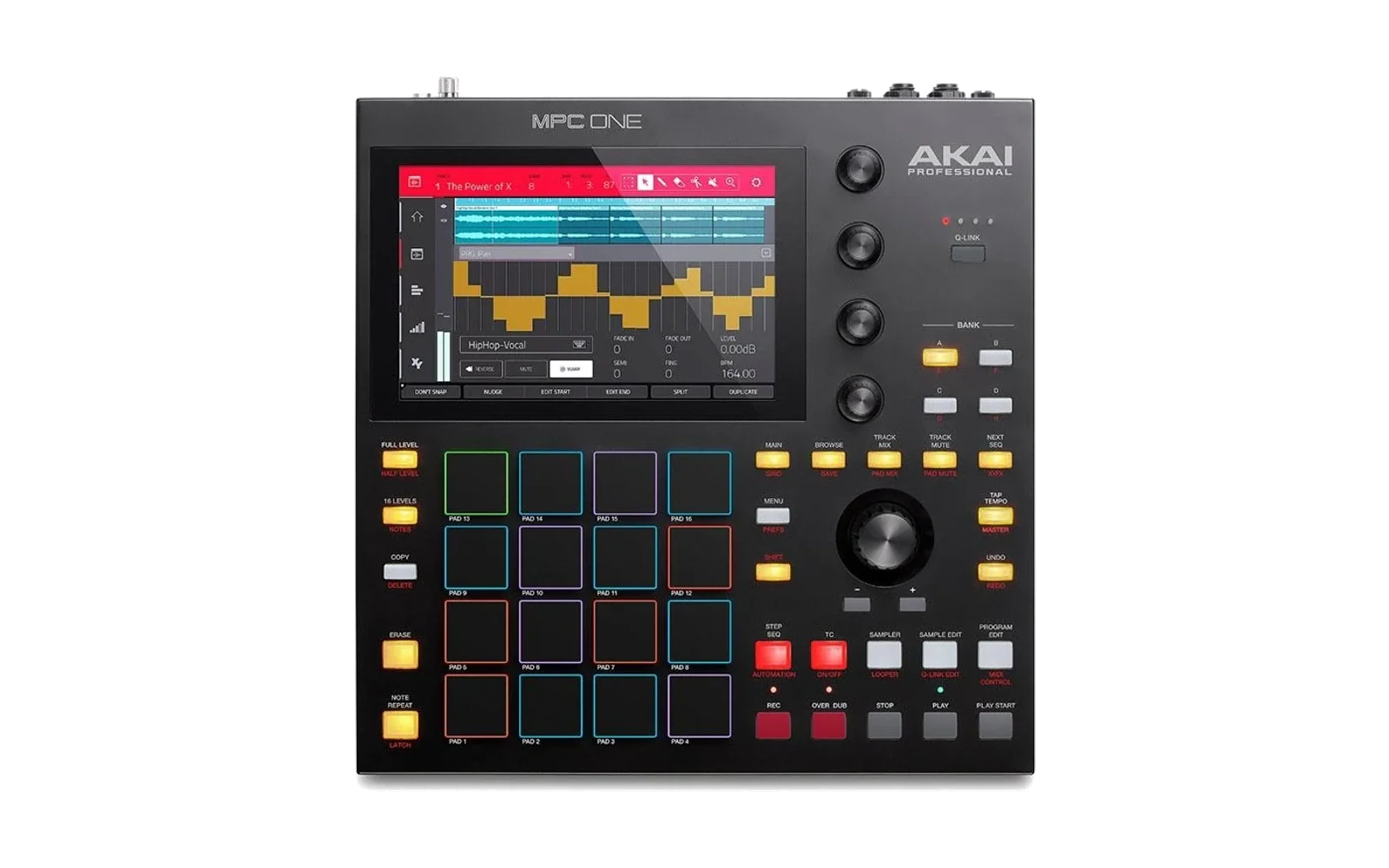
Granola MPC - Multitrack granular synthesizer for the Akai MPC One (Gen 1)
Foundational framework: OpenMPC
An independent application environment for the Akai MPC One (Gen 1,
inmusic,acva). The unit boots directly into Granola MPC, with the stock
Akai application disabled.
What Granola MPC is
A five-voice granular instrument that turns the MPC One into something it was never sold as. Each of the five tracks takes a sample and reads it not as a recording to be played back, but as a field of material to draw grains from — hundreds of short fragments a second, scattered around a playhead you move by hand, each one pitched, panned and shaped independently. Move the playhead slowly through a two-second sample and it can last for minutes; open the jitter and the same sample becomes a cloud with no obvious source.
Every track is a complete instrument in itself:
- The grain cloud — size, density, jitter and drift, with a cap that keeps grain overlap inside what the board can actually sustain.
- A multimode filter — lowpass, highpass or comb, four parameters each.
- Nine independent LFOs, one per destination, any number running at once, from a cycle every three minutes to eight a second.
- Four grain windows — gaussian, percussive, plateau and reverse, chosen per track, and modulatable, so the window steps between shapes as grains fire.
- Parameter-lock pads — twelve slots per track. A slot holds the whole grain state: transposition, playhead and all four Q-Link values, so a row of pads is a sequence rather than a set of transpose buttons.
- Gesture loops — hold RECORD and everything you touch is captured exactly as played, with no quantisation. Release and it loops, at its own length, drifting against the other tracks rather than locking to a bar.
Shared across all five: a delay and a reverb with per-track sends, a master chain of drive, three-band EQ and compression, and sixteen momentary Airwindows effects on the pads whose parameters are drawn fresh on every press.
Underneath the clouds there is a rhythm section — eight synthesised drum channels, each with its own sixteen-step pattern, its own clock division of the project tempo, and a die that writes it a fresh bar from six generative algorithms. The kick ducks the granular tracks. Holding one pad generates a break, built on the spot from a menu of transforms and different every time. And the grains themselves lock to the project tempo, so the clouds and the drums belong to the same bar rather than merely coexisting.
And when you have no sample worth granulating, Granola writes its own. The source generator composes a sequence — a real harmonic plan with phrases and cadences, not a random walk — and renders it through one of five engines: sampled orchestral instruments, a Yoshimi synthesiser, a DX7 clone with sixteen thousand voices, Mutable Instruments' Plaits, which generates its timbres rather than recalling them, or bytebeat, which is not played at all but computed — one integer expression on a sample counter. The result is committed to a track as granulation material, and the cycle begins again.
Work is kept in sixteen projects, each holding sixteen patterns — both complete snapshots of the entire machine, recalled from the pads.
The stock kernel is kept. The application layer is not.
Akai az01 Linux  (kernel 6.18.26-rt4, systemd, ALSA/DRM drivers, sshd)
        └── chroot: Debian 13 armhf runtime on the SD card
                     └── Granola MPC   (SuperCollider)
                     └── sfizz          (offline SFZ rendering)
Before you install anything, read Risk, warranty and affiliation at the foot of this page. In short: this is not an Akai product, installing it will void any warranty still in effect, and you do it entirely at your own risk.
Why it is built this way
OpenMPC runs as a chroot inside the stock OS, not as a replacement for it.
The Akai application layer — acvs, the HTTP API on port 80, network MIDI,
the device daemons — is masked and stopped at boot. az01-power-button is
deliberately kept: the shutdown dialog needs it.
Hardware, as measured
| SoC | Rockchip RK3288, 4 × Cortex-A17, 2 GiB RAM |
| Kernel | 6.18.26-az01-2026-04-30-rt4, PREEMPT_RT, isolcpus=2-3 |
| Audio | ALSA hw:ACVA, 44.1 kHz, 128-frame periods, S32_LE |
| Panel | DSI-1, 800×1280 portrait, presented as 1280×800 landscape |
| Touch | ILI2117 on /dev/input/event0 |
| Controller | internal USB-MIDI, 09e8:0046 |
| Networking | Ethernet only |
CPU affinity is enforced: JACK and scsynth on the isolated cores 2–3, sclang
on core 1, offline renders on cores 0–1.
Layout
openmpc/
  control/         supervisor and diagnostics  → /data/openmpc (internal eMMC)
    bin/           openmpcctl, openmpc-enter, openmpc-return-to-akai, doctor
    libexec/       session, runtime binds, standalone enforcement
  examples/        app bundles; granola-mpc is the appliance
  build/           reproducible ARMv7 runtime image + deploy.sh
  tools/           small C helpers built for the device (boot progress bar)
  schema/          versioned app manifest
  systemd/         unit templates
notes/             STATUS.md — the running record of everything measured
captures/redacted/ controller MIDI captures, identity replies removed
Storage is split deliberately. /data/openmpc on internal eMMC holds only the
control plane and session state — about 180 KiB. Everything substantial
lives on the SD card at /media/OPENMPC: the runtime, apps, the instrument
library, projects, logs.
An app manifest declares what it can see. readable and writable names are
validated against the schema enum before any of them reaches a mount command,
so no manifest string can become a path fragment.
Granola MPC
Five stereo GrainBuf voices. Parameter ranges, curves and grain topology
follow the macOS and Ableton Move versions.
Views
| button | view |
|---|---|
| MAIN | grain clouds, waveform, scrubbing, transposition pads |
| BROWSE | sample browser over the SD card |
| TRACK MIX | source-material generator |
| TRACK MUTE | master effects |
| SAMPLER | performance effects |
| PROGRAM EDIT | per-track multimode filter |
| LFO button | per-track modulation |
| MENU | projects, and with SHIFT, patterns |
| SHIFT + MAIN | rhythm section |
Active view bright, inactive dim, the same convention as the track buttons. The pads belong to whichever view is open and are unlit elsewhere; see the cheat sheet for what every control does in every view.
Overlays
STEP SEQ — per-track volume, pan and stereo spread. TC — per-track send amounts into the shared delay and reverb.
Performance effects
SAMPLER opens sixteen curated Airwindows effects, one per pad, placed ahead of every master effect. Pads toggle. Each effect's parameters are drawn fresh from measured bounds every time a pad is engaged, so the same pad is a different character each press.
The five buttons down the right-hand side choose which tracks the effects act on. A targeted track routes through the effects; an untargeted one goes straight to the master insert, keeping its delay and reverb sends either way. Bright means targeted.
Rhythm section
SHIFT + MAIN. Eight synthesised drum channels — kick, snare, hat, clap, cymbal, metal, and two percussion voices — from a single drum SynthDef whose body function differs per channel. Pads 1–8 select a channel; the top row of the screen shows all eight at once.
Each channel has a sixteen-step pattern, and a die that rewrites it from six generative algorithms: Euclidean, two Euclids folded together, additive grouping (3+3+2 and its relatives), bursts, residue sieves, and a Euclid whose hits are nudged off the grid. Density is weighted by role, so a kick that fires on a third of the grid is a kick and a hat that does is an absence.
Clock division is per channel — 1/8, 1/4, 1/2, 1, x2, x4 against the project tempo. A hat on x2 against a kick on 1/2 is two grids inside one tempo, which is the point. One tick runs underneath everything at the fastest division and each channel advances every Nth tick of it, so channels on different divisions share one timebase and cannot drift apart.
Sidechain. The kick carries one control the other channels do not: how hard it ducks the granular tracks. A single ducker synth writes a control bus every voice reads, shaped like the kick and decaying over roughly a beat, so the recovery is still climbing when the next kick lands.
Macro. Each channel has one morph control on the jog wheel that sweeps a set of its voice parameters together, from dark and long to bright and short.
Breaks. Holding pad 16 generates a break and plays it for as long as the pad is held. It is generated, not a fixed rule: two or three transforms are drawn at random from a menu of sixteen — strip, solo, stutter, reverse, rotate, regrid, rewrite, recruit, holes, double, tumble, accent — each with its own random parameters, applied to a copy of the live pattern, with the figure length drawn too. The combination is rerolled if it repeats the one before it. Measured over 200 generations against a three-channel groove, 197 were distinct.
Breaks stay inside the kit you are using: only channels with hits take part, so
a three-channel groove does not burst into eight channels of random drums, and
recruit is the deliberate exception that brings in exactly one otherwise-silent
channel. A break never empties the kit, and ratchets are expressed as grid
changes rather than extra steps, so they land exactly on the clock.
The main position never stops advancing underneath a break — it is a pure function of the tick count — so releasing the pad lands on the position the pattern would have reached anyway.
Grain sync
Grains lock to the project tempo by default. The trigger rate is quantised to a power-of-two division of the beat — the density control still chooses how dense the cloud is, it just lands on 1, 2, 4, 8 or 16 grains per beat rather than between them — and the grain phase is reset on every bar, so all five voices agree with each other and with the drums instead of each running from whenever its synth happened to start.
Drift is dropped from the rate while locked, since randomising the trigger interval is what the lock exists to prevent; it still shapes grain duration, position jitter and pan, so a locked cloud is not a metronome.
Measured at 100 BPM with density 23: locked, 26.667 triggers/second, exactly sixteen per beat, landing within about a millisecond of each bar line. Unlocked, 23.1 and wandering, drifting 15–21 ms away from the bar.
It can be turned off per project in the project settings.
Project settings
In the projects view, touching an occupied slot on screen opens its settings — the pads load projects, the screen configures them, which keeps a stage gesture and a setup gesture apart. Three settings, all saved with the project: tempo, drum level (how loud the rhythm section sits against the granular tracks) and grain sync.
Touchscreen
The panel is portrait and mounted rotated, so raw touch coordinates are neither the screen's axes nor a simple flip of them. The transform was calibrated against four measured corners rather than derived from the panel's declared geometry, which does not describe how it is mounted; residuals are within about six pixels, which is well inside a fingertip.
Touch is used where a control belongs to setup rather than performance — steps, the die, clock divisions, project settings, the shutdown dialog and the waveform — while the pads and encoders keep the gestures you would use on stage.
Audio graph
5 voices ──┬─► master bus ──► Transform (drive → 3-band EQ → compressor) ──► out
           ├─► delay send ──► delay  ──┘
           └─► reverb send ─► reverb ──┘
Delay and reverb are shared master effects with per-track sends, as in the originals. Sends are post-fader, so lowering a track takes its effect tail with it. Nodes sit in three ordered groups — voices, effects, master — because SuperCollider evaluates in order and effects must run after the voices write.
A density cap bounds grain overlap. Without it, maximum size and density is 200 grains/second of 2-second grains — 400 concurrent voices, which this board cannot sustain, and which is reachable from the front panel.
User guide
Getting around
Granola opens into an unsaved blank project: no material on any track, no project loaded. Nothing is restored from the last session, so what you hear is always something you put there.
Each view is opened by its own button, lit while active. The sixteen pads belong to whichever view is open — they do different things in each, and are unlit in views that do not claim them.
Five tracks, each an independent granular voice with its own sample, parameters, filter, LFOs and gesture loop. The track buttons select; everything you edit applies to the selected track.
A first pass
- BROWSE — find a sample on the card, then press a track button to load it onto that track. PLAY starts the clouds.
- MAIN — the four Q-Links shape the grain cloud: size, density, jitter and drift. The jog wheel moves the playhead; touching the waveform scrubs.
- STEP SEQ and TC overlay volume/pan/spread and the two send amounts.
- PROGRAM EDIT gives the track a filter; the LFO view modulates up to nine destinations at once.
- MENU saves the whole machine into one of sixteen project slots; SHIFT + MENU saves patterns inside that project.
Creating samples
TRACK MIX opens the source generator, which writes its own material. Choose an engine, a generator, a musical profile and a number of layers, then press the jog wheel to render. The result can be auditioned and committed to a track as granulation material.
Five engines: sampled orchestral instruments through sfizz, synthesised patches through Yoshimi, FM voices through a DX7 clone, Plaits, which generates its timbres rather than recalling them and gives every layer a different one of its twenty-four synthesis engines according to the part that layer plays, and bytebeat, which is not played at all — one integer expression evaluated on a sample counter.
Performance
- Parameter-lock pads (MAIN, pads 1–12) — step through the transpositions your scale allows with the A and C buttons, set the playhead and the four Q-Links as you want them, then hold SHIFT and press a pad to commit the lot. A short press plays it back. A slot you have edited since selecting it blinks until you save it — except while the gesture recorder is running, where the blink would be noise.
- Grain windows (MAIN, pads 13–16) — gaussian, percussive, plateau, reverse, per track.
- Performance effects (SAMPLER) — sixteen Airwindows effects on the pads, momentary, with fresh parameters on every press.
- Gesture loops (RECORD) — hold RECORD and play; everything you touch is captured exactly as performed, with no quantisation. Release and it loops immediately. Each track's loop is its own length, so they drift against each other rather than locking to a bar.
- Mute — SHIFT + a track button. The cloud keeps running underneath, so unmuting drops back into the texture rather than restarting it.
Rhythm
SHIFT + MAIN opens the rhythm section.
- Pads 1–8 select a channel; SHIFT + pad mutes it. A muted channel is skipped by the sequencer entirely, so muting also sheds load.
- Touch a step to toggle it, or touch the die to have a bar written for you from one of six algorithms.
- The row above the steps sets that channel's clock division. Each channel tile shows its own grid, so a polyrhythmic kit can be read off the top row.
- Q1–Q3 are volume, pan and effects send for the selected channel; on the kick, Q4 is how hard it ducks the granular tracks. The jog wheel sweeps that channel's macro.
- Hold pad 16 for a break. It is generated on the press and different every time; the panel names the transforms that came up.
Tempo, the rhythm section's overall level and grain sync live in the project settings — see Project settings.
Projects and patterns
A project is a snapshot of the entire machine: every track's sample, all grain parameters, filters, LFOs, sends, mutes, parameter-lock pads, grain windows, gesture loops, master effects, the source generator's settings, the whole rhythm section, and the project's own tempo and grain-sync setting. A pattern is the same snapshot one level down — sixteen of them live inside each project, and a project reopens on whichever pattern was in play when it was saved.
Both use the same gestures: press a pad to load, SHIFT + pad to save. Empty slots are unlit and do nothing. Projects are red, patterns green.
Patterns saved while no project is loaded are held in memory only, and the confirmation says so — there is no file to keep them in until a project exists.
Cheat sheet
Conventions used throughout: unlit = empty or unavailable, dim = holds something, bright = active or selected. SHIFT is held, never toggled.
Global — these work in every view
| control | action |
|---|---|
| MAIN | main view |
| BROWSE | sample browser |
| TRACK MIX | source generator |
| TRACK MUTE | master effects |
| SAMPLER | performance effects |
| PROGRAM EDIT | filter |
| LFO button † | LFO view |
| MENU | projects |
| SHIFT + MENU | patterns |
| SHIFT + MAIN | rhythm section |
| track buttons 1–5 | select track |
| SHIFT + track button | mute / unmute that track (button goes dark) |
| PLAY / STOP | start and stop all clouds |
| RECORD (hold) | record a gesture loop on the selected track |
| RECORD (release) | loop starts immediately |
| SHIFT + RECORD | clear the selected track's gesture loop |
| STEP SEQ | mixer overlay (volume / pan / spread) |
| TC | send overlay (delay / reverb) |
† The button captured for the LFO view. Its panel label was never recorded during capture — it is the one you assigned, MIDI note 6.
MAIN — grain clouds and waveform
| control | parameter | range |
|---|---|---|
| Q1 | grain size | 2 ms – 2 s |
| Q2 | density | 0.2 – 200 grains/s |
| Q3 | jitter | 0 – 100 % of the buffer |
| Q4 | drift | 0 – 100 % |
| A / C | transposition, stepped through the current scale | −24 – +24 st |
| jog wheel | playhead position | 0 – 100 % |
| jog press | playhead to centre | |
| touch waveform | scrub the playhead | |
| pad 1–12 (short press) | recall a stored slot | |
| SHIFT + pad 1–12 | store the current grain state to that pad | |
| pad 13–16 | grain window: gaussian, percussive, plateau, reverse |
Pads 1–12 are parameter-lock slots per track, painted in that track's own colour. A slot holds transposition, playhead and all four Q-Link values, so a row of them is a sequence rather than a set of transpose buttons. Dim means a stored slot; bright means the track is currently sitting on it — derived from the actual values, so stepping away with A/C dims it by itself. A slot you have edited since selecting it blinks until you save, except while the gesture recorder is running.
Mixer overlay (STEP SEQ) and send overlay (TC)
| control | mixer | sends |
|---|---|---|
| Q1 | volume | delay send |
| Q2 | pan | reverb send |
| Q3 | stereo spread | — |
Both are per track and post-fader: lowering a track takes its effect tail with it. The two overlays share the encoders, so opening one closes the other.
BROWSE — sample browser
| control | action |
|---|---|
| jog wheel | move through the listing |
| jog press | enter a folder, or audition a file |
| track button 1–5 | load the highlighted file onto that track |
TRACK MIX — source generator
The jog wheel moves between rows; Q1 edits the highlighted row, Q2 does the same in coarse steps for the long lists. Press the jog wheel to render.
| row | what it sets |
|---|---|
| ENGINE | sso / sfizz, yoshimi, dx7, plaits, bytebeat |
| GENERATOR | walk, euclid, progression, motif |
| PROFILE | any, plucky, pad, lead, bass, percussive, texture |
| LAYERS | how many independent parts are generated |
| ROOT | key centre |
| SCALE | fifteen scales |
| TEMPO | BPM |
| VOICES | 1 (mono) to 4 (poly) |
| BARS | loop length, 1–8 |
| DENSITY | how busy the result is |
PROGRAM EDIT — filter (per track)
| control | action |
|---|---|
| pad 1 | lowpass |
| pad 2 | highpass |
| pad 3 | comb |
| pad 4 | filter off |
| Q1 | Q2 | Q3 | Q4 | |
|---|---|---|---|---|
| lowpass / highpass | cutoff | resonance | drive | mix |
| comb | tune | feedback | damping | mix |
Each kind keeps its own four values, so moving between them and back finds each as you left it.
LFO view — nine destinations (per track)
| control | action |
|---|---|
| pad 1–9 | select which destination the knobs edit |
| Q1 | shape — sine, triangle, saw, square, step random, smooth random |
| Q2 | rate — 0.005 – 8 Hz |
| Q3 | depth — 0 – 100 % |
Destinations, in pad order: grain size, density, jitter, drift, spread, grain envelope shape, delay send, playhead position, reverb send.
Every destination has its own oscillator and runs whenever its depth is above zero — the pads only choose what the knobs edit, not what is modulating. The main view animates every destination that has depth dialled in.
SAMPLER — performance effects
| control | action |
|---|---|
| pad 1–16 | engage an effect, momentary; parameters are randomised on every press |
| Q1 | wet / dry mix |
| Q2 | fade in and out time, 1 – 10 s |
| five buttons down the right-hand side | choose which tracks the effects act on |
TRACK MUTE — master effects
The jog wheel moves between four tabs; Q1–Q4 edit the four parameters of the tab in view.
| tab | parameters |
|---|---|
| EQ | drive, low, mid, high |
| COMP | threshold, ratio, attack, release |
| DELAY | time, feedback, damping, level |
| REVERB | size, damping, high cut, level |
SHIFT + MAIN — rhythm section
| control | action |
|---|---|
| pad 1–8 | select a drum channel |
| SHIFT + pad 1–8 | mute / unmute that channel (pad goes dark) |
| pad 16 (hold) | generate and play a break for as long as it is held |
| Q1 | channel volume |
| Q2 | channel pan (bipolar) |
| Q3 | channel effects send |
| Q4 | sidechain depth — kick channel only |
| jog wheel | that channel's macro, dark/long → bright/short |
| touch a step | toggle it |
| touch the division row | that channel's clock division |
| touch the die | write the channel a new bar |
Divisions are per channel: 1/8, 1/4, 1/2, 1, x2, x4 against the project tempo. Each channel tile shows its own grid alongside its hit count.
MENU — projects, and SHIFT + MENU — patterns
| control | action |
|---|---|
| pad (short press) | load that slot |
| SHIFT + pad | save the current state into that slot |
Sixteen slots each. Projects red, patterns green, and a pattern bank belongs to the project that holds it.
Touching an occupied project slot on screen opens its settings: tempo, drum level and grain sync, all saved with the project.
Third-party components and their licences
OpenMPC's own source is MIT (LICENSE). It builds on, installs or renders through the following, each under its own terms. Several are copyleft; check before redistributing anything built from this repository.
| component | used for | licence |
|---|---|---|
| SuperCollider | audio engine and language | GPL-3.0-or-later |
| JACK | audio server | LGPL-2.1 / GPL-2.0 |
| Qt | the on-screen interface, via sclang | LGPL-3.0 |
| sfizz | offline SFZ rendering | BSD-2-Clause |
| Yoshimi | synthesised source material | GPL-2.0 |
| mi-UGens by Volker Böhm | Plaits as a SuperCollider UGen | GPL-3.0 |
| Mutable Instruments Plaits | the DSP mi-UGens ports | MIT (firmware), CC-BY-SA-4.0 (hardware) |
| DX7-Supercollider by Aziz Ege Gonul | FM voices and its 16384-preset bank | see repository |
| bytebeat by midouest | bytebeat interpreter and UGen | see repository |
| PoundHard | the drum voice the rhythm section is built on | see repository |
| Airwindows by Chris Johnson | performance effects | MIT |
| Sonatina Symphonic Orchestra | sampled orchestral instruments | CC-BY-3.0 |
| Debian armhf | the runtime the chroot is built from | various, per package |
| MPC-LiveXplore by TheKikGen | controller protocol groundwork | see repository |
Sonatina Symphonic Orchestra, the Yoshimi preset banks and the DX7 bank are not in this repository and are fetched or installed separately — see "Third-party payloads" below.
The Akai stock firmware, its kernel and its proprietary components are not redistributed here and remain the property of their owners.
Source material generator
Generates sequences, renders them through a selected engine and commits the result to a track as granulation material.
5 tone engines, chosen with the ENGINE field:
-
SSO / sfizz — sampled orchestral instruments, rendered offline.
-
Yoshimi — synthesised. Each layer derives a new patch from a stock Yoshimi preset, mutated within bounds set by the preset's own category, so a pad stays a pad and a plucked instrument keeps its transient. 902 presets across 24 banks ship with
yoshimi-data; the profile decides which banks are eligible and the preset itself is random. -
DX7 — Aziz Ege Gonul's DX7-Supercollider, an accurate Yamaha DX7 clone built on the
FM7UGen from SC3-Plugins, with its own bank of 16384 presets. It is used unmodified:DX7.scdis loaded as published and its ownmainCallerplays the notes. Because it is SuperCollider, it renders offline and is the quickest of the three — about 0.8x the loop length. Its own bank carries no patch names, sodx7_import.pyconverts named.syxcartridges into the same format and puts them at the head of the bank; the profile then selects by name (456 labelled patches), falling back to the full 16384 when nothing matches. -
Plaits — Mutable Instruments' Plaits, through Volker Böhm's mi-UGens port, compiled for this board. Alone among the four it has no preset library: its sound is four continuous controls, so the timbre is generated rather than recalled. Plaits is twenty-four synthesis engines in one — virtual analog, waveshaping, two-op and three banks of six-operator FM, granular, additive, wavetable, chords, speech, swarm, two noise engines, plucked string, modal body, three drum models, phase distortion, wave terrain, string machine and chiptune — and every layer is given a different one, chosen for the part that layer plays. Engines from the same family are kept apart, so three layers do not arrive as the same idea three times. The generated controls are ranged per engine, because the same knob is a modulator ratio on the FM engines and a filter frequency on the noise ones; sampling all four uniformly for every engine is what makes generated Plaits patches sound alike. It renders offline, and is the fastest of the five.
-
Bytebeat — midouest's bytebeat interpreter and UGen, compiled for this board with its own Catch2 suite run on the target architecture rather than the host, because
charsignedness and shifts of signed types differ on ARM in exactly the places this code cares about.This engine is unlike the other four, structurally rather than as a matter of taste. The others are played: they take a sequence of notes and render it. Bytebeat cannot be played — it has no note-on, no pitch input and no way to be told what to do at a particular moment. The expression is the piece, and what it does at second thirty is decided by the same arithmetic that decides second one. So the generated sequence is ignored here, and root, scale and voices have nothing to attach to.
What replaces them is expression generation. The variety has to come from the formulas, so they are built from a grammar of families known to behave differently from one another, and every layer is given a different family. The counter's clock rate is generated too: the same expression at 2 kHz and at 32 kHz is two unrelated sounds, which makes rate the single most effective diversity control here. Expressions are screened before anything is rendered — the standalone interpreter evaluates seconds of audio in milliseconds, so a formula that turns out silent, constant or a pure square wave is discarded and replaced rather than discovered in the audio afterwards.
Yoshimi has no offline render mode, so it is run headless on a pty with the
ALSA default PCM redefined as a file sink through ALSA_CONFIG_PATH — scoped
to that process, with a null slave, so no hardware is opened and a render can
never contend with the live audio device. Rendering is therefore realtime.
Four note-pattern generators — constrained random walk, Euclidean, chord progression, motif development — over 15 scales, 1–8 bars, 1–6 layers. Instruments are chosen at random per generation, biased by a profile (plucky, pad, lead, bass, percussive, texture) that also reshapes note length, density and register. Everything is seed-deterministic: a seed fully describes a result.
Two findings shaped this and are worth keeping in mind:
--use-eotis mandatory. Without it sfizz renders until every voice falls silent, and SSO's looped and long-release patches never do — one produced 197 MB in 40 seconds and was still going. Because that flag stops at the last MIDI event, the generator writes a silent terminator on the loop boundary: a note-off for a note that was never on, which cannot make a sound but keeps the render running to a full loop.- The instrument index deliberately includes non-top-level SFZ files.
Indexing only files that nothing else
#includes yielded 90 instruments, 71 of them keyswitch patches that pick an arbitrary articulation unless a keyswitch note is sent. Indexing every file that defines playable regions yields 741, of which 668 are plain single articulations.
Build and deploy
One-shot install onto a device that already has SSH working:
openmpc/build/export-runtime.sh 0.2.0        # build the ARMv7 runtime image
openmpc/build/install.sh --dry-run           # print every step, change nothing
openmpc/build/install.sh --i-have-a-backup   # do it
install.sh pushes the control plane, the systemd units, the runtime, the SDK
and the app, then verifies. It leaves boot activation off unless
--enable-at-boot is given, so a device that fails to install still boots the
stock application. It is untested end to end — every step in it has been
performed by hand, but their assembly has not. Read it, and dry-run it first.
The individual steps, which is what the installer calls:
openmpc/build/export-runtime.sh 0.2.0        # build the ARMv7 runtime image
openmpc/build/deploy.sh runtime 0.2.0 --switch --restart
openmpc/build/deploy.sh app granola-mpc --restart
openmpc/build/deploy.sh control              # safe under a live session
openmpc/build/deploy.sh sdk --restart
Both scripts read MPC_HOST and MPC_KEY from the environment — the address of
your device on the network and the private key that reaches it. Set them to
whatever is true for your setup.
The device has no rsync, so every transfer is tar-through-ssh, staged beside the
destination and swapped with rename(2). A push that would replace a
bind-mounted tree under a live session is refused unless --restart is
given, because deleting the old directory unlinks files the running app can
still reach through the mount.
Boot splash
The splash lives in its own partition as a headerless raw framebuffer image —
800 × 1280 portrait, 32-bit BGRA, followed by unrelated data that must be left
alone, so a write stops at the image and no further. make-splash.py composes a
replacement in display space and rotates it on the way out; it has no
dependencies, decoding PNG itself, so it runs wherever the splash is built.
openmpc/tools/splash-progress.c fills a progress track drawn into that splash,
and boot stages call it with rising numbers. It must be given --prime on the
first call: U-Boot paints the panel directly and never fills /dev/fb0, so the
buffer is black, and writing into it makes the driver flush a region that would
otherwise erase a widening band of the real splash.
A blank or corrupted splash does not affect the boot itself, and a missing
openmpc-splash-progress binary is simply skipped.
openmpc/build/build-splash-progress.sh          # static armv7, into control/bin
openmpc/build/make-splash.py --logo granola-logo-horizontal.png \
    --out splash.raw --preview splash-preview.png
The binary is not tracked, for the same reason no other compiled artefact here
is; build it before deploy.sh control if you want the bar.
Third-party payloads (not in the repository)
# Sonatina Symphonic Orchestra → /media/OPENMPC/instruments
curl -L -o sso.tar.gz https://codeload.github.com/peastman/sso/tar.gz/refs/tags/v4.0
cat sso.tar.gz | ssh "$MPC_HOST" 'mkdir -p /media/OPENMPC/instruments && tar -C /media/OPENMPC/instruments -xzf -'
python3 openmpc/examples/granola-mpc/index_instruments.py <local-sso-copy> \
    openmpc/examples/granola-mpc/instruments.json
sfizz is not packaged for Debian in any suite and is compiled from source in
Dockerfile.armv7 as a separate build stage.
Safety and recovery
- U-Boot and the partition table are untouched.
- The stock rootfs is read-only and remains the fastboot recovery image. Nothing
was deleted from it: re-enabling
acvsrestores the original fallback with no other change. openmpc-enterarms an independent safety timer before stopping the stock application, and rolls back on any failure.- Take a verified full eMMC and boot-area backup before you start.
backup-mpc-emmc.shdoes this and records checksums.
Accepted trade: with the stock application disabled there is no fallback UI. A failed start leaves the appliance retrying, with SSH reachable.
Gotchas discovered the hard way
Each of these cost real debugging time and is documented in notes/STATUS.md:
/etcis an overlay mounted after the boot transaction is computed. Units and mask symlinks placed in/etc/systemd/systemare invisible to early boot; services start from/usr/libregardless. Standalone enforcement therefore runs from the appliance script, not from a unit of its own./varis an overlay on/data. The stock app writes a waveform thumbnail for every audio file it can see. With an instrument library on the card that reached 2.5 GiB and filled the internal partition, after which nothing could start. The cache is now bind-mounted onto the SD card.- Qt eglfs applies a high-DPI scale factor. Without
QT_ENABLE_HIGHDPI_SCALING=0the app is handed a 355×222 surface on a 1280×800 panel and every layout collapses. - JACK leaves shared memory behind when killed. The next server then hangs
after printing its banner, before ever opening the audio device — which looks
exactly like a broken sound card.
openmpc-sessionclears stale objects when nojackdis running. - Q-Links report a bounded 0–127 position for endless encoders, and the
stock init configures them in two groups (
01 01and00 00). The00 00pair jams against the ends of its range; all four are now set to01 01. Array:includescompares Strings by identity in SuperCollider. The sample browser's extension filter silently matched nothing.
Known limitations
- Reverb has no independent decay control.
FreeVerb2exposes room and damping only. A genuine size/decay pair needs a different algorithm, sinceJPverblives in sc3-plugins which is not installed. - Csound's armhf
liblinear_algebra.sohas an unresolveddorgqr_symbol; those opcodes are unavailable.
Licence
OpenMPC is released under the MIT Licence — see LICENSE. That covers this repository's own source only; the third-party components it builds on carry their own terms, several of them copyleft, and are listed under Third-party components and their licences.
Credit
Granola is by nzimas; this is the MPC One port. Sonatina Symphonic Orchestra is maintained at peastman/sso. Controller protocol groundwork draws on TheKikGen/MPC-LiveXplore.
Risk, warranty and affiliation
OpenMPC is not an Akai product and has no affiliation, association, authorisation, endorsement or connection with Akai Professional, inMusic Brands, or any of their subsidiaries. "Akai", "MPC" and "MPC One" are trademarks of their respective owners and are used here only to identify the hardware this software runs on.
Installing this will almost certainly void any warranty still in effect on your device. It requires root access to a machine the manufacturer never intended you to have root on.
You install and run this entirely at your own risk and on your own responsibility. It modifies system state on a device that costs real money and is not designed to be modified. It can render the unit unusable. Nobody involved in this project is liable for damage to your hardware, loss of your work, or any other consequence of using it, and there is no support, no warranty and no promise that it works at all. The software is provided "as is" — see LICENSE.
If any of that is not acceptable to you, do not install it. Back up your device
first; backup-mpc-emmc.sh in this repository exists for that reason.