Frodhes
A physically modelled electric piano, vibraphone and marimba for the M-VAVE FM-1.
Frodhes is an independent open-source project, not affiliated with or endorsed by M-VAVE, the Rhodes or Fender trademark owners or any instrument maker. It comes with no warranty: install it at your own risk (M-VAVE's own firmware can always be put back); see LICENSING.md.

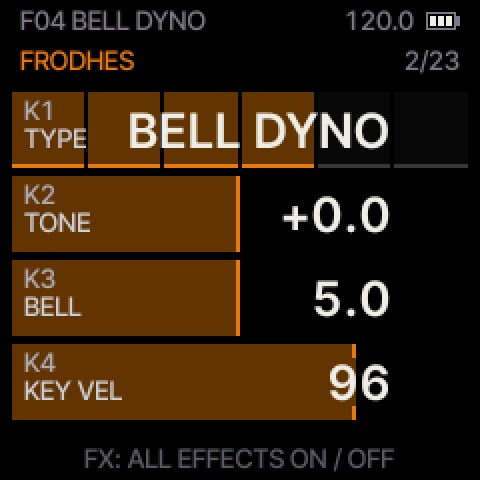
Frodhes turns the FM-1 into an electric piano, a vibraphone and a marimba. Every note is computed live from the mechanics of the instrument: on a Rhodes a hammer strikes a tine, the tine rings against its tonebar and a magnetic pickup turns the motion into sound, with the bark of hard notes, the bell of the attack, the slow whirl of a held tine and keys that each sound a little different; on the vibraphone a mallet strikes a bar, its tuned tube rings along and the motor makes it pulse; on the marimba a yarn mallet strikes a rosewood bar whose long tube makes the low notes bloom. Six instrument types (Stage 77, Suitcase, Early Felt, Bell Dyno, Vibes and Marimba), a stage-keyboard effects chain (compressor, a drive with five overdrive types, a resonant filter with its LFO, tremolo / wah, phaser, chorus, delay with a digital, an analog-style and a tape echo, a reverb with hall, plate and infinite types), tap tempo with MIDI clock sync, USB-MIDI in and out and TRS MIDI in, MIDI pitch bend, release velocity and a stereo SPREAD by key on the Rhodes, chord mode, a pattern recorder (1–16 bar loops, quantize, overdub, undo / erase), an arpeggiator, scales, a sustain pedal, velocity from the FM-1's own keys (TOUCH: LIGHT / MEDIUM / HEAVY / FIXED), 10-voice polyphony on every instrument and 19 factory plus 16 user presets. The screen shows one page at a time with four cards, one for each of the FM-1's four knobs, each read at a glance by its kind (an amount fills its row like a fader, a selector lights one block per option up to its choice, an ON / OFF switch shows a lit dot), the value always in the same large letters; the instrument brings its own VOICE pages; the first page, PERFORM, puts the drive, the filter's cutoff and the delay's and reverb's dry / wet (or anything you assign) on those four knobs for playing live.
Try it in your browser: the Frodhes emulator: the same firmware code compiled to WebAssembly, with the FM-1's screen, knobs, buttons and keys (computer keyboard and Web MIDI too).
Screens
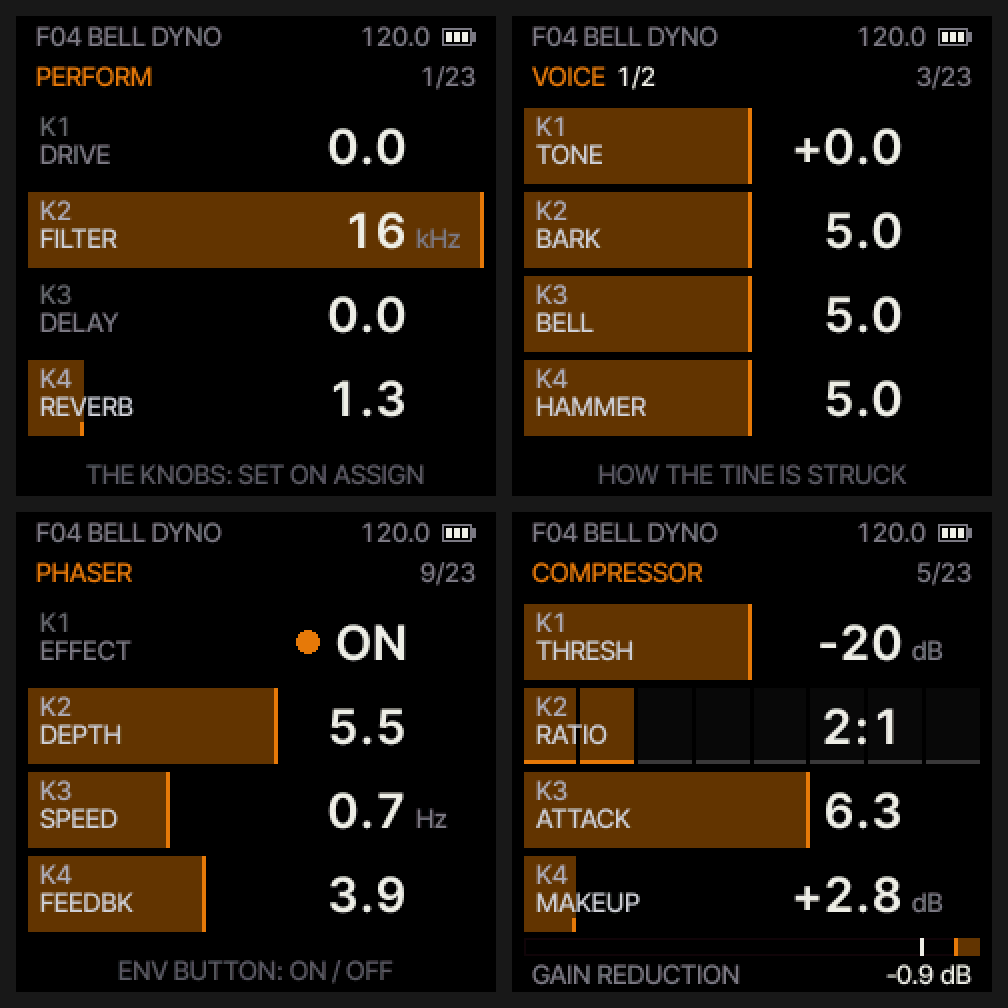
Every page is in the manual, with its screenshot.
Download
Latest release: the release page (its version, notes
and earlier versions); the firmware file is frodhes.fwsc, always the newest
(package identity FM-1_958, the same for every version).
Install it over USB, from the browser (Chrome or Edge: the emulator page's Install on your FM-1 or SMK-37, which finds the unit, fetches the latest release's package for its model and checks its sha256) or from a terminal:
pip install mido python-rtmidi
python3 tools/fm1_install.py frodhes.fwsc
If anything goes wrong, switch the FM-1 off, hold OCT− and switch it on: that is the USB rescue, from which you can always install again. To return to M-VAVE's firmware, use the "Official firmware" section of thefirmwarehub.com with V15 from m-vave.com.
Other keyboards: the SMK-37 (experimental)
Frodhes also builds for the SMK-37, the FM-1's bigger relative (37 keys with velocity, pads, faders, wheels, a pedal jack). Experimental: not tested on hardware by us. Back up your flash first; the way back is your model's stock package. The three SMK files are on the release page (table below). Everything is in docs/SMK37.md and the manual's appendix.
| Model | File | Package identity |
|---|---|---|
| FM-1 | frodhes.fwsc | FM-1_958 |
| SMK-37 Pro (experimental) | frodhes-smk37-experimental.fwsc | SMK-37 Pro_470 |
| SMK-37 Elite (experimental) | frodhes-smk37-elite-experimental.fwsc | SMK-37 Elite_470 |
| MKE-P37 (experimental) | frodhes-smk37-mke-experimental.fwsc | MKE-P37_470 |
Manual
The user manual: every page, button and knob, presets, effects, tempo, scales, sustain and the MIDI map.
| Page | K1 | K2 | K3 | K4 | Button |
|---|---|---|---|---|---|
| PERFORM | DRIVE | FILTER | DELAY | REVERB | HOME (assignable on ASSIGN) |
| FRODHES (main) | TYPE | TONE (VIBES / MARIMBA: MALLET) | BELL (VIBES: MOTOR; MARIMBA: TUBE) | KEY VEL | HOME twice |
| VOICE 1/2 (VIBES: 1/3) | TONE (VIBES / MARIMBA: STRIKE) | BARK (MALLET) | BELL (TUBE) | HAMMER (WEIGHT) | (SELECT) |
| VOICE 2/2 (VIBES: 2/3) | DECAY (VIBES / MARIMBA: RING) | RELEASE (VIBES: DAMPER; MARIMBA: MUTE) | NOISE | TUNE | (SELECT) |
| VOICE 3/3 (VIBES only: the motor) | MOTOR (ON / OFF) | DEPTH | SPEED | SHAPE | (SELECT) |
| COMPRESSOR | THRESHOLD (OFF / on) | RATIO | ATTACK | MAKEUP | (SELECT) |
| DRIVE | OFF / FDRV / KHLON / TSH8 / OHCD / BHLUE | AMOUNT | TONE | MIX | (SELECT) |
| FILTER | OFF / LP12 / LP18 (default) / HP12 / HP18 / BP / NOTCH | FREQ | RESO | LFO | (SELECT) |
| TREM/WAH | OFF / PAN / TREM / WAH | DEPTH | RATE | SHAPE | LFO (there: on / off) |
| PHASER | OFF / ON | DEPTH | SPEED | FEEDBACK | ENV (there: on / off) |
| CHORUS | OFF / ON | DEPTH | SPEED | SYNC | (SELECT) |
| DELAY | OFF / DIG / ANA / TAPE | MIX | TIME | FEEDBACK | SEL (there: on / off) |
| REVERB | OFF / HALL / PLATE / INFINITE | MIX | DECAY (INFINITE: up to FREEZE) | TONE | (SELECT) |
| REVERB 2 | PRE-DELAY | SIZE (AUTO / fixed) | MOD | LOW CUT | (SELECT) |
| TEMPO | BPM | TREM SYNC | PHA SYNC | DLY SYNC | GLO |
| SCALE | OFF / SNAP / DEGREE | SCALE | ROOT | TRANSPOSE | (SELECT) |
| CHORD | OFF / DIATONIC / DIA 7TH / MAJ ... MIN6 | INVERSION | VOICING | STRUM | EDIT (there: chord mode on / off) |
| ARPEGGIO | OFF / UP / DOWN / UP-DN / ORDER / RANDOM | RATE | OCTAVES | GATE | ARP (there: on / off; SEL: HOLD, on every page while the arp is on) |
| LFO | SHAPE | RATE | SYNC | RETRIG | (SELECT) |
| SEQUENCER | BARS 1–16 | QUANT | SWING | EDIT (UNDO / ERASE) | SEQ (there: REC, hold: CLEAR; PLAY: start / stop, tap tempo while the arp is on) |
| ASSIGN | what K1 plays | what K2 plays | what K3 plays | what K4 plays | (SELECT) |
| SETUP | DELAY TONE | LEVEL | USB VOL (KNOB / FIXED) | TOUCH (LIGHT / MEDIUM / HEAVY / FIXED) | GLO twice |
| MIDI | CHANNEL (ALL / 1–16) | TRS IN (ON / OFF) | CLOCK (INT / EXT) | GLO three times | |
| DISPLAY | COLOR (AMBER, then 25 pastel hues) | BRIGHTNESS (the screen and every light, 10 … 1) | LEDS (OFF / PLAYED / ROOTS / ALL / SCALE) | GLO four times |
SELECT turns the pages, K1–K4 turn the cards (on PERFORM: DRIVE, FILTER, DELAY, REVERB, or what you assign), ALGORITHM picks the TYPE, PRESETS browses sounds, FX switches all effects off / on, EDIT chord mode, SEQ the sequencer, ARP the arpeggiator, PLAY taps the tempo (everywhere but SEQUENCER, where it starts / stops; while the arpeggiator is on it taps there too and SEL is its HOLD on every page), REC is the sustain pedal, SAVE stores a preset. The top line shows the battery next to the tempo.
The DRIVE page's K1 picks one of five overdrive types: FDRV (the original Frodhes drive), KHLON (a clean-blend overdrive), TSH8 (a mid-hump overdrive), OHCD (a MOSFET overdrive, from a light bite to a thick drive) and BHLUE (a two-stage soft overdrive). The four after FDRV each follow a classic overdrive circuit type, computed live; TONE is each circuit's own tone knob, MIX blends the clean piano back in, and every type plays at about the loudness of the drive switched off. A new type fades the old one out, then fades in. CC 84 picks it (0–63 OFF, 64–75 KHLON, 76–87 TSH8, 88–99 OHCD, 100–111 BHLUE, 112–127 FDRV).
Build
Frodhes is built on Dinghy (zvenson), which is built on the platform of
Felucca (Leo Kuroshita, Hügelton Instruments) as
SLOOP (isod89) carries it. That platform handles updates, the USB rescue,
USB-MIDI, USB audio, the panel, the screen and settings. The MIDI pitch bend's retuning (rh_retune and its table)
is genkigenki's, from PR #3.
Key velocity on the FM-1's keys follows Charles Vestal's
fm1-velocity (GPL-3.0-only): how the key rows are read through the
chip's converter, rewritten in integers and scheduled inside the panel scan.
Contributing: CONTRIBUTING.md says what a pull request touches (the code, its tests, its own
release-note fragment in docs/changes/, the screenshots regenerated) and what it leaves alone (version numbers,
the release notes, ?v=).
firmware/src/frodhes.c    <- the app: keys, MIDI, sustain, settings, the main loop
firmware/src/rhodes.c     <- the voice engine: tine and tonebar, hammer, pickup, damper
firmware/src/bars.c       <- the bar instruments (VIBES, MARIMBA): bar modes, tube, mallet, damper / hand, motor
firmware/src/fx.c         <- the effects and the master (limiter, silence gate)
firmware/src/keyvel.c     <- key velocity: a key's reading once it lands -> its velocity (TOUCH); hal/fm1_keyadc.h the rows
firmware/src/ui.c         <- the pages;  params.c the parameters;  tempo.c tempo and scales;  presets.c
firmware/gen/             <- tables generated by tools/gen_rhodes.py, tools/gen_bars.py and tools/gen_fx_tables.py
firmware/src/platform.c   <- Dinghy's plumbing (boot, USB, updates, audio ISR, settings)
You need Python 3, JieLi's toolchain and the JieLi AC79 SDK; on macOS also Docker (the toolchain is Linux x86-64
only). Everything installs inside the project, in .local/ (git-ignored):
make setup        # .local/venv, the JieLi toolchain, the AC79 SDK files (sha256-checked)
make test         # the host scripts in tests/scripts
make pytest       # the Python tests (generators, the C engine against its reference, effects); in parallel
                  # with pytest-xdist (PYTEST_N=auto; PYTEST_N=0 or no xdist: serial)
make host         # render build/host/frodhes.wav and screen PNGs on the computer, no FM-1 needed
./build.sh        # build/frodhes.fwsc;  ./build.sh --release X.Y.Z -> build/frodhes-X.Y.Z.fwsc (always FM-1_958)
Testing on the real FM-1 over USB: tools/hil_scan.py plays it over MIDI and analyses its USB audio (keys,
velocity, every effect, presets); tools/hil_jack.py compares the headphone jack, recorded with an audio interface,
against the USB audio; tools/hil_usb_onset.py checks that every note reaches the USB recording as soon as the jack
(after a knob turn and a pause too: the settings save lands there); tools/hil_autosave.py lets the settings save land
while a computer records and checks the USB stream stays clean (missed 0, overruns 0) and the flash write's longest
interrupts-off stretch; tools/hil_clock.py sends MIDI clock (over USB-MIDI, or --via trs --port NAME from a MIDI
interface into the TRS IN) and checks that every synced item follows it (the tremolo, phaser, chorus, filter LFO and
VIBES motor by their effect on the audio, the delay types' echoes, the arpeggiator and the sequencer on the 1/16 grid),
through a tempo change and a Stop / Start, with CLOCK INT too (--via int), and writes one table row | INT | EXT-USB |
EXT-TRS (--selftest, --dry-run without the FM-1); tools/hil_cpu.py measures the
audio interrupt's worst block and the USB audio's health (--usb 44100|48000 holds a DAW-like stream open) and
tools/cpu_budget.py predicts it on the computer from the FM-1's measured costs. tools/manual_shots.py renders the manual's screenshots and sets each picture link's ?v= to the file's hash
(tools/doc_links.py --fix after editing a picture by hand; a test fails if a screenshot or a link is stale). web/build.sh builds the browser
emulator (Emscripten; web/web_hal.c stands in for the hardware) into web/dist/; the page shows the version it was
built with (web/build.sh --release X.Y.Z, else dev). CI builds it and runs its selftest (Chromium and WebKit) on
every pull request.
Releases are one command: tools/release.py [patch|minor|X.Y.Z] [--dry-run] [--no-device [--device-done FILE]] [--full] [--no-emulator] [--yes]
picks the next version from the latest tag, checks the tree (on main, clean, not behind origin/main, the notes
fragments in docs/changes/ well formed: tools/changes.py),
runs the host tests and the release build, installs it on the FM-1 and runs the tiers the change needs
(tools/test_map.py maps every file to them): the must-pass scenarios on every release, tools/hil_scan.py --tier must, six
real-use scenarios judged by the firmware's own CC 116 counters and the audio; the full sound scan, the CPU, scan and jack tests on the
Rhodes, VIBES and MARIMBA (and the MARIMBA sample-back), only when an engine or the DSP changed or with --full
(--device-done FILE records FM-1 runs already made on the same build, checked by its sha256), checks the docs' links (no version in them: they link releases/latest), assembles the fragments into
docs/releases/vX.Y.Z.md and commits it with the fragments removed, asks before publishing, then stops with the
commands for the release pull request (main is protected: the tool pushes nothing to it). After the merge,
tools/release.py X.Y.Z --after-merge checks that main is that commit's tree and its build the one tested, waits for
CI, tags, waits for the release workflow and checks that the published .fwsc is
byte for byte the one tested (as frodhes-X.Y.Z.fwsc and as the stable frodhes.fwsc), and checks the live emulator.
The release workflow publishes the emulator itself: it builds it from the tag and runs its selftest before anything
is published, creates the release as a draft, deploys the emulator to the gh-pages branch, waits until GitHub Pages
serves it, and only then publishes the release, so both appear at the same moment. It stops at the first failure and
ends with a table of every step (done, skipped and why, failed); --dry-run runs the local checks only, shows the
assembled notes and stops before anything is pushed; --verify-only [X.Y.Z] re-checks a published release (step 9
alone, read-only).
Frodhes is built on Dinghy 0.4 and changes its platform files in a few small places: the flash allow-list is
Frodhes' own, tighter than Dinghy's (APP_FL_RANGE in frodhes_store.h replaces store.h's blobs and slots: only the
update staging and the store: the record (the settings and the user presets) in two sectors, A 0xFC000 and B
0xFD000 (set_store.c, a save writes the one the load would not pick), and the pattern at 0xFE000, in no region of the
stock firmware's table; on the SMK-37 0xEB000..0xF3FFF, the record, the pattern and the staging; 0.9.5's places are
read once, by the migration, and never written; store.h's NBLOB / NSLOT set by the app to 0 / 0),
store.h finds fm1_flash_map.h by a relative path (the host builds have no -Ifirmware/hal), the app may drive the
codec to full scale (APP_OUT_SHIFT), send the USB audio before the MASTER knob (usb_pre_master), the MASTER knob
reading is smoothed, the TRS MIDI input can be switched off (uart_midi_on in midi_uart.c, the MIDI page's TRS IN),
the MIDI clock and transport packets carry their arrival time (16 bits of fm1_ms in their free data bytes, in
usb.c and midi_uart.c, for the tempo) and usb.c also takes them with the code index 5 that some hosts send
(and softens the 48 kHz resampler's overshoot above 24576 before its clamp, UAC_KNEE),
it builds for the browser (DINGHY_WEB), a host-mode fix in gfx.c, FONT_S in gen/felucca_font.h stores only
the glyphs the firmware draws (tools/gen_font.py; the others point at ?, which gfx.c draws for them), and the audio
interrupt times itself whole and reads the USB ring's low point (isr_stats in platform.c, for the CC 116 query),
the audio interrupt's tail is one pass per 32 frames (MASTER, the clip, the USB tap, the codec's shift; a new MASTER
ramps over the block, master_ramp; the headphone jack keeps MASTER's product at 24 bits, MASTER_JACK_SH) and skips the
clear before app_audio (APP_OUT_WRITTEN: Frodhes writes every sample), a developer build times the timer tick too (APP_DEFS=-DFM1_PROF_TICK: tick_prof in platform.c, the
tools/hil_cpu.py --tick items; the normal build is unchanged),
the panel scan has two hooks for key velocity (FM1_INPUT_ADC_TAKE / FM1_INPUT_ADC_START in hal/fm1_input.h),
and its tick does less work (the 595 shift unrolled, the glow's wait its own loop, a column whose key rows have not
changed since a pass that left no count running skips its debounce pass: fm1__kpass; the four LED lines set as two
port words; the 595 chain moved on by one bit on 10 ticks of 11, column 2's word shifted in after column 1's lines
are lit unless a key conversion runs: fm1__sr_at, FM1_INPUT_ADC_BUSY), the timer counts its 2 kHz phase without a divide (sub in fm1_timer5_irq) and latches
the TRS DMA on every 2 kHz call and drains the ring only when it holds a byte (uart_midi_tick in midi_uart.c),
hal/fm1_adc.h converts without blocking and gives MASTER and the battery their own slots in the scan, the new
hal/fm1_keyadc.h reads the key rows (which row, the drive, the LED blanking, a self-test),
the new hal/fm1_keep.h holds one compiler hint for the phaser (HAL_KEEP_REG, an empty asm),
the USB 48 kHz resampler's 12 taps are unrolled on 64-bit sums (uac_tap48 in usb.c, the same stream),
the SMK-37's button LEDs can be dimmed (smk_led_dark in hal/smk_input.h, for DISPLAY BRIGHTNESS),
the app's flash erases and page programs run in slices of ~0.25 ms with the interrupts off, the part suspended
(75h / 7Ah) while the interrupts run between them, the old blocking wait for a part that does not suspend
(fl_split_op in hal/fm1_flash.h, its CPU instructions behind macros so tests/flash_split_test.c runs it on a
host model of the part; the update loader keeps the blocking driver), and the same without the wait (fl_op_start /
fl_op_poll, settings_save_start / settings_save_poll in platform.c: the settings' auto save one slice a
main-loop pass, so MIDI is never held up by it),
and the USB audio ring keeps one more block in hand (UA_HOLD, UA_N 1024 in usb.c: a render of up to a whole
block can no longer run it dry and repeat a frame; 5.8 ms more USB latency), and the USB product string
names the model, "Frodhes FM-1" or "Frodhes " SMK_MODEL on the SMK-37 (USB_PRODUCT, written into STR2 in
RAM at the first request, in usb.c: the MIDI port and the audio input; the update mode keeps "Felucca Update"), the
MIDI jacks carry that name (MS_IJACK) and each model has its own USB product id (FELUCCA_USB_PID): FM-1 0x0006,
SMK-37 Pro 0x0007, Elite 0x0008, MKE-P37 0x0009 (tools/build.py MODEL_PID), the next free test ids after
Dinghy's 0x0001, the update loader's 0x0002 (unchanged) and 0x0005, which named the app "Frodhes" in 0.9.5 and
0.9.6. A Mac keeps a MIDI device per vendor / product id with the name it saw first, so a new id is what makes a
new name show; a port name with the model in it is what the community flasher looks for. The package
identity stays FM-1_958 (tools/build.py PRODUCT) and the update loader's screen says FRODHES (SCREEN_NAME) and draws no site name at its foot (LDR_FOOT, a define in
ldr_screen.c: Dinghy's screen shows its hub's address there). Dinghy stays the
upstream remote: git fetch upstream && git merge upstream/main.
docs/API.md describes what the platform provides; docs/RULES.md lists the chip's rules (no FPU, no 64-bit division, a 5.8 ms audio budget per 256 frames) and the checks the build runs.
License
GPL-3.0-only, the same as Dinghy, Felucca and SLOOP. See LICENSING.md.