FRASIL
English · Français
Drone textures frozen in motion. A custom firmware that turns the M-VAVE FM-1 into an instrument for ambient drones and textures.
Frasil: ice crystals that form in fast, open water (on the St. Lawrence River, among others). They stay suspended in the current: grainy, drifting, never still.
The drones are the notes you light, and they never change. GLINT's arpeggiator plays the keys you hold and its sequencer the steps you write; chance comes in only where you let it (CHANCE skips steps, RANDOM and DRIFT pick the arpeggio's order, SPARKLE lets glints fall on the notes your drones hold). A tap latches a drone: a note, or a chord built in the key you chose. Pressing harder makes it swell. The timbre drifts and ebbs on its own, slowly; the drones' notes never change. Everything flows into a large, lush reverb with shimmer and freeze. Above the drones you can play GLINT, small icy FM bells, by hand, through an arpeggiator or a 32-step sequencer that follow MIDI clock. Under them, BASS holds one deep note, or plays its own line of sixteen steps.
FRASIL is designed as one voice in a larger setup. It takes MIDI notes, pressure, CCs and clock over USB and TRS.
FRASIL 2.0. Install at your own risk: the installer can always put M-VAVE's firmware back. FRASIL is not affiliated with M-VAVE.
Install
- From the browser: Chrome or Edge, with the FM-1 connected by USB. Use FRASIL on The FM-1 Firmware Hub.
- From a terminal: download
frasil-X.Y.fwscfrom the releases, then runpython3 base/tools/fm1_install.py frasil-X.Y.fwscfrom a checkout of this repository. - Back to the official firmware: install M-VAVE's V15 from the hub. If the FM-1 no longer starts, hold OCT− while you switch it on: it waits for an update over USB.
Package identity: FM-1_47XXYYZZ, its version in it: 1.0 is FM-1_47010000, 2.0 FM-1_47020000. The version is in
VERSION.
Where your scenes are kept
FRASIL keeps what you save in the FM-1's flash, outside the firmware itself, in the area the Felucca family of firmwares uses. It has no area of its own:
| What | Where | How |
|---|---|---|
| The 16 scenes | 0xDA000 | two 4 KiB sectors, written in turn, each record with a CRC |
| The scenes' bass sequences and TEMPOs | 0xD8000 | the same |
| The settings: the sound at power-on, MIDI channels, tempo, LOAD, the metronome, the learned CCs | 0xFC000 | the same, in the sector pair where Felucca keeps its globals |
| The panel's calibration | 0xDC000 | in Felucca's own format, so it stays valid from one to the other |
When you switch firmwares:
-
FRASIL reads only its own records. It does not read another firmware's projects or samples. Anything else at those addresses is ignored: FRASIL then starts with its factory scenes and default settings.
-
Saving can overwrite another firmware's data: Felucca's globals, and a part of the area where Felucca keeps its projects and samples. Back up the firmware you come from before you save in FRASIL.
-
Another firmware may overwrite FRASIL's scenes. Updating or installing FRASIL writes only the firmware's own area (felucca-bsp's update loader): your scenes stay. What another firmware's install does depends on its own loader. M-VAVE's V15 writes its whole image: assume your scenes won't survive it.
-
Back up your scenes before you switch firmwares. FRASIL 1.1 and later back up the 16 scenes and the settings to a file over USB, and put them back:
- in the browser: the River (Chrome or Edge). Back up, download everything or the scenes you select, then put a backup back whole, or, with FRASIL 2.0 on the FM-1, scenes into the slots you choose, several at once;
- from a terminal:
python3 base/tools/fm1_backup.py backup scenes.frasil --magic FRBK, thenpython3 base/tools/fm1_backup.py restore scenes.frasil(infoshows what a file holds).
A restore never touches the panel's calibration. Hold PLAY to release everything first: the FM-1 won't restore while something plays (STOP FIRST). It receives the whole file and checks it before anything changes, then asks on its screen: RESTORE FROM USB? SEL yes, FX no.
The sound
Each drone voice (up to 8) has three layers. They all play the same notes; you mix them and shape each one:
| Layer | What it is |
|---|---|
| CHOIR | three detuned saws or pulses through a filter that follows the note: low, band or high, resonant |
| PARTIALS | 8 additive harmonics, each drifting on its own in level and tuning; from bright to dark, odd, stretched into bells, beating, with a formant down to one overtone alone |
| BREATH | noise or sparse grains through three resonators tuned to the note, from air (low Q) to glass (high Q) |
Each layer has a second page on EDIT for its source and what shapes it after (CHOIR II, PARTIALS II, BREATH II), and DRONE TONE shapes the whole drone (TIMBRE, SPACE, MOTION, BODY). PRESETS turns through 24 drone presets (MIST, CATHEDRAL, GLACIER, ABYSS, AURORA, EMBER, TIDE, DUST, WIND, ORGAN, HOLLOW, VOWEL, SHIMMER, CHANTER, ENSEMBLE, BELLS, NOCTURNE, HAZE, PULSE, RIME, DEEP, SPECTRAL, RUST, STILL): touch a setting and the drone becomes CUSTOM, which another preset doesn't lose. ALGORITHM thins the drone out (BODY), whatever the preset. Three LFOs (on LFO, after DRONE MOTION) move up to four settings each, free or on the MIDI clock or TEMPO.
Then WARMTH (soft saturation) feeds CLOUD, the reverb: an 8-line modulated feedback delay network with diffusion inside its loop, pre-delay, a pitch-shifted shimmer inside the loop, and FREEZE. The tail runs from 0.4 to 60 seconds.
GLINT sits on top: 4 voices of clean two-operator FM, never latched. It has 23 presets (ICE, BELL, BLIP, GLASS, CHIME, DROP, FROST, CELESTA, SINE, KALIMBA, MARIMBA, MUSIC BOX, VIBES, HARP, PIPE, BOWED, and the leads WARM LEAD, BRASS, SQUARE, SUB LEAD, STRINGS, REED: SUSTAIN holds them while the key is down; and PIANO, a lofi upright). Its envelope is on GLINT ADSR (ATTACK, DECAY, SUSTAIN, RELEASE), drawn there with each glint riding it. Its SEQ (GLINT I) chooses how the keys play it: each key its glint, its own arpeggiator (UP, DOWN, UPDOWN, RANDOM, DRIFT, with latch and chance), or a 32-step sequencer (written step by step or live, REC straight into it, with accents and ties, transposed along the scale by the keys, one per scene). OCTAVE is GLINT's own: it moves every glint, the arpeggio's and the sequence's too, those sounding at once. It has a tempo-synced delay, ping-pong. Pressure makes a glint louder and longer, and with VIBRATO a wiggle of the finger bends its pitch slightly (a steady press stays in tune).
BASS sits underneath: one deep note at a time, from eight MODELs (SINE, TRIANGLE, SQUARE, SAW, REESE, SUB, ORGAN, FM), DRIVE into a soft clip, a resonant low-pass (FILTER, RESONANCE), gliding from note to note. It is held like a drone and stays out of the reverb. Or it plays its own 16-step sequencer: each step a NOTE, a CUT or a HOLD, and as long as you want it, from a sixteenth to sixteen bars; written step by step or live, transposed along the scale by the keys, one per scene, started and stopped with GLINT's by PLAY.
GENERATIVE FX (FX's first page) acts on the whole: SWELL swells every voice and holds it there, SPARKLE plays glints by themselves on the drones' notes, BLUR dissolves the drone into the cloud, SINK takes everything under a low-pass.
Playing
| Control | What it does |
|---|---|
| Keys | tap: light a drone (it rises slowly and stays). Tap it again: it fades. Hold and press: it swells and opens |
| SELECT / PRESETS / ALGORITHM (A B C) | KEYS, what the keys play (DRONE, GLINT, BASS; a page you come to from another section chooses them too: ARP's GLINT, SEQ's BASS, EDIT's, ENV's and HOME's DRONE) / the drone's PRESET (24, and your CUSTOM) / BODY, on every page. Hold a page button and turn SELECT: that button's pages |
| K1–K4 | the four settings of the page on screen |
| REC | into GLINT's sequencer, recording LIVE (the keys on GLINT, the sequence playing); with the keys on BASS, into the bass's; again: RECORD OFF, the keys back to what they played before REC. REC flashes on the beat while it records, with a metronome; hold REC to turn the metronome off or on |
| ARP | GLINT's pages (tap again for the next: GLINT I, II, ADSR, DELAY, then GLINT ARP or the sequencer's as GLINT I's SEQ has it). Hold: arpeggio LATCH (turned on, SEQ on ARP too) |
| SEQ | BASS's pages (tap again for the next: BASS, II, ADSR, then BASS SEQ, BASS SEQ II) |
| SEL | HARMONY: root, scale, chord, voicing. Hold SEL and tap a key: a single note over a chord |
| EDIT, ENV, LFO, FX, GLO | DRONE TONE and the LAYERS (×7: each layer and its second page), DRONE SHAPE, DRONE MOTION and the three LFOs (×7), GENERATIVE FX, CLOUD (×3), MASTER FILTER, LOFI TAPE and PUMP (×2), GLOBAL, MIDI, MASTERING, MASTER EQ (×2), ROUTING and SCREEN. Hold ENV: SWELL, every drone voice swells together. Hold OCT-, then EDIT: COMPARE, the scene as saved. Hold FX: FREEZE. Hold LFO and turn K1–K4: that setting onto an LFO. Hold GLO and move a CC: MIDI learn |
| HOME | the play page; again: the MIXER; again: the living logo screen. Hold: on-screen help (5 pages, turn SELECT) |
| SAVE | SCENES (K1 or SELECT the slot, or NEW SHARD above slot 01 to start fresh, KEYS left as they are; MORPH, LOAD); again: back. Hold SAVE and press REC: STORE. Hold SAVE and press a white key: load that scene |
| PLAY | with nothing playing, the scene (its three tracks, as held); else the transport: GLINT's sequence and the bass's stop together or start together from the top, the arpeggio waits or goes on; on SCENES, load. Tapped twice quick while anything plays, or held: RELEASE ALL; with nothing playing, RESTORE: the scene again, its sequences from the top. Starting or held, it restarts the beat there, as a MIDI Start (a MIDI clock's beats are left as they are) |
| FREEZE (hold FX, or CLOUD's K4) | the cloud holds what is in it, nothing more goes in (FX bright meanwhile) |
| OCT− / OCT+ | octave, −3 to +2 (both: back to −1). They blink on the beat. Hold OCT− and turn GLINT's PRESET, BASS's MODEL or PRESETS (B): picked unheard, taken when you let go |
A press shows, a hold acts: the buttons do their job when you let them go (OCT at once), and held, their other thing.
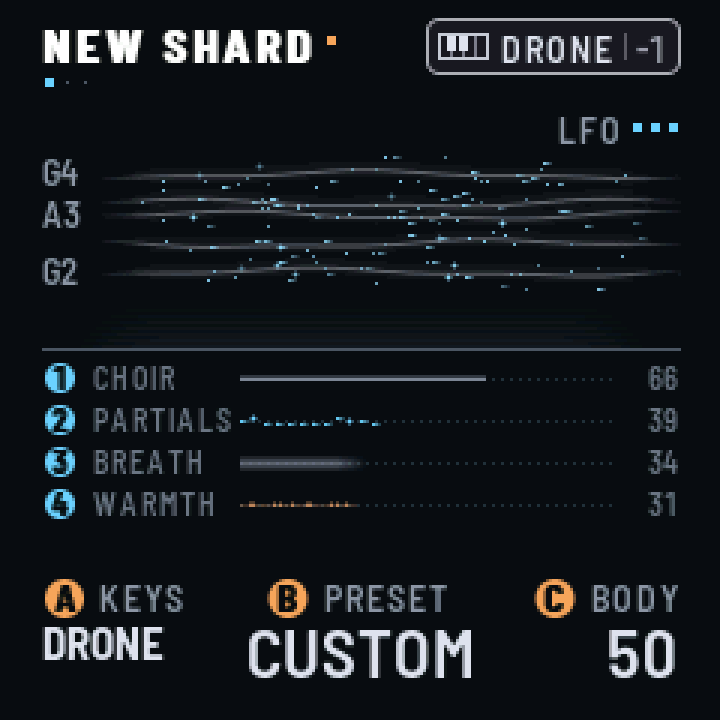
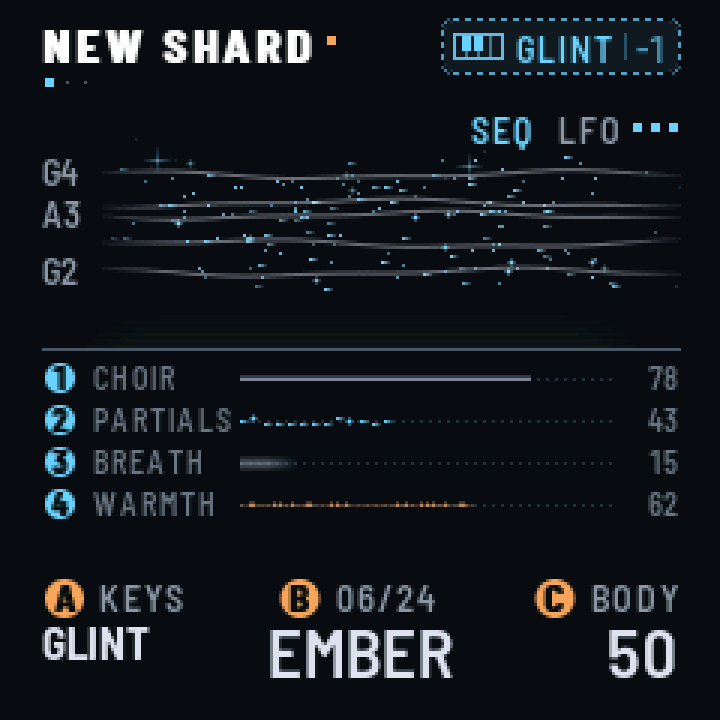
On screen, each setting wears the badge of its control: a blue disc 1–4 for K1–K4, an orange disc A, B or C for the three left encoders. On the play page, each layer shows in the river: the current is CHOIR, the crystals PARTIALS, the mist BREATH; the bass is a slow swell of lamp light across the river, the water darker under it. The four strata below the waterline show the exact mix, WARMTH with it. The header names the scene, with an amber dot once the sound has changed, and dots under each page's title say where it is among its button's pages. At the top right, a badge shows what the keys play (SELECT) and the octave: a small keyboard and DRONE in white, GLINT in blue, BASS in orange (four climbing dots when GLINT's arpeggiator is on; REC in orange while the keys write into a sequence). Its frame is solid while the notes latch, dotted while they sound only as long as their key is held.
Harmony. 12 scales (chromatic, the seven modes, harmonic and melodic minor, both pentatonics). Chords built in the scale (SINGLE, FIFTH, TRIAD, SEVENTH, SUS2, SUS4, ADD9, QUARTAL) or fixed (MAJ, MIN, MAJ7, MIN7, DOM7, AUG, DIM). Voicings: CLOSE, OPEN, WIDE. A key outside the scale plays the scale note just below; the scale's keys glow.
Arpeggiator. With SEQ (GLINT I) on ARP, it plays GLINT's held keys one at a time, at RATE, over RANGE octaves. It follows MIDI clock, or TEMPO when no clock comes in. A new chord takes effect on the next RATE step, so the pattern stays on the grid. MIDI Start resets the grid. With LATCH on (the default), the pattern keeps going after you lift your hands. The key whose note is sounding lights up for as long as the note lasts.
Bass. With the keys on BASS, a tap holds a note: the key's note in the scale, an octave down (BASS II's OCTAVE, the bass's own: none, one or two, on every note it plays, the one sounding moved at once). Tap another key and the bass glides to it; tap its own key and it lets go. Pressing into it makes it louder and opens its filter. With GLOBAL's KEY MODE on HOLD, it sounds while its key is down. BASS ADSR is its envelope, in ADSR's order (ATTACK, DECAY, SUSTAIN, RELEASE: DECAY is heard once SUSTAIN is under 100 %), drawn on the page with the note riding it; PULSE (BASS II) lets the held note go a moment and plays it again on each division of the grid, from 1/8 of a beat to 4 beats, and keeps the beat: a note changed by hand is struck on the next division. With its SEQUENCE on (BASS SEQ II), the keys transpose its sequence, or write into it (RECORD on STEP or LIVE; REC goes straight in); an empty sequence leaves them the bass.
Mixer, pump, mastering. HOME's second screen is a MIXER: a fader and a live meter for DRONE, BASS, GLINT and CLOUD, the reverb's return; hold OCT- and turn K1-K4 for each track's pan. PUMP (FX) ducks each track on the beat, as a sidechain would, from 4 bars to 1/8, synced to MIDI clock or TEMPO, its release, attack and offset on PUMP II. MASTERING (GLO) is a light compressor on the output, with its gain reduction on screen. MASTER FILTER (FX) is a low-pass or a high-pass with resonance on the tracks you choose, LOFI TAPE (FX) puts them on a saturated, wobbling tape (a cassette's reels on screen), and MASTER EQ (GLO) shapes the output before the compressor: three bands and seven presets, its curve drawn. Each scene keeps them. ROUTING (GLO) puts the filter and the tape before or after the cloud, and SPK/JACK quiets the FM-1's own output (speaker and jack) while the USB audio goes on; SCREEN has ANIMATIONS LOW to keep the screen quick with a heavy scene.
Scenes. 16 slots, 7 of them factory scenes that play once loaded, each at its own TEMPO (NORTH RIVER, LUMIERE NOCTURNE, RESILIENCE, LONG NIGHT, OPEN WATER, WHITEOUT, THAW). A new FM-1 starts on NEW SHARD, a fresh sound to begin from. A scene holds the sound, its TEMPO, the latched drones, GLINT's arpeggio and sequence, the bass and its sequence. SAVE held and REC stores (then name it, up to sixteen characters); SAVE held and a white key loads one of the 16, as does PLAY on SCENES or a MIDI Program Change. MORPH glides into a scene, up to two minutes, or cuts; LOAD on SND+NOTES lets everything go and plays the scene's notes at its TEMPO, its sequences from the top, on SND ONLY changes the sound alone. Hold OCT-, then EDIT, to hear the scene as saved (COMPARE); SAVE lights while the sound has changed. Scenes saved by an earlier FRASIL load as they were, the newer settings at their defaults.
The full manual is app/docs/MANUAL.md. A one-page field card (in French) is docs/cheatsheet.html.
MIDI (USB and TRS)
Each track has its own channel, whatever the keys play: the drones 1, GLINT 2, BASS 3 by default (GLO's second page, MIDI: OFF, 1–16 or OMNI each). Notes for the drones go through the harmony, so a sequencer's single note plays a chord; sustain (CC 64) holds them. GLINT's and BASS's notes play as they come, with no scale, their track's OCTAVE on them (GLINT's go into its arpeggiator or its sequencer while one is on); the bass is mono, its last note on top. Notes sound only while held. Polyphonic aftertouch swells a note; channel pressure swells the whole track. The sound's CCs come in on the drones' channel; 123 releases the notes of the track whose channel it comes on, 120 (All Sound Off), on any channel, everything. Program Change 0–15 on the drones' channel loads scenes 1–16.
| CC | CC | ||
|---|---|---|---|
| 1 | MOTION | 74 | TIMBRE |
| 91 | SPACE | 11 | SWELL |
| 70 · 71 · 72 | CHOIR · PARTIALS · BREATH | 73 · 75 | ATTACK · RELEASE |
| 76 · 77 | SIZE · DECAY | 78 · 79 | SHIMMER · WARMTH |
| 12 · 13 | BODY · the drone's PRESET | 14 · 15 · 16 | SPARKLE · BLUR · SINK |
| 17 · 18 · 19 | the DRONE · GLINT · BASS faders | 80 | FREEZE (≥ 64) |
| 120 | all sound off: everything let go, the sequences stopped | 123 | release the notes of the track on that channel |
MIDI learn: turn a setting, hold GLO, move a knob on the controller (a CC on the drones' channel): that CC turns it from then on. Up to 8, kept with the settings; a learned CC comes before the table's, but for 64, 120 and 123.
Clock (F8) drives the arpeggiator, the sequencers and GLINT's delay, and Start (FA) resets the grid.
Build from source
git clone --recursive https://github.com/styvesgoupil/frasil
cd frasil
python3 -m venv .venv && .venv/bin/pip install Pillow fonttools mido python-rtmidi numpy scipy matplotlib
brew install libraqm                     # the screen's fonts (macOS)

./build.sh --host                        # the host simulator: app/build/host/frasil_host
app/build/host/frasil_host app/tests/basic.txt app/build/host      # the checks
app/build/host/frasil_host app/tests/demo.txt renders              # a performance, as WAV files
./build.sh --web                         # the browser emulator: app/build/emu/ (Emscripten)
./build.sh                               # the firmware: app/build/frasil-VERSION.fwsc (the version in VERSION)
The firmware build needs JieLi's Linux toolchain and the AC79 SDK, run in Docker (OrbStack on macOS). See
fm1-base's README for setup. tools/screens.sh renders the
screenshots. tools/bench/ measures the DSP: test renders and instruction counts against the FM-1's budget.
| Path | What |
|---|---|
app/ | the firmware: app.c (controls, MIDI, scenes), ui.c (the screen), params.c, harmony.c |
app/dsp/ | the sound: frasil.c (voices), glint.c (GLINT and its delay), bass.c (BASS), nuage.c (CLOUD, the reverb) |
app/docs/, app/site/ | the manual and the site's front page (base/tools/make_site.py) |
base/ | fm1-base, the platform (git submodule) |
tools/ | screenshots, the DSP bench, the release script |
Releases: see RELEASING.md.
Licence and credits
FRASIL is free software under the Mozilla Public License 2.0: see LICENSING.md.
- By Styves Goupil.
- Built on fm1-base by Charles Vestal and felucca-bsp, from Felucca by Leo Kuroshita (Hügelton Instruments).
- Fonts: Barlow (The Barlow Project Authors) and Terminus (Dimitar Toshkov Zhekov), SIL OFL 1.1, through fm1-base.
M-VAVE and FM-1 are trademarks of their owners.