
FMLarynx
A formant synthesizer firmware for the M-VAVE FM-1.
A throaty talking formant synth with a 303-style pattern sequencer: The synth is a saw wave through a three-formant vowel filter with an envelope, an added resonant LPF with cutoff and a ping-pong delay with drive. The 16-step sequencer has vowels, accent and slide per step, a pattern randomizer and storage for 16 patterns.
It is a port of FormantSynth, a VST3 plugin, to the FM-1's chip, and is built on Dinghy by zvenson.
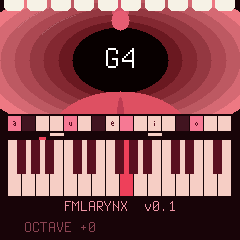
Status: 0.1, runs on the FM-1. Tested on the device: the sound engine, all controls, the sequencer with its randomizer and stored patterns, the effects, the screen, and updating over USB.
What it keeps: FMLarynx stores its patterns and settings in the FM-1's settings sector, the place Felucca, SLOOP, Dinghy and their relatives use for theirs: after one of them has run, FMLarynx starts from its defaults again (and the other way round). It does not read other firmwares' projects or samples.
Package identity: FM-1_984, for every release.
The sound
One voice, three formants:
-
Source: a sawtooth, harmonically rich, with a short attack (~5 ms) and release (~45 ms).
-
Filter: three resonant band-pass filters in parallel, tuned to the first three formants (F1, F2, F3) of a vowel.
-
Vowel plane: the five vowels i, e, a, o, u sit on a plane of the two things your mouth does for a vowel: Tongue (front for i and e, back for o and u) and Jaw (closed for i and u, wide open for a). Anywhere between them, the formant frequencies blend smoothly, so turning Tongue and Jaw morphs one vowel into the next.
Jaw open a e o closed i u front back Tongue -
Voice: moves the formants from an adult male vocal tract to a female/child one.
-
Size: scales all formants up or down (0.5x to 2x), from a giant's throat to a tiny one.
-
Resonance: how narrow and ringing the formants are. Output is compensated so the volume stays roughly level as you turn it up.
-
Cutoff: a resonant low-pass filter after the formants (12 dB/octave), from 60 Hz to fully open. Its resonance follows the Resonance knob (Q 0.7 to 8), one resonance for formants and filter as on a 303, and accents sharpen it too.
-
Effects: Drive, a soft-clipping distortion after the voice, and a tempo-synced ping-pong Delay: the echoes alternate left and right, each a little darker, and ring out after the notes stop.
-
Envelope (TB-303 style): every new note restarts it. Env Mod sets how far it opens the cutoff (up to 4 octaves) and the formant size (up to 2x); Decay how fast it closes again. Amp Decay lets the volume die away too.
-
Accent: an accented note is louder, and briefly raises the resonance and pulls the vowel towards "a".
Everything runs in integer maths (the chip has no FPU); the audio routine uses well under its time budget.
The screen
The top of the screen looks down a throat: rings of flesh from pink to deep red, the uvula hanging from above, the tongue below, teeth along the edge, and the note you play in the opening. The opening follows the vowel: tall and wide for "a", a flat slit for "i", small and round for "u", and everything in between as you turn Tongue and Jaw or the LFOs move them. On an accent the uvula wobbles.
Below it: the step strip (see the sequencer), the keyboard with the keys that sound, the last control you turned with its value, and the octave.
Controls
No menus: every parameter has its own encoder. The LFO, ENV and FX buttons turn knobs 1 to 4 into the LFO, envelope or effect controls for as long as you hold them.
Encoders
| Control | Normally | While holding LFO | While holding ENV | While holding FX |
|---|---|---|---|---|
| KNOB 1 | Size, 500 to 2000 (0.5x to 2x) | Tongue LFO rate, 0 to 1000 (0 to 8 Hz) | Decay, 0 to 1000 (30 ms to 2 s) | Delay mix, 0 to 1000 (0 = off) |
| KNOB 2 | Resonance, 10 to 500 (Q 1 to 50) | Tongue LFO depth, 0 to 1000 | Env Mod, 0 to 1000 | Delay feedback, 0 to 1000 |
| KNOB 3 | Voice, 0 to 1000 (male to female/child) | Jaw LFO rate, 0 to 1000 (0 to 8 Hz) | Accent amount, 0 to 1000 | Delay time: 1/16, 1/8, 3/16, 1/4, 3/8 |
| KNOB 4 | Cutoff, 0 to 1000 (60 Hz to open) | Jaw LFO depth, 0 to 1000 | Amp Decay, 0 to 1000 (30 ms to 2 s; 1000 holds) | Drive, 0 to 1000 |
| ALGORITHM | Tongue, 0 to 1000 (front to back) | |||
| SELECT | Jaw, 0 to 1000 (closed to open; see the sequencer for its other jobs) | |||
| PRESETS | Jump to a vowel: i, e, a, o, u (in record mode: the cursor step's vowel) | |||
| MASTER | Volume |
At power-on: Cutoff open, Env Mod 0, Decay 500, Accent 1000, Amp Decay 1000, Drive 0, Delay mix 0 (3/16, feedback 400), so the envelope and the effects are out of the way until you dial it in.
The tongue LFO moves the tongue, the jaw LFO the jaw, each around where the encoders put it. The screen shows the name and value of the last control you turned.
Buttons and keys
| Control | What it does |
|---|---|
| Keys | Play the voice (27 keys, F3 to G5 at octave 0). Monophonic: the last note played wins. |
| OCT- / OCT+ | Octave, -2 to +2. The button lights when you're off centre. (With SEQ held: transpose the pattern.) |
| LFO | Hold to set the LFOs with knobs 1 to 4. Glows softly as a reminder, lights up while held. |
| ENV | Hold to set the envelope with knobs 1 to 4; glows softly, lights up while held. In record mode it also marks accents. |
| REC | Sequencer record mode on/off. |
| PLAY | Start/stop the sequencer. |
| GLO | In record mode: marks slides (it only glows there). |
| SEL | Hold and press a white key: load a stored pattern. Tapped in record mode: enters a rest. |
| SAVE | Hold and press a white key: store the pattern there (16 places). |
| SEQ | Hold and turn SELECT to set the tempo; hold and press a key or OCT to transpose the pattern. |
| ARP | The pattern randomizer: hold it and press PLAY, a key or turn SELECT (see below). |
| FX | Hold to set the effects with knobs 1 to 4; glows softly, lights up while held. |
Sequencer
A 16-step pattern sequencer in the spirit of the TB-303, so both hands are free for the knobs while it plays. Each step is a 16th note.
Recording a pattern
- Press REC. Playback stops and the cursor goes to step 1. The 16 white keys now show the 16 steps.
- Turn SELECT to move the cursor to a step.
- Press a key: its note goes into that step and the cursor moves on to the next one. Hold GLO and/or ENV while pressing the key to make that step a slide and/or an accent.
- Press REC again to leave record mode.
You hear every note as you enter it. A step without a note is a rest: tap SEL to enter one (it clears the cursor step and moves on, like a key does), so notes and rests go in one after the other. To change a step, move the cursor to it and record over it, or tap SEL to clear it. To add or remove a slide or accent afterwards, move the cursor to the step and tap GLO or ENV on its own: it toggles on release, and only if you didn't press a key or turn SELECT while holding it.
A vowel per step: in record mode, turn PRESETS to give the cursor step its own vowel (-, i, e, a, o, u; - = none). There is nothing to confirm: the step has it as you turn, and the throat shows it. While the pattern plays, a step with a vowel glides there; steps without one follow the Tongue and Jaw knobs, and the LFOs work on top of both. Recording a note over a step keeps its vowel; SEL clears it with the rest.
Notes and slides, as on a 303: a note sounds for half its step, then lets go. A slide on a step holds its note into the next step, which then glides there in pitch (in ~50 ms) without restarting the envelope.
Accents: louder, with a short burst of resonance and a vowel shift towards "a"; ENV + KNOB 3 sets how much.
On the screen: a strip of 16 cells above the keyboard shows the pattern, each cell over its own white key: dark = rest, pale = a note, pink = an accented note, a tiny letter = the step's vowel, a bar running into the next cell = a slide, and a red tick under the cursor (record mode) or under the step that is playing.
The lights in record mode
| White key | Means |
|---|---|
| Off | Empty step (a rest) |
| Soft | The cursor |
| Medium | A step with a note in it |
| Full | The note sounding right now |
| GLO / ENV full | The step under the cursor is a slide / an accent |
While the pattern plays, GLO and ENV light up on every step that has a slide or an accent.
Playing: press PLAY. Hold SEQ and turn SELECT to set the tempo (40 to 300 BPM, 120 by default).
Random patterns: hold ARP and
- press PLAY: a new random pattern, heard from the next step if it is playing (it doesn't start or stop it);
- press a key: that note becomes the root, and a pattern on it comes right away;
- turn SELECT: the scale, one of MIN PENTA, MINOR, PHRYGIAN, DORIAN, MAJOR, CHROMATIC.
The notes come from the scale over the root, two octaves up, with the root and its octave the most likely; step 1 is always the root. About a quarter of the steps are rests, a fifth slides and a quarter accents, and about 30% of the notes get a vowel of their own (the rest follow the knobs and the LFOs). Root and scale are kept with the pattern.
MIDI clock: when a DAW or another device sends MIDI clock over USB, the sequencer follows it, and MIDI start, stop and continue start and stop it. If the clock stops for half a second, it carries on at its own tempo.
Transpose: hold SEQ and press a key: the pattern moves so that its first note lands on that key (press that first note itself to go back). SEQ + OCT- / OCT+ moves it an octave. It is live: the stored notes stay as they are, the change is heard from the next step, and it goes back to 0 when you load a pattern or pick a new root with ARP + a key (not with ARP + PLAY, so you can jam on in the same key). Not kept after power-off.
Stored patterns: hold SAVE and press a white key to store the pattern (notes, slides, accents, vowels, root and scale) in one of 16 places; hold SEL and press a white key to load one. While the sequencer plays, a load waits for the next step 1, so the switch lands on the beat. While SAVE or SEL is held, the white keys show the places: middle = stored, full = the one last saved or loaded. The tempo is the same for all of them.
Saved: the pattern, the 16 stored patterns, the tempo, the octave, and the randomizer's root and scale are kept in flash and come back after power-off. They are saved two seconds after your last change, once the sequencer is stopped and nothing is sounding, because writing to flash briefly interrupts the sound. Stop the sequencer for a moment before you switch off, so your last changes are saved.
MIDI and audio over USB
- MIDI in: notes on any channel play the voice, with velocity. MIDI clock drives the sequencer.
- MIDI out: notes from the keys and from the sequencer.
- Audio: the FM-1 shows up as a 16-bit stereo audio input (44.1 or 48 kHz), so you can record it straight into a DAW.
Installing
Installing custom firmware is at your own risk. The easy way is the FM-1 Firmware Hub
in Chrome or Edge: it installs a release in one click, and takes you back to the official firmware or to another one
the same way. Or download the .fwsc from this repository's
releases.
To build it yourself, then install over USB:
./build.sh                                       # -> build/fmlarynx.fwsc
python3 tools/fm1_install.py build/fmlarynx.fwsc   # asks before it writes, then restarts into the new build
python3 tools/fm1_install.py --info              # what runs on the connected FM-1
The build needs Linux on x86-64 (or Windows with WSL, or macOS with Docker), Python 3 with Pillow, the JieLi toolchain and three files of the JieLi AC79 SDK:
pip3 install Pillow mido python-rtmidi
tools/get_toolchain.sh                           # JieLi's clang for the chip, to ~/.jieli/toolchain
git clone --depth 1 --branch AC79NN_SDK_V1.2.1_2023-12-13 \
    https://gitee.com/Jieli-Tech/fw-AC79_AIoT_SDK.git ~/fw-AC79_AIoT_SDK
tests/run_host.sh runs the same firmware on your computer, writing the sound to a WAV and the screen to images.
If something goes wrong: hold OCT- while switching on to reach the USB rescue mode (no sound, only the updater), and install a working build from there. If the firmware crashes twice at boot, the FM-1 goes there by itself.
For developers
The whole synth is in firmware/src/dinghy.c. Everything underneath it (boot, USB, updates, the audio interrupt, settings) is Dinghy's platform: see docs/API.md for what it offers and docs/RULES.md for the chip's rules (no FPU, no 64-bit division, the audio time budget), which the build checks for you.
License and credits
GPL-3.0-only: you may change and share it, and whoever gets a firmware built from it gets its source too. Details and third-party parts in LICENSING.md.
- FMLarynx (the formant synth, sequencer, screen and effects in
dinghy.c): Presethead - The formant filter design follows MouthTowel by nickb808-dev
- Dinghy (the app skeleton, the wiring
platform.c, host mode, docs): zvenson - The platform: Copyright (C) 2026 Leo Kuroshita (@kurogedelic), Hügelton Instruments (Felucca), with the changes of SLOOP (isod89)
"M-VAVE" and "FM-1" belong to their owners. FMLarynx is not made or endorsed by them.