NCC: Novation Circuit Companion
Firmware that turns the M-VAVE FM-1 into a two-part synth for the Novation Circuit Tracks.

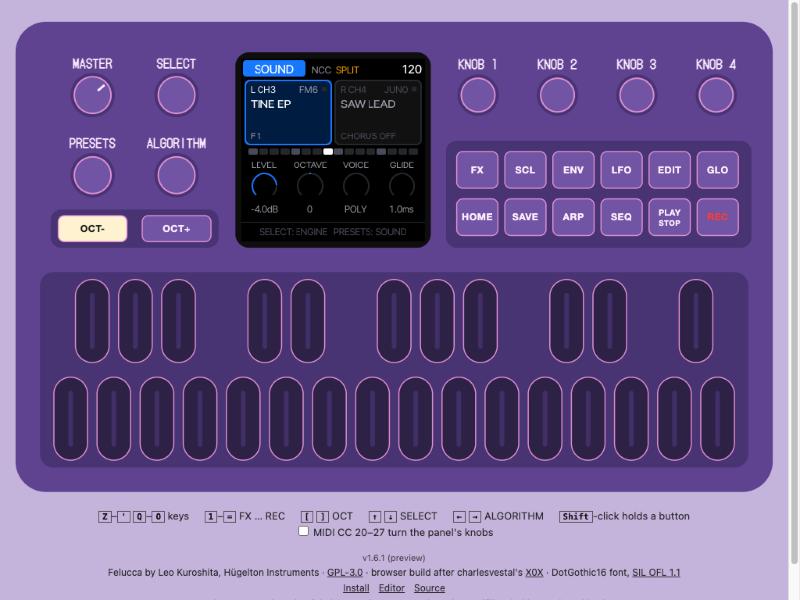
Current release: NCC 0.4 — twelve engines,
161 sounds, Dual and chord REPLACE. The public installer provides FM-1_704.
See release notes and the manual.
The idea
The Circuit Tracks has two synth tracks inside, plus two MIDI tracks and two audio inputs. That spare pair is an open invitation: plug in a second instrument and give each MIDI track its own sound. The FM-1 is small, cheap and runs Felucca, a brilliant multi-engine firmware. But Felucca is a whole groovebox with a sequencer, songs, menus and a lot to learn.
NCC strips the FM-1 down to one job: be the Circuit Tracks' companion.
- Two parts, two tracks. Part L listens to the Circuit's MIDI 1 track (channel 3), part R to MIDI 2 (channel 4). The Circuit plays the notes and sends the clock. The FM-1 has no sequencer of its own: the Circuit is the boss.
- Two outputs, split by default. L comes out on the left channel, R on the right. Use a Y-cable into the Circuit's two audio inputs and mix, mute and effect each part separately on the Circuit itself.
- Your Circuit's knobs just work. For every engine, the Circuit's 8 macro knobs (OSCILLATOR, OSC MOD, AMP ENV, FILTER ENV, FILTER FREQ, RESONANCE, MODULATION, FX) are mapped to the parameters that match their labels. Every sound is hands-on from the Circuit, with smooth (zipper-free) moves. The FM-1's screen shows what each knob does.
- Sounds by role, not by engine. SELECT picks the type (BASS, PAD, LEAD, KEYS, PLUCK, BEAT), ALGORITHM the engine (or ALL), PRESETS walks through what's left. A pad is a pad, wherever it comes from.
- Twelve engines. FM6 (6-operator, DX7-style FM), JUNO (analog-style with a Juno chorus and Juno sounds), PHASE (Casio CZ-style phase distortion), TRIO (SID-style chip synth), ACID (a 303 with accent and slide), PHYS (physical models), GRAIN (granular), VOICE (formants), LOFI (chip), WHEEL (organ), NOISE and SAMPLE. 161 built-in sounds, including 46 new patches for the extra engines. All eight Circuit knobs are mapped on each engine. Coming soon: LOOP, one-bar drum loops that always fit the bar.
- Built for jamming. OCT- / OCT+ switch the FM-1's keys and knobs between your two sounds in one press. An arp locked to the Circuit's clock, with HOLD. A Drone button with STACK (build up notes) and REPLACE (hold only the latest chord, with a smooth overlapping transition when voices are available). Effects one tap away (sends, delay, reverb, chorus, insert, and Felucca's PERFORM effects on the keys), plus echo and reverb throws. SELECT only chooses sound categories on SOUND; PLAY browses settings/edit/arp/FX pages (tap next, hold previous).
- Dual sounds. SCL switches Dual on/off; GLO chooses MIDI channel 3 or 4 as the note source for L and R together. Each part keeps its own patch, arp and Drone; the Circuit's knobs keep controlling their usual part.
- Settings and sound editing on the device. GLO opens channels, clock, output and performance settings. EDIT opens the focused sound's engine, envelope, LFO and voice controls, plus FM6's operators.
- Delay and reverb start at zero. Every new sound loads with both sends off. Turn them up on FX > SENDS; the shared effects keep their usual controls.
Less to learn, more to play: NCC gives you more jam with your Circuit Tracks, not more menus.
Get started
Everything is on fenderberg.github.io/fm1-nc-companion (Chrome or Edge):
- Try it in your browser, with a built-in "Circuit" playing: no FM-1 needed.
- Install it: connect the FM-1 by USB and press Install. Back to stock any time on the same page (Return to official V15) or with M-VAVE's updater.
- Manage it from your computer: sounds on L/R, your own sounds, DX7 banks, backups and settings over USB.
- Read the manual. It's short.
Locally: sh tools/ncc_demo.sh (the emulator), sh tools/ncc_manager.sh (the manager), and see
Installing for the command-line installer.
Installing firmware is at your own risk.
Status
Early but playable. The 0.4 code passes host/audio tests and the WebAssembly panel/MIDI checks. Installation, restart and the twelve-engine/161-sound library were verified on the FM-1. Listening to the new patches and REPLACE transition, physical controls and hardware timing remain practical checks.
The development handoff records the installed package checksum, memory use, validation limits and open issues. Feedback and ideas are welcome in the issues.
Working on NCC
Start with AGENTS.md (the rules, a map of the code, the commands; for people and AI assistants alike) and
docs/HANDOFF.md (where the work stands). Every chore goes through sh tools/ncc_dev.sh (test,
build, emulator, manager, release, site); in VS Code they are tasks (Terminal → Run Task).
Built on Felucca
NCC is a fork of Felucca by Leo Kuroshita (Hügelton Instruments). All of
Felucca's engines, effects, audio and hardware support are what make NCC possible; NCC adds its own live interface,
the Circuit macro layer, the Juno chorus, the split output and the ACID engine on top. Without the FELUCCA_LIVEUI=1
build flag the code builds plain Felucca. Felucca's own README is in README-Felucca.md; building
is described in BUILDING.md (NCC: FELUCCA_LIVEUI=1 ./build.sh).
Like Felucca, NCC is developed with the help of AI coding agents (Claude Code and Codex); the ideas, the sound and the direction are the author's.
Licence
Free software: GPL-3.0-only, as Felucca. The engines in firmware/engines are MIT, the bundled fonts and
ported DSP keep their own licences (LICENSES/, LICENSING.md, CREDITS.md).
Novation and Circuit Tracks are trademarks of Focusrite Audio Engineering Ltd; M-VAVE and FM-1 are trademarks of their respective owners. NCC is not affiliated with or endorsed by any of them.