An eight-track groovebox firmware for the M-VAVE FM-1
Groove Engine · eight tracks of any kind · a premium 240 × 240 interface designed for performance
▶ Try it in your browser · Install & manage · Manual · Status · Features · Interface · Controls · Build · Docs · Credits
[!WARNING] Experimental beta. Everything below is implemented and verified in host simulation and with the real JieLi target compiler. Community testers have installed earlier 0.3 builds on their FM-1s and reported bugs (see the changelog and the 0.3.1 report); the fixes are verified in simulation and wait for their retest. No structured hardware test pass has been made by the maintainer. Do not install it on a device you are not prepared to recover (see Recovery). The stable firmware this project builds on is SLOOP.
Status
| Version | 0.3.1 (bug fixes from the testers' reports), based on SLOOP 2.6 (upstream tag v2.6 merged): 27 punch-ins, INSERT on every track, TEXTURE, MIDI LEARN… |
Firmware build (FM1MOVE=1) | ✅ compiles and links — 569 828 B of 581 564 B, RAM 96 496 / 98 304 B, pool 10 904 B spare |
| Host tests | ✅ all FM1 Move suites pass (also under ASan + UBSan); the 182 reference renders identical to SLOOP 2.6's (host simulation) |
| Browser test view | ▶ nicodesy06.github.io/FM1-MOVE/sim — the firmware compiled to WebAssembly on a simulated panel (simulation, not the device) |
| Device page | nicodesy06.github.io/FM1-MOVE/device — install (FM1 Move 0.3.1 beta, SLOOP 2.6 stable, official V15) and manage tracks, presets, samples and kits, FM6, projects, backup; tested against the firmware in WebAssembly; community testers have used it on their FM-1s, no structured hardware test yet |
| Manual | nicodesy06.github.io/FM1-MOVE/manual — quick start and every feature |
| SLOOP parity | what was kept, changed, removed against SLOOP 2.6 — every engine and sequencer feature kept; song arranger replaced by clips and scenes |
| Hardware | ⏳ not tested yet |
| Branch | fm1-move/dev — master is the untouched SLOOP 2.5 baseline (SLOOP 2.6 merged on fm1-move/dev) |
Features
Eight tracks, no fixed roles
- 8 independent tracks, each a synth or a drum track (any number of drum kits at once).
- Per track: pattern up to 64 steps with its own length and division (polymeter), level, pan, mute / solo, sends, filter, slicer, parameter locks, micro-timing, fill conditions, groove.
- 12 synth engines and 153 sounds from SLOOP; up to three tracks on the heavy engines (FM6, GRAIN, PHYS) at once.
- One shared 8-voice synth budget with predictable stealing that never exceeds it, even with eight held leads.
Clips, scenes and step editing
- 6 clips per track (8 × 6): hold CLIPS and press white keys 1–6 to launch the selected track's clips, 9–14 to launch scenes (clip n on every track). Playing, the launch waits for the next bar and the clip starts on its first step; stopped, it starts at once. Key lights show playing, queued, filled and empty clips.
- Clips are written with the usual tools (step entry, live recording, erase, groove) and saved with the project.
- STEP page (SLOOP's step editor, back): a piano roll with a cursor; play keys to write the step (chords too), release to move on; STEP / NOTE / TIME / FLAG (accent, slide) on the knobs; ALGORITHM on a note moves it (a chord played a step late goes back where it belongs, locks and all; one undo).
- Battery in the status bar (three bars, a BATTERY LOW toast, SETTINGS › BATTERY).
- Layer pages as on SLOOP: hold SEQ to see and write the page's steps as a 4 × 4 grid from any screen, hold SEL to see the chord every key plays (chord mode) with the key and scale.
Groove Engine
- Non-destructive quantize with strength 0–100 %: the recorded timing is kept,
q = raw + s · (grid − raw). - 8 groove templates (Straight, MPC 16, House, UK Garage, Broken, Rolling, Latin, User) with real timing offsets, velocity and accent maps — and a suggested swing, so swing is never applied twice.
- Swing per track and global, micro-timing per step, offsets per drum pad (early or late).
- Deterministic humanize (seeded: the same every loop and after a reload; REGEN draws new values).
- Groove commit with undo. Sample-clock timing: no drift, 0.73 ms event resolution.
Projects
- Sparse, versioned FM1M format: a typical 8-track project is about 1 KB, eight full 64-step tracks about 5 KB.
- Power-loss safe: a save cut at any flash write leaves the old project or the new one, never a mix.
- 2 project slots (with their clips) + the autosave; SLOOP's working project is imported on first boot.
- Projects, settings and backups of FM1 Move 0.2 load in 0.3 as they are (the SLOOP 2.6 parameters start off).
Performance
- Tempo with one hand: on PLAY, TRACKS, MIXER and PERFORM, ALGORITHM turns the tempo (no button held; fast turns go further) and the BPM shows large for a moment. OCT− + OCT+ tapped together in time = tap tempo.
- 27 punch-in effects: FX held + the 16 white keys, and (SLOOP 2.6) the 11 black keys: KILL LOW / MID / HIGH, REWIND, OCT UP, FLANGER, AUTO-PAN, FREEZE, LOOP 8T, MONO, FADE OUT. FX + OCT− / OCT+: REV / ECHO THROW.
- INSERT effect per track (SOFT, HARD, FOLD, FUZZ, CRUSH, PHASR, FLANG, CHOR, dry / wet MIX): up to 4 tracks at once (RAM), drum tracks included.
- TEXTURE, a bed under the mix: VINYL, TAPE, RAIN, WIND, RADIO, ROOM or a user sample, saved with the project.
- SCALE LOCK (as Ableton's scale mode): pick a key and one of 16 scales; every synth track's keys play in it and light only its notes, the note knobs and a MIDI keyboard stay in it, and FIT (SEL + OCT−) moves existing notes into it. Chord mode builds its chords from the same scale.
Kept from SLOOP (2.6)
USB-MIDI in/out, TRS MIDI in, MIDI clock in, sustain pedal, pitch bend, MIDI LEARN (16 CCs), USB audio to a computer or phone, LFO sync, ENV SYNC, note length and step velocity, live drum mutes, chord and scale modes, arpeggiator, note repeat, USB updates and the USB rescue mode.
The interface
Designed for the FM-1's 1.54" display at its native resolution: bold Inter numerals, a black background, eight track colours, state shown by shape as well as colour, and only the screen rows that change are redrawn.
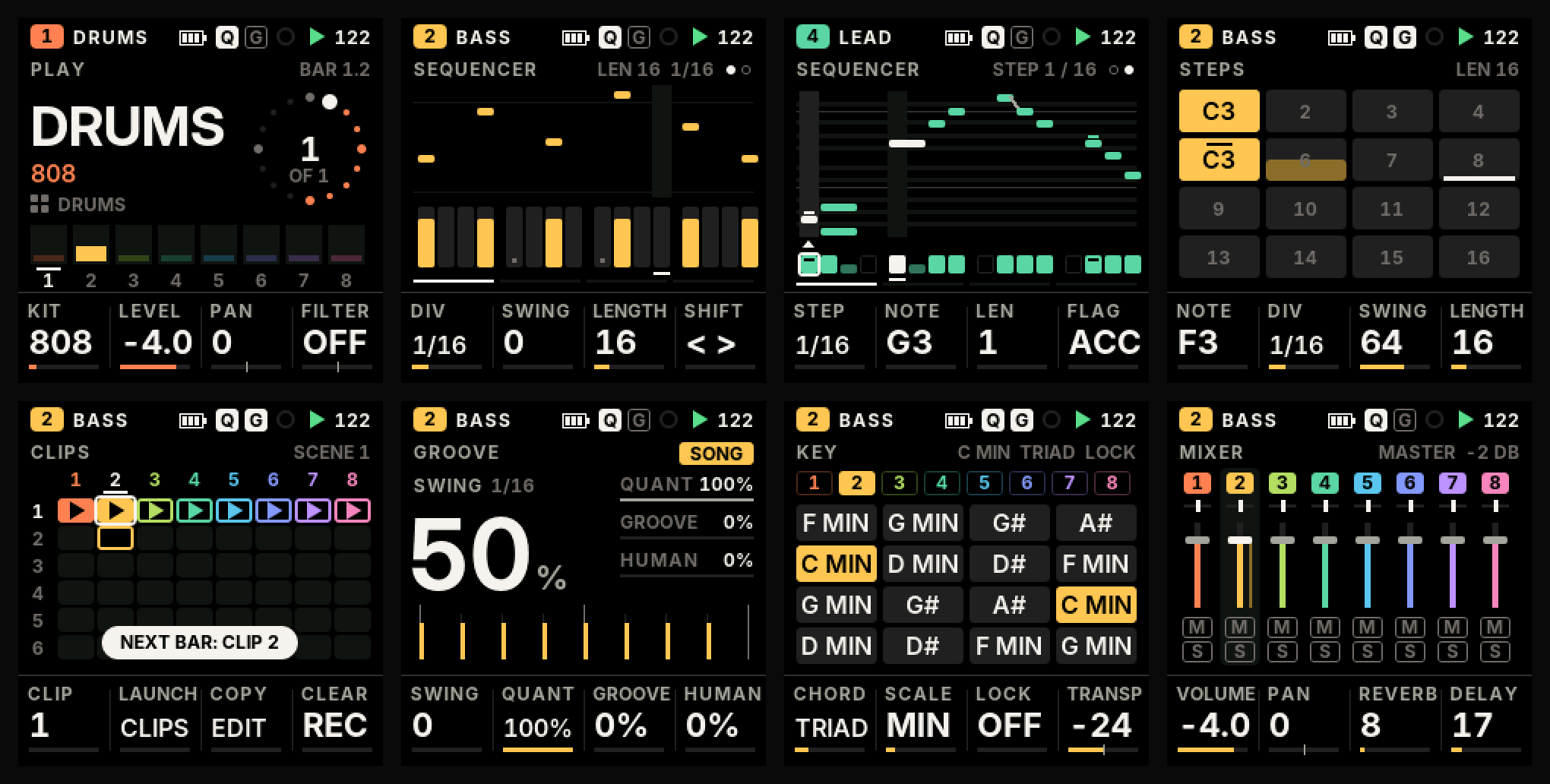
Every screen above is rendered by the firmware's own drawing code, running on a simulated FM-1 with the 8-track engine playing. More in docs/ui/live and the design reference UI_DESIGN_SYSTEM.md.
Ten screens: PLAY · TRACKS · SEQUENCER · GROOVE · CLIPS · MIXER · SOUND · PERFORM · PROJECT · SETTINGS.
Controls
The two rows of buttons have one meaning each: the top row is sound and mix, the bottom row is time and arrangement. Every screen is one press away.
| Button | Tap | Hold + keys / knobs |
|---|---|---|
| HOME | PLAY | (held) PROJECT and SETTINGS |
| SEL | TRACKS | keys 1–8 select a track; the KEY page shows the chord on every key |
| SEQ | SEQUENCER (again: the STEP page) | the 16 white keys are the steps, shown as a 4 × 4 STEPS page |
| SAVE | CLIPS | keys 1–6 launch clips, 9–14 scenes (on the next bar) |
| ARP | GROOVE | note repeat |
| GLO | MIXER | keys 1–8 mute, 9–16 solo; black keys F# fill held, G# fill next bar, A# tap tempo, C# MIDI LEARN |
| FX | PERFORM (again: black-key effects, TEXTURE, TEXTURE 2) | 27 punch-in effects (white and black keys); OCT− / OCT+ REV / ECHO THROW |
| EDIT / ENV / LFO | SOUND (preset, envelope, LFO, sync, sends, insert) | EDIT: erase, EDIT + OCT− / OCT+ undo / redo; EDIT + a black key on a drum track: the keys mute lanes |
| PLAY / REC | transport / record | |
| OCT− + OCT+ | together, tapped in time: tap tempo |
SELECT always picks the track, PRESETS the sound, ALGORITHM navigates the screen (on PLAY, TRACKS, MIXER and PERFORM, where there is nothing to navigate, it turns the tempo), and KNOB 1–4 are the four values along the bottom of the screen, in the same order as the knobs. Turning a knob shows its value large; destructive actions ask first and confirm with the same button. Full map: UI_MAPPING.md.
Build
Linux x86-64 (or WSL), Python 3 with Pillow:
tools/get_deps.sh ~/fm1move-deps          # JieLi toolchain + the 3 SDK files it needs
export JIELI_TOOLCHAIN=~/fm1move-deps/jieli/toolchain AC79_SDK=~/fm1move-deps/ac79sdk
FM1MOVE=1 sh build.sh                     # -> build/felucca.fwsc (FM1 Move)
sh build.sh && sh tests/run_tests.sh      # the SLOOP-layout build, then every host test
python3 tools/ui_mockups.py               # render the screens (docs/ui/)
Recovery
FM1 Move keeps SLOOP's update and rescue paths unchanged: hold OCT− while switching on for the USB rescue mode (two failed boots enter it by themselves), then install another firmware — or the official one — from the FM-1 Firmware Hub or SLOOP's web installer. Back up your SLOOP data with SLOOP's web editor before trying FM1 Move. Installing custom firmware is at your own risk.
Not there yet
Capture · MIDI-out tracks and per-track MIDI channels · import of SLOOP's saved project slots · MIDI LEARN clear on the panel · step and piano-roll editing on the device page · dual-core research. See the development plan and the feature matrix.
Documentation
| UI design system · navigation · mapping | the interface |
| Groove Engine · project format | the core modules |
| Hardware audit · memory budget · codebase map | the platform |
| Test report · changelog · plan | progress |
Credits and licence
FM1 Move is based on SLOOP 2.6 by isod89, itself based on Felucca by Leo Kuroshita / Hügelton Instruments. SLOOP's original README is kept as SLOOP_README.md. Hardware research from FM-1-RE and Dinghy.
Code: GPL-3.0-only (LICENSE, LICENSING.md). Interface font: Inter, SIL Open Font License 1.1 (assets/fonts/inter/OFL.txt).
"M-VAVE" and "FM-1" are trademarks of their respective owners. FM1 Move is independent firmware, not affiliated with or endorsed by them. It never enables the device's Bluetooth / Wi-Fi radio.