
J6: a JUNO-60 style firmware for the M-VAVE FM-1
A six-voice polysynth after the Roland JUNO-60 for the M-VAVE FM-1, built on fm1-base (MPL-2.0) and felucca-bsp. Independent project, not affiliated with Roland. The sound is an approximation, not a circuit model.
New to J6? Read the beginner's guide.
Features
- Voices: 6, one DCO each: band-limited saw, pulse (manual width or LFO PWM), sub square, noise; 16'/8'/4' range
- Filter: 24 dB resonant low-pass (self-oscillates), 4-position HPF (boost / flat / thin / thinner), key follow
- Envelope: one ADSR shared by VCF and VCA (inverted option, gate VCA)
- LFO: rate, delay, to pitch, to cutoff, PWM; the key pressure also moves its depth
- Chorus: stereo, off / I / II / I+II
- Play modes: Poly, Unison (with spread), Solo; portamento; bend range; hold
- Arpeggiator: up / down / up-down, 1-3 octaves, rate
- Recorder / sequencer: 16 steps with rests, tempo follows the ARP rate, saved with SAVE
- Memories: 56, all factory sounds (brass, strings, pads, keys, basses, leads, organs, effects), stored in flash; MIDI program change selects. A unit that already has a saved bank gets the new sounds only in memories it still holds as INIT
- MIDI: notes, velocity, pitch bend, channel pressure, program change and a CC for every control (see docs/MIDI_CC.md)
- Web editor: editor/ is a browser page with knobs for every parameter over Web MIDI; it runs on your computer, not on the FM-1
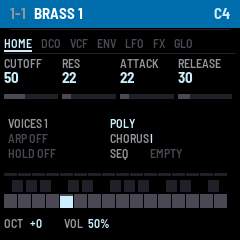
- UI: page tabs, six colour themes (JUNO blue by default, GREEN, AMBER, CYAN, RED, MONO), status page with a pattern strip
MIDI
J6 answers to USB-MIDI notes, velocity, pitch bend, channel pressure, program change (memory 1–56) and a control change for every parameter. The full chart with ranges and values is the MIDI CC Implementation Chart.
| Section | CCs |
|---|---|
| Performance | 1 mod wheel, 64 sustain, 120 all sound off, 121 reset controllers, 123 all notes off |
| DCO | 20 range, 21 saw, 22 pulse, 23 sub, 24 noise, 25 pulse width, 26 PWM source |
| VCF / HPF / VCA | 74 cutoff, 71 resonance, 27 env amount, 28 key follow, 29 env polarity, 30 VCA mode, 31 HPF, 7 level |
| Envelope | 73 attack, 75 decay, 70 sustain, 72 release |
| LFO | 76 rate, 77 delay, 78 to DCO, 79 to VCF |
| Voice | 80 mode, 5 portamento, 85 unison spread, 86 bend range, 93 chorus |
| Global | 102 tune, 103 velocity, 104–106 arp direction / octaves / tempo, 107–110 arp, seq play, seq record, hold, 111 screen theme |
The FM-1 only receives MIDI, and there is no SysEx. Build your own front end from the chart, or use the web editor below.
Controls
| Control | Action |
|---|---|
| HOME | status page (sound name, mode, arp / hold / seq state, 16-step pattern strip) |
| EDIT / SEL / ENV / LFO / FX / GLO | pages DCO, VCF+HPF, envelope, LFO, chorus+mode+porta, global. Press the button again for the page's second half; DCO, VCF and GLO have two |
| K1..K4 | the four values shown |
| SELECT encoder | flip a page's halves |
| PRESET / ALGO encoders | memory ±1 / ±8 |
| SAVE | store the sound, settings and pattern (lit when something changed) |
| ARP | arpeggiator on/off; while recording, inserts a rest; says "SEQ RUNNING" if the sequence plays |
| PLAY | hold on/off |
| REC | start recording (clears the pattern, play keys, ARP = rest); press again to finish |
| SEQ | play / stop the pattern ("EMPTY: REC" if none). Starting it turns the arp off |
| OCT- / OCT+ | octave; both together = panic (all notes off, stops the sequence and recording) |
| Touch keys | the 27-key keyboard |
GLO page 2 holds TEMPO (the arp/sequence rate), and THEME.
Web editor
A browser-based front end for J6, in editor/. It is a static page that runs on your computer and talks to the FM-1 over Web MIDI (Chrome, Edge or Opera); nothing is installed on the FM-1.
- A knob, switch or selector for every parameter: DCO, VCF/HPF, envelope, LFO, voice, chorus, arpeggiator and global settings
- Performance controls (mod wheel, pitch bend, sustain, panic) and an on-screen keyboard
- All 56 factory sounds, plus a local sound library with save, export and import
- A theme picker (JUNO blue, GREEN, AMBER, CYAN, RED, MONO) that recolours the page and sets the screen theme on the FM-1 (CC 111)
- Knobs: drag, mouse wheel or arrow keys; double-click resets
See docs/MIDI_CC.md for how it works and the full CC chart.
Open it online: https://jackiealacrity2373.github.io/fm1-j6/ (hosted free by GitHub Pages from editor/).
Run it locally instead (no internet needed; Python 3 required):
- Open a terminal in the repository folder.
- Run
python -m http.server 8080 -d editor - Browse to http://localhost:8080 in Chrome, Edge or Opera and click Connect MIDI.
Web MIDI only works on https:// pages or localhost, so don't open index.html by double-clicking it.
To host your own copy, serve the editor/ folder from any static web host over HTTPS.
Install
Download j6-1.4.0.fwsc from the releases and install it with the
Firmware Hub installer or python fm1-base/tools/fm1_install.py j6-1.4.0.fwsc.
The package carries the felucca update loader, so you can leave J6 by installing any other FM-1 firmware the same way.
Flashing custom firmware is at your own risk.
What it keeps
J6 keeps only its own data: its 56 memories, settings and sequencer pattern. It does not read the projects, samples or settings of other firmwares, and they cannot read J6's.
Build
Host simulator (any OS with a C compiler and Python + Pillow):
python fm1-base/tools/build.py . --host
build/host/j6_host tests/basic.txt build/host     # runs the script, writes screenshots and a WAV
On Windows with MinGW see shim/: set PYTHONPATH=shim, set CC=shim\cc.bat.
Engine test (levels, NaN, voice counts, CPU, MIDI CC map), then python tests/analyze.py OUT for spectra:
gcc -O2 -ffp-contract=off -I fm1-base/include -o engine_test tests/engine_test.c src/juno.c -lm
Web editor (a static page; Chrome, Edge or Opera): python -m http.server 8080 -d editor, then open
http://localhost:8080/. After changing the factory sounds in src/juno.c, run python tools/gen_patches.py;
python tests/editor_test.py checks that the firmware, the editor and docs/MIDI_CC.md agree.
Firmware, Linux: set JIELI_TOOLCHAIN and AC79_SDK (see fm1-base/README.md), then ./build.sh → build/j6.fwsc
(./build.sh --release 1.4.0 → build/j6-1.4.0.fwsc, identity FM-1_66010400).
Windows: Docker Desktop, then .\build_device.ps1 (see the script header for the toolchain layout).
Pushing a vX.Y.Z tag builds, signs and releases through GitHub Actions.
Status
Host simulator and engine tests pass. Real CPU headroom (app_overload sheds voices if the render runs late), the
exact output level and the chorus / HPF values are by ear-of-the-spec, not measured from hardware.
Licence and credits
MPL-2.0 (LICENSE). Built on fm1-base (Charles Vestal, Leo Kuroshita) and felucca-bsp, vendored here under their own
MPL-2.0 licences. fm1-base/tools/build.py has one local change (POSIX container paths on Windows).