fm1-insert-coin
1980s arcade games as firmware for the M-Vave FM-1 pocket synthesizer.
The FM-1 is an inexpensive FM synth with a 240 × 240 colour screen, 27 keys, 14 buttons and 7 encoders. Since its maker opened the firmware, the community has written more than a hundred of them, nearly all musical instruments; someone even got Doom running. This repository runs arcade classics on it, faithfully rebuilt from research on the original hardware and software.
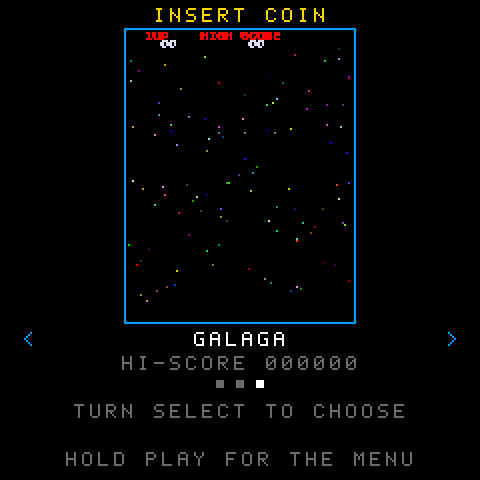
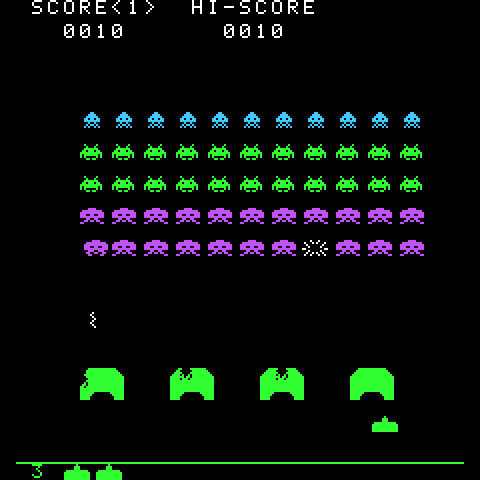
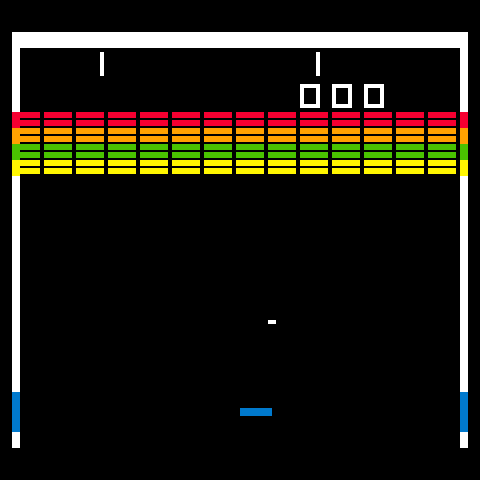

The games
| Game | Status | Controls |
|---|---|---|
| Space Invaders (Taito, 1978) | Playable, with sound | OP1 OP2 OP3 left, OP4 OP5 fire, OP6 PIT GLO right, PLAY to start, FX colours |
| Breakout (Atari, 1976) | Playable, with sound | Any encoder moves the paddle, PLAY serves, FX colours |
| Galaga (Namco, 1981) | Playable, with the original's music and effects | Same as Space Invaders |
All three are in one firmware, insert-coin, which opens on a menu: turn SELECT, PRESETS or ALGORITHM to choose a game (its attract screen plays in the middle), press PLAY to enter it, hold PLAY for two seconds to come back. Each game keeps its own high score in the synth's memory, even when it is switched off.
The games are C ports of the web version in insert-coin, playable at darkhelmet67.github.io/insert-coin. The TypeScript logic is the specification: the C code must play the same game, frame by frame.
How to play
| Action | On the synth | In the simulator, from a computer |
|---|---|---|
| Choose a game in the menu | SELECT, PRESETS or ALGORITHM | Up and Down arrows |
| Enter it / back to the menu | PLAY / hold PLAY 2 s | Enter / hold Enter |
| Left (Space Invaders, Galaga) | OP1, OP2, OP3 | Left arrow, A |
| Fire (Space Invaders, Galaga) | OP4, OP5 | Space, W |
| Right (Space Invaders, Galaga) | OP6, PIT, GLO | Right arrow, D |
| Move the paddle (Breakout) | Any encoder | Left and right arrows |
| Coin and start, serve | PLAY (blinking) | Enter, C |
| Colour or black and white (Space Invaders, Breakout) | FX | V |
Installing on the synth
Installing third-party firmware is at your own risk. Back up your projects and sounds with the official Workbench first.
From the browser (the easiest way). Open the installer in Chrome or Edge on a computer, connect the FM-1 (switched on) with a USB data cable, and press Install. It works from the official V15 firmware too, and if the cable comes out it carries on where it stopped (guide 09).
From the command line. Download insert-coin.fwsc from the installer page (or from the GitHub Actions artifacts) and install it with python3 platform/tools/fm1_install.py insert-coin.fwsc (needs pip3 install mido python-rtmidi). The FM-1 Firmware Hub works as well.
Back to the official V15 firmware: M-VAVE's M-UPGRADE with the FM-1 V15 file from their site, or the same hub, entry "FM-1 V15".
If something goes wrong, hold OCT- while switching on: the FM-1 starts in USB rescue mode, where installing always works.
Trying it without a synth
In the browser. The simulator runs the same C code as the firmware, compiled to WebAssembly: the FM-1's screen, keyboard, buttons and sound, played with the mouse, your fingers or the computer keyboard (guide 07). Every pull request also gets its own preview of the site at /pr-<number>/.
On the computer. Dinghy's host mode runs the firmware: the screen becomes a series of PNGs, the sound a WAV, and the keys come from a script.
pip3 install Pillow
make test                         # the unit tests
make host                         # the menu and the three games -> build/host/insert-coin-*.png and .wav
make sim                          # -> build/site/simulator/index.html (needs clang with lld)
All it takes is a C compiler (Linux or macOS). On macOS the simulator needs Homebrew's clang, since Apple's cannot target WebAssembly: brew install llvm lld, then PATH="$(brew --prefix lld)/bin:$PATH" make sim WASM_CC="$(brew --prefix llvm)/bin/clang".
Building the firmware
The firmware is built with the JieLi toolchain (Linux x86-64; on macOS the script uses Docker by itself) and three files of the AC79 SDK:
pip3 install Pillow
sh platform/tools/get_toolchain.sh
git clone --depth 1 --branch AC79NN_SDK_V1.2.1_2023-12-13 \
    https://gitee.com/Jieli-Tech/fw-AC79_AIoT_SDK.git ~/fw-AC79_AIoT_SDK
export JIELI_TOOLCHAIN=~/.jieli/toolchain AC79_SDK=~/fw-AC79_AIoT_SDK
python3 tools/build.py                  # -> build/insert-coin/insert-coin.fwsc
GitHub Actions does the same on every push and attaches the .fwsc to the run.
How it is built
platform/   Dinghy: boot, USB, updates, keys, screen, audio, flash, host mode (left untouched)
libs/       code shared by the games, plain tested C: screen, font, sprite, input, clock,
            audio (synthesizer and Namco WSG chip), cartridge (the game interface), trace
launcher/   the firmware: the menu, the records, src/main.c (the only file that talks to the
            FM-1) and sim/sim.c (the same firmware in the browser)
games/      one game per folder, pure logic, compiled as one file (unity.c) and seen by the launcher
            as a cartridge; traces/ holds games recorded from the web version
sim/        the simulator page, the same for every game
installer/  the web installer page; vendor/ holds Felucca's update protocol (from Skiff)
tools/      build.py (the firmware), ppm_to_png.py (screenshots), traces/ (the trace recorders),
            galaga/ (Galaga's data tables from the web version),
            sounds/ (the sound comparison), sim/ (simulator page and tests),
            installer/ (the site with the packages, the fake FM-1 for tests)
docs/       the guides, step by step
Guides
| 00 Introduction | Why a synth, why C, the plan |
| 01 The platform | Dinghy, host mode, the build, the first firmware |
| 02 The screen | Different resolutions on the 240 × 240 display, only the changed rows, 60 Hz |
| 03 The traces | Games recorded from the web version, to prove the C code is the same game |
| 04 The logic | Space Invaders in C, module by module, identical to the web version over 32,000 frames |
| 05 Graphics and controls | Draw everything, send little; the synth's keys; the high score in flash |
| 06 Sounds | An integer synthesizer with the web version's numbers, measured against Web Audio |
| 07 The simulator | The same C code in WebAssembly, in a page that also opens from disk |
| 08 Summary | How it fits together, what is verified, how to add a game |
| 09 The installer | Installing from the browser with WebMIDI, Felucca's protocol, tests with a fake FM-1, PR previews |
| 10 The launcher | One firmware, a menu of games, games as cartridges, the unity build |
| 11 Breakout | A paddle on any encoder, the ball in exact fifths of a pixel |
| 12 Galaga | 60 modules, 58,000 frames of parity, 288 rows on 240, the WSG sound chip |
| 13 Counting visitors | GoatCounter on the published site: visits, installs and downloads, no cookies |
| AI diary | The decisions made with Claude |
| Single prompt | The prompt that recreates the project |
The development rules are in CLAUDE.md.
License
GPL-3.0-only, like Dinghy, which it derives from. Credits and third-party material in LICENSING.md.