
Cat Piano
A cat piano for the M-VAVE FM-1: each of the 27 keys plays a real cat's meow, tuned to its note. Four banks of cats, held notes that keep meowing, a pitch-bend knob, a four-track sequencer, an arpeggiator, reverb and delay. Forked from Fart Machine One, which is built on FoMni, X0X and Felucca.
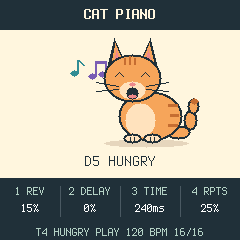
Listen (host renders of the firmware): the four banks, four tracks recorded live, the arpeggiator. Development notes: firmware review, cat piano plan, sequencer and dual-core plan.
Status: runs on an FM-1 (installed with
tools/fm1_install.py) and passes its host tests. CPU load on the device is still to be measured (hold FX); the sequencer's per-track and per-step settings have no panel controls yet (see the roadmap).
Controls
| Control | Behaviour |
|---|---|
| 27 keys | Play a meow at that key's note. Hold a key to keep it meowing; let go and it finishes. Up to eight overlap; the oldest is cut first. |
| PRESET | The bank: MEOW, KITTENS, TOMCATS, HUNGRY. The screen names it. |
| ALGO | Pitch bend, 10 cents a detent, up to 2 semitones either way. It springs back when you let go. |
| PLAY | Start all four tracks from step 1, or stop playback and recording and silence everything. |
| REC (tap) | Start recording from step 1 if stopped; during playback, overdub on or off. |
| SEL + white key 1-4 | Choose the track (cat) to play and record into, even while recording. PRESET sets that track's bank. |
| REC (hold 1 s) | Clear the selected track. |
| FX (hold) | Audio load: CPU now and its peak since FX went down, xruns, voices sounding. |
| ARP (tap) | Arpeggiator on or off (lit when on). With it on, held keys and MIDI notes are played one a step, in time with the tempo, and recorded as heard. |
| ARP (hold) + knobs | KNOB 1 rate (1/32 to 1/4, triplets too), KNOB 2 mode (UP, DOWN, UP-DN, DN-UP, PLAYED, RANDOM, CONVERGE, DIVERGE, PINKY, THUMB, CHORD), KNOB 3 octaves 1-3, KNOB 4 gate 5-100 %, ALGO latch (right on, left off). |
| SELECT | Tempo, 40-240 BPM. |
| KNOB 1 / 2 / 3 / 4 | Reverb, delay level, delay time (80-500 ms), delay repeats (0-70%). |
| MASTER | Volume. |
Four tracks, each with its own cat (bank), 16 sixteenths long by default. Notes are recorded to the step nearest
where you heard them (key-to-ear latency taken off), up to four per step, each with its velocity and the length you
held it, so a held meow plays back sustained. The engine (firmware/src/dsp/seq.c, after SLOOP and Felucca) also
does per-track length (1-64), division and swing, per-step nudge, ratchets, chance, a:b and fill conditions, and
mute; the panel controls for those are the next step. Patterns are kept in RAM only: switching off clears them.
MIDI in, channel 1: the bank's 27 notes (MEOW: 67-93) play the matching key with velocity; note-off lets it finish. Pitch bend covers 2 semitones. CC 120 and 123 stop the loop and silence the sound.
The cats
| Bank | Keys | Cats |
|---|---|---|
| MEOW | G4-A6 | two takes per note, played in turn: Kerzoven's purry and soft mews, IgnasD's meow, AntumDeluge's kitten, a British Shorthair asking for food, Heismark's impatient cat |
| KITTENS | C5-D7 | small, high mews: a Greek street cat, Heismark, Kerzoven, the kitten |
| TOMCATS | G3-A5 | low and long: a Siamese, the British Shorthair, a pleading cat |
| HUNGRY | D4-E6 | Heismark's impatient and pleading cats |
Each bank has a take every three semitones, pitch-shifted to that note with its formants kept (so a cat sounds
like the same cat, not a chipmunk), and each key resamples its nearest take by a semitone at most. Takes are
stored as 22.05 kHz 2nd-order ADPCM (about 4.6 bits a sample, 27-58 dB SNR) with a sustain loop for held keys.
Sources, crops and licences: samples/banks.json, LICENSING.md.
Install
python3 -m venv .venv && . .venv/bin/activate
python -m pip install -r requirements-install.txt
python tools/fm1_install.py --info                 # finds the FM-1, changes nothing
python tools/fm1_install.py build/cat-piano.fwsc   # asks before it writes
The package identity is FM-1_963. To go back, use the FM-1 Firmware Hub or M-VAVE's updater. Holding OCT- while switching on starts the USB rescue. See INSTALL.md. Installing firmware is at your own risk.
Build and test
See BUILDING.md: the JieLi toolchain runs in a linux/amd64 container on macOS.
sh tests/run_tests.sh      # host tests: pitch of every key, sustain, bend, DSP, codec, sequencer, UI, storage, USB
./build.sh                 # -> build/cat-piano.fwsc
tests/fmo/demo.omni renders a listening demo with the host simulator (sh host/build_host.sh, then
build/host/omni_host tests/fmo/demo.omni build/demo).
Your own meows
Authoring needs numpy, ffmpeg and the Rubber Band CLI (brew install rubberband); the firmware build itself does not.
- Put WAVs (16-bit PCM) under
samples/and list each sound insamples/banks.jsonundersources: itsfile, astart/endcrop in seconds, andlicense,authorandsource. python3 tools/measure_pitch.py samples/banks.json --writemeasures each crop's pitch asroot_hz. Check it by ear or on a spectrogram: meows glide. Add"root_checked": "how"to keep a value you set by hand.- Add the ids to a bank's
pool(a bank:nameof up to 10 characters,note0its lowest key, optionaltakesper anchor), thenpython3 tools/render_banks.pywritessamples/rendered/. python3 tools/import_samples.py --banks samples/rendered/banks.jsonwrites the firmware bank, then./build.sh. Up to 8 banks and 460 KB of ADPCM (about 36 s of audio) fit.
Licence
GPL-3.0-only, as the firmwares it comes from: give the source to anyone you give the firmware to. The meow recordings are CC0 1.0 or public domain, except one under CC BY 4.0 whose attribution must travel with the firmware. Credits and third-party notices are in LICENSING.md. M-VAVE and FM-1 are trademarks of their owners; this project is not affiliated with them.
Roadmap
- Panel controls and a step-grid screen for track length, division, swing, nudge, ratchets, conditions and mute (the engine and its tests already have them).
- Pattern save and load (sections A-D, chaining, undo) in the flash store.
- MIDI clock in and out; sequenced notes to MIDI out.
- Dual core (after Felucca 1.6.1), only if the measured CPU load calls for it.