
Dinghy
This repository is GROOVEDECK, a drum machine / groovebox built on Dinghy (identity
FM-1_950): 16 synthesized drums, a 16-step sequencer, 8 patterns, 4 kits. See docs/MANUAL.md and docs/STATUS.md. The text below is Dinghy's.MIDI. Play the drums from a keyboard or pad controller on the 3.5 mm TRS jack (MIDI in; use a DIN-to-TRS cable or adapter of type A; the jack is input only) or over USB-MIDI, on any channel: notes 36-51 are pads 1-16 (KICK SNARE CLAP C.HAT O.HAT TOM RIM COWBL CNG H CNG L CLAVE SHAKE CRASH RIDE G.SNR ZAP), velocity is the hit level, General MIDI drum notes outside that range play the drum they match, program change 0-7 picks the pattern and 8-11 the kit, CC 120/123 silences the drums. GROOVEDECK sends its pad hits and sequencer steps over USB-MIDI on channel 10 with the same notes, a note off 30 ms later. MIDI clock is ignored for now. The TRS input has not been tried by us on a GROOVEDECK unit yet. Details: docs/MANUAL.md.
The smallest firmware for the M-VAVE FM-1 to build your own on.
Dinghy plays a sine wave on the keys, and that is all it does. Under it is everything an FM-1 firmware needs before it can be any fun: the update path, the USB rescue, USB-MIDI, USB audio, the keys, knobs and LEDs, the screen and a place to keep settings. It all works, so you start with the part you actually want to write.
firmware/src/dinghy.c     <- your firmware: ~200 lines, a 4-voice sine. Start here.
firmware/src/platform.c   <- the plumbing (boot, USB, updates, audio ISR, settings). Done; read it, don't fight it.
firmware/src/*.c, hal/    <- Felucca's platform, as SLOOP carries it, unchanged
Dinghy is based on Felucca by Leo Kuroshita (Hügelton Instruments), with its platform as SLOOP (isod89) carries it: it keeps that platform and throws away the rest. The smallest boat of the family, after the felucca and the sloop.
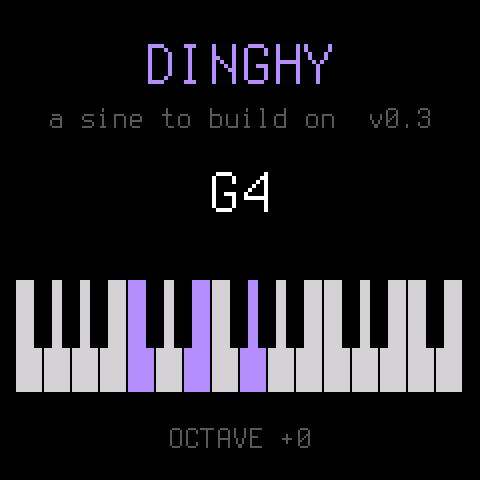
Status: 0.3, runs on the FM-1. Tested on the device: the install, MIDI in (pitch exact, 4 voices), USB audio at 44.1 / 48 kHz, the keys, the screen, the octave kept in flash, and back to another firmware through the hub.
What you get
| Updates that always work | tools/fm1_install.py, the web installers and the FM-1 Firmware Hub reach your firmware over USB, so you (and your users) can always install the next build, or go back to the official firmware. |
| USB rescue | Hold OCT- while switching on: no sound, only the updater. If your firmware crashes twice at boot, the FM-1 goes there by itself. |
| USB-MIDI | In and out, class compliant: midi_get(), midi_send(). |
| USB audio | The FM-1 shows up as a 16-bit stereo audio input (44.1 or 48 kHz): record it into any DAW or phone. Nothing to do. |
| Panel | 27 keys, 14 buttons, 7 encoders, the MASTER knob, the LEDs, by name (BTN_PLAY, ENC_KNOB1, ...). |
| Screen | 240 x 240, text in two sizes, rectangles, lines, pixels. |
| Settings | settings_load() / settings_save(): up to 256 bytes with a CRC in their own flash sector. |
| A crash screen | A fault shows where it happened (the PC), then the FM-1 restarts. |
| Host mode | The same dinghy.c on your computer: the screen as an image, the sound as a WAV. No FM-1 needed to try an idea. |
| Checks | The build fails on what bricks or breaks an FM-1 firmware: a 64-bit division, a call into the chip ROM, too much RAM, a register touched outside hal/. |
Build your own
From nothing to your own firmware on the FM-1, step by step. Each step works before you go to the next.
1. Copy it
On GitHub: Use this template (top right on this page) or fork it, then clone your copy. Rename nothing yet: first make sure the unchanged Dinghy builds on your machine.
2. Set up once
You need Linux on x86-64 (or macOS / Windows with Docker or WSL), Python 3 with Pillow, the JieLi toolchain and three files of the JieLi AC79 SDK:
pip3 install Pillow mido python-rtmidi
tools/get_toolchain.sh                      # JieLi's clang for the chip, to ~/.jieli/toolchain
git clone --depth 1 --branch AC79NN_SDK_V1.2.1_2023-12-13 \
    https://gitee.com/Jieli-Tech/fw-AC79_AIoT_SDK.git ~/fw-AC79_AIoT_SDK
On macOS the build runs the toolchain in a linux/amd64 Docker container by itself (have Docker running).
JIELI_TOOLCHAIN and AC79_SDK point elsewhere if your copies live somewhere else.
3. Hear it without an FM-1
tests/run_host.sh # -> build/host/dinghy.wav and screen PNGs
Host mode runs the same dinghy.c on your computer: the sound as a WAV, the screen as images. Most ideas can be
tried here first, in seconds.
4. Your first change
Open firmware/src/dinghy.c (~200 lines). The sound is app_audio(): it gets an empty
buffer of stereo frames and adds to it. Make the sine a square:
s = ((int32_t)ph < 0 ? 8000 : -8000) * amp >> 15; /* instead of s = (sine(ph) * amp) >> 15; */
Run tests/run_host.sh again and listen to build/host/dinghy.wav. The screen is drawn in app_main(), the keys
are read there too: change the text, add a knob (docs/API.md has every call).
5. Onto the FM-1
./build.sh                                       # -> build/dinghy.fwsc (fails on what would brick the FM-1)
python3 tools/fm1_install.py build/dinghy.fwsc   # over USB; asks before it writes, restarts into your build
python3 tools/fm1_install.py --info              # what runs on the connected FM-1
That is the whole loop: change, hear it on the host, build, install. Back to another firmware, or to the official one, with the FM-1 Firmware Hub in Chrome or Edge: Dinghy (and every copy of it) answers the hub's updater like every firmware there. Installing firmware is at your own risk.
6. When it goes wrong
- It crashes: the screen shows where (the PC), then the FM-1 restarts. Twice at boot and it goes to the USB rescue by itself.
- It won't start at all: hold OCT- while switching on: the USB rescue, no sound, only the updater. Install a working build (or another firmware from the hub) from there.
- The build refuses: it checks for a 64-bit division, a call into the chip ROM, too much RAM, a register touched
outside
hal/. docs/RULES.md says why each one matters; read it before your first crash.
7. Make it yours, release it, get into the hub
Your name and logo, your own package identity (so the FM-1 and the installers tell your firmware from Dinghy),
a GitHub release with the .fwsc, and how to get listed next to the others in the
FM-1 Firmware Hub: docs/MAKE-IT-YOURS.md.
Where to go next
- docs/API.md: everything
platform.cgives you, with the panel's ids, the screen calls, the audio contract, MIDI, settings, the flash map, timing. - docs/MAKE-IT-YOURS.md: turn Dinghy into your firmware: the name, the package identity, releases, getting into the FM-1 Firmware Hub.
- docs/RULES.md: the chip's rules (no FPU, no libgcc, the audio ISR's budget) and what the build checks for you. Read it before your first crash, not after.
License
GPL-3.0-only, as Felucca and SLOOP: you may change and share it, and whoever gets your firmware gets its source. Details, credits and third-party parts in LICENSING.md.
The platform is Copyright (C) 2026 Leo Kuroshita (@kurogedelic), Hügelton Instruments, with SLOOP's changes (isod89). Dinghy (the app, the host mode, the docs) by zvenson.