
Fart Machine One
Turns your M-VAVE FM-1 into a questionable musical instrument. Ten real recorded CC0 farts, reverb, delay, and a 16-step sequencer. Finally, a productive use for wind instruments.
Install: from download to first fart
You do not need to build the firmware. You will need:
- An M-VAVE FM-1 and a USB cable that carries data.
- A computer with Python 3 installed. If needed, get it from python.org.
- The two downloads listed below, from the same release.
This is replacement firmware for the FM-1. Installation replaces its current firmware. Keep the USB cable connected until installation and restart finish. This CC0 audio update is built and tested locally. Installation and hardware verification are separate from the host/browser checks recorded with the release.
1. Download the firmware and source
Open Releases on this repository's GitHub page and open the release you want. Under Assets, download:
- fart-machine-one.fwsc — the ready-to-install firmware.
- fart-machine-one-source.zip — the source, samples and installation tool.
Extract the source ZIP. Find the folder containing README.md,
requirements-install.txt and the tools folder. Copy fart-machine-one.fwsc
into that same folder. Leave the firmware file as .fwsc; do not unzip it.
2. Open a terminal in that folder
macOS: Open Terminal, type cd (including the space), drag the extracted
folder from Finder into Terminal, then press Return.
Windows: Open the extracted folder in File Explorer, click its address bar,
type cmd, then press Enter. The Windows commands below are for Command Prompt.
Linux: Open a terminal in the extracted folder using your file manager, or
use cd to move into it.
3. Set up the installer
Run these lines one at a time.
macOS / Linux:
python3 -m venv .venv
. .venv/bin/activate
python -m pip install -r requirements-install.txt
Windows (Command Prompt):
py -m venv .venv
.venv\Scripts\activate
python -m pip install -r requirements-install.txt
Keep this terminal window open for the remaining steps.
4. Connect and check your FM-1
Connect the FM-1 by USB. Close your DAW, MIDI utilities and browser tabs that might be using its MIDI connection. Then run:
python tools/fm1_install.py --info
The installer should report the FM-1's identity and MIDI port. This command only checks the connection; it does not install anything.
5. Install
python tools/fm1_install.py fart-machine-one.fwsc
Read the confirmation prompt, check that it is the intended device, and type
y to continue. Wait for the update and restart to finish. Successful completion
reports that the FM-1 runs FM-1_703. You can run the --info command again
to check.
6. Make something regrettable
Start with the volume low and press a key. Tap REC, play a few sounds, then tap REC again to hear the loop without adding notes. Turn the four effect knobs to add reverb and delay. Press PLAY to stop, or hold REC for one second to clear the loop.
Your loop stays in memory only. Turning the FM-1 off clears it.
If something goes wrong
| Problem | What to try |
|---|---|
| Python command not found | Install Python 3, reopen the terminal and return to the source folder. On Windows, use the py command shown above. |
requirements-install.txt or the installer cannot be found | Check that your terminal is in the folder containing this README and tools. |
| Firmware file cannot be found | Put fart-machine-one.fwsc beside this README and check its filename. |
| No FM-1 found | Try a USB data cable and close other apps using MIDI. The error lists the MIDI input names it can see. |
| Multiple MIDI devices | Add --port "part of the FM-1 port name" to the command, using the actual name reported on your computer. |
| Interrupted update; FM-1 still in update mode | Run the same install command again to finish the update. |
| Dependency installation fails | Keep the error text and include your operating system and Python version when asking for help. |
The short installation guide has the compact command sequence. For developers, BUILDING.md explains building from source.
Controls
| Control | Behavior |
|---|---|
| All 27 keys | Play a full one-shot sample immediately, whether stopped, playing or recording. Ten sounds repeat across the keys. |
| PLAY | Start the loop from step 1, or stop playback and recording, silence all voices/effect tails and clear puffs. Stopping retains the loop. |
| REC — tap and release | Start recording from step 1 if stopped. During playback, turn overdubbing on/off without restarting. Turning recording off leaves playback running. |
| REC — hold 1 second | Clear the whole loop, stop and silence everything. Releasing after a clear does not start recording. Tempo/effects stay unchanged. |
| SELECT | Tempo, 40–240 BPM, one BPM per detent; starts at 120. |
| KNOB 1 | Reverb amount. |
| KNOB 2 | Delay amount. |
| KNOB 3 | Delay time, 80–500 ms. |
| KNOB 4 | Delay repeats/feedback, 0–70%. |
| MASTER | Volume. |
One bar of 16 sixteenth-notes. Recording snaps to the nearest step. Different sounds can share a step; recording the same sound again on the same step updates its velocity rather than duplicating it. Repeated keyboard copies of one sample share that stored sound. A live tap is heard immediately; a tap quantized ahead joins loop playback on the next circuit, avoiding a second near-immediate echo. Eight audio voices are available, with oldest-voice replacement if more overlap.
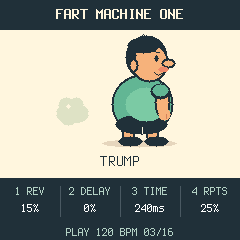
The bottom line shows STOP / PLAY / REC, tempo and the current step while running. The four effect values remain visible while the cartoon and status strip animate. PLAY lights when running, REC lights when recording, and PLAY uses its red LED during recording.
The one pattern lives in RAM. Power-off/reboot clears it. No song mode, multi-pattern storage, lane editing or synth engines. Musical controls not listed above are unused. Hardware calibration, boot recovery and update shortcuts remain.
MIDI channel 1 notes 53–79 play/record the corresponding keys with velocity; note-off does not shorten the sample. CC120/123 stop transport and silence sound without erasing the loop. MIDI clock sync is not implemented.
Sounds and names
The ten samples are TOOT, TRUMP, PFFT, RASPBERRY, WIND, FLATULENCE,
BOTTOM BURP, AIR BISCUIT, RIPPER and SBD, cycling in that order across all 27 keys.
They are actual recordings published by their creators under CC0 1.0. Full
unchanged downloads are in samples/source-originals/; the selected mono PCM16
excerpts used for the bank are in samples/bank-inputs/. Creator/source links,
original and derived SHA256 hashes, and exact selection/processing details are
recorded in samples/SOURCE-MANIFEST.json and samples/ATTRIBUTION.md.
Compressed originals retain their original quality limits after PCM conversion.
The code's GPL licence is separate from the recordings' CC0 dedication.
The excerpts total 5.698163 seconds; their compiled bank is 251,292 bytes.
To reproduce the bank without altering source WAVs:
python3 tools/import_samples.py samples/bank-inputs --names samples/display_names.json --provenance samples/SOURCE-MANIFEST.json
Importer accepts 1–27 PCM16 mono/stereo WAVs at 8–192 kHz, converts to 22,050 Hz
mono, removes DC, limits excessive peaks and applies brief boundary fades.
Compiled audio budget: 320 KiB, about 7.4 seconds of unique audio; no automatic
truncation. --map mapping.json optionally specifies 27 source basenames;
--names names.json supplies distinct readable display labels up to 20 ASCII
characters. Names affect metadata only. --provenance copies supplied credits/licences only when every WAV filename and SHA256 match; stale metadata fails without replacing the bank. Generic imports without provenance retain their unspecified-licence notice. Tests use a separate generated fixture, which is not shipped as the instrument bank.
Build, test, preview and provenance
See BUILDING.md. tests/run_tests.sh includes sanitized playback/FX/UI/sequencer
checks and platform tests. Additional actual-bank timing/stress/browser tests and
screenshots are under tests/fmo/; generated results go under build/.
This GPL-3.0-only fork is based on FoMni commit
405ef41aef75f7e70afd6decc01505df07c708e9, with the Felucca-derived HAL, USB,
audio, flash/loader and recovery support retained. Original cartoon/puff geometry
was drawn from scratch in firmware/src/app/cartoon.h; no downloaded/copied
character sprites or existing character reference were used. Inherited code and
the licensed Terminus font remain credited separately. See LICENSING.md and
docs/ARTWORK-PROVENANCE.md.
Package identity: FM-1_703. See BUILDING.md for the source build and LICENSING.md for code, audio and third-party notices. Native/browser CPU figures are not an FM-1 timing measurement.
Inspiration
Fart Machine One was partly inspired by Tooty Loop, a game-jam project I worked on with my friend Candice (cannice) for the GMTK Game Jam 2025. Candice led the idea and game development, and I contributed the sound work. Big thanks to her for the original spark—go give Tooty Loop a toot!