
Emerald YM
Generative 16-bit music firmware for the M-VAVE FM-1, by Caspius Labs. A real YM2612 emulator, lightweight Sega-style PSG and generative sequencer turn the FM-1 into a small chiptune instrument. Play along on its keyboard and shape each instrument independently.
Current stable firmware: 1.0.12, hardware-tested on FM-1. PLAY resumes from pause, REC resets the song, and USB MIDI OUT sends Stop and Continue. Installation · Manual · Build · FM-1 test evidence · Development roadmap
Download: Emerald YM 1.0.12 (.fwsc) · SHA-256 · Stable release notes
The exact tested 609,677-byte package has SHA-256 0ebf70db09e5cf5536bd9ea2924eb1ddbe244732de22ac8c469efb5439440e86. Tag v1.0.12 points to source 2e4bf3b5a9b8418a5ba4c18616b19c2fd0e40da6. Documentation VERSION 1.0.17 refreshes the Firmware Hub submission checklist and future feature roadmap; the firmware bytes remain exact 1.0.12.
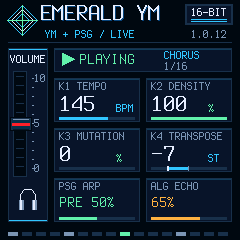
240 × 240 capture from the desktop test of the v1.0.12 native UI renderer.
Song mode and animated startup
HOME bright enables an 88-bar song: INTRO 8 → VERSE 16 → CHORUS 16 → BREAK 8 → VERSE 16 → CHORUS 16 → OUTRO 8 → END. At 134 BPM it lasts about 2 min 38 s. The outro reduces backing level, then pauses automatically; in MIDI OUT it sends Stop and releases notes. HOME dim returns to endless generation. HOME preserves the playhead. After END/DONE, press REC to reset the song and choose a new seed, then press PLAY. Mode/progress are not saved; instrument levels, FX and K1–K4 retain their normal persistence. Section changes temporarily scale stems/density without replacing saved settings. Live keys remain available. The audio fade does not send MIDI volume CC automation.
The silent startup animation uses an original console silhouette, moving red fader and segmented spectrum bars. The larger right panel reaches POWER; its cyan matches 16-BIT SOUND SYSTEM. It is decorative, not audio analysis. Tiny changed-only tiles keep the existing dismissible boot period without a new framebuffer or blocking delay.
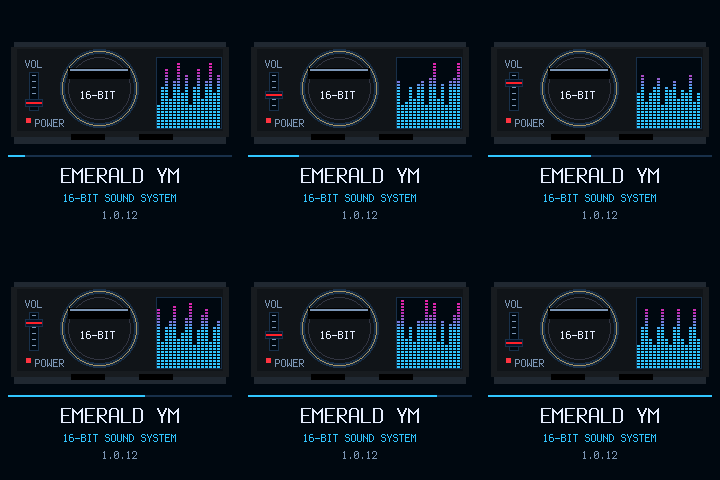
240 × 240 startup animation from the desktop test of the v1.0.12 native UI renderer. The preview loops for display.
Historical physical 1.0.4 results
The final newly built 1.0.4 package was retested after fixing PLAY; these are its own results, not copied from 1.0.8:
| Check | Result |
|---|---|
| Complete song / automatic END | 162.40 s, 88 bars; stopped at bar 89 |
| Diagnostics | 407 queries / 407 replies, no timeout; maximum reply 6.55 ms |
| Sampled music CPU average / maximum | 47.59% / 72% |
| Longest block | 4,233 us |
| XRUN / overload / failed boots | 0 / 0 / 0 |
| USB MIDI master | Start/Clock and automatic Stop; no idle Clock or remaining captured notes |
| USB audio | 203.81 s stereo PCM16/44.1 kHz; signal present, no clipped samples in the analyzed music |
| Owner observations | Final PLAY tip, smooth music and automatic END/DONE confirmed |
These results describe the completed 1.0.4 repeat. Finite tests do not establish multi-hour reliability, electrical jitter, external receiver synchronization, USB packet counters or new recovery/TRS-input paths. Section/end updates are control-rate, not sample-exact. Historical test reports and scope.
K1–K4 while playing: targeted physical test
On the same exact stable 1.0.4, each knob was turned separately in both directions, slowly and faster, during MIDI OUT, stereo USB recording and read-only status polling. HOME was dim/endless to exclude the song's automatic ending. After each phase the owner returned to the initial setting; final 130 BPM / 100% / 100% / 0 restoration was confirmed before stopping.
| Test window | Observed result |
|---|---|
| K1 TEMPO | Clock changed with tempo and returned to approximately 130 BPM |
| K2 DENSITY | Playback and Clock continued |
| K3 MUTATION | Playback and Clock continued |
| K4 TRANSPOSE | Note changes continued while transport remained active |
321.78 s music; 806/806 status replies, no timeout. Sampled music CPU averaged 47.47%, lifetime maximum 72%, worst block 4,193 us; XRUN/overload 0. All four knob windows had USB audio signal and no clipped samples. The only Stop was the requested final PLAY press; no held outgoing notes remained. Total USB recording: 403.53 s, stereo PCM16/44.1 kHz.
Phase windows include instruction/response time, not exact encoder-event telemetry. Per-phase metrics, raw report and scope.
MIDI IN / OUT and EDIT
Press EDIT to switch note direction:
- EDIT dim — MIDI IN: receive live notes and effect CCs over USB or the minijack. Notes 53–79 on any channel play the live PSG; USB and TRS have separate held-note masks. The minijack requires a compatible TRS MIDI adapter (the original Launchpad Pro MK3 Type A adapter was used in the earlier 0.9.0 input test).
- EDIT bright — USB MIDI OUT: send the physical keyboard and generative sequencer to a computer. The header shows USB MIDI OUT. Local synthesis continues; incoming USB/TRS notes and effect CCs are ignored to avoid MIDI feedback. In your DAW, select Emerald YM FM-1 as the MIDI input.
In IN, USB Start/Continue selects external clock following at 24 PPQ. K1 returns to internal tempo. In OUT, FM-1 sends Start on fresh playback, Stop on pause and Continue at the retained position. Clock runs at 24 PPQ while playing. The receiver must retain its position for Continue. EDIT resets to IN after reboot. Read-only diagnostics and stereo USB audio remain available in both modes. USB MIDI protocol.
| MIDI output channel | Part |
|---|---|
| 1 | Physical keyboard, including chords |
| 2 / 3 | FM bass / lead |
| 4–6 | Three FM chord voices |
| 7 / 8 | PSG arpeggio / noise |
| 10 | Kick 36, snare 38, closed hat 42, open hat 46 |
The minijack remains MIDI IN in both modes; EDIT does not switch its electrical direction. For physical MIDI OUT, route FM-1's USB MIDI through a computer or compatible USB host to an external interface such as Roland UM-ONE. No Bluetooth output is included. Detailed controls, routing and timing limits.
Historical physical 0.10.0 tests
The exact release package passed a 60-second 180 BPM USB Clock run with simultaneous MIDI OUT reception, USB audio recording and status diagnostics, plus separate live-key/EDIT/input tests:
| Check | Result |
|---|---|
| Keyboard and sequencer MIDI OUT | 2,047 Note Ons captured across all nine assigned channels in the main session |
| Keyboard chords / EDIT | Up to four simultaneous keys captured separately; switching EDIT to IN released held outgoing notes |
| USB note input before/after EDIT | Three notes and a chord recorded successfully in IN; no performance echo |
| Incoming USB notes in OUT | Ignored; no audio response or echo during the paused negative control |
| STOP | All captured outgoing notes released |
| Average sampled audio CPU | 45.98% during the 60-second sequence |
| Maximum audio CPU / longest block | 72% / 4,212 us |
| XRUNS / overload / failed boots | 0 / 0 / 0 |
| Simultaneous USB audio | 81.41 s stereo PCM16 / 44.1 kHz, including the 60-second backing; no clipping in the analyzed body |
| User observation | Smooth backing and correct EDIT LED/header changes |
This is a short physical test, not long-session, destination-synth or USB packet-counter validation. The minijack input was physically checked on earlier exact 0.9.0; it was not retested in this USB-focused 0.10.0 session. Exact package, raw reports and scope · Desktop tests and memory.
Release v0.10.0 contains the exact tested 609,677-byte package, published without rebuilding, SHA-256 195cd2d1a504d5936e79cde227d64d2d8d1bd407945e8156dac795f682d59401. The tag points to matching firmware source commit e906fbc5eb3c91e45c95101c46bd0d674eef533d. Documentation version 0.10.1 adds this publication/evidence update in PR #11; it does not identify a new firmware image. Older release packages and tags remain unchanged.
USB ONLY on GLO
Press GLO to mute the FM-1 speaker and headphone output, while USB audio, MIDI, diagnostics and playback continue. GLO changes from dim to bright, and the display shows USB ONLY below the MASTER slider. Press GLO again to restore the physical outputs and dim illumination. MASTER continues controlling the USB-recorded level. This is a digital output mute, not a power-off of the speaker amplifier.
All buttons with available assigned functions are visibly illuminated: dim when inactive, bright when active or acknowledging an action, with transport/error colors retained. This rule applies to GLO in stable 1.0.4; older releases turned its LED off with physical audio enabled.
Switching fades the physical output over about 5.8 ms; USB receives the unchanged mix before that fade. The mode is not saved: physical outputs are enabled after reboot. Release 0.7.0 contains the exact tested package, without rebuilding. A 30-second USB ONLY recording/live-MIDI/status test passed: average sampled audio CPU 47.77%, maximum 73%, longest block 4242 us, XRUNS 0, overload 0, failed boots 0. The owner confirmed speaker mute/restore, GLO illumination and the USB ONLY label. Captured audio: 32.34 s stereo PCM16/44.1 kHz, no clipping. Raw hardware results. Documentation version 0.7.1 does not change firmware. Validation scope.
Main screen and physical test (0.6.0)
The console-inspired main screen adds a vertical red MASTER slider beside the transport, K1-K4 cards and per-source mixer/effect controls. It follows the physical MASTER knob: 0 at the bottom, 10 at the top. This is a knob-position indicator, not a signal meter or a decibel scale. MASTER controls the speaker/headphone and USB-recorded mix and is not saved. The owner confirmed correct slider movement, readability and no flicker during the physical check.
On 2026-10-27, the exact 0.6.0 package passed 30 seconds of continuous backing with live MIDI notes and USB diagnostics while recording USB audio:
| Check | Result |
|---|---|
| Recorded audio | 32.34 s, stereo PCM16 / 44.1 kHz |
| Average sampled audio CPU | 46.93% (about 47%) |
| Maximum audio CPU | 72% |
| Longest audio block | 4196 us |
| XRUNS / overload / failed boots | 0 / 0 / 0 |
| Recording clipping | 0 clipped samples in the analyzed body |
| Screen and MASTER movement | Owner-confirmed working correctly |
The recording input retained Emerald YM FM-1 (Emerald YM FM-1) in Windows. Exact package, raw hardware reports and owner feedback · Desktop tests, memory and native previews.
This short run does not establish long-session reliability or prove absence of individual USB packet glitches. The public 0.6.0 release contains this exact tested file, published without rebuilding. Tag v0.6.0 points to matching firmware source commit c0530a6cd7d026554e21b957665edfd7fe7d51d9. Source/documentation version 0.6.2 adds publication links without changing the firmware. Older releases remain available unchanged. The V15/Dinghy installation round trips below apply to exact 0.4.3, not 0.6.0.
What it does
- Five YM2612 FM voices plus percussion through the emulated channel-six DAC, with the NTSC chip clock.
- Three Sega-style PSG tone voices and white noise. The keyboard plays up to three live PSG notes alongside the backing music.
- Seeded melodies, bass, chords and changing arrangements; tempo, density, mutation and transpose controls.
- Independent levels and DECAY, COLOR and ECHO settings for twelve sources. All three effects can run together.
- A screen that redraws only changed tiles, active-note LEDs and a documented USB MIDI/status interface.
This is original generative music inspired by the Mega Drive/Genesis sound palette. It contains no Sonic game music, extracted game samples or Sega logos. It is an independent project, not affiliated with Sega, Yamaha or M-VAVE.
Quick controls
Start with MASTER low, then press PLAY. The sequencer is paused after boot.
| Control | Function in 1.0.12 |
|---|---|
| PLAY | Start, pause or resume at the retained position. After END, press REC first. Live keys remain available |
| HOME | Bright: 88-bar song. Dim: endless generation. Preserves the playhead |
| REC | Generate a new seed and sequence |
| SAVE | Pause the backing and save instrument levels/effects and K1–K4 after notes have settled |
| SEQ | Toggle mutation between 0 and 35 |
| K1 / K2 / K3 / K4 | Tempo / melody density / mutation / transpose |
| SELECT | Select one of twelve instruments |
| PRESETS | Set the selected instrument's level, 0–100% |
| FX | Select DECAY, COLOR or ECHO for editing |
| GLO | Toggle USB ONLY; dim with physical audio enabled, bright when muted |
| ALGORITHM | Set the selected effect amount, 0–100% |
| ARP | Enable/disable all PSG, including live keys |
| EDIT | Dim: USB/TRS note input; bright: physical keyboard + sequencer note output over USB |
| Keyboard | Up to three live PSG notes, F3–G5 |
| MASTER | Overall output level; the on-screen red slider follows the physical knob |
Effect amounts and levels remain independent when changing selections. All twelve levels and 36 effect amounts are restored after power-off. Changes are saved after three seconds without edits, playback or held live keys. Press SAVE to pause and wait for SAVED before switching off. Tempo, density, mutation and transpose also restore after reboot. Seed, master, PSG enable and selection/cursor are not saved. With three live notes, the PSG arpeggio yields its voice; FM and DAC continue. See the manual for details.
Compatibility and data
Target: M-VAVE FM-1, not SMK-37 or other models. USB MIDI name: Emerald YM FM-1. Stable 1.0.12 identity: FM-1_68010012; older release 0.4.3 identity: FM-1_68000403. The .fwsc includes the inherited Felucca update loader.
Emerald YM does not import stock, DUB-1 or other firmware's presets, projects or samples. It does not provide a way to back them up or restore them. Back up with your existing firmware's tools before switching. Firmware installation writes flash; do not assume another firmware's data will survive switching or recovery. From 0.4.0, instrument levels/FX are stored in the existing project-sector pair at 0xFC000 / 0xFD000. Saving may replace another firmware's data there; panel calibration and the update-loader area are separate.
In validated 0.4.3, USB audio is disabled: listen on the FM-1 speaker or headphone output. Firmware 0.5.0 and later, including the tested 0.6.0 build, enable stereo 16-bit / 44.1 kHz USB capture of the master mix alongside USB MIDI and status diagnostics. It does not receive computer audio or expose separate instrument tracks. See USB audio validation for desktop and physical results, with version-specific limits. This is a restricted musical chip profile, not a general VGM/register player or a full Genesis emulator. There is currently no Emerald browser player or editor; inherited DUB-1 web tools are historical code.
USB audio (0.5.0 and later)
Connect by USB and choose Emerald YM FM-1 as a stereo recording input at 44.1 kHz / 16-bit in your recording software. Windows may add a prefix such as Line. In both physical 0.5.0 and 0.5.1 tests, this computer displayed Line (Felucca). On 0.5.1, the USB bus-reported product and audio-interface name were already Emerald YM FM-1, but the Microsoft usbaudio devnode still stored Felucca as its friendly name. Firmware descriptors alone did not refresh that Windows registration. See the Windows audio-name refresh procedure. The targeted refresh was physically verified on this computer: the MEDIA adapter became Emerald YM FM-1; the recording endpoint became Emerald YM FM-1 (Emerald YM FM-1) (Windows combines endpoint and adapter names). WinMM truncates that full label to 31 characters. No manual registry/endpoint rename or firmware reflash was used.
The input carries the full master mix: FM, PSG, drums, live notes and effects. MASTER controls the captured level. USB does not automatically route audio to your computer speakers: enable input monitoring in a DAW/recorder to listen there, or listen directly through the FM-1. Computer-to-FM-1 audio and separate instrument tracks are not provided. USB MIDI and read-only status diagnostics remain available while recording.
Physical 0.5.0 test: 30 seconds of continuous backing with alternating two/three MIDI-held notes and status polling, while capturing 32.33 seconds of stereo audio. Sampled CPU averaged 46.93%, maximum 72%, longest block 4200 us; XRUNS 0, overload 0, failed boots 0. Signal analysis found no clipped samples or long repeated/silent stretches in the measured body. This is a short test, not proof of zero USB packet glitches or long-session reliability; separate UAC packet counters are not exposed by status v1. Exact package, raw reports and scope.
Physical 0.5.1 follow-up: recording with simultaneous MIDI/status also passed: sampled CPU average 46.93%, maximum 72%, longest block 4195 us, XRUNS 0, overload 0. The Windows name check failed (Line (Felucca)) and is recorded separately from the successful audio test. Raw evidence.
Verified installation paths
Physical tests on 2026-10-27 used the exact historical 0.4.3 package, official M-VAVE V15 and Dinghy 0.3:
| Transition | Result |
|---|---|
| Emerald 0.4.3 → official V15 | Passed |
| Official V15 → Emerald 0.4.3 | Passed |
| Emerald 0.4.3 → Dinghy 0.3 | Passed |
| Dinghy 0.3 → Emerald 0.4.3 | Passed |
All four used normal USB MIDI updating and returned the expected running identity, without a rescue shortcut or manual power cycle. The owner confirmed screens and audible keys in V15 and Dinghy. After each return, Emerald passed 20 seconds of continuous playback: CPU MAX 67%, XRUNS 0, overload 0. Emerald 0.4.3 was restored at the end. Package hashes, raw reports and scope.
A subsequent USB data-interruption test on battery passed: disconnect at 25% of the loader transfer, reconnect, restart installation and return to 0.4.3. The following 20-second continuous playback test passed (CPU MAX 67%, XRUNS 0). This used the same image already installed; equal sectors may be skipped, so it does not prove interrupted changed-sector writing or power-loss recovery.
These results apply to the exact linked package, not earlier review builds with the same 0.4.3 identity, release 0.4.0, arbitrary firmware versions or every device. They do not establish interrupted-write recovery or compatibility/preservation of other firmware's data.
Levels/FX and K1–K4 retention after full power-off were user-confirmed in the preceding 0.4.x checks. Desktop tests cover the renderer, storage migration, interrupted/corrupt simulated saves and UI/LED/update logic. Verification separates those tests from physical measurements. The immutable accepted baseline v0.1.4, its tag and original evidence remain preserved.
Firmware Hub: stable, hardware-tested v1.0.12 is public. The root fmhub.json now includes the creator and native preview. Historical 0.4.3 V15/Dinghy round trips do not establish 1.0.12 cross-firmware installation paths. Hub identity uniqueness, Connect/browser installation and version-specific exit tests remain to be verified. Current submission checklist. No submission has been sent.
Song variation 1.0.10
The tested 1.0.10 candidate adds four harmonic cycles, eight melodic motif families, four lead grids, seed-dependent bass contours and voicings, four drum grooves (including fills), alternative PSG arpeggios, and phrase-based tension/rests. It keeps the existing 88-bar HOME song structure. REC changes the seed, and a repeat of the same seed/controls is intended to reproduce the same music. HOME Endless intentionally retains the original generator, including its historical PCM reference test.
Documentation VERSION 1.0.11 archives the exact tested candidate and the FM-1 results. The current public release is v1.0.12.
Stable 1.0.12 transport
PLAY pauses and resumes the backing at the current position. REC resets the arrangement and chooses a new seed. After END/DONE, use REC before PLAY. HOME and EDIT preserve the playhead. USB MIDI OUT sends Start for a fresh arrangement, Stop on pause, and Continue on resume. Continue uses the receiver's retained position.
Documentation VERSION 1.0.13 archives the tested 1.0.12 package and FM-1 pause, resume and REC results.
Development
The canonical repository is CaspiusLabs/Emerald-YM. Work in a local clone. Every change increments VERSION, uses a separate branch and opens a pull request to main for review; do not push directly to main or auto-merge. The original DUB-1 remote is reference-only.
git clone https://github.com/CaspiusLabs/Emerald-YM.git
cd Emerald-YM
# Provision the ignored .runtime dependencies first; see BUILDING.md.
.\build-ym-windows.ps1
.\test-ym-windows.ps1
These commands do not open MIDI ports or flash hardware. VERSION determines the firmware version. Documentation-only changes do not change the installed binary. See BUILDING.md, architecture, CHANGELOG, USB protocol and contributor handoff.
License and credits
The combined firmware is GPL-3.0-only. It uses the DUB-1/AMB-1/Felucca platform lineage, Aaron Giles's ymfm (BSD-3-Clause) and original Emerald engine/PSG/FX code (MIT). JieLi package inputs and fonts retain their licenses. Full provenance and redistribution terms: LICENSING.md, LICENSE, LICENSE-emerald.txt.
The PR #21 song-variation candidate 1.0.7 completed the 88-bar FM-1 test. Documentation VERSION 1.0.8 archives the exact tested package and the physical results.