
Doom FM-1 / SMK
Your synth. Their Doom. A real Doom-engine port for the M-VAVE FM-1 and SMK-37 Pro / Elite, by Chance Roth (@ChanceTheMaker).
SMK release 24: illuminated drum-pad controls
SMK release 24 adds cyan movement pads, amber strafing, green Use and red Fire. Only a pressed pad goes dark. Fader 2 controls brightness with idle-noise rejection; REC opens the menu and PLAY selects. The owner confirmed controls, colors, brightness and sound on SMK Pro. FM-1 release 26 adds GameDude-style controls and incremental input scanning, with owner-confirmed improvement in responsiveness. See pad mapping and validation.
Play in your browser with FM-1, SMK-37 Pro or Elite device controls. The browser shares the game engine and LCD assets; its performance is not a measurement of physical hardware. Release 15 passed the FM-1 normal-USB update and owner gameplay check. The owner also confirmed Sloop → Doom → Felucca USB transitions on SMK-37 Pro. The older release evidence is retained in Release 15; current Pro acceptance is recorded in release 24.
Test06 cannot receive this update over normal USB because it has no runtime USB driver. It needs a model-specific recovery installation first. Keep power connected during any active flash transfer; do not repeatedly retry a failed install. Other synth installers must explicitly recognize Doom before they can restore synth firmware over USB.
The homepage has a Simulator button. The simulator opens directly to the device controls, with FM-1, Pro and Elite views, keyboard/touch play, pause, fullscreen and help. The browser and Release 16 firmware share the updated splash, centered face, K1 volume and K2 menus.
The gallery below shows the shared renderer: the Release 16 splash and existing campaign views.
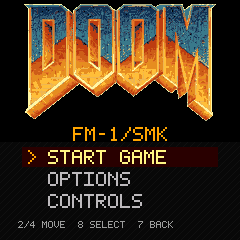
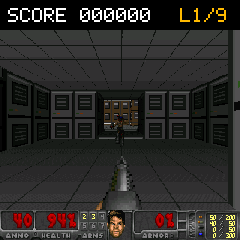
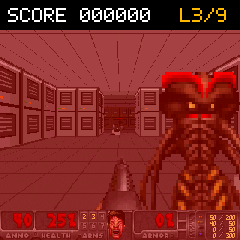
Screenshots are actual engine output at the device's 240 x 240 resolution; they are not hardware photographs.
Campaign
- Nine connected-room levels: The Outpost, Iron Halls, Reactor Core, Cooling Works, Switchback, The Foundry, Freight Line, Blackout and Last Transmission.
- 77 enemies, guard/imp sprites, attacks and death animations.
- Shotgun, pistol and fists, health/ammo pickups, kill scoring and a classic status HUD.
- Original background music and synthesized shotgun, reload, growl, impact, death, pickup and switch sounds, with separate music/effects volume controls.
- A new boot splash, readable LCD menus and white-key controls.
- Separate FM-1, SMK-37 Pro and SMK-37 Elite builds, all available in the website builder.
- Animated hardware hero: alternating FM-1/SMK screen zooms, seven FM-1 finishes and six SMK finishes, with pause and reduced-motion support.
Historical release 15 sizes and acceptance:
| Model | Release 15 application | Physical status |
|---|---|---|
| FM-1 | 576,660 bytes | Normal USB, title/menu, door, weapons, HUD, gameplay and audio accepted |
| SMK-37 Pro | 576,968 bytes | Sloop → Doom → Felucca USB transitions confirmed; detailed gameplay checklist pending |
| SMK-37 Elite | 576,968 bytes | Compiled and package-checked; Release 15 hardware validation pending |
The game uses a 240 x 180 viewport with LCD-resolution menus/HUD. A 256 KiB Doom zone and 24 KiB C heap keep it within the native memory budget. CPU1 uses private 8 KiB stacks and a 1 KiB audio block; a worker fault or missed deadline returns audio to one core. SMK release 24 has 1,272 bytes left in the common application limit. See release checks and release hashes.
Install
- Back up your synth projects. Have a working XIAO recovery adapter configured for your exact model.
- Open the installer in desktop Chrome or Edge. Choose FM-1, SMK-37 Pro or SMK-37 Elite.
- Click Build firmware. The browser downloads the reviewed app and checksum-pinned base, validates the model/layout, preserves protected bytes and prepares the package locally. A local base-file fallback is available; no file upload is needed normally.
- Connect only that instrument by normal USB, running Doom Test07 or later, or compatible synth firmware. SMKs support official matching 016 firmware or the portable Felucca/Sloop/Melodee SMK updater (identity version 922 or newer).
- Close other MIDI apps, acknowledge the notice, then Install / resume. Keep USB and power connected until completion. The installer checks for the selected Doom identity (SMK 24 or FM-1 26); check the physical game too. A missing identity is reported as unconfirmed boot, not success.
Doom replaces the synth application and has no persistent saves. Release 07 added normal-USB updating through an embedded RAM loader; Release 06 and earlier need the recovery adapter first. Earlier SMK loaders also reject a fully blank calibration sector before programming; those devices need a one-time recovery update to Release 14. The new loader preserves either valid calibration or a completely blank sector, and still rejects corrupt partial records. FM-1 and SMK recovery write ranges differ; never use one model's image or write bounds for another. See Release 14 checks, USB details, recovery notes and FM-1 transporter.
The Elite's official RAM loader can identify itself as ota-FM-1; the installer explicitly asks you to confirm the connected Elite before programming. It does not treat that generic identity as model proof. Failed handoffs do not automatically repeat writes.
Experimental firmware is provided without warranty. Power loss, an incompatible device or a software defect can require hardware recovery. FM-1 testing does not establish SMK hardware compatibility. No USB audio, multiplayer or synth functions are included.
FM-1 release 26 controls
Release 26 matches GameDude: left-hand direction cluster, middle Menu/Select, Use/Fire on the last two piano keys, and illuminated control keys. See the full mapping and validation. The public FM-1 installer uses the owner-tested release 26. Its incremental key scan removes the blocking full-matrix scan from the gameplay loop; no numerical gameplay speedup or SMK speed parity is claimed.
Controls
SMK release 24 includes illuminated pads: top row 1/2/3 = strafe left / forward / strafe right; bottom row 1/2/3 = turn left / back / turn right; bottom row 7/8 = Use / Fire. Strafe pads are amber, movement cyan, Use green, and Fire red. Pads go dark while held. Fader 2 changes brightness (startup level 150 until moved). REC opens the menu and PLAY selects; PATCH/PARA and the existing keyboard controls remain. See release validation.
Count white keys from the far left (FM-1 starts at F; SMK starts at C).
| White key | Action |
|---|---|
| 1 / 3 | Turn left / right; adjust menu values |
| 2 / 4 | Forward / back; menu up / down |
| 5 | Fire |
| 6 | Use / retry after death |
| 7 / 8 | Menu / select |
| 9 | Run |
| 10 / 11 | Strafe left / right |
| 12 | Next weapon |
K1 controls music/effects volume; K2 scrolls menus (clockwise down, counterclockwise up). SMK PATCH opens the menu; PARA selects. Adjust effects and music volume under Options > Sound; FM-1 MASTER also controls output. Guards award 100 points, imps 200. Face the wall switch in the final room and press Use to exit. Fire or Use advances from results. Retry restores the score from level entry; finishing the campaign offers a fresh run.
Build from source
Clone with submodules. Linux/WSL requires Python 3, GCC multilib, binutils and zdbsp 1.19. Native builds additionally require the JieLi pi32v2/r3 Linux toolchain (tested with jieli-linux-toolchains-20250324.1).
git clone --recurse-submodules https://github.com/ChanceTheMaker/doom-fm1-smk.git
cd doom-fm1-smk
python3 tools/fetch_test_wad.py
python3 tools/pack_test_wad.py --trim-textures
python3 tools/build_campaign.py
python3 -m pip install Pillow
python3 tools/build_browser_campaign.py
python3 tools/build_native_art.py
python3 tools/build_browser.py --emcc /path/to/emsdk/upstream/emscripten/emcc
python3 tools/build_host.py --board fm1 --no-wipe --mapped-wad --small-room --static-wad --bounded-heap --abi32 --campaign --native-art
python3 tools/check_campaign.py build/fm1/strip-no-wipe-mapped-small-static-heap24-abi32-campaign-test07/doom-host --wad build/fixtures/native-art.wad
node tests/browser_engine_test.mjs # shared title/menu and gameplay regression
python3 tools/build_native.py --board fm1 --campaign --toolchain /path/to/jieli/toolchain
python3 tools/build_native.py --board smk37-pro --campaign --toolchain /path/to/jieli/toolchain
python3 tools/build_native.py --board smk37-elite --campaign --toolchain /path/to/jieli/toolchain
Native outputs are app-only .bin files under build/native/<board>/, not full-flash images. The compiler does not flash devices. tools/capture_screenshots.py captures the campaign/splash from the host executable; converting PPM to PNG requires Pillow. The host harness uses scripted inputs rather than an interactive game window and can record synthesized effects to WAV.
The asset generator authors maps and pixel art over checksum-pinned Miniwad assets. Arbitrary retail WADs do not fit the measured budget. No commercial Doom WAD is required. The separately credited classic DOOM logo remains its owner's branding asset, outside the GPL and Freedoom licenses.
Website development and checks
python3 -m http.server 8786 --directory site
node tests/site_installer_test.mjs
node tests/site_installer_test.mjs /private/fm1-salt14.fwsc /private/Pro016.fwsc /private/Elite016.fwsc
python3 tools/check_site.py
Node 22 or newer is recommended. Optional original-firmware fixtures stay outside Git. Tests validate actual packages, protected data, corruption rejection, wrong-model refusal, loader failure paths and exact-model runtime identity confirmation after transfer. Tests use simulated transport and never open MIDI hardware.
GitHub Pages publishes only site/ on pushes to main. Compiled apps are checksum-verified in CI; complete device dumps, calibration, build output and private backups are excluded. The exact official FM-1 V15 restore package is bundled and checksum-pinned; other vendor packages are fetched from pinned public sources. The browser downloads base files from pinned public sources and assembles packages on the user's computer.
Analytics
The live site uses the shared GA4 property G-JVF09MZEGD for visits, firmware builds, downloads and installer results, tagged product=doom-fm1-smk. Cookie settings provide an opt-out. Localhost sends nothing, and no MIDI data, firmware files or raw logs are collected. See event definitions.
Credits and license
New code: GPL-3.0-only, LICENSE. DoomGeneric retains upstream Doom notices. Miniwad/Freedoom content retains its BSD-style license; mpaland/printf retains its MIT license. Hardware and updater work derives from Felucca by Leo Kuroshita / Hugelton Instruments and the Felucca, Sloop and Melodee SMK ports. See THIRD_PARTY.md, web credits and per-file provenance.
Independent community project; not affiliated with id Software, Bethesda or M-VAVE. Product names belong to their respective owners.
Windows USB installation
SMK-37 Pro installation and original-firmware restore use a local USB helper on Windows, so Chrome does not own MIDI during the device restart. The same Install and Restore buttons remain on the website. Other platforms and Elite retain their existing browser installer; the native path is Pro-only.
With Python 3 and Node.js 22+ installed, run from this checkout:
python tools/setup_native_smk.py
python tools/serve_native_smk.py --allow-hosted
Then use the Doom website, or http://localhost:8895/. Allow local-network
access when prompted. The setup command verifies the official Pro 016 package
and the published Doom app; it never accesses MIDI or installs firmware.
Close connected Studio/Simulator tabs and other MIDI apps before installing.
If Chrome is already frozen, restart it first to release its previous session.
Keep the helper running until the installer confirms the returned identity.
No browser flags or alternative browser profile are required.
SMK flash compatibility release
The SMK update and stock-restore path now accepts the reported EB6014 flash chip alongside 856014 and displays detailed loader failures. Update older Windows USB-helper checkouts before installing this release. See release scope, evidence and recovery limits.