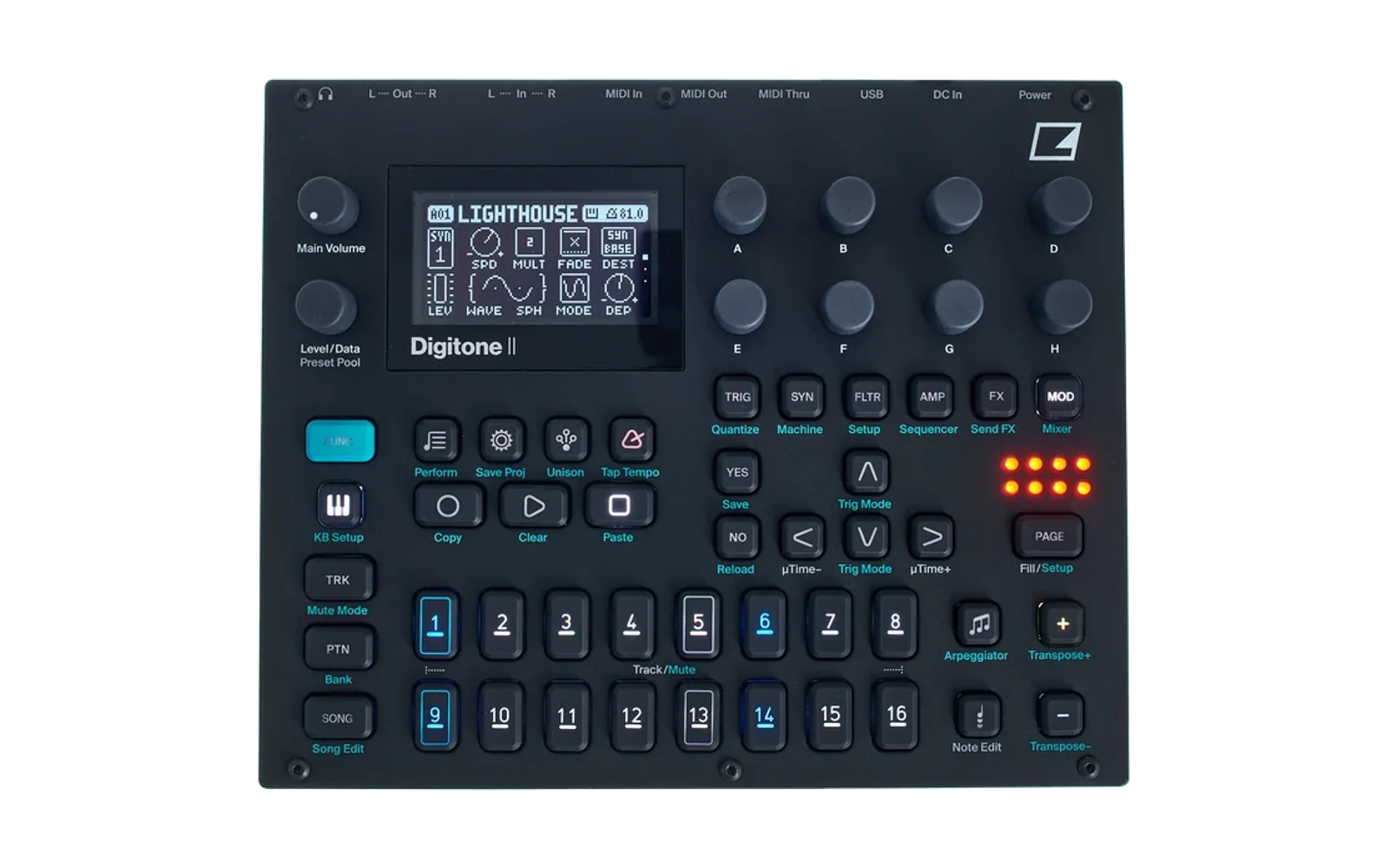
DN2 DT2 firmware research
[!WARNING] R013 adds first-time sample-storage setup. If Transfer shows zero capacity or cannot upload samples, see sample-storage setup. SYSTEM → FORMAT SAMPLES erases the sample area, including existing samples and other mods' data there. Back up first and restart after formatting. Existing users with working sample storage do not need to format it. Do not substitute stock FORMAT +DRIVE or a reset command.
Six Digitakt II sample Machines, recording and resampling, and 42-channel USB audio for Digitone II—alongside its stock synth Machines.
Play stereo samples chromatically, stretch and slice loops, record the main mix, and send individual tracks and effect returns to your DAW.
R014 is the current candidate; hardware validation is pending. It restores FUNC + TUNE octave snapping, SYN + PLAY page clear/undo for all six sample Machines on both SYN pages, and held SLICE boundary updates. Intermittent sample browser failures and hung notes remain unresolved. Recorder, DSP and USB audio code are unchanged.
R014 retains R013's explicit sample-storage setup. Formatting, restart, Transfer capacity and post-format sample uploads passed on-device checks on R013. Supply your own official Digitone II OS 1.11 and Digitakt II OS 1.16 files; no private sample bank or factory sample library is needed.
The DN2 already contains the physical flash capacity. Stock firmware does not expose this area as sample storage. R013 initializes a sample filesystem there; Elektron Transfer reported about 20 GB available on the tested DN2.
R012 was tested with sample storage already initialized during development; that missed the first-install case fixed by R013. R012 remains the stable target; R013, R011 and T1E2 remain available as older builds. R012 and earlier targets are not workarounds for missing storage setup.
This repository distributes source, build recipes and research only. Firmware images and sample audio are not included. Builds happen locally; add your own playable samples through Transfer after installation.
Build in your browser — select both OS files, build locally, download. Browser guide.
Sample loading · Recorder · USB audio · Build · Release manifest
First installation, step by step
- Back up projects, Sounds and samples. Keep the official DN2 recovery OS.
- Open the browser patcher,
select your official DN2 OS 1.11 and DT2 OS 1.16 files, choose
Build firmware, then download the verified R014
.syx. - Install that file with Elektron Transfer using its OS update workflow. Let installation finish, then boot the DN2 into normal playing mode.
- If sample uploads already work, skip formatting. If sample storage needs setup, stop playback/transfers, close Transfer, and open SETTINGS → SYSTEM → FORMAT SAMPLES. YES erases the sample area, including other mods' data there; NO cancels. Do not use FORMAT +DRIVE.
- If you formatted, keep power connected until SAMPLES FORMATTED / SWITCH OFF / ON DN2 appears, then switch off and back on. Reconnect Transfer and verify Samples reports nonzero capacity.
- In Transfer EXPLORE → Samples, upload a WAV file or folder.
- On the DN2, press VOICE twice from a track page to open Sample Manager. Browse +DRIVE, select the file and choose LOAD TO PROJECT.
- Choose a sample Machine with FUNC + SYN, assign the loaded sample with SYN → SAMP, and play it. Save the project to retain its assignments.
During bulk transfers: playback may stutter, miss notes or go quiet. Stop playback before large uploads or restores and wait for completion before playing. After formatting, restore the samples required by existing projects, then reload the project. If audio problems continue after transfers finish, report them.
The sample guide covers backups, confirmation, loading, preview and troubleshooting in detail.
What you get
Six sample Machines
| Machine | Main purpose |
|---|---|
| ONESHOT | Direct sample playback for drum hits, pitched sounds and loops. |
| WERP | Tempo-following playback with segment size and segment-mode controls. |
| STRETCH | Granular time stretching with pitch control. |
| REPITCH | Tempo matching through playback-rate and pitch changes. |
| GRID | Divide a sample into evenly spaced slices for rhythmic rearrangement. |
| SLICE | Play and edit individual slice boundaries within a sample. |
The sample Machines share the DN2 with FM TONE, WAVETONE, FM DRUM and SWARMER, using the instrument's existing voice-allocation controls.
- Mono and stereo samples, chromatic keyboard playing and live playback controls, including tuning, loop position, length and sample level.
- Waveform views and DT2 parameter graphics, with sample browsing from SYN and a separate Sample Manager.
- Slice editing and performance: editable boundaries, slice-grid creation, linear/random slice locks and SLICES trig mode for GRID/SLICE.
- DN2 sequencing and modulation integration, including parameter locks and the existing voice-allocation controls.
- Recording and resampling, with source selection, normalization, trimming, auditioning, saving to +Drive and optional track assignment.
- Class-compliant USB audio: the main mix, all 16 stereo tracks, three stereo effect returns and physical inputs available to the computer separately.
Explicitly switching another Machine to ONESHOT initializes FLTR, AMP, track FX and all three LFO pages. Loading a saved Sound or project preserves its settings; existing parameter locks can still override track-level values.
Getting around
From a normal track page, plain VOICE cycles through three views:
| Action | View or function |
|---|---|
| Press VOICE once | Voice Setup / voice allocation |
| Press VOICE again | Sample Manager |
| Press VOICE a third time | Recorder |
| FUNC + VOICE | Existing unison shortcut |
| FUNC + SYN | Machine selection, including the sample Machines |
| Turn SAMP on SYN | Project sample browser |
Load and play a sample
- Use Elektron Transfer → EXPLORE to send your audio files or folders to the DN2's +Drive. Wait for the transfer to finish.
- Open Sample Manager with two VOICE presses. Browse +DRIVE, mark samples, open actions with RIGHT, then choose LOAD TO PROJECT.
- Select a sample Machine on the destination track. Turn SAMP, choose a loaded sample and press YES. For a first ONESHOT check, use PLAY FWD, STRT 0, LEN 120 and an audible sample level on an unmuted track.
- Save the project after loading and assigning samples.
Transfer stores files on +Drive; project loading makes them available to the Machines; assignment chooses which sample a track plays. These are separate steps. You can also enter +Drive from the SYN SAMP list with FUNC + YES for quick assignment.
Use your own audio files, such as WAV. Manual conversion before Transfer is not required for this workflow; Transfer performs its own audio-format conversion. For tempo-following loops, set BARS to the sample's actual bar length.
See loading your own samples for folder navigation, preview, assignment and troubleshooting.
Record, trim and save
Open Recorder on the third VOICE page. Select SRC MAIN to resample the main mix, or choose an available physical-input, USB or individual-track source. Arm with H/ARM and use YES to start and stop recording.
On the trim page, E/H set start/end, F zooms, G pans and
FUNC + YES auditions the selected range. Press YES to name and save the
sample to the +Drive recorded folder. Assign it when prompted, or press NO
to keep the file without assigning it. Save the project to retain assignments.
MAIN recording, saving and Recorder reopening have been confirmed on hardware. Validation of every source and exact trimmed-file comparison remains incomplete. The Recorder guide covers the full workflow and its limits.
USB audio routing
Select USB AUDIO/MIDI in the DN2's USB configuration, then choose Digitone II as your DAW's audio input. The interface exposes 42 capture channels at 48 kHz / 24 bit, arranged as 21 stereo pairs. Enable the pairs you need in the DAW's input configuration.
| DAW input pair | Signal from DN2 |
|---|---|
| 1/2 | Main stereo mix |
| 3/4–33/34 | Tracks 1–16, one stereo pair per track |
| 35/36 | Delay return |
| 37/38 | Reverb return |
| 39/40 | Chorus return |
| 41/42 | Physical inputs |
Track n uses channels 2n+1 / 2n+2: track 1 is 3/4, track 2 is 5/6, and track 13 is 27/28.
Individual track pairs exclude the shared effect returns. To capture a multitrack arrangement with those effects, record the track pairs and the separate DELAY, REVERB and CHORUS pairs. MAIN already contains the mixed effects.
The computer-to-DN2 USB return remains stereo. The 42 channels describe capture into the computer, not 42 independent return channels. Host buffer settings affect latency; exact end-to-end USB latency has not been measured. See the USB guide for R011's changes and validation scope.
Status and limitations
“Stable” records successful owner testing. It is not a claim of complete DT2 feature parity or exhaustive hardware validation.
| Target | Status | Scope |
|---|---|---|
| R014 | Default build / candidate | FUNC + TUNE snapping, SYN page clear/undo and held SLICE boundary updates; hardware validation pending |
| R013 | Earlier candidate / exact build | Adds confirmed sample-storage formatting; hardware setup and uploads verified |
| R012 | Stable; first-install limitation | Requires sample storage already initialized; lacks FORMAT SAMPLES |
| R011 | Previous stable / historical exact build | Sample Machines, browsing, Recorder and latest USB publication fix |
| T1E2 | Earlier stable | Sample Machines, browsing and 42-channel USB; no Recorder |
| R003 | Historical experimental | Recorder extension on the T1E2 baseline |
| R008 | Historical diagnostic | Recorder plus earlier USB publication diagnostics |
Current limits:
- R014 controls: offline checks pass; on-device validation remains pending. Intermittent sample browser failures and hung notes remain unresolved.
- Recorder coverage: MAIN recording/save/reopen has hardware confirmation; not every input source, trimming case or power-cycle workflow is verified.
- USB endurance: repeated instrumented project changes, long-running dense workloads and exact end-to-end latency remain to be characterized.
- External parameter control: a complete DN2-compatible CC/NRPN map for the added sampler parameters is not implemented.
This port targets Digitone II OS 1.11, using Digitakt II OS 1.16 as donor. It is version-specific; these recipes do not support the original Digitone or arbitrary OS revisions. Research builds modify device firmware. Keep a known-good recovery image privately.
Private inputs
R014 requires these two exact local inputs. The builder verifies their sizes and SHA-256 hashes against the release manifest.
| Input | Purpose |
|---|---|
Official Digitone II OS 1.11 .syx | Recipient firmware |
Official Digitakt II OS 1.16 .syx | Donor Machine code and UI assets |
Obtain official firmware from Elektron and retain your own copies locally. The DT2 input is its OS firmware, not its factory sample library. These are build inputs for one DN2 update; a second instrument is not involved in building.
R014 needs no private sample bank. It generates silent compatibility data for an unused legacy bank region. Load playable samples through Transfer after installation; see sample loading.
Exact historical targets R011, R008, R003 and T1E2 still require their original 47,104-byte private test bank. That asset is not distributed and is not DT2 factory content. Choose R014 for the current two-file candidate, or R012 for the stable two-file build when sample storage is already initialized.
Build
Use macOS or Linux with Python 3.12+, Git, curl, Rust/Cargo, GNU Make, a host C compiler, Clang's preprocessor and zlib development headers. See tool setup for the pinned dependencies. The builder does not open MIDI ports or flash a device.
1. Get the source and Python dependencies
git clone https://github.com/armio/dn2-dt2-firmware-research.git
cd dn2-dt2-firmware-research
python3 -m venv .venv
. .venv/bin/activate
python -m pip install -r requirements.txt
2. Check your private inputs
Replace the example paths with your local files:
python tools/check_inputs.py \
  --dn2 /path/to/Digitone_II_OS1.11.syx \
  --dt2 /path/to/Digitakt_II_OS1.16.syx
Resolve any missing-input or hash error before continuing. This check does not change the input files.
3. Build the toolchain and R014
python port/tools/bootstrap.py --prefix .toolchain --jobs 4
python build.py \
  --dn2 /path/to/Digitone_II_OS1.11.syx \
  --dt2 /path/to/Digitakt_II_OS1.16.syx \
  --out /private/builds/R014.syx
The output must be outside this repository. Existing outputs are never overwritten. Intermediate firmware and diagnostic logs stay in the private temporary directory printed by the builder. Nothing is flashed automatically.
Expected R014 output: 2,565,792 bytes, SHA-256:
a6f51887aa651d4c23ff4d79ce9ec458df72f20b9129a9316de0dd4fb3f5000e
The builder verifies MAIN, DSP and complete SysEx identities. The R014 manifest records the current output identity, source-reproduction results and hardware validation limits.
Use --target R012 for the stable two-file build, or --target R013 to reproduce
the earlier sample-storage setup build.
Use --target R011, --target R008, --target R003 or --target T1E2 only for
historical exact reproduction. Those targets additionally require
--sample-bank /private/path/to/sample-bank.bin. R014, R013 and R012 reject that option so a
private bank cannot accidentally enter the new build.
Documentation and contributions
| Guide | Contents |
|---|---|
| Sample loading | Transfer, +Drive, project slots, assignment and preview |
| Recorder | Recording, trimming, auditioning, saving and reopening |
| USB audio | R011 publication fix and validation limits |
| Build tools | Pinned toolchain and local setup |
| Audit guide | Offline checks and synthetic tests |
| November 3 update | Stable designation, project-change results and resolved sample report |
| Publication boundaries | What belongs in this source-only repository |
Useful contributions include reproducible bug reports, synthetic regression cases, clearer workflow documentation and improvements to the local build workflow. For a bug report, include the firmware target, Machine, steps to reproduce, USB mode/host buffer size where relevant, and whether the fault affects headphones, USB or both. For sample reload issues, state whether the project was saved after assignment.
Keep firmware, samples, generated disassemblies and raw device captures out of commits, issues, pull requests and releases. The repository contains original adapters, extraction/relocation recipes and factual address metadata; donor routines, fonts and graphics are extracted from private inputs locally.
Credits and licence
This project builds on the DN2 research and dnfw tooling from
angellinares/dn2_firmware_explore,
with firmware container tooling from
mischa85/elektron-firmware-tool.
Credit to the upstream authors and contributors for that foundation.
The source attribution lists component credits, licences and additional research dependencies. Source licence: AGPL-3.0-or-later, with component notices retained. This project is independent of Elektron; the source licence does not grant rights to Elektron's firmware or private sample audio.