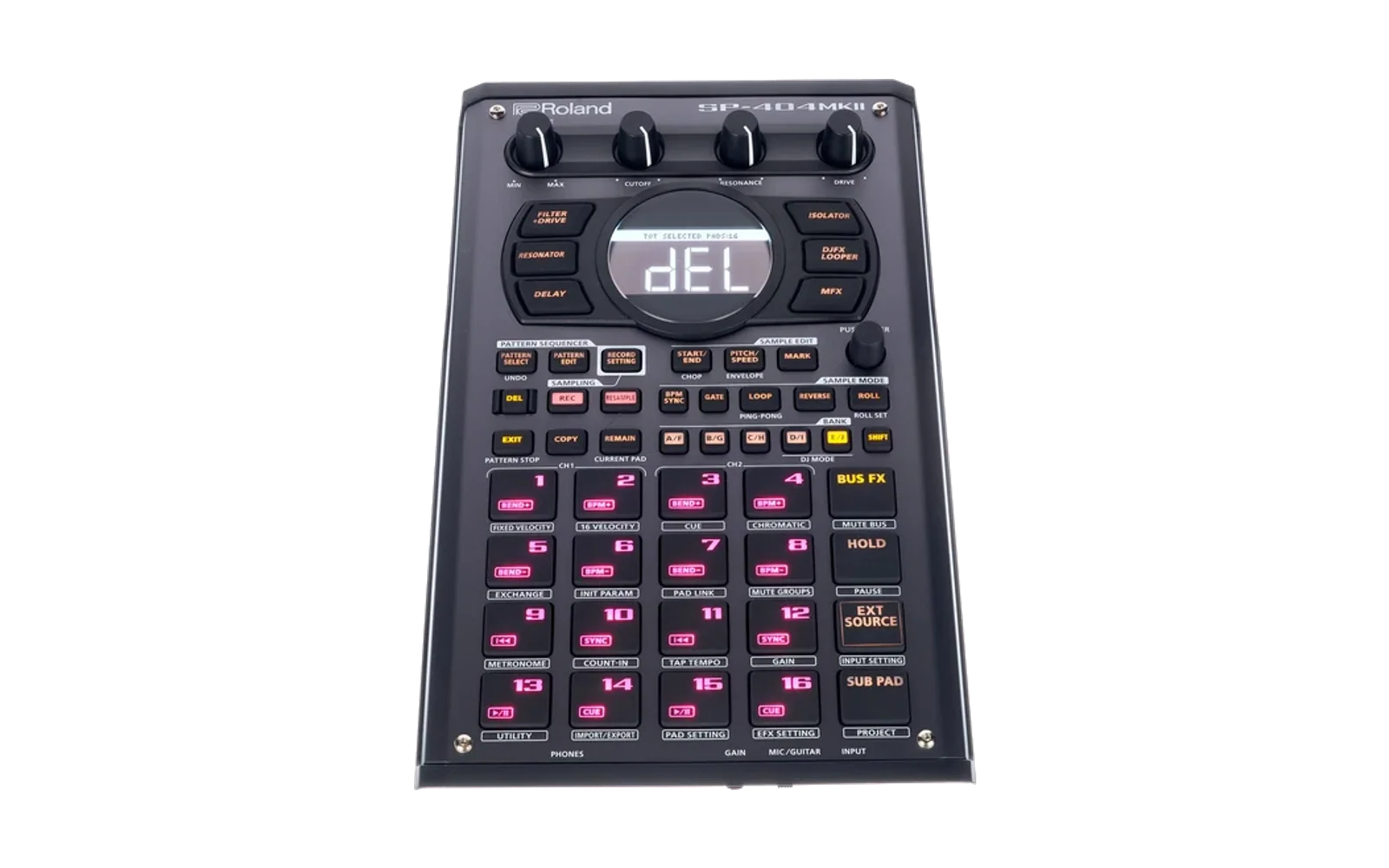
dm-404
Rising67/100An SP-404MKII emulator: Roland's own firmware (bring your own) on an emulated i.MX RT1060 in QEMU, with a hardware-style app and a DAW plugin
dm-404 is custom firmware for the Roland SP-404MKII, by @nickpetty. Latest release v0.1.5 (October 2026), 7 stars on GitHub.
forRoland SP-404MKII·by@nickpetty
Unclaimed. Is this yours? Sign in with GitHub as @nickpetty to claim it.
DM-404-0.1.5-win64.zip· 17 MB
Custom license· nickpetty/dm-404·downloads come from the creator’s GitHub releases
v0.1.5DM-404 0.1.5Latest1 file
An SP-404MKII emulator that runs Roland's own firmware (System Program 5.52), with a hardware-style app and a DAW plugin. Windows 64-bit.
You need your own copy of the SP-404MKII System Program (free from Roland's support site). None of Roland's files are in this package. On first run the app asks for the zip, or
SP404MKII_APP1.bin, then makes a blank internal drive and SD card in%LOCALAPPDATA%\DM-404.Changes in 0.1.5
- Touch screens and Remote Desktop. A tap on a pad now always plays (before, a quick tap was often missed and needed a second one), so SHIFT + pad works by touch too.
- Several fingers at once. Keys and pads can be held together, and two knobs turned at once.
- SHIFT held down stays on for every pad or key pressed meanwhile. A tap on SHIFT still applies it to the next one only.
Features
- The unit: boots to its main screen with blank drives or your own projects. Keys, pads (with velocity), CTRL knobs, VALUE and LEDs all work.
- Audio: pads, the metronome, sampling, resampling and skip back. Your audio device's input is heard through EXT SOURCE and the bus effects (following EFX SET › Input Bus). Sampling follows INPUT SETTING's ROUTING (Mix / ExtIn), and the Input FX is recorded.
- Effects: all 48, on BUS 1-4 and the Input FX, in a stand-in for the unit's effects chip.
- Storage: a 16 GB internal drive, and an SD card you can take out, put back and copy files to and from. Backup and restore of the internal drive.
- MIDI: the MIDI IN/OUT jacks on your computer's MIDI ports (several inputs at once), MIDI clock, and MIDI learn (right-click any key, pad or knob).
- DAW plugin: audio and MIDI both ways, in sync, with DRY / BUS 1 / BUS 2 outputs and the DAW's transport as MIDI clock.
- TouchOSC: the panel on a tablet or phone, with LED feedback.
- Panel: a default background picture or your own, and a custom text colour.
What's inside
DM-404.exe: the app. Unzip anywhere and run it; keep theqemu/folder next to it.VST3/DM-404 Link.vst3: the DAW plugin.- Audio and MIDI both ways, DAW clock, and DRY / BUS 1 / BUS 2 outputs.
- Copy it to your VST3 folder (e.g.
%LOCALAPPDATA%\Programs\Common\VST3) and run the app while you use it.
TouchOSC/DM-404.tosc: the TouchOSC layout.- Licences:
LICENSE,LICENSES/,THIRD-PARTY.txt,third-party-licenses/, andSOURCE.txt(the exact source of this build).
Optional
- usbip-win2, to attach the unit's USB serial port to Windows.
- Windows MIDI Services, for the app's own "DM-404" MIDI port. It is used when present; DM-404 does not ship it.
Known issues
- The unit's USB audio/MIDI device is not emulated. Use the DAW plugin or the MIDI port menus.
- The effects are a stand-in built on DaisySP: close to the hardware, not identical.
- DAW bounces must be in real time.
- Windows MIDI Services can hang on repeated runs (Microsoft's issue #1047). Restarting the service or Windows clears it.
Licences: the app and plugin are AGPL-3.0 (JUCE), the emulator GPL-2.0 (QEMU), and the effects engine MIT plus LGPL-2.1 (DaisySP-LGPL). "Roland" and "SP-404" are trademarks of Roland Corporation; DM-404 is not affiliated with or endorsed by Roland.
v0.1.4DM-404 0.1.41 file
An SP-404MKII emulator that runs Roland's own firmware (System Program 5.52), with a hardware-style app and a DAW plugin. Windows 64-bit.
You need your own copy of the SP-404MKII System Program (free from Roland's support site). None of Roland's files are in this package. On first run the app asks for the zip, or
SP404MKII_APP1.bin, then makes a blank internal drive and SD card in%LOCALAPPDATA%\DM-404.Changes in 0.1.4
- TouchOSC control. Play the panel from a tablet or phone over Wi-Fi. The keys, pads, knobs and VALUE all work, and the LEDs (pads in colour) and knobs follow along.
- Switch it on in Options › TouchOSC.... The window shows the address to enter in TouchOSC (send port 8000, receive port 9000).
- The layout is in the
TouchOSCfolder, or can be saved from that window. - Other OSC apps can use the same addresses (README).
Features
- The unit: boots to its main screen with blank drives or your own projects. Keys, pads (with velocity), CTRL knobs, VALUE and LEDs all work.
- Audio: pads, the metronome, sampling, resampling and skip back. Your audio device's input is heard through EXT SOURCE and the bus effects (following EFX SET › Input Bus). Sampling follows INPUT SETTING's ROUTING (Mix / ExtIn), and the Input FX is recorded.
- Effects: all 48, on BUS 1-4 and the Input FX, in a stand-in for the unit's effects chip.
- Storage: a 16 GB internal drive, and an SD card you can take out, put back and copy files to and from. Backup and restore of the internal drive.
- MIDI: the MIDI IN/OUT jacks on your computer's MIDI ports (several inputs at once), MIDI clock, and MIDI learn (right-click any key, pad or knob).
- DAW plugin: audio and MIDI both ways, in sync, with DRY / BUS 1 / BUS 2 outputs and the DAW's transport as MIDI clock.
- TouchOSC: the panel on a tablet or phone, with LED feedback.
- Panel: a default background picture or your own, and a custom text colour.
What's inside
DM-404.exe: the app. Unzip anywhere and run it; keep theqemu/folder next to it.VST3/DM-404 Link.vst3: the DAW plugin.- Audio and MIDI both ways, DAW clock, and DRY / BUS 1 / BUS 2 outputs.
- Copy it to your VST3 folder (e.g.
%LOCALAPPDATA%\Programs\Common\VST3) and run the app while you use it.
TouchOSC/DM-404.tosc: the TouchOSC layout.- Licences:
LICENSE,LICENSES/,THIRD-PARTY.txt,third-party-licenses/, andSOURCE.txt(the exact source of this build).
Optional
- usbip-win2, to attach the unit's USB serial port to Windows.
- Windows MIDI Services, for the app's own "DM-404" MIDI port. It is used when present; DM-404 does not ship it.
Known issues
- The unit's USB audio/MIDI device is not emulated. Use the DAW plugin or the MIDI port menus.
- The effects are a stand-in built on DaisySP: close to the hardware, not identical.
- DAW bounces must be in real time.
- Windows MIDI Services can hang on repeated runs (Microsoft's issue #1047). Restarting the service or Windows clears it.
Licences: the app and plugin are AGPL-3.0 (JUCE), the emulator GPL-2.0 (QEMU), and the effects engine MIT plus LGPL-2.1 (DaisySP-LGPL). "Roland" and "SP-404" are trademarks of Roland Corporation; DM-404 is not affiliated with or endorsed by Roland.
- TouchOSC control. Play the panel from a tablet or phone over Wi-Fi. The keys, pads, knobs and VALUE all work, and the LEDs (pads in colour) and knobs follow along.
v0.1.3DM-404 0.1.31 file
An SP-404MKII emulator that runs Roland's own firmware (System Program 5.52), with a hardware-style app and a DAW plugin. Windows 64-bit.
You need your own copy of the SP-404MKII System Program (free from Roland's support site). None of Roland's files are in this package. On first run the app asks for the zip, or
SP404MKII_APP1.bin, then makes a blank internal drive and SD card in%LOCALAPPDATA%\DM-404.Changes in 0.1.3
- Pad labels fit inside their boxes, and the pad rows are evenly spaced.
- BPM SYNC, GATE, LOOP, REVERSE and ROLL are evenly sized and spaced.
- Scrolling:
- VALUE turns one step per wheel notch (it jumped two or three).
- The knobs turn 1/160 of their range per notch, which is 1 BPM on a tempo (it was about 8). Ctrl + scroll turns faster.
- The debug drawer starts hidden on a fresh install.
- EXT SOURCE no longer flickers during boot.
Features
- The unit: boots to its main screen with blank drives or your own projects. Keys, pads (with velocity), CTRL knobs, VALUE and LEDs all work.
- Audio: pads, the metronome, sampling, resampling and skip back. Your audio device's input is heard through EXT SOURCE and the bus effects (following EFX SET › Input Bus). Sampling follows INPUT SETTING's ROUTING (Mix / ExtIn), and the Input FX is recorded.
- Effects: all 48, on BUS 1-4 and the Input FX, in a stand-in for the unit's effects chip.
- Storage: a 16 GB internal drive, and an SD card you can take out, put back and copy files to and from. Backup and restore of the internal drive.
- MIDI: the MIDI IN/OUT jacks on your computer's MIDI ports (several inputs at once), MIDI clock, and MIDI learn (right-click any key, pad or knob).
- DAW plugin: audio and MIDI both ways, in sync, with DRY / BUS 1 / BUS 2 outputs and the DAW's transport as MIDI clock.
- Panel: a default background picture or your own, and a custom text colour.
What's inside
DM-404.exe: the app. Unzip anywhere and run it; keep theqemu/folder next to it.VST3/DM-404 Link.vst3: the DAW plugin.- Audio and MIDI both ways, DAW clock, and DRY / BUS 1 / BUS 2 outputs.
- Copy it to your VST3 folder (e.g.
%LOCALAPPDATA%\Programs\Common\VST3) and run the app while you use it.
- Licences:
LICENSE,LICENSES/,THIRD-PARTY.txt,third-party-licenses/, andSOURCE.txt(the exact source of this build).
Optional
- usbip-win2, to attach the unit's USB serial port to Windows.
- Windows MIDI Services, for the app's own "DM-404" MIDI port. It is used when present; DM-404 does not ship it.
Known issues
- The unit's USB audio/MIDI device is not emulated. Use the DAW plugin or the MIDI port menus.
- The effects are a stand-in built on DaisySP: close to the hardware, not identical.
- DAW bounces must be in real time.
- Windows MIDI Services can hang on repeated runs (Microsoft's issue #1047). Restarting the service or Windows clears it.
Licences: the app and plugin are AGPL-3.0 (JUCE), the emulator GPL-2.0 (QEMU), and the effects engine MIT plus LGPL-2.1 (DaisySP-LGPL). "Roland" and "SP-404" are trademarks of Roland Corporation; DM-404 is not affiliated with or endorsed by Roland.
v0.1.2DM-404 0.1.21 file
An SP-404MKII emulator that runs Roland's own firmware (System Program 5.52), with a hardware-style app and a DAW plugin. Windows 64-bit.
You need your own copy of the SP-404MKII System Program (free from Roland's support site). None of Roland's files are in this package. On first run the app asks for the zip, or
SP404MKII_APP1.bin, then makes a blank internal drive and SD card in%LOCALAPPDATA%\DM-404.Features
- The unit: boots to its main screen with blank drives or your own projects. Keys, pads (with velocity), CTRL knobs, VALUE and LEDs all work.
- Audio: pads, the metronome, sampling, resampling and skip back. Your audio device's input is heard through EXT SOURCE and the bus effects (following EFX SET › Input Bus). Sampling follows INPUT SETTING's ROUTING (Mix / ExtIn), and the Input FX is recorded.
- Effects: all 48, on BUS 1-4 and the Input FX, in a stand-in for the unit's effects chip.
- Storage: a 16 GB internal drive, and an SD card you can take out, put back and copy files to and from. Backup and restore of the internal drive.
- MIDI: the MIDI IN/OUT jacks on your computer's MIDI ports (several inputs at once), MIDI clock, and MIDI learn (right-click any key, pad or knob).
- DAW plugin: audio and MIDI both ways, in sync, with DRY / BUS 1 / BUS 2 outputs and the DAW's transport as MIDI clock.
- Panel: a default background picture or your own, and a custom text colour.
What's inside
DM-404.exe: the app. Unzip anywhere and run it; keep theqemu/folder next to it.VST3/DM-404 Link.vst3: the DAW plugin.- Audio and MIDI both ways, DAW clock, and DRY / BUS 1 / BUS 2 outputs.
- Copy it to your VST3 folder (e.g.
%LOCALAPPDATA%\Programs\Common\VST3) and run the app while you use it.
- Licences:
LICENSE,LICENSES/,THIRD-PARTY.txt,third-party-licenses/, andSOURCE.txt(the exact source of this build).
Optional
- usbip-win2, to attach the unit's USB serial port to Windows.
- Windows MIDI Services, for the app's own "DM-404" MIDI port. It is used when present; DM-404 does not ship it.
Known issues
- The unit's USB audio/MIDI device is not emulated. Use the DAW plugin or the MIDI port menus.
- The effects are a stand-in built on DaisySP: close to the hardware, not identical.
- DAW bounces must be in real time.
- Windows MIDI Services can hang on repeated runs (Microsoft's issue #1047). Restarting the service or Windows clears it.
Licences: the app and plugin are AGPL-3.0 (JUCE), the emulator GPL-2.0 (QEMU), and the effects engine MIT plus LGPL-2.1 (DaisySP-LGPL). "Roland" and "SP-404" are trademarks of Roland Corporation; DM-404 is not affiliated with or endorsed by Roland.