
Dinghy
The smallest firmware for the M-VAVE FM-1 to build your own on.
Dinghy plays a sine wave on the keys, and that is all it does. Under it is everything an FM-1 firmware needs before it can be any fun: the update path, the USB rescue, MIDI over USB and the TRS jack (with clock), USB audio, the keys, knobs and LEDs, the screen, flash storage, and the same again for the M-Vave SMK-37. It all works, so you start with the part you actually want to write.
firmware/src/dinghy.c     <- your firmware: ~300 lines, a 4-voice sine. Start here.
firmware/src/platform.c   <- the plumbing (boot, USB, MIDI, updates, audio ISR, storage). Done; read it, don't fight it.
firmware/src/store.h      <- where your data lives in flash, per board
firmware/src/*.c, hal/    <- Felucca's platform, as SLOOP / sloopDX / OberVave carry it; the SMK-37 layer
Dinghy is based on Felucca by Leo Kuroshita (Hügelton Instruments), with its platform as SLOOP (isod89) carries it: it keeps that platform and throws away the rest. The smallest boat of the family, after the felucca and the sloop.
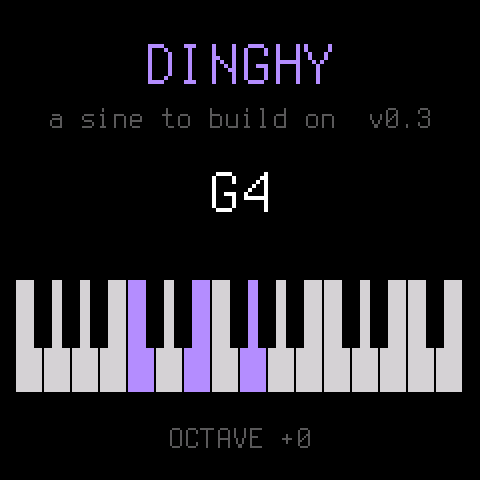
Status: 0.4. 0.3 was tested on the FM-1: the install, MIDI in (pitch exact, 4 voices), USB audio at 44.1 / 48 kHz, the keys, the screen, the octave kept in flash, and back to another firmware through the hub. 0.4 brings OberVave's platform over: the TRS MIDI IN, the clock, blobs and slots, the loader's screen, the SMK-37. That code runs on the device in OberVave (FM-1 and SMK-37); Dinghy 0.4 itself is tested on the host only so far.
What you get
| Updates that always work | tools/fm1_install.py, the web installers and the FM-1 Firmware Hub reach your firmware over USB, so you (and your users) can always install the next build, or go back to the official firmware. |
| USB rescue | Hold OCT- while switching on: no sound, only the updater. If your firmware crashes twice at boot, the FM-1 goes there by itself. |
| MIDI | USB in and out (class compliant) and the FM-1's TRS MIDI IN, in one queue: midi_get() says where a message came from, midi_send(). Clock, start, stop and continue reach your app. |
| USB audio | The FM-1 shows up as a 16-bit stereo audio input (44.1 or 48 kHz): record it into any DAW or phone. Nothing to do. |
| Panel | 27 keys, 14 buttons, 7 encoders, the MASTER knob, the LEDs, by name (BTN_PLAY, ENC_KNOB1, ...). |
| Screen | 240 x 240, text in two sizes, rectangles, lines, pixels. |
| Storage | settings_* (4 KB), 8 blobs of 4 KB (blob_*), 8 slots of 16 KB (slot_*), each with a CRC, in places no other part of the flash is in reach of. |
| Never waits for the screen | LCD_IDLE: your app reads MIDI and the keys while the screen's DMA runs, so a chord never stumbles over a redraw. |
| The SMK-37 too | ./build.sh --board smk37 (Pro, Elite, MKE-P37): the same app on M-Vave's 37-key keyboard, with velocity, outer keys, 16 coloured pads, faders and wheels. docs/SMK37.md |
| An update screen | The update loader draws your name in your colour, a progress bar and what to do, also after an install was cut off (FM-1). |
| A crash screen | A fault shows where it happened (the PC), then the FM-1 restarts. |
| Host mode | The same dinghy.c on your computer: the screen as an image, the sound as a WAV, scripted keys, knobs, MIDI (USB and TRS, a clock), SMK-37 pads and wheels. No FM-1 needed to try an idea. |
| Tests and CI | tests/run_tests.sh: the host app, the flash maps, the update path, the loader, the installer. A tag vX.Y on GitHub builds, tests and releases the packages with a build attestation. |
| Checks | The build fails on what bricks or breaks an FM-1 firmware: a 64-bit division, a call into the chip ROM, too much RAM, a register touched outside hal/. |
Build your own
From nothing to your own firmware on the FM-1, step by step. Each step works before you go to the next.
1. Copy it
On GitHub: Use this template (top right on this page) or fork it, then clone your copy. Rename nothing yet: first make sure the unchanged Dinghy builds on your machine.
2. Set up once
You need Linux on x86-64 (or macOS / Windows with Docker or WSL), Python 3 with Pillow, the JieLi toolchain and three files of the JieLi AC79 SDK:
pip3 install Pillow mido python-rtmidi
tools/get_toolchain.sh                      # JieLi's clang for the chip, to ~/.jieli/toolchain
git clone --depth 1 --branch AC79NN_SDK_V1.2.1_2023-12-13 \
    https://gitee.com/Jieli-Tech/fw-AC79_AIoT_SDK.git ~/fw-AC79_AIoT_SDK
On macOS the build runs the toolchain in a linux/amd64 Docker container by itself (have Docker running).
JIELI_TOOLCHAIN and AC79_SDK point elsewhere if your copies live somewhere else.
3. Hear it without an FM-1
tests/run_host.sh # -> build/host/dinghy.wav and screen PNGs
Host mode runs the same dinghy.c on your computer: the sound as a WAV, the screen as images. Most ideas can be
tried here first, in seconds.
4. Your first change
Open firmware/src/dinghy.c (~200 lines). The sound is app_audio(): it gets an empty
buffer of stereo frames and adds to it. Make the sine a square:
s = ((int32_t)ph < 0 ? 8000 : -8000) * amp >> 15; /* instead of s = (sine(ph) * amp) >> 15; */
Run tests/run_host.sh again and listen to build/host/dinghy.wav. The screen is drawn in app_main(), the keys
are read there too: change the text, add a knob (docs/API.md has every call).
5. Onto the FM-1
./build.sh                                       # -> build/dinghy.fwsc (fails on what would brick the FM-1)
python3 tools/fm1_install.py build/dinghy.fwsc   # over USB; asks before it writes, restarts into your build
python3 tools/fm1_install.py --info              # what runs on the connected FM-1
That is the whole loop: change, hear it on the host, build, install. Back to another firmware, or to the official one, with the FM-1 Firmware Hub in Chrome or Edge: Dinghy (and every copy of it) answers the hub's updater like every firmware there. Installing firmware is at your own risk.
6. When it goes wrong
- It crashes: the screen shows where (the PC), then the FM-1 restarts. Twice at boot and it goes to the USB rescue by itself.
- It won't start at all: hold OCT- while switching on: the USB rescue, no sound, only the updater. Install a working build (or another firmware from the hub) from there.
- The build refuses: it checks for a 64-bit division, a call into the chip ROM, too much RAM, a register touched
outside
hal/. docs/RULES.md says why each one matters; read it before your first crash.
7. Make it yours, release it, get into the hub
Your name and logo, your own package identity (so the FM-1 and the installers tell your firmware from Dinghy),
a GitHub release with the .fwsc, and how to get listed next to the others in the
FM-1 Firmware Hub: docs/MAKE-IT-YOURS.md.
Where to go next
- docs/API.md: everything
platform.cgives you, with the panel's ids, the screen calls, the audio contract, MIDI, storage, the flash map, timing, the SMK-37. - docs/SMK37.md: building and installing for the M-Vave SMK-37.
- docs/MAKE-IT-YOURS.md: turn Dinghy into your firmware: the name, the package identity, releases, getting into the FM-1 Firmware Hub.
- docs/RULES.md: the chip's rules (no FPU, no libgcc, the audio ISR's budget) and what the build checks for you. Read it before your first crash, not after.
License
GPL-3.0-only, as Felucca and SLOOP: you may change and share it, and whoever gets your firmware gets its source. Details, credits and third-party parts in LICENSING.md.
The platform is Copyright (C) 2026 Leo Kuroshita (@kurogedelic), Hügelton Instruments, with SLOOP's changes (isod89); the SMK-37 layer by M. Geisler (genkigenki); the loader's screen after Skiff (illuminus5). Dinghy (the app, the host mode, the docs) by zvenson.