DIGISNAKE for Digitone
This is the Digitone version. For the Elektron Digitakt mk1, use DIGISNAKE for Digitakt instead: the files here do not run on a Digitakt, and the Digitakt's do not run on a Digitone.
A Cartesian step sequencer for the Elektron Digitone mk1 (and Digitone Keys), after Maxime Dangles'
MDD Snake and Make Noise's René, as an elekloader mod (id
digisnake). Eight cells sit in a 4 × 2 grid that matches knobs A–H; a path, the snake, walks the grid and
each sequencer step plays the cell it lands on. It runs on every track: the four synth tracks and the
four MIDI tracks, for external gear.
By Robbie (designed and tested on a Digitone mk1, OS 1.44). GPL-2.0-or-later.
DIGISNAKE carries on in DIGISEQ for Digitone, as its SNAKE type, unchanged, next to a second sequencer type, 185 (a stage sequencer after ML-185). Each track picks its own type there, and DIGISNAKE projects load into DIGISEQ as they were. Use one or the other, not both: DIGISEQ replaces DIGISNAKE in a build. DIGISNAKE 1.3 stays here for builds without DIGISEQ.
Unofficial and unsupported. Flashing modified firmware is at your own risk; the stock Digitone OS always recovers the unit (send the stock .syx from the boot menu).
What you need
| Unit | Digitone mk1 or Digitone Keys |
| OS | 1.44 (tested). A 1.43 build is included, untested; on 1.43 there are no drop-down messages and settings are not kept over a power cycle |
| Mods | elekloader's core-dn1 (3.3 or later), built into the elekloader app, and seq-events (0.1), included here in elemods/ (the elekloader app does not ship it yet) |
Install
In the elekloader app, add both files for your OS from elemods/: digisnake-1.3-os1.44.elemod and
seq-events-0.1-os1.44.elemod (or the two -os1.43 files). Tick both, keep the app's core-dn1 ticked,
build, and send the firmware to the Digitone. From the command line:
python -m elekloader.patch --stock Digitone_and_Digitone_Keys_OS1.44.syx \
  --mod core-4.1.1-os1.44.elemod --mod elemods/seq-events-0.1-os1.44.elemod \
  --mod elemods/digisnake-1.3-os1.44.elemod --out Digitone_digisnake.syx
Opening it
Press TRIG twice: DIGISNAKE is the page after the stock TRIG page, on synth and MIDI tracks alike. Turn the track's SNAKE on (PATH page, knob A) and it plays the snake in place of its own trigs; lock trigs still play. Everything is per track, saved with the project, and on OS 1.44 kept over a power cycle. New projects start with a little demo line. TRIG opens the page however long it is held. DIGISNAKE has no entry in core-dn1's Mod Menu (hold a track key), so that stays free for machines and other mods.
Pages
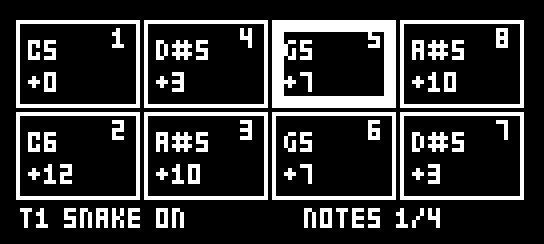
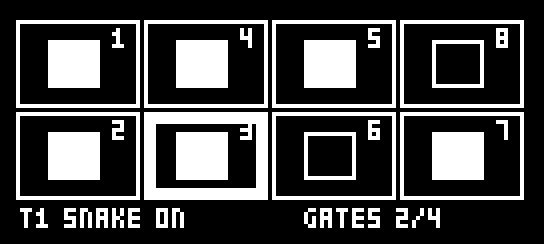
LEFT / RIGHT move between the four pages. On NOTES, GATES and VELOCITY, knobs A–H are the eight cells. The small number in each cell's corner is its place on the path; the thick frame is the playhead.
| NOTES | GATES |
|---|---|
 |  |
| VELOCITY | PATH |
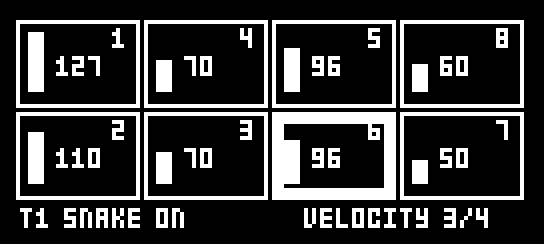 | 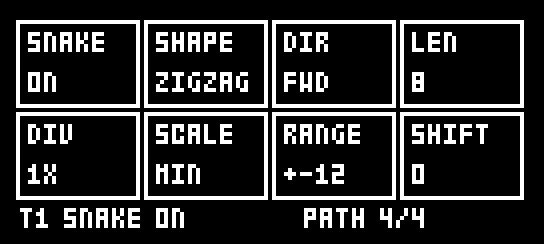 |
The pages as DIGISNAKE draws them (the Digitone's own title bar sits above).
| Page | Knobs A–H | Also |
|---|---|---|
| NOTES | Each cell's note, −24 to +24 semitones from the track's NOTE, quantised to SCALE | UP / DOWN: all notes a semitone (FUNC: an octave). FUNC + knob: −24 / −12 / 0 / +12 / +24 |
| GATES | Each cell plays or rests | Trig keys 1–8 toggle a cell. UP / DOWN: rotate |
| VELOCITY | Each cell's velocity, 1–127 | UP / DOWN: all up or down. FUNC + knob: 1 / 32 / 64 / 96 / 127 |
| PATH | The settings below |
| Knob | PATH setting | Values |
|---|---|---|
| A | SNAKE | On or off for this track |
| B | SHAPE | ROWS, SNAKE, COLS, ZIGZAG, DIAG, CORNER, HOP |
| C | DIR | FWD, BWD, F/B, B/F, RND |
| D | LEN | Path length, 1–8 cells |
| E | DIV | 1/8, 1/4, 1/2, 1X, 2X. At 1/2 the snake plays every other step (eighth notes at 16th steps), at 1/4 every fourth. 2X runs the track at twice its own speed and needs the pattern's SCALE set to per track; DIGISNAKE puts the track's speed back when 2X or SNAKE goes off |
| F | SCALE | CHR, MAJ, MIN, DOR, PHR, LYD, MIX, HMIN, PENT, mPNT, BLUE, WHOL, in the keyboard's ROOT |
| G | RANGE | The spread of randomised notes, ±1–24 semitones (FUNC + knob: 1 / 12 / 24) |
| H | SHIFT | Where on the path the snake starts, 0–7 |
Keys
PAGE is the TRIG key, held. On OS 1.44 every action shows the stock drop-down message.
| Keys | What happens |
|---|---|
| PAGE + YES | Randomise the page shown (PATH: all but SNAKE and SCALE), as often as you like |
| PAGE + NO | Back to how the track was when PAGE went down, a print included. No redo |
| PAGE + PLAY | Clear the page: notes 0, gates on, velocity 100, PATH defaults (SNAKE kept) |
| PAGE + REC | Copy the page shown |
| PAGE + STOP | Paste it onto this track, synth or MIDI (PATH keeps this track's SNAKE) |
| PAGE + FUNC + REC | Print: write the snake into the track's own trigs, notes and velocities over the track's length, then turn SNAKE off |
| FUNC + YES | Randomise NOTES, GATES and VELOCITY together |
| FUNC + NO | Back to before the last run of FUNC + YES |
| FUNC + knob | Jump to preset values (NOTES, VELOCITY, RANGE) |
Print keeps lock trigs and parameter locks, and a 2X track stays at 2X. With DIR on RND it freezes one random run.
With DIRECT JUMP
With DIRECT JUMP 1.4 or later in the build, a pattern started by its START ON BAR (from step 1 on the next bar line, or the playing pattern relaunched on the beat) starts every snake from the beginning of its path too, so the whole groove relaunches together. A legato jump leaves the snakes walking. Without DIRECT JUMP nothing changes. With DIRECT JUMP and PUMP for Digitone in one build, use core-dn1 4.1.1 (see DIRECT JUMP's README). Tested on a Digitone mk1 (OS 1.44) with DIRECT JUMP 1.5.
Changes
- 1.3: out of core-dn1's Mod Menu; the page stays on TRIG.
- 1.2: randomised notes no longer all come out at 0 (RANGE now runs from 1; a saved 0 loads as 12, and a randomised PATH picks 5 to 24); TRIG opens the page on a long press too; LEFT / RIGHT / UP / DOWN held on the page no longer nudge the tempo; the snake's step 1 is the path's start from PLAY, and PRINT while playing writes what each step plays next time round.
- 1.1: restarts the snakes on DIRECT JUMP's pattern starts.
- 1.0: the first release.
How it works
DIGISNAKE uses seq-events' step-fire events: ev_gen_trig decides whether a step fires, ev_gen_notes
its note and ev_fire_vel its velocity, so the stock sequencer plays everything (timing, note length,
locks). It reads DIRECT JUMP's count of pattern starts, dj_starts, as a weak import: a build without DIRECT JUMP
links it to core's zero word. The page is a core-dn1 mod page after the TRIG page (page 28 for synth tracks, 29 for MIDI
tracks), the settings are core-dn1 project data (SNK1, SNK2), and on OS 1.44 an edit asks the OS to
refresh its power-up copy of the project. No firmware address is named in the C source except the
drop-down message and the power-up copy on 1.44 (mod.json's 1.44 port).
Building
With elekloader and an m68k cross GCC on the path:
python -m elekloader.sdk.build --stock Digitone_and_Digitone_Keys_OS1.44.syx .
Credits and third-party code
DIGISNAKE is Robbie's own work, written with Claude (Anthropic); every line of digisnake.c is new. The
idea, a path walking a grid of steps, comes from MDD Snake (Maxime Dangles' free Max for Live device)
and Make Noise René; no code from either. The random numbers use Marsaglia's xorshift, a public
algorithm.
DIGISNAKE builds against irpina's elekloader SDK headers and runs on
its core-dn1 and seq-events (GPL-2.0-or-later). core-dn1 is not included here. seq-events is: the two
elemods/seq-events-0.1-*.elemod files are unmodified builds of elekloader's mods/seq-events-dn1
(GPL-2.0-or-later, by elekloader's contributors), made from
its source at commit 92a99c9, because
the elekloader app does not ship seq-events yet. They carry only that mod's own code and no Elektron
code. The firmware addresses in
mod.json and the pattern layout DIGISNAKE prints into were found by studying the Digitone's own OS so the
mod can work with it; no Elektron code is included.
Trademarks
Elektron and Digitone are trademarks of Elektron Music Machines; Make Noise and René of Make Noise; Max for Live of Ableton AG and Cycling '74. They are named only to say what this works with or was inspired by. This project is not affiliated with or endorsed by any of them.
Licence
GPL-2.0-or-later, see LICENSE.