DIGISEQ for Digitakt
This is the Digitakt version. For the Elektron Digitone mk1 / Digitone Keys, use DIGISEQ for Digitone instead: the files here do not run on a Digitone, and the Digitone's do not run on a Digitakt.
Sequencer types for the Elektron Digitakt mk1, as an elekloader mod
(id digiseq-dt). Each track picks its own TYPE and plays it in place of its own trigs, so T1 can play
SNAKE, T2 185, T3 ARP, and T4 its own trigs. It works on all 8 audio tracks (a note is the sample's pitch, like a note
lock) and the 8 MIDI tracks, for external gear.
- SNAKE: a Cartesian sequencer after Maxime Dangles' MDD Snake and Make Noise's René. Eight cells in a 4 × 2 grid that matches knobs A–H, walked by a path. This is DIGISNAKE for Digitakt, unchanged.
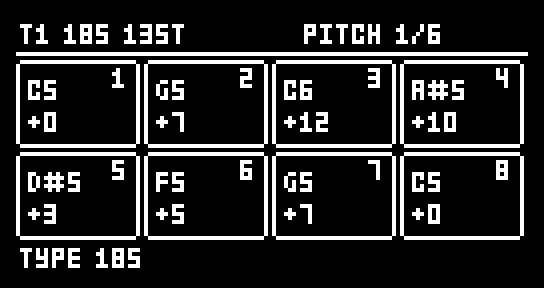
- 185: a stage sequencer after ML-185 (Nico Starke's free Max for Live device, itself after RYK's M-185 for the Roland System 100m). Eight stages, each with a pitch, a velocity, a length of 1–8 clock pulses (how long the stage plays before the next) and a mode: rest, one note, a note every pulse, or one note held for the whole stage.
- ARP: an arpeggiator, played by the keys you hold in keyboard mode (FUNC + TRK, audio tracks, HOLD to latch) or by the track's own note trigs, and recorded live into the track with REC + PLAY. The notes held are arpeggiated over 1–4 octaves, through a 16-step offset sequence. In slice mode a note is a slice, so ARP arpeggiates slices; on a single-cycle waveform it plays like a synth's arp. ARP is for the Digitakt only: the Digitone has its own arpeggiator, so DIGISEQ for Digitone has no ARP type.
By Robbie (designed and tested on a Digitakt mk1, OS 1.54). GPL-2.0-or-later.
Unofficial and unsupported. Flashing modified firmware is at your own risk; the stock Digitakt OS always recovers the unit (send the stock .syx from the boot menu).
| 185: PITCH | 185: PULSES |
|---|---|
 |  |
| 185: MODE (playing) | 185: SETUP |
 |  |
| ARP: OFFSETS | ARP: ARP |
 |  |
| SNAKE: NOTES | SNAKE: PATH |
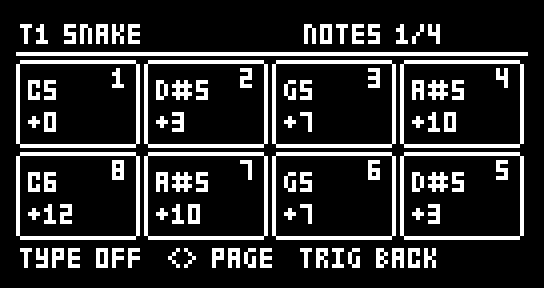 | 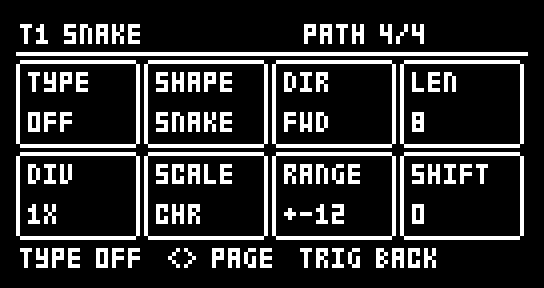 |
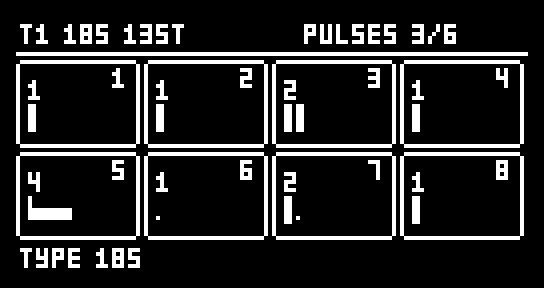
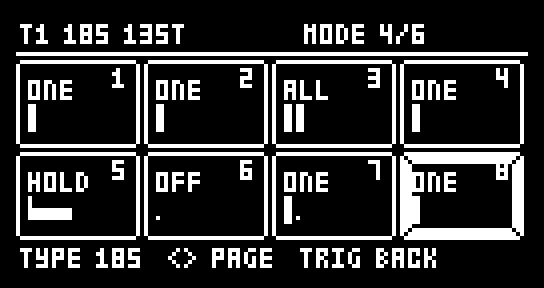
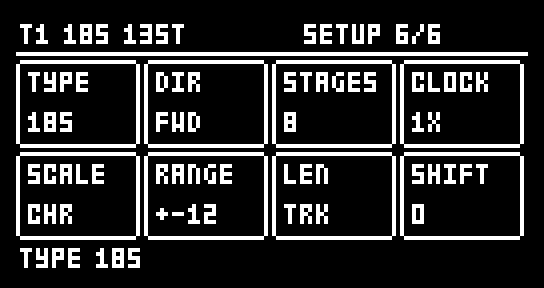
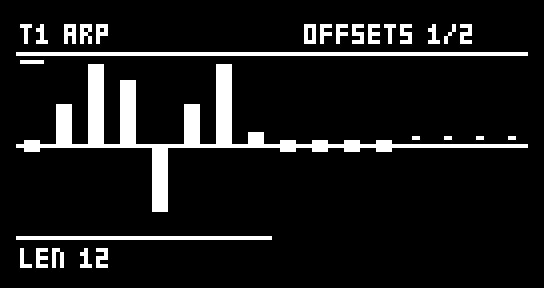
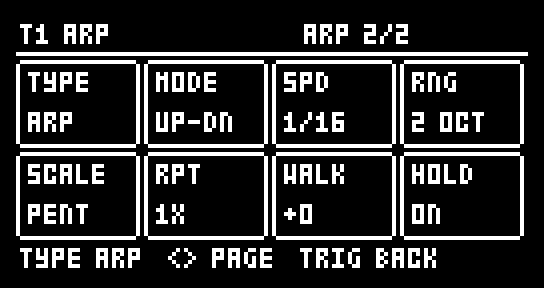
The pages as DIGISEQ draws them on the Digitakt (the whole screen: the title line on top, hints on the bottom line). Messages show in the stock drop-down over the title line, as on the other pages (Type=ARP, Arp Mode=UP-DN).
What you need
| Unit | Digitakt mk1 (not the Digitakt II) |
| OS | 1.54. A 1.53 build is included (run in an emulator, not on a unit) |
| Mods | elekloader's Digitakt core (3.0 or later; the app's own is fine, or the core 4.1 that PUMP for Digitakt needs), and seq-events 0.2 for the Digitakt, included here in elemods/ |
| Not with | DIGISNAKE for Digitakt: DIGISEQ replaces it (SNAKE is one of its types) |
seq-events 0.2 is elekloader's seq-events with one new event, ev_fire_len, which lets a mod set the length
of the note a step plays. 185's held stages need it. Mods built for seq-events 0.1 work with 0.2.
Install
In the elekloader app, add both files for your OS from elemods/: digiseq-dt-0.8-os1.54.elemod and
seq-events-dt-0.2-os1.54.elemod (or the two -os1.53 files). Untick DIGISNAKE and any older seq-events, keep
the app's core ticked, build, and send the firmware to the Digitakt. From the command line:
python -m elekloader.patch --stock Digitakt_OS1.54.syx \
  --mod core-4.1-os1.54.elemod --mod elemods/seq-events-dt-0.2-os1.54.elemod \
  --mod elemods/digiseq-dt-0.8-os1.54.elemod --out Digitakt_digiseq.syx
It links with PUMP for Digitakt 1.3, DH-101 0.25, Digi Mono 0.24, machine-pages 1.3, digihealth 1.0.1, the LØST LVLS boot splash and DIRECT JUMP for Digitakt 1.0.
Opening it and choosing a type
Press TRIG twice: the first press shows the Digitakt's TRIG page, the second opens DIGISEQ (however long it is held). TRIG again goes back to the TRIG page; another page key goes to its page, and a menu opening over the pages (GLOBAL, the pattern menu ...) closes it. FUNC + TRIG is the stock's, as ever: the QUANTIZE menu.
The last page's knob A is TYPE: OFF, SNAKE, 185 or ARP. Hold TRIG + UP / DOWN to step through the types from any page. With a type on, the track plays it in place of its own trigs; lock trigs still play, and trig conditions or probabilities on the track's own trigs do not stop a step the type plays. OFF keeps every type's settings, so the pages still show and edit the last type.
Nothing is saved with the project. The Digitakt's core has no project storage yet: the types and their settings reset on power-off and project load. PRINT keeps a sequence (it writes it into the track's trigs), and so does live recording.
Recording live (every type)
Live recording (REC + PLAY) records what a track's type plays, step by step as it plays: each note goes onto its step as a note trig (its note as the note lock, its velocity, no micro timing and no condition; 185's held and LEN-set notes with their LEN, the others the track's LEN), over a trig already on that step. The steps the type does not play keep what they had. Change anything while it records (SNAKE's DIV, its SHAPE or DIR, 185's stages, the notes) and what you hear is what goes into the track.
When the recording stops (REC off, or STOP), TYPE goes to OFF on each track it recorded into, so the trigs play back as recorded. A track recorded at 2X keeps its doubled speed, as PRINT does, so it plays back at the speed it was recorded at. 2X runs the whole track at twice its speed, so switch it on or off before a take, not during one: notes recorded at the other speed would play back at the wrong time.
185
The sequence plays the stages in turn. Each stage lasts its PULSES in clock pulses (a pulse is a step at CLOCK 1X), then the next stage starts. What a stage plays depends on its MODE:
| MODE | What the stage plays |
|---|---|
| OFF | Nothing: a rest as long as the stage |
| ONE | One note on the stage's first pulse |
| ALL | A note on every pulse, or with DIV 2–4 every 2nd, 3rd or 4th pulse |
| HOLD | One note on the first pulse, held for the whole stage |
Each stage box shows its pulses as a row of slots: a tall tick is a note, a dot a silent pulse, a bar a held note, and the line underneath the pulse playing. Knobs A–H are stages 1–8.
| Page | Knobs A–H | Also |
|---|---|---|
| PITCH | Each stage's note, −24 to +24 semitones from the track's NOTE, quantised to SCALE | UP / DOWN: all a semitone (FUNC: an octave). FUNC + knob: −24 / −12 / 0 / +12 / +24 |
| VELOCITY | Each stage's velocity, 1–127 | UP / DOWN: all up or down. FUNC + knob: 1 / 32 / 64 / 96 / 127 |
| PULSES | Each stage's length, 1–8 pulses | UP / DOWN: all one longer or shorter |
| MODE | Each stage's mode | Trig keys 1–8: that stage's next mode (hold TRK to select tracks as usual). UP / DOWN: rotate the modes |
| DIV | ALL's division, 1–4 | UP / DOWN: all |
| SETUP | The settings below |
| Knob | SETUP | Values |
|---|---|---|
| A | TYPE | OFF, SNAKE, 185 |
| B | DIR | FWD, BWD, F/B, B/F, RND |
| C | STAGES | How many stages the sequence plays, 1–8 |
| D | CLOCK | 1/8, 1/4, 1/2, 1X, 2X: steps a pulse. 2X runs the track at twice its own speed and needs the pattern in per-track SCALE mode (FUNC + PAGE) |
| E | SCALE | CHR, MAJ, MIN, DOR, PHR, LYD, MIX, HMIN, PENT, mPNT, BLUE, WHOL, rooted on the track's NOTE (the Digitakt has no keyboard ROOT) |
| F | RANGE | The spread of randomised pitches, ±1–24 semitones |
| G | LEN | The length of ONE and ALL notes: TRK (the track's LEN), 1/32, 1/16, 1/8, 1/4. HOLD notes always last their stage |
| H | SHIFT | Which stage the sequence starts on, 0–7 |
The title line shows the sequence's length in steps (13ST: 13 steps), which may not match the pattern's.
ARP
ARP plays from the keys you hold in keyboard mode, and from the track's own note trigs.
From the keys (keyboard mode)
On an audio track with TYPE ARP, turn the keyboard on (FUNC + TRK) and press PLAY: the keys you hold are the arp's notes, in whatever KB SCALE, ROOT, FOLD and octave the keyboard is set to (up to 8 at once; a 9th lets go of the oldest). The arp starts on the next step after the first key goes down and keeps time with the sequencer, at SPD. While keys hold notes they play the arp in place of the track's trigs; let go of them all and the trigs play again. Every arp note plays at the keyboard's velocity.
- HOLD on latches: the notes stay when you let go. The next key pressed with none held starts a new set; keys added while others are held join it. HOLD off lets go of the latched notes.
- Stopped, a key plays its note as usual (no arp: the arp keeps time with the sequencer) and is still held for the arp, so with HOLD on you can latch a set and then press PLAY.
- The title line shows KB and how many notes are held (T1 ARP KB3).
Recording it
Live recording (REC + PLAY) on an ARP track records what the arp plays from the keys: each arp note goes onto its step as a note trig, with the note as its note lock, the keyboard's velocity and the track's LEN, no micro timing and no condition. It records over a trig already on that step; the steps the arp does not play keep what they had. While recording with no key held, the track's trigs play as they are stored (no arp), so you hear what you have recorded so far.
When the recording stops (REC off, or STOP), TYPE goes to OFF on each track it recorded into, so the notes play back as recorded. Turn TYPE back to ARP to play the arp again (the trigs you recorded would then start it, as any trigs do). Grid recording (REC alone) is unchanged: trig keys place trigs as usual.
From the trigs
The track's own note trigs work like keys held down. Put a trig where the arp should start and give it a LEN (the TRIG page's LEN, or the track's): the trig's note is held that long and the arp plays it at SPD, the trig's own step playing the first note. A new trig starts it again with its note. With HOLD on, a trig's note is held until the next trig (or STOP), whatever its LEN; a LEN of INF does the same.
- Audio tracks: the trig's note (its note lock, else the track's NOTE) is arpeggiated over RNG octaves. In slice mode, where a note is a slice, this steps through slices: an octave is 12 slices on.
- MIDI tracks: the trig's whole chord (the note and its intervals) is the notes held.
- Velocity: every arp note plays the trig's velocity.
- Trig conditions and probability on a trig decide whether that trig starts the arp, as they decide whether it plays. The arp's own notes always play.
- Locks: a trig's parameter locks belong to its own step; the arp's later notes play without them.
| Page | Knobs | Also |
|---|---|---|
| OFFSETS | The 16 offset steps, −24 to +24 semitones (slices) added to the arp's notes in turn, one step a note. Knobs A–H edit steps 1–8 or 9–16: press a trig key to select a step and its half | FUNC + trig key: LEN, the steps the offsets play (1–16). UP / DOWN: all a semitone (FUNC: an octave). FUNC + knob: −24 / −12 / 0 / +12 / +24 |
| ARP | The settings below |
| Knob | ARP | Values |
|---|---|---|
| A | TYPE | OFF, SNAKE, 185, ARP |
| B | MODE | UP, DOWN, UP-DN (the ends once), UP+DN (the ends twice), CONV (outside in), DIV (inside out), PINKY (each note, then the top), THUMB (the bottom, then each note), ORDER (as played: a MIDI chord's order), RAND, SHUF (each note once a cycle, in a new order each cycle) |
| C | SPD | 1/16, 1/8, 3/16, 1/4, 1/2, 1/1: a note every 1, 2, 3, 4, 8 or 16 steps (at the track's speed) |
| D | RNG | 1–4 octaves |
| E | SCALE | CHR (none), MAJ, MIN, DOR, PHR, LYD, MIX, HMIN, PENT, mPNT, BLUE, WHOL, rooted on the track's NOTE: every arp note (its octaves, offsets and WALK included) is moved down to the scale's nearest note. The same scales as 185's SETUP, on the same knob |
| F | RPT | Each note played 1–4 times before the next |
| G | WALK | −12 to +12: every arp cycle moves the whole arp by this many semitones (slices), back to 0 past ±48. Set to 0, the arp goes back to its notes untransposed |
| H | HOLD | OFF: a trig's note is held for its LEN. ON: until the next trig |
The OFFSETS page draws the steps as bars from a centre line: the steps past LEN as dots, the step selected marked on top, the half on the knobs underlined, the step playing framed.
ARP's notes come from the sequencer's steps, so SPD is 1/16 at the fastest, and there are no triplet speeds. ARP does not run from incoming MIDI notes: only from the keyboard and the track's trigs.
PRINT does nothing on an ARP track ("PRINT N/A FOR ARP"): record it live instead (above).
SNAKE
As DIGISNAKE for Digitakt: NOTES, GATES (trig keys 1–8 toggle a cell), VELOCITY and PATH (TYPE, SHAPE, DIR, LEN, DIV, SCALE, RANGE, SHIFT). PATH's knob A is TYPE instead of SNAKE on/off.
Keys
PAGE is the TRIG key, held.
| Keys | What happens |
|---|---|
| PAGE + UP / DOWN | The next / previous TYPE |
| PAGE + YES | Randomise the page shown (SNAKE's PATH: all but TYPE and SCALE; 185's SETUP: DIR, STAGES, RANGE and SHIFT; ARP's ARP: MODE, SPD, RNG, RPT and WALK; ARP's OFFSETS: the offsets and LEN) |
| PAGE + NO | Back to how the track was when PAGE went down, a print included |
| PAGE + PLAY | Clear the page shown |
| PAGE + REC | Copy the page shown |
| PAGE + STOP | Paste it onto this track (only onto a track of the same type) |
| PAGE + FUNC + REC | Print (not on an ARP track): write what the track plays into its own trigs, note locks and velocities over the track's length (185: held and LEN-set notes as LEN locks), then set TYPE to OFF |
| FUNC + YES | Randomise the note pages together (SNAKE: NOTES, GATES, VELOCITY; 185: PITCH, VELOCITY, PULSES, MODE; ARP: OFFSETS and MODE) |
| FUNC + NO | Back to before the last run of FUNC + YES |
| FUNC + knob | Jump to preset values (pitches, velocities, RANGE) |
With DIRECT JUMP
With DIRECT JUMP for Digitakt 1.0 in the build, a pattern started by its START ON BAR starts every track's sequence from the beginning too, SNAKE and 185 alike. A legato jump leaves them playing on.
Changes
See CHANGELOG.md.
How it works
DIGISEQ uses seq-events' step-fire events: ev_gen_trig decides whether a step fires, ev_gen_notes its note,
ev_fire_vel its velocity, ev_fire_len its length and ev_fire_cond lets a step it plays through a stored
trig's condition (ARP leaves a note trig's condition to decide, and starts in ev_gen_notes, which runs only for a
step that plays). A HOLD sets its note's LEN to the stage's length in steps (the Digitakt's LEN values are the
Digitone's: index 14 is one step, 30 two, 46 four, 62 eight). The page reads the key dispatcher's screens to
know when the TRIG page is up and draws over it. PRINT and 2X write the active pattern: 911 bytes a track, its
step words at +0, each step's VEL at +0x80 and LEN at +0xc0, note lock 1 at +0x280, the track's speed at
+0x38b; the pattern pointer and the transport are the per-OS addresses seq-events uses (mod.json's cflags).
ev_fire_len is new in seq-events 0.2: two code sites on the Digitakt, one in each step fire (the audio
tracks' and the MIDI tracks'), where the fire reads a step's LEN (its lock at +0xc0, else the track's at
+0x381). The change to elekloader's source is in seq-events/ev_fire_len.patch (the Digitone's and the
Digitakt's).
The keyboard: two code sites (kbsites.s), the same in OS 1.53 and 1.54. The keyboard plays a key's note through
one routine, 0x4002930e (it is handed the key, the track, the note and the velocity), and lets the key go through
another, 0x40028c78. DIGISEQ enters each by a jmp over its first instructions: on an ARP track it keeps the key's
note for the arp (and, while playing, returns before the stock note plays); otherwise the routine runs as stock. Live recording: the keyboard's controller (the routine's first argument) keeps
the sequencer's state at +152, where +353 is REC and +361 live recording; ARP writes each recorded note on its step
(note lock +0x280, velocity +0x80, LEN +0xc0, micro timing +0x100 cleared, condition +0x200 none).
Building
With elekloader (with the seq-events patch applied) and an m68k cross GCC on the path:
python -m elekloader.sdk.build --stock Digitakt_OS1.54.syx .
Credits and third-party code
DIGISEQ is Robbie's own work, written with Claude (Anthropic); every line of digiseq_dt.c and kbsites.s is new. The ideas
come from MDD Snake (Maxime Dangles' free Max for Live device), Make Noise René, ML-185 (Nico
Starke's free Max for Live device) and RYK's M-185; no code from any of them. The random numbers use
Marsaglia's xorshift, a public algorithm.
It builds against irpina's elekloader SDK headers and runs on its
Digitakt core and seq-events (GPL-2.0-or-later). The core is not included here. seq-events is: the two
elemods/seq-events-dt-0.2-*.elemod files are builds of elekloader's mods/seq-events-dt1 (GPL-2.0-or-later,
by elekloader's contributors) from
its source at commit b9006bf
with seq-events/ev_fire_len.patch applied. They carry only that mod's own code and no Elektron code. The
firmware addresses in mod.json and the patch, and the pattern layout DIGISEQ prints into, were found by
studying the Digitakt's own OS so the mod can work with it; no Elektron code is included.
Trademarks
Elektron, Digitakt and Digitone are trademarks of Elektron Music Machines; Make Noise and René of Make Noise; Roland and System 100m of Roland Corporation; Max for Live of Ableton AG and Cycling '74. They are named only to say what this works with or was inspired by. This project is not affiliated with or endorsed by any of them.
Licence
GPL-2.0-or-later, see LICENSE.