DigiRust
Experimental firmware tools for the Elektron Digitone II, with a browser-based patcher and a macOS app.
DIGITONE II ONLY — USE AT YOUR OWN RISK. Installing modified firmware may void your manufacturer warranty. It can render your instrument unusable; recovery is not guaranteed. Do not install it on any other machine. Read the full disclaimer before use.
DigiRust is made for IDM, rhythmic noise / power noise, and electroacoustic music. Its generators favor unusual timbres, textures, varied rhythms, deliberate structure and controlled aggression. Abstract material and melodic exploration belong alongside percussion.
This is the author's musical direction, and the tools offered here follow it. Conventional groovebox workflows, mainstream beatmaking and hip-hop beat generation are outside the project's design goals. The aim is to explore, sculpt and perform edgier electronic music.
Only the patcher and modification resources are distributed. No complete stock or modified Elektron firmware is provided. You supply the supported official OS file; DigiRust creates a modified copy locally in your browser or the macOS app. Neither connects to or updates an instrument.
DigiRust demo
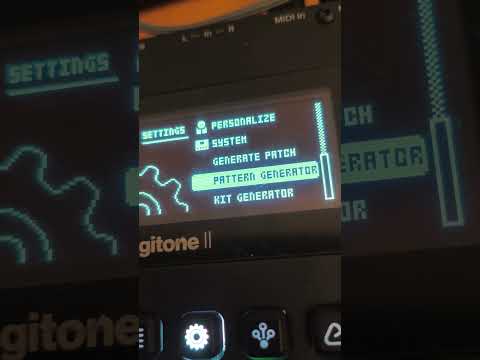
Watch the DigiRust demo on YouTube.
Website and browser patcher
Visit DigiRust · Open the browser patcher · Online manual
The website includes the patcher, demo, manual and disclaimer. Firmware is processed in a background worker on your device and is never uploaded. The browser output is byte-identical to DigiRust from the macOS app. No browser MIDI access or automatic installation is implemented.
macOS download
Download DigiRust 1.2.0 for macOS · All releases
| Component | Supported version |
|---|---|
| Instrument | Elektron Digitone II |
| Official input firmware | OS 1.12, exact file verified by SHA-256 |
| Patcher | DigiRust 1.2.0 |
| Generated modification | DigiRust |
| Internal instrument OS version | Remains 1.12 |
| Tested environment | Apple Silicon, macOS 27.0 (build 26A428) |
| Included executable architectures | Apple Silicon / Intel |
| Minimum compilation target | macOS 11; not a tested compatibility claim |
Local patcher testing was performed on this Apple Silicon Mac running macOS 27.0 (build 26A428). The macOS 11 setting is only the compiler/deployment target; it does not mean the app was tested on macOS 11. Intel Macs and other macOS versions have not been verified. The current application is ad-hoc signed, not Developer ID signed or notarized. Signing status and firmware verification are different checks.
What DigiRust adds
| Tool | Purpose |
|---|---|
| Patch Generator | Generate a sound on the selected audio track: Abstract, Rhythmic → IDM / Rhythmic Noise, Melodic or Free. |
| Kit Generator | Generate all 16 track sounds together; the same sound paths, with independent Brutality controls for IDM and Rhythmic Noise. |
| Pattern Generator | Generate a complete pattern: Abstract, Rhythmic → IDM / Rhythmic Noise, or Melodic. Density on every path; Brutality on rhythmic paths. |
| Phrase Generator | Generate a sequence for the selected track, preserving the other tracks: Abstract, Rhythmic or Melodic. |
| Control All macros | A held TRACK encoder gesture affects the corresponding parameters across every subpage of SYN, FILTER, AMP and FX. |
| Live drone latch | Hold a live audio track trig, then tap FUNC to retain its gate. Repeat to release; STOP clears latches. |
| Perform Kit restoration | Exiting Perform Kit restores stored sound parameters to latched voices without issuing another note-on. |
The pattern tools include varied rhythmic structures and tempos, and path-aware compressor generation. Brutality shapes synthesis and sequence behavior according to the chosen tool; it is not simply a volume control. High-contrast percentage bars support parameter editing.
See the complete feature and control guide and DigiRust release details. The guide distinguishes tools with adjustable controls from immediate generation actions.
Create your firmware copy
- Obtain the official Digitone II OS 1.12 from Elektron and extract its download archive. Use your own official
.syxfile; an already modified image is rejected. - Open the browser patcher in a current browser over HTTPS, with Web Crypto and Web Workers enabled.
- Choose or drop the official firmware. DigiRust checks that it is the exact supported file.
- Read the disclaimer, acknowledge the warning and choose Create firmware copy. You can cancel while it runs.
- When verification succeeds, choose Download verified DigiRust firmware. The filename is
Digitone_II_OS1.12_DigiRust.syx.
Your original file is unchanged. Browser saving follows your browser's download behavior. No Python, Homebrew or compiler is required. The site's patch resources need a network connection; your firmware itself stays in browser memory. The demo thumbnail loads from YouTube; its embedded player loads only when you press play.
The macOS app remains available. Choose/drop the same official file, select Create patched firmware… and a new local destination, then wait for verification. The macOS app never overwrites existing files and requires a filesystem with hard-link support, such as APFS/HFS+.
Creating the file does not install it. Device transfer is a separate, deliberate operation outside this patcher. Read the validation and recovery limits before deciding whether to install a generated image. Follow Elektron's documentation for your instrument and keep the official firmware available. No recovery procedure can be guaranteed by this project's local tests.
Developer hardware report
The developer reports that DigiRust modified firmware has been thoroughly tested on a real Elektron Digitone II and is currently running on that instrument without any observed issues.
This records the developer's experience on that instrument. It is a factual report, not encouragement to install, an endorsement, a guarantee of safety or compatibility, or a prediction of results on another instrument. The warranty and use-at-your-own-risk warnings remain applicable. See the validation guide for the distinction between this report and the recorded automated checks.
Documentation
- Features, paths, track roles and performance controls
- Browser architecture, tests and GitHub Pages deployment
- Build from source and command-line use
- Validation evidence, integrity hashes and limitations
- Distribution contents, attribution and licensing
- Changes and version numbering
- MIT License, important disclaimer and third-party notices
This repository contains both patcher implementations, the static website, a pinned COPY/ADD patch recipe, modification additions, artwork and the bundled format tool. It does not contain the complete firmware development/research tree or a generator firmware source build system. The macOS build rebuilds the native app for the pinned DigiRust target; the web preparation step stages the same resources for the browser patcher.
Independent project; not affiliated with or endorsed by Elektron. Modified firmware is experimental. Local integrity and emulator checks do not establish hardware safety or sound quality for every possible generated result.
License
DigiRust-authored code and documentation are licensed under the MIT License. Third-party components retain their own licenses; Elektron firmware is not covered by this grant. See distribution and licensing.