DigiReel
A time-warp pedal for the Digitone mk1's audio inputs: the inputs go onto a tape that always listens, and a head plays it back at -2x to +2x, backwards included, in windows in time with the Digitone's tempo; the pitch follows the speed (TAPE) or stays apart from it (STRETCH); HOLD loops a window, TAPE STOP brings the tape to a stop, random events change the speed, the pitch or the direction or stutter on the beat, and a step slicer gates the result. DigiReel is an elekloader mod on fxkit (core-dn1 4.1).
Its MIDI CCs follow the Red Panda Tensor's published CC chart, so a controller set up for that pedal works with it too. DigiReel is not affiliated with Red Panda and uses none of its code.
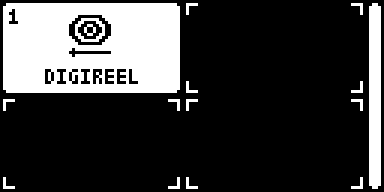
DIGIREEL is an entry in core-dn1's Mod Menu (hold a track key). While it is the
active effect DigiReel owns the audio engine, as DigiSwarm and DigiPrism do
(fxkit's core_audio owner): the synths are silent, the Digitone's own
effects are off, and what you hear is the inputs through the pedal. NO turns
it off and gives the audio and the screen back. The sequencer keeps running, so PLAY, STOP and
TEMPO still work and the clock can follow the Digitone's tempo. BYPASS
(trig 16) passes the inputs through dry, with the tape's tail.
DigiReel is one of the pedals on the pedal shell (pedal.h,
pedal_dsp.inc, pedal_ui.inc, pedal_tables.py, the same in each), which
gives them the same page, keys, SETUP, TAP, BYPASS, CPU guard and project
data, on fxkit.
DigiReel 0.2 is a beta (a pre-release). It is an effect on fxkit: a MIXER on AMP (the inputs' levels and pans, as loud as the Digitone's own input), two LFOs on the stock LFO page aimed at its controls, p-locks kept in the pattern (RECORD, then hold a trig and turn a control), and MIDI hands the screen to the stock UI for the MIDI tracks while it keeps playing. Presets are gone: the project keeps its controls, mixer and LFOs, and a project saved with 0.1 opens it at its defaults. 0.2 was tested on a Digitone mk1 by its author (built before the effects' rename, which changed only names); it was also checked in digikit's emulator (digiemu) on OS 1.43 and 1.44. Not yet run on a Digitone Keys. Its source is also in elekloader, as mods/digireel-dn1.
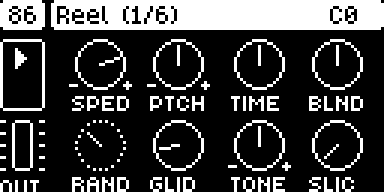
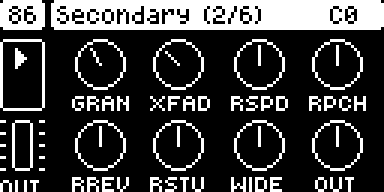
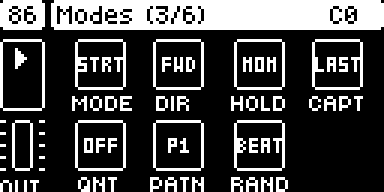
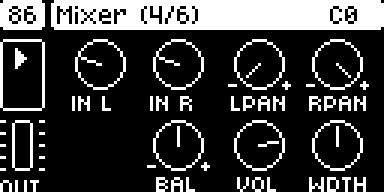
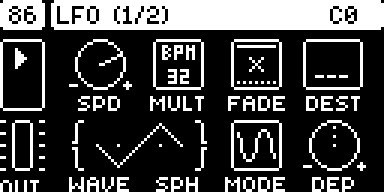
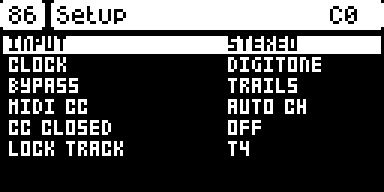
The screenshots are from the emulator, which has no DMA timer 0, so the C
at the top right (the render's share of each block) does not read true
there.
Install
The easiest way is elekloader's web page: tick DigiReel and the + beside its Needs fxkit; the page takes the core it needs. To build it yourself you need:
- elekloader from its main branch, with Python 3.9 or newer (see
its README). DigiReel keeps 2 MB of buffers in the
Digitone profile's
bulkarea, which the 0.4.0 app does not know: it refuses DigiReel. - This mod, fxkit and their core, from
this repository's releases:
digireel-0.2.elemod,fxkit-0.1.elemodandcore-dn1-4.1.elemodfor OS 1.43, or the three-os1.44files for 1.44. DigiReel needs core-dn1 4.1 or newer and fxkit; every effect on fxkit (DigiSwarm, DigiPrism, DigiTide, DigiTriad, DigiReel, DigiHoard, DigiHalo) fits in one build with them. - The stock OS file:
Digitone_and_Digitone_Keys_OS1.44.syxor..._OS1.43.syx, from Elektron's Digitone downloads. elekloader recognises the file by its hash.
Build your OS on the command line (or in elekloader's window, run from source: + Install from file... the three files and tick digireel):
python -m elekloader.patch --stock Digitone_and_Digitone_Keys_OS1.44.syx \
    --mod core-dn1-4.1-os1.44.elemod --mod fxkit-0.1-os1.44.elemod \
    --mod digireel-0.2-os1.44.elemod \
    --out Digitone_OS1.44-digireel.syx --version RE02
--version is the 4 characters the unit will show. Flash the .syx with
Elektron Transfer, as for any OS update: connect the unit over USB, select
it in Transfer and Connect, drag the .syx onto Drop files here,
and press YES on the unit. Don't turn it off until the upgrade is done.
Recovery: elekloader never changes the bootloader, so the stock OS
file always restores the unit. Hold FUNC while powering on for the
startup menu, and press TRIG 4 for OS UPGRADE. Then send the stock
.syx with Transfer.
Opening it: hold a track key on its own for the Mod Menu, then pick DIGIREEL with its trig key (or YES). NO turns it off and gives the synths back.
0.2: on fxkit
From 0.2 DigiReel is an effect on fxkit (../fxkit-dn1), as every effect in the build is: one at a time is active. Its Mod Menu entry makes it the active effect and opens its page; while it is active it owns the audio, page or no page, and opening another effect's entry hands that one the audio.
| key | on DigiReel's page |
|---|---|
| SYN1, SYN2, FLTR | its three pages (page 1, 2 and 3) |
| AMP | the MIXER: IN L, IN R (the inputs' levels, as the stock mixer's: 32 unity, up to +24 dB), L PAN, R PAN (where each input sits), BAL, VOL, WDTH (the output's width) |
| LFO | LFO 1, pressed again LFO 2: the stock LFO page (its knobs, WAVE and SPH as one wave, a turned knob's value under it), at the stock rates; turning DEST opens its list (DigiReel's controls and the mixer's), YES picks, NO closes |
| RECORD | LOCK mode: hold a trig and turn a control, and that step has a p-lock of it (the title bar shows the 16 steps, filled where DigiReel has a lock); FUNC + a trig clears the step; PAGE the next 16 steps. RECORD again (or NO) leaves it |
| MIDI | the stock UI, for the MIDI tracks and the rest, with DigiReel playing on; its Mod Menu entry brings the page back |
| NO | DigiReel off: the synths again |
The p-locks are the pattern's: they are kept in one synth track's lock table
(SETUP's LOCK TRACK, T4 unless you pick another), saved and copied with the
pattern, and play on their steps; that track should play nothing of its own
(no notes, no arpeggiator) in a pattern with DigiReel's locks, or its trigs go astray. 0.1's presets are gone: the
project keeps DigiReel's controls, mixer and LFOs (tag DTEN, 52 bytes).
The page
Drawn like the Digitone's own parameter pages: the tempo in the box at the top left, the page in the title bar, HOLD's state (a dot while it takes a window in, hollow while it waits for the beat, a play arrow while it loops), a square while the tape is stopped, or the direction, with the random event playing (R, or S, P, V, U: speed, pitch, reverse, stutter) and B while bypassed, and the output's meter on the left. LEFT and RIGHT, or PAGE, move between the pages; holding FUNC shows page 2; pushing a knob sets its default (a setting: its next value).
| Page | Knobs A-D | Knobs E-H |
|---|---|---|
| 1 Reel | SPED: the speed, -2x (left) through a stop (middle) to 1x (96) and 2x (right); PTCH: -24 to +24 semitones (STRETCH only); TIME: the window, 1/32 to 2 bars in time, 30 ms to 4 s free; BLND: the dry against the tape | RAND: how likely a random event is at each point; GLID: how slowly the speed follows the knob (and TAPE STOP); TONE: dark (left) or thin (right); SLIC: the slicer's depth |
| 2 Secondary | GRAN: STRETCH's grains, 20-150 ms; XFAD: the crossfade at a jump or a loop's seam, 2-40 ms; RSPD, RPCH: the random events' weights | RREV, RSTU: the same for reverse and stutter; WIDE: the tape's stereo width; OUT: the output level |
| 3 Modes | MODE: TAPE or STRT(ETCH); DIR: FWD, REV, ALT (back and forth); HOLD: MOM(entary) or LTCH (latching); CAPT: LAST (the window just played) or NEXT (the window from the press) | QNT: HOLD on the next beat; PATN: the slicer's pattern, P1-P8; RAND: random events at each WIN(dow) or each BEAT |
| Control | On DigiReel |
|---|---|
| SPEED, PITCH, BLEND, TIME | page 1 |
| HOLD (momentary or latching, LAST or NEXT) | T1 (HOLD and CAPT on page 3) |
| Reverse | T2: tap to flip the direction, hold for a momentary flip; DIR on page 3 |
| Tape stop | T3 held: the tape slows to a stop over GLIDE (in STRETCH a freeze: the grains hold the moment) |
| RANDOM | T4: tap to turn the random events on or off; held, an event at every point |
| Tap tempo | trig 15 (CLOCK becomes TAP) |
| Bypass | trig 16 (with the tail; SETUP's BYPASS: TRAILS or CUT) |
| Presets | none from 0.2: the project keeps the pedal, and p-locks (RECORD) follow the pattern |
| TIME and SPEED | trig 1-10: TIME's divisions, 1/32 to 2 bars; trig 11-14: SPEED -1x, 0.5x, 1x, 2x |
| SETUP | YES opens SETUP: INPUT (STEREO, or MONO from input L), CLOCK (FREE, DIGITONE, TAP), BYPASS (TRAILS, CUT), MIDI CC (auto channel or any), CC CLOSED |
How it plays
The tape holds 10.9 s and always records, bypassed too, so HOLD with CAPT LAST can loop what just went by. The head reads the tape at the speed. At 1x it plays the present; slower (or backwards) it falls behind, and once it is a window behind it jumps forward a window; faster it catches up with the present and jumps back one: at -1x you hear each window backwards, at 0.5x each window at half speed. Each jump crossfades over XFADE. In STRETCH two grains read the tape at the pitch while the head moves at the speed, so the pitch and the time are apart: a stopped tape becomes a freeze. HOLD loops the window (the tape stops recording while it loops), at the speed and the pitch, forwards, backwards or back and forth (DIR ALT); its seam fades over XFADE. Random events happen at each window, or each beat (RAND: BEAT), with RAND's chance: a speed (0.25x to 2x of the knob's), a pitch (-12, -7, -5, +5, +7, +12), a reverse or a stutter (a window, a half or a quarter of one, over and over), each until the next point, picked by the four weights on page 2. The slicer gates the tape's sound in one of eight 16-step patterns a bar (or four windows, free).
MIDI
On the auto channel while the page is open (or any channel, or with the page closed, in SETUP):
| CC | CC | ||
|---|---|---|---|
| 20 | SPEED (0 reverse, 64 stop) | 27 | MODE: TAPE below 64 |
| 21 | TIME | 28 | CAPTURE: NEXT 0-42, LAST above |
| 22 | PITCH (64 unison) | 29 | DIR: FWD, REV, ALT by thirds |
| 23 | BLEND | 30 | PATTERN by eighths |
| 24 | RANDOM | 31 | GLIDE |
| 25 | TONE | 85 | HOLD on from 64 |
| 26 | SLICE | 86 | REVERSE from 64 |
| 87 | TAPE STOP from 64 | 88 | RANDOM on from 64 |
| 93 | TAP | 102 | the pedal on from 64, bypassed below |
How it works
- The tape: 2^19 frames (10.9 s) of stereo 16-bit at half scale in its region of the profile's bulk area (0x47700000-0x47900000); the UI clears it once before the first block.
- Fixed point: as the shell's, positions on the tape in frames Q8.
- CPU: the whole render 23-28% of a block with the pedal open (the emulator's cycle model), of which the Digitone's own part, with the synths muted, is about 17%.
Build
python -m elekloader.sdk.build . --stock Digitone_and_Digitone_Keys_OS1.43.syx   # out/digireel-0.2.elemod
python -m elekloader.sdk.build . --stock Digitone_and_Digitone_Keys_OS1.44.syx   # out/digireel-0.2-os1.44.elemod
It names no firmware address, so its 1.44 port is empty. It needs fxkit and core-dn1
4.1. gentables.py makes tables.h.
Checked
In digikit's emulator, OS 1.43 and 1.44, and with the render's own code compiled for a computer and fed test signals:
-
On a unit: tested on a Digitone mk1 by its author: it loads and works as expected. It is still a beta.
-
The firmware. A build with the released core-dn1 3.2 and DigiReel passes every stage of the emulator's check against stock on 1.43 and 1.44, with every screen identical.
-
INPUTS. With plucked notes on the inputs and the factory pattern playing: closed, the synths; open, the plucks through the pedal and the synths silent (rms 0 against the synths' 1819), the whole render 25.8% of a block (the most 28.2%) in STRETCH, 22.7% in TAPE (the stock render with the synths playing: 57%); after NO the synths again.
-
The page and the keys. The three pages, SETUP, a knob turn, a preset saved as P5 and recalled with FUNC + trig 5, T1-T4 tapped and held, HOLD looping while T1 is down and off after, TAPE STOP, trig 11 (-1x: sound backwards), MODE on page 3, BYPASS on trig 16.
-
MIDI. On 1.43, the chart's CCs on the auto channel (SPEED, PITCH, BLEND, GLIDE, MODE, CAPTURE (0-42 for NEXT), DIR, RANDOM, the pedal on and bypassed) set DigiReel and stopped at core's site; a CC outside the chart went on to the Digitone.
-
The sound (the render on a computer): STRETCH's pitch an octave up and down (440 Hz in: 892 and 214 Hz measured by zero crossings), TAPE at 2x an octave up; reverse, half speed, HOLD LAST and NEXT (a burst loops on after the input stops), HOLD released (the loop stops), TAPE STOP to silence, STRETCH's freeze holding a note, random events, ALT, the slicer (P1 at 120 BPM: 125 ms on, 125 ms off), TONE both ways, WIDTH, BYPASS with and without trails, the CPU guard's trip. The jumps crossfade: no step in a sine's output larger than the sine's own.
Not yet
- An expression pedal input and program changes.
- CAPTURE's NEXT and LAST in every combination with the random events (a stutter always loops the window just played).
Licence
GPL-2.0-or-later, as the rest of elekloader (LICENSE).