DigiPrism
An effects pedal for the Digitone mk1's audio inputs: four modules in a chain you can reorder, each with five effects, Color (DRIVE, WARMTH, FUZZ, WAIL, SWELL), Motion (DOUBLER, VIBRATO, PHASER, TREMOLO, PITCH), Ambience (ECHOES, TAPE, SPACE, SCATTER, REVERSE) and Grit (FILTER, COMP, LO-FI, GLITCH, STATIC), with GESTURE (knob recordings), CAPTURE (a 30-second looper and sustainer) and MIDI CCs. DigiPrism is an elekloader mod on fxkit (core-dn1 4.1). Its MIDI CCs follow the Hologram Electronics Chroma Console's published CC chart, so a controller set up for that pedal works with it too. DigiPrism is not affiliated with Hologram Electronics and uses none of its code.
DIGIPRISM is an entry in core-dn1's Mod Menu (hold a track key). While it is the
active effect, DigiPrism owns the audio engine, as DigiSwarm does (fxkit's
core_audio owner): the synths are silent, the Digitone's own effects are
off, and what you hear is the inputs through the pedal. NO turns it off and gives the audio and the screen back. The sequencer keeps running, so PLAY, STOP and TEMPO
still work and the clock can follow the Digitone's tempo. BYPASS (trig 16)
passes the inputs through dry, with the delays' and the reverb's tails.
Sources. That is SETUP's SOURCE: INPUTS, the default. With core-dn1 3.4 (its insert audio) SOURCE can also be DIGITONE: the pedal then sits after the Digitone's master stage, so the synths, the inputs as the mixer has them and the Digitone's own chorus, delay and reverb all go through it, and it stays on after NO, while you play the Digitone as usual, until BYPASS. A project saved without DigiPrism starts with it off. With an older core SOURCE reads INPUTS ONLY.
DigiPrism 0.2 is a beta (a pre-release). It is an effect on fxkit: a MIXER on AMP (the inputs' levels and pans, as loud as the Digitone's own input), two LFOs on the stock LFO page aimed at its controls, p-locks kept in the pattern (RECORD, then hold a trig and turn a control), and MIDI hands the screen to the stock UI for the MIDI tracks while it keeps playing. Presets are gone: the project keeps its controls, mixer and LFOs, and a project saved with 0.1 opens it at its defaults. 0.2 was tested on a Digitone mk1 by its author (built before the effects' rename, which changed only names); it was also checked in digikit's emulator (digiemu) on OS 1.43 and 1.44. Not yet run on a Digitone Keys. Its source is also in elekloader, as mods/digiprism-dn1.
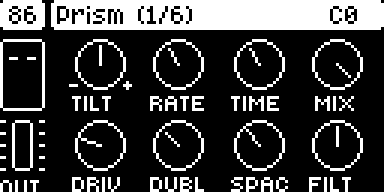
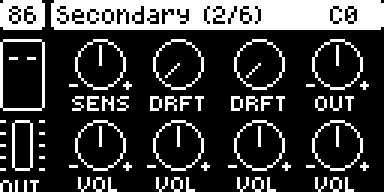
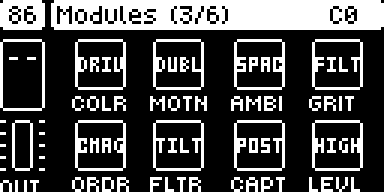
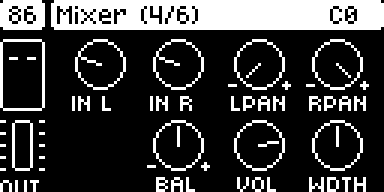
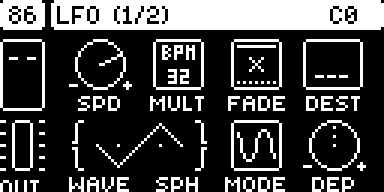
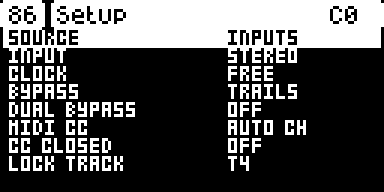
The screenshots are from the emulator, which has no DMA timer 0, so the C
at the top right (the render's share of each block) does not read true
there.
Install
The easiest way is elekloader's web page: tick DigiPrism and the + beside its Needs fxkit; the page takes the core it needs. To build it yourself you need:
- elekloader from its main branch, with Python 3.9 or newer (see
its README). DigiPrism keeps 7 MB of buffers in the
Digitone profile's
bulkarea, which the 0.4.0 app does not know: it refuses DigiPrism. - This mod, fxkit and their core, from
this repository's releases:
digiprism-0.2.elemod,fxkit-0.1.elemodandcore-dn1-4.1.elemodfor OS 1.43, or the three-os1.44files for 1.44. DigiPrism needs core-dn1 4.1 or newer and fxkit; every effect on fxkit (DigiSwarm, DigiPrism, DigiTide, DigiTriad, DigiReel, DigiHoard, DigiHalo) fits in one build with them. - The stock OS file:
Digitone_and_Digitone_Keys_OS1.44.syxor..._OS1.43.syx, from Elektron's Digitone downloads. elekloader recognises the file by its hash.
Build your OS on the command line (or in elekloader's window, run from source: + Install from file... the three files and tick digiprism):
python -m elekloader.patch --stock Digitone_and_Digitone_Keys_OS1.44.syx \
    --mod core-dn1-4.1-os1.44.elemod --mod fxkit-0.1-os1.44.elemod \
    --mod digiprism-0.2-os1.44.elemod \
    --out Digitone_OS1.44-digiprism.syx --version PR02
--version is the 4 characters the unit will show. Flash the .syx with
Elektron Transfer, as for any OS update: connect the unit over USB, select
it in Transfer and Connect, drag the .syx onto Drop files here,
and press YES on the unit. Don't turn it off until the upgrade is done.
Recovery: elekloader never changes the bootloader, so the stock OS
file always restores the unit. Hold FUNC while powering on for the
startup menu, and press TRIG 4 for OS UPGRADE. Then send the stock
.syx with Transfer.
Opening it: hold a track key on its own for the Mod Menu, then pick DIGIPRISM with its trig key (or YES). NO turns it off and gives the synths back.
0.2: on fxkit
From 0.2 DigiPrism is an effect on fxkit (../fxkit-dn1), as every effect in the build is: one at a time is active. Its Mod Menu entry makes it the active effect and opens its page; while it is active it owns the audio, page or no page, and opening another effect's entry hands that one the audio.
| key | on DigiPrism's page |
|---|---|
| SYN1, SYN2, FLTR | its three pages (PRIMARY, SECONDARY and MODULES) |
| AMP | the MIXER: IN L, IN R (the inputs' levels, as the stock mixer's: 32 unity, up to +24 dB), L PAN, R PAN (where each input sits), BAL, VOL, WDTH (the output's width) |
| LFO | LFO 1, pressed again LFO 2: the stock LFO page (its knobs, WAVE and SPH as one wave, a turned knob's value under it), at the stock rates; turning DEST opens its list (DigiPrism's controls and the mixer's), YES picks, NO closes |
| RECORD | LOCK mode: hold a trig and turn a control, and that step has a p-lock of it (the title bar shows the 16 steps, filled where DigiPrism has a lock); FUNC + a trig clears the step; PAGE the next 16 steps. RECORD again (or NO) leaves it |
| MIDI | the stock UI, for the MIDI tracks and the rest, with DigiPrism playing on; its Mod Menu entry brings the page back |
| NO | DigiPrism off: the synths again |
The p-locks are the pattern's: they are kept in one synth track's lock table
(SETUP's LOCK TRACK, T4 unless you pick another), saved and copied with the
pattern, and play on their steps; that track should play nothing of its own
(no notes, no arpeggiator) in a pattern with DigiPrism's locks, or its trigs go astray. 0.1's presets are gone: the
project keeps DigiPrism's controls, mixer and LFOs (tag DCHR, 56 bytes).
The page
DigiPrism's page is drawn like the Digitone's own parameter pages, in their fonts: the tempo in the box at the top left, the page in the title bar, CAPTURE's state (with G while a gesture plays, B while bypassed) and the output's meter on the left, and eight controls, one per knob: the top row TILT, RATE, TIME and MIX, the bottom row the four modules' AMOUNT, each named by its module's effect. A bypassed module's knobs are dotted. While you turn a knob the title bar shows its value; LEFT and RIGHT, or PAGE, move between the three pages, and holding FUNC shows page 2.
| Page | Knobs A-D | Knobs E-H |
|---|---|---|
| 1 Prism (the primary controls) | TILT (Color's tone), RATE (Motion), TIME (Ambience), MIX | AMOUNT of Color, Motion, Ambience, Grit |
| 2 Secondary (the gray labels) | SENS (Color's sensitivity), DRFT (Motion's DRIFT), DRFT (Ambience's), OUT (output level) | VOL: each module's EFFECT VOL (Ambience's: its wet only) |
| 3 Modules | the four modules' effects: turn to pick, push for on/off | ORDR (the order, as letters: CMAG), FLTR (FILTER's style: TILT, LPF, HPF), CAPT (CAPTURE: POST or PRE the effects), LEVL (the input level: LOW, MED, HIGH, VHI) |
Pushing a knob on pages 1 and 2 sets it back to its default; on page 2 the
knobs whose middle is neutral (SENS, OUT, the VOLs) show - and +. The C at
the top right is how much of each audio block the whole render takes, the
Digitone's and DigiPrism's (see CPU below).
| Control | On DigiPrism |
|---|---|
| A module's next effect, or its bypass | T1-T4, the Digitone's track keys: tap for the module's next effect, hold to bypass it |
| TAP and CAPTURE | trig 15: tap tempo; hold to CAPTURE, release to play; tap to stop |
| BYPASS | trig 16 (with DUAL BYPASS, in SETUP, the chosen modules; double tap, everything) |
| GESTURE | trig 13: record knob movements; again to play them. FUNC + trig 13 erases every gesture |
| Secondary controls | page 2, or FUNC held |
| Routing, filter style, capture routing | page 3 (DUAL BYPASS in SETUP) |
| Calibration | LEVL on page 3, and SENS on page 2 |
| Presets | none from 0.2: the project keeps the pedal, and p-locks (RECORD) follow the pattern |
| Global settings | YES opens SETUP: SOURCE (INPUTS, or DIGITONE with core-dn1 3.4), INPUT (STEREO, or MONO from input L), CLOCK, BYPASS (trails or cut), DUAL BYPASS, MIDI CC (auto channel or any), CC CLOSED |
| Expression pedal | not yet |
Modules and effects
The chain runs in the order on page 3 (Color, Motion, Ambience, Grit by default), and MIX blends the chain against the dry signal. Each module's EFFECT VOL sets its output, and OUT the pedal's, with a soft clip before the output.
| Module | Effect | Its controls |
|---|---|---|
| Color: TILT, AMOUNT, SENS | DRIVE | a tube-like drive. AMOUNT: the drive; TILT the tone before it and after it |
| WARMTH | a preamp: EQ, compression and gentle saturation, all growing with AMOUNT | |
| FUZZ | a fuzz. AMOUNT: its intensity; TILT changes its tightness, bias and tone together | |
| WAIL | a fuzz into a resonant filter, opened by the playing. TILT: from smooth low tones to bright stabs; AMOUNT: drive and resonance | |
| SWELL | each note fades in. AMOUNT: the attack and decay; SENS: when it triggers | |
| Motion: RATE, AMOUNT, DRIFT | DOUBLER | two short voices, as overdubs. RATE: tight to slapback; AMOUNT: how much; DRIFT: random pitch jumps |
| VIBRATO | RATE, AMOUNT (depth); DRIFT: a random wave and a wider stereo | |
| PHASER | RATE; AMOUNT: depth, feedback and 2 to 12 stages; DRIFT: a random sweep | |
| TREMOLO | RATE; AMOUNT: depth, and from a sine to a square; DRIFT: an unsteady rate and depth | |
| PITCH | RATE: -1 to +1 octave, gliding (the middle is none); AMOUNT: the mix, all pitched at full; DRIFT: lo-fi and unsteady | |
| Ambience: TIME, AMOUNT, DRIFT | ECHOES | a dark bucket-brigade delay. TIME: 30-700 ms, and turning it bends the repeats; AMOUNT: repeats, self-oscillating at the top; DRIFT: modulation and wear |
| TAPE | a tape echo: brighter, with wow and flutter. DRIFT: worn tape, dropouts | |
| SPACE | a reverb from a small chamber (TIME left) to a cloud (right). AMOUNT: its mix; DRIFT: pitch modulation inside | |
| SCATTER | a looping delay, 40 ms to 2.5 s: moving TIME bends and folds the loop. AMOUNT: repeats; DRIFT: random double-speed loops | |
| REVERSE | backwards windows of what just played. TIME: half speed (left) to double (right); AMOUNT: its mix; DRIFT: pitch modulation | |
| Grit: AMOUNT | FILTER | the cutoff: TILT style cuts highs left of the middle and lows right of it; LPF and HPF styles are open at one end |
| COMP | a heavy compressor that overdrives near the top | |
| LO-FI | tape: saturation, a narrowing band, wow, flutter, hiss and dropouts, in turn as AMOUNT grows | |
| GLITCH | a motor in need of service: pitch drops, wobbling level and speed | |
| STATIC | static and crackle that follow the music, radio fading, bursts of a phone's buzz, then stutters, crushed bits and dropouts |
With CLOCK on DIGITONE (or TAP, after you tap trig 15) the delays' TIME picks subdivisions of the tempo (1/32 to 1/4; SCATTER 1/16 to two bars), VIBRATO's, PHASER's and TREMOLO's RATE picks a cycle from two bars to 1/32, REVERSE's windows are a quarter note long, and gestures play at the tempo against the one they were recorded at. On FREE the knobs are continuous.
With SOURCE INPUTS Ambience is stereo. SPACE takes each side through its own allpasses into four of its eight lines, and the delays and REVERSE keep a line a side, so a stereo source keeps its sides in the repeats. On a mono source the two sides' modulation (the delays' wow, REVERSE's windows) runs apart, for width. As an insert (DIGITONE) Ambience is lean: SPACE has four lines at half the rate, and the delays and REVERSE repeat the sum of both sides (see CPU below).
GESTURE and CAPTURE
- GESTURE: trig 13 starts recording. Each primary knob you then turn (page 1, or by MIDI) records its own loop of values, from your first move until trig 13 again, which plays them all, each knob looping on its own. A dot over a knob shows its gesture playing. Turning that knob later deletes its gesture; FUNC + trig 13 deletes all of them. Gestures are not saved.
- CAPTURE: hold trig 15 to record (from the press), release to play. A recording under a second plays as a sustained pad (two overlapping windows); a longer one as a loop, up to 30 seconds. A tap stops it. POST (page 3's CAPT) records what you hear and plays it beside the pedal's output; PRE records what comes in and plays it into the effects. Captures are not saved.
MIDI
DigiPrism takes its MIDI CCs (the chart below) that come on
the Digitone's auto channel (MIDI CONFIG > CHANNELS > AUTO CHANNEL), through
core-dn1's ev_midi_cc, while its page is open; with SETUP's CC CLOSED on,
also while it is closed, and with MIDI CC on ANY CH on a track's channel too.
The Digitone does not apply a CC DigiPrism takes; every other CC goes on to
the Digitone. MIDI CONFIG > PORT CONFIG > INPUT FROM has to let them in.
| CC | CC | ||
|---|---|---|---|
| 64 | TILT | 72 | SENSITIVITY |
| 65 | AMOUNT (Color) | 73 | EFFECT VOL (Color) |
| 66 | RATE | 74 | DRIFT (Motion) |
| 67 | AMOUNT (Motion) | 75 | EFFECT VOL (Motion) |
| 68 | TIME | 76 | DRIFT (Ambience) |
| 69 | AMOUNT (Ambience) | 77 | EFFECT VOL (Ambience) |
| 70 | MIX | 78 | OUTPUT LEVEL |
| 71 | AMOUNT (Grit) | 79 | EFFECT VOL (Grit) |
| 16-19 | a module's effect: 0-21, 22-43, 44-65, 66-87, 88-109 the five, 110-127 off | 91 | bypass below 64, on from 64 |
| 92 | total bypass (0-31), dual bypass (32-63), all on (64-127) | 103-106 | a module's bypass, below 64 |
| 80 | GESTURE: record from 64, play below | 81 | GESTURE: erase |
| 82 | CAPTURE: stop (0-43), play (44-87), record (88-127) | 83 | CAPTURE: post below 64, pre from 64 |
| 84 | FILTER: LPF (0-43), TILT (44-87), HPF (88-127) | 93 | TAP |
| 94 | the input level: LOW, MED, HIGH, VERY HIGH by quarters | 95 | taken, does nothing |
Program changes (for presets) are not mapped: core-dn1 passes mods the CCs only.
How it works
The render (dsp.c) runs at interrupt level in core-dn1's render, on each
block of 32 frames (the inputs, or with DIGITONE what the master stage
made): the modules in their order, MIX against the dry, CAPTURE, OUTPUT
LEVEL and a soft clip. Everything is fixed
point in C: samples are 16-bit with 6 dB of headroom between the modules,
and the delay lines hold them at half scale. The UI (ui.c) runs in the
Digitone's UI task.
- Memory: the buffers (7 MB: Ambience's 2.7-second line, SPACE's
eight lines, Motion's and Grit's short lines, the gestures and
CAPTURE's 30 seconds) are a region in the Digitone profile's
bulkarea after DigiSwarm's, cleared at the first ticks after power-up. The code and its state take 59 KB of the 128 KB mods share; with DigiSwarm, digitables and digihealth too, 114 KB. - CPU: in digikit's emulator, with the factory pattern playing. With the source INPUTS the Digitone's own render shrinks to about 18% (no master stage, no voices' filters), and DigiPrism uses the time: the full SPACE takes 17% of each block, the stereo delays and REVERSE 8%, the other effects 3-7%; the default chain 24%, and the heaviest chain tried (FUZZ, PHASER, SPACE, STATIC) 27%, so the whole render stays under 45%. With DIGITONE DigiPrism runs on top of all of the Digitone's render, about 57%, and is lean: one module takes 3-8% (SPACE the most), the default chain 14%, the heaviest chain 17%, and the whole render stays under 80%. In both PHASER's wet chain runs at half the rate and slow modulation is worked out a block at a time. The emulator's timing tables assume memory without wait states, so a unit runs slower: a guard times the whole render on DMA timer 0 every block, and if the unit stays over 93% for 0.2 s it bypasses the pedal at once (no trails) and says so in the title ("CPU full: bypassed"); BYPASS turns it back on.
- Project data: DigiPrism's controls, its latches and SETUP, with fxkit's mixer and LFOs
(
fx_pack), are saved with the project (tagDCHR, 56 bytes; mods share 480 there, and the seven effects, GAIN and fxkit take about 470). The p-locks are the pattern's.
Build
With the SDK and a stock OS file:
python -m elekloader.sdk.build . --stock Digitone_and_Digitone_Keys_OS1.43.syx   # out/digiprism-0.2.elemod
python -m elekloader.sdk.build . --stock Digitone_and_Digitone_Keys_OS1.44.syx   # out/digiprism-0.2-os1.44.elemod
It names no firmware address, so its 1.44 port is empty. It needs fxkit and core-dn1
4.1 ("requires": ["core", "fxkit"], "resources": {"core": "4.1"}) and an elekloader with the profile's
bulk area. The source DIGITONE needs core-dn1 3.4's insert audio:
DigiPrism weak-imports 3.4's core_audio_caps ("weak" in mod.json),
which reads 0 with 3.2, and then offers the inputs only. gentables.py
makes tables.h.
Checked
In digikit's emulator, OS 1.43 and 1.44, and with the render's own code compiled for a computer and fed test signals:
- The firmware. A build with the released core-dn1 3.2 and DigiPrism passes every stage of the emulator's check against stock on 1.43 and 1.44, with every screen identical (and so did one with core-dn1 3.4).
- INPUTS. With plucked notes on the inputs and the factory pattern playing: closed, the synths; open, the plucks through the pedal and the synths silent (with the inputs silent too, an rms of 6 against the synths' 1856), the whole render 40% of a block with the default chain and its full SPACE; after NO the synths again, and the stock render. With core-dn1 3.2 SOURCE stays INPUTS.
- DIGITONE (core-dn1 3.4): SETUP's SOURCE turns to DIGITONE, the synths go through the pedal, and it stays on after NO.
- The page and the keys. Its three pages, a knob turn and its value in the title, T2's next effect (VIBRATO, by name), T3 held (Ambience bypassed, its knobs dotted), page 3's order, SETUP, GESTURE (RATE turned while recording, then playing on its own) and CAPTURE (held 1.5 s: 1.5 s playing), as screenshots and as the state DigiPrism keeps; on 1.43 and 1.44.
- Presets. Saved as P5 from SETUP and recalled with FUNC + trig 5 exactly (the knobs, the effects, which run, the order); an empty one changes nothing.
- MIDI. CCs sent into the emulator's MIDI input on 1.43. Before the page was ever opened a mapped CC went on to the Digitone. With it open, each kind in the chart on the auto channel (the primary and secondary knobs, the modules' effects and bypasses, FILTER's style, CAPTURE's route and its record, play and stop, GESTURE's record and stop, bypass, the input level, TAP) set DigiPrism and stopped at core's site, and a CC outside the chart went on. The runs were split: in the timed emulator, MIDI input stops a few seconds after a track key has been held, on stock 1.43 too.
- The effects (the render on a computer): every effect at AMOUNT 0, 64 and 127 on plucked notes, within a few dB of the dry (louder where a delay self-oscillates, FUZZ and WAIL near the top) and with no DC; PITCH's and REVERSE's octaves; the delays' first repeat at the knob's time (30-700 ms, SCATTER 40 ms-2.5 s), and on the tempo when synced; their feedback at the top bounded; SPACE's decay from 0.3 s (TIME left) to 9.4 s (right), the lean one's to 10.6 s; with INPUTS an input on L alone reaching R through SPACE and staying on L through the delays, at the lean versions' level within 1 dB; TREMOLO's rate, also synced; FILTER's three styles open where the table above says; COMP's curve; CAPTURE's pad and loop; GESTURE's loop; BYPASS's trails, and without them a clean cut; the CPU guard's trip (sustained 94% bypasses, 92% and a short burst do not).
- CPU on the cycle clock: above.
Not yet
- Program changes, and an expression pedal (the Digitone Keys has an input for one).
- The source DIGITONE on a unit with a released core: it needs core-dn1 3.4, which is not released yet.
- Presets, and gestures and captures saved: the project keeps one, and the Digitone's +Drive has no files for mods.
- Automatic calibration: LEVL and SENS set the input level by hand.
Licence
GPL-2.0-or-later, as the rest of elekloader (LICENSE).