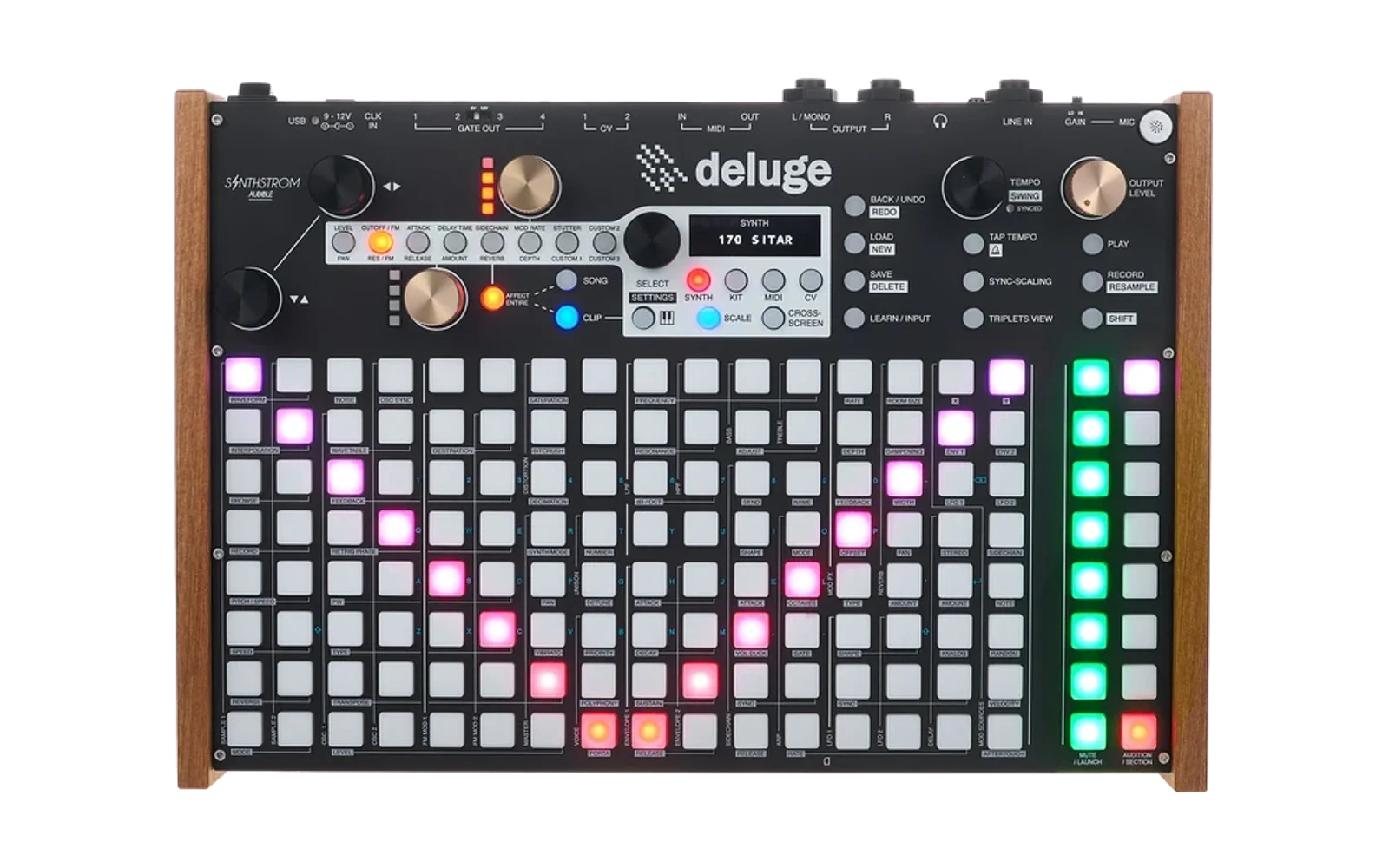
Deluge SDK
The Deluge SDK — write apps for the Synthstrom Deluge in async Rust.
A single attribute, #[deluge::app], absorbs all of the platform bring-up
(heaps, clocks, interrupts, the async executor, and a panic handler), and a
Deluge capability handle hands you the hardware: OLED, pads, buttons,
encoders, LEDs, audio DSP, CV/gate, MIDI, the SD card, and more. No unsafe,
no register pokes, no linker flags.
It is built on Embassy and targets the Deluge's onboard Renesas RZ/A1L (ARM Cortex-A9, R7S721020).
#![no_std]
#![no_main]
#![feature(impl_trait_in_assoc_type)]
use deluge::prelude::*;
use embassy_time::Timer;

#[deluge::app]
async fn main(dlg: Deluge) {
    let mut led = dlg.sync_led();
    loop {
        led.toggle();                  // heaps, clocks, IRQs, executor: already up
        Timer::after_millis(200).await;
    }
}
New here? Start with the Getting started guide — toolchain,
cargo deluge, and your first app in five minutes.
[!Note] The Deluge SDK is intended for the OLED Deluge only. Legacy (i.e. 7SEG) Deluges are not supported and use of the App Loader and SDK are untested on the 7SEG Deluge.
Safe to hack on
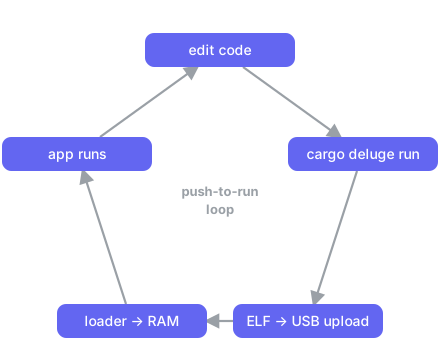
Apps are ELF binaries that run from RAM, loaded by the on-device app-loader
either straight over USB (dev mode) or from the /APPS/ folder on the SD card.
That means:
- You can't easily brick the device. Apps never touch flash; power-cycle to recover.
- Iteration is push-to-run. With dev mode on,
cargo deluge runuploads the ELF over USB and the loader launches it from RAM — no SD shuffling, no debug probe.
Quick start
rustup show                          # installs the pinned nightly + target
cargo install --path tools/cargo-deluge

cargo deluge new myapp
cd myapp
cargo deluge run                     # build + upload over USB, launch from RAM
cargo deluge run needs a Deluge running the app-loader with dev mode
on. Flashing the app-loader is a one-time step — see
Installing the loader. Without dev
mode, cargo deluge deploy copies the ELF to a mounted SD card's /APPS/ instead.
No hardware at all? cargo deluge sim runs the app in the
desktop simulator.
The capability handle
#[deluge::app] async fn main(dlg: Deluge) receives a Deluge handle. Each
accessor takes ownership of one peripheral (takeable once — a second call
panics), so the type system keeps two parts of your app from driving the same
hardware. Async accessors bring the peripheral up and wait for it before
returning.
| Accessor | Hands you | What it drives |
|---|---|---|
dlg.oled().await | Oled | SSD1309 OLED — an embedded-graphics DrawTarget |
dlg.input() | Input | unified Event stream: pads, buttons, encoders |
dlg.pads().await | Pads | the 18×8 RGB pad grid |
dlg.leds().await | Leds | button/indicator LEDs + gold-knob columns |
dlg.audio() | Audio | per-block stereo DSP over the codec |
dlg.cv() / dlg.gate() | Cv / Gate | CV and gate outputs |
dlg.clock_in() / dlg.clock_out(ch) | ClockIn / ClockOut | analog trigger-clock in / out |
dlg.midi() | Midi | DIN MIDI port |
dlg.jacks() | Jacks | audio jack-detect + speaker-amp control |
dlg.sd().await | Sd | FAT filesystem on the SD card |
dlg.sync_led() | SyncLed | the SYNC LED |
dlg.spawner() | Spawner | Embassy spawner for your own background tasks |
use deluge::prelude::*; brings the handle, all capability types, the
#[deluge::app] macro, controls (named button/encoder ids), and the log
macros (info!, warn!, …) into scope. Fixed-point DSP types live under
deluge::fixed (Q31, Q16, …) for audio callbacks.
Optional features (on the deluge crate)
| Feature | Effect |
|---|---|
rtt | route log to RTT (SEGGER Real-Time Transfer), needs a debug probe |
usb-log | route log to a USB CDC serial port — visible over the cable, no probe |
usb-serial | take USB0 as a CDC-ACM serial port under your own VID/PID via Deluge::usb_serial — device-only, mutually exclusive with usb-log |
alloc | register the on-chip SRAM heap as the global allocator (needed for the UI toolkit; requires -Zbuild-std=core,alloc) |
audio-irq | drive dlg.audio() from the per-block RX-DMA interrupt (drift-free, lower latency) |
sim | host backend for the desktop simulator (cargo deluge sim) |
linux | backend for the Deluge's Linux userland via libdeluge (cargo deluge linux) |
cargo deluge
The host subcommand so you never touch -Zbuild-std, linker flags, or the
embedded target triple by hand:
| Command | Does |
|---|---|
cargo deluge new <name> | scaffold a new app crate |
cargo deluge build [--release] | build the current app → ELF |
cargo deluge run [--release] [--port <p>] [--log] | build, upload over USB, launch from RAM (needs dev mode) |
cargo deluge deploy [--release] [--dest <mount>] | copy the ELF to a mounted SD card's /APPS/ |
cargo deluge log [--port <p>] | stream a running app's USB serial log (usb-log feature) |
cargo deluge sim [--release] [--headless …] | build for the host and run in the desktop simulator |
cargo deluge linux [opts] | build for the Deluge's Linux userland and pack a bootable image (needs DELUGE_BASE) |
cargo deluge debug [--release] [-- …] | build, then probe-rs run over J-Link |
cargo deluge trace [--release] [--flow] [-- …] | build, then probe-rs read-trace (trace-a9 fork) |
Examples
Every example under examples/ is a complete, buildable app. Build
and run any of them with cargo deluge run from its directory (CI
compile-proves all of them on the firmware target).
| Example | Shows |
|---|---|
blinky | the minimal app — one async loop, no unsafe |
oled_hello | draw to the OLED with embedded-graphics |
oled_menu | immediate-mode settings menu (UI toolkit) |
oled_hmenu | horizontal param-column menu (UI toolkit) |
input_demo | react to the unified input event stream |
pad_paint | press pads to paint the RGB grid |
button_leds | light each button's LED while held |
midi_cv | DIN MIDI → CV/gate converter |
clock_jacks | clock I/O + jack detection |
audio_passthru | a line-in audio effect |
audio_passthru_irq | the same, on the per-block IRQ clock |
test_osc | the pad grid as an isomorphic polyphonic synth keyboard |
additive_osc | additive synth with a C++/Argon (NEON SIMD) DSP core over FFI — needs ARGON_SRC (see its README) |
sd_demo | SD-card write/read round-trip |
usb_log | stream log output over USB — no probe |
Documentation
- Getting started — toolchain,
cargo deluge, and a tour of every capability. Read this first. - App Loader Manual — installing the loader, the boot menu, dev mode, storing apps to flash, and recovery.
- Desktop simulator — build and debug apps without hardware: the panel, audio/MIDI/SD bridges, and headless golden-frame testing.
- Advanced developer guide — Embassy tasks, interrupts, the HAL/BSP layers, and Cortex-A9 trace tooling.
- Wren scripting — live-code the Deluge in Wren: see the deluge-wren repo.
- Linux examples — apps for the Deluge's Linux userland.
Repository layout
| Path | Crate | What |
|---|---|---|
crates/deluge-sdk | deluge-sdk (imported as deluge) | the SDK facade + #[deluge::app] runtime |
crates/deluge-sdk-macros | deluge-sdk-macros | the #[deluge::app] proc-macro |
crates/deluge-bsp | deluge-bsp | board support: peripherals, PIC, OLED, SD, … |
rza1/rza1-hal | rza1-hal | RZ/A1L hardware abstraction layer |
rza1/rza1-rt | rza1-rt | Runtime for the RZ/A1L: reset vector, exception entry, linker script |
rza1/rza1-alloc | rza1-alloc | SRAM / SDRAM heap allocators |
usb/usb-classes | usb-classes | board-agnostic Embassy USB classes: UAC2, USB-MIDI, MSC + Bulk-Only Transport, host MIDI/UAC |
drivers/max5136 | max5136 | board-agnostic embedded-hal driver for the MAX5136 CV DAC |
crates/deluge-image | deluge-image | firmware-image format logic shared by the app-loader and cargo deluge |
crates/deluge-fixedpoint (imported as fixedpoint), crates/armv7-dsp-intrinsics | fixed-point DSP math + ARMv7 intrinsics | |
crates/deluge-simulator, crates/deluge-sim-link, crates/deluge-protocol | the desktop simulator and its link/wire protocol | |
crates/deluge-ui-toolkit, crates/deluge-grid-toolkit | OLED menu/text and pad-grid UI toolkits (GPL) | |
crates/deluge-fonts | deluge-fonts | bitmap fonts for the toolkit (GPL) |
linux/ | the native Linux backend: deluge-sys (libdeluge FFI), deluge-hal-linux, deluge-linux-ui | |
firmwares/ | standalone firmware images: the app-loader (second-stage bootloader), demo, controller, MSC | |
hw-tests/ | single-purpose hardware bring-up / validation probes | |
examples/baremetal/, examples/linux/ | SDK example apps for each backend | |
tools/cargo-deluge/ | the cargo deluge host subcommand | |
tools/deluge-web-sim/ | browser front panel that connects to a simulator core over WebSocket |
The deluge SDK facade depends only on the BSP and HAL — it does not pull
in the GPL UI toolkit, so an app stays permissively licensed unless it opts in.
Target
| Property | Value |
|---|---|
| CPU | ARM Cortex-A9, ARMv7-A, 400 MHz |
| SoC | Renesas RZ/A1L (R7S721020) |
| RAM | 3 MB on-chip SRAM + 64 MB SDRAM |
| Rust target | armv7a-none-eabihf |
| Rust channel | nightly (pinned in rust-toolchain.toml) |
| Async runtime | Embassy |
Licensing
The SDK and core libraries are MIT OR Apache-2.0. The OLED UI toolkit
(crates/deluge-ui-toolkit), its fonts (crates/deluge-fonts) and the pad-grid
toolkit (crates/deluge-grid-toolkit) are GPL-3.0-or-later (see
LICENSE-GPL). They are standalone crates: the permissive
deluge facade does not depend on them, so an app stays MIT/Apache unless
it opts into the toolkit, in which case that app becomes GPL.
Working on the SDK itself
The sections below are for hacking on the firmware and SDK internals rather than
writing apps. App authors can stop at cargo deluge.
Building firmware images
.cargo/config.toml sets target = "armv7a-none-eabihf" and defines build
aliases that pass the required -Zbuild-std=core flags — always use them over a
bare cargo build:
| Command | Output |
|---|---|
cargo build-fw -p <crate> | debug ELF (add --features rtt for RTT logging) |
cargo build-fw-rel -p <crate> | release ELF, default features off |
cargo build-fw-bin | demo-firmware as a raw .bin image to flash as the device firmware |
The app-loader and other firmwares have their own aliases
(cargo build-app-loader / -bin, cargo build-controller-bin,
cargo build-msc / -bin); see each crate's
README. Every image is a RAM-linked ELF (loaded at SRAM 0x20020000).
Testing
The default target is bare-metal, so tests run on two host-side targets:
QEMU ARM (armv7-unknown-linux-gnueabihf) for crates using ARM
asm/intrinsics, and the host triple for pure-logic crates. Run everything
with:
./tools/test.sh
One-time setup:
rustup target add armv7-unknown-linux-gnueabihf x86_64-unknown-linux-gnu
# Debian/Ubuntu: sudo apt-get install qemu-user gcc-arm-linux-gnueabihf libudev-dev
# Arch:          sudo pacman -S qemu-user-static arm-linux-gnueabihf-gcc
The qemu-arm runner and ARM cross-linker are wired up in .cargo/config.toml.
Debugging
Two probe backends are supported: J-Link (stable, recommended) and a custom
probe-rs fork with Cortex-A9 PTM/ETF trace support
(trace-a9 branch).
For J-Link, open the project in VS Code with Cortex-Debug and use the
launch configs in .vscode/launch.json — they load the
ELF via rza1_debug.JLinkScript and attach RTT
(written to rtt.log). cargo deluge debug / cargo deluge trace wrap the
probe-rs-fork commands with the right chip preset and flags; see the
Advanced developer guide for the full trace workflow.
CI
The CI workflow runs on every push to main and on
pull requests:
- Images — builds the app-loader and the demo/controller firmwares.
- Examples — compile-proves every SDK example on the firmware target.
- Tests — the host + QEMU-ARM unit suite.