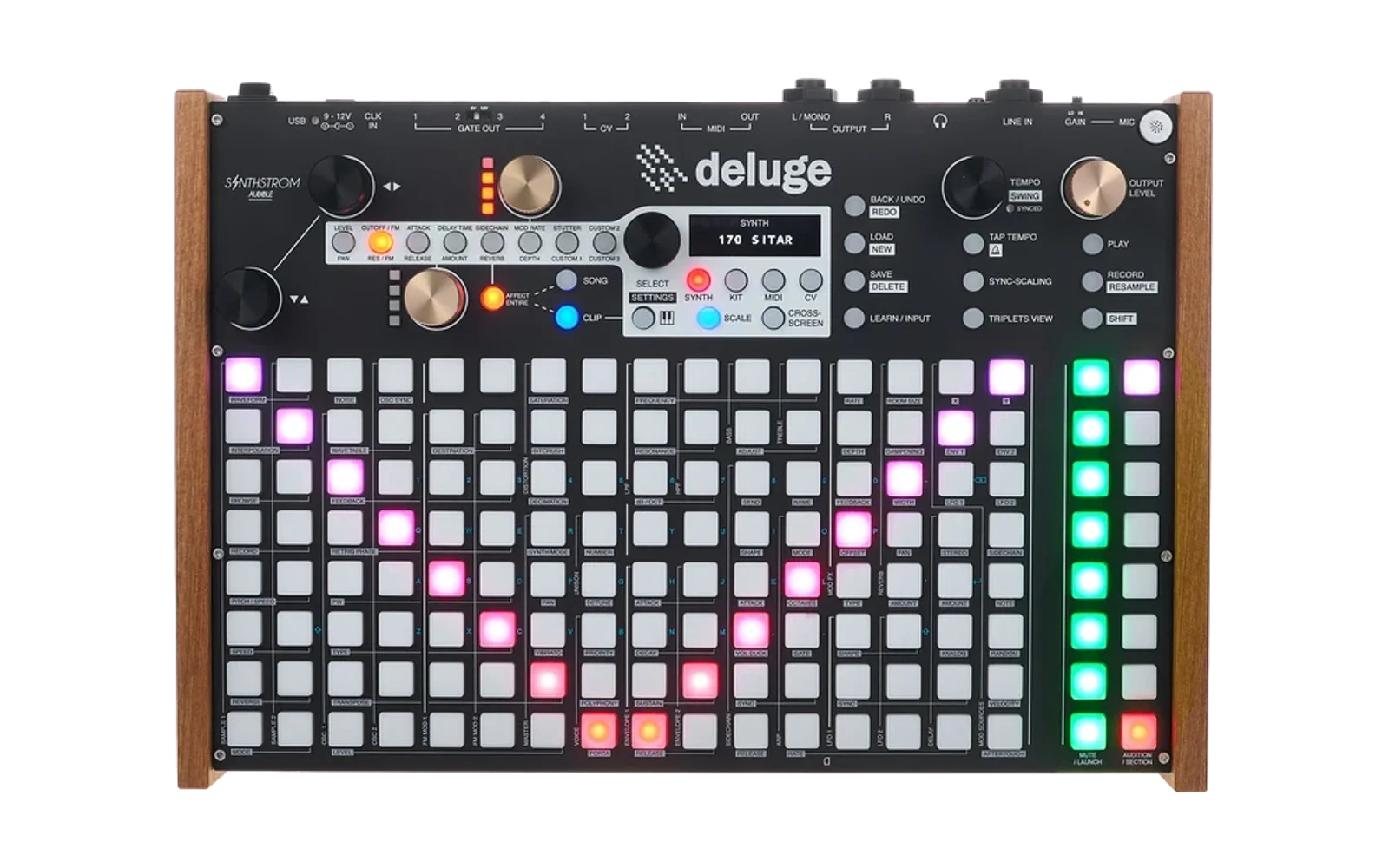
Deluge Controller Firmware
About
This firmware runs the Deluge from Synthstrom Audible as a USB controller peripheral. Rather than operating as a stand-alone sequencer/synthesizer, the Deluge exposes all of its hardware — pads, buttons, encoders, OLED display, CV/Gate outputs, and audio I/O — to a connected host computer over USB. The host drives the hardware directly using the serial protocol described below.
The firmware is written in C and C++ and runs bare-metal (no OS) on a Renesas RZ/A1L processor (Arm® Cortex®-A9, 400 MHz, 3 MB on-chip SRAM + 64 MB SDRAM).
USB Interface
The Deluge enumerates as a composite USB device with three interfaces:
| Interface | Class | Description |
|---|---|---|
| CDC Serial | USB CDC ACM | Control protocol — hardware events and output commands |
| Audio | USB Audio Class 2 | 44.1 kHz stereo I2S audio I/O |
| MIDI | USB MIDI 1.0 | DIN MIDI I/O over USB |
Connect the Deluge via its USB port. The CDC serial interface is the primary channel for controlling hardware and receiving input events.
Serial Protocol (USB CDC)
Protocol version: 1.0.0
All messages share the same framing: a 2-byte little-endian length field followed by the message type byte and optional data bytes. The length value counts the type byte and all data bytes but does not include the 2-byte length field itself.
+--------+--------+--------+------------ - -+
| len_lo | len_hi |  type  |   data[0..N]   |
+--------+--------+--------+------------ - -+
  byte 0   byte 1   byte 2   bytes 3 .. 2+len
Both directions use the same framing. Parse by reading the 2-byte length, then reading exactly len more bytes to obtain type (byte 0 of those) and data (remaining bytes).
Messages: Deluge → Host
The Deluge sends these messages in response to hardware events or host requests.
| Type | Value | Payload | Description |
|---|---|---|---|
PAD_PRESSED | 0x01 | [col, row] | Pad pressed at grid column col (0–17), row row (0–7) |
PAD_RELEASED | 0x02 | [col, row] | Pad released at grid column col, row row |
BUTTON_PRESSED | 0x03 | [button_id] | Hardware button pressed |
BUTTON_RELEASED | 0x04 | [button_id] | Hardware button released |
ENCODER_ROTATED | 0x05 | [encoder_id, delta] | Encoder turned; delta is a signed int8 (positive = clockwise) |
VERSION | 0x10 | [major, minor, patch] | Protocol version (response to GET_VERSION) |
PONG | 0x11 | (none) | Response to PING |
READY | 0x12 | (none) | Sent once initialization is complete |
ERROR | 0x13 | [msg...] | UTF-8 error string (max 255 bytes) |
Encoder button presses. Encoder shaft presses and releases are reported as BUTTON_PRESSED / BUTTON_RELEASED, not as separate encoder messages. The button_id values for encoder pushes are:
| Encoder | button_id |
|---|---|
| SCROLL_Y | 144 |
| SCROLL_X | 153 |
| TEMPO | 157 |
| MOD_0 | 162 |
| MOD_1 | 171 |
| SELECT | 175 |
Pad coordinates. The pad grid is 18 columns × 8 rows. Column 0 is the leftmost column; row 0 is the bottom row. Internally the hardware encodes pads with a single ID using the formula:
y = id / 9
x = (id - y * 9) * 2
if y >= 8: y -= 8, x += 1
The firmware decodes this automatically before sending col/row to the host.
Messages: Host → Deluge
Send these messages to control Deluge outputs.
| Type | Value | Payload | Description |
|---|---|---|---|
UPDATE_DISPLAY | 0x20 | [buffer...] | Write raw pixel data to the OLED |
CLEAR_DISPLAY | 0x21 | (none) | Clear the OLED to black |
SET_PAD_RGB | 0x22 | [col, row, r, g, b] | Set a single pad LED to the given 24-bit RGB colour |
CLEAR_ALL_PADS | 0x23 | (none) | Turn off all pad LEDs |
SET_LED | 0x24 | [led_index, on] | Set a hardware indicator LED (0 = off, non-zero = on) |
SET_CV | 0x25 | [channel, value_hi, value_lo] | Set CV output voltage; value is a 16-bit big-endian unsigned integer |
SET_GATE | 0x26 | [channel, on] | Set gate output (0 = low, non-zero = high) |
SET_ALL_PADS | 0x27 | [18 × 8 × 3 bytes] | Bulk update all pad LEDs; bytes are packed row-major RGB triples |
SET_KNOB_INDICATOR | 0x28 | [which, b0, b1, b2, b3] | Set gold knob indicator brightness; which selects knob 0 or 1; b0–b3 are per-LED brightness values |
SET_SYNCED_LED | 0x29 | [on] | Control the external-sync (SYNCED) LED (GPIO, not a PIC LED) |
CLEAR_ALL_LEDS | 0x2A | (none) | Turn off all 36 indicator LEDs, both knob indicator bars, and the SYNCED LED in one command |
SET_BRIGHTNESS | 0x2B | [level] | Set display brightness; level 0–25 where 0 is dimmest and 25 is brightest |
GET_VERSION | 0x30 | (none) | Request protocol version; Deluge replies with VERSION |
PING | 0x31 | (none) | Request a PONG reply (connection health check) |
Example: Set one pad to red
// SET_PAD_RGB: col=2, row=3, r=255, g=0, b=0
// payload length = 1 (type) + 5 (data) = 6
05 00  22  02 03 FF 00 00
│──┘   │   └──────────────── data: col=2 row=3 r=255 g=0 b=0
│      └── type: 0x22 (SET_PAD_RGB)
└── length: 6 (little-endian)
Example: Bulk-update all pads
Send SET_ALL_PADS (0x27) with 18 × 8 × 3 = 432 bytes of RGB data. The payload is row-major: pad (col=0, row=0) first, then (col=1, row=0), ... (col=17, row=7) last.
Hardware Overview
| Component | Details |
|---|---|
| CPU | Renesas RZ/A1L, Arm Cortex-A9 @ 400 MHz |
| SRAM | 3 MB on-chip |
| SDRAM | 64 MB external |
| Display | OLED (SPI via PIC32, shared with CV DAC) |
| Pad matrix | 18 × 8 RGB LED grid |
| Buttons | Scanned by PIC32 microcontroller over UART (200 kHz) |
| Encoders | Multiple rotary encoders with push |
| CV outputs | DAC via SPI, 16-bit resolution per channel |
| Gate outputs | GPIO |
| Audio | I2S codec (SSI0), 44.1 kHz stereo |
| USB | Full-speed USB via on-chip RZ/A1L controller (TinyUSB) |
| MIDI | DIN 5-pin IN and OUT |
Building
Requirements: the Deluge Build Tools (dbt). On Windows:
dbt.cmd build Debug
dbt.cmd build Release
dbt.cmd build RelWithDebInfo
On Linux:
chmod +x ./dbt
./dbt build Release
The resulting firmware binary under build/ can be loaded via JTAG/SWD using J-Link or OpenOCD.
Debugging
RTT (SEGGER Real-Time Transfer) channel 0 carries verbose boot and runtime log output. Connect a J-Link or compatible probe and open an RTT viewer to see messages. All USB lifecycle events, PIC initialization steps, and periodic USB register dumps are logged there.
License
The original Deluge firmware is copyright © Synthstrom Audible Limited. Released under the GNU General Public License v3 or later.