Roland D-70 Rosetta OS (work in progress)

A new OS for the Roland D-70 (1990 Super LA synthesizer), built one piece at a time. Today it patches Roland's own v1.11 firmware: Hex girl, the Rosetta mascot, boots on the 240 x 64 LCD, the D-70 starts straight into the ROSETTA OS menu, and its SYNTH pages edit the four layers live (wave, zone, pitch, filter, amp, both envelopes with a drawn graph, a DLM page that draws the loop slice, effects, MIDI OUT) while you play. There's an arpeggiator, the Alpha Dial and the sliders work in every menu, and slider 1 can grab any parameter and keep it (knob lock). Stock's tone, rhythm, effects, MIDI and data-transfer screens are cut to make room: their buttons and menu numbers land in Rosetta pages instead. The goal is to replace the stock OS completely: Roland's patch and layer structure out, our own engine, menus and live controls in.
It's the same Rosetta boot as the SP-808 Rosetta OS and the Sony HR-GP5 Rosetta OS, now on a Roland synth.
Work in progress. v0.10 is burned and running on a real D-70: our own effects (SINGLE / DOUBLE on the effects chip), custom U-110 cards with a BANK row, and the keyboard fix (keys no longer die while editing). Keep your original EPROMs.
Made by JunkSmithWizard (JSW) together with Claude (Anthropic's AI). Claude did the reverse engineering (80C196 disassembly, bank and LCD mapping, panel scan, the parameter system, slider and ROM PLAY code) and wrote the tools, the player, both menus and the simulator. JSW repaired the unit (new PCM56P DAC, 4052, a wave-ROM address line), dumped the EPROMs, drew Hex girl, designed the menus, decided what goes and what stays, and burns and tests on the real D-70.
Legal: this repo contains no Roland code or ROM data. You dump your own unit's EPROMs and the tools patch them on your PC. Don't share dumps or builds: share this repo instead.
Previews
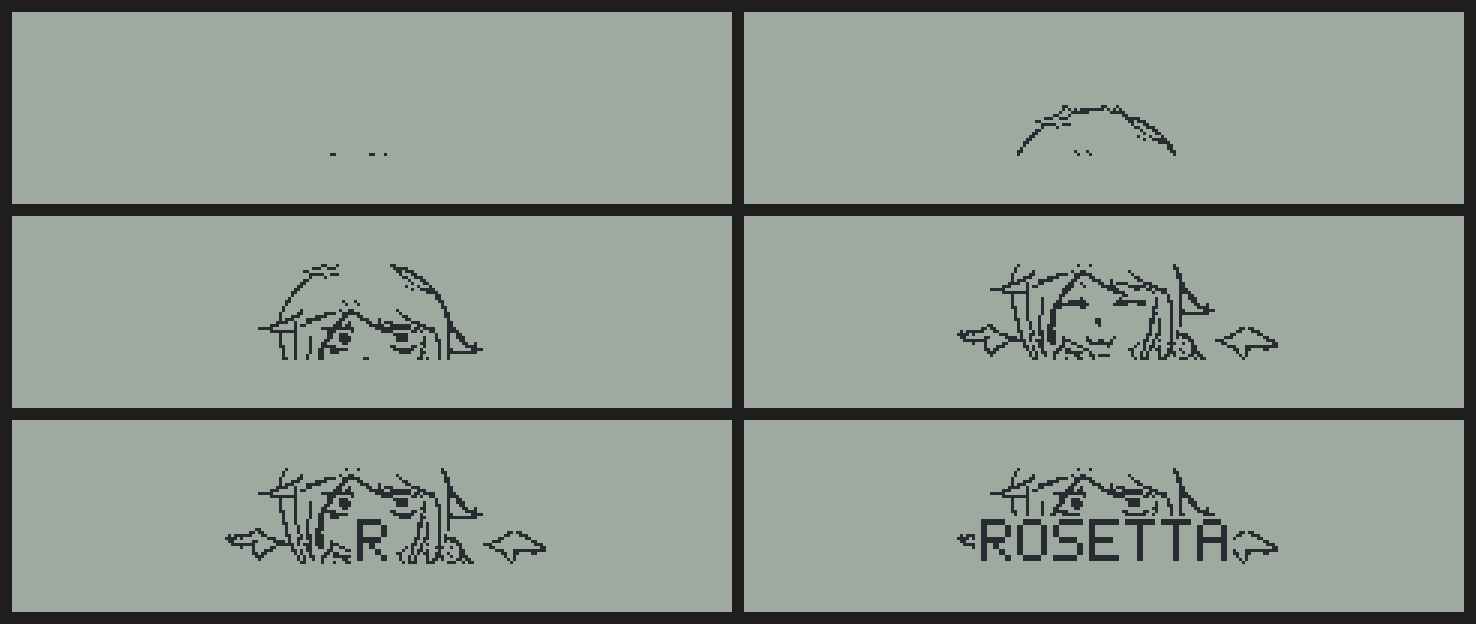
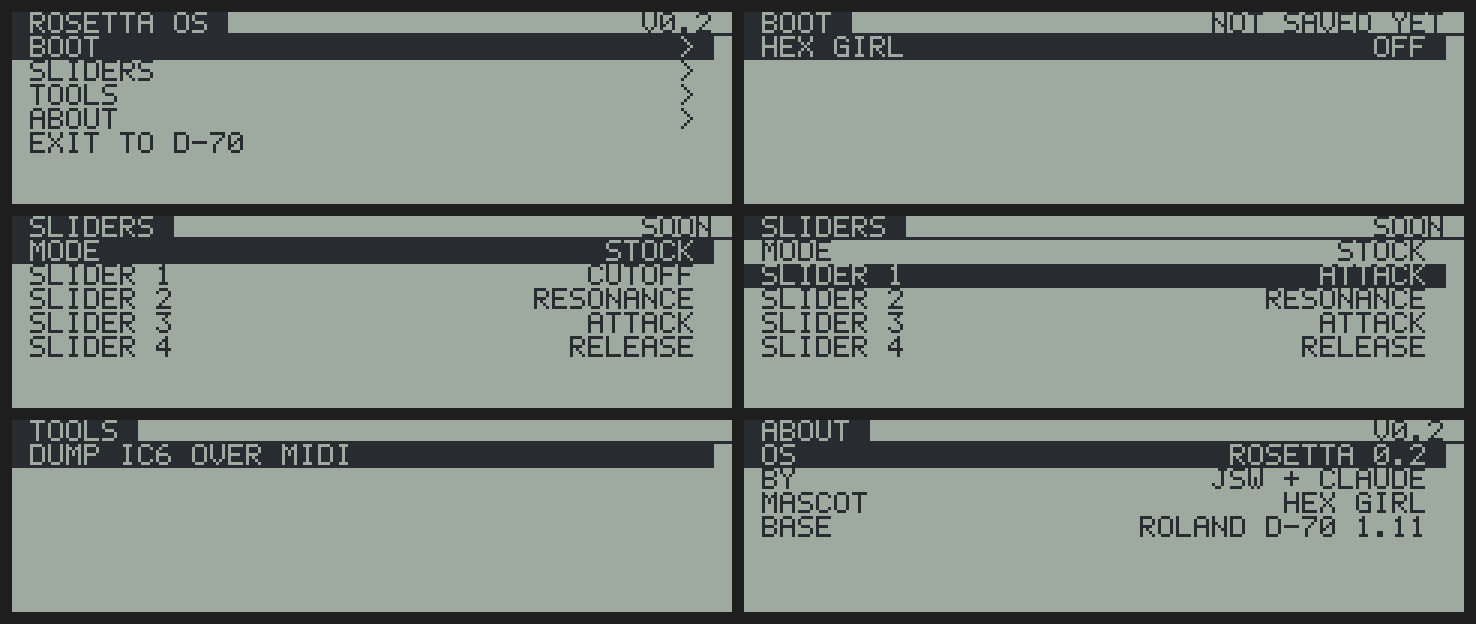
Rendered from the build checker, which runs the real ROM code against a model of the D-70's LCD (the real unit uses the LCD's own font; the previews use a stand-in, and the tone names are made up).

Status
| What | Status |
|---|---|
| Hex girl boot animation (45 frames, 5.6 s), drawn at 2x on the big screen | works on hardware |
| Boots into ROSETTA OS: SYNTH, TOOLS, ABOUT, EXIT TO D-70. [USER] opens it again from the stock OS. Hold [EXIT] at power-on for the plain D-70 | works on hardware (v0.5) |
| SYNTH pages: LAYERS (tone, zone bar, level per layer, key mode), WAVE / ZONE, PITCH, FILTER, FILTER ENV, AMP, AMP ENV, LFO. Two-column pages, envelope pages draw the curve. F5 / L1-U4 pick the layer, F5 also gives ALL LAYERS (one edit writes all four) | works on hardware (v0.5), more pages to come |
| DLM page (Differential Loop Modulation: DLM on/off, mode A/B, start, length) with a live view of the loop slice read from wave ROM | works on hardware (v0.6) |
| WAVE sweep through every wave (internal + card) with its name; EFFECTS page (reverb, chorus) reloads the effects chip | built, sim + MAME checked |
| ARP: up, down, up-down, random over 1-4 octaves, tempo, hold; notes go out like real keys (all layers, effects, MIDI OUT) | built, MAME checked, on-unit test next |
| MIDI OUT page: key mode, split, velocity curve / sens, per section MIDI on, channel, program, volume, transpose, zone | built, sim checked |
| Alpha Dial in every menu (turn faster = bigger steps), sliders keep working in the menu | built, sim checked |
| Knob lock (SETTINGS): slider 1 grabs the parameter you're on and keeps driving it after you leave the menu | built, sim checked |
| [EFFECT/CTRL] and [MIDI OUT] open the Rosetta pages; stock tone / rhythm / effector / MIDI / D.Xfer screens are cut (4 KB) and their menu numbers open Rosetta instead | built, sim + MAME checked |
| Edits go through Roland's own SysEx parameter code: every value is checked, clamped and applied like an incoming SysEx message | works on hardware |
| Boot menu (hold [EDIT] at power-on): BOOT, SLIDERS, TOOLS, ABOUT | works on hardware |
| Common sliders: LOWER 1 = CUTOFF, LOWER 2 = RESONANCE, UPPER 3 = ATTACK, UPPER 4 = RELEASE, each on all four layers | works on hardware |
TOOLS > DUMP IC6 OVER MIDI: battery RAM out as SysEx, tools/ic6_decode.py turns it back into a file | built, decode is byte-exact in the sim |
| ROM PLAY demo removed: 6.3 KB of page 7 free (now holds the sliders and the SYNTH menu) | built |
| Settings saved in battery RAM | waits for an IC6 dump from a real unit |
| TOOLS > DSP PEEK: reads the effects chip (IC23) live, peak bits / hex per cell | works on hardware (v0.7) |
DSP LAB: read / write the effects chip over MIDI SysEx from a PC (dsp/dsplab.py) | works on hardware (v0.8) |
| FX box (master insert on the effects chip): drive, bit crush, resonant LP/BP/HP filter, decimator, rectifier. Every part goes through it, whatever its Output Assign (docs/DSP.md) | works on hardware from the PC (dsp/fxbox.py) |
EFFECTS > SINGLE / DOUBLE on the D-70 itself (v0.10): SINGLE = stock chorus or one of DRIVE, DECIMATE, CRUSH, RECTIFY, LPF, BPF, HPF, LO-FI with its params + MIX; DOUBLE = box A (DRIVE / DECIMATE) into box B (DRIVE, CRUSH, RECTIFY, LPF, BPF, HPF). Compiled from tools/fx2.py, the firmware engine is checked bit for bit against it (tools/test_fxfw2.py) | works on hardware (v0.10) |
| LAYER page BANK row: I1 / I2 / I3 / card; changing it makes the D-70 read the card slots again, WAVE stays inside the bank | works on hardware (v0.10) |
Custom U-110 cards: the D-70 only takes a card whose header name starts SN-U110- (the U-110 takes any name). Build cards with u110-romhex-studio; this build also accepts any name | works on hardware |
| Keyboard fix: the boot animation runs with interrupts off and the stock boot then clears pending interrupts, which could leave the key scan chip waiting forever (keys dead, MIDI fine). The player now drains the chip like Roland's own buffer-full recovery, and every main-loop pass repairs the keyboard queue / interrupt mask | works on hardware |
DLM in the SYNTH menu; DSP LAB command 5 reads CPU memory (dsp/dsplab.py mem ADDR, keys) | built, sim checked |
| Firmware map: banks, LCD, keys, sliders, parameters, free space (docs/FINDINGS.md) | first pass |
Roadmap
- Patch the stock OS: boot, menus, live synth pages, common sliders, ARP, MIDI OUT, knob lock.
- Gut it (now): first cut done (stock tone, rhythm, effector, MIDI and data-transfer screens). Next: free the code behind them, then ARP step-pattern recording and wave sequencing (a new wave every step), a Rosetta-style data transfer page, a new boot animation drawn for the full 240 x 64 screen. Keep the drivers: LCD, panel, MIDI, PCM card slots, sound chip, filter, effects.
- Replace it: our own voice engine on Roland's sound chips, every button a live synth parameter, Rosetta menus everywhere, animations on the big screen. Ideas on the list: a real wave view, on-board PCM editing.
How it works
- CPU: Intel 80C196KB at 12 MHz, firmware in two 27C512 EPROMs (IC4 even bytes, IC9 odd bytes, 128 KB). The CPU sees 64 KB: fixed ROM, a 16 KB window that shows one of eight ROM pages or the battery RAM, and work RAM. The stock firmware keeps page 2 in the window and calls into it directly, so all our page-7 code calls stock routines through Roland's own far-call stubs (bank in, call, bank back).
- LCD: T6963C, 240 x 64, 6 pixels per byte, text and graphics layers XORed together. Stock uses two text pages (0x1400, 0x1540) and two graphics pages; the menu draws its text at 0x1680 and flips the LCD's home addresses, so the stock screen keeps updating underneath and comes straight back on EXIT.
- The boot: 3 bytes at the start of the normal boot path call a 680-byte player in free space. It parks a bit of work RAM in unused LCD memory, plays the frames straight to the LCD (timed on the CPU's own timer, 50 ms steps), then puts everything back exactly as it found it. Then the stock boot carries on.
- The codec (
tools/codec_d70.py) codes each frame as changes against the previous one (skips, fills, copies from ahead, XOR bytes, replays). Hex girl's 45 frames go from 115 KB raw to 2.3 KB. - ROSETTA OS menu: 3 bytes in the main loop swap Roland's UI step for ours (via a 7-byte trampoline into page 7). Menu closed: Roland's UI runs as before. Menu open: our key handling and drawing run instead, while MIDI, sound and the sliders keep going. Parameters are read and written through the firmware's SysEx address table.
- Common sliders: 3 bytes jump over Roland's play-mode slider loop. In four-layer mode each moved slider goes to its own parameter on all four layers; every other mode runs Roland's code untouched. The menu runs that loop itself, so the sliders keep working while it's open.
- ARP: keyboard events come off the interrupt ring through one far-call entry; 3 bytes point it at the ARP, which keeps the held chord and sends notes back into the same queue a real key uses, timed on the CPU's timer.
- Alpha Dial: the panel board counts the clicks itself; one stock routine reads the count (signed) over the panel's serial port, and the menu reads it every pass.
- The cut: every stock screen has a step routine, an enter routine and a display list. Cut screens get the play screen's routines, their display lists (4 KB on page 4) are wiped, and any stock path into one lands in the matching Rosetta page.
- Every build is checked before it's written:
tools/sim.pyruns the real ROM bytes (decoded by our own 80C196 disassembler) against an LCD model and compares every frame, drives both menus through key tours, checks every parameter write, decodes the IC6 dump back, exercises the slider hook, and fails on anything the real CPU would get wrong (word reads at odd addresses, stock code called with the wrong ROM page in the window).
Quick start

Easiest: Rosetta Patcher (Windows). Download RosettaPatcher-D70.exe from the
Releases page and run it: no Python needed. Or, with Python 3
(pip install numpy pillow), double-click tools/Rosetta_Patcher.bat (or run python tools/rosetta_patcher.py).
Pick your IC4 and IC9 dumps (either order: it sorts them out) or one combined 128 KB file, your effects chip dump
(step 3 below) and an output folder. It checks that they are v1.11, runs the whole build with every check (a few
minutes) and writes the two images to burn. The Releases .exe is still v0.8 (no effects chip dump needed) until a
new one is cut. Command line:
python -I tools/rosetta_patcher.py --even IC4.bin --odd IC9.bin --rcc rcc.txt --out outdir (or --both combined.bin).
By hand:
- Dump your EPROMs. IC4 is the even one, IC9 the odd one. With a T48:
minipro -p "AM27C512@DIP28" -r dumps/IC4_even.bin(and IC9). Read each twice and compare. The tools expect firmware v1.11 (IC4 MD53f9e12e8d73380a5c26c312940f1ff6e, IC9 MD5640e279056386577499544f826df9253) and refuse anything else. pip install pillow numpy- Dump your effects chip (new in v0.9+; Roland's effect program isn't shipped, the effects tables are built from
your unit's): this needs DSP LAB on the D-70, so a first-time build goes v0.8 first (
git checkout 06ae533, build, burn), thenpip install mido python-rtmidi, D-70 MIDI IN/OUT to your PC, stock effect type, andpython dsp/dsplab.py --port "<your MIDI port>" dump rcc.txt python -I tools/boot_build.py dumps/IC4_even.bin dumps/IC9_odd.bin --rcc rcc.txt(a few minutes, most of it the checks)- Burn two new chips and keep your originals. 27C512 (we use W27C512):
build/D70_rosetta_v010_IC4_even.bingoes in IC4,build/D70_rosetta_v010_IC9_odd.binin IC9. - Power off, swap the chips (notch the same way round), power on. It boots into ROSETTA OS. Hold [EXIT] while switching on for the plain D-70, [EDIT] for the boot menu.
Tools
| File | What |
|---|---|
tools/rosetta_patcher.py | Rosetta Patcher: window / command line around the build (also the .exe in Releases) |
tools/boot_build.py | builds Rosetta OS from your dump, runs every check, writes the images and previews |
tools/player.py | the boot player (80C196) |
tools/menu.py | the boot menu: pages, keys, drawing, the IC6 dump |
tools/synth.py | ROSETTA OS / SYNTH menu: pages, parameter access, drawing, envelope graphs |
tools/sliders.py | the common-slider hook |
tools/arp.py | the arpeggiator: key in, clock, note out |
tools/cuts.py | stock features removed and the space they free |
tools/codec_d70.py | the frame codec |
tools/asm.py | small 80C196 assembler; every instruction is decoded back to check it |
tools/mcs96.py | 80C196 (MCS-96) disassembler |
tools/sim.py | check-only 80C196 simulator with the D-70's LCD, banks and battery RAM |
tools/ic6_decode.py | turns a captured IC6 dump (SysEx) into a 32 KB file |
tools/font57.py | 5 x 7 preview font |
frames/roland_chan_frames.npz | Hex girl boot frames (same as the SP-808 Rosetta boot) |
docs/FINDINGS.md | the firmware map |
tools/dsplab.py | DSP LAB: the SysEx receiver in the firmware (tools/test_dsplab.py checks it in the sim) |
dsp/ | PC tools for the effects chip: dsplab.py, fxbox.py, hwab.py, hwscan.py, fxhw_master.py |
docs/DSP.md | effects chip findings and the FX box |
Legal
Not affiliated with or endorsed by Roland Corporation. "Roland" and "D-70" are trademarks of Roland Corporation. This repo contains no Roland code or data: you build from your own EPROM dumps. Hex girl art by JSW. Burn at your own risk, and always keep your stock EPROMs.
License: MIT (see LICENSE).
Thanks for enjoying, and God bless you! — JSW