D-110 Rosetta OS
"You can't teach an old dog new tricks, but you can feed it only crack and steroids for a week."
New tricks for the Roland D-110. Rosetta OS is a patch kit for the stock OS v1.10: an arpeggiator and step sequencer, MIDI out, chords and scale chords, unison, mono and glide, a mod matrix, Wavestation-style wave sequencing, vintage drift, and a Lab that pokes the LA32 chip into sounds Roland never let out. It all runs from a menu on the front panel. You bake it into your own ROM dumps and burn two chips: the socketed OS EPROM (IC19) and the control ROM (IC15). Put the old chips back and it's a stock D-110 again.
Made by JunkSmithWizard (JSW) together with Claude (Anthropic's AI). Claude wrote the code and did the reverse engineering: an MCS-96 disassembler, assembler and simulator built for the 8097 CPU, then the OS hooks. JSW burned every build into a real D-110, played it, and made the calls by ear. Same family as the GP-16, S2000 and SP-808 Rosetta OSes. Your own waves for the D-110 come from Rosetta ROM.
Rosetta ROM Studio
The PC side: swap the D-110's waves for your own samples, then patch the OS, all in one app. It lives in the Rosetta ROM repo; this repo is the OS code it bakes in.
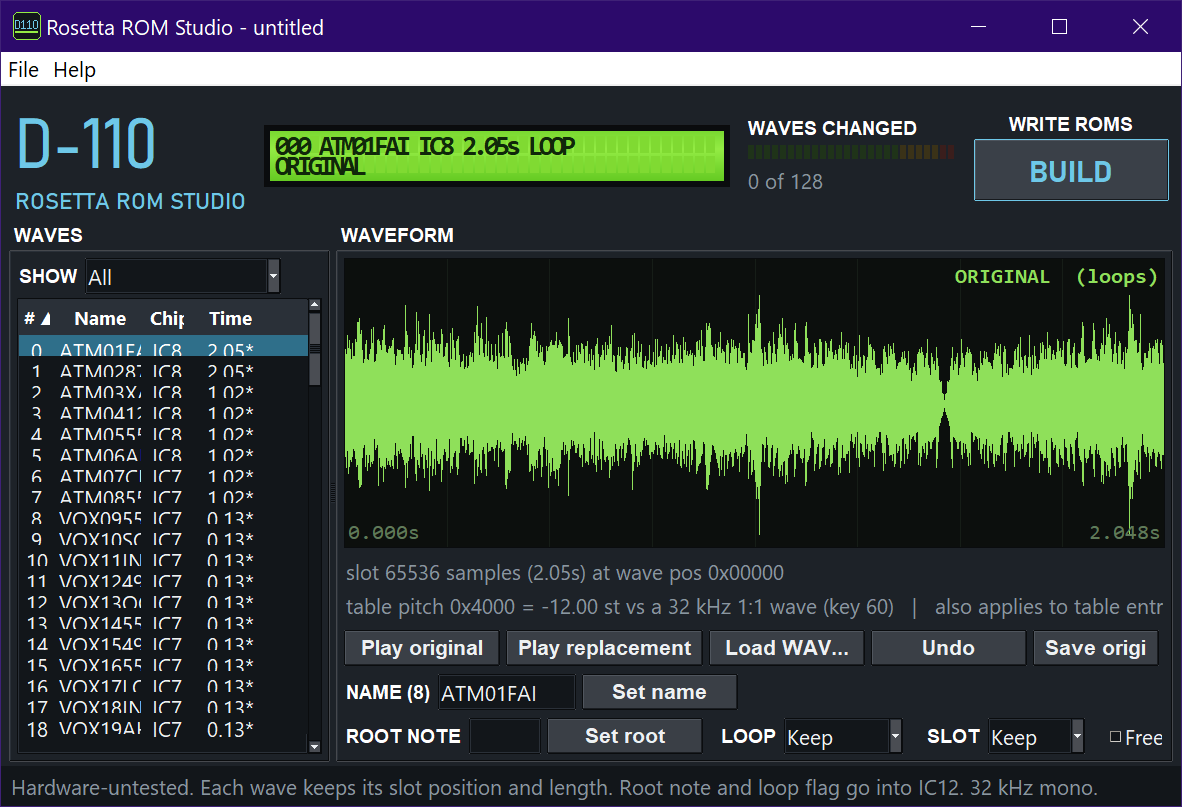
The wave editor (here with a custom wave bank loaded): pick a wave, load a WAV, set name, root note and loop, BUILD writes the ROMs.
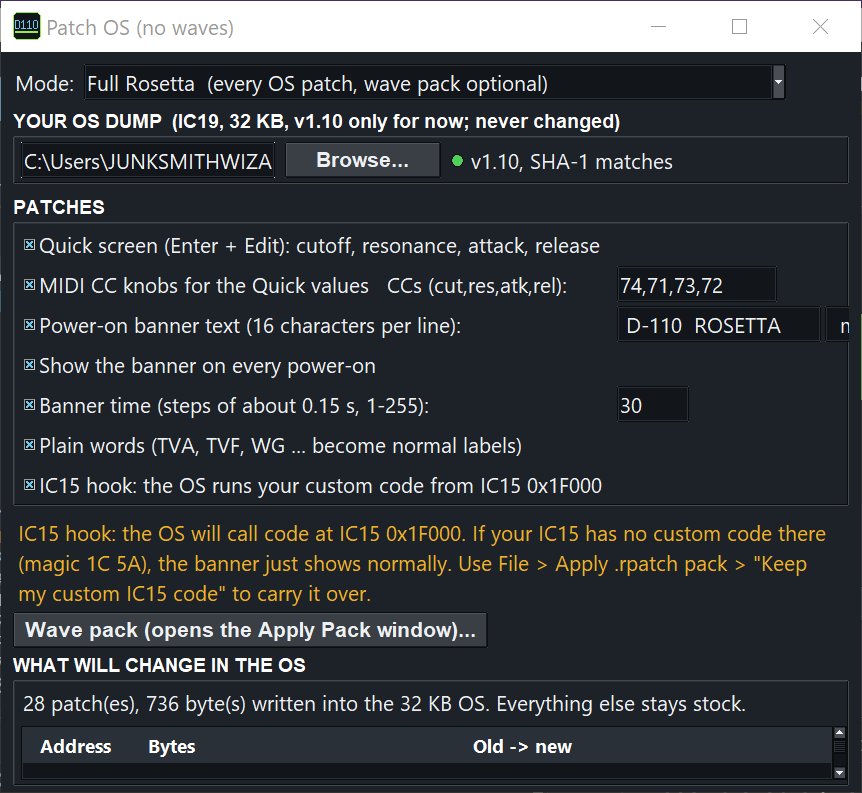
Patch OS: your v1.10 IC19 dump in, pick the patches, and it lists every byte it will change. Your dump is never touched.
What it adds
| Feature | Status |
|---|---|
| Rosetta menu on the front panel, every setting kept in battery RAM (survives power-off) | ✅ on hardware (v12) |
| Arpeggiator: Up, Down, Up+Down, Random, Played, Seq; octaves, rate 1/4-1/32, gate, latch, humanize, ratchets, accents, Euclid patterns, chance %. Syncs to MIDI clock | ✅ on hardware (v12) |
| Step sequencer: up to 32 steps (notes, rests, ties), step or live recording, transposed by the last key held | ✅ on hardware (v12) |
| MIDI out of the arp notes on the arp part's channel | ✅ on hardware (v12) |
| Chords: fixed shapes, Chord Learn (play a chord once, one key plays it), Scale / Scale 7 (one key = the triad or 7th of the key and scale) | ✅ on hardware (v12) |
| Unison (1-4 voices with detune), Mono / Legato, Glide | ✅ on hardware (v12) |
| Mod Matrix: 4 slots; ModWheel, aftertouch, velocity, key, LFO, S&H, CC16/17 to cutoff, pitch, wave, level, reso. LFO syncs to MIDI clock | ✅ on hardware (v12) |
| Wave Seq (Wavestation style: each note steps through PCM waves), Wave Scan on CC70, Random wave / pitch / cutoff per note | ✅ on hardware (v12) |
| Vintage: every note drifts in pitch and cutoff on its own, like an old analog | ✅ on hardware (v12) |
| Lab: resonance past the stock maximum, control-byte and PCM-position XORs, Lab Motion that sweeps them in time | ✅ on hardware (Reso High + Ctrl XOR since v8); the PCM items are experimental |
| Quick screen (Enter + Edit): cutoff, resonance, attack, release of the whole part, live | ✅ on hardware (IC19 only, v6) |
| MIDI CC knobs for the Quick values (CC74 / 71 / 73 / 72 by default) | ✅ on hardware (IC19 only, v6) |
| Plain words (WG, TVF, TVA ... become OS, Flt, Amp ...) and your own boot banner | ✅ on hardware (IC19 only, v6) |
Every control and value is in the user guide (also as a page: docs/rosetta-manual.html).
Two ways to run it
| Chips | You get | |
|---|---|---|
| Quick mod | IC19 only (one socketed EPROM) | Quick screen, CC knobs, plain words, boot banner. Stock IC15 / IC7 / IC8 |
| Full Rosetta | IC19 + IC15 | everything in the table above |
IC19 is the same from v8 to v12, so a new Rosetta version only needs IC15 reburned. With a stock IC15 the unit simply runs as a D-110 with the Quick mod.
Quick start
- Read your own IC19 (27C256-type EPROM) and IC15 (LH5310 mask ROM) on a programmer such as a T48. Keep the originals.
- Put the dumps in
roms/IC19 (main OS EPROM)/androms/IC15 (bin from Rosetta Studio here)/(or use the IC15 file Rosetta ROM Studio made, if you also swapped waves). - Run
python bake_rosetta.py --test. It checks your dumps, runs the simulator tests, and writes the burn files plusBURN.txt(with MD5s) tobaked/. - Burn IC19 to a 27C256 (or a W27C512 / 27C512 with the doubled image) and IC15 to an SST39SF040 on an adapter. Read back, compare the MD5s, fit the chips.
- Power on:
ROSETTA OS v12/D-110 by JSWmeans both chips are right. On the Quick screen (hold Enter, press Edit), Edit again opens the Rosetta menu.
IC15 socket wiring and the drop-in module: HARDWARE.md and
IC15_MODULE.md. IC19 only? patch_ic19.py does the Quick mod on
its own (see the dev log).
For developers
| File | |
|---|---|
rosetta.py, test_rosetta.py | the Rosetta code (IC19 hooks + IC15 code) and its simulator tests |
bake_rosetta.py, roms/ | the ROM baker: your dumps in, burn files out |
patch_ic19.py, ic19_quick.py, test_ic19_quick.py | IC19 patcher (Quick screen, CC knobs, plain words, banner, Rosetta hooks) |
patch_ic15.py | puts the Rosetta code into your own IC15 image |
mcs96_asm.py, mcs96_dis.py, mcs96_sim.py | MCS-96 assembler, disassembler + flow tracer, and simulator |
IC19_MAP.md, IC12_MAP.md | maps of the OS ROM and the control ROM: hooks, RAM, routines |
how-to-reverse-engineer/ | the method, rules and pitfalls, for people (or AI models) working on the OS |
docs/DEVLOG.md | the old README: per-version notes, build flags, findings |
The disassembly listing comes from Roland's code, so it's gitignored and stays on your machine.
Status: work in progress 🚧
v12 boots and works on a real D-110, and Rosetta has already been used in real music sessions. Keep your old chips or v9/v11 files as a fallback.
Planned:
- A D-10 port (
PORT_D10.md). - Rosetta Lite: more of the OS on IC19 alone, no IC15 swap.
Ideas, bug reports and test results are very welcome. Open an issue.
Legal
Not affiliated with or endorsed by Roland Corporation. "Roland" and "D-110" are trademarks of their owners. This repo contains no Roland code or ROM data: you read your own chips and the tools add the new bytes. Please don't share patched or baked .bin files; share this repo instead. Burn at your own risk, and always keep your original chips.
License: MIT (see LICENSE).
Thanks for enjoying, and God bless you! — JSW