
CTL-1 for the M-VAVE FM-1
CTL-1 turns the M-VAVE FM-1 into a MIDI controller. The keys play notes, with velocity and aftertouch read from the keys themselves, in any scale with its chords under the black keys; the knobs send controllers in four banks; an arpeggiator and a four-track Euclidean drum sequencer run on its clock. Everything goes out over USB and Bluetooth, MIDI from the TRS jack is passed along, and the FM-1 plays it all on its own General MIDI sounds too, so it works with nothing connected.
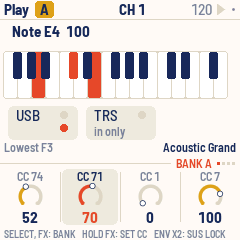
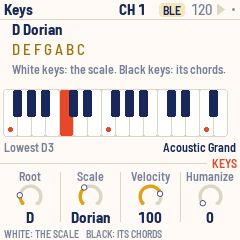
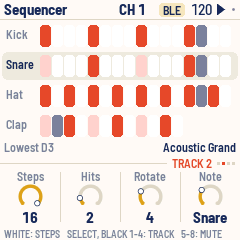
- Try it in your browser (no FM-1 needed): https://charlesvestal.github.io/fm1-ctl/emu/
- Install it (Chrome or Edge, with the FM-1 plugged in): https://charlesvestal.github.io/fm1-ctl/install/
- Read the manual: https://charlesvestal.github.io/fm1-ctl/manual/ (source: docs/MANUAL.md)
- Download the firmware file: releases:
ctl-X.Y.fwschas USB, TRS and Bluetooth MIDI,ctl-usb-X.Y.fwscthe same without Bluetooth
Installing it is at your own risk, though it's hard to get stuck: the web installer can put M-VAVE's own firmware back, and an FM-1 that fails to start twice comes up in a safe mode the installer can reach.
In short
| Keys | Notes; with a scale, its notes on the white keys and its chords on the black keys |
| KNOB 1–4 | The page's four values; on Play, four controllers in four banks |
| HOME · SEL · ARP · SEQ · EDIT · GLO | The pages: Play, Keys, Arp, Sequencer, Sound, Setup |
| SELECT | The page's own pages: the banks on Play, the tracks on the Sequencer |
| ALGORITHM · PRESETS · MASTER | MIDI channel · program change (the sound follows) · volume |
| FX | The next bank; held, KNOB 1–4 set its controller numbers |
| ENV · LFO | Sustain (tap twice to lock) · mod wheel |
| PLAY · REC · SAVE | Start / stop · panic · save |
| OCT− / OCT+ | An octave down or up |
The manual has the rest.
Screen reader
CTL-1 tells the FM-1 Screen Reader what its screen shows, over USB: the page and its knobs, a knob's value as it turns (a controller with its name, "CC 74 cutoff 64"), the channel and the program, the Sequencer's steps and mutes, the Touch settings, play and stop, and what each button did (the notes you play are not read out). Open the page in Chrome with the FM-1 plugged in; it speaks with its own voice, or hands the text to your computer's screen reader. The reader's messages stay between it and CTL-1: they are never passed on to Bluetooth.
Building and testing
CTL-1 is an app on fm1-base (base/, a git submodule); clone with
--recursive. The toolchain and prerequisites are in BUILDING.md:
sh tests/run_tests.sh                                  # the app in the simulator, the emulator, the update path
./build.sh                                             # app/build/ctl.fwsc
./build.sh --no-ble                                    # app/build/ctl-usb.fwsc: without Bluetooth
python3 base/tools/fm1_install.py app/build/ctl.fwsc   # install it over USB
app/build/host/ctl_host SCRIPT OUTDIR runs the whole app on a computer from a script
(tests/scenarios/*.ctl), with screenshots and the MIDI sent coming out; tools/gen_screens.sh makes the
manual's screenshots. ./build.sh --web builds the same code for the browser (the emulator), which can play a
real MIDI port through Web MIDI.
Bluetooth starts at every boot and advertises as "FM-1" (on a Mac: Audio MIDI Setup, Window, Show MIDI Studio, the Bluetooth button, Connect); the Setup page shows the stack's log, which survives a reset.
Credits
The platform (hardware layer, USB, update loader, storage, installer, Bluetooth) is fm1-base on felucca-bsp, from Felucca by Leo Kuroshita (Hügelton Instruments), by way of X0X and FoMni-1; the top bar and knob row are X0X's. Bluetooth runs on JieLi's Bluetooth libraries (Apache-2.0). The General MIDI sounds are Sonivox EAS (Apache-2.0). The Euclidean rhythms are Godfried Toussaint's reading of Bjorklund's algorithm. The idea of running FM-1 firmware in the browser comes from Groove OS. MPL-2.0; see LICENSING.md.