Clackotron — Noise Engineering Versio Firmware
A West Coast-inspired stereo Low Pass Gate for the Noise Engineering Versio platform.
Clackotron can operate as a stereo LPG with envelope-controlled filter (classic Buchla 292 bloom), a stereo enhancer / spatial processor (chorus, M/S widening, spectral spreading), or a waveshaper (harmonic saturation, triangle fold, bit reduction) — or all three simultaneously.
The LPG combines a voltage-controlled filter and amplifier driven by a single envelope. The Arc knob morphs between an analog vactrol simulation (pluck, snap) and a clean ramp envelope (pads, drones).
Demo
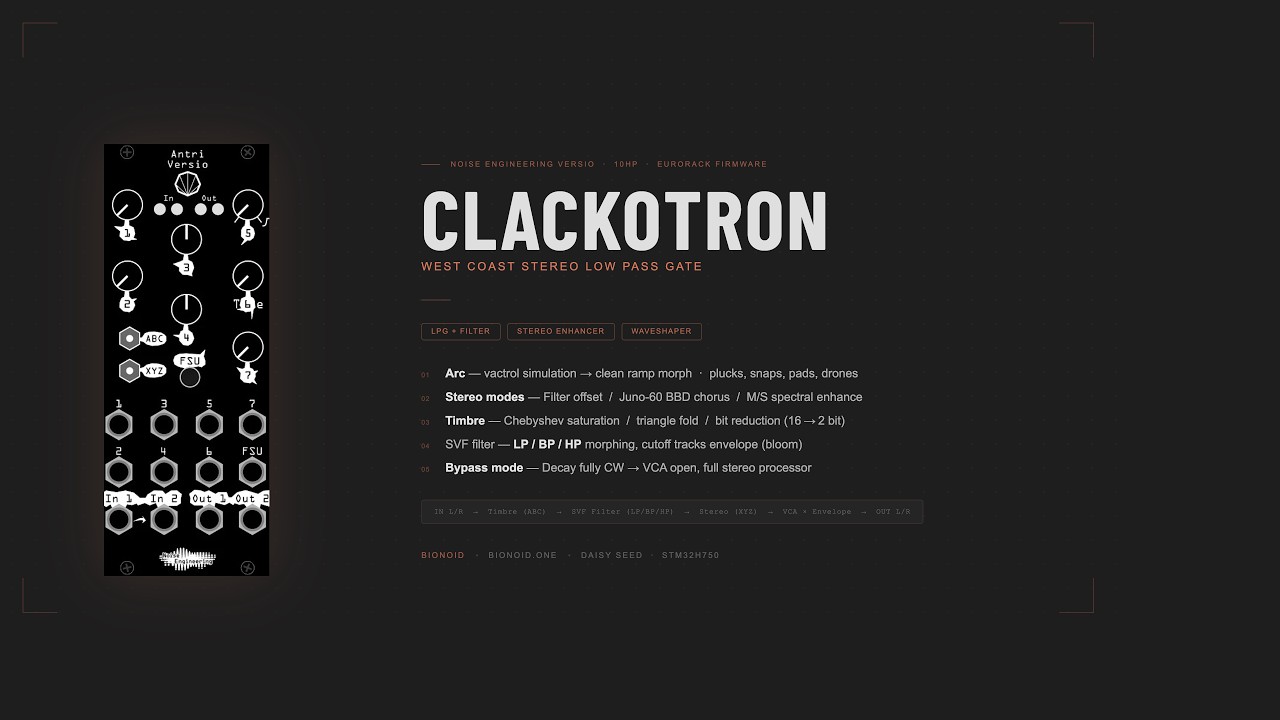
Signal Flow
IN L/R → Timbre (ABC) → SVF Filter (LP/BP/HP) → Stereo (XYZ) → VCA × Envelope → OUT L/R
The filter cutoff tracks the envelope (Cutoff knob sets maximum brightness), with a bloom effect: the filter closes slower than the VCA, giving a natural tail.
Controls
Knobs
| Knob | Label | Function |
|---|---|---|
| 0 | Timbre | Waveshaping drive amount |
| 1 | Spread | Stereo spread / mode amount (bipolar: left = negative, right = positive) |
| 2 | Cutoff | Maximum filter brightness at gate open |
| 3 | Resonance | Filter resonance |
| 4 | Fl.Type | Filter type: BP (left) → LP (center) → HP (right) |
| 5 | Arc | Envelope character: vactrol snap (left) → clean ramp (right) |
| 6 | Decay | Decay time 10ms → 3.3s. Fully clockwise = bypass (VCA always open) |
Switches
| Switch | Positions | Function |
|---|---|---|
| SW_0 | A / B / C | Timbre algorithm: A = Chebyshev harmonic saturation (T3+T5, musical odd harmonics), B = triple waveshaper (Serge TWS-style triangle fold), C = hard clip + integer bit reduction (16-bit → 2-bit, aliased digital crunch) |
| SW_1 | X / Y / Z | Stereo mode: X = filter L/R offset, Y = Juno-60 chorus, Z = M/S spectral enhance |
Inputs / Button
| Jack / Button | Function |
|---|---|
| Gate In | Trigger or gate input. Tip = signal, ring = ground |
| FSU button | Tap trigger — works independently of gate jack |
Arc: Vactrol → Ramp Morph
The Arc knob is the main character control:
- 0–65% (left): Pure vactrol simulation. Instant snap on attack, exponential decay with an organic S-curve tail from the 2-pole vactrol follower. Classic pluck / click character.
- 65–100% (right): Clean ramp envelope with quadratic attack (0 to ~30ms) and morphable decay shape (exponential → linear → convex). Suitable for pads and drones.
Sweeping Arc during a held note produces no clicks or jumps.
Stereo Modes (SW_1)
X — Filter offset: Left and right channels receive slightly different cutoff frequencies, offset by the Spread knob. Positive spread = L brighter, negative = R brighter. Passive stereo widening through tonal difference.
Y — Juno-60 chorus: BBD-style chorus with antiphase LFOs (0.5Hz). Spread controls wet/dry mix. Negative spread swaps L/R channels, flipping the stereo image. Bass below 150Hz is attenuated on the stereo Side component (−6dB), keeping low end centered for cleaner mono compatibility in a mix.
Z — M/S Spectral Enhance: Encodes the signal into Mid and Side components. Positive Spread widens the stereo image (Side boosted up to ×3); negative Spread narrows toward mono. A gentle peak EQ (+0.8dB, Q=1.5) on the Side channel is linked to the filter cutoff frequency: as the LPG envelope blooms open the filter, the stereo image simultaneously opens in that same frequency band. A subtle 2ms Mid-channel delay adds depth. Bass below 150Hz is attenuated on the Side component (−6dB) — low frequencies stay centered and mono-compatible, avoiding bass conflicts when mixing with kick, bass, or other low-end elements. The effect scales with Spread amount — at center position, the signal passes through unprocessed.
Modulation tip: For Spread and Cutoff, bipolar LFO sources give the most expressive results — the effect is perceived more strongly when it sweeps through the center position in both directions. Unipolar sources work but tend to sound one-sided.
LEDs
| LED | Color | Meaning |
|---|---|---|
| 0 | Green → Yellow | Input L level. Yellow flash = clipping |
| 1 | Green → Yellow | Input R level. Yellow flash = clipping |
| 2 | Orange → Red | Envelope level |
| 3 | Blue → Green → Red | Filter type position (BP / LP / HP) |
Gate / Trigger Behavior
- No cable: VCA closed. FSU button fires a one-shot trigger.
- Cable connected: Triggers only on confirmed rising edges (5ms minimum LOW required between triggers). Floating or high-impedance signals do not cause phantom sustain.
- Zero-crossing alignment: Trigger firing is delayed to the next zero crossing of the input signal (up to 4ms). On pitched audio this eliminates the mid-cycle click the VCA would otherwise produce. If no zero crossing is found within 4ms (silent or near-DC input) the trigger fires immediately.
- Decay fully clockwise: Bypass mode — VCA always open, signal passes through without envelope.
Installation
The firmware is distributed as a .bin file for DFU flashing over USB.
- Power off your Eurorack case.
- Connect the Versio to your computer via USB (micro-USB on the Daisy Seed).
- Enter DFU mode: hold the BOOT button on the Daisy Seed, then press RESET (or power on while holding BOOT).
- Flash the firmware:
dfu-util -a 0 -s 0x08000000:leave -D Clackotron.bin
- The module will restart automatically. The startup animation (white sweep → green flash) confirms successful boot.
macOS: Install dfu-util via Homebrew: brew install dfu-util
Windows: Use Zadig to install the WinUSB driver, then run dfu-util.
Building from Source
Requires ARM GCC toolchain and libDaisy / DaisySP.
git clone https://github.com/electro-smith/libDaisy
git clone https://github.com/electro-smith/DaisySP
make -j4
See SETUP.md for full toolchain setup instructions.
Hardware
Built on the Noise Engineering Versio platform:
- Eurorack, 10HP
- Daisy Seed (STM32H750, 480MHz Cortex-M7)
- Stereo audio I/O, 7 knobs, 2 switches, 4 RGB LEDs, gate input, FSU button
License
MIT License — see LICENSE.
IN L/R → Timbre (ABC) → SVF Filter (LP/BP/HP) → Stereo (XYZ) → VCA × Envelope → OUT L/R
The filter cutoff tracks the envelope (Cutoff knob sets maximum brightness), with a bloom effect: the filter closes slower than the VCA, giving a natural tail.
Controls
Knobs
| Knob | Label | Function |
|---|---|---|
| 0 | Timbre | Waveshaping drive amount |
| 1 | Spread | Stereo spread / mode amount (bipolar: left = negative, right = positive) |
| 2 | Cutoff | Maximum filter brightness at gate open |
| 3 | Resonance | Filter resonance |
| 4 | Fl.Type | Filter type: BP (left) → LP (center) → HP (right) |
| 5 | Arc | Envelope character: vactrol snap (left) → clean ramp (right) |
| 6 | Decay | Decay time 10ms → 3.3s. Fully clockwise = bypass (VCA always open) |
Switches
| Switch | Positions | Function |
|---|---|---|
| SW_0 | A / B / C | Timbre algorithm: A = Chebyshev harmonic saturation (T3+T5, musical odd harmonics), B = triple waveshaper (Serge TWS-style triangle fold), C = hard clip + integer bit reduction (16-bit → 2-bit, aliased digital crunch) |
| SW_1 | X / Y / Z | Stereo mode: X = filter L/R offset, Y = Juno-60 chorus, Z = M/S spectral enhance |
Inputs / Button
| Jack / Button | Function |
|---|---|
| Gate In | Trigger or gate input. Tip = signal, ring = ground |
| FSU button | Tap trigger — works independently of gate jack |
Arc: Vactrol → Ramp Morph
The Arc knob is the main character control:
- 0–65% (left): Pure vactrol simulation. Instant snap on attack, exponential decay with an organic S-curve tail from the 2-pole vactrol follower. Classic pluck / click character.
- 65–100% (right): Clean ramp envelope with quadratic attack (0 to ~30ms) and morphable decay shape (exponential → linear → convex). Suitable for pads and drones.
Sweeping Arc during a held note produces no clicks or jumps.
Stereo Modes (SW_1)
X — Filter offset: Left and right channels receive slightly different cutoff frequencies, offset by the Spread knob. Positive spread = L brighter, negative = R brighter. Passive stereo widening through tonal difference.
Y — Juno-60 chorus: BBD-style chorus with antiphase LFOs (0.5Hz). Spread controls wet/dry mix. Negative spread swaps L/R channels, flipping the stereo image. Bass below 150Hz is attenuated on the stereo Side component (−6dB), keeping low end centered for cleaner mono compatibility in a mix.
Z — M/S Spectral Enhance: Encodes the signal into Mid and Side components. Positive Spread widens the stereo image (Side boosted up to ×3); negative Spread narrows toward mono. A gentle peak EQ (+0.8dB, Q=1.5) on the Side channel is linked to the filter cutoff frequency: as the LPG envelope blooms open the filter, the stereo image simultaneously opens in that same frequency band. A subtle 2ms Mid-channel delay adds depth. Bass below 150Hz is attenuated on the Side component (−6dB) — low frequencies stay centered and mono-compatible, avoiding bass conflicts when mixing with kick, bass, or other low-end elements. The effect scales with Spread amount — at center position, the signal passes through unprocessed.
Modulation tip: For Spread and Cutoff, bipolar LFO sources give the most expressive results — the effect is perceived more strongly when it sweeps through the center position in both directions. Unipolar sources work but tend to sound one-sided.
LEDs
| LED | Color | Meaning |
|---|---|---|
| 0 | Green → Yellow | Input L level. Yellow flash = clipping |
| 1 | Green → Yellow | Input R level. Yellow flash = clipping |
| 2 | Orange → Red | Envelope level |
| 3 | Blue → Green → Red | Filter type position (BP / LP / HP) |
Gate / Trigger Behavior
- No cable: VCA closed. FSU button fires a one-shot trigger.
- Cable connected: Triggers only on confirmed rising edges (5ms minimum LOW required between triggers). Floating or high-impedance signals do not cause phantom sustain.
- Zero-crossing alignment: Trigger firing is delayed to the next zero crossing of the input signal (up to 4ms). On pitched audio this eliminates the mid-cycle click the VCA would otherwise produce. If no zero crossing is found within 4ms (silent or near-DC input) the trigger fires immediately.
- Decay fully clockwise: Bypass mode — VCA always open, signal passes through without envelope.
Installation
The firmware is distributed as a .bin file for DFU flashing over USB.
- Power off your Eurorack case.
- Connect the Versio to your computer via USB (micro-USB on the Daisy Seed).
- Enter DFU mode: hold the BOOT button on the Daisy Seed, then press RESET (or power on while holding BOOT).
- Flash the firmware:
dfu-util -a 0 -s 0x08000000:leave -D Clackotron.bin
- The module will restart automatically. The startup animation (white sweep → green flash) confirms successful boot.
macOS: Install dfu-util via Homebrew: brew install dfu-util
Windows: Use Zadig to install the WinUSB driver, then run dfu-util.
Building from Source
Requires ARM GCC toolchain and libDaisy / DaisySP.
git clone https://github.com/electro-smith/libDaisy
git clone https://github.com/electro-smith/DaisySP
make -j4
See SETUP.md for full toolchain setup instructions.
Hardware
Built on the Noise Engineering Versio platform:
- Eurorack, 10HP
- Daisy Seed (STM32H750, 480MHz Cortex-M7)
- Stereo audio I/O, 7 knobs, 2 switches, 4 RGB LEDs, gate input, FSU button
License
MIT License — see LICENSE.